instrument panel HUMMER H3 2009 User Guide
[x] Cancel search | Manufacturer: HUMMER, Model Year: 2009, Model line: H3, Model: HUMMER H3 2009Pages: 382, PDF Size: 1.99 MB
Page 90 of 382

Full-Time Four-Wheel
Drive
Full-Time Four-Wheel Drive sends
engine power to all four wheels
for extra traction. To get the most
out of Full-Time Four-Wheel Drive,
you must be familiar with its
operation.
Transfer Case Buttons
The transfer case buttons are
located to the right of the instrument
panel cluster. Use these switches to
shift into and out of the different
Full-Time Four-Wheel Drive modes.4
m(Four-Wheel High):This
setting is used for driving in most
street and highway situations.
You can also use this setting for
light or variable off-road conditions.
N (Neutral):Shift the transfer
case to Neutral only when towing
the vehicle. SeeRecreational
Vehicle Towing on page 4-40or
Towing Your Vehicle on page 4-40
for more information.
Notice:Driving on pavement in
Four-Wheel High Lock or Four
Wheel Low Lock for extended
periods may cause premature
wear on the vehicle powertrain
and tires. Do not drive in
Four-Wheel High Lock or
Four-Wheel Low Lock on
pavement for extended periods.
4
mQ(Four-Wheel-High Lock):
Use this setting when you need
extra traction in most off-road
situations such as sand, mud, snow
or level, rocky trails.Notice:Operating the vehicle in
Four-Wheel-Low Lock above
30 mph (48 km/h) for any
extended period of time could
cause damage to the transfer
case. Do not operate the vehicle
in Four-Wheel-Low Lock above
30 mph (48 km/h) for extended
periods.
4
nQ(Four-Wheel-Low Lock):
This setting delivers extra torque to
all four wheels and is used for
extreme off-road conditions.
If the vehicle has locking axles,
they can be locked for additional
traction in extreme off-road
situations. SeeLocking Rear Axle
on page 4-8andLocking Front Axle
on page 4-9.
Indicator lights in the buttons show
which setting the transfer case
is in. The indicator lights will come
on briey when the ignition is in
ON/RUN. The If the lights do
not come on, take the vehicle to
your dealer/retailer for service.
2-24 Features and Controls
Page 107 of 382

Most vehicles include 30 trial
minutes good for 60 days.
Hands-Free Calling can also be
linked to a Verizon Wireless service
plan in the U.S. or a Bell Mobility
service plan in Canada, depending
on eligibility. To nd out more,
refer to the OnStar Owner’s Guide
in the vehicle’s glove box, visit
onstar.com or onstar.ca, or speak
with an OnStar advisor by pressing
the OnStar button or calling
1-888-4-ONSTAR (1-888-466-7827).
OnStar Turn-by-Turn
Navigation
Vehicles with the OnStar
Turn-by-Turn Navigation system
can provide voice-guided driving
directions. Press the OnStar button
to have an OnStar advisor locate
a business or address and download
driving directions to the vehicle.
Voice-guided directions to the
desired destination will play
through the audio system speakers.
See the OnStar Owner’s Guide
for more information.
OnStar Virtual Advisor
OnStar Virtual Advisor is a feature
of OnStar Hands-Free Calling
that uses minutes to access
location-based weather, local traffic
reports, and stock quotes. Press
the phone button and give a
few simple voice commands to
browse through the various topics.
See the OnStar Owner’s Guide
for more information. This feature is
only available in the continental U.S.
Additional OnStar Controls
The vehicle may have a button,
located on the driver side of the
instrument panel near the headlamp
controls, that can be used to
interact with OnStar.Use this button to dial numbers
into voicemail systems or to
dial phone number extensions.
See the OnStar Owner’s Guide for
more information.
How OnStar Service Works
The OnStar system can record
and transmit vehicle information.
This information is automatically
sent to an OnStar Call Center when
the OnStar button is pressed, the
emergency button is pressed,
or if the airbags or AACN system
deploy. This information usually
includes the vehicle’s GPS location
and, in the event of a crash,
additional information regarding
the crash that the vehicle was
involved in (e.g. the direction from
which the vehicle was hit). When the
Virtual Advisor feature of OnStar
Hands-Free Calling is used,
the vehicle also sends OnStar the
vehicle’s GPS location so they
can provide services where
it is located.
Features and Controls 2-41
Page 119 of 382
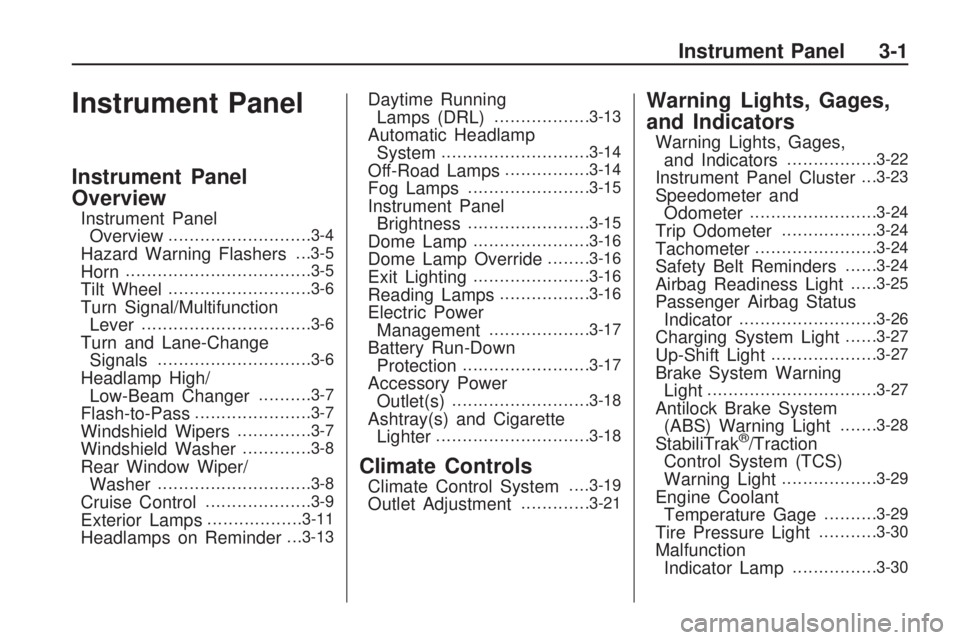
Instrument Panel
Instrument Panel
Overview
Instrument Panel
Overview...........................3-4
Hazard Warning Flashers. . .3-5
Horn...................................3-5
Tilt Wheel...........................3-6
Turn Signal/Multifunction
Lever................................3-6
Turn and Lane-Change
Signals.............................3-6
Headlamp High/
Low-Beam Changer..........3-7
Flash-to-Pass......................3-7
Windshield Wipers..............3-7
Windshield Washer.............3-8
Rear Window Wiper/
Washer.............................3-8
Cruise Control....................3-9
Exterior Lamps..................3-11
Headlamps on Reminder. . .3-13
Daytime Running
Lamps (DRL)..................3-13
Automatic Headlamp
System............................3-14
Off-Road Lamps................3-14
Fog Lamps.......................3-15
Instrument Panel
Brightness.......................3-15
Dome Lamp......................3-16
Dome Lamp Override........3-16
Exit Lighting......................3-16
Reading Lamps.................3-16
Electric Power
Management...................3-17
Battery Run-Down
Protection........................3-17
Accessory Power
Outlet(s)..........................3-18
Ashtray(s) and Cigarette
Lighter.............................3-18
Climate Controls
Climate Control System. . . .3-19
Outlet Adjustment.............3-21
Warning Lights, Gages,
and Indicators
Warning Lights, Gages,
and Indicators.................3-22
Instrument Panel Cluster. . .3-23
Speedometer and
Odometer........................3-24
Trip Odometer..................3-24
Tachometer.......................3-24
Safety Belt Reminders......3-24
Airbag Readiness Light.....3-25
Passenger Airbag Status
Indicator..........................3-26
Charging System Light......3-27
Up-Shift Light....................3-27
Brake System Warning
Light................................3-27
Antilock Brake System
(ABS) Warning Light.......3-28
StabiliTrak®/Traction
Control System (TCS)
Warning Light
..................3-29
Engine Coolant
Temperature Gage..........3-29
Tire Pressure Light...........3-30
Malfunction
Indicator Lamp................3-30
Instrument Panel 3-1
Page 120 of 382
Oil Pressure Light.............3-32
Security Light....................3-33
Cruise Control Light..........3-33
Highbeam On Light...........3-33
Fuel Gage........................3-33
Driver Information
Center (DIC)
Driver Information Center
(DIC)...............................3-34
DIC Operation and
Displays..........................3-34
DIC Warnings and
Messages........................3-37
Audio System(s)
Audio System(s)................3-41
Setting the Clock..............3-41
Radio(s)............................3-42
XM Radio Messages.........3-51
Navigation/Radio System. . .3-52
Bluetooth®........................3-52
Theft-Deterrent Feature.....3-62
Radio Reception...............3-62
Fixed Mast Antenna..........3-63
XM™ Satellite Radio
Antenna System..............3-63
3-2 Instrument Panel
Page 121 of 382
✍NOTES
Instrument Panel 3-3
Page 122 of 382
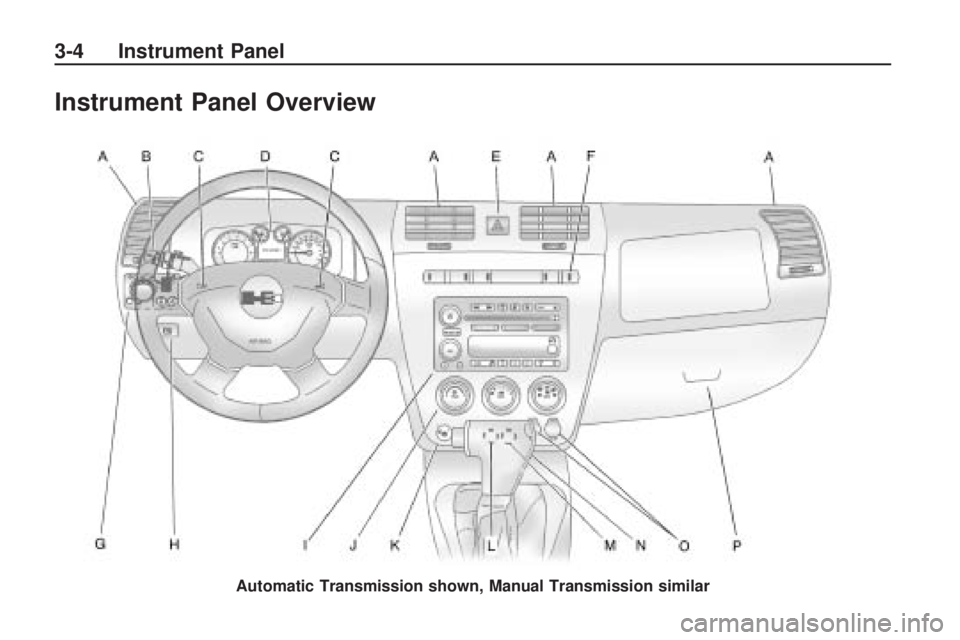
Instrument Panel Overview
Automatic Transmission shown, Manual Transmission similar
3-4 Instrument Panel
Page 123 of 382
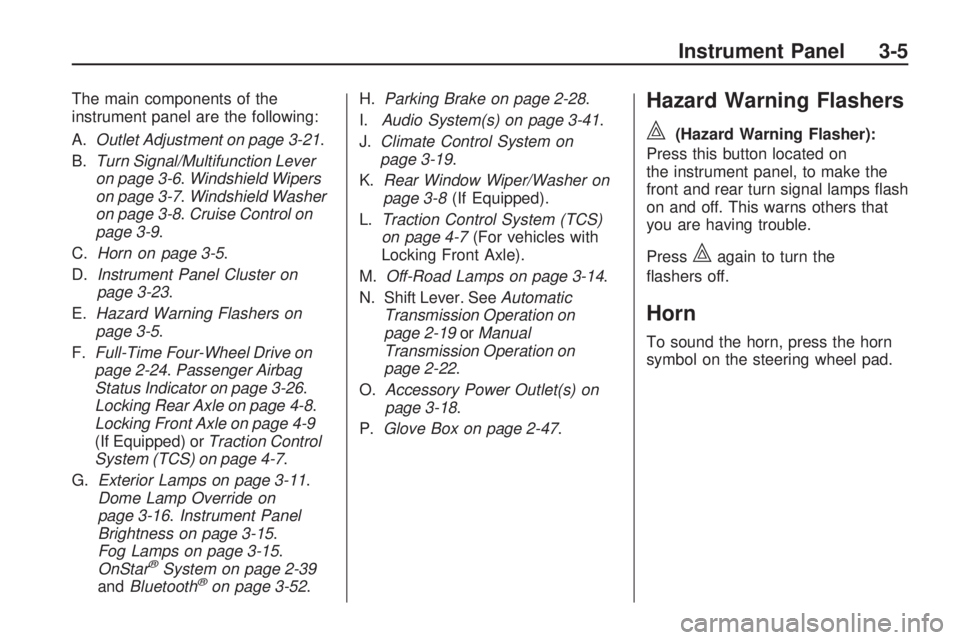
The main components of the
instrument panel are the following:
A.Outlet Adjustment on page 3-21.
B.Turn Signal/Multifunction Lever
on page 3-6.Windshield Wipers
on page 3-7.Windshield Washer
on page 3-8.Cruise Control on
page 3-9.
C.Horn on page 3-5.
D.Instrument Panel Cluster on
page 3-23.
E.Hazard Warning Flashers on
page 3-5.
F.Full-Time Four-Wheel Drive on
page 2-24.Passenger Airbag
Status Indicator on page 3-26.
Locking Rear Axle on page 4-8.
Locking Front Axle on page 4-9
(If Equipped) orTraction Control
System (TCS) on page 4-7.
G.Exterior Lamps on page 3-11.
Dome Lamp Override on
page 3-16.Instrument Panel
Brightness on page 3-15.
Fog Lamps on page 3-15.
OnStar
®System on page 2-39
andBluetooth®on page 3-52.H.Parking Brake on page 2-28.
I.Audio System(s) on page 3-41.
J.Climate Control System on
page 3-19.
K.Rear Window Wiper/Washer on
page 3-8(If Equipped).
L.Traction Control System (TCS)
on page 4-7(For vehicles with
Locking Front Axle).
M.Off-Road Lamps on page 3-14.
N. Shift Lever. SeeAutomatic
Transmission Operation on
page 2-19orManual
Transmission Operation on
page 2-22.
O.Accessory Power Outlet(s) on
page 3-18.
P.Glove Box on page 2-47.
Hazard Warning Flashers
|
(Hazard Warning Flasher):
Press this button located on
the instrument panel, to make the
front and rear turn signal lamps ash
on and off. This warns others that
you are having trouble.
Press
|again to turn the
ashers off.
Horn
To sound the horn, press the horn
symbol on the steering wheel pad.
Instrument Panel 3-5
Page 124 of 382
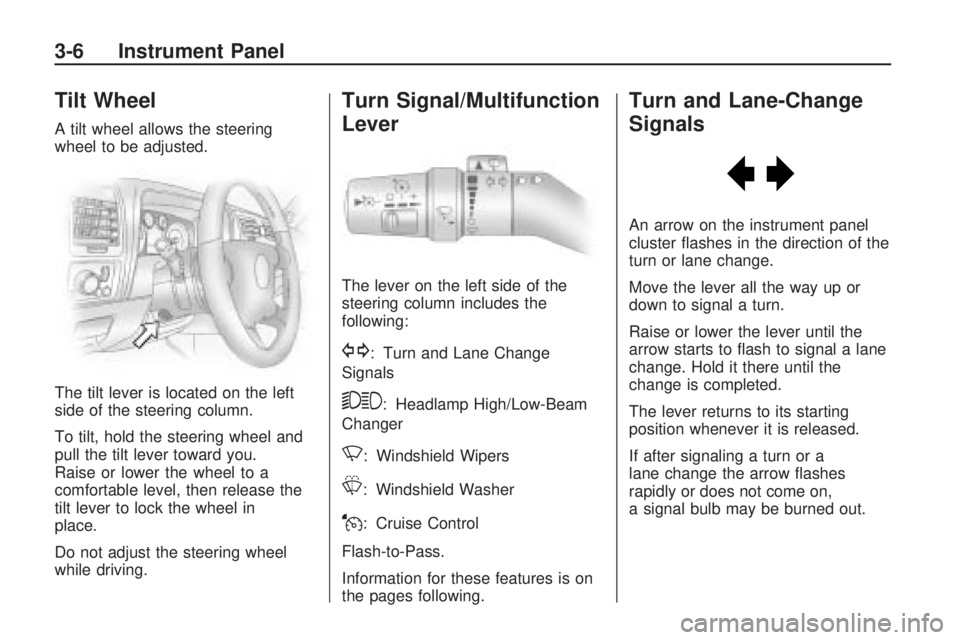
Tilt Wheel
A tilt wheel allows the steering
wheel to be adjusted.
The tilt lever is located on the left
side of the steering column.
To tilt, hold the steering wheel and
pull the tilt lever toward you.
Raise or lower the wheel to a
comfortable level, then release the
tilt lever to lock the wheel in
place.
Do not adjust the steering wheel
while driving.
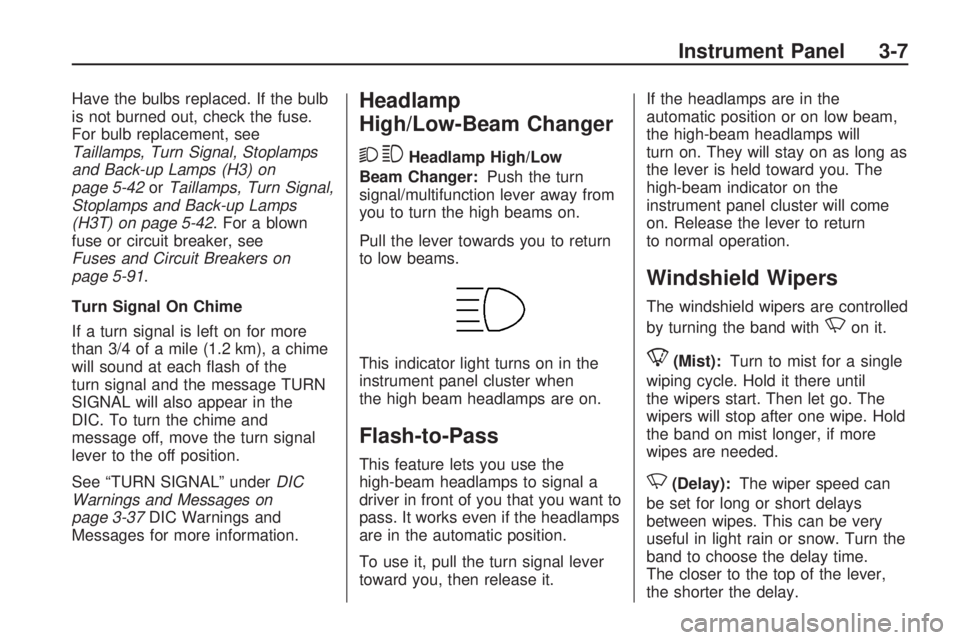
Turn Signal/Multifunction
Lever
The lever on the left side of the
steering column includes the
following:
G: Turn and Lane Change
Signals
53: Headlamp High/Low-Beam
Changer
N: Windshield Wipers
L: Windshield Washer
J: Cruise Control
Flash-to-Pass.
Information for these features is on
the pages following.
Turn and Lane-Change
Signals
An arrow on the instrument panel
cluster ashes in the direction of the
turn or lane change.
Move the lever all the way up or
down to signal a turn.
Raise or lower the lever until the
arrow starts to ash to signal a lane
change. Hold it there until the
change is completed.
The lever returns to its starting
position whenever it is released.
If after signaling a turn or a
lane change the arrow ashes
rapidly or does not come on,
a signal bulb may be burned out.
3-6 Instrument Panel
Page 125 of 382
Have the bulbs replaced. If the bulb
is not burned out, check the fuse.
For bulb replacement, see
Taillamps, Turn Signal, Stoplamps
and Back-up Lamps (H3) on
page 5-42orTaillamps, Turn Signal,
Stoplamps and Back-up Lamps
(H3T) on page 5-42. For a blown
fuse or circuit breaker, see
Fuses and Circuit Breakers on
page 5-91.
Turn Signal On Chime
If a turn signal is left on for more
than 3/4 of a mile (1.2 km), a chime
will sound at each ash of the
turn signal and the message TURN
SIGNAL will also appear in the
DIC. To turn the chime and
message off, move the turn signal
lever to the off position.
See “TURN SIGNAL” underDIC
Warnings and Messages on
page 3-37DIC Warnings and
Messages for more information.Headlamp
High/Low-Beam Changer
23
Headlamp High/Low
Beam Changer:Push the turn
signal/multifunction lever away from
you to turn the high beams on.
Pull the lever towards you to return
to low beams.
This indicator light turns on in the
instrument panel cluster when
the high beam headlamps are on.
Flash-to-Pass
This feature lets you use the
high-beam headlamps to signal a
driver in front of you that you want to
pass. It works even if the headlamps
are in the automatic position.
To use it, pull the turn signal lever
toward you, then release it.If the headlamps are in the
automatic position or on low beam,
the high-beam headlamps will
turn on. They will stay on as long as
the lever is held toward you. The
high-beam indicator on the
instrument panel cluster will come
on. Release the lever to return
to normal operation.
Windshield Wipers
The windshield wipers are controlled
by turning the band with
Non it.
8(Mist):Turn to mist for a single
wiping cycle. Hold it there until
the wipers start. Then let go. The
wipers will stop after one wipe. Hold
the band on mist longer, if more
wipes are needed.
N(Delay):The wiper speed can
be set for long or short delays
between wipes. This can be very
useful in light rain or snow. Turn the
band to choose the delay time.
The closer to the top of the lever,
the shorter the delay.
Instrument Panel 3-7
Page 126 of 382
6(Low Speed):For steady
wiping at low speed, turn the band
away from you to the rst solid
position past the delay settings.
1(High Speed):For high-speed
wiping, turn the band to the
second solid position past the delay
settings.
9(Off):Move the band to off, to
stop the wipers.
Be sure to clear ice and snow from
the wiper blades before using
them. If they are frozen to the
windshield, carefully loosen or thaw
them. If the blades do become
worn or damaged, get new blades
or blade inserts.
Windshield wipers work in all power
modes, except when the ignition
is set to LOCK/OFF. After the
engine is turned off, wipers will work
in Retained Accessory Power
(RAP) mode until a door is opened.
SeeRetained Accessory Power
(RAP) on page 2-17.
Windshield Washer
L
(Washer Fluid):This feature is
located on the paddle marked
with
Lat the top of the
multifunction lever. Push the paddle
to spray washer uid on the
windshield. The wipers will clear the
window and then either stop or
return to the preset speed.
{CAUTION
In freezing weather, do not use
your washer until the windshield is
warmed. Otherwise the washer
uid can form ice on the
windshield, blocking your vision.
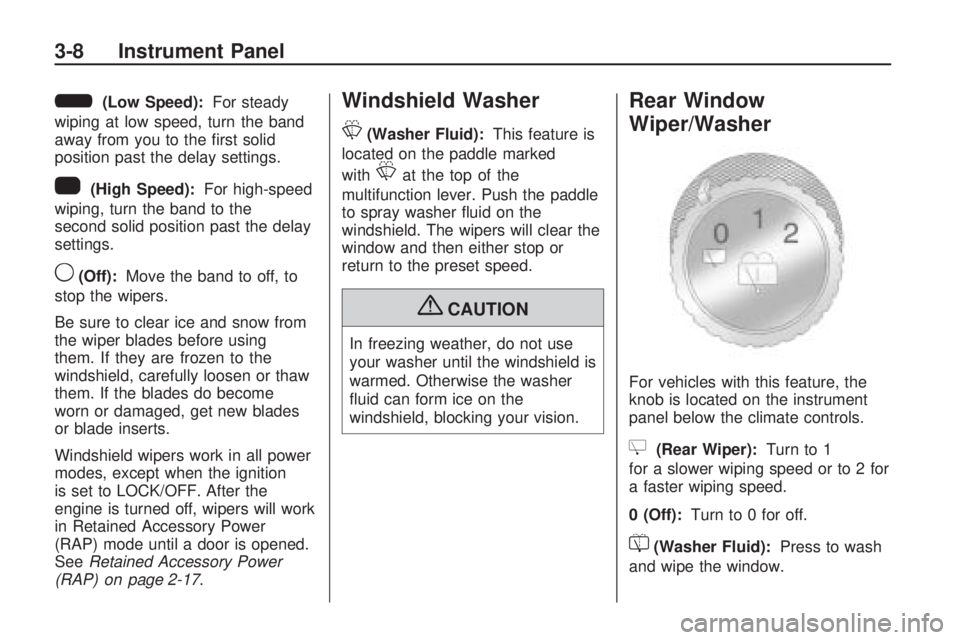
Rear Window
Wiper/Washer
For vehicles with this feature, the
knob is located on the instrument
panel below the climate controls.
Z(Rear Wiper):Turn to 1
for a slower wiping speed or to 2 for
a faster wiping speed.
0 (Off):Turn to 0 for off.
=(Washer Fluid):Press to wash
and wipe the window.
3-8 Instrument Panel