roof HUMMER H3 2009 User Guide
[x] Cancel search | Manufacturer: HUMMER, Model Year: 2009, Model line: H3, Model: HUMMER H3 2009Pages: 382, PDF Size: 1.99 MB
Page 83 of 382
If you leave the key in the
ACC/ACCESSORY or ON/RUN
position with the engine off,
the battery could be drained.
You may not be able to start the
vehicle if the battery is allowed
to drain for an extended period
of time.
(D) START:This is the position that
starts the engine. When the engine
starts, release the key. The ignition
switch returns to ON/RUN for driving.
A warning tone will sound when the
driver door is opened, the ignition
is in ACC/ACCESSORY or
LOCK/OFF and the key is in
the ignition.Retained Accessory
Power (RAP)
These vehicle accessories can be
used for up to 20 minutes after
the engine is turned off:
Audio System
Front Wipers
Power Windows
Sunroof (if equipped)
These features will work when
the key is in ON/RUN or
ACC/ACCESSORY. Once the key is
turned from ON/RUN to LOCK/OFF,
these features continue working
for up to 20 minutes or until a door
is opened.
Starting the Engine
Place the transmission in the
proper gear.
Automatic Transmission
Move the shift lever to P (Park) or
N (Neutral). The engine will not start
in any other position. To restart
the vehicle when it is already
moving, use N (Neutral) only.
Notice:Do not try to shift to
P (Park) if the vehicle is moving.
If you do, you could damage
the transmission. Shift to P (Park)
only when the vehicle is stopped.
Manual Transmission
The shift lever should be in
N (Neutral) and the parking brake
engaged. Hold the clutch pedal
down to the oor and start the
engine. The vehicle will not start
if the clutch pedal is not all the
way down.
Features and Controls 2-17
Page 114 of 382
Luggage Carrier
If the vehicle has this feature, cargo
can be loaded on top of the vehicle.
The luggage carrier consists of
siderails attached to the roof.
The crossrails attach into the
siderails and can be moved back
and forth to accommodate various
cargo sizes.
Notice:Loading cargo on the
luggage carrier that weighs more
than 250 lbs. (113 kg) or hangs
over the rear or sides of the
vehicle may damage the vehicle.
Load cargo only on top of the
crossrails and tie the cargo down
to the crossrail support cargo
tie-down loops, making sure
to fasten it securely
Do not exceed the maximum vehicle
capacity when loading your vehicle.
For more information on vehicle
capacity and loading, seeLoading
the Vehicle on page 4-35.Adjusting the Crossrails
To adjust the crossrails to t a load:
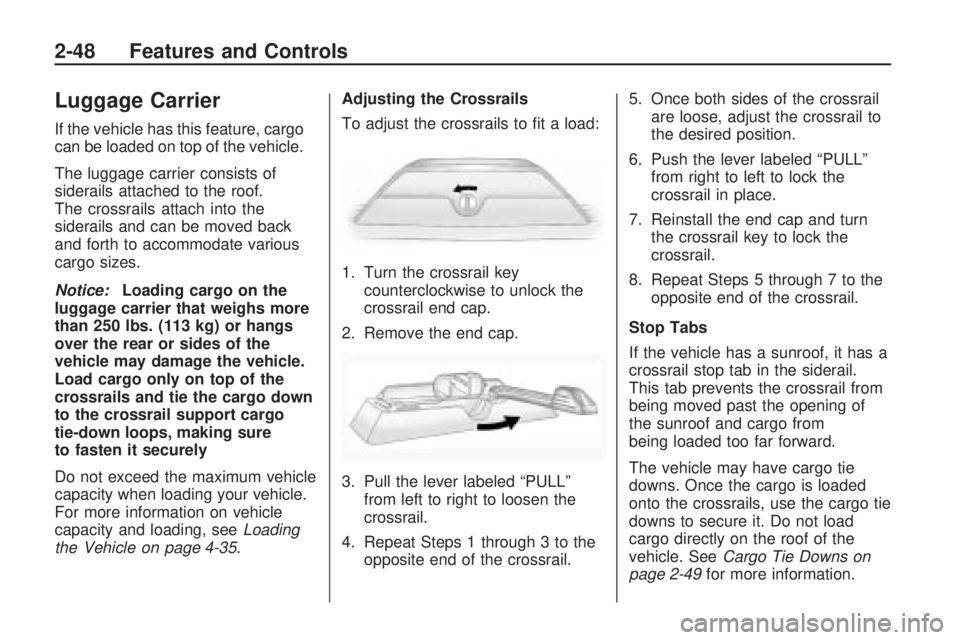
1. Turn the crossrail key
counterclockwise to unlock the
crossrail end cap.
2. Remove the end cap.
3. Pull the lever labeled “PULL”
from left to right to loosen the
crossrail.
4. Repeat Steps 1 through 3 to the
opposite end of the crossrail.5. Once both sides of the crossrail
are loose, adjust the crossrail to
the desired position.
6. Push the lever labeled “PULL”
from right to left to lock the
crossrail in place.
7. Reinstall the end cap and turn
the crossrail key to lock the
crossrail.
8. Repeat Steps 5 through 7 to the
opposite end of the crossrail.
Stop Tabs
If the vehicle has a sunroof, it has a
crossrail stop tab in the siderail.
This tab prevents the crossrail from
being moved past the opening of
the sunroof and cargo from
being loaded too far forward.
The vehicle may have cargo tie
downs. Once the cargo is loaded
onto the crossrails, use the cargo tie
downs to secure it. Do not load
cargo directly on the roof of the
vehicle. SeeCargo Tie Downs on
page 2-49for more information.
2-48 Features and Controls
Page 115 of 382
Rear Storage Area
The H3 has a rear storage area
located on the passenger side of the
cargo area. To open it, pull the
two tabs out and open lid.
Convenience Net
Use the convenience net, located in
the rear, to store small loads as far
forward as possible. The net should
not be used to store heavy loads.
Cargo Cover (H3)
Notice:Do not put items onto
the cargo cover. The weight of the
items could cause the attachment
clips to break. The cargo cover
could no longer be attached
and used. The repairs would not
be covered by the warranty.
Never put anything on top of the
cargo cover.
The vehicle may have a cargo
cover. It can be used to cover
items in the rear of the vehicle.To install the cover, place the loops
on each corner of the cover on
the four hooks in the rear of
the vehicle. The cover should be
stored securely when not in use.
Cargo Tie Downs
There may be four cargo tie-downs
that can be moved on the tracks
located on the roof. To move, loosen
the tie-down counterclockwise.
Turn clockwise to tighten and lock
in place.
Cargo Management
System (H3T)
The vehicle comes with a cargo
management system located in the
bed of the vehicle. The system
contains three rails located on the
front and sides of the bed.
The system has four adjustable
cargo tie-downs, that can be placed
on the upper and lower slides of
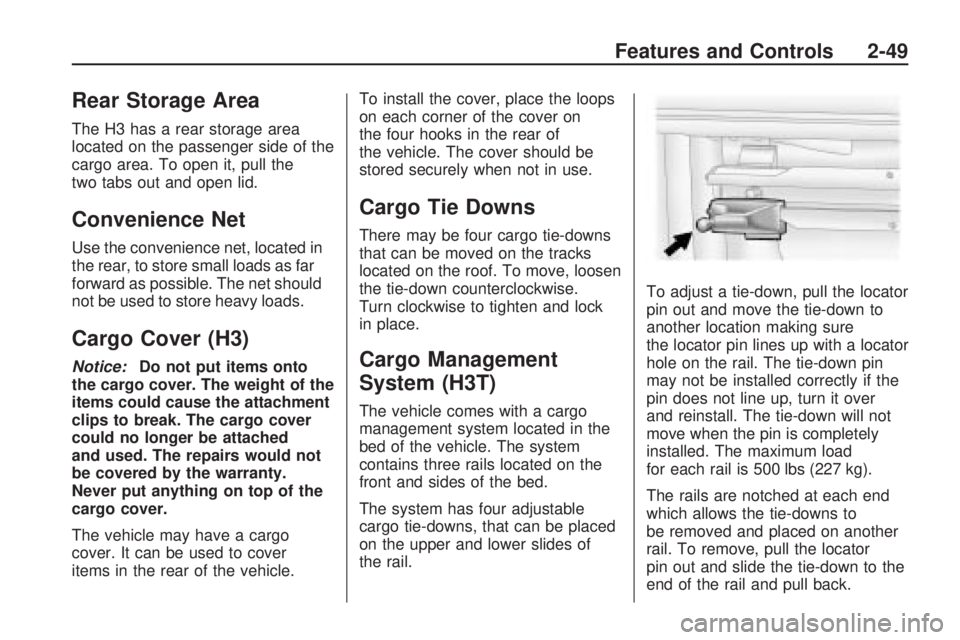
the rail.To adjust a tie-down, pull the locator
pin out and move the tie-down to
another location making sure
the locator pin lines up with a locator
hole on the rail. The tie-down pin
may not be installed correctly if the
pin does not line up, turn it over
and reinstall. The tie-down will not
move when the pin is completely
installed. The maximum load
for each rail is 500 lbs (227 kg).
The rails are notched at each end
which allows the tie-downs to
be removed and placed on another
rail. To remove, pull the locator
pin out and slide the tie-down to the
end of the rail and pull back.
Features and Controls 2-49
Page 116 of 382
To remove or install cargo tie-downs
at the front of the bed, slide the
corner cap towards the center of the
bed to expose the rail notches.
To remove the corner cap,
pull either edge away from the rail.
To remove the system, loosen
the toggle bolts on each rail until
they can be removed from the bed
of the truck. To replace the system,
place the toggle bolts and rails
into their original locations and
tighten them to a torque setting of
12.5 ft-lbs (17Y).
Notice:If cargo is tied down
using the horizontal slots on the
top of the pickup box, the box
could be damaged. Using the
horizontal slots on the top of
the pickup box for tie-down
locations may cause damage to
the pickup box and would not
be covered by the vehicle
warranty. Only use the tie-down
loops if the vehicle does not have
the cargo management system.Sunroof
To operate a power sliding sunroof,
the ignition must be on, or Retained
Accessory Power (RAP) must be
active. SeeRetained Accessory
Power (RAP) on page 2-17.
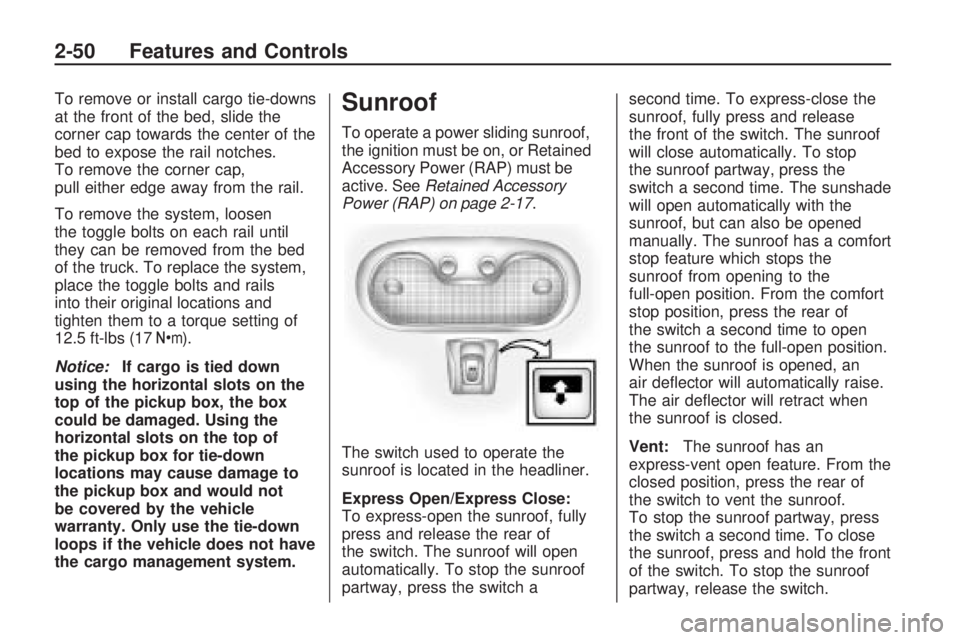
The switch used to operate the
sunroof is located in the headliner.
Express Open/Express Close:
To express-open the sunroof, fully
press and release the rear of
the switch. The sunroof will open
automatically. To stop the sunroof
partway, press the switch asecond time. To express-close the
sunroof, fully press and release
the front of the switch. The sunroof
will close automatically. To stop
the sunroof partway, press the
switch a second time. The sunshade
will open automatically with the
sunroof, but can also be opened
manually. The sunroof has a comfort
stop feature which stops the
sunroof from opening to the
full-open position. From the comfort
stop position, press the rear of
the switch a second time to open
the sunroof to the full-open position.
When the sunroof is opened, an
air deector will automatically raise.
The air deector will retract when
the sunroof is closed.
Vent:The sunroof has an
express-vent open feature. From the
closed position, press the rear of
the switch to vent the sunroof.
To stop the sunroof partway, press
the switch a second time. To close
the sunroof, press and hold the front
of the switch. To stop the sunroof
partway, release the switch.
2-50 Features and Controls
Page 117 of 382
Anti-Pinch Feature
If an object is in the path of the
sunroof while it is closing, the
anti-pinch feature will detect the
object and stop the sunroof
from closing at the point of
obstruction. The sunroof will then
open halfway, and the air deector
will raise.
Sunshade Operation
The sunshade automatically opens
with the sunroof. Manually pull it
shut after the sunroof is closed.
To adjust the sunshade, push it
backward or pull it forward to the
desired position. The sunshade
cannot be adjusted further than the
current closed position of the sunroof.
Do not leave the sunroof open for
long periods of time. Excessive
debris may collect in the tracks and
possibly damage the sunroof
operation, or plug the water draining
system.
Features and Controls 2-51
Page 132 of 382
Automatic Headlamp
System
When it is dark enough outside,
the automatic headlamp system
will turn on after the transmission
has been shifted from P (Park) to
D (Drive). The headlamps, taillamps,
sidemarker, parking lamps, roof
marker lamps, and the instrument
panel lights turn on at normal
brightness. The radio lights will
become dimmer when the
headlights are off compared to
when the headlights are on.
The vehicle has a light sensor
located on the top of the instrument
panel. Do not cover the sensor,
or the system will be on whenever
the ignition is on.
The system can turn on the
headlamps when driving in a parking
garage, through a tunnel or when
there is overcast weather. This
is normal.There is a delay in the transition
between the daytime and nighttime
operation of the Daytime Running
Lamps (DRL) and the automatic
headlamp system so that driving
under bridges or bright overhead
street lights does not affect the
system. The DRL and automatic
headlamp system will only be
affected when the light sensor
detects a change in lighting lasting
longer than the delay.
If the vehicle is started in a dark
garage, the automatic headlamp
system will come on immediately.
Once the vehicle leaves the garage,
it will take about one minute for
the automatic headlamp system to
change to DRL if it is light
outside. During that delay, the
instrument panel cluster may not be
as bright as usual. Make sure the
instrument panel brightness
control is in the full bright position.
SeeInstrument Panel Brightness on
page 3-15.
Off-Road Lamps
The off-road lamps, if the vehicle
has them, provide auxiliary lighting
when the vehicle is used off
road. These lamps are not intended
to be used in place of existing
vehicle lighting. The lamps are not
to be used on any public street
or highway and are to be covered
when not in use. Check your
state and local laws before installing
or using any auxiliary lighting. In
some states it may be necessary to
remove the roof lamps when
operating the vehicle on the
highway.
3-14 Instrument Panel
Page 181 of 382
Cellular Phone Usage
Cellular phone usage may cause
interference with the vehicle’s radio.
This interference may occur when
making or receiving phone calls,
charging the phone’s battery,
or simply having the phone on. This
interference causes an increased
level of static while listening to
the radio. If static is received while
listening to the radio, unplug the
cellular phone and turn it off.
Fixed Mast Antenna
The xed mast antenna can
withstand most car washes without
being damaged as long as it is
securely attached to the base. If the
mast becomes slightly bent,
straighten it out by hand. If the mast
is badly bent, replace it.
Occasionally check to make sure
the antenna is tightened to its base.
If tightening is required, tighten
by hand. until fully seated plus one
quarter turn.
XM™ Satellite Radio
Antenna System
The XM Satellite Radio antenna is
located on the roof of the vehicle.
Keep the antenna clear of
obstructions for clear radio
reception.
If the vehicle has a sunroof, the
performance of the XM system may
be affected if the sunroof is open.
Instrument Panel 3-63
Page 196 of 382
Before You Go Off-Roading
Have all necessary maintenance
and service work done.
Make sure there is enough fuel,
that uid levels are where they
should be, and that the spare tire
is fully inated.
Be sure to read all the
information about
four-wheel-drive vehicles in this
manual.
Make sure all underbody shields,
if the vehicle has them, are
properly attached.
Know the local laws that apply to
off-roading where you will be
driving or check with law
enforcement people in the area.
Be sure to get the necessary
permission if you will be on
private land.
Loading Your Vehicle for
Off-Road Driving
{CAUTION
Cargo on the load oor piled
higher than the seatbacks
can be thrown forward during
a sudden stop. You or your
passengers could be injured.
Keep cargo below the top of
the seatbacks.
Unsecured cargo on the load
oor can be tossed about
when driving over rough
terrain. You or your
passengers can be struck by
ying objects. Secure the
cargo properly.
(Continued)
CAUTION (Continued)
Heavy loads on the roof raise
the vehicle’s center of gravity,
making it more likely to roll
over. You can be seriously or
fatally injured if the vehicle
rolls over. Put heavy loads
inside the cargo area, not on
the roof. Keep cargo in the
cargo area as far forward and
low as possible.
There are some important things to
remember about how to load
your vehicle.
The heaviest things should be on
the oor, forward of the rear axle.
Put heavier items as far forward
as you can.
Be sure the load is properly
secured, so things are not tossed
around.
4-14 Driving Your Vehicle
Page 329 of 382
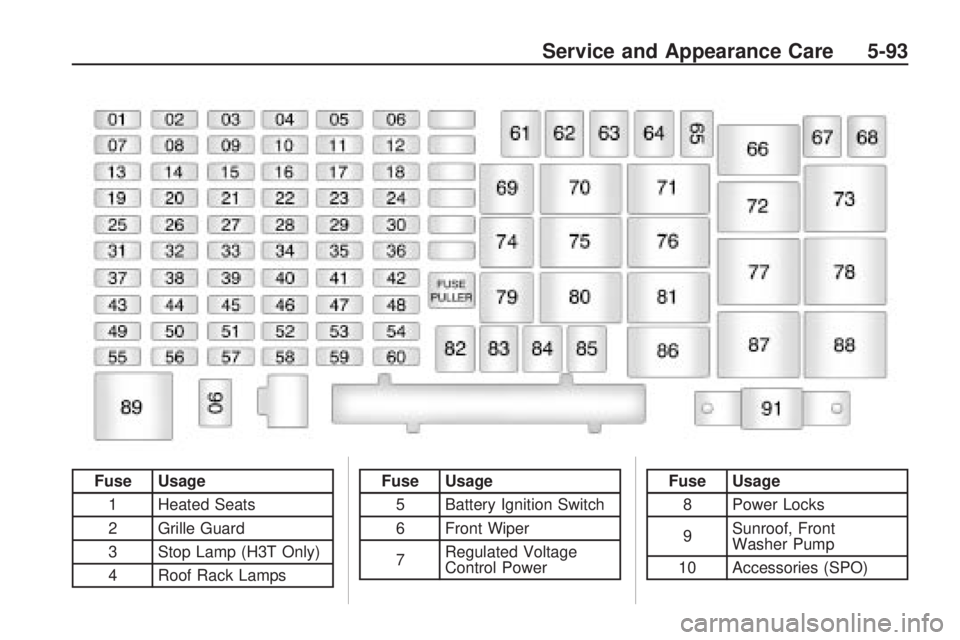
Fuse Usage1 Heated Seats
2 Grille Guard
3 Stop Lamp (H3T Only)
4 Roof Rack LampsFuse Usage5 Battery Ignition Switch
6 Front Wiper
7 Regulated Voltage
Control PowerFuse Usage
8 Power Locks
9 Sunroof, Front
Washer Pump
10 Accessories (SPO)
Service and Appearance Care 5-93
Page 331 of 382
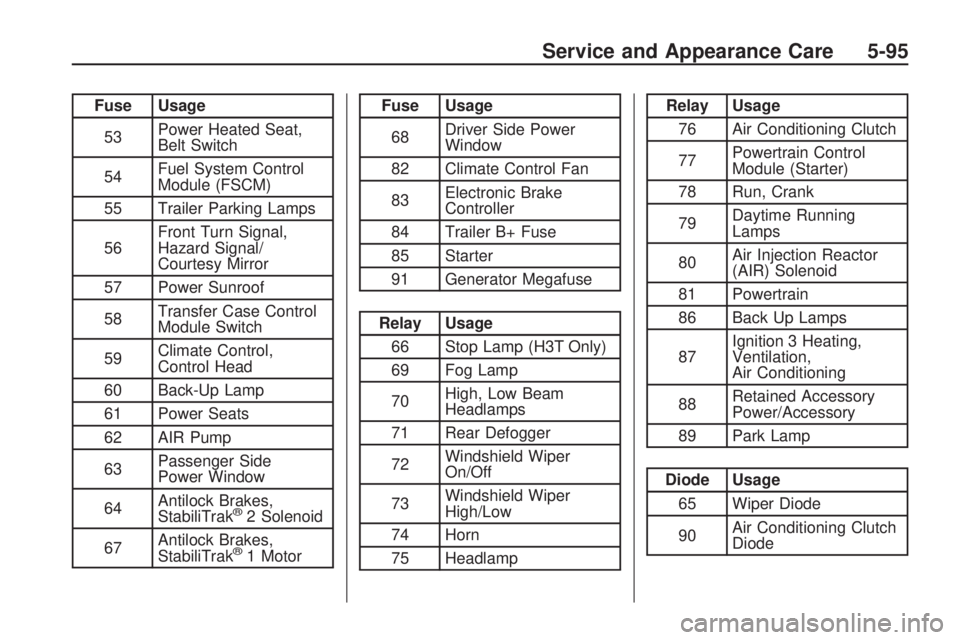
Fuse Usage
53Power Heated Seat,
Belt Switch
54Fuel System Control
Module (FSCM)
55 Trailer Parking Lamps
56Front Turn Signal,
Hazard Signal/
Courtesy Mirror
57 Power Sunroof
58Transfer Case Control
Module Switch
59Climate Control,
Control Head
60 Back-Up Lamp
61 Power Seats
62 AIR Pump
63Passenger Side
Power Window
64Antilock Brakes,
StabiliTrak
®2 Solenoid
67Antilock Brakes,
StabiliTrak
®1 Motor
Fuse Usage
68Driver Side Power
Window
82 Climate Control Fan
83Electronic Brake
Controller
84 Trailer B+ Fuse
85 Starter
91 Generator Megafuse
Relay Usage
66 Stop Lamp (H3T Only)
69 Fog Lamp
70High, Low Beam
Headlamps
71 Rear Defogger
72Windshield Wiper
On/Off
73Windshield Wiper
High/Low
74 Horn
75 Headlamp
Relay Usage
76 Air Conditioning Clutch
77Powertrain Control
Module (Starter)
78 Run, Crank
79Daytime Running
Lamps
80Air Injection Reactor
(AIR) Solenoid
81 Powertrain
86 Back Up Lamps
87Ignition 3 Heating,
Ventilation,
Air Conditioning
88Retained Accessory
Power/Accessory
89 Park Lamp
Diode Usage
65 Wiper Diode
90Air Conditioning Clutch
Diode
Service and Appearance Care 5-95