ECU HUMMER H3 2009 Service Manual
[x] Cancel search | Manufacturer: HUMMER, Model Year: 2009, Model line: H3, Model: HUMMER H3 2009Pages: 382, PDF Size: 1.99 MB
Page 120 of 382
Oil Pressure Light.............3-32
Security Light....................3-33
Cruise Control Light..........3-33
Highbeam On Light...........3-33
Fuel Gage........................3-33
Driver Information
Center (DIC)
Driver Information Center
(DIC)...............................3-34
DIC Operation and
Displays..........................3-34
DIC Warnings and
Messages........................3-37
Audio System(s)
Audio System(s)................3-41
Setting the Clock..............3-41
Radio(s)............................3-42
XM Radio Messages.........3-51
Navigation/Radio System. . .3-52
Bluetooth®........................3-52
Theft-Deterrent Feature.....3-62
Radio Reception...............3-62
Fixed Mast Antenna..........3-63
XM™ Satellite Radio
Antenna System..............3-63
3-2 Instrument Panel
Page 151 of 382
Notice:Lack of proper engine oil
maintenance can damage the
engine. The repairs would not be
covered by the vehicle warranty.
Always follow the maintenance
schedule in this manual for
changing engine oil.
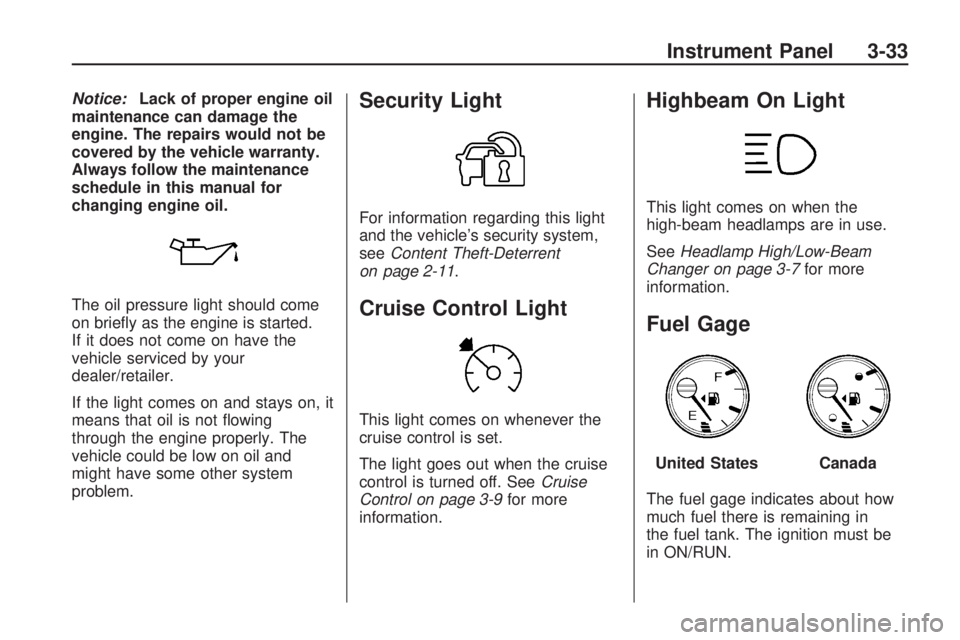
The oil pressure light should come
on briey as the engine is started.
If it does not come on have the
vehicle serviced by your
dealer/retailer.
If the light comes on and stays on, it
means that oil is not owing
through the engine properly. The
vehicle could be low on oil and
might have some other system
problem.Security Light
For information regarding this light
and the vehicle’s security system,
seeContent Theft-Deterrent
on page 2-11.
Cruise Control Light
This light comes on whenever the
cruise control is set.
The light goes out when the cruise
control is turned off. SeeCruise
Control on page 3-9for more
information.
Highbeam On Light
This light comes on when the
high-beam headlamps are in use.
SeeHeadlamp High/Low-Beam
Changer on page 3-7for more
information.
Fuel Gage
The fuel gage indicates about how
much fuel there is remaining in
the fuel tank. The ignition must be
in ON/RUN.
United StatesCanada
Instrument Panel 3-33
Page 156 of 382
CHANGE OIL
This message displays when the oil
needs to be changed. Check the
oil in the vehicle as soon as possible
and have the vehicle serviced by
your dealer/retailer. SeeEngine Oil
on page 5-13andScheduled
Maintenance on page 6-4for more
information. Press and release
the reset stem to acknowledge the
message and clear it from the
display.
DOORS
This message displays when one or
more of the doors is ajar. Check
all the doors on the vehicle to make
sure they are closed. The message
clears from the display after all
of the doors are closed.
ENG (Engine) HOT
This message displays when the
engine coolant temperature is
hot. Check the engine coolant
temperature gage. SeeEngine
Coolant Temperature Gage
on page 3-29. Have the vehicleserviced by your dealer/retailer as
soon as possible if you suspect
the engine is overheating. See
Engine Overheating on page 5-27
for more information.
FLUID
This message displays if the brake
uid is low. Check the brake
uid as soon as possible and have
the vehicle serviced by your
dealer/retailer. SeeBrakes on
page 5-30for more information.
Press and release the reset stem to
acknowledge the message and
clear it from the display.
FUEL CAP
This message displays if the
vehicle’s fuel cap is either off or
loose. Pull over as soon as possible
and check to see if the fuel cap is
secure. You may also see the check
engine light on the instrument
panel cluster. If the check engine
light does come on when the
fuel cap was loose, it may take a
few driving trips before the lightturns off. SeeMalfunction Indicator
Lamp on page 3-30for more
information if the light still remains
on. Press and release the reset
stem to acknowledge the message
and clear it from the display.
HSA (Hill Start Assist) ON
This message displays when the Hill
Start Assist is enabled. See
Braking on page 4-3for more
information.
LOW FUEL
This message displays if the level of
fuel in the vehicle is low. Also
check the fuel gage. SeeFuel Gage
on page 3-33for more information.
Rell the fuel tank as soon as
possible.
LOW TIRE
On vehicles with the Tire Pressure
Monitor System (TPMS), this
message displays if a low tire
pressure is detected in any of the
vehicle’s tires. Press and release the
reset stem to acknowledge the
3-38 Instrument Panel
Page 170 of 382
Not Found:There are no channels
available for the selected category.
The system is working properly.
XM Locked:The XM receiver in the
vehicle may have previously been
in another vehicle. For security
purposes, XM receivers cannot be
swapped between vehicles. If
this message is received after
having the vehicle serviced, check
with your dealer/retailer.
Radio ID:If tuned to channel 0, this
message will alternate with the XM
Radio 8 digit radio ID label. This label
is needed to activate the service.
Unknown:If this message is
received when tuned to channel 0,
there may be a receiver fault.
Consult with your dealer/retailer.
Chk XMRcvr:If this message does
not clear within a short period of
time, the receiver may have a fault.
Consult with your dealer/retailer.Navigation/Radio System
For vehicles with a navigation
radio system, see the separate
Navigation System manual.
Bluetooth®
Vehicles with a Bluetooth system
can use a Bluetooth capable
cell phone with a Hands Free Prole
to make and receive phone calls.
The system can be used while
the key is in ON/RUN or
ACC/ACCESSORY position. The
range of the Bluetooth system
can be up to 30 ft. (9.1 m). Not all
phones support all functions,
and not all phones are guaranteed
to work with the in-vehicle
Bluetooth system. See
gm.com/bluetooth for more
information on compatible phones.
Voice Recognition
The Bluetooth system uses voice
recognition to interpret voice
commands to dial phone numbers
and name tags.Noise:Keep interior noise levels to
a minimum. The system may not
recognize voice commands if there
is too much background noise.
When to Speak:A short tone
sounds after the system responds
indicating when it is waiting for
a voice command. Wait until
the tone and then speak.
How to Speak:Speak clearly in a
calm and natural voice.
Audio System
When using the in-vehicle Bluetooth
system, sound comes through
the vehicle’s front audio system
speakers and overrides the audio
system. Use the audio system
volume knob, during a call,
to change the volume level. The
adjusted volume level remains
in memory for later calls. To prevent
missed calls, a minimum volume
level is used if the volume is turned
down too low.
3-52 Instrument Panel
Page 181 of 382
Cellular Phone Usage
Cellular phone usage may cause
interference with the vehicle’s radio.
This interference may occur when
making or receiving phone calls,
charging the phone’s battery,
or simply having the phone on. This
interference causes an increased
level of static while listening to
the radio. If static is received while
listening to the radio, unplug the
cellular phone and turn it off.
Fixed Mast Antenna
The xed mast antenna can
withstand most car washes without
being damaged as long as it is
securely attached to the base. If the
mast becomes slightly bent,
straighten it out by hand. If the mast
is badly bent, replace it.
Occasionally check to make sure
the antenna is tightened to its base.
If tightening is required, tighten
by hand. until fully seated plus one
quarter turn.
XM™ Satellite Radio
Antenna System
The XM Satellite Radio antenna is
located on the roof of the vehicle.
Keep the antenna clear of
obstructions for clear radio
reception.
If the vehicle has a sunroof, the
performance of the XM system may
be affected if the sunroof is open.
Instrument Panel 3-63
Page 196 of 382
Before You Go Off-Roading
Have all necessary maintenance
and service work done.
Make sure there is enough fuel,
that uid levels are where they
should be, and that the spare tire
is fully inated.
Be sure to read all the
information about
four-wheel-drive vehicles in this
manual.
Make sure all underbody shields,
if the vehicle has them, are
properly attached.
Know the local laws that apply to
off-roading where you will be
driving or check with law
enforcement people in the area.
Be sure to get the necessary
permission if you will be on
private land.
Loading Your Vehicle for
Off-Road Driving
{CAUTION
Cargo on the load oor piled
higher than the seatbacks
can be thrown forward during
a sudden stop. You or your
passengers could be injured.
Keep cargo below the top of
the seatbacks.
Unsecured cargo on the load
oor can be tossed about
when driving over rough
terrain. You or your
passengers can be struck by
ying objects. Secure the
cargo properly.
(Continued)
CAUTION (Continued)
Heavy loads on the roof raise
the vehicle’s center of gravity,
making it more likely to roll
over. You can be seriously or
fatally injured if the vehicle
rolls over. Put heavy loads
inside the cargo area, not on
the roof. Keep cargo in the
cargo area as far forward and
low as possible.
There are some important things to
remember about how to load
your vehicle.
The heaviest things should be on
the oor, forward of the rear axle.
Put heavier items as far forward
as you can.
Be sure the load is properly
secured, so things are not tossed
around.
4-14 Driving Your Vehicle
Page 221 of 382
Notice:Overloading your
vehicle may cause damage.
Repairs would not be covered
by your warranty. Do not
overload your vehicle.
If you put things inside your
vehicle – like suitcases, tools,
packages, or anything
else – they will go as fast as the
vehicle goes. If you have to
stop or turn quickly, or if there is
a crash, they will keep going.
{CAUTION
Things you put inside your
vehicle can strike and injure
people in a sudden stop or
turn, or in a crash.
Put things in the cargo
area of your vehicle. Try to
spread the weight evenly.
(Continued)
CAUTION (Continued)
Never stack heavier
things, like suitcases,
inside the vehicle so that
some of them are above
the tops of the seats.
Do not leave an
unsecured child restraint in
your vehicle.
When you carry something
inside the vehicle, secure
it whenever you can.
Do not leave a seat folded
down unless you need to.There is also important loading
information for off-road driving
in this manual. See
“Loading Your
Vehicle for Off-Road Driving”
underOff-Road Driving on
page 4-13.
Truck-Camper Loading
Information
Your vehicle was not designed
to carry a slide-in camper.
Driving Your Vehicle 4-39
Page 223 of 382
Use the following procedure to tow
the vehicle:
1. Put the transmission in P (Park)
for an automatic transmission or
in 1 (First) for a manual
transmission.
2. Turn the engine off, but leave the
ignition in ACC/ACCESSORY.
3. Firmly set the parking brake.
4. Securely attach the vehicle being
towed to the tow vehicle.
{CAUTION
Shifting a full-time
four-wheel-drive vehicle’s
transfer case into N (Neutral)
can cause the vehicle to roll
even if the automatic transmission
is in P (Park) or the manual
transmission is in any gear. You
or others could be injured. Make
sure the parking brake is rmly
set before the transfer case is
shifted to N (Neutral).5. Shift the transfer case to
N (Neutral). SeeFull-Time
Four-Wheel Drive on page 2-24
for the proper procedure to
select the N (Neutral) position for
the vehicle.
6. Release the parking brake only
after the vehicle being towed is
rmly attached to the tow vehicle.
7. Make sure the ignition is in
ACC/ACCESSORY.
When towing the vehicle for
extended periods of time, start the
vehicle as often as possible to
prevent battery drain. This should
only be done when the tow
vehicle is parked.
After towing, see “Shifting Out of
NEUTRAL” underFull-Time
Four-Wheel Drive on page 2-24.
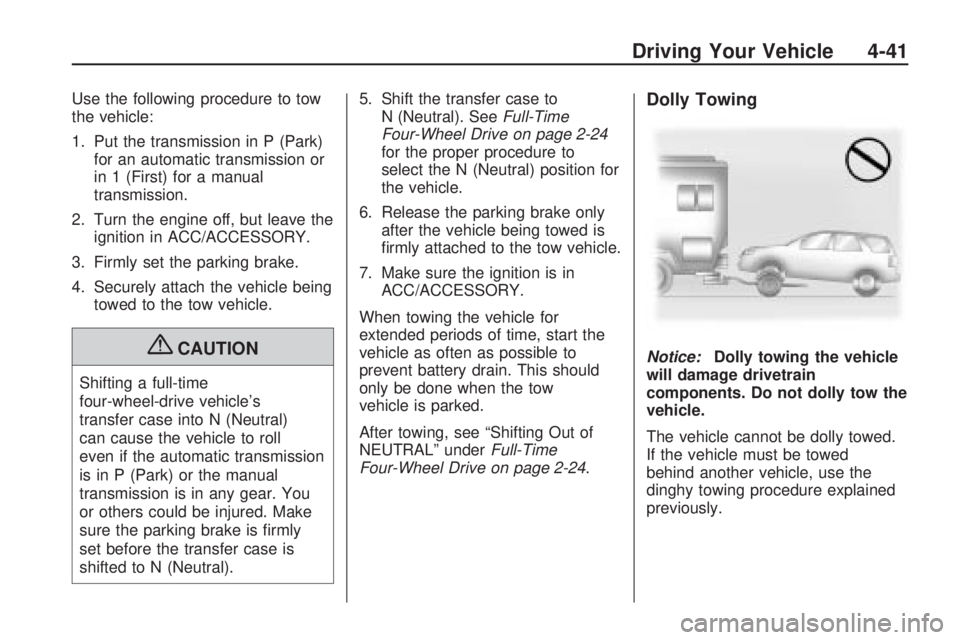
Dolly Towing
Notice:Dolly towing the vehicle
will damage drivetrain
components. Do not dolly tow the
vehicle.
The vehicle cannot be dolly towed.
If the vehicle must be towed
behind another vehicle, use the
dinghy towing procedure explained
previously.
Driving Your Vehicle 4-41
Page 230 of 382
Safety Chains
Always attach chains between the
vehicle and the trailer. Cross
the safety chains under the tongue
of the trailer to help prevent the
tongue from contacting the road if it
becomes separated from the
hitch. Always leave just enough
slack so the rig can turn. Never
allow safety chains to drag on the
ground.
Trailer Brakes
A loaded trailer that weighs more
than 1,500 lbs (680 kg) needs
to have its own brake system that is
adequate for the weight of the
trailer. Be sure to read and follow
the instructions for the trailer brakes
so they are installed, adjusted
and maintained properly.
Driving with a Trailer
Towing a trailer requires a certain
amount of experience. Get to
know the rig before setting out for
the open road. Get acquainted
with the feel of handling and braking
with the added weight of the
trailer. And always keep in mind that
the vehicle you are driving is now
longer and not as responsive as the
vehicle is by itself.
Before starting, check all trailer hitch
parts and attachments, safety
chains, electrical connectors, lamps,
tires and mirror adjustments. If
the trailer has electric brakes, start
the vehicle and trailer moving
and then apply the trailer brake
controller by hand to be sure
the brakes are working. This checks
the electrical connection at the
same time.
During the trip, check occasionally
to be sure that the load is secure,
and that the lamps and any
trailer brakes are still working.
Following Distance
Stay at least twice as far behind
the vehicle ahead as you would
when driving the vehicle without a
trailer. This can help to avoid
situations that require heavy braking
and sudden turns.
Passing
More passing distance is needed
when towing a trailer. Because
the rig is longer, it is necessary to
go much farther beyond the
passed vehicle before returning to
the lane.
Backing Up
Hold the bottom of the steering
wheel with one hand. Then, to move
the trailer to the left, move that
hand to the left. To move the trailer
to the right, move your hand to
the right. Always back up slowly
and, if possible, have someone
guide you.
4-48 Driving Your Vehicle
Page 262 of 382
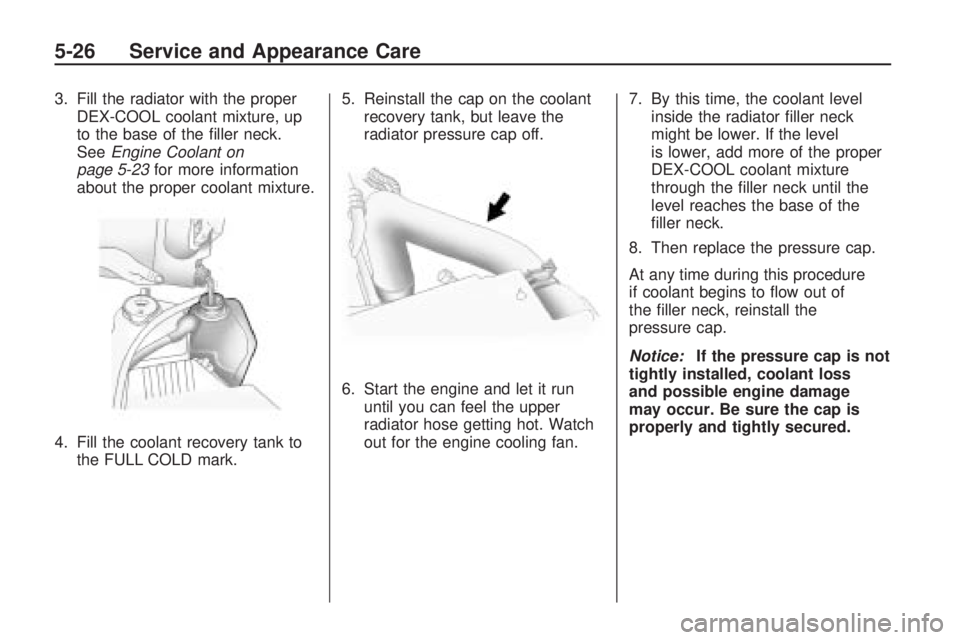
3. Fill the radiator with the proper
DEX-COOL coolant mixture, up
to the base of the ller neck.
SeeEngine Coolant on
page 5-23for more information
about the proper coolant mixture.
4. Fill the coolant recovery tank to
the FULL COLD mark.5. Reinstall the cap on the coolant
recovery tank, but leave the
radiator pressure cap off.
6. Start the engine and let it run
until you can feel the upper
radiator hose getting hot. Watch
out for the engine cooling fan.7. By this time, the coolant level
inside the radiator ller neck
might be lower. If the level
is lower, add more of the proper
DEX-COOL coolant mixture
through the ller neck until the
level reaches the base of the
ller neck.
8. Then replace the pressure cap.
At any time during this procedure
if coolant begins to ow out of
the ller neck, reinstall the
pressure cap.
Notice:If the pressure cap is not
tightly installed, coolant loss
and possible engine damage
may occur. Be sure the cap is
properly and tightly secured.
5-26 Service and Appearance Care