change wheel HUMMER H3 2010 User Guide
[x] Cancel search | Manufacturer: HUMMER, Model Year: 2010, Model line: H3, Model: HUMMER H3 2010Pages: 410, PDF Size: 2.24 MB
Page 229 of 410
Driving and Operating 9-45
You can shift into 1 (First) when
you are going less than 30 km/h
(20 mph). If you have come to a
complete stop and it is hard to shift
into 1 (First), put the shift lever in
Neutral and let up on the clutch.
Then press the clutch pedal back
down and shift into 1 (First).
2 (Second):Press the clutch pedal
as you let up on the accelerator
pedal and shift into 2 (Second).
Then, slowly let up on the clutch
pedal as you press the accelerator
pedal.
3 (Third), 4 (Fourth) and 5 (Fifth):
Shift into 3 (Third), 4 (Fourth) and
5 (Fifth) the same way you do for
2 (Second). Slowly let up on the
clutch pedal as you press the
accelerator pedal.
To stop, let up on the accelerator
pedal and press the brake pedal.
Just before the vehicle stops, press
the clutch pedal and the brake
pedal, and shift to Neutral.
Neutral: Use this position when
you start or idle the engine. R (Reverse):
To back up, stop the
vehicle. Press the clutch pedal and
shift into R (Reverse). Slowly let up
on the clutch pedal as you press
the accelerator pedal. If it is hard
to shift, let the shift lever return to
Neutral and release the clutch
pedal. Then press the clutch again
and shift into R (Reverse). Do not
attempt to shift into the fifth gear
position prior to shifting into
R (Reverse). The transmission has
a lock out feature which prevents a
5 (Fifth) gear to R (Reverse) gear
shift.
Notice: Shifting to R (Reverse)
while the vehicle is moving
forward could damage the
transmission. The repairs would
not be covered by the vehicle
warranty. Shift to R (Reverse) only
after the vehicle is stopped.
Use R (Reverse), along with the
parking brake, for parking the
vehicle.Up-Shift Light
This light will show you when to shift
to the next higher gear for best fuel
economy.
When this light comes on, you
can shift to the next higher gear if
weather, road and traffic conditions
permit. For the best fuel economy,
accelerate slowly and shift when the
light comes on.
While you accelerate, it is normal
for the light to go on and off if you
quickly change the position of the
accelerator. Ignore the shift light
when you downshift.
Disregard the shift light when the
transfer case is in four-wheel low.
For more information, see Up-Shift
Light on page 5‑15.
Page 234 of 410

9-50 Driving and Operating
Brakes
Antilock Brake
System (ABS)
This vehicle has the Antilock Brake
System (ABS), an advanced
electronic braking system that helps
prevent a braking skid.
When the engine is started and the
vehicle begins to drive away, ABS
checks itself. A momentary motor or
clicking noise might be heard while
this test is going on, and it might
even be noticed that the brake
pedal moves a little. This is normal.
If there is a problem with ABS, this
warning light stays on. SeeAntilock
Brake System (ABS) Warning Light
on page 5‑15. If driving safely on a wet road and
it becomes necessary to slam on
the brakes and continue braking
to avoid a sudden obstacle, a
computer senses that the wheels
are slowing down. If one of the
wheels is about to stop rolling, the
computer will separately work the
brakes at each wheel.
ABS can change the brake pressure
to each wheel, as required, faster
than any driver could. This can help
the driver steer around the obstacle
while braking hard.
As the brakes are applied, the
computer keeps receiving updates
on wheel speed and controls
braking pressure accordingly.
Remember: ABS does not change
the time needed to get a foot up to
the brake pedal or always decrease
stopping distance. If you get too
close to the vehicle in front of you,
there will not be enough time to
apply the brakes if that vehicle
suddenly slows or stops. Always
leave enough room up ahead to
stop, even with ABS.
Using ABS
Do not pump the brakes. Just hold
the brake pedal down firmly and let
ABS work. The ABS pump or motor
might be heard operating, and the
brake pedal might be felt to pulsate,
but this is normal.
Braking in Emergencies
ABS allows the driver to steer and
brake at the same time. In many
emergencies, steering can help
more than even the very best
braking.
Page 241 of 410
Driving and Operating 9-57
Cruise Control
With cruise control, a speed of
about 40 km/h (25 mph) or more can
be maintained without keeping your
foot on the accelerator. Cruise
control does not work at speeds
below about 40 km/h (25 mph).
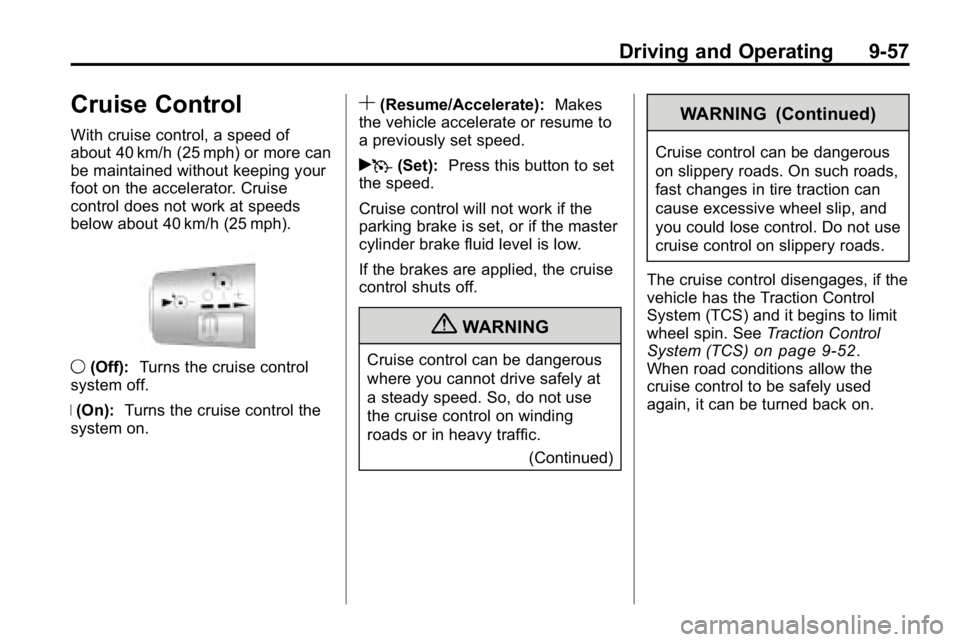
9(Off): Turns the cruise control
system off.
R (On): Turns the cruise control the
system on.
S(Resume/Accelerate): Makes
the vehicle accelerate or resume to
a previously set speed.
rT (Set): Press this button to set
the speed.
Cruise control will not work if the
parking brake is set, or if the master
cylinder brake fluid level is low.
If the brakes are applied, the cruise
control shuts off.
{WARNING
Cruise control can be dangerous
where you cannot drive safely at
a steady speed. So, do not use
the cruise control on winding
roads or in heavy traffic.
(Continued)
WARNING (Continued)
Cruise control can be dangerous
on slippery roads. On such roads,
fast changes in tire traction can
cause excessive wheel slip, and
you could lose control. Do not use
cruise control on slippery roads.
The cruise control disengages, if the
vehicle has the Traction Control
System (TCS) and it begins to limit
wheel spin. See Traction Control
System (TCS)
on page 9‑52.
When road conditions allow the
cruise control to be safely used
again, it can be turned back on.
Page 256 of 410
9-72 Driving and Operating
Towing with a Stability Control
System
When towing, the sound of the
stability control system might be
heard. The system is reacting to the
vehicle movement caused by the
trailer, which mainly occurs during
cornering. This is normal when
towing heavier trailers.
Following Distance
Stay at least twice as far behind the
vehicle ahead as you would when
driving the vehicle without a trailer.
This can help to avoid situations
that require heavy braking and
sudden turns.
Passing
More passing distance is needed
when towing a trailer. Because the
rig is longer, it is necessary to go
much farther beyond the passed
vehicle before returning to the lane.
Backing Up
Hold the bottom of the steering
wheel with one hand. Then, to move
the trailer to the left, move that hand
to the left. To move the trailer to the
right, move your hand to the right.
Always back up slowly and,
if possible, have someone
guide you.
Making Turns
Notice:Making very sharp turns
while trailering could cause the
trailer to come in contact with the
vehicle. The vehicle could be
damaged. Avoid making very
sharp turns while trailering.
When turning with a trailer, make
wider turns than normal. Do this
so the trailer won't strike soft
shoulders, curbs, road signs, trees
or other objects. Avoid jerky or
sudden maneuvers. Signal well in
advance.
Turn Signals When Towing a
Trailer
The arrows on the instrument panel
flash whenever signaling a turn or
lane change. Properly hooked up,
the trailer lamps also flash, telling
other drivers the vehicle is turning,
changing lanes or stopping.
When towing a trailer, the arrows on
the instrument panel flash for turns
even if the bulbs on the trailer are
burned out. For this reason you
may think other drivers are seeing
the signal when they are not. It is
important to check occasionally to
be sure the trailer bulbs are still
working.
Driving On Grades
Reduce speed and shift to a
lower gear before starting down a
long or steep downgrade. If the
transmission is not shifted down, the
brakes might have to be used so
much that they would get hot and no
longer work well.
Page 292 of 410
10-26 Vehicle Care
Brakes
This vehicle has disc brakes. Disc
brake pads have built-in wear
indicators that make a high-pitched
warning sound when the brake pads
are worn and new pads are needed.
The sound can come and go or be
heard all the time the vehicle is
moving, except when applying the
brake pedal firmly.
{WARNING
The brake wear warning sound
means that soon the brakes will
not work well. That could lead to
an accident. When the brake
wear warning sound is heard,
have the vehicle serviced.
Notice: Continuing to drive with
worn-out brake pads could result
in costly brake repair. Some driving conditions or climates
can cause a brake squeal when the
brakes are first applied or lightly
applied. This does not mean
something is wrong with the brakes.
Properly torqued wheel nuts are
necessary to help prevent brake
pulsation. When tires are rotated,
inspect brake pads for wear and
evenly tighten wheel nuts in the
proper sequence to torque
specifications in
Capacities and
Specifications on page 12‑2.
Brake linings should always be
replaced as complete axle sets.
Brake Pedal Travel
See your dealer if the brake pedal
does not return to normal height,
or if there is a rapid increase in
pedal travel. This could be a sign
that brake service might be
required.
Brake Adjustment
Every time the brakes are applied,
with or without the vehicle moving,
the brakes adjust for wear.
Replacing Brake System Parts
The braking system on a vehicle is
complex. Its many parts have to be
of top quality and work well together
if the vehicle is to have really good
braking. The vehicle was designed
and tested with top-quality brake
parts. When parts of the braking
system are replaced, be sure to get
new, approved replacement parts.
If this is not done, the brakes might
not work properly. For example,
installing disc brake pads that are
wrong for the vehicle, can change
the balance between the front and
rear brakes —for the worse. The
braking performance expected can
change in many other ways if the
wrong replacement brake parts are
installed.
Page 295 of 410
Vehicle Care 10-29
Vehicle Storage
{WARNING
Batteries have acid that can burn
you and gas that can explode.
You can be badly hurt if you are
not careful. SeeJump Starting
on
page 10‑86
for tips on working
around a battery without
getting hurt.
Infrequent Usage: Remove the
black, negative (−) cable from the
battery to keep the battery from
running down.
Extended Storage: Remove the
black, negative (−) cable from the
battery or use a battery trickle
charger.
Four-Wheel Drive
It is recommended that the
four-wheel drive transfer case fluid
be checked and filled by the dealer.
Front Axle
It is not necessary to regularly
check front axle fluid unless a leak
is suspected or an unusual noise is
heard. A fluid loss could indicate a
problem.
It is recommended that the front
axle fluid be checked and filled by
your dealer.
Rear Axle
When to Check and Change
Lubricant
It is not necessary to regularly
check rear axle fluid unless a leak is
suspected or an unusual noise is
heard. A fluid loss could indicate a
problem. Have it inspected and
repaired.
How to Check Lubricant
To get an accurate reading, the
vehicle should be on a level
surface.
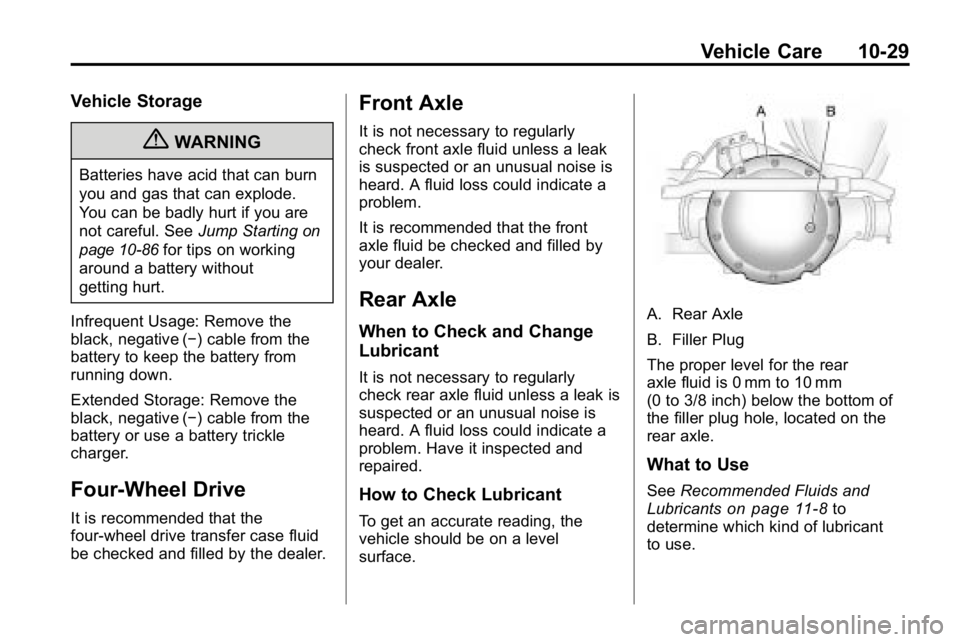
A. Rear Axle
B. Filler Plug
The proper level for the rear
axle fluid is 0 mm to 10 mm
(0 to 3/8 inch) below the bottom of
the filler plug hole, located on the
rear axle.
What to Use
See Recommended Fluids and
Lubricantson page 11‑8to
determine which kind of lubricant
to use.
Page 331 of 410
Vehicle Care 10-65
A rear blowout, particularly on a
curve, acts much like a skid and
may require the same correction
you would use in a skid. In any rear
blowout remove your foot from the
accelerator pedal. Get the vehicle
under control by steering the way
you want the vehicle to go. It may
be very bumpy and noisy, but you
can still steer. Gently brake to a
stop, well off the road if possible.
{WARNING
Lifting a vehicle and getting
under it to do maintenance or
repairs is dangerous without the
appropriate safety equipment and
training. If a jack is provided with
the vehicle, it is designed only for
changing a flat tire. If it is used for
anything else, you or others could
be badly injured or killed if the
vehicle slips off the jack. If a jack
is provided with the vehicle, only
use it for changing a flat tire.If a tire goes flat, avoid further
tire and wheel damage by driving
slowly to a level place. Turn on
your hazard warning flashers.
See
Hazard Warning Flashers
on
page 6‑5.
{WARNING
Changing a tire can be
dangerous. The vehicle can slip
off the jack and roll over or fall
on you or other people. You and
they could be badly injured or
even killed. Find a level place to
change your tire. To help prevent
the vehicle from moving:
1. Set the parking brake firmly.
2. Put the shift lever in P (Park).
3. If you have a four-wheel-drive vehicle,
be sure the transfer case
is in a drive gear –not in
N (Neutral).
(Continued)
WARNING (Continued)
4. Turn off the engine and donot restart while the vehicle
is raised.
5. Do not allow passengers to remain in the vehicle.
To be even more certain the
vehicle will not move, put blocks
at the front and rear of the tire
farthest away from the one being
changed. That would be the tire
on the other side, at the opposite
end of the vehicle.
When the vehicle has a flat tire, the
wheel blocks need to be set up
before changing it. The wheel
blocks are located in the tool bag in
the swing-gate for H3 models or
below the rear seat for H3T models.
Page 332 of 410
10-66 Vehicle Care
SeeTire Changing (H3T)on
page 10‑66or Tire Changing (H3)on page 10‑75for more information.
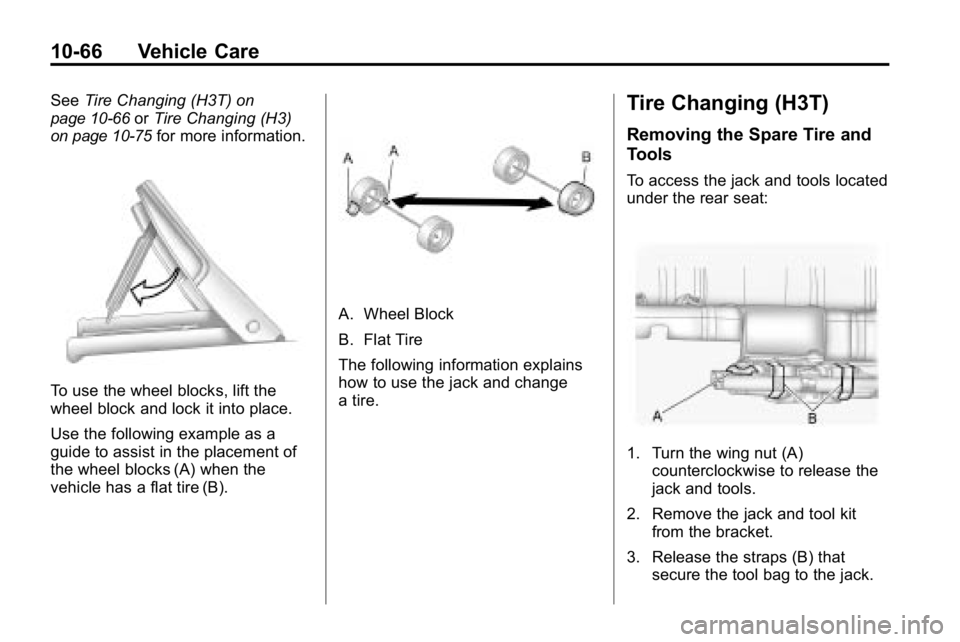
To use the wheel blocks, lift the
wheel block and lock it into place.
Use the following example as a
guide to assist in the placement of
the wheel blocks (A) when the
vehicle has a flat tire (B).
A. Wheel Block
B. Flat Tire
The following information explains
how to use the jack and change
a tire.
Tire Changing (H3T)
Removing the Spare Tire and
Tools
To access the jack and tools located
under the rear seat:
1. Turn the wing nut (A)
counterclockwise to release the
jack and tools.
2. Remove the jack and tool kit from the bracket.
3. Release the straps (B) that secure the tool bag to the jack.
Page 369 of 410

Service and Maintenance 11-5
.Exhaust system and nearby heat
shields inspection for loose or
damaged components.
.Accelerator pedal check for
damage, high effort, or binding.
Replace if needed.
First Engine Oil Change After
Every 40 000 km/25,000 Miles
.Fuel system inspection for
damage or leaks.
First Engine Oil Change After
Every 80 000 km/50,000 Miles
.Engine air cleaner filter
replacement. See Engine Air
Cleaner/Filter on page 10‑17.
.Automatic transmission fluid
change (severe service) for
vehicles mainly driven in heavy
city traffic in hot weather, in
hilly or mountainous terrain,
when frequently towing a
trailer, or used for taxi, police,
or delivery service. See
Automatic Transmission Fluid
on
page 10‑12.
.Four‐wheel drive only: Transfer
case fluid change. Check vent
hose at transfer case for kinks
and proper installation. Check
to be sure vent hose is
unobstructed, clear, and free of
debris. During any maintenance,
if a power washer is used to
clean mud and dirt from the
underbody, care should be taken
to not directly spray the transfer
case output seals. High pressure
water can overcome the seals
and contaminate the transfer
case fluid. Contaminated fluid
will decrease the life of the
transfer case and should be
replaced.
First Engine Oil Change After
Every 160 000 km/100,000 Miles
.Automatic transmission fluid
change (normal service).
See Automatic Transmission
Fluid on page 10‑12.
.Rear axle fluid change (normal
service). See Rear Axleon
page 10‑29.
.Spark plug replacement and
spark plug wires inspection.
An Emission Control Service.
First Engine Oil Change After
Every 240 000 km/150,000 Miles
.Engine cooling system drain,
flush, and refill, cooling system
and cap pressure check, and
cleaning of outside of radiator
and air conditioning condenser
(or every 5 years, whichever
occurs first). See Cooling
System
on page 10‑18. An
Emission Control Service.
.Engine accessory drive belt
inspection for fraying, excessive
cracks, or obvious damage
and replacement, if needed.
An Emission Control Service.
Page 408 of 410

i-10 INDEX
Servicing theAirbag-Equipped Vehicle . . . . . 3-40
Shifting Into Park . . . . . . . . . . . . . . . . . . . . . . 9-37
Out of Park . . . . . . . . . . . . . . . . . . . 9-38
Signals, Turn and Lane-Change . . . . . . . . . . . . . . . . . 6-5
Specifications and Capacities . . . . . . . . . . . . . . . . . . . . 12-2
Speedometer . . . . . . . . . . . . . . . . . . . 5-8
StabiliTrak System . . . . . . . . . . . . . 9-53
Start Assist, Hills . . . . . . . . . . . . . . 9-52
Starter Switch Check . . . . . . . . . 10-30
Starting the Engine . . . . . . . . . . . . 9-35
Steering . . . . . . . . . . . . . . . . . . . . . . . . 9-4 Fluid, Power . . . . . . . . . . . . . . . . 10-24
Wheel Adjustment . . . . . . . . . . . . . 5-2
Stoplamps and Back-Up Lamps Bulb Replacement . . . 10-35, 10-36
Storage Areas Cargo Cover . . . . . . . . . . . . . . . . . . . 4-2
Cargo Management System . . . 4-2
Center Console . . . . . . . . . . . . . . . . 4-1
Convenience Net . . . . . . . . . . . . . . 4-3
Front . . . . . . . . . . . . . . . . . . . . . . . . . . 4-1 Storage Areas (cont.)
Glove Box . . . . . . . . . . . . . . . . . . . . . 4-1
Rear Compartment/Storage
Panel Cover . . . . . . . . . . . . . . . . . . 4-2
Roof Rack System . . . . . . . . . . . . . 4-4
Stuck Vehicle . . . . . . . . . . . . . . . . . . 9-26
Sun Visors . . . . . . . . . . . . . . . . . . . . . 2-17
Sunroof . . . . . . . . . . . . . . . . . . . . . . . . 2-17
Symbols . . . . . . . . . . . . . . . . . . . . . . . . . . iv
System Roof Rack . . . . . . . . . . . . . . . . . . . . . 4-4
System Check Automatic TransmissionShiftlock Control . . . . . . . . . . 10-30
T
Tachometer . . . . . . . . . . . . . . . . . . . . . 5-8
Tailgate . . . . . . . . . . . . . . . . . . . . . . . . . 2-7
TaillampsBulb Replacement . . . 10-35, 10-36
Text Telephone (TTY) Users . . . 13-4
Theft-Deterrent Systems . . . . . . . . . . . . . . . 2-10, 2-11
Immobilizer . . . . . . . . . . . . . . . . . . . 2-10
Time . . . . . . . . . . . . . . . . . . . . . . . . . . . . 5-4 Tires
Buying New Tires . . . . . . . . . . . 10-59
Chains . . . . . . . . . . . . . . . . . . . . . . 10-64
Changing . . . . . . . . . . . . 10-66, 10-75
Designations . . . . . . . . . . . . . . . 10-46
Different Size . . . . . . . . . . . . . . . 10-60
Full-Size Spare . . . . . . . . . . . . . 10-85
If a Tire Goes Flat . . . . . . . . . . 10-64
Inflation Monitor System . . . . 10-53
Inspection . . . . . . . . . . . . . . . . . . 10-57
Messages . . . . . . . . . . . . . . . . . . . . 5-25
Pressure Light . . . . . . . . . . . . . . . . 5-16
Pressure Monitor System . . . 10-52
Rotation . . . . . . . . . . . . . . . . . . . . 10-57
Secondary Latch System . . . 10-84
Sidewall Labeling . . . . . . . . . . . 10-44
Terminology and
Definitions . . . . . . . . . . . . . . . . . 10-48
Uniform Tire Quality Grading . . . . . . . . . . . . . . . . . . . 10-61
Wheel Alignment and Tire
Balance . . . . . . . . . . . . . . . . . . . 10-62
Wheel Replacement . . . . . . . . 10-63
When It Is Time for New Tires . . . . . . . . . . . . . . . . . . . . . . 10-58