brake light HUMMER H3 2010 Owner's Manual
[x] Cancel search | Manufacturer: HUMMER, Model Year: 2010, Model line: H3, Model: HUMMER H3 2010Pages: 410, PDF Size: 2.24 MB
Page 244 of 410
9-60 Driving and Operating
Ending Cruise Control
To turn off the cruise control, do
one of the following:
.Step lightly on the brake pedal.
.Move the cruise control switch
to
9.
.Lightly tap or press the clutch,
if the vehicle has a manual
transmission.
Erasing Speed Memory
The cruise control set speed
memory is erased, when the cruise
control or the ignition is turned off.
Object Detection
Systems
Rear Vision
Camera (RVC)
Vehicles with the rear vision camera
system are designed to help the
driver while the vehicle is backing
up. The area behind the vehicle is
displayed on the screen in the
inside rear view mirror. Read this
entire section before using the
camera system.
When the key is in the ON/RUN
position and the driver shifts the
vehicle into R (Reverse), the video
image appears from inside the rear
view mirror. Once the vehicle is
shifted out of R (Reverse), the
image disappears. The display may have a guideline
overlay that can help the driver align
the vehicle when backing into a
parking spot.
Turning the Rear Vision Camera
System On or Off
To turn off the rear vision camera
system, press and hold
z, located
on the inside rearview mirror, until
the left indicator light turns off. The
rear camera vision display is now
disabled.
To turn the rear vision camera
system on again, press and
hold
zuntil the left indicator light
illuminates. The rear vision camera
system display is now enabled and
the display will appear in the mirror
normally.
Page 263 of 410
Driving and Operating 9-79
Safety Chains
Always attach chains between the
vehicle and the trailer. Cross the
safety chains under the tongue
of the trailer to help prevent the
tongue from contacting the road if it
becomes separated from the hitch.
Always leave just enough slack so
the rig can turn. Never allow safety
chains to drag on the ground.
Trailer Brakes
A loaded trailer that weighs more
than 680 kg (1,500 lbs) needs to
have its own brake system that
is adequate for the weight of the
trailer. Be sure to read and follow
the instructions for the trailer brakes
so they are installed, adjusted and
maintained properly.
Trailer Wiring Harness
Light‐Duty Trailer Wiring Package
If the vehicle does not have a
trailer towing package, the chassis
harness will contain the following
blunt cut circuits:
.Yellow: Left Stop/Turn Signal
.Dark Green: Right Stop/Turn
Signal
.White: Ground
.Brown: Tail Lamps
To add a trailer towing wiring
package, have it installed by
your dealer or a qualified service
center. Also, see Add-On Electrical
Equipment
on page 9‑81for more
information. Heavy-Duty Trailer Wiring Package
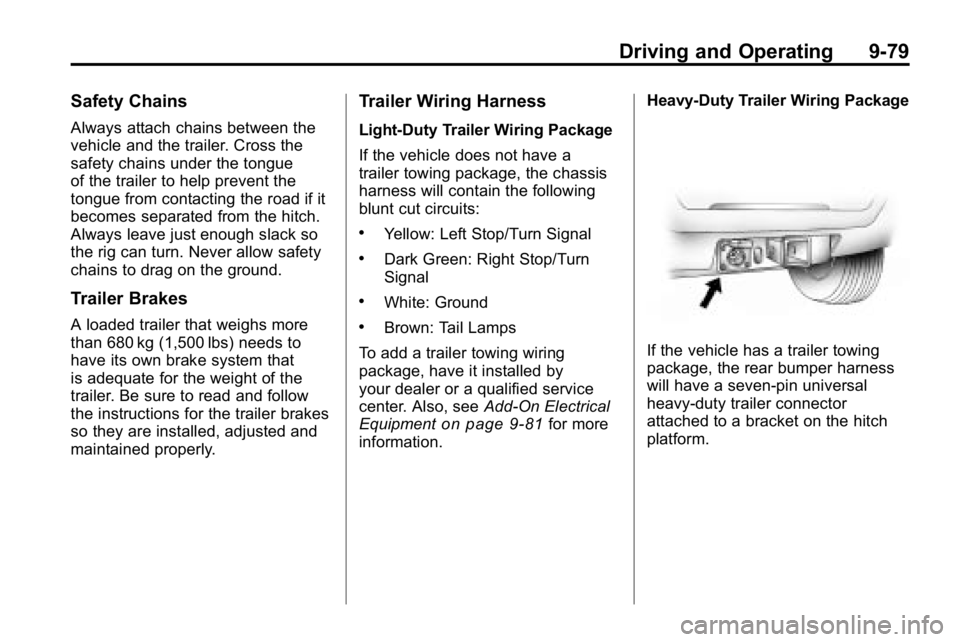
If the vehicle has a trailer towing
package, the rear bumper harness
will have a seven‐pin universal
heavy‐duty trailer connector
attached to a bracket on the hitch
platform.
Page 264 of 410
9-80 Driving and Operating
The trailer towing harness contains
the following seven trailer circuits:
.Yellow: Left Stop/Turn Signal
.Dark Green: Right Stop/Turn
Signal
.Brown: Taillamps
.White: Ground
.Light Green: Back-up Lamps
.Red: Battery Feed
.Dark Blue: Trailer Brake
If charging a remote (non‐vehicle)
battery, turn on the headlamps to
boost the vehicle system voltage to
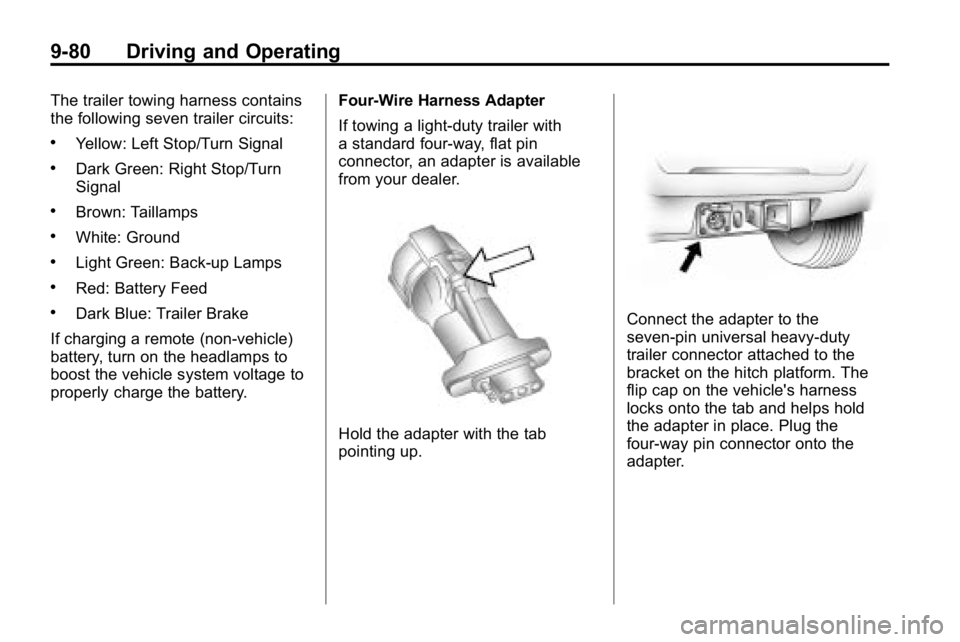
properly charge the battery. Four-Wire Harness Adapter
If towing a light-duty trailer with
a standard four-way, flat pin
connector, an adapter is available
from your dealer.
Hold the adapter with the tab
pointing up.
Connect the adapter to the
seven‐pin universal heavy‐duty
trailer connector attached to the
bracket on the hitch platform. The
flip cap on the vehicle's harness
locks onto the tab and helps hold
the adapter in place. Plug the
four-way pin connector onto the
adapter.
Page 265 of 410
Driving and Operating 9-81
Trailer Brake Control Wiring
Harness
The trailer brake control wiring
harness is located under the
instrument panel to the right of the
steering column. The wires are
taped to the harness that goes
to the courtesy light under the
instrument panel. The harness
has the following wires:
.Red Wire: AUX B+
.Black Wire: Ground
.Light Blue Wire: Brake Signal
.Dark Blue Wire: Trailer Brakes
Trailer Recommendations
Subtract the hitch loads from the
Cargo Weight Rating (CWR). CWR
is the maximum weight of the load
the vehicle can carry. It does not
include the weight of the people
inside, but you can figure about
68 kg (150 lbs) for each passenger.
The total cargo load must not be
more than the vehicles CWR.
Weigh the vehicle with the trailer
attached, so the GVWR or GAWR
are not exceeded. If using a
weight-distributing hitch, weigh the
vehicle without the spring bars in
place.
The best performance is obtained
by correctly spreading out the
weight of the load and choosing the
correct hitch and trailer brakes.
For more information seeTrailer
Towing on page 9‑74.
Conversions and
Add-Ons
Add-On Electrical
Equipment
Notice: Do not add anything
electrical to the vehicle unless
you check with your dealer first.
Some electrical equipment can
damage the vehicle and the
damage would not be covered
by the vehicle's warranty. Some
add-on electrical equipment can
keep other components from
working as they should.
Add-on equipment can drain the
vehicle battery, even if the vehicle is
not operating.
The vehicle has an airbag system.
Before attempting to add anything
electrical to the vehicle, see
Servicing the Airbag-Equipped
Vehicle
on page 3‑40and Adding
Equipment to the Airbag-Equipped
Vehicle on page 3‑40.
Page 292 of 410
10-26 Vehicle Care
Brakes
This vehicle has disc brakes. Disc
brake pads have built-in wear
indicators that make a high-pitched
warning sound when the brake pads
are worn and new pads are needed.
The sound can come and go or be
heard all the time the vehicle is
moving, except when applying the
brake pedal firmly.
{WARNING
The brake wear warning sound
means that soon the brakes will
not work well. That could lead to
an accident. When the brake
wear warning sound is heard,
have the vehicle serviced.
Notice: Continuing to drive with
worn-out brake pads could result
in costly brake repair. Some driving conditions or climates
can cause a brake squeal when the
brakes are first applied or lightly
applied. This does not mean
something is wrong with the brakes.
Properly torqued wheel nuts are
necessary to help prevent brake
pulsation. When tires are rotated,
inspect brake pads for wear and
evenly tighten wheel nuts in the
proper sequence to torque
specifications in
Capacities and
Specifications on page 12‑2.
Brake linings should always be
replaced as complete axle sets.
Brake Pedal Travel
See your dealer if the brake pedal
does not return to normal height,
or if there is a rapid increase in
pedal travel. This could be a sign
that brake service might be
required.
Brake Adjustment
Every time the brakes are applied,
with or without the vehicle moving,
the brakes adjust for wear.
Replacing Brake System Parts
The braking system on a vehicle is
complex. Its many parts have to be
of top quality and work well together
if the vehicle is to have really good
braking. The vehicle was designed
and tested with top-quality brake
parts. When parts of the braking
system are replaced, be sure to get
new, approved replacement parts.
If this is not done, the brakes might
not work properly. For example,
installing disc brake pads that are
wrong for the vehicle, can change
the balance between the front and
rear brakes —for the worse. The
braking performance expected can
change in many other ways if the
wrong replacement brake parts are
installed.
Page 293 of 410
Vehicle Care 10-27
Brake Fluid
The brake master cylinder reservoir
is filled with DOT 3 brake fluid as
indicated on the reservoir cap. See
Engine Compartment Overview
on
page 10‑6for the location of the
reservoir. There are only two reasons why the
brake fluid level in the reservoir
might go down:
.The brake fluid level goes down
because of normal brake lining
wear. When new linings are
installed, the fluid level goes
back up.
.A fluid leak in the brake
hydraulic system can also cause
a low fluid level. Have the brake
hydraulic system fixed, since a
leak means that sooner or later
the brakes will not work well.
Do not top off the brake fluid.
Adding fluid does not correct a leak.
If fluid is added when the linings
are worn, there will be too much
fluid when new brake linings are
installed. Add or remove brake fluid,
as necessary, only when work is
done on the brake hydraulic system.
{WARNING
If too much brake fluid is added, it
can spill on the engine and burn,
if the engine is hot enough. You
or others could be burned, and
the vehicle could be damaged.
Add brake fluid only when work is
done on the brake hydraulic
system.
When the brake fluid falls to a low
level, the brake warning light comes
on. See Brake System Warning
Light on page 5‑14.
Page 308 of 410

10-42 Vehicle Care
FuseUsage
39 Daytime Running
Lamps
40 Passenger Side
Headlamp
41 Driver Side
Headlamp
42 Trailer
Back-Up Lamp
43 Front Park Lamps
44 Air Injection Reactor
(AIR) Solenoid
45 Auxiliary Power 2/
Cigarette Lighter
46 Electronic Throttle
Control
47 Oxygen Sensor
48 Air Conditioning
Clutch
49 Rear Park Lamp
50 Stop Lamp Fuse
Usage
51 Auxiliary Power 1/
Cigarette Lighter
52 StabiliTrak
®,
Antilock Brake
System
53 Power Heated Seat,
Belt Switch
54 Fuel System Control
Module (FSCM)
55 Trailer Parking
Lamps
56 Front Turn Signal,
Hazard Signal,
Courtesy Mirror
57 Power Sunroof
58 Transfer Case
Control Module
Switch
59 Climate Controls
Control Head
60 Back‐Up Lamp
61 Power Seats Fuse Usage
62 Air Injection Reactor
(AIR) Pump
63 Passenger Side
Power Window
64 Antilock Brake
System,
StabiliTrak
®2
Solenoid
67 Antilock Brake
System,
StabiliTrak
®1 Motor
68 Driver Side Power
Window
82 Climate Control Fan
83 Electronic Brake
Controller
84 Trailer B+ Fuse
85 Starter
91 Generator Megafuse
Page 322 of 410

10-56 Vehicle Care
You have one minute to match
the first tire/wheel position, and
five minutes overall, to match all
four tire/wheel positions. If it takes
longer than one minute, to match
the first tire and wheel, or more than
five minutes to match all four tire
and wheel positions, the matching
process stops and you need to
start over.
The TPMS sensor matching
procedure is outlined below:
1. Set the parking brake.
2. Turn the ignition switch toON/RUN with the engine off.
3. Turn the exterior lamp switch from AUTO to OFF four times
within three seconds.
A double horn chirp will
sound and the TPMS low tire
warning light starts flashing.
The double horn chirp and
flashing TPMS warning light
indicates the TPMS matching
process has started. The TPMS warning light should continue
flashing throughout the matching
procedure. The LOW TIRE
message displays on the Driver
Information Center (DIC).
4. Start with the driver side front tire.
5. Remove the valve cap from the valve cap stem. Activate the
TPMS sensor by increasing or
decreasing the tire's air pressure
for 10 seconds, then stop and
listen for a single horn chirp. The
single horn chirp should sound
within 15 seconds, confirming
that the sensor identification
code has been matched to this
tire and wheel position. If you
do not hear the confirming
single horn chirp, turn the
ignition switch to LOCK and start
over beginning with Step 2.
6. Proceed to the passenger side front tire, and repeat the
procedure in Step 5. 7. Proceed to the passenger side
rear tire, and repeat the
procedure in Step 5.
8. Proceed to the driver side rear tire, and repeat the procedure in
Step 5.
9. After hearing the confirming horn chirp for the driver side rear tire,
check to see if the TPMS low tire
warning light and the DIC LOW
TIRE messages have turned off.
If yes, the TPMS sensors have
been relearned. Turn the ignition
switch to LOCK/OFF.
If the low tire warning light and
the SERV TPM message on the
DIC are on after completing
Step 5 for the driver side rear
tire, the sensor relearn process
has not been successful. Turn
the ignition switch to LOCK/OFF
and repeat the matching process
beginning with Step 2.
Page 327 of 410
Vehicle Care 10-61
Additionally, if your vehicle has
electronic systems such as anti‐lock
brakes, rollover airbags, traction
control, and electronic stability
control, the performance of these
systems can be affected.
{WARNING
If you add different sized
wheels, your vehicle may not
provide an acceptable level of
performance and safety if tires not
recommended for those wheels
are selected. You may increase
the chance that you will crash and
suffer serious injury. Only use
Hummer specific wheel and tire
systems developed for your
vehicle, and have them properly
installed by a GM certified
technician.
See Buying New Tires
on
page 10‑59and Accessories and
Modificationson page 10‑3for
additional information.
Uniform Tire Quality
Grading
Quality grades can be found
where applicable on the tire
sidewall between tread shoulder
and maximum section width. For
example:
Treadwear 200 Traction AA
Temperature A
The following information relates
to the system developed by the
United States National Highway
Traffic Safety Administration
(NHTSA), which grades tires
by treadwear, traction, and
temperature performance. This
applies only to vehicles sold in
the United States. The grades
are molded on the sidewalls
of most passenger car tires.
The Uniform Tire Quality
Grading (UTQG) system
does not apply to deep
tread, winter-type snow tires, space-saver, or temporary use
spare tires, tires with nominal
rim diameters of 10 to 12 inches
(25 to 30 cm), or to some
limited-production tires.
While the tires available on
Hummer light trucks may vary
with respect to these grades,
they must also conform to
federal safety requirements and
additional General Motors Tire
Performance Criteria (TPC)
standards.
All Passenger Car Tires Must
Conform to Federal Safety
Requirements In Addition To
These Grades.
Treadwear
The treadwear grade is a
comparative rating based
on the wear rate of the tire
when tested under controlled
conditions on a specified
government test course.
Page 353 of 410
Vehicle Care 10-87
You would not be able to start
your vehicle, and the bad
grounding could damage the
electrical systems.
To avoid the possibility of the
vehicles rolling, set the parking
brake firmly on both vehicles
involved in the jump start
procedure. Put an automatic
transmission in P (Park) or a
manual transmission in Neutral
before setting the parking brake.
If you have a four-wheel-drive
vehicle, be sure the transfer
case is not in Neutral.
Notice: If you leave the radio or
other accessories on during the
jump starting procedure, they
could be damaged. The repairs
would not be covered by the
warranty. Always turn off the
radio and other accessories
when jump starting the vehicle. 3. Turn off the ignition on both
vehicles. Unplug unnecessary
accessories plugged into the
cigarette lighter or the accessory
power outlets. Turn off the radio
and all lamps that are not
needed. This will avoid sparks
and help save both batteries.
And it could save the radio!
4. Open the hoods and locate the batteries on both vehicles. You
will use the positive (+) battery
terminal and the remote
negative (−) jump starting
terminal to jump start your
vehicle. To access the
positive (+) battery terminal,
open the terminal cover. See
Engine Compartment Overview
on page 10‑6for more
information on the terminal
locations.
{WARNING
Using a match near a battery can
cause battery gas to explode.
People have been hurt doing this,
and some have been blinded.
Use a flashlight if you need more
light.
Be sure the batteries have
enough water. You do not need
to add water to the ACDelco
®
battery (or batteries) installed in
your new vehicle. But if a battery
has filler caps, be sure the right
amount of fluid is there. If it is low,
add water to take care of that
first. If you do not, explosive gas
could be present.
Battery fluid contains acid that
can burn you. Do not get it on
you. If you accidentally get it in
your eyes or on your skin, flush
the place with water and get
medical help immediately.