air condition Hyundai Accent 2009 User Guide
[x] Cancel search | Manufacturer: HYUNDAI, Model Year: 2009, Model line: Accent, Model: Hyundai Accent 2009Pages: 266, PDF Size: 8.77 MB
Page 123 of 266

1
FEATURES OF YOUR HYUNDAI
1131
FEATURES OF YOUR HYUNDAI
113
AIR CONDITIONING SYSTEM
B740A01MC-D B740A01A-AAT
(If Installed)
Air Conditioning SwitchThe air conditioning is turned on by push-
ing the A/C button on the heating/air
conditioning control panel.
B740B02A-AATAir Conditioning Operation
(Cooling)To use the air conditioning to cool the
interior:
o Turn on the fan control switch.
o Turn on the air conditioning switch by
pushing in on the switch.
The air conditioning indicator light
should come on at the same time.
o Set the temperature control to "Cool".
("Cool" provides maximum cooling. The
temperature may be moderated by
moving the control toward "Warm".)
o Adjust the fan control to the desired
speed. For greater cooling, turn the fan
control to one of the higher speeds or
temporarily select the (
)position
on the air intake control.B740B01MC-D B730A01L-AAT
Operation Tipso To keep dust or unpleasant fumes
from entering the car through the ven-
tilation system, temporarily set the air
intake control at the (
) position.
Be sure to return the control to the (
) position when the irritation has
passed to keep fresh air in the vehicle.
This will help keep the driver alert and
comfortable.
o Air for the heating/cooling system is
drawn in through the grilles just ahead
of the windshield. Care should be taken
that these are not blocked by leaves,
snow, ice or other obstructions.
o To prevent interior fog on the wind-
shield, set the air intake control to the
fresh air (
) position, fan speed to
the desired position, turn on the air
conditioning system, and adjust tem-
perature control to desired tempera-
ture.
Page 124 of 266

1FEATURES OF YOUR HYUNDAI
114
B740D01A-AATOperation Tipso If the interior of the car is hot when you
first get in, open the windows for a few
minutes to expel the hot air.
o When you are using the air condition-
ing system, keep all windows closed to
keep hot air out.
o When moving slowly, as in heavy traf-
fic, shift to a lower gear.
This increases engine speed, which in
turn increases the speed of the air
conditioning compressor.
o On steep grades, turn the air condi-
tioning off to avoid the possibility of the
engine overheating.
o During winter months or in periods
when the air conditioning is not used
regularly, run the air conditioning once
every month for a few minutes.
This will help circulate the lubricants
and keep your system in peak operat-
ing condition.
For dehumidified heating:
o Turn on the fan control switch.
o Push the air conditioning switch. The
air conditioning indicator light should
come on at the same time.
o Set the air intake control switch to the
fresh air (
) position.
o Adjust the fan control to the desired
speed.
o For more rapid action, set the fan at
one of the higher speeds.
o Adjust the temperature control to pro-
vide the desired amount of warmth.
B740C01MC-AATDe-Humidified Heating
B740C01MC-D
Page 126 of 266

1FEATURES OF YOUR HYUNDAI
116
!
CAUTION:
o Replace the filter every 10,000 miles
(15,000 km) or once a year. If the car
is being driven in severe conditions
such as dusty, rough roads, more
frequent climate control air filter in-
spections and changes are required.
o When the air flow rate is decreased,
the system should be checked at an
authorized dealer.
CLIMATE CONTROL AIR
FILTER
B760A01MC
Inside of
a vehicle
Evaporator coreFilter Blower
Outside air
Inside air
The climate control air filter is located in
front of the evaporator unit behind the
glove box.
It operates to decrease the amount of
pollutants entering the car.
To replace the climate control air filter,
refer to the page 6-15.B760A07A-AAT(For evaporator and blow unit)
Page 135 of 266
![Hyundai Accent 2009 User Guide 1
FEATURES OF YOUR HYUNDAI
125125
6. Automatic Track Selection Buttono Push [SEEK
] button for less than
0.8 second to play from the beginning
of current song.
o Push [SEEK ] button for less than
0](/img/35/14391/w960_14391-134.png "Hyundai Accent 2009 User Guide 1
FEATURES OF YOUR HYUNDAI
125125
6. Automatic Track Selection Buttono Push [SEEK
] button for less than
0.8 second to play from the beginning
of current song.
o Push [SEEK ] button for less than
0")
1
FEATURES OF YOUR HYUNDAI
125125
6. Automatic Track Selection Buttono Push [SEEK
] button for less than
0.8 second to play from the beginning
of current song.
o Push [SEEK ] button for less than
0.8 second and press again within 1
second to play the previous song.
o Push [SEEK ] button for 0.8 or longer
to initiate reverse direction high speed
sound search of current song.
o Push [SEEK ] button for less than
0.8 second to play the next song.
o Push [SEEK ] button for 0.8 or longer
to initiate high speed sound search of
current song.
7. Information Display ButtonDisplays the information of the current
CD TRACK in the order of DISC TITLE
➟DISC ARTIST➟TRACK TITLE➟ TRACK
ARTIST➟TOTAL TRACK➟ Play Screen
➟DISC TITLE➟···.(not displayed if the in-
formation is not available on the DISC.)8. TUNE/ENTER ButtonTurn this button clockwise to display
songs after current song.
Also, turn this button counterclockwise to
display songs before current song.
To listen to the displayed song, press the
button to skip to the song and play.
9. RANDOM Play ButtonTurns on/off the randomization of the play
list of files in the currently played DISC.
To cancel the mode, press the key once
again.10. REPEAT ButtonRepeats current song when the button is
pressed for less than 0.8 second.
Repeats current folder when the button is
pressed for 0.8 second or longer. (If there
is no folder, entire disc will be repeated.)11. SCAN Play ButtonPlays first 10 seconds of each song in the
DISC. To cancel the mode, press the key
once again.12. FOLDER ButtonFolder up/down operation
o Folder is moved up or down from cur-
rently playing and folder name be-
comes displayed.
o Press enter key to play the selected
folder.
o If the enter key is not pressed within 5
seconds, then the previous folder name
will be displayed again.
NOTE:o To assure proper operation of the
unit, keep the vehicle interior tem-
perature within a normal range by
using the vehicle's air conditioning
or heating system.
o When replacing the fuse, replace it
with a fuse having the correct capac-
ity.
o All stored bookmarks are all erased
when the car battery is disconnected
or power to the vehicle is lost. If this
occurs, the bookmarks will have to
be reset.
o This equipment is designed to be
used only in a 12 volt DC battery
system with negative ground.
o This unit is made of precision parts.
Do not attempt to disassemble or
adjust any parts.
o When driving your vehicle, be sure to
keep the volume of the unit set low
enough to allow you to hear sounds
coming from the outside.
o Do not expose this equipment (in-
cluding the speakers and CD) to water
or excessive moisture.
Page 142 of 266

1FEATURES OF YOUR HYUNDAI
132
o If an external power connector is
connected to the vehicle, noise may
be introduced to the sound. If noise is
heard, verify the AUX device volume
is turned up, then test the sound with
the power cable disconnected. If
necessary, use the AUX device pow-
ered from its internal battery, or pur-
chase a ground loop isolator to con-
nect the AUX device to the vehicle.5. Automatic Track Selection Buttono Push [SEEK
] button for less than
0.8 second to play from the beginning
of current song.
o Push [SEEK ] button for less than
0.8 second and press again within 1
second to play the previous song.
o Push [SEEK ] button for 0.8 or longer
to initiate reverse direction high speed
sound search of current song.
o Push [SEEK ] button for less than
0.8 second to play the next song.
o Push [SEEK ] button for 0.8 or longer
to initiate high speed sound search of
current song.
6. Information Display ButtonDisplays the information of the current
CD TRACK in the order of DISC TITLE
➟DISC ARTIST➟TRACK TITLE➟ TRACK
ARTIST➟TOTAL TRACK➟Play Screen
➟DISC TITLE➟···.(not displayed if the in-
formation is not available on the DISC.)7. TUNE/ENTER ButtonTurn this button clockwise to display
songs after current song.
Also, turn this button counterclockwise to
display songs before current song.
To listen to the displayed song, press the
button to skip to the song and play.8. RANDOM Play ButtonTurns on/off the randomization of the play
list of files in the currently played DISC.
To cancel the mode, press the key once
again.9. REPEAT ButtonRepeats current song when the button is
pressed for less than 0.8 seconds.
Repeats current folder when the button is
pressed for 0.8 second or longer. (If there
is no folder, entire disc will be repeated.)
10. SCAN Play ButtonPlays first 10 seconds of each song in the
DISC. To cancel the mode, press the key
once again.11. FOLDER ButtonFolder up/down operation
o Folder is moved up or down from cur-
rently playing and folder name be-
comes displayed.
o Press enter key to play the selected
folder.
o If the enter key is not pressed within 5
seconds, then the previous folder name
will be displayed again.NOTE:o To assure proper operation of the
unit, keep the vehicle interior tem-
perature within a normal range by
using the vehicle's air conditioning
or heating system.
o When replacing the fuse, replace it
with a fuse having the correct capac-
ity.
o All stored bookmarks are all erased
when the car battery is disconnected
or power to the vehicle is lost. If this
occurs, the bookmarks will have to
be reset.
Page 159 of 266
2
DRIVING YOUR HYUNDAI
16
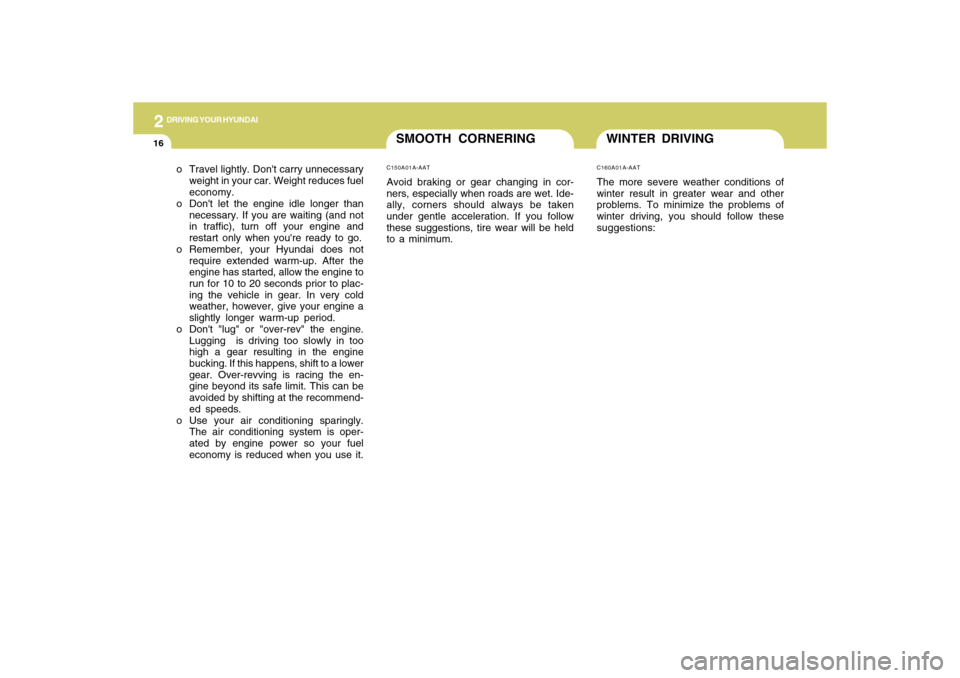
WINTER DRIVINGC160A01A-AATThe more severe weather conditions of
winter result in greater wear and other
problems. To minimize the problems of
winter driving, you should follow these
suggestions: o Travel lightly. Don't carry unnecessary
weight in your car. Weight reduces fuel
economy.
o Don't let the engine idle longer than
necessary. If you are waiting (and not
in traffic), turn off your engine and
restart only when you're ready to go.
o Remember, your Hyundai does not
require extended warm-up. After the
engine has started, allow the engine to
run for 10 to 20 seconds prior to plac-
ing the vehicle in gear. In very cold
weather, however, give your engine a
slightly longer warm-up period.
o Don't "lug" or "over-rev" the engine.
Lugging is driving too slowly in too
high a gear resulting in the engine
bucking. If this happens, shift to a lower
gear. Over-revving is racing the en-
gine beyond its safe limit. This can be
avoided by shifting at the recommend-
ed speeds.
o Use your air conditioning sparingly.
The air conditioning system is oper-
ated by engine power so your fuel
economy is reduced when you use it.
SMOOTH CORNERINGC150A01A-AATAvoid braking or gear changing in cor-
ners, especially when roads are wet. Ide-
ally, corners should always be taken
under gentle acceleration. If you follow
these suggestions, tire wear will be held
to a minimum.
Page 172 of 266
34WHAT TO DO IN AN EMERGENCY
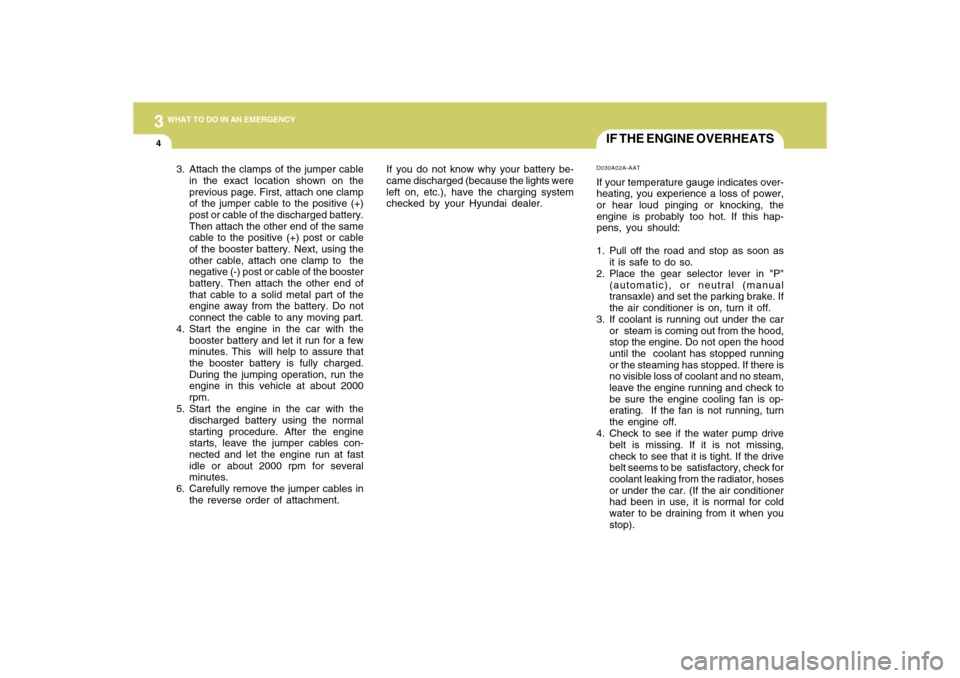
IF THE ENGINE OVERHEATSD030A02A-AATIf your temperature gauge indicates over-
heating, you experience a loss of power,
or hear loud pinging or knocking, the
engine is probably too hot. If this hap-
pens, you should:
1. Pull off the road and stop as soon as
it is safe to do so.
2. Place the gear selector lever in "P"
(automatic), or neutral (manual
transaxle) and set the parking brake. If
the air conditioner is on, turn it off.
3. If coolant is running out under the car
or steam is coming out from the hood,
stop the engine. Do not open the hood
until the coolant has stopped running
or the steaming has stopped. If there is
no visible loss of coolant and no steam,
leave the engine running and check to
be sure the engine cooling fan is op-
erating. If the fan is not running, turn
the engine off.
4. Check to see if the water pump drive
belt is missing. If it is not missing,
check to see that it is tight. If the drive
belt seems to be satisfactory, check for
coolant leaking from the radiator, hoses
or under the car. (If the air conditioner
had been in use, it is normal for cold
water to be draining from it when you
stop). 3. Attach the clamps of the jumper cable
in the exact location shown on the
previous page. First, attach one clamp
of the jumper cable to the positive (+)
post or cable of the discharged battery.
Then attach the other end of the same
cable to the positive (+) post or cable
of the booster battery. Next, using the
other cable, attach one clamp to the
negative (-) post or cable of the booster
battery. Then attach the other end of
that cable to a solid metal part of the
engine away from the battery. Do not
connect the cable to any moving part.
4. Start the engine in the car with the
booster battery and let it run for a few
minutes. This will help to assure that
the booster battery is fully charged.
During the jumping operation, run the
engine in this vehicle at about 2000
rpm.
5. Start the engine in the car with the
discharged battery using the normal
starting procedure. After the engine
starts, leave the jumper cables con-
nected and let the engine run at fast
idle or about 2000 rpm for several
minutes.
6. Carefully remove the jumper cables in
the reverse order of attachment.If you do not know why your battery be-
came discharged (because the lights were
left on, etc.), have the charging system
checked by your Hyundai dealer.
Page 190 of 266
44
CORROSION PREVENTION AND APPEARANCE CARE2
CORROSION PROTECTION
E010B01A-AATCommon Causes of CorrosionThe most common causes of corrosion
on your car are:
o Road salt, dirt and moisture that is
allowed to accumulate underneath the
car.
o Removal of paint or protective coat-
ings by stones, gravel, abrasion or
minor scrapes and dents which leave
unprotected metal exposed to corro-
sion.
E010A01A-AATProtecting Your Hyundai from Cor-
rosionBy using the most advanced design and
construction practices to combat corro-
sion, Hyundai produces cars of the high-
est quality. However, this is only part of
the job. To achieve the long term corro-
sion resistance your Hyundai can deliver,
the owner's cooperation and assistance
is also required.
E010C01A-AATHigh-Corrosion AreasIf you live in an area where your car is
regularly exposed to corrosive materials,
corrosion protection is particularly impor-
tant. Some of the common causes of
accelerated corrosion are road salts, dust
control chemicals, ocean air and indus-
trial pollution.
E010D01A-AATMoisture Breeds CorrosionMoisture creates the conditions in which
corrosion is most likely to occur. For ex-
ample, corrosion is accelerated by high
humidity, particularly when temperatures
are just above freezing. In such condi-
tions, the corrosive material is kept in
contact with the car surfaces by moisture
that is slow to evaporate.
Mud is a particular enemy of corrosion
protection because it is slow to dry and
holds moisture in contact with the ve-
hicle. Even though the mud appears to
be dry, it can still retain moisture and
promote corrosion.
High temperatures can also accelerate
corrosion of parts that are not properly
ventilated so the moisture can be dis-
persed. For all these reasons, it is par-
ticularly important to keep your car clean
and free of mud or accumulations of other
materials. This applies not only on the
visible surfaces but particularly to the
underside of the car.
Page 200 of 266
5
VEHICLE MAINTENANCE REQUIREMENTS
5
GENERAL ITEMS
DRIVE BELT (WATER PUMP, ALTERNATOR AND A/CON)
COOLANT
TIMING BELT
MANUAL TRANSAXLE OIL
AUTOMATIC TRANSAXLE FLUID
BRAKE FLUID
BRAKE HOSES AND LINES
REAR BRAKE DRUMS/LININGS, PARKING BRAKE
BRAKE PADS, CALIPERS AND ROTORS
EXHAUST PIPE AND MUFFLER
SUSPENSION MOUNTING BOLTS
STEERING GEAR BOX, LINKAGE & BOOTS/LOWER ARM
BALL JOINT
POWER STEERING PUMP, BELT AND HOSES
DRIVESHAFTS AND BOOTS
AIR CONDITIONING REFRIGERANT
CLIMATE CONTROL AIR FILTER 1
2
3
4
5
6
7
8
9
10
11
12
13
14
15
16 No.DESCRIPTIONMILES X 1000
KILOMETERS X 1000
MONTHS7.5
12
615
24
12
I
I
I
I
I
I
I
I22.5
36
1830
48
24
I
I
I
I
I
I
I
I
I
I
I
I
I
I37.5
60
3045
72
36
I
I
I
I
I
I
I
I52.5
84
4260
96
48
I
R
I
I
I
I
I
I
I
I
I
I
I
I67.5
108
5475
120
60
I
I
I
I
I
I
I
I82.5
132
6690
144
72
I
I
I
I
I
I
I
I
I
I
I
I
I
I97.5
156
78105
168
84
R
I
I
I
I
I
I
I112.5
180
90120
192
96
I
R
I
I
I
I
I
I
I
I
I
I
I
I127.5
204
102135
216
108
I
I
I
I
I
I
I
I142.5
228
114150
240
120
I
I
I
I
I
I
I
I
I
I
I
I
I
I
See Note *
2
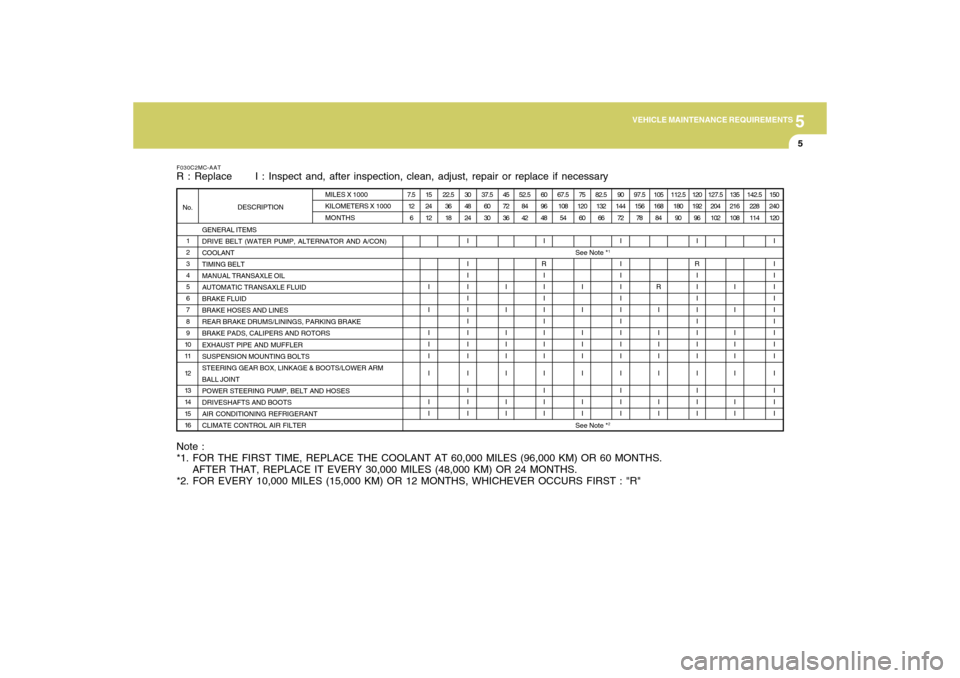
Note :
*1. FOR THE FIRST TIME, REPLACE THE COOLANT AT 60,000 MILES (96,000 KM) OR 60 MONTHS.
AFTER THAT, REPLACE IT EVERY 30,000 MILES (48,000 KM) OR 24 MONTHS.
*2. FOR EVERY 10,000 MILES (15,000 KM) OR 12 MONTHS, WHICHEVER OCCURS FIRST : "R"F030C2MC-AATR : Replace I : Inspect and, after inspection, clean, adjust, repair or replace if necessary
See Note *
1
Page 201 of 266
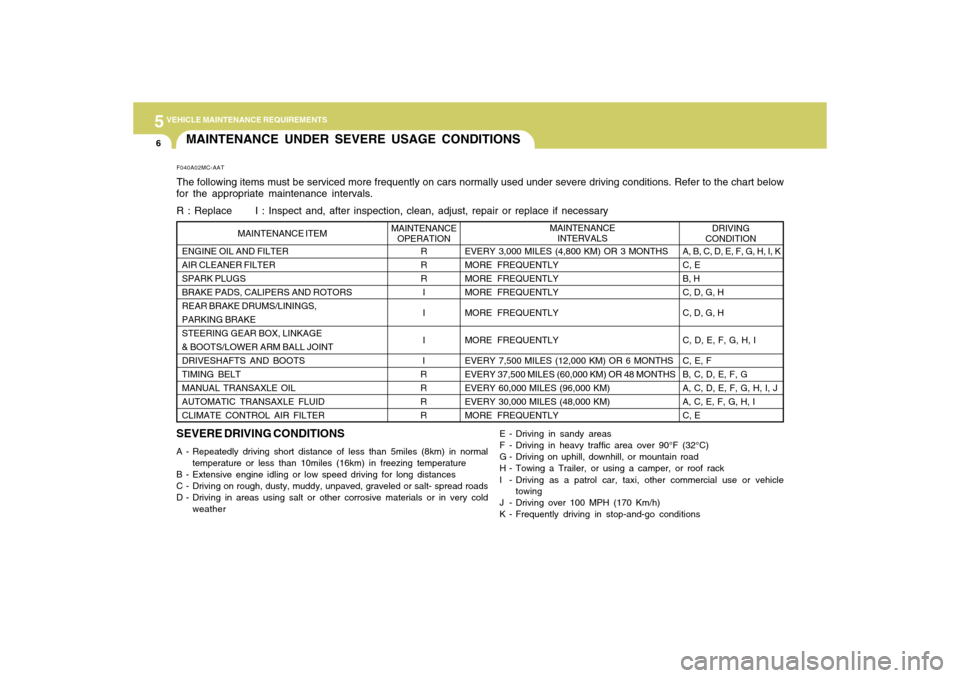
5
VEHICLE MAINTENANCE REQUIREMENTS6
DRIVING
CONDITION MAINTENANCE
INTERVALS
ENGINE OIL AND FILTER
AIR CLEANER FILTER
SPARK PLUGS
BRAKE PADS, CALIPERS AND ROTORS
REAR BRAKE DRUMS/LININGS,
PARKING BRAKE
STEERING GEAR BOX, LINKAGE
& BOOTS/LOWER ARM BALL JOINT
DRIVESHAFTS AND BOOTS
TIMING BELT
MANUAL TRANSAXLE OIL
AUTOMATIC TRANSAXLE FLUID
CLIMATE CONTROL AIR FILTER
R
R
R
I
I
I
I
R
R
R
R MAINTENANCE
OPERATION MAINTENANCE ITEM
EVERY 3,000 MILES (4,800 KM) OR 3 MONTHS
MORE FREQUENTLY
MORE FREQUENTLY
MORE FREQUENTLY
MORE FREQUENTLY
MORE FREQUENTLY
EVERY 7,500 MILES (12,000 KM) OR 6 MONTHS
EVERY 37,500 MILES (60,000 KM) OR 48 MONTHS
EVERY 60,000 MILES (96,000 KM)
EVERY 30,000 MILES (48,000 KM)
MORE FREQUENTLY
SEVERE DRIVING CONDITIONSA - Repeatedly driving short distance of less than 5miles (8km) in normal
temperature or less than 10miles (16km) in freezing temperature
B - Extensive engine idling or low speed driving for long distances
C - Driving on rough, dusty, muddy, unpaved, graveled or salt- spread roads
D - Driving in areas using salt or other corrosive materials or in very cold
weatherE - Driving in sandy areas
F - Driving in heavy traffic area over 90°F (32°C)
G - Driving on uphill, downhill, or mountain road
H - Towing a Trailer, or using a camper, or roof rack
I - Driving as a patrol car, taxi, other commercial use or vehicle
towing
J - Driving over 100 MPH (170 Km/h)
K - Frequently driving in stop-and-go conditionsA, B, C, D, E, F, G, H, I, K
C, E
B, H
C, D, G, H
C, D, G, H
C, D, E, F, G, H, I
C, E, F
B, C, D, E, F, G
A, C, D, E, F, G, H, I, J
A, C, E, F, G, H, I
C, EMAINTENANCE UNDER SEVERE USAGE CONDITIONSF040A02MC-AATThe following items must be serviced more frequently on cars normally used under severe driving conditions. Refer to the chart below
for the appropriate maintenance intervals.
R : Replace I : Inspect and, after inspection, clean, adjust, repair or replace if necessary