key Hyundai Accent 2009 Owner's Guide
[x] Cancel search | Manufacturer: HYUNDAI, Model Year: 2009, Model line: Accent, Model: Hyundai Accent 2009Pages: 266, PDF Size: 8.77 MB
Page 101 of 266
1
FEATURES OF YOUR HYUNDAI
911
FEATURES OF YOUR HYUNDAI
91
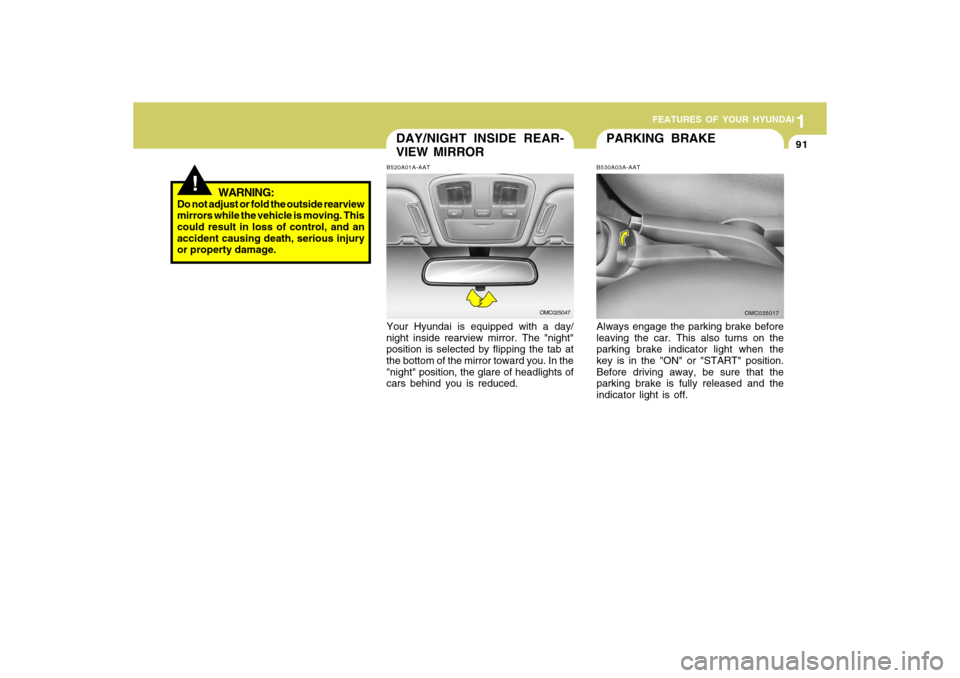
PARKING BRAKE
DAY/NIGHT INSIDE REAR-
VIEW MIRRORB520A01A-AATYour Hyundai is equipped with a day/
night inside rearview mirror. The "night"
position is selected by flipping the tab at
the bottom of the mirror toward you. In the
"night" position, the glare of headlights of
cars behind you is reduced.
OMC025047
B530A03A-AATAlways engage the parking brake before
leaving the car. This also turns on the
parking brake indicator light when the
key is in the "ON" or "START" position.
Before driving away, be sure that the
parking brake is fully released and the
indicator light is off.
OMC035017
!
WARNING:
Do not adjust or fold the outside rearview
mirrors while the vehicle is moving. This
could result in loss of control, and an
accident causing death, serious injury
or property damage.
Page 106 of 266
1FEATURES OF YOUR HYUNDAI96
!
WARNING:
- When refueling always shut the
engine off. Sparks produced by
electrical components related to
the engine can ignite fuel vapors
causing a fire. Always insure that
the engine is OFF before and dur-
ing refueling. Once refueling is
complete, check to make sure the
fuel filler cap and door are se-
curely closed, before starting the
engine.
- Do not light any fire around a gas
station. DO NOT use matches or a
lighter and DO NOT SMOKE or
leave a lit cigarette in your vehicle
while at a gas station especially
during refueling. Automotive fuel
is highly flammable and can, when
ignited, result in explosion by
flames.
- If a fire breaks out during refueling,
leave the vicinity of the vehicle,
and immediately contact the man-
ager of the gas station or contact
the police and local fire depart-
ment. Follow any safety instruc-
tions they provide.
!TRUNK LID/TAIL GATEB540A01MC-GAT
WARNING:
The trunk lid or the tail gate should al-
ways be kept completely closed while
the vehicle is in motion. If it is left open or
ajar, poisonous exhaust gases may en-
ter the car resulting in serious illiness or
death to the occupants. See additional
warnings concerning exhaust gases on
page 2-2.
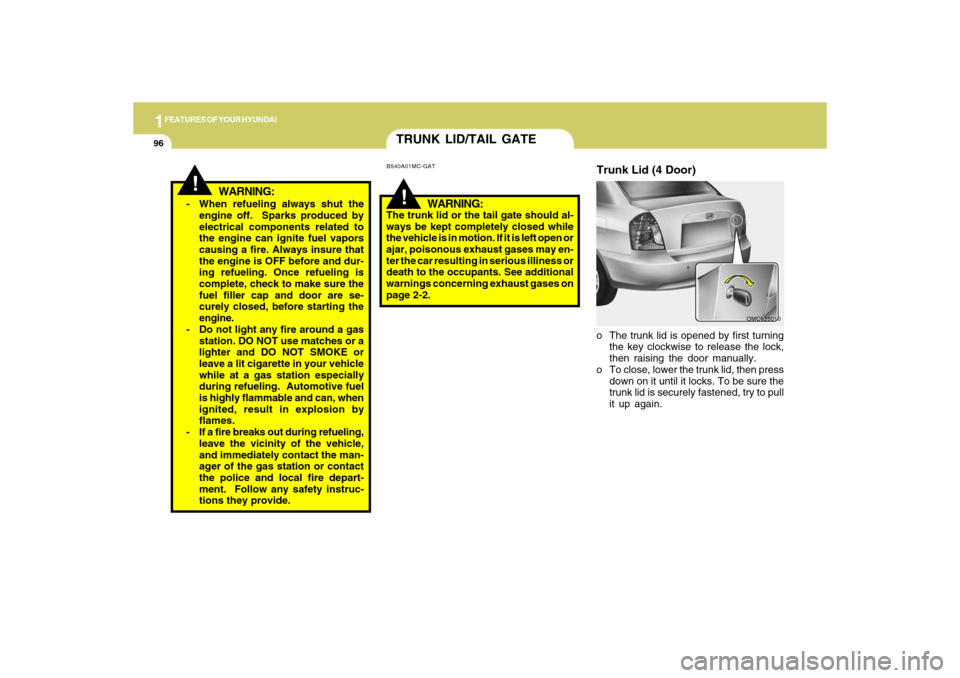
o The trunk lid is opened by first turning
the key clockwise to release the lock,
then raising the door manually.
o To close, lower the trunk lid, then press
down on it until it locks. To be sure the
trunk lid is securely fastened, try to pull
it up again.
OMC025010
Trunk Lid (4 Door)
Page 107 of 266
1
FEATURES OF YOUR HYUNDAI
971
FEATURES OF YOUR HYUNDAI
97
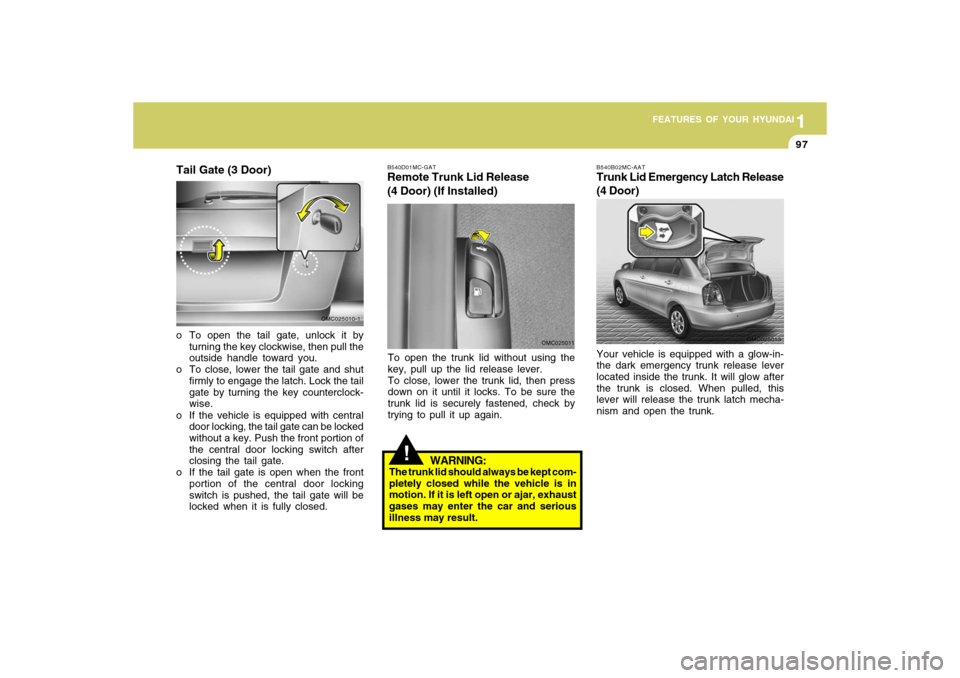
OMC025013 B540B02MC-AAT
Trunk Lid Emergency Latch Release
(4 Door)Your vehicle is equipped with a glow-in-
the dark emergency trunk release lever
located inside the trunk. It will glow after
the trunk is closed. When pulled, this
lever will release the trunk latch mecha-
nism and open the trunk.
!
WARNING:
The trunk lid should always be kept com-
pletely closed while the vehicle is in
motion. If it is left open or ajar, exhaust
gases may enter the car and serious
illness may result.B540D01MC-GATRemote Trunk Lid Release
(4 Door) (If Installed)
OMC025011
To open the trunk lid without using the
key, pull up the lid release lever.
To close, lower the trunk lid, then press
down on it until it locks. To be sure the
trunk lid is securely fastened, check by
trying to pull it up again.
Tail Gate (3 Door)o To open the tail gate, unlock it by
turning the key clockwise, then pull the
outside handle toward you.
o To close, lower the tail gate and shut
firmly to engage the latch. Lock the tail
gate by turning the key counterclock-
wise.
o If the vehicle is equipped with central
door locking, the tail gate can be locked
without a key. Push the front portion of
the central door locking switch after
closing the tail gate.
o If the tail gate is open when the front
portion of the central door locking
switch is pushed, the tail gate will be
locked when it is fully closed.
OMC025010-1
Page 108 of 266
1FEATURES OF YOUR HYUNDAI98
!
WARNING:
o If a person becomes locked in the
trunk, pull the emergency trunk re-
lease lever of the inside panel in the
trunk to open the trunk lid.
o Keep cars locked and keys out of the
reach of children. HYUNDAI recom-
mends parents teach children about
the emergency trunk release lever
in their vehicle and how to open the
trunk lid if they are accidentally
locked in the trunk.
!
CAUTION:
To prevent damage to the goods or the
vehicle, care should be taken when car-
rying fragile or bulky objects in the lug-
gage compartment.
!
WARNING:
Avoid eye injury. DO NOT overstretch
the luggage net. ALWAYS keep your
face and body out of its recoil path. DO
NOT use when the luggage net straps
have visible signs of wear or damage.
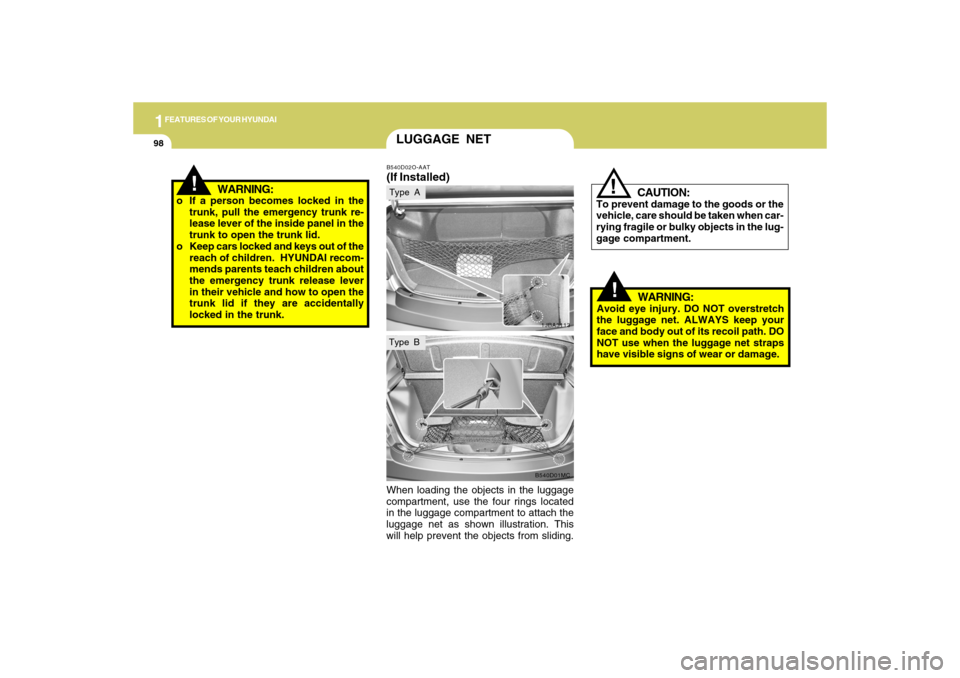
When loading the objects in the luggage
compartment, use the four rings located
in the luggage compartment to attach the
luggage net as shown illustration. This
will help prevent the objects from sliding.
LUGGAGE NETB540D02O-AAT(If Installed)
1JBA3113B540D01MC
Type AType B
Page 135 of 266
![Hyundai Accent 2009 Owners Guide 1
FEATURES OF YOUR HYUNDAI
125125
6. Automatic Track Selection Buttono Push [SEEK
] button for less than
0.8 second to play from the beginning
of current song.
o Push [SEEK ] button for less than
0](/img/35/14391/w960_14391-134.png "Hyundai Accent 2009 Owners Guide 1
FEATURES OF YOUR HYUNDAI
125125
6. Automatic Track Selection Buttono Push [SEEK
] button for less than
0.8 second to play from the beginning
of current song.
o Push [SEEK ] button for less than
0")
1
FEATURES OF YOUR HYUNDAI
125125
6. Automatic Track Selection Buttono Push [SEEK
] button for less than
0.8 second to play from the beginning
of current song.
o Push [SEEK ] button for less than
0.8 second and press again within 1
second to play the previous song.
o Push [SEEK ] button for 0.8 or longer
to initiate reverse direction high speed
sound search of current song.
o Push [SEEK ] button for less than
0.8 second to play the next song.
o Push [SEEK ] button for 0.8 or longer
to initiate high speed sound search of
current song.
7. Information Display ButtonDisplays the information of the current
CD TRACK in the order of DISC TITLE
➟DISC ARTIST➟TRACK TITLE➟ TRACK
ARTIST➟TOTAL TRACK➟ Play Screen
➟DISC TITLE➟···.(not displayed if the in-
formation is not available on the DISC.)8. TUNE/ENTER ButtonTurn this button clockwise to display
songs after current song.
Also, turn this button counterclockwise to
display songs before current song.
To listen to the displayed song, press the
button to skip to the song and play.
9. RANDOM Play ButtonTurns on/off the randomization of the play
list of files in the currently played DISC.
To cancel the mode, press the key once
again.10. REPEAT ButtonRepeats current song when the button is
pressed for less than 0.8 second.
Repeats current folder when the button is
pressed for 0.8 second or longer. (If there
is no folder, entire disc will be repeated.)11. SCAN Play ButtonPlays first 10 seconds of each song in the
DISC. To cancel the mode, press the key
once again.12. FOLDER ButtonFolder up/down operation
o Folder is moved up or down from cur-
rently playing and folder name be-
comes displayed.
o Press enter key to play the selected
folder.
o If the enter key is not pressed within 5
seconds, then the previous folder name
will be displayed again.
NOTE:o To assure proper operation of the
unit, keep the vehicle interior tem-
perature within a normal range by
using the vehicle's air conditioning
or heating system.
o When replacing the fuse, replace it
with a fuse having the correct capac-
ity.
o All stored bookmarks are all erased
when the car battery is disconnected
or power to the vehicle is lost. If this
occurs, the bookmarks will have to
be reset.
o This equipment is designed to be
used only in a 12 volt DC battery
system with negative ground.
o This unit is made of precision parts.
Do not attempt to disassemble or
adjust any parts.
o When driving your vehicle, be sure to
keep the volume of the unit set low
enough to allow you to hear sounds
coming from the outside.
o Do not expose this equipment (in-
cluding the speakers and CD) to water
or excessive moisture.
Page 138 of 266

1FEATURES OF YOUR HYUNDAI
128
PA710SB01MC-AAT1. AM Selection ButtonTurns to AM mode, and toggles in the
order of AM1➟AM2➟···➟AM1···when the
button is pressed each time.2. FM Selection ButtonTurns to FM mode and toggles FM1 and
FM2 when the button is pressed each
time.3. XM Selection ButtonTurns to XM mode, and toggles in the
order of XM1➟XM2➟XM3➟···➟XM1···
when the button is pressed each time.4. Automatic Channel Selection But-
tono When the [SEEK
] button is pressed,
it reduces the band frequency by
200khz to automatically select chan-
nel. Stops at the previous frequency if
no channel is found.
o When the [SEEK ] button is pressed,
it increases the band frequency by
50khz to automatically select channel.
Stops at the previous frequency if no
channel is found.
5. Power ON/OFF & Volume Control
ButtonTurns on/off the set when the ignition
switch is on ACC or ON. If the button is
turned to the right, it increases the volume
and left, decreases the volume.6. SCAN ButtonIf this button is pressed, the frequencies
will become increased and receive the
corresponding broadcasts.
This function will play the frequencies for
10 seconds each and find other broad-
casts as the frequency increases.
Press the button again when desiring to
continue listening to the currently playing
broadcast.7. MUTE ButtonPress to temporarily cut off the sound.
8. SETUP ButtonPress this button to turn to the XM option,
SCROLL and AUDIO adjustment mode.
If no action is taken for 5 seconds after
pressing the button, it will return to the
play mode.(After entering SETUP mode,
move between items using the left, right
and PUSH functions of the TUNE button.)9. Information Display ButtonInformation Display function operation
(Information is displayed each time (the)
Key is pressed)
Pressing the Title ➟Artist ➟Album➟
Category➟Channel➟ Title-KEY for 3 sec-
onds will display the corresponding text
then become restored.
Text Scroll operation
After pressing (the) Key, if the text to be
displayed is longer than the LCD text line,
then rotating the Tune Knob will operate
the Page up function displaying 8 charac-
ters for 3 seconds each - displays the
maximum lines of text supported by XM.
Page 139 of 266
![Hyundai Accent 2009 Owners Guide 1
FEATURES OF YOUR HYUNDAI
129129
10. CAT(FOLDER) ButtonMoves [CAT
] Button when Category
Up search operation.
o Category is moved Up from the cat-
egory currently being received and
Category Name b](/img/35/14391/w960_14391-138.png "Hyundai Accent 2009 Owners Guide 1
FEATURES OF YOUR HYUNDAI
129129
10. CAT(FOLDER) ButtonMoves [CAT
] Button when Category
Up search operation.
o Category is moved Up from the cat-
egory currently being received and
Category Name b")
1
FEATURES OF YOUR HYUNDAI
129129
10. CAT(FOLDER) ButtonMoves [CAT
] Button when Category
Up search operation.
o Category is moved Up from the cat-
egory currently being received and
Category Name becomes displayed.
o If the Enter Key is not pressed within 5
seconds, then the previous mode will
be restored.
o If the Key is pressed while in the last
Category, then the first category will
become displayed and operation will
be repeated.
o Corresponding category can be se-
lected by pressing ENTER. Moves
[CAT
] Button when Category Down
search operation.
o Category is moved Down from the cat-
egory currently being received and
Category Name becomes displayed.
o If the Enter Key is not pressed within 5
seconds, then the previous mode will
be restored.
o If the [CAT
] Key is pressed while in
the first Category, then the last cat-
egory will become displayed and op-
eration will be repeated.
o Corresponding category can be se-
lected by pressing ENTER.
11. TUNE/ENTER ButtonTurn this button clockwise by one notch to
increase or decrease frequency in FM or
AM MODE. The frequency changes by
0.2Mhz in FM MODE and 10Khz in AM
MODE.
In XM MODE, turn this button to explore
the channel and press this button select
the channel.
Press this button while holding SETUP
button to activate / inactivate the item to.
Select SETUP item using left and right
function of the Tune button.12. PRESET ButtonPush [1]~[6] buttons less than 0.8 second
to play the channel saved in each button.
Push PRESET button for 0.8 second or
longer to save current channel to the
respective button with a beep.
!
CAUTION:
o Do not place beverages close to the
audio system. The playback mecha-
nism may be damaged if you spill
them.
o Do not strike or allow anything to
impact the audio system, damage to
the system mechanisms could oc-
cur.
Page 142 of 266

1FEATURES OF YOUR HYUNDAI
132
o If an external power connector is
connected to the vehicle, noise may
be introduced to the sound. If noise is
heard, verify the AUX device volume
is turned up, then test the sound with
the power cable disconnected. If
necessary, use the AUX device pow-
ered from its internal battery, or pur-
chase a ground loop isolator to con-
nect the AUX device to the vehicle.5. Automatic Track Selection Buttono Push [SEEK
] button for less than
0.8 second to play from the beginning
of current song.
o Push [SEEK ] button for less than
0.8 second and press again within 1
second to play the previous song.
o Push [SEEK ] button for 0.8 or longer
to initiate reverse direction high speed
sound search of current song.
o Push [SEEK ] button for less than
0.8 second to play the next song.
o Push [SEEK ] button for 0.8 or longer
to initiate high speed sound search of
current song.
6. Information Display ButtonDisplays the information of the current
CD TRACK in the order of DISC TITLE
➟DISC ARTIST➟TRACK TITLE➟ TRACK
ARTIST➟TOTAL TRACK➟Play Screen
➟DISC TITLE➟···.(not displayed if the in-
formation is not available on the DISC.)7. TUNE/ENTER ButtonTurn this button clockwise to display
songs after current song.
Also, turn this button counterclockwise to
display songs before current song.
To listen to the displayed song, press the
button to skip to the song and play.8. RANDOM Play ButtonTurns on/off the randomization of the play
list of files in the currently played DISC.
To cancel the mode, press the key once
again.9. REPEAT ButtonRepeats current song when the button is
pressed for less than 0.8 seconds.
Repeats current folder when the button is
pressed for 0.8 second or longer. (If there
is no folder, entire disc will be repeated.)
10. SCAN Play ButtonPlays first 10 seconds of each song in the
DISC. To cancel the mode, press the key
once again.11. FOLDER ButtonFolder up/down operation
o Folder is moved up or down from cur-
rently playing and folder name be-
comes displayed.
o Press enter key to play the selected
folder.
o If the enter key is not pressed within 5
seconds, then the previous folder name
will be displayed again.NOTE:o To assure proper operation of the
unit, keep the vehicle interior tem-
perature within a normal range by
using the vehicle's air conditioning
or heating system.
o When replacing the fuse, replace it
with a fuse having the correct capac-
ity.
o All stored bookmarks are all erased
when the car battery is disconnected
or power to the vehicle is lost. If this
occurs, the bookmarks will have to
be reset.
Page 144 of 266
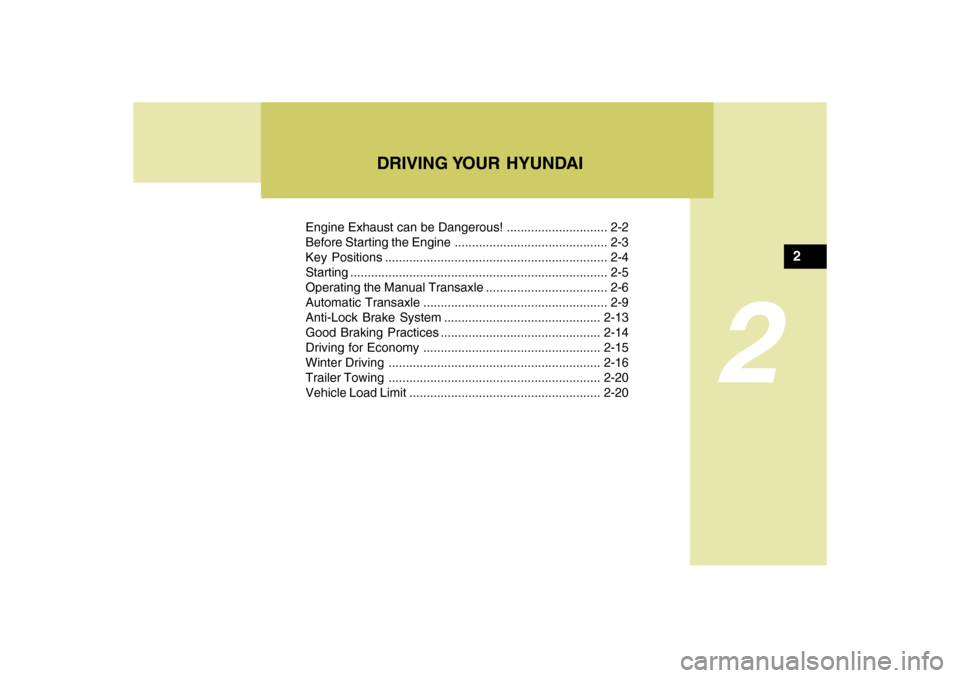
Engine Exhaust can be Dangerous! ............................. 2-2
Before Starting the Engine ............................................ 2-3
Key Positions ................................................................ 2-4
Starting ..........................................................................2-5
Operating the Manual Transaxle ................................... 2-6
Automatic Transaxle ..................................................... 2-9
Anti-Lock Brake System.............................................2-13
Good Braking Practices..............................................2-14
Driving for Economy...................................................2-15
Winter Driving.............................................................2-16
Trailer Towing .............................................................2-20
Vehicle Load Limit.......................................................2-20
DRIVING YOUR HYUNDAI
2
2
Page 146 of 266
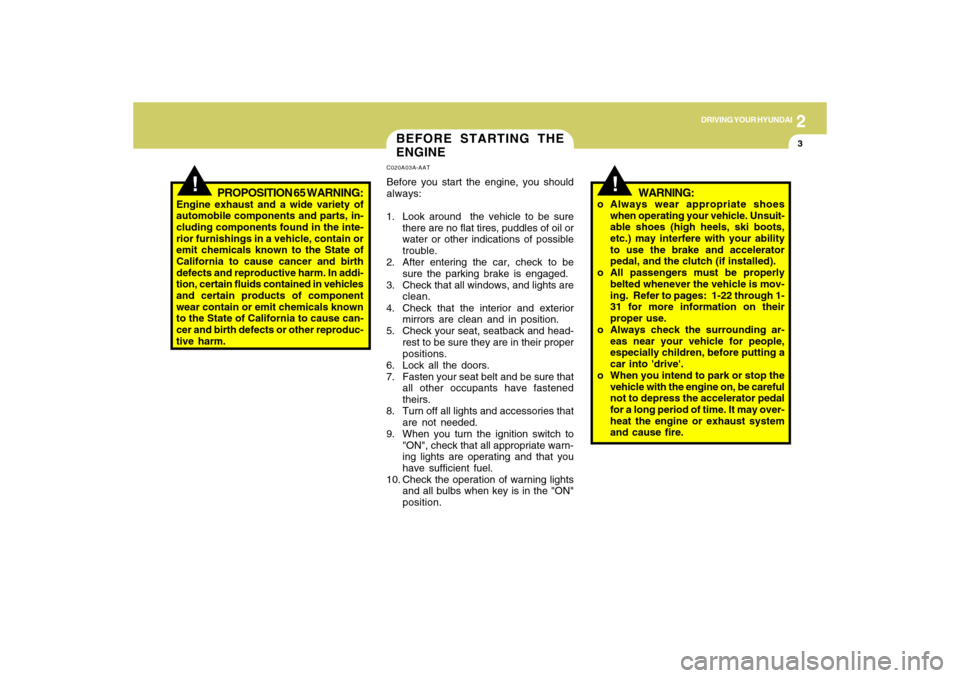
DRIVING YOUR HYUNDAI
32
!
BEFORE STARTING THE
ENGINEC020A03A-AATBefore you start the engine, you should
always:
1. Look around the vehicle to be sure
there are no flat tires, puddles of oil or
water or other indications of possible
trouble.
2. After entering the car, check to be
sure the parking brake is engaged.
3. Check that all windows, and lights are
clean.
4. Check that the interior and exterior
mirrors are clean and in position.
5. Check your seat, seatback and head-
rest to be sure they are in their proper
positions.
6. Lock all the doors.
7. Fasten your seat belt and be sure that
all other occupants have fastened
theirs.
8. Turn off all lights and accessories that
are not needed.
9. When you turn the ignition switch to
"ON", check that all appropriate warn-
ing lights are operating and that you
have sufficient fuel.
10. Check the operation of warning lights
and all bulbs when key is in the "ON"
position.
PROPOSITION 65 WARNING:
Engine exhaust and a wide variety of
automobile components and parts, in-
cluding components found in the inte-
rior furnishings in a vehicle, contain or
emit chemicals known to the State of
California to cause cancer and birth
defects and reproductive harm. In addi-
tion, certain fluids contained in vehicles
and certain products of component
wear contain or emit chemicals known
to the State of California to cause can-
cer and birth defects or other reproduc-
tive harm.
!
WARNING:
o Always wear appropriate shoes
when operating your vehicle. Unsuit-
able shoes (high heels, ski boots,
etc.) may interfere with your ability
to use the brake and accelerator
pedal, and the clutch (if installed).
o All passengers must be properly
belted whenever the vehicle is mov-
ing. Refer to pages: 1-22 through 1-
31 for more information on their
proper use.
o Always check the surrounding ar-
eas near your vehicle for people,
especially children, before putting a
car into 'drive'.
o When you intend to park or stop the
vehicle with the engine on, be careful
not to depress the accelerator pedal
for a long period of time. It may over-
heat the engine or exhaust system
and cause fire.