AUX Hyundai Accent 2009 Owner's Manual
[x] Cancel search | Manufacturer: HYUNDAI, Model Year: 2009, Model line: Accent, Model: Hyundai Accent 2009Pages: 266, PDF Size: 8.77 MB
Page 9 of 266
F9
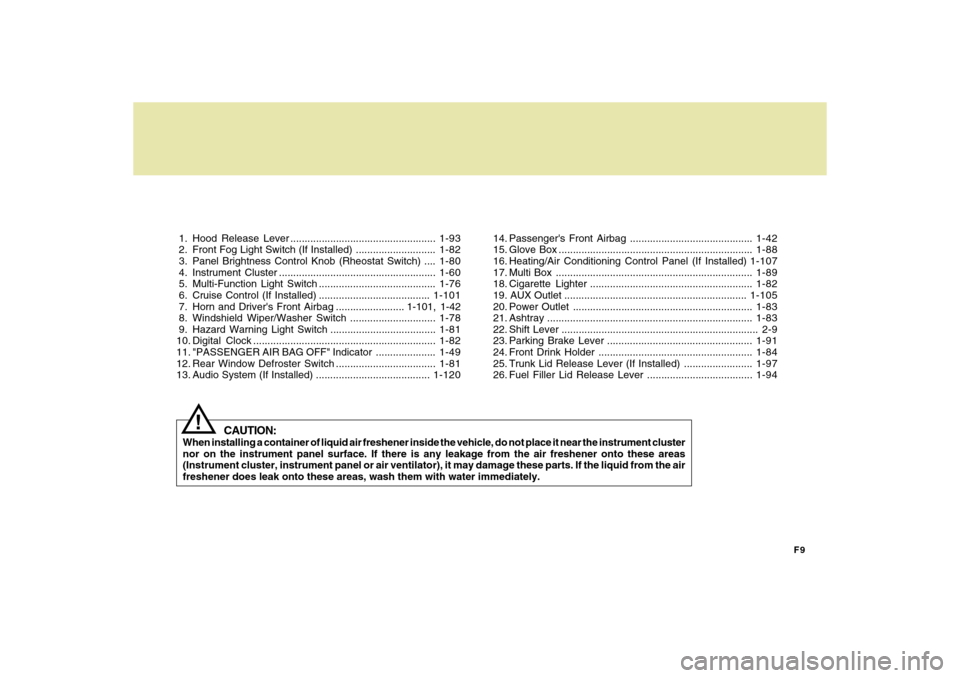
1. Hood Release Lever ...................................................1-93
2. Front Fog Light Switch (If Installed) ............................1-82
3. Panel Brightness Control Knob (Rheostat Switch) ....1-80
4. Instrument Cluster .......................................................1-60
5. Multi-Function Light Switch .........................................1-76
6. Cruise Control (If Installed) .......................................1-101
7. Horn and Driver's Front Airbag ........................ 1-101, 1-42
8. Windshield Wiper/Washer Switch ..............................1-78
9. Hazard Warning Light Switch .....................................1-81
10. Digital Clock ................................................................1-82
11. "PASSENGER AIR BAG OFF" Indicator .....................1-49
12. Rear Window Defroster Switch ...................................1-81
13. Audio System (If Installed) ........................................1-12014. Passenger's Front Airbag ...........................................1-42
15. Glove Box ....................................................................1-88
16. Heating/Air Conditioning Control Panel (If Installed)1-107
17. Multi Box .....................................................................1-89
18. Cigarette Lighter .........................................................1-82
19. AUX Outlet ................................................................1-105
20. Power Outlet ...............................................................1-83
21. Ashtray........................................................................1-83
22. Shift Lever ..................................................................... 2-9
23. Parking Brake Lever ...................................................1-91
24. Front Drink Holder ......................................................1-84
25. Trunk Lid Release Lever (If Installed) ........................1-97
26. Fuel Filler Lid Release Lever .....................................1-94
CAUTION:
When installing a container of liquid air freshener inside the vehicle, do not place it near the instrument cluster
nor on the instrument panel surface. If there is any leakage from the air freshener onto these areas
(Instrument cluster, instrument panel or air ventilator), it may damage these parts. If the liquid from the air
freshener does leak onto these areas, wash them with water immediately.
!
Page 115 of 266
1
FEATURES OF YOUR HYUNDAI
1051
FEATURES OF YOUR HYUNDAI
105
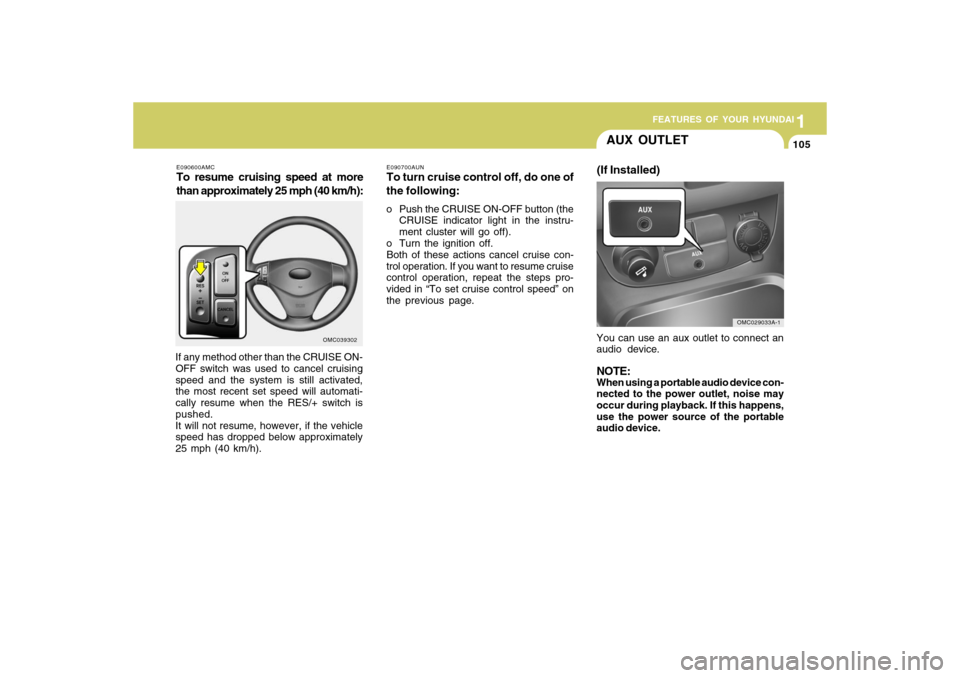
AUX OUTLET(If Installed)You can use an aux outlet to connect an
audio device.NOTE:When using a portable audio device con-
nected to the power outlet, noise may
occur during playback. If this happens,
use the power source of the portable
audio device.
OMC029033A-1
E090600AMCTo resume cruising speed at more
than approximately 25 mph (40 km/h):If any method other than the CRUISE ON-
OFF switch was used to cancel cruising
speed and the system is still activated,
the most recent set speed will automati-
cally resume when the RES/+ switch is
pushed.
It will not resume, however, if the vehicle
speed has dropped below approximately
25 mph (40 km/h).
OMC039302E090700AUN
To turn cruise control off, do one of
the following:o Push the CRUISE ON-OFF button (the
CRUISE indicator light in the instru-
ment cluster will go off).
o Turn the ignition off.
Both of these actions cancel cruise con-
trol operation. If you want to resume cruise
control operation, repeat the steps pro-
vided in “To set cruise control speed” on
the previous page.
Page 133 of 266
1
FEATURES OF YOUR HYUNDAI
123123
PA710C01MC-AATCD (PA710) (If Installed)
- Compatiable with MP3/WMA/WAVE
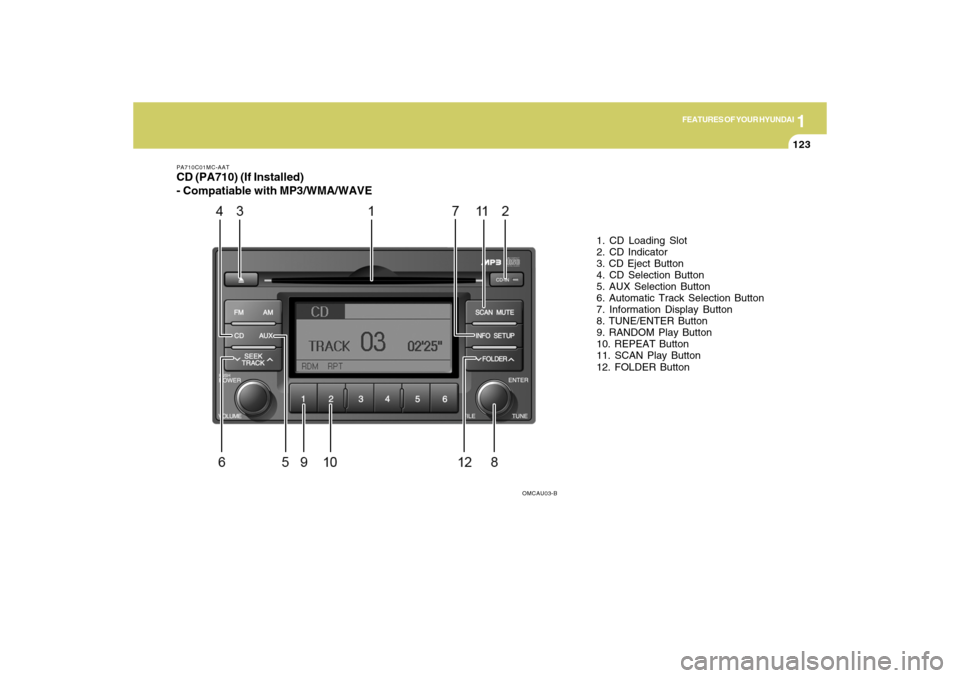
1. CD Loading Slot
2. CD Indicator
3. CD Eject Button
4. CD Selection Button
5. AUX Selection Button
6. Automatic Track Selection Button
7. Information Display Button
8. TUNE/ENTER Button
9. RANDOM Play Button
10. REPEAT Button
11. SCAN Play Button
12. FOLDER Button
OMCAU03-B
Page 134 of 266
1FEATURES OF YOUR HYUNDAI
124
PA710D01MC-AAT1. CD Loading SlotPlease face printed side upward and
gently push in. When the ignition switch
is on ACC or ON and power is off, power
is automatically turned on if the CD is
loaded. This CDP supports only 12 cm
CD. If VCD or Data CD is loaded, "Er-6"
message will appear and CD will be
ejected.2. CD IndicatorWhen ignition switch is ACC or ON and if
the CD is loaded, this indicator is lighted.
If the CD is ejected the light is turned off.3. CD Eject ButtonPush
button to eject the CD. This
button is enabled when ignition switch is
off.
4. CD Selection ButtonIf there is a CD in the CDP DECK it plays
the CD.
Press CD button to automatically insert
CD when the disc is ejected from the deck
by pressing CD EJECT.
NOTE:o Do not stick paper or tape etc., on
the label side or the recording side
of any discs, as it may cause a
malfunction.
o Depending on the recording status,
some CD-Rs/CD-RWs may not be
played on this unit.
o Playback of MP3 and WMA file for-
mats are supported. Load to play
time for these formats may be longer
due to the compressed nature of
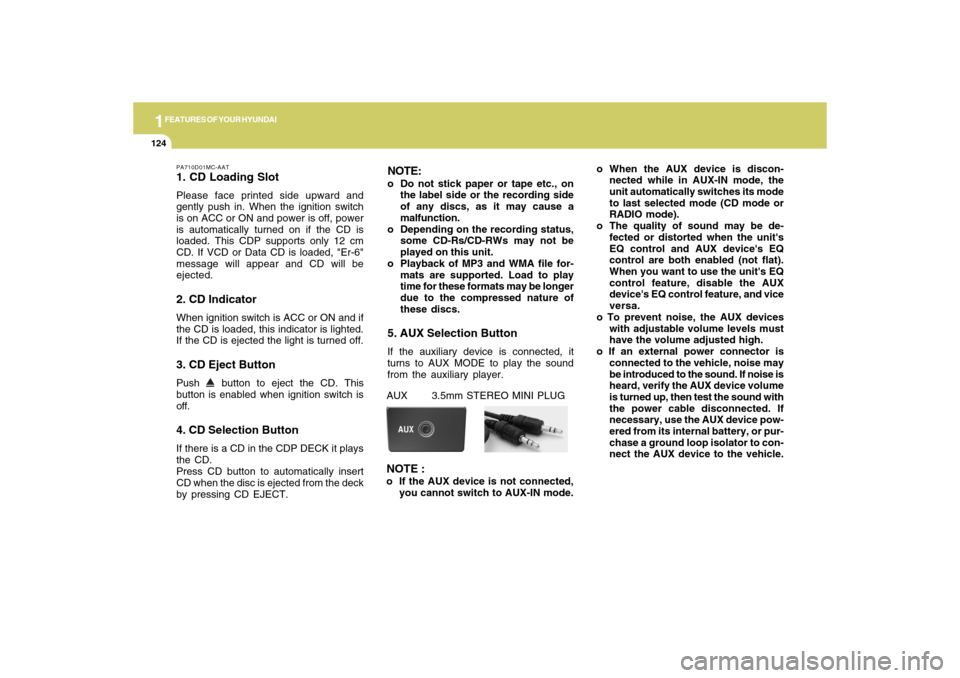
these discs.5. AUX Selection ButtonIf the auxiliary device is connected, it
turns to AUX MODE to play the sound
from the auxiliary player.o When the AUX device is discon-
nected while in AUX-IN mode, the
unit automatically switches its mode
to last selected mode (CD mode or
RADIO mode).
o The quality of sound may be de-
fected or distorted when the unit's
EQ control and AUX device's EQ
control are both enabled (not flat).
When you want to use the unit's EQ
control feature, disable the AUX
device's EQ control feature, and vice
versa.
o To prevent noise, the AUX devices
with adjustable volume levels must
have the volume adjusted high.
o If an external power connector is
connected to the vehicle, noise may
be introduced to the sound. If noise is
heard, verify the AUX device volume
is turned up, then test the sound with
the power cable disconnected. If
necessary, use the AUX device pow-
ered from its internal battery, or pur-
chase a ground loop isolator to con-
nect the AUX device to the vehicle.AUX 3.5mm STEREO MINI PLUGNOTE :o If the AUX device is not connected,
you cannot switch to AUX-IN mode.
Page 140 of 266

1FEATURES OF YOUR HYUNDAI
130
OMCAU04-B PA710SC01MC-AAT
CD (PA710S) (If Installed)
- Compatiable with MP3/WMA/WAVE
1. CD Loading Slot
2. CD Indicator
3. CD Eject Button
4. CD/AUX Selection Button
5. Automatic Track Selection Button
6. Information Display Button
7. TUNE/ENTER Button
8. RANDOM Play Button
9. REPEAT Button
10. SCAN Play Button
11. FOLDER Button
Page 141 of 266
1
FEATURES OF YOUR HYUNDAI
131131
PA710SD01MC-AAT1. CD Loading SlotPlease face printed side upward and
gently push in. When the ignition switch
is on ACC or ON and power is off, power
is automatically turned on if the CD is
loaded. This CDP supports only 12 cm
CD. If VCD or Data CD is loaded, "Er-6"
message will appear and CD will be
ejected.2. CD IndicatorWhen car ignition switch is ACC or ON
and if the CD is loaded, this indicator is
lighted. If the CD is ejected the light is
turned off.3. CD Eject ButtonPush
button to eject the CD. This
button is enabled when ignition switch is
off.
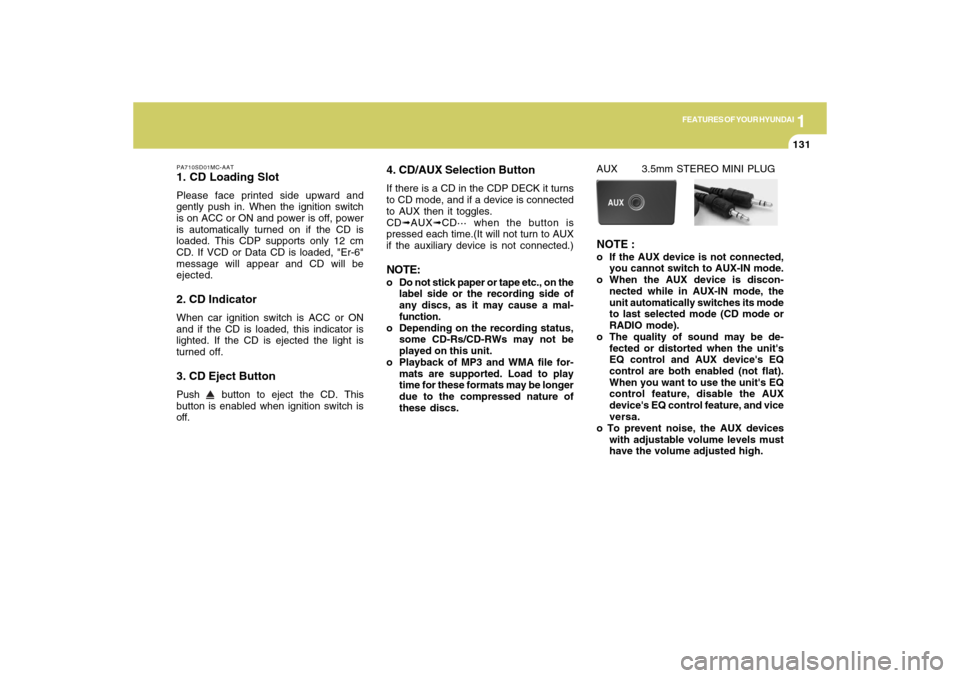
4. CD/AUX Selection ButtonIf there is a CD in the CDP DECK it turns
to CD mode, and if a device is connected
to AUX then it toggles.
CD➟AUX➟CD··· when the button is
pressed each time.(It will not turn to AUX
if the auxiliary device is not connected.)NOTE:o Do not stick paper or tape etc., on the
label side or the recording side of
any discs, as it may cause a mal-
function.
o Depending on the recording status,
some CD-Rs/CD-RWs may not be
played on this unit.
o Playback of MP3 and WMA file for-
mats are supported. Load to play
time for these formats may be longer
due to the compressed nature of
these discs.
AUX 3.5mm STEREO MINI PLUGNOTE :o If the AUX device is not connected,
you cannot switch to AUX-IN mode.
o When the AUX device is discon-
nected while in AUX-IN mode, the
unit automatically switches its mode
to last selected mode (CD mode or
RADIO mode).
o The quality of sound may be de-
fected or distorted when the unit's
EQ control and AUX device's EQ
control are both enabled (not flat).
When you want to use the unit's EQ
control feature, disable the AUX
device's EQ control feature, and vice
versa.
o To prevent noise, the AUX devices
with adjustable volume levels must
have the volume adjusted high.
Page 142 of 266

1FEATURES OF YOUR HYUNDAI
132
o If an external power connector is
connected to the vehicle, noise may
be introduced to the sound. If noise is
heard, verify the AUX device volume
is turned up, then test the sound with
the power cable disconnected. If
necessary, use the AUX device pow-
ered from its internal battery, or pur-
chase a ground loop isolator to con-
nect the AUX device to the vehicle.5. Automatic Track Selection Buttono Push [SEEK
] button for less than
0.8 second to play from the beginning
of current song.
o Push [SEEK ] button for less than
0.8 second and press again within 1
second to play the previous song.
o Push [SEEK ] button for 0.8 or longer
to initiate reverse direction high speed
sound search of current song.
o Push [SEEK ] button for less than
0.8 second to play the next song.
o Push [SEEK ] button for 0.8 or longer
to initiate high speed sound search of
current song.
6. Information Display ButtonDisplays the information of the current
CD TRACK in the order of DISC TITLE
➟DISC ARTIST➟TRACK TITLE➟ TRACK
ARTIST➟TOTAL TRACK➟Play Screen
➟DISC TITLE➟···.(not displayed if the in-
formation is not available on the DISC.)7. TUNE/ENTER ButtonTurn this button clockwise to display
songs after current song.
Also, turn this button counterclockwise to
display songs before current song.
To listen to the displayed song, press the
button to skip to the song and play.8. RANDOM Play ButtonTurns on/off the randomization of the play
list of files in the currently played DISC.
To cancel the mode, press the key once
again.9. REPEAT ButtonRepeats current song when the button is
pressed for less than 0.8 seconds.
Repeats current folder when the button is
pressed for 0.8 second or longer. (If there
is no folder, entire disc will be repeated.)
10. SCAN Play ButtonPlays first 10 seconds of each song in the
DISC. To cancel the mode, press the key
once again.11. FOLDER ButtonFolder up/down operation
o Folder is moved up or down from cur-
rently playing and folder name be-
comes displayed.
o Press enter key to play the selected
folder.
o If the enter key is not pressed within 5
seconds, then the previous folder name
will be displayed again.NOTE:o To assure proper operation of the
unit, keep the vehicle interior tem-
perature within a normal range by
using the vehicle's air conditioning
or heating system.
o When replacing the fuse, replace it
with a fuse having the correct capac-
ity.
o All stored bookmarks are all erased
when the car battery is disconnected
or power to the vehicle is lost. If this
occurs, the bookmarks will have to
be reset.