child lock Hyundai Accent 2011 User Guide
[x] Cancel search | Manufacturer: HYUNDAI, Model Year: 2011, Model line: Accent, Model: Hyundai Accent 2011Pages: 282, PDF Size: 14.82 MB
Page 109 of 282
1FEATURES OF YOUR HYUNDAI98
!
WARNING:
o If a person becomes locked in the
trunk, pull the emergency trunk re-
lease lever of the inside panel in the
trunk to open the trunk lid.
o Keep cars locked and keys out of the
reach of children. HYUNDAI recom-
mends parents teach children about
the emergency trunk release lever
in their vehicle and how to open the
trunk lid if they are accidentally
locked in the trunk.
!
CAUTION:
To prevent damage to the goods or the
vehicle, care should be taken when car-
rying fragile or bulky objects in the lug-
gage compartment.
!
WARNING:
Avoid eye injury. DO NOT overstretch
the luggage net. ALWAYS keep your
face and body out of its recoil path. DO
NOT use when the luggage net straps
have visible signs of wear or damage.
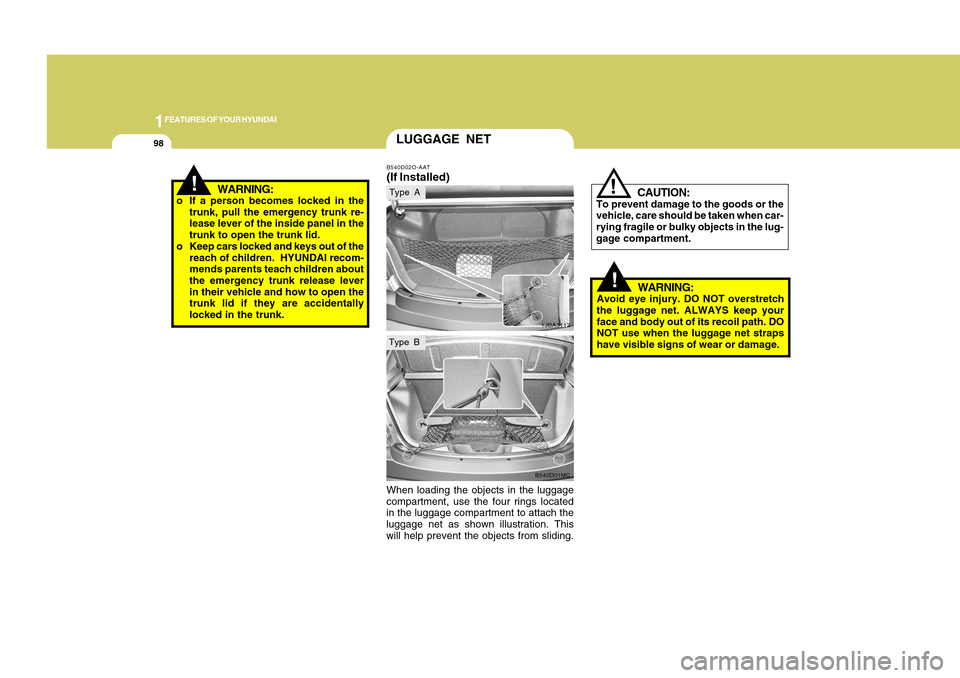
When loading the objects in the luggage
compartment, use the four rings located
in the luggage compartment to attach the
luggage net as shown illustration. This
will help prevent the objects from sliding.
LUGGAGE NETB540D02O-AAT(If Installed)
1JBA3113B540D01MC
Type AType B
Page 140 of 282
1129129
DRIVING YOUR HYUNDAI
1
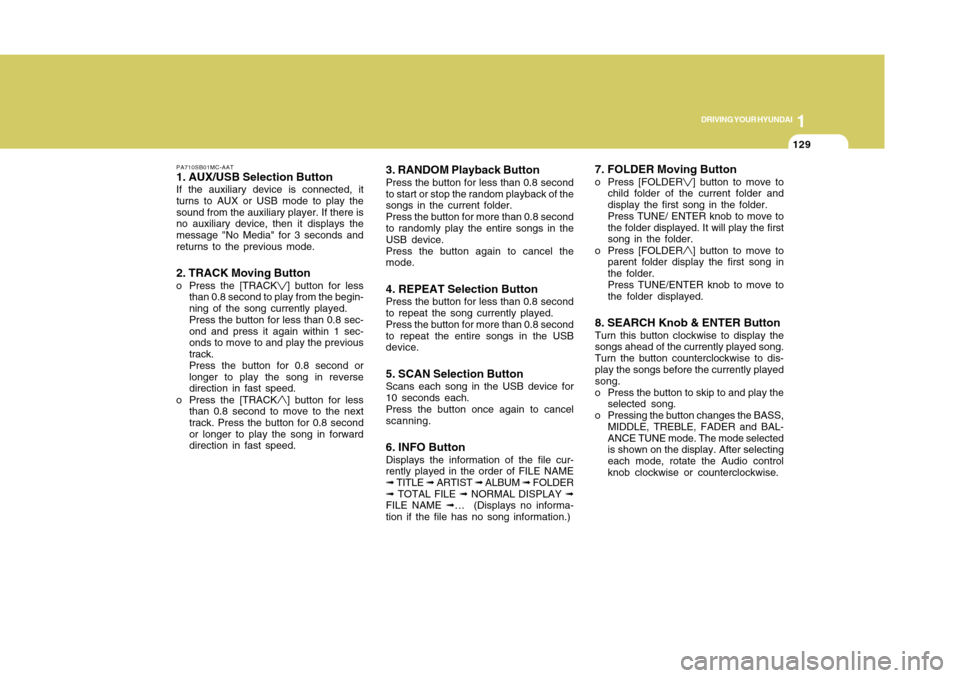
PA710SB01MC-AAT1. AUX/USB Selection ButtonIf the auxiliary device is connected, it
turns to AUX or USB mode to play the
sound from the auxiliary player. If there is
no auxiliary device, then it displays the
message "No Media" for 3 seconds and
returns to the previous mode.2. TRACK Moving Buttono Press the [TRACK
] button for less
than 0.8 second to play from the begin-
ning of the song currently played.
Press the button for less than 0.8 sec-
ond and press it again within 1 sec-
onds to move to and play the previous
track.
Press the button for 0.8 second or
longer to play the song in reverse
direction in fast speed.
o Press the [TRACK] button for less
than 0.8 second to move to the next
track. Press the button for 0.8 second
or longer to play the song in forward
direction in fast speed.
3. RANDOM Playback ButtonPress the button for less than 0.8 second
to start or stop the random playback of the
songs in the current folder.
Press the button for more than 0.8 second
to randomly play the entire songs in the
USB device.
Press the button again to cancel the
mode.4. REPEAT Selection ButtonPress the button for less than 0.8 second
to repeat the song currently played.
Press the button for more than 0.8 second
to repeat the entire songs in the USB
device.5. SCAN Selection ButtonScans each song in the USB device for
10 seconds each.
Press the button once again to cancel
scanning.6. INFO ButtonDisplays the information of the file cur-
rently played in the order of FILE NAME
➟ TITLE ➟ ARTIST ➟ ALBUM ➟ FOLDER
➟ TOTAL FILE ➟ NORMAL DISPLAY ➟
FILE NAME ➟… (Displays no informa-
tion if the file has no song information.)
7. FOLDER Moving Buttono Press [FOLDER
] button to move to
child folder of the current folder and
display the first song in the folder.
Press TUNE/ ENTER knob to move to
the folder displayed. It will play the first
song in the folder.
o Press [FOLDER] button to move to
parent folder display the first song in
the folder.
Press TUNE/ENTER knob to move to
the folder displayed.
8. SEARCH Knob & ENTER ButtonTurn this button clockwise to display the
songs ahead of the currently played song.
Turn the button counterclockwise to dis-
play the songs before the currently played
song.
o Press the button to skip to and play the
selected song.
o Pressing the button changes the BASS,
MIDDLE, TREBLE, FADER and BAL-
ANCE TUNE mode. The mode selected
is shown on the display. After selecting
each mode, rotate the Audio control
knob clockwise or counterclockwise.
Page 152 of 282
1141141
DRIVING YOUR HYUNDAI
1
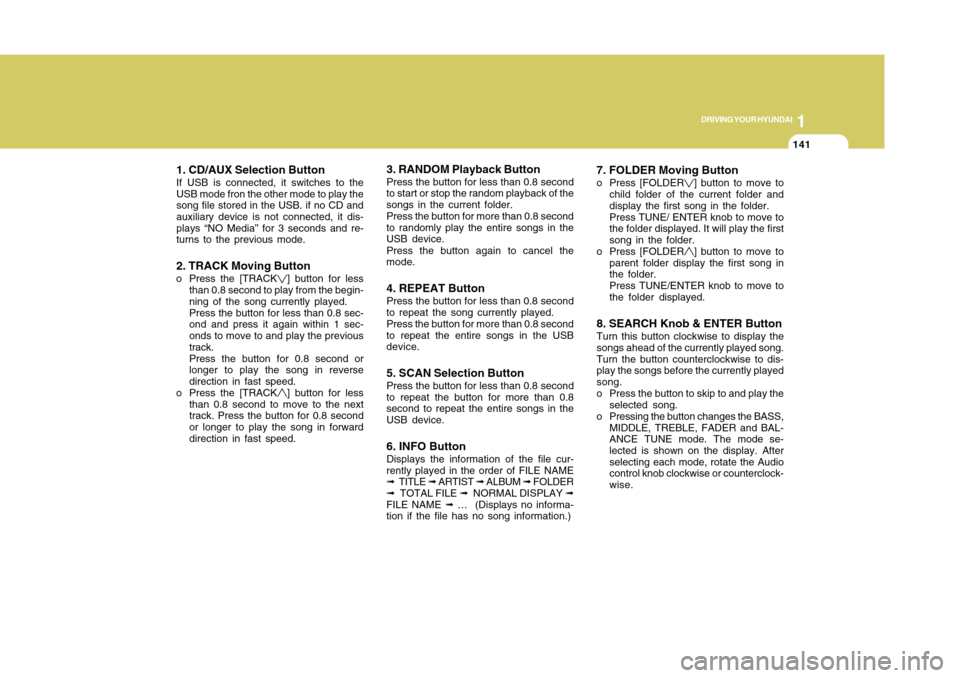
1. CD/AUX Selection ButtonIf USB is connected, it switches to the
USB mode fron the other mode to play the
song file stored in the USB. if no CD and
auxiliary device is not connected, it dis-
plays “NO Media” for 3 seconds and re-
turns to the previous mode.2. TRACK Moving Buttono Press the [TRACK
] button for less
than 0.8 second to play from the begin-
ning of the song currently played.
Press the button for less than 0.8 sec-
ond and press it again within 1 sec-
onds to move to and play the previous
track.
Press the button for 0.8 second or
longer to play the song in reverse
direction in fast speed.
o Press the [TRACK] button for less
than 0.8 second to move to the next
track. Press the button for 0.8 second
or longer to play the song in forward
direction in fast speed.
3. RANDOM Playback ButtonPress the button for less than 0.8 second
to start or stop the random playback of the
songs in the current folder.
Press the button for more than 0.8 second
to randomly play the entire songs in the
USB device.
Press the button again to cancel the
mode.4. REPEAT ButtonPress the button for less than 0.8 second
to repeat the song currently played.
Press the button for more than 0.8 second
to repeat the entire songs in the USB
device.5. SCAN Selection ButtonPress the button for less than 0.8 second
to repeat the button for more than 0.8
second to repeat the entire songs in the
USB device.6. INFO ButtonDisplays the information of the file cur-
rently played in the order of FILE NAME
➟ TITLE ➟ ARTIST ➟ ALBUM ➟ FOLDER
➟ TOTAL FILE ➟ NORMAL DISPLAY ➟
FILE NAME ➟ … (Displays no informa-
tion if the file has no song information.)
7. FOLDER Moving Buttono Press [FOLDER
] button to move to
child folder of the current folder and
display the first song in the folder.
Press TUNE/ ENTER knob to move to
the folder displayed. It will play the first
song in the folder.
o Press [FOLDER] button to move to
parent folder display the first song in
the folder.
Press TUNE/ENTER knob to move to
the folder displayed.
8. SEARCH Knob & ENTER ButtonTurn this button clockwise to display the
songs ahead of the currently played song.
Turn the button counterclockwise to dis-
play the songs before the currently played
song.
o Press the button to skip to and play the
selected song.
o Pressing the button changes the BASS,
MIDDLE, TREBLE, FADER and BAL-
ANCE TUNE mode. The mode se-
lected is shown on the display. After
selecting each mode, rotate the Audio
control knob clockwise or counterclock-
wise.
Page 159 of 282
3
DRIVING YOUR HYUNDAI
2
!
BEFORE STARTING THE
ENGINEC020A03A-AATBefore you start the engine, you should
always:
1. Look around the vehicle to be sure
there are no flat tires, puddles of oil or
water or other indications of possible
trouble.
2. After entering the car, check to be
sure the parking brake is engaged.
3. Check that all windows, and lights are
clean.
4. Check that the interior and exterior
mirrors are clean and in position.
5. Check your seat, seatback and head-
rest to be sure they are in their proper
positions.
6. Lock all the doors.
7. Fasten your seat belt and be sure that
all other occupants have fastened
theirs.
8. Turn off all lights and accessories that
are not needed.
9. When you turn the ignition switch to
"ON", check that all appropriate warn-
ing lights are operating and that you
have sufficient fuel.
10. Check the operation of warning lights
and all bulbs when key is in the "ON"
position.
CALIFORNIA PROPOSITION
65 WARNING:
Engine exhaust and a wide variety of
automobile components and parts, in-
cluding components found in the inte-
rior furnishings in a vehicle, contain or
emit chemicals known to the State of
California to cause cancer and birth
defects and reproductive harm. In addi-
tion, certain fluids contained in vehicles
and certain products of component
wear contain or emit chemicals known
to the State of California to cause can-
cer and birth defects or other reproduc-
tive harm.
!
WARNING:
o Always wear appropriate shoes
when operating your vehicle. Unsuit-
able shoes (high heels, ski boots,
etc.) may interfere with your ability
to use the brake and accelerator
pedal, and the clutch (if installed).
o All passengers must be properly
belted whenever the vehicle is mov-
ing. Refer to pages: 1-22 through 1-
31 for more information on their
proper use.
o Always check the surrounding ar-
eas near your vehicle for people,
especially children, before putting a
car into 'drive'.
o When you intend to park or stop the
vehicle with the engine on, be careful
not to depress the accelerator pedal
for a long period of time. It may over-
heat the engine or exhaust system
and cause fire.
Page 242 of 282
6
DO-IT-YOURSELF MAINTENANCE
24
G270A03O
!
WARNING:
o When removing/replacing halogen
bulbs, always handle the metal body
of the bulb, not the glass. Residual oil
may cause the bulb to overheat and
burst when lit.
o The halogen bulb contains gas under
pressure and if impacted could shat-
ter, resulting in flying fragments. Al-
ways wear eye protection when ser-
vicing the bulb. Protect the bulb
against abrasions or scratches and
against liquids when lighted. Turn
the bulb on only when installed in a
headlight. Replace the headlight if
damaged or cracked. Keep the bulb
out of the reach of children and dis-
pose of the used bulb with care.
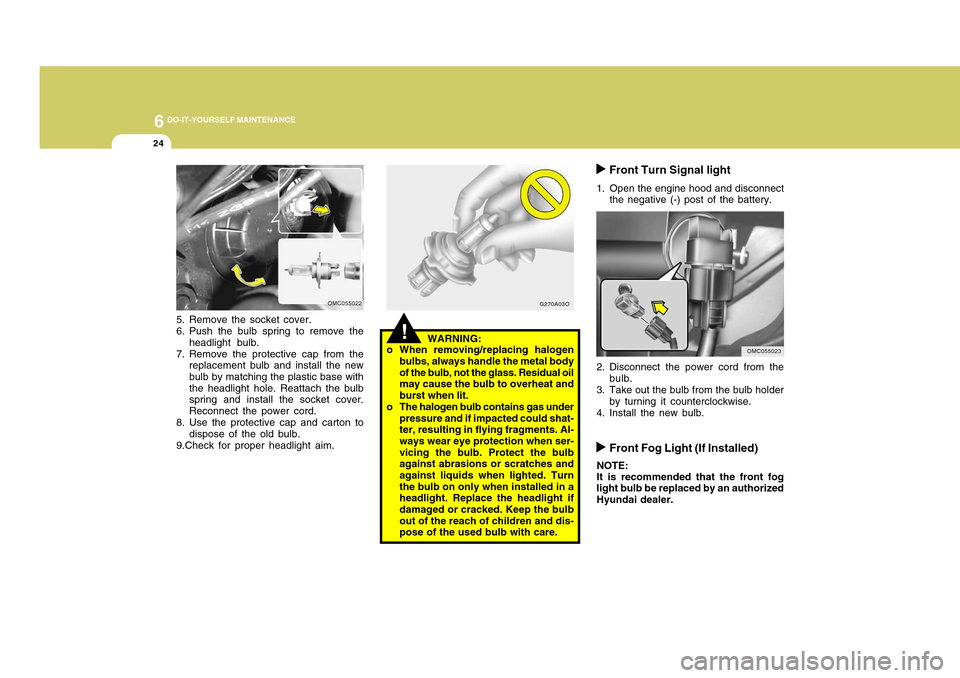
5. Remove the socket cover.
6. Push the bulb spring to remove the
headlight bulb.
7. Remove the protective cap from the
replacement bulb and install the new
bulb by matching the plastic base with
the headlight hole. Reattach the bulb
spring and install the socket cover.
Reconnect the power cord.
8. Use the protective cap and carton to
dispose of the old bulb.
9.Check for proper headlight aim.
OMC055022
Front Turn Signal light
1. Open the engine hood and disconnect
the negative (-) post of the battery.
2. Disconnect the power cord from the
bulb.
3. Take out the bulb from the bulb holder
by turning it counterclockwise.
4. Install the new bulb.
OMC055023
Front Fog Light (If Installed)
NOTE:
It is recommended that the front fog
light bulb be replaced by an authorized
Hyundai dealer.
Page 278 of 282
10
INDEX
2
A
Advanced Supplemental Restraint (AIRBAG)
System (SRS) ....................................................................1-41
Curtain airbag .................................................................1-56
Driver's and passenger's front airbag ............................1-42
Occupant classification system ......................................1-49
Side impact airbag .........................................................1-54
Air Cleaner Filter .................................................................. 6-9
Air Conditioning
Care.................................................................................6-15
Operation............................................................ 1-115, 6-15
Switch............................................................................1-115
Antenna ............................................................................1-122
Ashtray................................................................................1-83
Audio System ...................................................................1-122
Audio remote control switch .........................................1-102
B
Battery .................................................................................6-20
Binding Arbitration .............................................................8-18
Brake
Anti-lock brake system (ABS) .........................................2-13
Checking the brakes ......................................................6-14
Fluid.................................................................................6-14
Practices..........................................................................2-14
Breaking-In your New Hyundai ........................................... 1-3C
Care of Discs ....................................................................1-121
Cargo Area Cover ..............................................................1-99
Catalytic Converter ............................................................... 7-3
Child Restraint System ......................................................1-31
Installing a child restraint seat with
"Tether Anchorage" system ...........................................1-33
Securing a child restraint seat with
"Child Seat Lower Anchor" system ...............................1-35
Child-Protector Rear Door Lock .......................................... 1-6
Cigarette Lighter ................................................................1-82
Climate Control Air Filter ....................................... 1-118, 6-16
Clock...................................................................................1-82
Combination Light ..............................................................1-76
Headlight flasher ............................................................1-77
Headlight switch .............................................................1-76
High-beam switch ...........................................................1-77
Lane change signal ........................................................1-76
Parking light auto off ......................................................1-77
Turn signal operation .....................................................1-76
Consumer Information .......................................................8-15
Cooling Fans ......................................................................6-21
Corrosion Protection
Cleaning the interior ......................................................... 4-6
Protecting your Hyundai from corrosion .......................... 4-2
Washing and waxing ........................................................ 4-4
Cruise Control ..................................................................1-103