power Hyundai Accent 2011 Owner's Manual
[x] Cancel search | Manufacturer: HYUNDAI, Model Year: 2011, Model line: Accent, Model: Hyundai Accent 2011Pages: 282, PDF Size: 14.82 MB
Page 9 of 282
F9
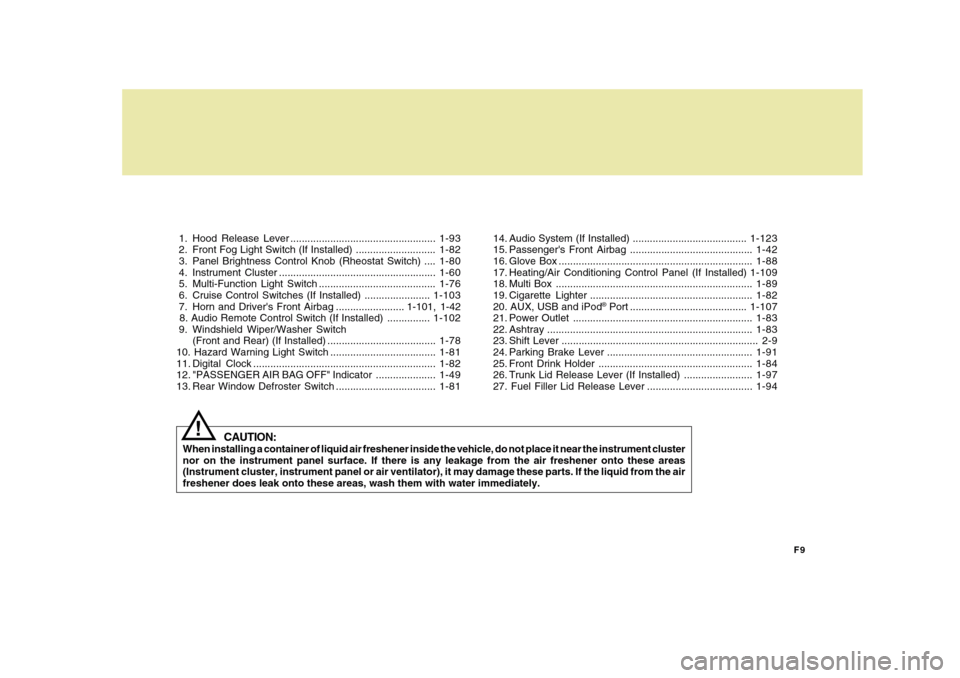
1. Hood Release Lever ...................................................1-93
2. Front Fog Light Switch (If Installed) ............................1-82
3. Panel Brightness Control Knob (Rheostat Switch) ....1-80
4. Instrument Cluster .......................................................1-60
5. Multi-Function Light Switch .........................................1-76
6. Cruise Control Switches (If Installed) .......................1-103
7. Horn and Driver's Front Airbag ........................ 1-101, 1-42
8. Audio Remote Control Switch (If Installed) ...............1-102
9. Windshield Wiper/Washer Switch
(Front and Rear) (If Installed) ......................................1-78
10. Hazard Warning Light Switch .....................................1-81
11. Digital Clock ................................................................1-82
12. "PASSENGER AIR BAG OFF" Indicator .....................1-49
13. Rear Window Defroster Switch ...................................1-8114. Audio System (If Installed) ........................................1-123
15. Passenger's Front Airbag ...........................................1-42
16. Glove Box ....................................................................1-88
17. Heating/Air Conditioning Control Panel (If Installed)1-109
18. Multi Box .....................................................................1-89
19. Cigarette Lighter .........................................................1-82
20. AUX, USB and iPod
® Port .........................................1-107
21. Power Outlet ...............................................................1-83
22. Ashtray........................................................................1-83
23. Shift Lever ..................................................................... 2-9
24. Parking Brake Lever ...................................................1-91
25. Front Drink Holder ......................................................1-84
26. Trunk Lid Release Lever (If Installed) ........................1-97
27. Fuel Filler Lid Release Lever .....................................1-94
CAUTION:
When installing a container of liquid air freshener inside the vehicle, do not place it near the instrument cluster
nor on the instrument panel surface. If there is any leakage from the air freshener onto these areas
(Instrument cluster, instrument panel or air ventilator), it may damage these parts. If the liquid from the air
freshener does leak onto these areas, wash them with water immediately.
!
Page 22 of 282
1
FEATURES OF YOUR HYUNDAI
111
FEATURES OF YOUR HYUNDAI
11
WINDOW GLASS!
3FDA2015 B050A01MC-AAT
To lower or raise the window, turn the
window regulator handle clockwise or
counterclockwise.
WARNING:
When opening or closing the windows,
make sure your passenger's arms,
hands and body are safely out of the way.
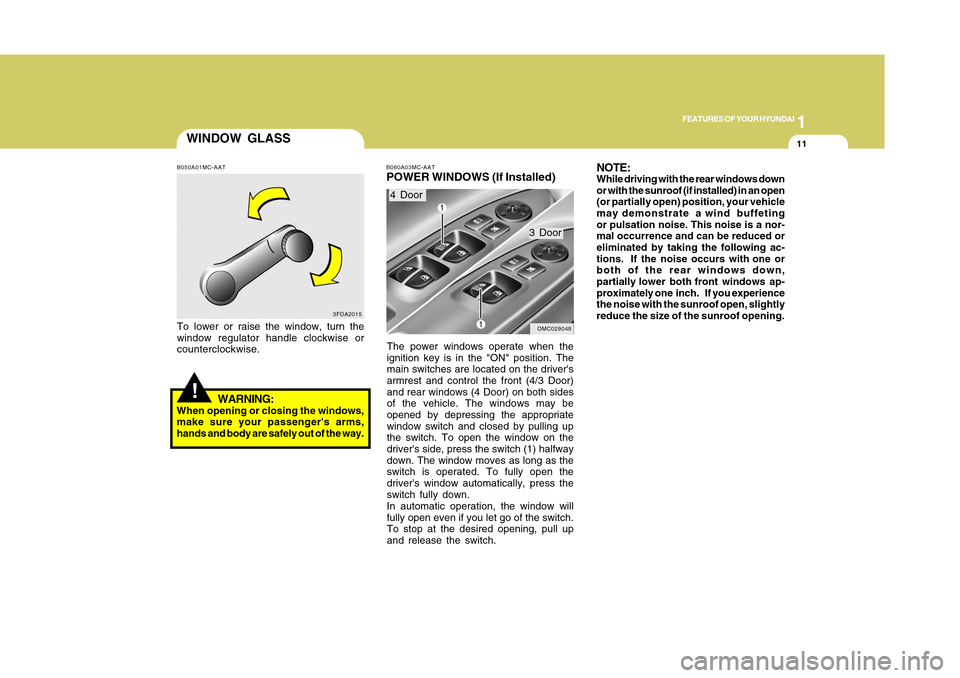
B060A03MC-AATPOWER WINDOWS (If Installed)The power windows operate when the
ignition key is in the "ON" position. The
main switches are located on the driver's
armrest and control the front (4/3 Door)
and rear windows (4 Door) on both sides
of the vehicle. The windows may be
opened by depressing the appropriate
window switch and closed by pulling up
the switch. To open the window on the
driver's side, press the switch (1) halfway
down. The window moves as long as the
switch is operated. To fully open the
driver's window automatically, press the
switch fully down.
In automatic operation, the window will
fully open even if you let go of the switch.
To stop at the desired opening, pull up
and release the switch.4 Door
3 Door
OMC029048
NOTE:While driving with the rear windows down
or with the sunroof (if installed) in an open
(or partially open) position, your vehicle
may demonstrate a wind buffeting
or pulsation noise. This noise is a nor-
mal occurrence and can be reduced or
eliminated by taking the following ac-
tions. If the noise occurs with one or
both of the rear windows down,
partially lower both front windows ap-
proximately one inch. If you experience
the noise with the sunroof open, slightly
reduce the size of the sunroof opening.
Page 23 of 282
1FEATURES OF YOUR HYUNDAI12
OMC025015
CLOSE
OPEN
OMC029049
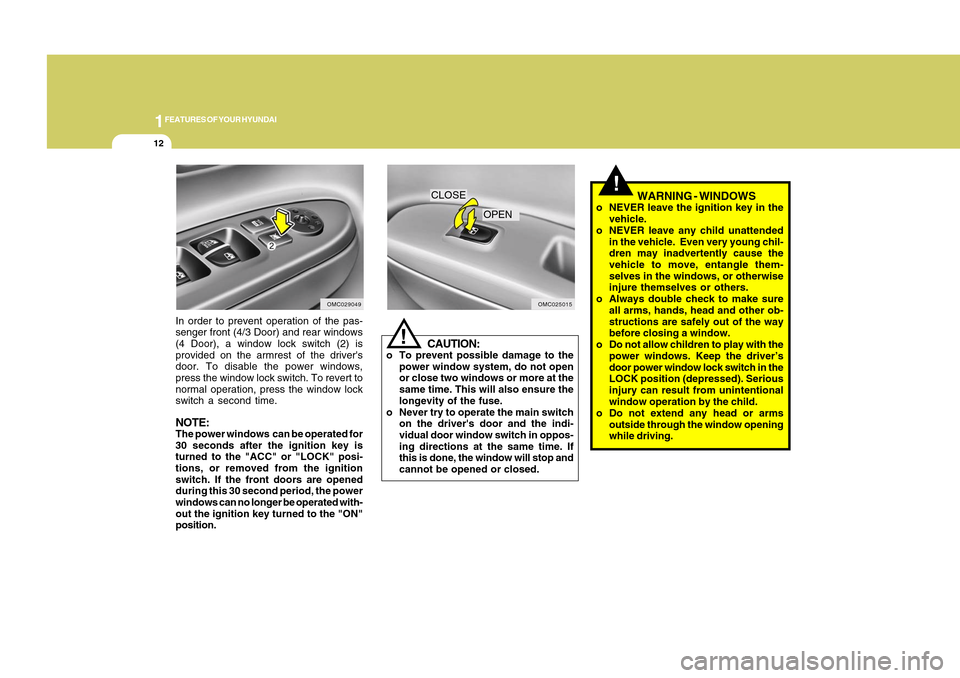
In order to prevent operation of the pas-
senger front (4/3 Door) and rear windows
(4 Door), a window lock switch (2) is
provided on the armrest of the driver's
door. To disable the power windows,
press the window lock switch. To revert to
normal operation, press the window lock
switch a second time.NOTE:The power windows can be operated for
30 seconds after the ignition key is
turned to the "ACC" or "LOCK" posi-
tions, or removed from the ignition
switch. If the front doors are opened
during this 30 second period, the power
windows can no longer be operated with-
out the ignition key turned to the "ON"
position.
!
CAUTION:
o To prevent possible damage to the
power window system, do not open
or close two windows or more at the
same time. This will also ensure the
longevity of the fuse.
o Never try to operate the main switch
on the driver's door and the indi-
vidual door window switch in oppos-
ing directions at the same time. If
this is done, the window will stop and
cannot be opened or closed.
WARNING - WINDOWS
o NEVER leave the ignition key in the
vehicle.
o NEVER leave any child unattended
in the vehicle. Even very young chil-
dren may inadvertently cause the
vehicle to move, entangle them-
selves in the windows, or otherwise
injure themselves or others.
o Always double check to make sure
all arms, hands, head and other ob-
structions are safely out of the way
before closing a window.
o Do not allow children to play with the
power windows. Keep the driver’s
door power window lock switch in the
LOCK position (depressed). Serious
injury can result from unintentional
window operation by the child.
o Do not extend any head or arms
outside through the window opening
while driving.
!
Page 78 of 282
1
FEATURES OF YOUR HYUNDAI
671
FEATURES OF YOUR HYUNDAI
67
B260N01MC-AAT
Malfunction Indicator Light
This light illuminates when there is a
malfunction of an exhaust gas related
component and the system is not func-
tioning properly. This light will also illumi-
nate when the ignition key is turned to the
"ON" position, and will go out in a few
seconds after the engine is started. If it
illuminates while driving, or does not illumi-
nate when the ignition key is turned to the
"ON" position, take your car to your nearest
authorized Hyundai dealer and have the
system checked.
!
CAUTION:
Prolonged driving with the Emission
Control System Malfunction Indicator
Light illuminated may cause damage to
the emission control systems which
could effect drivability or fuel economy.
If the Emission Control System Malfunc-
tion Indicator Light begins to flash ON
and OFF, potential catalytic converter
damage is possible. This could result in
loss of engine power. Have the Engine
Control System inspected as soon as
possible by an authorized Hyundai
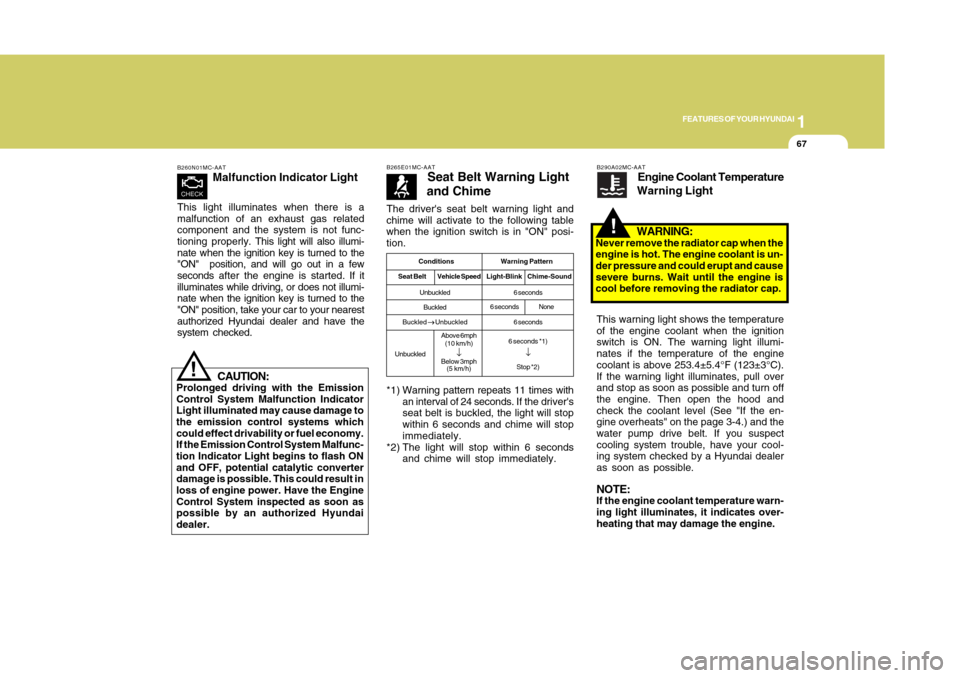
dealer.The driver's seat belt warning light and
chime will activate to the following table
when the ignition switch is in "ON" posi-
tion.
B265E01MC-AAT
Seat Belt Warning Light
and Chime
*1) Warning pattern repeats 11 times with
an interval of 24 seconds. If the driver's
seat belt is buckled, the light will stop
within 6 seconds and chime will stop
immediately.
*2) The light will stop within 6 seconds
and chime will stop immediately.
Conditions Warning Pattern
Seat BeltVehicle SpeedLight-Blink Chime-SoundUnbuckled
Buckled
Buckled
→ →→ →
→ Unbuckled
UnbuckledAbove 6mph
(10 km/h)
↓
Below 3mph
(5 km/h)6 seconds
6 seconds
6 seconds *1)
↓Stop *2)
6 secondsNone
B290A02MC-AAT
Engine Coolant Temperature
Warning Light
WARNING:
Never remove the radiator cap when the
engine is hot. The engine coolant is un-
der pressure and could erupt and cause
severe burns. Wait until the engine is
cool before removing the radiator cap.
!
This warning light shows the temperature
of the engine coolant when the ignition
switch is ON. The warning light illumi-
nates if the temperature of the engine
coolant is above 253.4±5.4°F (123±3°C).
If the warning light illuminates, pull over
and stop as soon as possible and turn off
the engine. Then open the hood and
check the coolant level (See "If the en-
gine overheats" on the page 3-4.) and the
water pump drive belt. If you suspect
cooling system trouble, have your cool-
ing system checked by a Hyundai dealer
as soon as possible.NOTE:If the engine coolant temperature warn-
ing light illuminates, it indicates over-
heating that may damage the engine.
Page 94 of 282
1
FEATURES OF YOUR HYUNDAI
831
FEATURES OF YOUR HYUNDAI
83
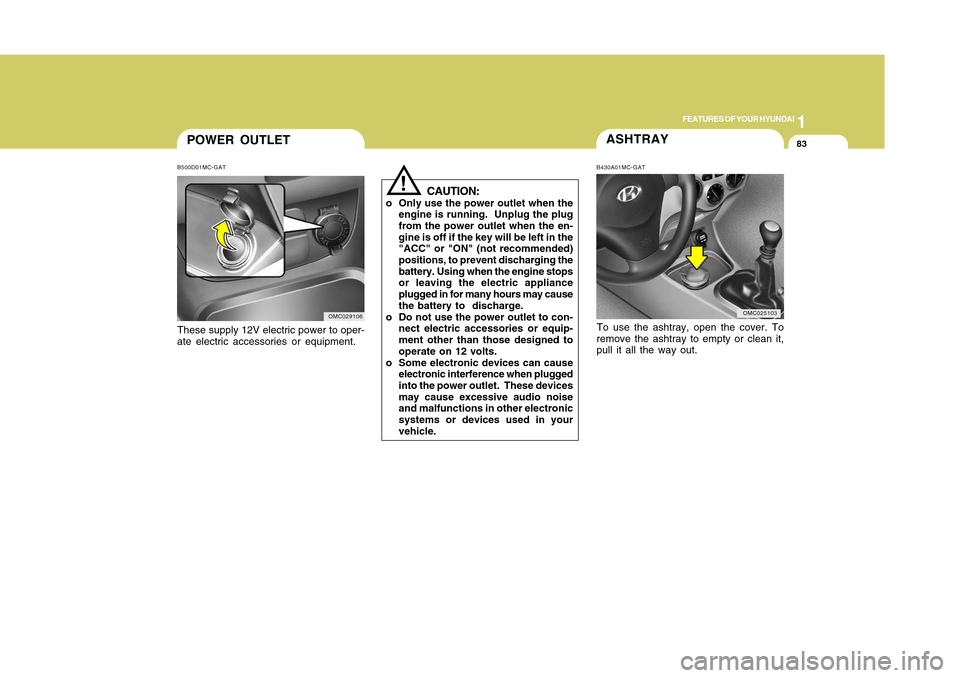
POWER OUTLETB500D01MC-GATThese supply 12V electric power to oper-
ate electric accessories or equipment.
OMC029106
ASHTRAYTo use the ashtray, open the cover. To
remove the ashtray to empty or clean it,
pull it all the way out.B430A01MC-GAT
OMC025103
!
CAUTION:
o Only use the power outlet when the
engine is running. Unplug the plug
from the power outlet when the en-
gine is off if the key will be left in the
"ACC" or "ON" (not recommended)
positions, to prevent discharging the
battery. Using when the engine stops
or leaving the electric appliance
plugged in for many hours may cause
the battery to discharge.
o Do not use the power outlet to con-
nect electric accessories or equip-
ment other than those designed to
operate on 12 volts.
o Some electronic devices can cause
electronic interference when plugged
into the power outlet. These devices
may cause excessive audio noise
and malfunctions in other electronic
systems or devices used in your
vehicle.
Page 118 of 282
1
FEATURES OF YOUR HYUNDAI
1071
FEATURES OF YOUR HYUNDAI
107
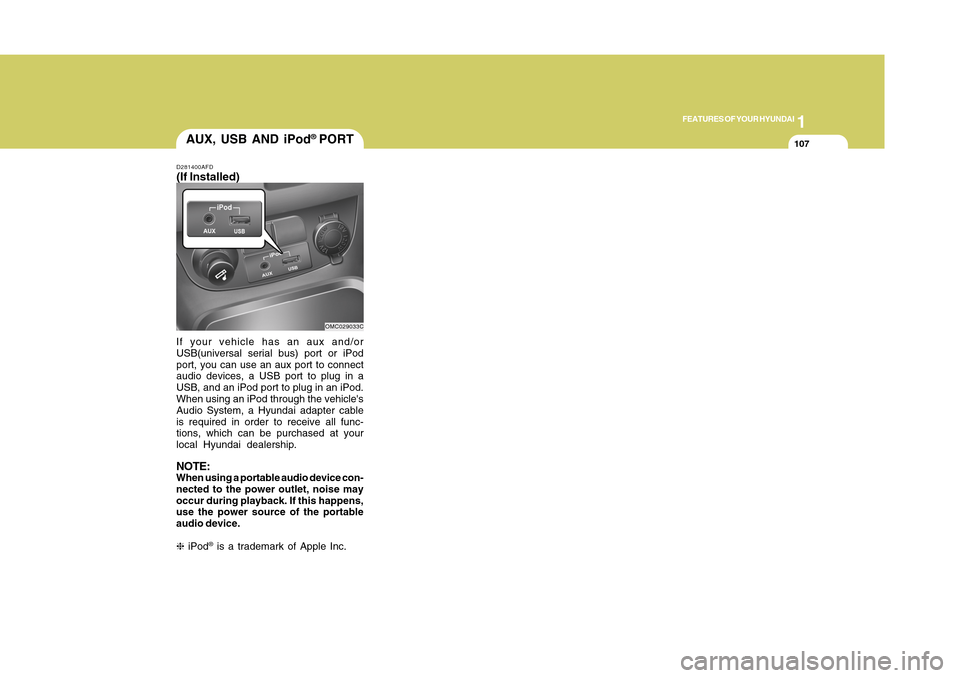
If your vehicle has an aux and/or
USB(universal serial bus) port or iPod
port, you can use an aux port to connect
audio devices, a USB port to plug in a
USB, and an iPod port to plug in an iPod.
When using an iPod through the vehicle's
Audio System, a Hyundai adapter cable
is required in order to receive all func-
tions, which can be purchased at your
local Hyundai dealership.NOTE:When using a portable audio device con-
nected to the power outlet, noise may
occur during playback. If this happens,
use the power source of the portable
audio device.
❈ iPod
® is a trademark of Apple Inc.
AUX, USB AND iPod
® PORT
D281400AFD(If Installed)
OMC029033C
Page 131 of 282
1FEATURES OF YOUR HYUNDAI
120
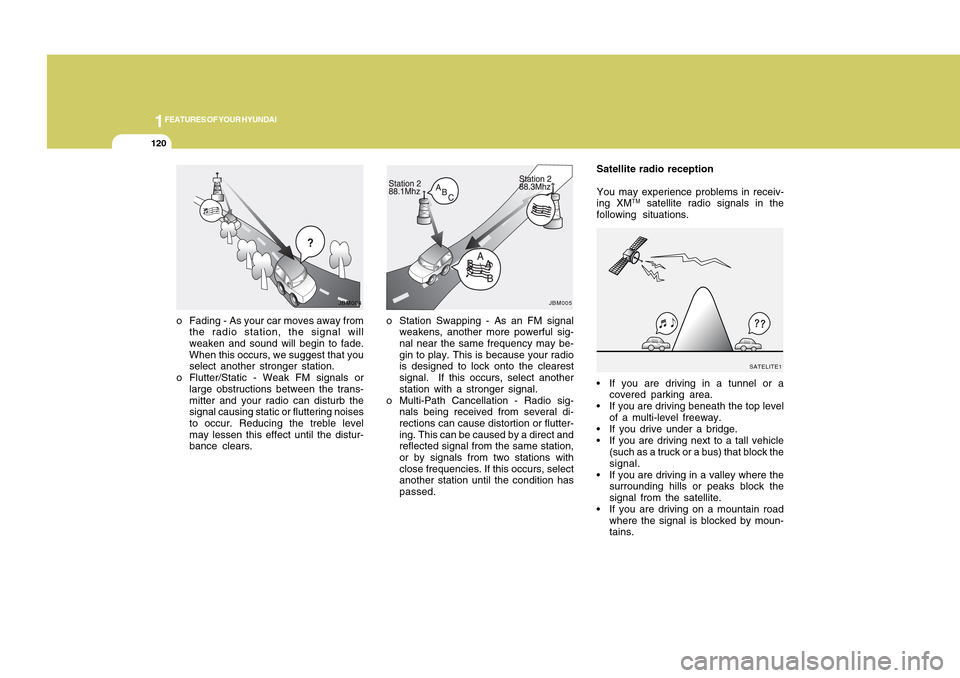
o Station Swapping - As an FM signal
weakens, another more powerful sig-
nal near the same frequency may be-
gin to play. This is because your radio
is designed to lock onto the clearest
signal. If this occurs, select another
station with a stronger signal.
o Multi-Path Cancellation - Radio sig-
nals being received from several di-
rections can cause distortion or flutter-
ing. This can be caused by a direct and
reflected signal from the same station,
or by signals from two stations with
close frequencies. If this occurs, select
another station until the condition has
passed. o Fading - As your car moves away from
the radio station, the signal will
weaken and sound will begin to fade.
When this occurs, we suggest that you
select another stronger station.
o Flutter/Static - Weak FM signals or
large obstructions between the trans-
mitter and your radio can disturb the
signal causing static or fluttering noises
to occur. Reducing the treble level
may lessen this effect until the distur-
bance clears.
JBM004
Satellite radio reception
You may experience problems in receiv-
ing XM
TM satellite radio signals in the
following situations.
If you are driving in a tunnel or a
covered parking area.
If you are driving beneath the top level
of a multi-level freeway.
If you drive under a bridge.
If you are driving next to a tall vehicle
(such as a truck or a bus) that block the
signal.
If you are driving in a valley where the
surrounding hills or peaks block the
signal from the satellite.
If you are driving on a mountain road
where the signal is blocked by moun-
tains.
JBM005
SATELITE1
Page 134 of 282
1123123
DRIVING YOUR HYUNDAI
1
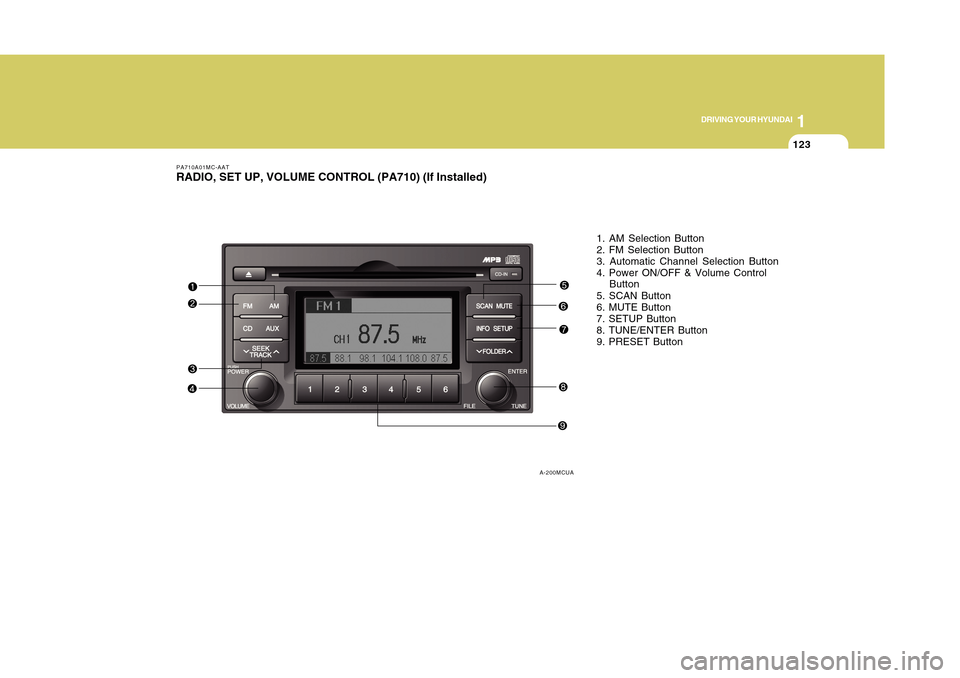
1. AM Selection Button
2. FM Selection Button
3. Automatic Channel Selection Button
4. Power ON/OFF & Volume Control
Button
5. SCAN Button
6. MUTE Button
7. SETUP Button
8. TUNE/ENTER Button
9. PRESET Button
PA710A01MC-AATRADIO, SET UP, VOLUME CONTROL (PA710) (If Installed)
A-200MCUA
Page 135 of 282
![Hyundai Accent 2011 Owners Manual 1FEATURES OF YOUR HYUNDAI
124
PA710B01MC-AAT1. AM Selection ButtonPressing the [AM] button selects the AM
band. AM Mode is displayed on the LCD.2. FM Selection ButtonTurns to FM mode and toggles FM1 a](/img/35/14385/w960_14385-134.png "Hyundai Accent 2011 Owners Manual 1FEATURES OF YOUR HYUNDAI
124
PA710B01MC-AAT1. AM Selection ButtonPressing the [AM] button selects the AM
band. AM Mode is displayed on the LCD.2. FM Selection ButtonTurns to FM mode and toggles FM1 a")
1FEATURES OF YOUR HYUNDAI
124
PA710B01MC-AAT1. AM Selection ButtonPressing the [AM] button selects the AM
band. AM Mode is displayed on the LCD.2. FM Selection ButtonTurns to FM mode and toggles FM1 and
FM2 when the button is pressed each
time.3. Automatic Channel Selection
Buttono When the [SEEK
] button is pressed,
it reduces the band frequency by
200khz to automatically select chan-
nel. Stops at the previous frequency if
no channel is found.
o When the [SEEK ] button is pressed,
it increases the band frequency by
50khz to automatically select channel.
Stops at the previous frequency if no
channel is found.
4. Power ON/OFF & Volume Control
ButtonTurns on/off the set when the IGNITION
SWITCH is on ACC or ON. If the button is
turned to the right, it increases the volume
and left, decreases the volume.
5. SCAN ButtonIf this button is pressed, the frequencies
will become increased and receive the
corresponding broadcasts.
This function will play the frequencies for
10 seconds each and find other broad-
casts as the frequency increases.
Press the button again when desiring to
continue listening to the currently playing
broadcast.6. MUTE ButtonPress to temporarily cut off the Sound.7. SETUP ButtonPress this button to turn to the SCROLL
and P.BASS adjustment mode.
If no action is taken for 5 seconds after
pressing the button, it will return to the
play mode.(After entering SETUP mode,
move between items using the left, right
and PUSH functions of the TUNE button.)
The setup Items changes from SCROLL
<->P.BASS.
8. TUNE/ENTER ButtonTurn this button clockwise one notch to
increase frequency from current fre-
quency.
Turn this button counterclockwise by one
notch to decrease frequency from current
frequency.
The frequency cahnges by 0.2Mhz in FM
MODE and 9Khz in AM MODE.
Press this button while holding SETUP
button to activate / inactivate the item to.
Select SETUP item using left and right
function of the Tune button.9. PRESET ButtonPush [1]~[6] buttons less than 0.8 second
to play the channel saved in each button.
Push PRESET button for 0.8 second or
longer to save current channel to the
respective button with a beep.
!
CAUTION:
o Do not place beverages close to the
audio system. The audio system
mechanism may be damaged if you
spill them.
o Do not strike or allow anything to
impact the audio system, damage to
the system mechanisms could oc-
cur.
Page 137 of 282
1FEATURES OF YOUR HYUNDAI
126
1. CD Loading SlotPlease face printed side upward and
gently push in. When the ignition switch
is on ACC or ON and power is off, power
is automatically turned on if the CD is
loaded. This CDP supports only 12cm
CD. If VCD, Data CD, are loaded, "Er-6"
message will appear and CD will be
ejected.2. CD IndicatorWhen car ignition switch is ACC or ON
and if the CD is loaded, this indicator is
lighted. If the CD is ejected the light is
turned off.3. CD Eject ButtonPush button to eject the CD. This button
is enabled when ignition switch is off.4. CD Selection ButtonIf there is a CD in the CDP DECK it plays
the CD.
Press CD button to automatically insert
CD when the disc is ejected from the deck
by pressing CD EJECT.
5. AUX Selection ButtonIf the auxiliary device is connected, it
turns to AUX MODE to play the sound
from the auxiliary player.
If no Disk and auxiliary device is con-
nected, it displays “NO Media” 3 seconds
and returns ti the previous mode.6. Automatic Track Selection Buttono Push [SEEK
] button for less than 0.8
second to play from the beginning of
current song.
o Push [SEEK ] button for less than 0.8
second and press again within 1 sec-
onds to play the previous song.
o Push [SEEK ] button for 0.8 or longer
to initiate reverse direction high speed
sound search of current song.
o Push [SEEK ] button for less than 0.8
second to play the next song.
o Push [SEEK ] button for 0.8 or longer
to initiate high speed sound search of
current song.
7. Information Display ButtonDisplays the information of the current
CD TRACK in the order of DISC TITLE
➟DISC ARTIST➟TRACK TITLE➟ TRACK
ARTIST➟TOTAL TRACK➟Play Screen
➟DISC TITLE➟···.(not displayed if the in-
formation is not available on the DISC.)
8. TUNE/ENTER ButtonTurn this button clockwise to display
songs after current song.
Also, turn this button counterclockwise to
display songs before current song.
To listen to the displayed song, press the
button to skip to the song and play.9. RANDOM Play ButtonTurns on/off the randomization of the play
list of files in the currently played DISC.
To cancel the mode, press the key once
again.10. REPEAT ButtonRepeats current song when the button is
pressed for less than 0.8 second.
Repeats current folder when the button is
pressed for 0.8 second or longer. (If there
is no folder, entire disc will be repeated.)