temperature light Hyundai Accent 2011 Owner's Manual
[x] Cancel search | Manufacturer: HYUNDAI, Model Year: 2011, Model line: Accent, Model: Hyundai Accent 2011Pages: 282, PDF Size: 14.82 MB
Page 10 of 282
YOUR VEHICLE AT A GLANCE
F10
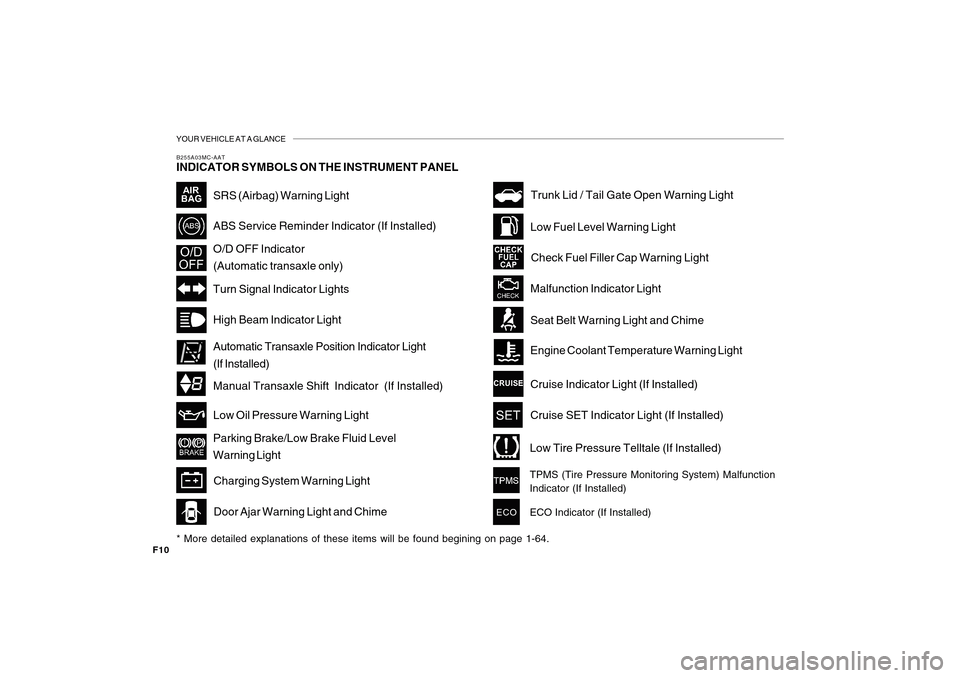
B255A03MC-AATINDICATOR SYMBOLS ON THE INSTRUMENT PANEL* More detailed explanations of these items will be found begining on page 1-64.
SRS (Airbag) Warning LightHigh Beam Indicator LightLow Oil Pressure Warning LightParking Brake/Low Brake Fluid Level
Warning LightCharging System Warning Light
Door Ajar Warning Light and Chime
Trunk Lid / Tail Gate Open Warning LightLow Fuel Level Warning Light
Check Fuel Filler Cap Warning LightMalfunction Indicator LightSeat Belt Warning Light and ChimeEngine Coolant Temperature Warning LightCruise Indicator Light (If Installed)Cruise SET Indicator Light (If Installed)Low Tire Pressure Telltale (If Installed)TPMS (Tire Pressure Monitoring System) Malfunction
Indicator (If Installed)
ECO
ECO Indicator (If Installed)
ABS Service Reminder Indicator (If Installed)O/D OFF Indicator
(Automatic transaxle only)Turn Signal Indicator Lights
Manual Transaxle Shift Indicator (If Installed) Automatic Transaxle Position Indicator Light
(If Installed)
Page 72 of 282
1
FEATURES OF YOUR HYUNDAI
611
FEATURES OF YOUR HYUNDAI
61
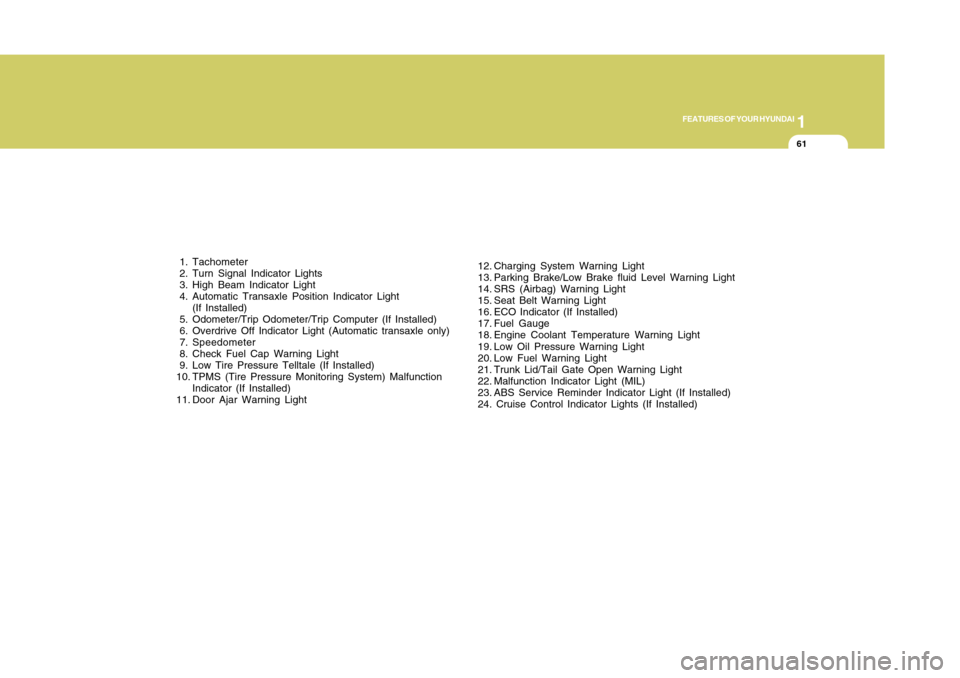
1. Tachometer
2. Turn Signal Indicator Lights
3. High Beam Indicator Light
4. Automatic Transaxle Position Indicator Light
(If Installed)
5. Odometer/Trip Odometer/Trip Computer (If Installed)
6. Overdrive Off Indicator Light (Automatic transaxle only)
7. Speedometer
8. Check Fuel Cap Warning Light
9. Low Tire Pressure Telltale (If Installed)
10. TPMS (Tire Pressure Monitoring System) Malfunction
Indicator (If Installed)
11. Door Ajar Warning Light12. Charging System Warning Light
13. Parking Brake/Low Brake fluid Level Warning Light
14. SRS (Airbag) Warning Light
15. Seat Belt Warning Light
16. ECO Indicator (If Installed)
17. Fuel Gauge
18. Engine Coolant Temperature Warning Light
19. Low Oil Pressure Warning Light
20. Low Fuel Warning Light
21. Trunk Lid/Tail Gate Open Warning Light
22. Malfunction Indicator Light (MIL)
23. ABS Service Reminder Indicator Light (If Installed)
24. Cruise Control Indicator Lights (If Installed)
Page 74 of 282
1
FEATURES OF YOUR HYUNDAI
631
FEATURES OF YOUR HYUNDAI
63
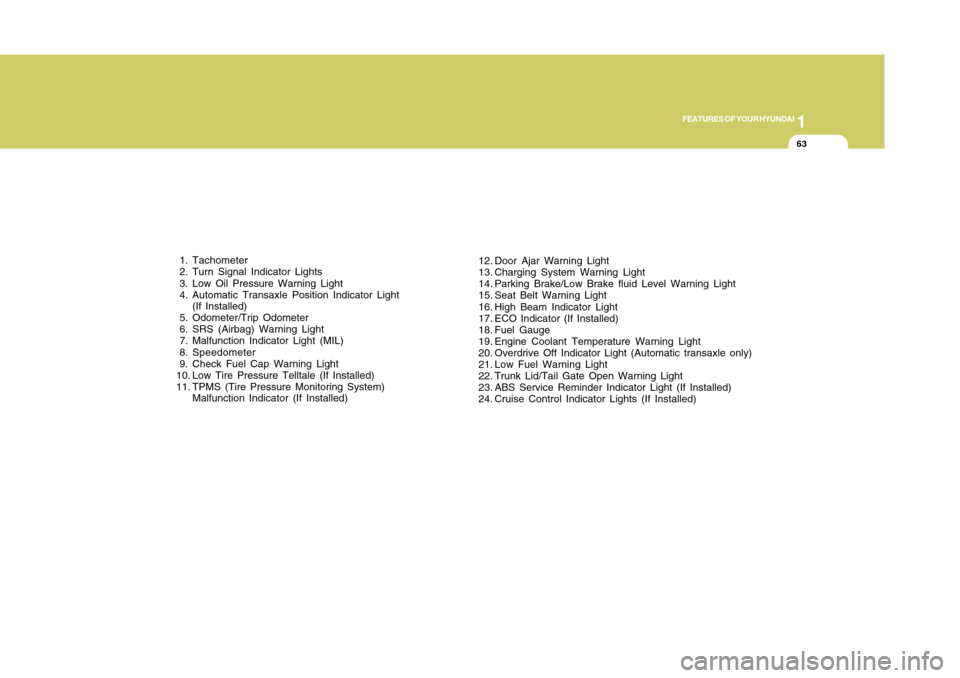
12. Door Ajar Warning Light
13. Charging System Warning Light
14. Parking Brake/Low Brake fluid Level Warning Light
15. Seat Belt Warning Light
16. High Beam Indicator Light
17. ECO Indicator (If Installed)
18. Fuel Gauge
19. Engine Coolant Temperature Warning Light
20. Overdrive Off Indicator Light (Automatic transaxle only)
21. Low Fuel Warning Light
22. Trunk Lid/Tail Gate Open Warning Light
23. ABS Service Reminder Indicator Light (If Installed)
24. Cruise Control Indicator Lights (If Installed) 1. Tachometer
2. Turn Signal Indicator Lights
3. Low Oil Pressure Warning Light
4. Automatic Transaxle Position Indicator Light
(If Installed)
5. Odometer/Trip Odometer
6. SRS (Airbag) Warning Light
7. Malfunction Indicator Light (MIL)
8. Speedometer
9. Check Fuel Cap Warning Light
10. Low Tire Pressure Telltale (If Installed)
11. TPMS (Tire Pressure Monitoring System)
Malfunction Indicator (If Installed)
Page 78 of 282
1
FEATURES OF YOUR HYUNDAI
671
FEATURES OF YOUR HYUNDAI
67
B260N01MC-AAT
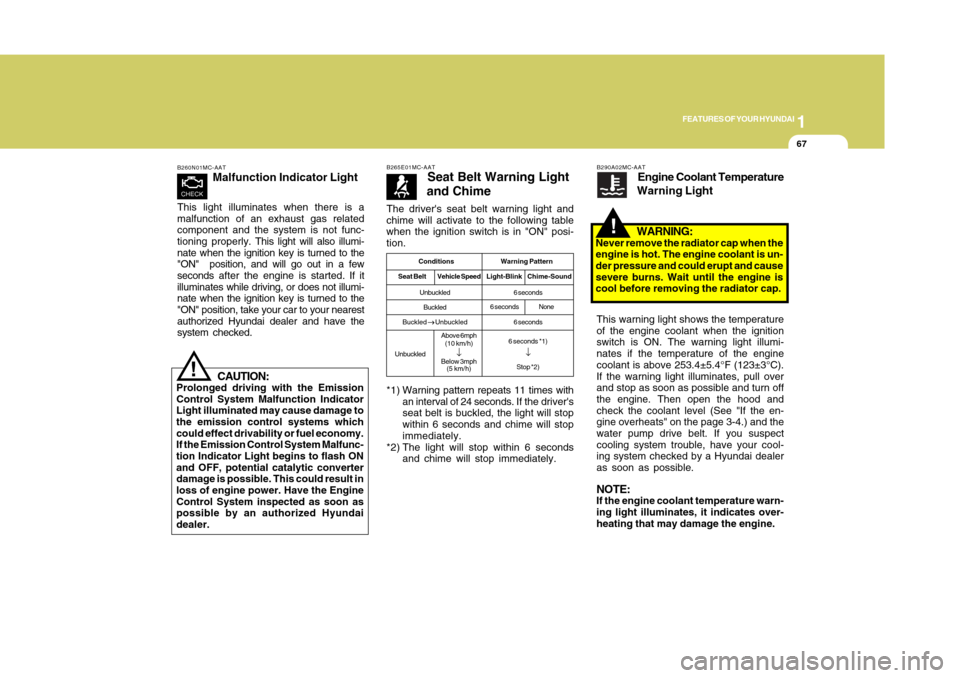
Malfunction Indicator Light
This light illuminates when there is a
malfunction of an exhaust gas related
component and the system is not func-
tioning properly. This light will also illumi-
nate when the ignition key is turned to the
"ON" position, and will go out in a few
seconds after the engine is started. If it
illuminates while driving, or does not illumi-
nate when the ignition key is turned to the
"ON" position, take your car to your nearest
authorized Hyundai dealer and have the
system checked.
!
CAUTION:
Prolonged driving with the Emission
Control System Malfunction Indicator
Light illuminated may cause damage to
the emission control systems which
could effect drivability or fuel economy.
If the Emission Control System Malfunc-
tion Indicator Light begins to flash ON
and OFF, potential catalytic converter
damage is possible. This could result in
loss of engine power. Have the Engine
Control System inspected as soon as
possible by an authorized Hyundai
dealer.The driver's seat belt warning light and
chime will activate to the following table
when the ignition switch is in "ON" posi-
tion.
B265E01MC-AAT
Seat Belt Warning Light
and Chime
*1) Warning pattern repeats 11 times with
an interval of 24 seconds. If the driver's
seat belt is buckled, the light will stop
within 6 seconds and chime will stop
immediately.
*2) The light will stop within 6 seconds
and chime will stop immediately.
Conditions Warning Pattern
Seat BeltVehicle SpeedLight-Blink Chime-SoundUnbuckled
Buckled
Buckled
→ →→ →
→ Unbuckled
UnbuckledAbove 6mph
(10 km/h)
↓
Below 3mph
(5 km/h)6 seconds
6 seconds
6 seconds *1)
↓Stop *2)
6 secondsNone
B290A02MC-AAT
Engine Coolant Temperature
Warning Light
WARNING:
Never remove the radiator cap when the
engine is hot. The engine coolant is un-
der pressure and could erupt and cause
severe burns. Wait until the engine is
cool before removing the radiator cap.
!
This warning light shows the temperature
of the engine coolant when the ignition
switch is ON. The warning light illumi-
nates if the temperature of the engine
coolant is above 253.4±5.4°F (123±3°C).
If the warning light illuminates, pull over
and stop as soon as possible and turn off
the engine. Then open the hood and
check the coolant level (See "If the en-
gine overheats" on the page 3-4.) and the
water pump drive belt. If you suspect
cooling system trouble, have your cool-
ing system checked by a Hyundai dealer
as soon as possible.NOTE:If the engine coolant temperature warn-
ing light illuminates, it indicates over-
heating that may damage the engine.
Page 106 of 282
1
FEATURES OF YOUR HYUNDAI
951
FEATURES OF YOUR HYUNDAI
95
!
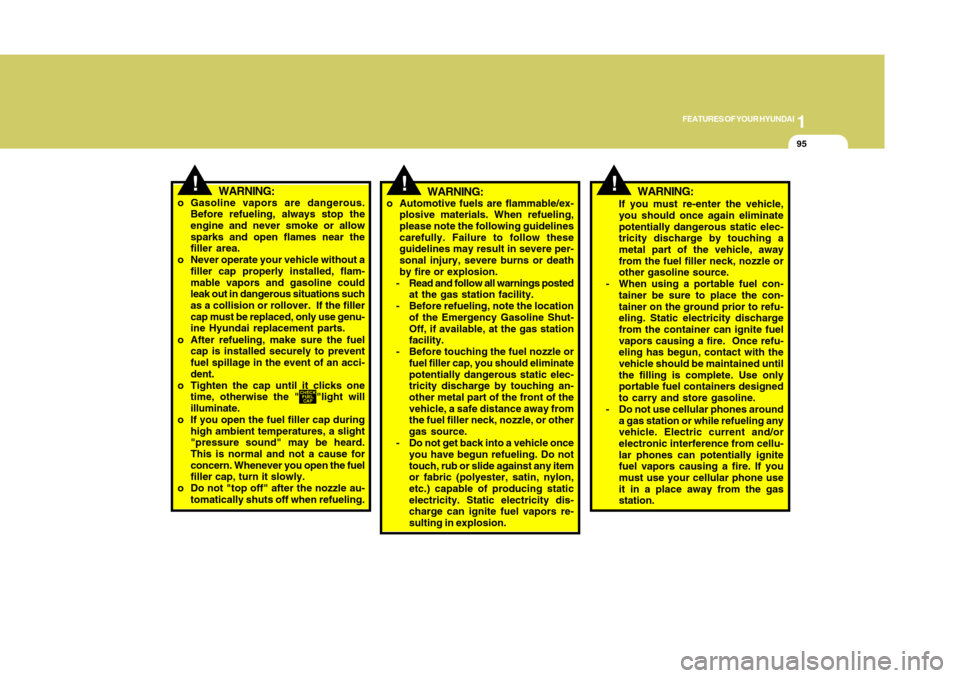
WARNING:
If you must re-enter the vehicle,
you should once again eliminate
potentially dangerous static elec-
tricity discharge by touching a
metal part of the vehicle, away
from the fuel filler neck, nozzle or
other gasoline source.
- When using a portable fuel con-
tainer be sure to place the con-
tainer on the ground prior to refu-
eling. Static electricity discharge
from the container can ignite fuel
vapors causing a fire. Once refu-
eling has begun, contact with the
vehicle should be maintained until
the filling is complete. Use only
portable fuel containers designed
to carry and store gasoline.
- Do not use cellular phones around
a gas station or while refueling any
vehicle. Electric current and/or
electronic interference from cellu-
lar phones can potentially ignite
fuel vapors causing a fire. If you
must use your cellular phone use
it in a place away from the gas
station.
!
WARNING:
o Gasoline vapors are dangerous.
Before refueling, always stop the
engine and never smoke or allow
sparks and open flames near the
filler area.
o Never operate your vehicle without a
filler cap properly installed, flam-
mable vapors and gasoline could
leak out in dangerous situations such
as a collision or rollover. If the filler
cap must be replaced, only use genu-
ine Hyundai replacement parts.
o After refueling, make sure the fuel
cap is installed securely to prevent
fuel spillage in the event of an acci-
dent.
o Tighten the cap until it clicks one
time, otherwise the "
"light will
illuminate.
o If you open the fuel filler cap during
high ambient temperatures, a slight
"pressure sound" may be heard.
This is normal and not a cause for
concern. Whenever you open the fuel
filler cap, turn it slowly.
o Do not "top off" after the nozzle au-
tomatically shuts off when refueling.
o Automotive fuels are flammable/ex-
plosive materials. When refueling,
please note the following guidelines
carefully. Failure to follow these
guidelines may result in severe per-
sonal injury, severe burns or death
by fire or explosion.
- Read and follow all warnings posted
at the gas station facility.
- Before refueling, note the location
of the Emergency Gasoline Shut-
Off, if available, at the gas station
facility.
- Before touching the fuel nozzle or
fuel filler cap, you should eliminate
potentially dangerous static elec-
tricity discharge by touching an-
other metal part of the front of the
vehicle, a safe distance away from
the fuel filler neck, nozzle, or other
gas source.
- Do not get back into a vehicle once
you have begun refueling. Do not
touch, rub or slide against any item
or fabric (polyester, satin, nylon,
etc.) capable of producing static
electricity. Static electricity dis-
charge can ignite fuel vapors re-
sulting in explosion.
!
WARNING:
Page 126 of 282
1
FEATURES OF YOUR HYUNDAI
1151
FEATURES OF YOUR HYUNDAI
115
AIR CONDITIONING SYSTEM
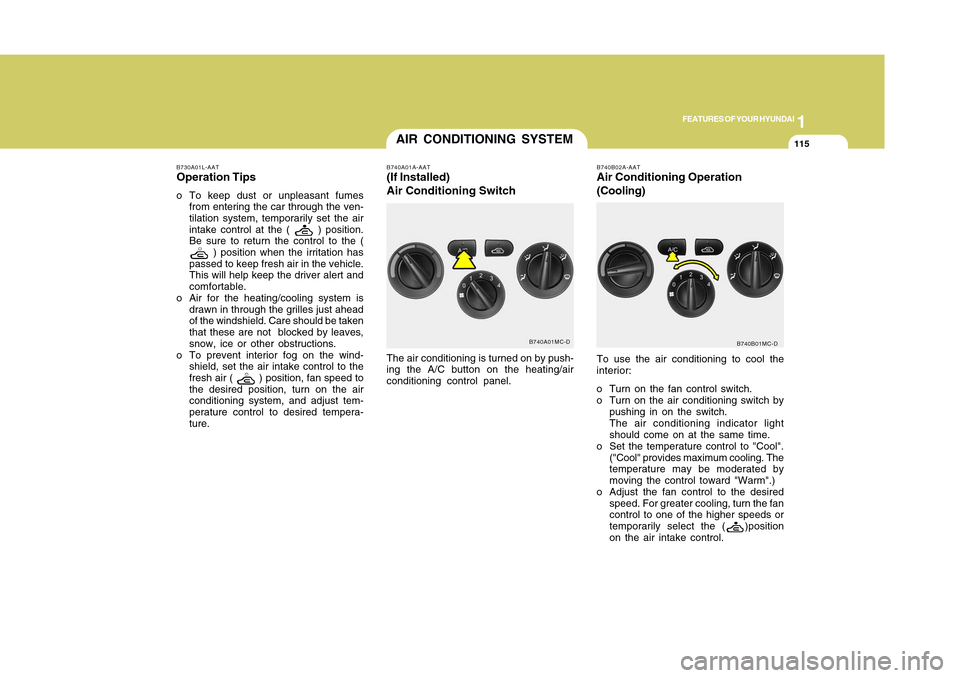
B740A01MC-D B740A01A-AAT
(If Installed)
Air Conditioning SwitchThe air conditioning is turned on by push-
ing the A/C button on the heating/air
conditioning control panel.
B740B02A-AATAir Conditioning Operation
(Cooling)To use the air conditioning to cool the
interior:
o Turn on the fan control switch.
o Turn on the air conditioning switch by
pushing in on the switch.
The air conditioning indicator light
should come on at the same time.
o Set the temperature control to "Cool".
("Cool" provides maximum cooling. The
temperature may be moderated by
moving the control toward "Warm".)
o Adjust the fan control to the desired
speed. For greater cooling, turn the fan
control to one of the higher speeds or
temporarily select the (
)position
on the air intake control.B740B01MC-D B730A01L-AAT
Operation Tipso To keep dust or unpleasant fumes
from entering the car through the ven-
tilation system, temporarily set the air
intake control at the (
) position.
Be sure to return the control to the (
) position when the irritation has
passed to keep fresh air in the vehicle.
This will help keep the driver alert and
comfortable.
o Air for the heating/cooling system is
drawn in through the grilles just ahead
of the windshield. Care should be taken
that these are not blocked by leaves,
snow, ice or other obstructions.
o To prevent interior fog on the wind-
shield, set the air intake control to the
fresh air (
) position, fan speed to
the desired position, turn on the air
conditioning system, and adjust tem-
perature control to desired tempera-
ture.
Page 127 of 282
1FEATURES OF YOUR HYUNDAI
116
B740D01A-AATOperation Tipso If the interior of the car is hot when you
first get in, open the windows for a few
minutes to expel the hot air.
o When you are using the air condition-
ing system, keep all windows closed to
keep hot air out.
o When moving slowly, as in heavy traf-
fic, shift to a lower gear.
This increases engine speed, which in
turn increases the speed of the air
conditioning compressor.
o On steep grades, turn the air condi-
tioning off to avoid the possibility of the
engine overheating.
o During winter months or in periods
when the air conditioning is not used
regularly, run the air conditioning once
every month for a few minutes.
This will help circulate the lubricants
and keep your system in peak operat-
ing condition.
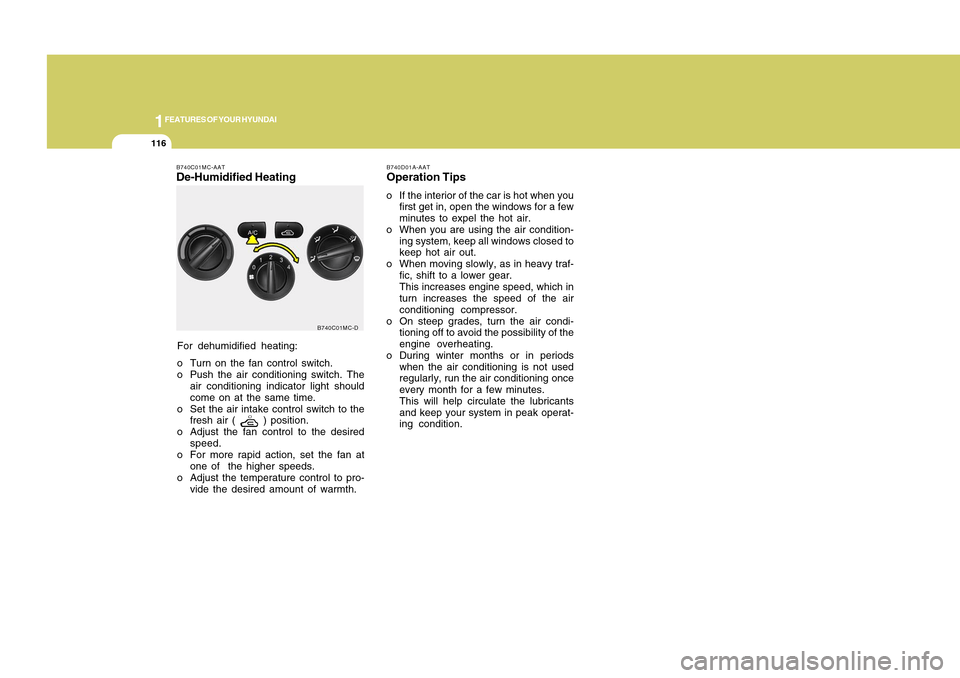
For dehumidified heating:
o Turn on the fan control switch.
o Push the air conditioning switch. The
air conditioning indicator light should
come on at the same time.
o Set the air intake control switch to the
fresh air (
) position.
o Adjust the fan control to the desired
speed.
o For more rapid action, set the fan at
one of the higher speeds.
o Adjust the temperature control to pro-
vide the desired amount of warmth.
B740C01MC-AATDe-Humidified Heating
B740C01MC-D
Page 185 of 282
34WHAT TO DO IN AN EMERGENCY
IF THE ENGINE OVERHEATSD030A02A-AATIf your temperature gauge indicates over-
heating, you experience a loss of power,
or hear loud pinging or knocking, the
engine is probably too hot. If this hap-
pens, you should:
1. Pull off the road and stop as soon as
it is safe to do so.
2. Place the gear selector lever in "P"
(automatic), or neutral (manual
transaxle) and set the parking brake. If
the air conditioner is on, turn it off.
3. If coolant is running out under the car
or steam is coming out from under-
neath the hood, stop the engine. Do
not open the hood until the coolant
has stopped running or the steaming
has stopped. If there is no visible loss
of coolant and no steam, leave the
engine running and check to be sure
the engine cooling fan is operating. If
the fan is not running, turn the engine
off.
4. Check to see if the water pump drive
belt is missing. If it is not missing,
check to see that it is tight. If the drive
belt seems to be satisfactory, check for
coolant leaking from the radiator, hoses
or under the car. (If the air conditioner
had been in use, it is normal for cold
water to be draining from it when you
stop). 3. Attach the clamps of the jumper cable
in the exact location shown on the
previous page. First, attach one clamp
of the jumper cable to the positive (+)
post or cable of the discharged battery.
Then attach the other end of the same
cable to the positive (+) post or cable
of the booster battery. Next, using the
other cable, attach one clamp to the
negative (-) post or cable of the booster
battery. Then attach the other end of
that cable to a solid metal part of the
engine away from the battery. Do not
connect the cable to any moving part.
4. Start the engine in the car with the
booster battery and let it run for a few
minutes. This will help to assure that
the booster battery is fully charged.
During the jumping operation, run the
engine in this vehicle at about 2000
rpm.
5. Start the engine in the car with the
discharged battery using the normal
starting procedure. After the engine
starts, leave the jumper cables con-
nected and let the engine run at fast
idle or about 2000 rpm for several
minutes.
6. Carefully remove the jumper cables in
the reverse order of attachment.If you do not know why your battery be-
came discharged (because the lights were
left on, etc.), have the charging system
checked by your Hyundai dealer.
Page 207 of 282
44
CORROSION PREVENTION AND APPEARANCE CARE6
E040A01A-AATTo Clean the Vinyl UpholsteryTo clean the vinyl upholstery, first remove
loose dirt and dust with a vacuum cleaner.
Then apply a solution of mild soap or
detergent and water using a clean sponge
or soft cloth. Allow this to stay on the
surface to loosen the dirt, then wipe with
a clean damp sponge or cloth. If all the
dirt stains are not removed, repeat this
procedure until the upholstery is clean.
Do not use gasoline, solvent, paint thin-
ner or other strong cleaners.CLEANING THE INTERIOR
E030D01A-AATWhen to Wax AgainYou should polish and wax the car again
when water no longer beads on a clean
surface but spreads out over a larger
area.E030E01A-AATMaintaining BumpersSpecial precautions must be observed to
preserve the appearance of the bumpers
on your Hyundai. They are:
o Be careful not to spill battery electro-
lyte or hydraulic brake fluid on the
bumpers. If you do, wash it off imme-
diately with clean water.
o Be gentle when cleaning the bumper
surfaces. They are made of soft plastic
and the surface can be damaged if
mistreated. Do not use abrasive clean-
ers. Use warm water and mild soap or
carwashing solution.
o Do not expose the bumpers to high
temperatures. For example, if you have
your car repainted, do not leave the
bumpers on the car if the car is going
to be placed in a high-temperature
paint booth.
E040B01A-AATTo Clean the Leather Upholstery
(If Installed)In the normal course of use, leather up-
holstered surfaces will, like any material,
pick-up dust and dirt. This dust and dirt
must be cleaned off or it may work into the
surface of the leather, causing damage.
Fine leather needs care, and should be
cleaned when necessary. Washing
leather thoroughly with soap and water
will keep your leather lustrous, beautiful
and ensure you have many years of wear.
Take a piece of cheese cloth and using
any mild soap and lukewarm water, work
up a good lather. Thoroughly wash the
leather. Wipe clean with a slightly damp
cloth and dry with soft cloth. Do this as
often as the leather becomes soiled.
During tanning operations, sufficient oils
are incorporated through processing that
none need be applied during the life of
the leather. Oil applied to the finished
surface will in no way help the leather
and may do more harm than good. Var-
nishes and furniture polishes should
never be used under any conditions.
Page 239 of 282
6
DO-IT-YOURSELF MAINTENANCE
21
!
G220A01A-AAT
G220B01A-AATChecking Engine Cooling FanThe engine cooling fan should come on
automatically if the engine coolant tem-
perature is high.WARNING:
The radiator fan is controlled by engine
coolant temperature and may some-
times operate even when the engine is
not running. Use extreme caution when
working near the blades of the cooling
fan, so that you are not injured by a
rotating fan blade. As the coolant tem-
perature decreases the fan will auto-
matically shut off. This is a normal con-
dition.G220C01A-AATChecking Condenser Cooling FanThe condenser cooling fan should come
on automatically whenever the air condi-
tioner is in operation.CHECKING ELECTRIC
COOLING FANS
!
Wear eye protection when
charging or working near a
battery.
Always provide ventilation
when working in an enclosed
space.
An inappropriately disposed
battery can be harmful to the
environment and human
health. Dispose the battery
according to your local law(s)
or regulation.
o When lifting a plastic-cased battery,
excessive pressure on the case may
cause battery acid to leak, resulting
in personal injury. Lift with a battery
carrier or with your hands on oppo-
site corners.
o Never attempt to charge the battery
when the battery cables are con-
nected.
o The electrical ignition system works
with high voltage.
Never touch these components with
the engine running or the ignition
switched on.
WARNING:
Always read the following in-
structions carefully when han-
dling a battery.
Keep lighted cigarettes and
all other flames or sparks
away from the battery.
Hydrogen, which is a highly
combustible gas, is always
present in battery cells and
may explode if ignited.
Keep batteries out of the reach
of children because batteries
contain highly corrosive SUL-
FURIC ACID. Do not allow bat-
tery acid to contact your skin,
eyes, clothing or paint finish.
If any electrolyte gets into
your eyes, flush your eyes
with clean water for at least
15 minutes and get immedi-
ate medical attention. If pos-
sible, continue to apply water
with a sponge or cloth until
medical attention is received.
If electrolyte gets on your skin,
thoroughly wash the con-
tacted area.
If you feel a pain or a burning
sensation, get medical atten-
tion immediately.
!
WARNING: