radio Hyundai Accent 2013 User Guide
[x] Cancel search | Manufacturer: HYUNDAI, Model Year: 2013, Model line: Accent, Model: Hyundai Accent 2013Pages: 402, PDF Size: 8.49 MB
Page 200 of 402
Features of your vehicle
130 4
CAUTION IN USING USB
DEVICE
• To use an external USB device,
make sure the device is not con-
nected when starting up the vehi-
cle. Connect the device after
starting up.
• If you start the engine when the
USB device is connected, it may
damage the USB device. (USB
flashdrives are very sensitive to
electric shock.)
• If the engine is started up or
turned off while the external USB
device is connected, the external
USB device may not work.
• It may not play inauthentic MP3 or
WMA files.
1) It can only play MP3 files with
the compression rate between
8Kbps~320Kbps.
2) It can only play WMA music
files with the compression rate
between 8Kbps~320Kbps.
• Take precautions for static elec-
tricity when connecting or dis-
connecting the external USB
device.
(Continued)
(Continued)
• An encrypted MP3 PLAYER is not
recognizable.
• Depending on the condition of
the external USB device, the con-
nected external USB device can
be unrecognizable.
• When the formatted byte/sector
setting of External USB device is
not either 512BYTE or 2048BYTE,
then the device will not be recog-
nized.
• Use only a USB device formatted
to FAT 12/16/32.
• USB devices without USB I/F
authentication may not be recog-
nizable.
• Make sure the USB connection
terminal does not come in con-
tact with the human body or other
objects.
• If you repeatedly connect or dis-
connect the USB device in a short
period of time, it may break the
device.
• You may hear a strange noise
when connecting or disconnect-
ing a USB device.
(Continued)(Continued)
• If you disconnect the external
USB device during playback in
USB mode, the external USB
device can be damaged or may
malfunction. Therefore, discon-
nect the external USB device
when the audio is turned off or in
another mode. (e.g, Radio or CD)
• Depending on the type and
capacity of the external USB
device or the type of the files
stored in the device, there is a dif-
ference in the time taken for
recognition of the device.
• Do not use the USB device for
purposes other than playing
music files.
• Use of USB accessories such as
rechargers or heaters using USB
I/F may lower performance or
cause trouble.
• If you use devices such as a USB
hub purchased separately, the
vehicle’s audio system may not
recognize the USB device. In that
case, connect the USB device
directly to the multimedia termi-
nal of the vehicle.
(Continued)
Page 212 of 402
Features of your vehicle
142 4
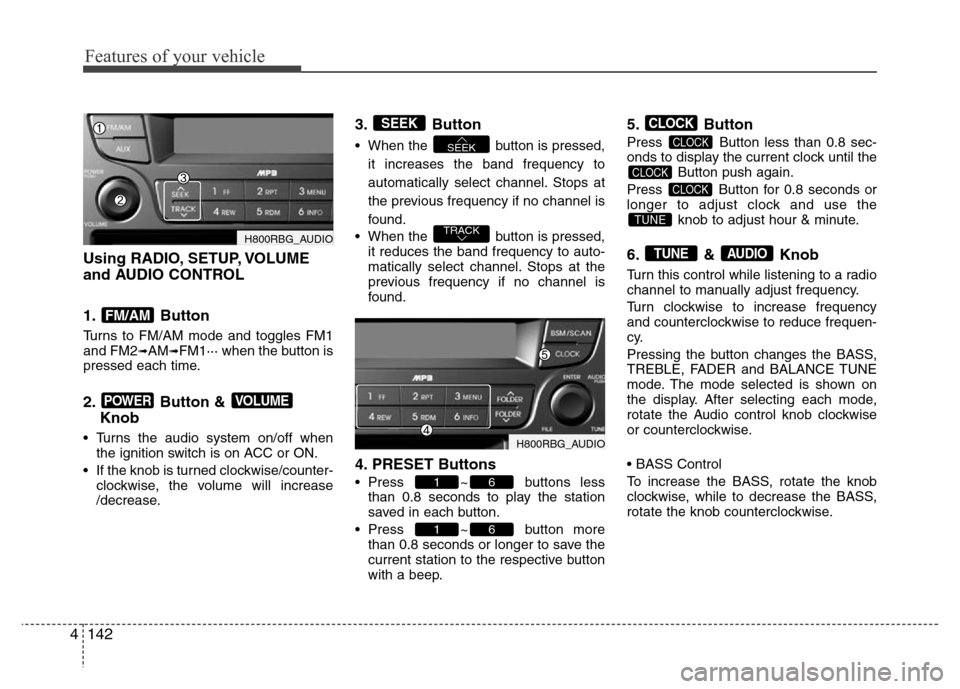
Using RADIO, SETUP, VOLUME
and AUDIO CONTROL
1. Button
Turns to FM/AM mode and toggles FM1
and FM2➟AM➟FM1··· when the button is
pressed each time.
2. Button &
Knob
• Turns the audio system on/off when
the ignition switch is on ACC or ON.
• If the knob is turned clockwise/counter-
clockwise, the volume will increase
/decrease.
3. Button
• When the button is pressed,
it increases the band frequency to
automatically select channel. Stops at
the previous frequency if no channel is
found.
• When the button is pressed,
it reduces the band frequency to auto-
matically select channel. Stops at the
previous frequency if no channel is
found.
4. PRESET Buttons
• Press ~ buttons less
than 0.8 seconds to play the station
saved in each button.
• Press ~ button more
than 0.8 seconds or longer to save the
current station to the respective button
with a beep.
5. Button
Press Button less than 0.8 sec-
onds to display the current clock until the
Button push again.
Press Button for 0.8 seconds or
longer to adjust clock and use the
knob to adjust hour & minute.
6. & Knob
Turn this control while listening to a radio
channel to manually adjust frequency.
Turn clockwise to increase frequency
and counterclockwise to reduce frequen-
cy.
Pressing the button changes the BASS,
TREBLE, FADER and BALANCE TUNE
mode. The mode selected is shown on
the display. After selecting each mode,
rotate the Audio control knob clockwise
or counterclockwise.
• BASS Control
To increase the BASS, rotate the knob
clockwise, while to decrease the BASS,
rotate the knob counterclockwise.
AUDIOTUNE
TUNE
CLOCK
CLOCK
CLOCK
CLOCK
61
61
TRACK
SEEK
SEEK
VOLUMEPOWER
FM/AM
H800RBG_AUDIO
H800RBG_AUDIO
Page 216 of 402
Features of your vehicle
146 4
CAUTION IN USING USB
DEVICE
• To use an external USB device,
make sure the device is not con-
nected when starting up the vehi-
cle. Connect the device after
starting up.
• If you start the engine when the
USB device is connected, it may
damage the USB device. (USB
flashdrives are very sensitive to
electric shock.)
• If the engine is started up or
turned off while the external USB
device is connected, the external
USB device may not work.
• It may not play inauthentic MP3 or
WMA files.
1) It can only play MP3 files with
the compression rate between
8Kbps~320Kbps.
2) It can only play WMA music
files with the compression rate
between 8Kbps~320Kbps.
• Take precautions for static elec-
tricity when connecting or dis-
connecting the external USB
device.
(Continued)
(Continued)
• An encrypted MP3 PLAYER is not
recognizable.
• Depending on the condition of
the external USB device, the con-
nected external USB device can
be unrecognizable.
• When the formatted byte/sector
setting of External USB device is
not either 512BYTE or 2048BYTE,
then the device will not be recog-
nized.
• Use only a USB device formatted
to FAT 12/16/32.
• USB devices without USB I/F
authentication may not be recog-
nizable.
• Make sure the USB connection
terminal does not come in con-
tact with the human body or other
objects.
• If you repeatedly connect or dis-
connect the USB device in a short
period of time, it may break the
device.
• You may hear a strange noise
when connecting or disconnect-
ing a USB device.
(Continued)(Continued)
• If you disconnect the external
USB device during playback in
USB mode, the external USB
device can be damaged or may
malfunction. Therefore, discon-
nect the external USB device
when the audio is turned off or in
another mode. (e.g, Radio or CD)
• Depending on the type and
capacity of the external USB
device or the type of the files
stored in the device, there is a dif-
ference in the time taken for
recognition of the device.
• Do not use the USB device for
purposes other than playing
music files.
• Use of USB accessories such as
rechargers or heaters using USB
I/F may lower performance or
cause trouble.
• If you use devices such as a USB
hub purchased separately, the
vehicle’s audio system may not
recognize the USB device. In that
case, connect the USB device
directly to the multimedia termi-
nal of the vehicle.
(Continued)
Page 220 of 402
Features of your vehicle
150 4
✽NOTICE FOR USING THE
iPod®DEVICE
• Some iPod®models might not support
the communication protocol and the
files will not be played.
Supported iPod
®models:
- iPod®Mini
- iPod®4th (Photo) ~ 6th (Classic) gen-
eration
- iPod
®Nano 1st~4th generation
- iPod®Touch 1st~2nd generation
• The order of search or playback of
songs in the iPod
®can be different
from the order searched in the audio
system.
• If the iPod
®disabled due to its own
malfunction, reset the iPod®. (Reset:
Refer to iPod®manual)
• An iPod®may not operate normally
on low battery.
• Some iPod
®devices, such as the
iPhone, can be connected through the
Bluetooth
®Wireless Technology inter-
face. The device must have audio
Bluetooth
®Wireless Technology capa-
bility (such as for stereo headphone
Bluetooth
® Wireless Technology). The
device can play, but it will not be con-
trolled by the audio system.
(Continued)
• When adjusting the sound effects
of the iPod
®and the audio sys-
tem, the sound effects of both
devices will overlap and might
reduce or distort the quality of the
sound.
• Deactivate (turn off) the equalizer
function of an iPod
®when adjust-
ing the audio system’s volume,
and turn off the equalizer of the
audio system when using the
equalizer of an iPod
®.
• When the iPod®cable is connect-
ed, the system can be switched to
RADIO mode even without iPod
®
device and may cause noise.
Disconnect the iPod®cable when
you are not using the iPod®
device.
• When not using iPod®with car
audio, detach the iPod®cable
from iPod®. Otherwise, iPod®may
remain in accessory mode, and
may not work properly.
CAUTION IN USING THE
iPod®DEVICE
• The HYUNDAI iPod®Power Cable
is (separeted USB, AUX jack type)
needed in order to operate iPod
®
with the audio buttons on the
audio system. The USB cable pro-
vided by Apple may cause mal-
function and should not be used
for HYUNDAI vehicles.
• When using this cable,
- Connect both AUX and USB
JACK to use iPod
®.
- Unconnect both AUX and USB
JACK to remove iPod
®.
❋iPod
Page 402 of 402
89
Specifications & Consumer information
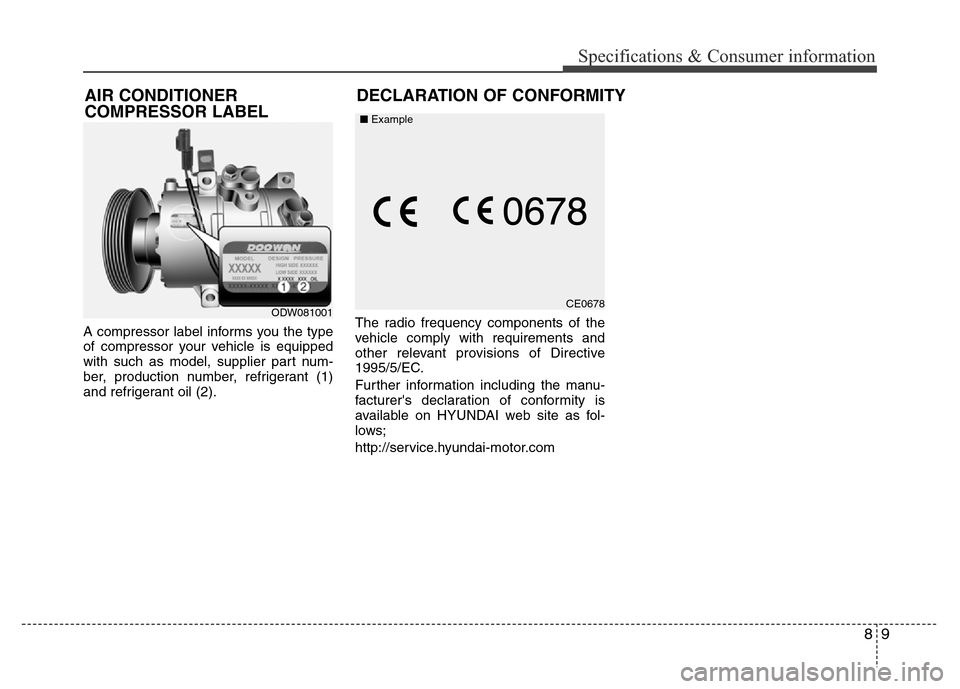
A compressor label informs you the type
of compressor your vehicle is equipped
with such as model, supplier part num-
ber, production number, refrigerant (1)
and refrigerant oil (2).The radio frequency components of the
vehicle comply with requirements and
other relevant provisions of Directive
1995/5/EC.
Further information including the manu-
facturer's declaration of conformity is
available on HYUNDAI web site as fol-
lows;
http://service.hyundai-motor.com
ODW081001
AIR CONDITIONER
COMPRESSOR LABELDECLARATION OF CONFORMITY
CE0678 ■Example