tailgate Hyundai Accent 2013 User Guide
[x] Cancel search | Manufacturer: HYUNDAI, Model Year: 2013, Model line: Accent, Model: Hyundai Accent 2013Pages: 402, PDF Size: 8.49 MB
Page 156 of 402
Features of your vehicle
86 4
CAUTION
The luggage room lamp comes on
as long as the trunk lid/tailgate
opens. To prevent unnecessary
charging system drain, close the
trunk lid/tailgate securely after
using the luggage room.
Page 183 of 402
4113
Features of your vehicle
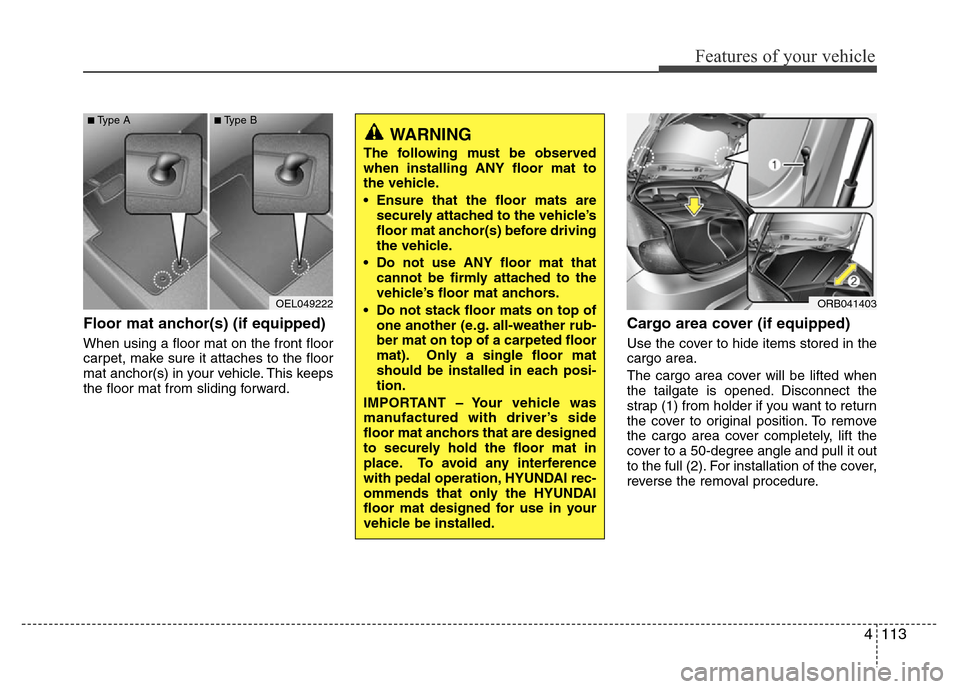
Floor mat anchor(s) (if equipped)
When using a floor mat on the front floor
carpet, make sure it attaches to the floor
mat anchor(s) in your vehicle. This keeps
the floor mat from sliding forward.
Cargo area cover (if equipped)
Use the cover to hide items stored in the
cargo area.
The cargo area cover will be lifted when
the tailgate is opened. Disconnect the
strap (1) from holder if you want to return
the cover to original position. To remove
the cargo area cover completely, lift the
cover to a 50-degree angle and pull it out
to the full (2). For installation of the cover,
reverse the removal procedure.
OEL049222
■Type A■Type B
WARNING
The following must be observed
when installing ANY floor mat to
the vehicle.
• Ensure that the floor mats are
securely attached to the vehicle’s
floor mat anchor(s) before driving
the vehicle.
• Do not use ANY floor mat that
cannot be firmly attached to the
vehicle’s floor mat anchors.
• Do not stack floor mats on top of
one another (e.g. all-weather rub-
ber mat on top of a carpeted floor
mat). Only a single floor mat
should be installed in each posi-
tion.
IMPORTANT – Your vehicle was
manufactured with driver’s side
floor mat anchors that are designed
to securely hold the floor mat in
place. To avoid any interference
with pedal operation, HYUNDAI rec-
ommends that only the HYUNDAI
floor mat designed for use in your
vehicle be installed.
ORB041403
Page 184 of 402
Features of your vehicle
114 4
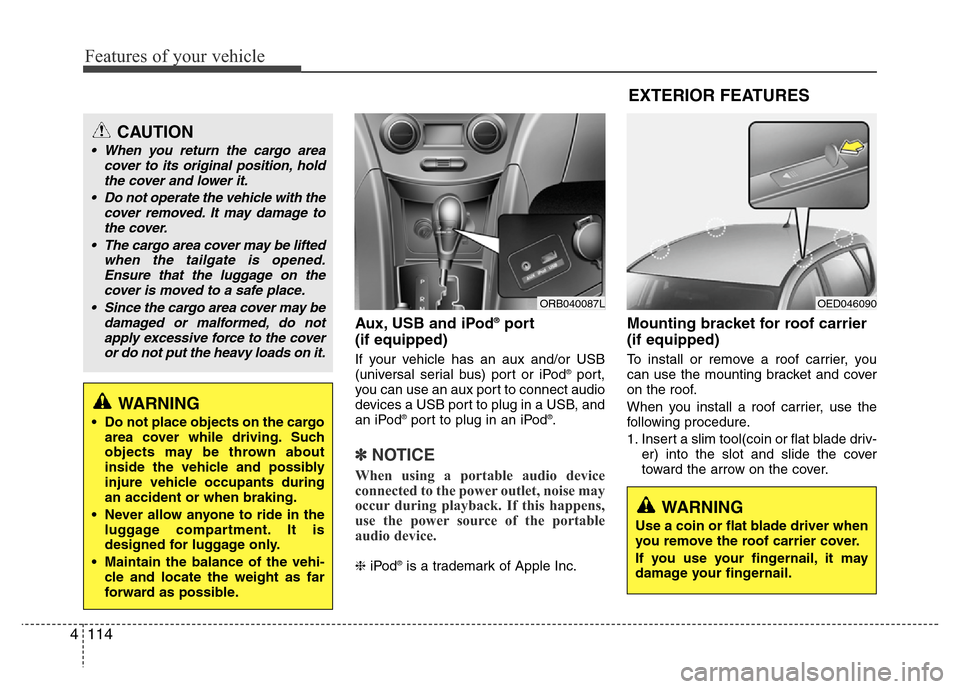
Aux, USB and iPod®port
(if equipped)
If your vehicle has an aux and/or USB
(universal serial bus) port or iPod®port,
you can use an aux port to connect audio
devices a USB port to plug in a USB, and
an iPod
®port to plug in an iPod®.
✽NOTICE
When using a portable audio device
connected to the power outlet, noise may
occur during playback. If this happens,
use the power source of the portable
audio device.
❈iPod®is a trademark of Apple Inc.
Mounting bracket for roof carrier
(if equipped)
To install or remove a roof carrier, you
can use the mounting bracket and cover
on the roof.
When you install a roof carrier, use the
following procedure.
1. Insert a slim tool(coin or flat blade driv-
er) into the slot and slide the cover
toward the arrow on the cover.
ORB040087L
CAUTION
• When you return the cargo area
cover to its original position, hold
the cover and lower it.
• Do not operate the vehicle with the
cover removed. It may damage to
the cover.
• The cargo area cover may be lifted
when the tailgate is opened.
Ensure that the luggage on the
cover is moved to a safe place.
• Since the cargo area cover may be
damaged or malformed, do not
apply excessive force to the cover
or do not put the heavy loads on it.
WARNING
• Do not place objects on the cargo
area cover while driving. Such
objects may be thrown about
inside the vehicle and possibly
injure vehicle occupants during
an accident or when braking.
• Never allow anyone to ride in the
luggage compartment. It is
designed for luggage only.
• Maintain the balance of the vehi-
cle and locate the weight as far
forward as possible.
OED046090
WARNING
Use a coin or flat blade driver when
you remove the roof carrier cover.
If you use your fingernail, it may
damage your fingernail.
EXTERIOR FEATURES
Page 288 of 402
615
What to do in an emergency
When towing your vehicle in an emer-
gency without wheel dollies :
1. Set the ignition switch in the ACC posi-
tion.
2. Place the shift lever in N (Neutral).
3. Release the parking brake.
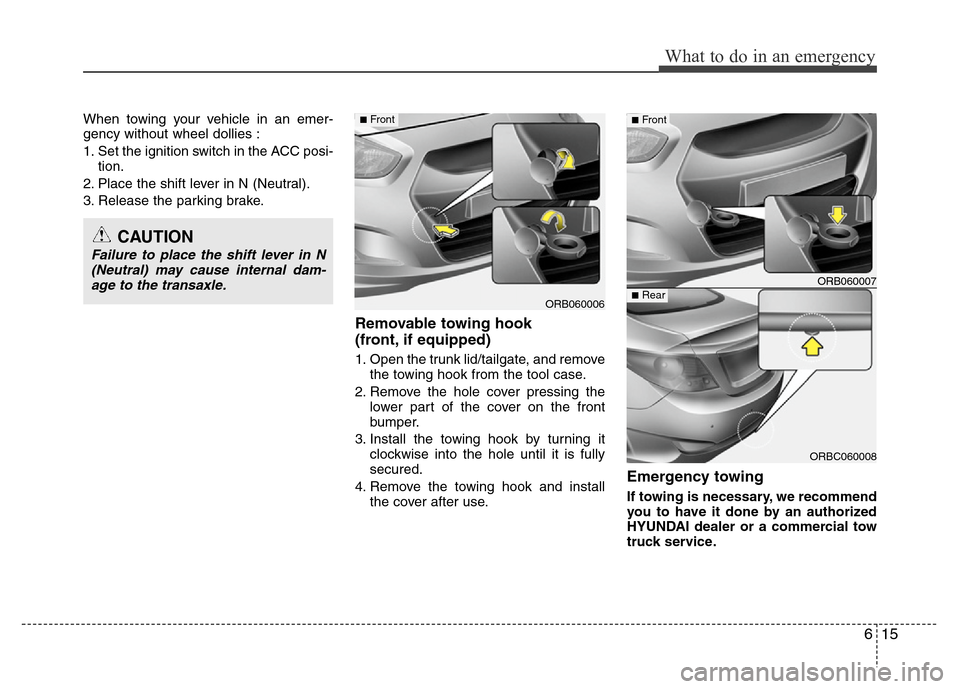
Removable towing hook
(front, if equipped)
1. Open the trunk lid/tailgate, and remove
the towing hook from the tool case.
2. Remove the hole cover pressing the
lower part of the cover on the front
bumper.
3. Install the towing hook by turning it
clockwise into the hole until it is fully
secured.
4. Remove the towing hook and install
the cover after use.
Emergency towing
If towing is necessary, we recommend
you to have it done by an authorized
HYUNDAI dealer or a commercial tow
truck service.
CAUTION
Failure to place the shift lever in N
(Neutral) may cause internal dam-
age to the transaxle.
ORB060006
■Front
ORB060007
ORBC060008
■Front
■Rear
Page 380 of 402
789
Maintenance
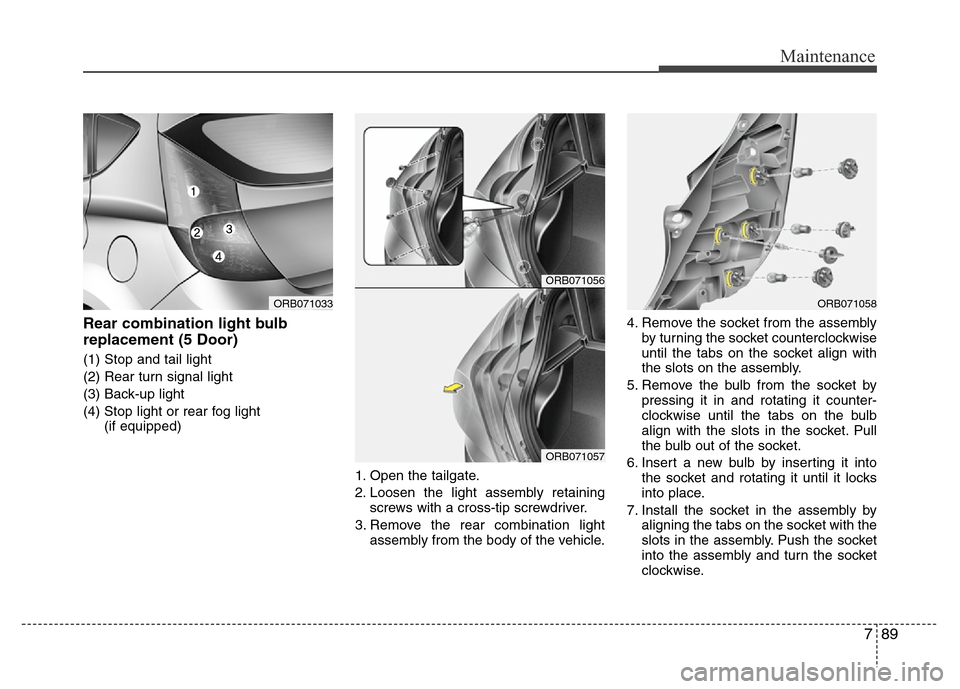
Rear combination light bulb
replacement (5 Door)
(1) Stop and tail light
(2) Rear turn signal light
(3) Back-up light
(4) Stop light or rear fog light
(if equipped)
1. Open the tailgate.
2. Loosen the light assembly retaining
screws with a cross-tip screwdriver.
3. Remove the rear combination light
assembly from the body of the vehicle.4. Remove the socket from the assembly
by turning the socket counterclockwise
until the tabs on the socket align with
the slots on the assembly.
5. Remove the bulb from the socket by
pressing it in and rotating it counter-
clockwise until the tabs on the bulb
align with the slots in the socket. Pull
the bulb out of the socket.
6. Insert a new bulb by inserting it into
the socket and rotating it until it locks
into place.
7. Install the socket in the assembly by
aligning the tabs on the socket with the
slots in the assembly. Push the socket
into the assembly and turn the socket
clockwise.
ORB071056
ORB071057
ORB071033ORB071058