trans Hyundai Accent 2013 User Guide
[x] Cancel search | Manufacturer: HYUNDAI, Model Year: 2013, Model line: Accent, Model: Hyundai Accent 2013Pages: 402, PDF Size: 8.49 MB
Page 83 of 402
413
Features of your vehicle
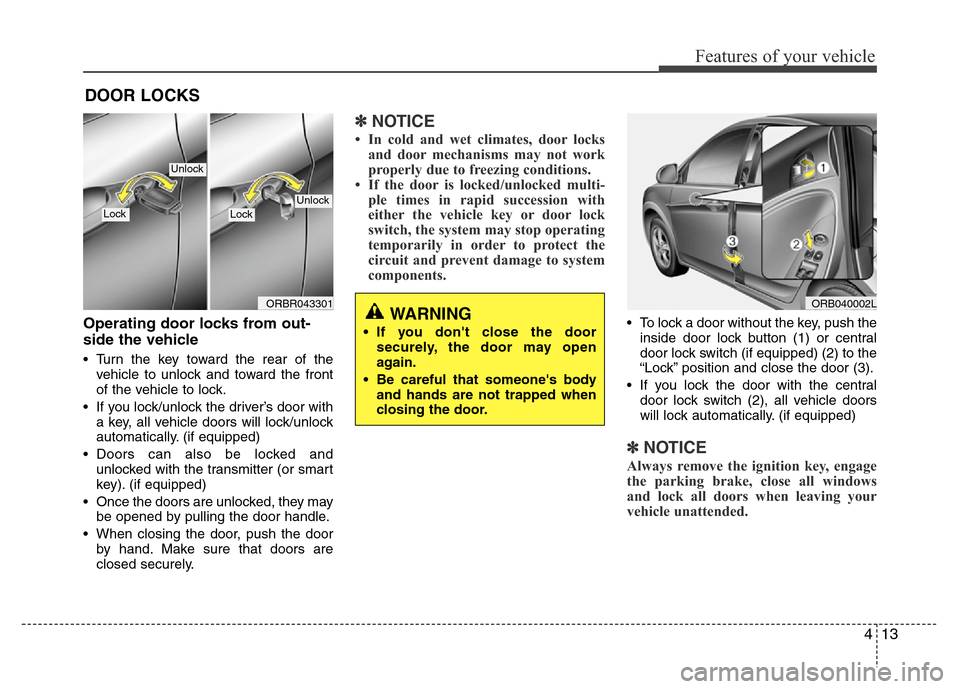
Operating door locks from out-
side the vehicle
• Turn the key toward the rear of the
vehicle to unlock and toward the front
of the vehicle to lock.
• If you lock/unlock the driver’s door with
a key, all vehicle doors will lock/unlock
automatically. (if equipped)
• Doors can also be locked and
unlocked with the transmitter (or smart
key). (if equipped)
• Once the doors are unlocked, they may
be opened by pulling the door handle.
• When closing the door, push the door
by hand. Make sure that doors are
closed securely.
✽NOTICE
• In cold and wet climates, door locks
and door mechanisms may not work
properly due to freezing conditions.
• If the door is locked/unlocked multi-
ple times in rapid succession with
either the vehicle key or door lock
switch, the system may stop operating
temporarily in order to protect the
circuit and prevent damage to system
components.
• To lock a door without the key, push the
inside door lock button (1) or central
door lock switch (if equipped) (2
) to the
“Lock” position and close the door (3).
• If you lock the door with the central
door lock switch (2), all vehicle doors
will lock automatically. (if equipped)
✽NOTICE
Always remove the ignition key, engage
the parking brake, close all windows
and lock all doors when leaving your
vehicle unattended.
DOOR LOCKS
ORB040002LWARNING
• If you don't close the door
securely, the door may open
again.
• Be careful that someone's body
and hands are not trapped when
closing the door.
ORBR043301
UnlockLockLock
Unlock
Page 87 of 402
417
Features of your vehicle
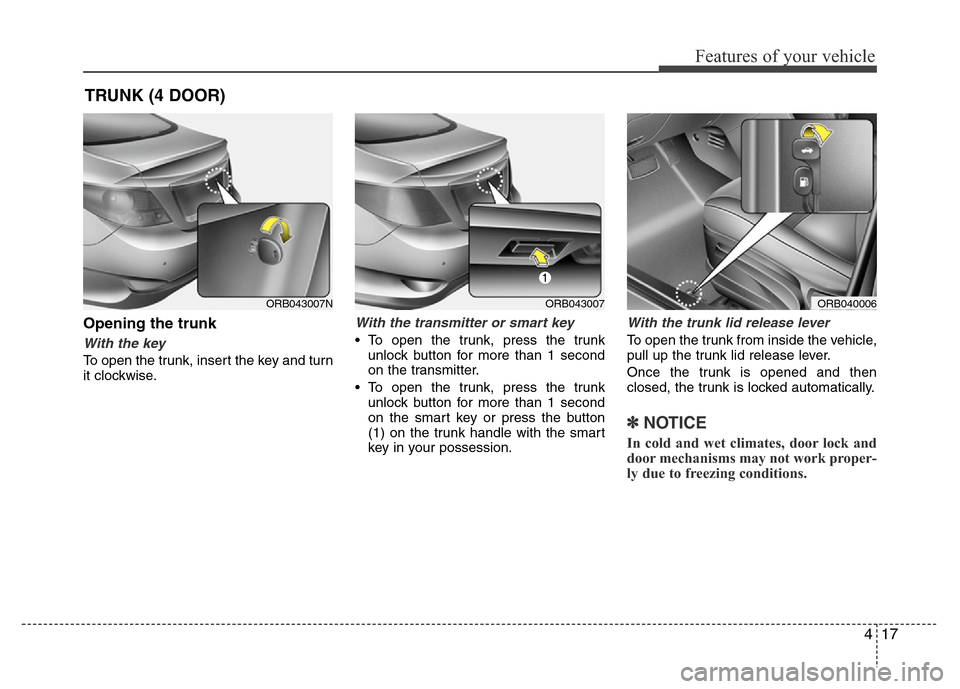
Opening the trunk
With the key
To open the trunk, insert the key and turn
it clockwise.
With the transmitter or smart key
• To open the trunk, press the trunk
unlock button for more than 1 second
on the transmitter.
• To open the trunk, press the trunk
unlock button for more than 1 second
on the smart key or press the button
(1) on the trunk handle with the smart
key in your possession.
With the trunk lid release lever
To open the trunk from inside the vehicle,
pull up the trunk lid release lever.
Once the trunk is opened and then
closed, the trunk is locked automatically.
✽NOTICE
In cold and wet climates, door lock and
door mechanisms may not work proper-
ly due to freezing conditions.
TRUNK (4 DOOR)
ORB040006ORB043007ORB043007N
Page 90 of 402
Features of your vehicle
20 4
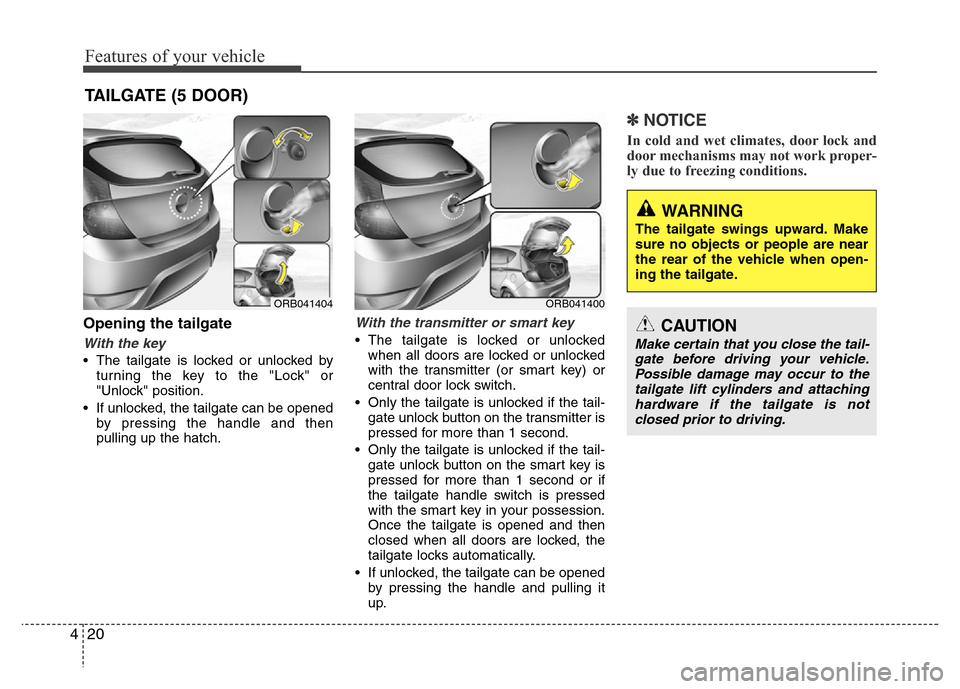
Opening the tailgate
With the key
• The tailgate is locked or unlocked by
turning the key to the "Lock" or
"Unlock" position.
• If unlocked, the tailgate can be opened
by pressing the handle and then
pulling up the hatch.
With the transmitter or smart key
• The tailgate is locked or unlocked
when all doors are locked or unlocked
with the transmitter (or smart key) or
central door lock switch.
• Only the tailgate is unlocked if the tail-
gate unlock button on the transmitter is
pressed for more than 1 second.
• Only the tailgate is unlocked if the tail-
gate unlock button on the smart key is
pressed for more than 1 second or if
the tailgate handle switch is pressed
with the smart key in your possession.
Once the tailgate is opened and then
closed when all doors are locked, the
tailgate locks automatically.
• If unlocked, the tailgate can be opened
by pressing the handle and pulling it
up.
✽NOTICE
In cold and wet climates, door lock and
door mechanisms may not work proper-
ly due to freezing conditions.
TAILGATE (5 DOOR)
WARNING
The tailgate swings upward. Make
sure no objects or people are near
the rear of the vehicle when open-
ing the tailgate.
CAUTION
Make certain that you close the tail-
gate before driving your vehicle.
Possible damage may occur to the
tailgate lift cylinders and attaching
hardware if the tailgate is not
closed prior to driving.
ORB041400ORB041404
Page 98 of 402
Features of your vehicle
28 4
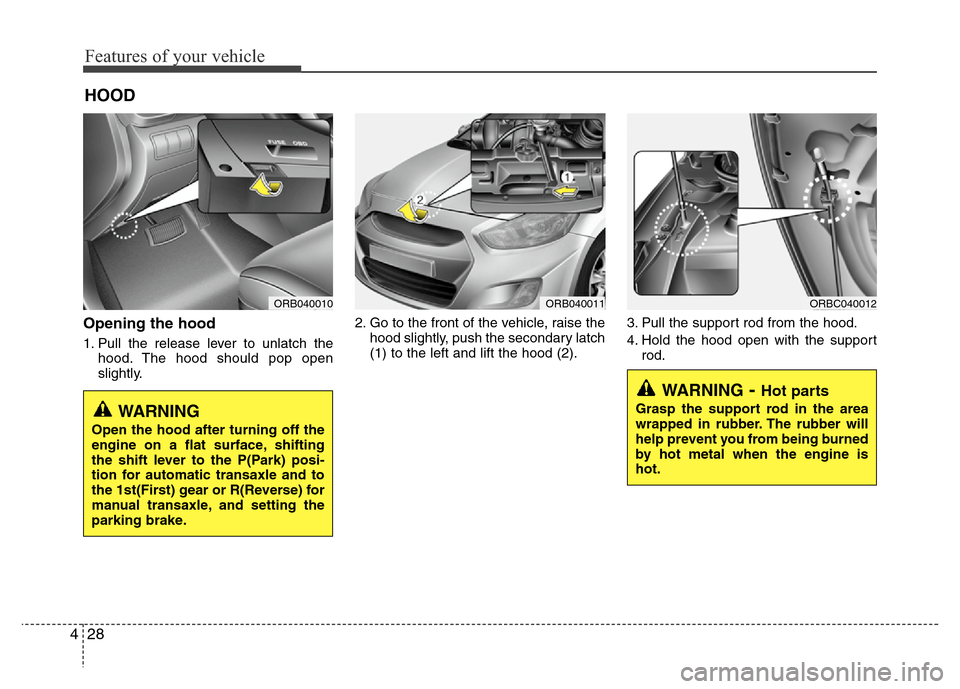
Opening the hood
1. Pull the release lever to unlatch the
hood. The hood should pop open
slightly.2. Go to the front of the vehicle, raise the
hood slightly, push the secondary latch
(1) to the left and lift the hood (2).3. Pull the support rod from the hood.
4. Hold the hood open with the support
rod.
HOOD
ORB040010ORB040011ORBC040012
WARNING- Hot parts
Grasp the support rod in the area
wrapped in rubber. The rubber will
help prevent you from being burned
by hot metal when the engine is
hot.WARNING
Open the hood after turning off the
engine on a flat surface, shifting
the shift lever to the P(Park) posi-
tion for automatic transaxle and to
the 1st(First) gear or R(Reverse) for
manual transaxle, and setting the
parking brake.
Page 122 of 402
Features of your vehicle
52 4
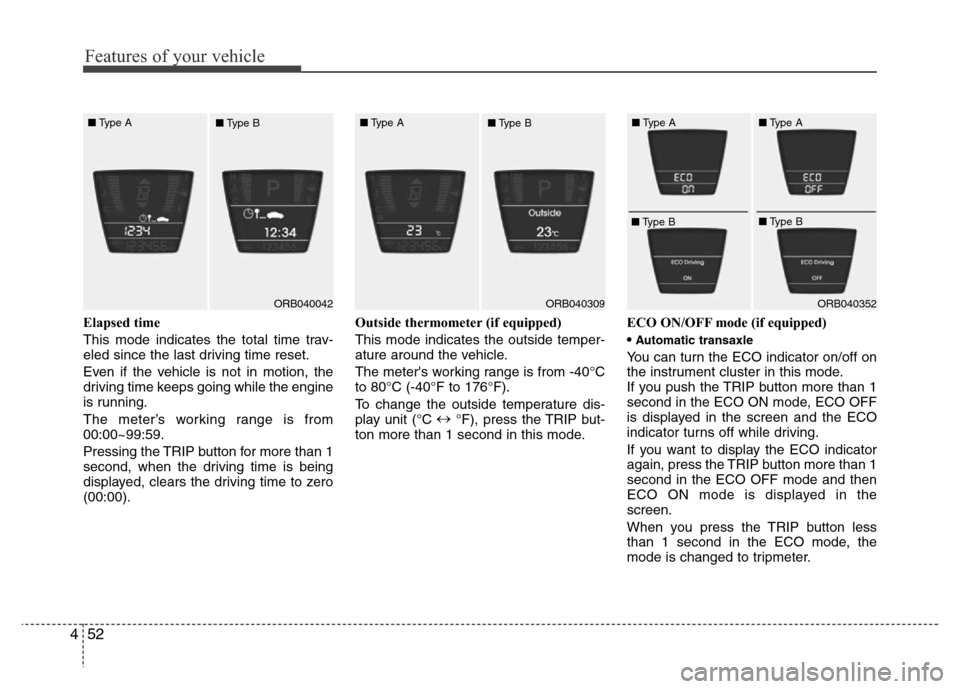
Elapsed time
This mode indicates the total time trav-
eled since the last driving time reset.
Even if the vehicle is not in motion, the
driving time keeps going while the engine
is running.
The meter’s working range is from
00:00~99:59.
Pressing the TRIP button for more than 1
second, when the driving time is being
displayed, clears the driving time to zero
(00:00).Outside thermometer (if equipped)
This mode indicates the outside temper-
ature around the vehicle.
The meter's working range is from -40°C
to 80°C (-40°F to 176°F).
To change the outside temperature dis-
play unit (°C ↔
°F), press the TRIP but-
ton more than 1 second in this mode.ECO ON/OFF mode (if equipped)
•
Automatic transaxle
You can turn the ECO indicator on/off on
the instrument cluster in this mode.
If you push the TRIP button more than 1
second in the ECO ON mode, ECO OFF
is displayed in the screen and the ECO
indicator turns off while driving.
If you want to display the ECO indicator
again, press the TRIP button more than 1
second in the ECO OFF mode and then
ECO ON mode is displayed in the
screen.
When you press the TRIP button less
than 1 second in the ECO mode, the
mode is changed to tripmeter.
ORB040042ORB040352 ■Type A
■Type BORB040309 ■Type A
■Type B■Type A
■Type B■Type A
■Type B
Page 123 of 402
453
Features of your vehicle
•Manual transaxle
You can turn the manual transaxle shift
indicator on/off on the instrument cluster
in this mode.
If you select the ECO OFF in the trip
computer, the manual transaxle shift
indicator will not illuminate.✽NOTICE
• If the vehicle is not on level ground or
the battery power has been interrupt-
ed, the “Distance to empty” function
may not operate correctly.
The trip computer may not register
additional fuel if less than 6 liters (1.6
gallons) of fuel are added to the vehi-
cle.
• The fuel consumption (if equipped)
and distance to empty values may
vary significantly based on driving
conditions, driving habits, and condi-
tion of the vehicle.
• The distance to empty value is an esti-
mate of the available driving distance.
This value may differ from the actual
driving distance available.
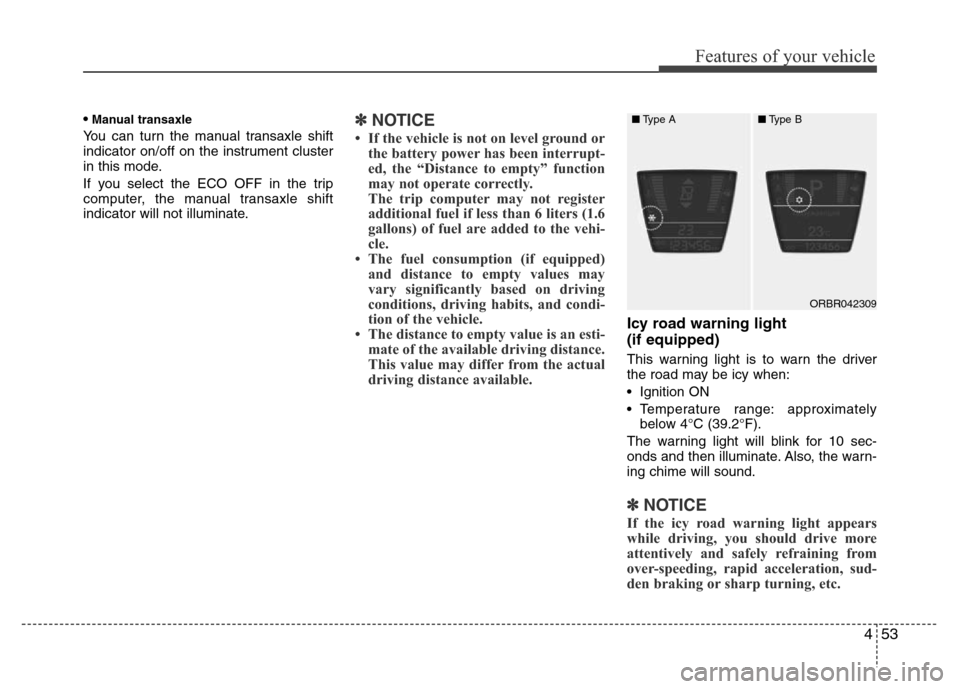
Icy road warning light
(if equipped)
This warning light is to warn the driver
the road may be icy when:
• Ignition ON
• Temperature range: approximately
below 4°C (39.2°F).
The warning light will blink for 10 sec-
onds and then illuminate. Also, the warn-
ing chime will sound.
✽NOTICE
If the icy road warning light appears
while driving, you should drive more
attentively and safely refraining from
over-speeding, rapid acceleration, sud-
den braking or sharp turning, etc.
ORBR042309 ■Type A■Type B
Page 124 of 402
Features of your vehicle
54 4
Warnings and indicators
All warning lights are checked by turning
the ignition switch ON (do not start the
engine). Any light that does not illuminate
should be checked by an authorized
HYUNDAI dealer.
After starting the engine, check to make
sure that all warning lights are off. If any
are still on, this indicates a situation that
needs attention. When releasing the
parking brake, the brake system warning
light should go off. The fuel warning light
will stay on if the fuel level is low.
ECO indicator
(if equipped)
(Automatic transaxle)
The ECO indicator is a system that
informs you to drive economically.
It is displayed if you drive fuel efficiently
to help you improve fuel efficiency.
• The ECO indicator (green) will turn on
when you are driving fuel efficiently in
the ECO ON mode.
If you don't want the indicator dis-
played, you can turn the ECO ON
mode to OFF mode by pressing the
TRIP button.
As per ECO ON/OFF Mode operation,
refer to the previous page.
• The fuel-efficiency can be changed by
the driver's driving habit and road con-
dition.
• It doesn't work at the condition which
doesn't meet economical driving such
as P (Park), N (Neutral), R (Reverse)
or sports mode.
• While the instant fuel consumption
mode is displayed on the LCD screen,
the ECO indicator turns off.
WARNING
Don't keep watching the indicator
while driving. It will distract you
while driving and cause an acci-
dent that results in severe personal
injury.ECO
Page 128 of 402
Features of your vehicle
58 4
To check bulb operation, check whether
the parking brake and brake fluid warning
light illuminates when the ignition switch
is in the ON position.Automatic transaxle shift
indicator (if equipped)
The indicator displays to show the auto-
matic transaxle shift lever selection.
Manual transaxle shift
indicator (if equipped)
This indicator informs you which gear is
desired while driving to save fuel.
For example
: Indicates that shifting up to the 3rd
gear is desired (currently the shift
lever is in the 2nd gear).
: Indicates that shifting down to the
3rd gear is desired (currently the
shift lever is in the 4th gear).
✽NOTICE
• When the system is not working prop-
erly, up & down arrow indicator and
Gear are not displayed.
• If you select the ECO OFF in the trip
computer, the manual transaxle shift
indicator will not illuminate.
Front fog light indicator
(if equipped)
This light comes on when the front fog
lights are ON.
Rear fog light indicator
(if equipped)
This indicator illuminates when the rear
fog lights are ON.
WARNING
Driving the vehicle with a warning
light on is dangerous. If the brake
warning light remains on, have the
brakes checked and repaired imme-
diately by an authorized HYUNDAI
dealer.
Page 135 of 402
465
Features of your vehicle
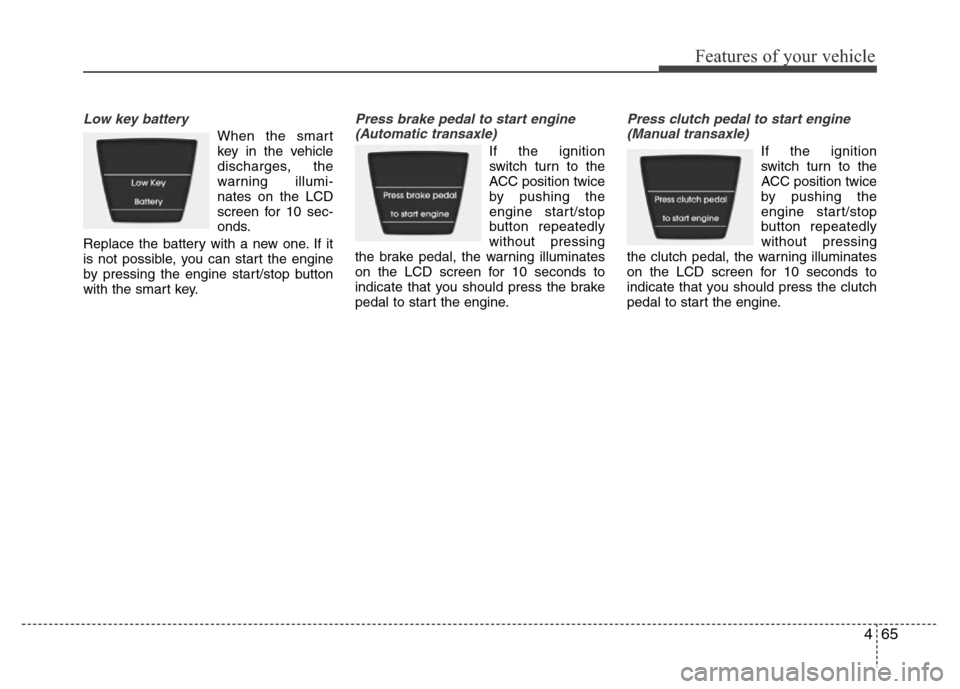
Low key battery
When the smart
key in the vehicle
discharges, the
warning illumi-
nates on the LCD
screen for 10 sec-
onds.
Replace the battery with a new one. If it
is not possible, you can start the engine
by pressing the engine start/stop button
with the smart key.
Press brake pedal to start engine
(Automatic transaxle)
If the ignition
switch turn to the
ACC position twice
by pushing the
engine start/stop
button repeatedly
without pressing
the brake pedal, the warning illuminates
on the LCD screen for 10 seconds to
indicate that you should press the brake
pedal to start the engine.
Press clutch pedal to start engine
(Manual transaxle)
If the ignition
switch turn to the
ACC position twice
by pushing the
engine start/stop
button repeatedly
without pressing
the clutch pedal, the warning illuminates
on the LCD screen for 10 seconds to
indicate that you should press the clutch
pedal to start the engine.
Page 140 of 402
Features of your vehicle
70 4
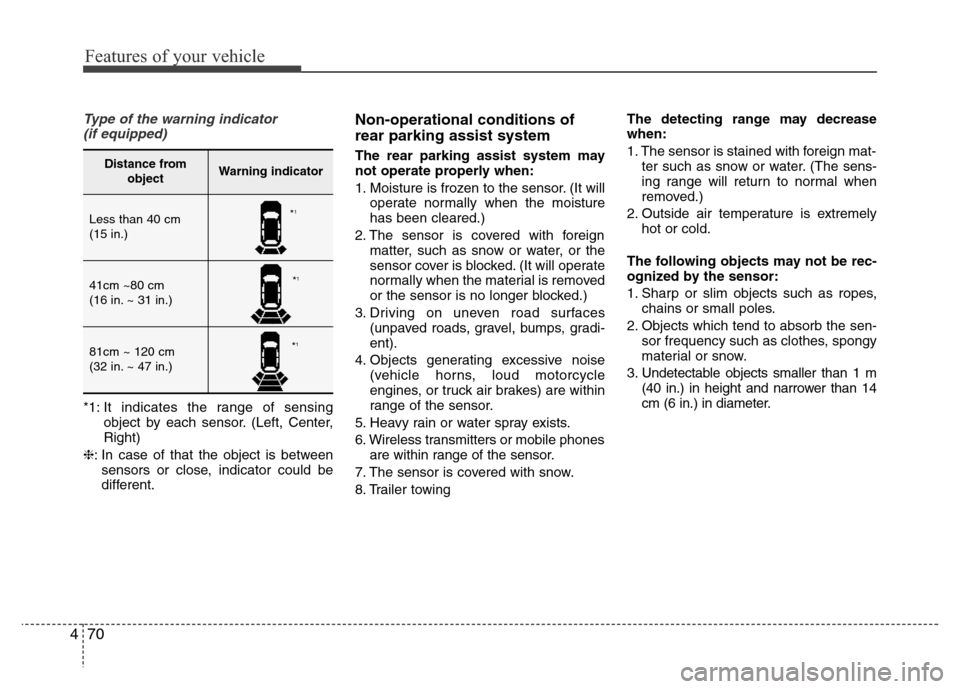
Type of the warning indicator
(if equipped)
*1: It indicates the range of sensing
object by each sensor. (Left, Center,
Right)
❈: In case of that the object is between
sensors or close, indicator could be
different.
Non-operational conditions of
rear parking assist system
The rear parking assist system may
not operate properly when:
1. Moisture is frozen to the sensor. (It will
operate normally when the moisture
has been cleared.)
2. The sensor is covered with foreign
matter, such as snow or water, or the
sensor cover is blocked. (It will operate
normally when the material is removed
or the sensor is no longer blocked.)
3. Driving on uneven road surfaces
(unpaved roads, gravel, bumps, gradi-
ent).
4. Objects generating excessive noise
(vehicle horns, loud motorcycle
engines, or truck air brakes) are within
range of the sensor.
5. Heavy rain or water spray exists.
6. Wireless transmitters or mobile phones
are within range of the sensor.
7. The sensor is covered with snow.
8. Trailer towingThe detecting range may decrease
when:
1. The sensor is stained with foreign mat-
ter such as snow or water. (The sens-
ing range will return to normal when
removed.)
2. Outside air temperature is extremely
hot or cold.
The following objects may not be rec-
ognized by the sensor:
1. Sharp or slim objects such as ropes,
chains or small poles.
2. Objects which tend to absorb the sen-
sor frequency such as clothes, spongy
material or snow.
3. Undetectable objects smaller than 1 m
(40 in.) in height and narrower than 14
cm (6 in.) in diameter.Distance from
objectWarning indicator
Less than 40 cm
(15 in.)
41cm ~80 cm
(16 in. ~ 31 in.)
81cm ~ 120 cm
(32 in. ~ 47 in.)
*1
*1
*1