audio Hyundai Accent 2013 Owner's Guide
[x] Cancel search | Manufacturer: HYUNDAI, Model Year: 2013, Model line: Accent, Model: Hyundai Accent 2013Pages: 402, PDF Size: 8.49 MB
Page 220 of 402
Features of your vehicle
150 4
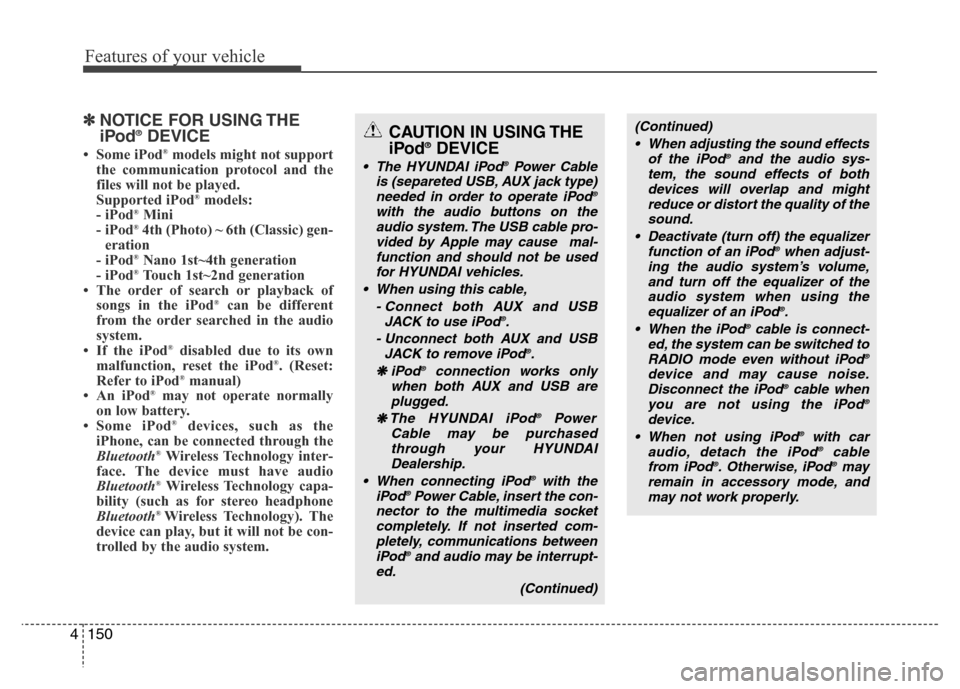
✽NOTICE FOR USING THE
iPod®DEVICE
• Some iPod®models might not support
the communication protocol and the
files will not be played.
Supported iPod
®models:
- iPod®Mini
- iPod®4th (Photo) ~ 6th (Classic) gen-
eration
- iPod
®Nano 1st~4th generation
- iPod®Touch 1st~2nd generation
• The order of search or playback of
songs in the iPod
®can be different
from the order searched in the audio
system.
• If the iPod
®disabled due to its own
malfunction, reset the iPod®. (Reset:
Refer to iPod®manual)
• An iPod®may not operate normally
on low battery.
• Some iPod
®devices, such as the
iPhone, can be connected through the
Bluetooth
®Wireless Technology inter-
face. The device must have audio
Bluetooth
®Wireless Technology capa-
bility (such as for stereo headphone
Bluetooth
® Wireless Technology). The
device can play, but it will not be con-
trolled by the audio system.
(Continued)
• When adjusting the sound effects
of the iPod
®and the audio sys-
tem, the sound effects of both
devices will overlap and might
reduce or distort the quality of the
sound.
• Deactivate (turn off) the equalizer
function of an iPod
®when adjust-
ing the audio system’s volume,
and turn off the equalizer of the
audio system when using the
equalizer of an iPod
®.
• When the iPod®cable is connect-
ed, the system can be switched to
RADIO mode even without iPod
®
device and may cause noise.
Disconnect the iPod®cable when
you are not using the iPod®
device.
• When not using iPod®with car
audio, detach the iPod®cable
from iPod®. Otherwise, iPod®may
remain in accessory mode, and
may not work properly.
CAUTION IN USING THE
iPod®DEVICE
• The HYUNDAI iPod®Power Cable
is (separeted USB, AUX jack type)
needed in order to operate iPod
®
with the audio buttons on the
audio system. The USB cable pro-
vided by Apple may cause mal-
function and should not be used
for HYUNDAI vehicles.
• When using this cable,
- Connect both AUX and USB
JACK to use iPod
®.
- Unconnect both AUX and USB
JACK to remove iPod
®.
❋iPod
Page 224 of 402
Driving your vehicle
4 5
WARNING- Driving under
the influence of alcohol or
drugs
Drinking and driving is dangerous.
Drunk driving is the number one
contributor to the highway death
toll each year. Even a small amount
of alcohol will affect your reflexes,
perceptions and judgment. Driving
while under the influence of drugs
is as dangerous or more dangerous
than driving drunk.
You are much more likely to have a
serious accident if you drink or
take drugs and drive.
If you are drinking or taking drugs,
don’t drive. Do not ride with a driv-
er who has been drinking or taking
drugs. Choose a designated driver
or call a cab.
WARNING
• When you intend to park or stop
the vehicle with the engine on, be
careful not to depress the accel-
erator pedal for a long period of
time. It may overheat the engine
or exhaust system and cause fire.
• When you make a sudden stop or
turn the steering wheel rapidly,
loose objects may drop on the
floor and it could interfere with
the operation of the foot pedals,
possibly causing an accident.
Keep all things in the vehicle
safely stored.
• If you do not focus on driving, it
may cause an accident. Be care-
ful when operating what may dis-
turb driving such as audio or
heater. It is the responsibility of
the driver to always drive safely.
Page 346 of 402
755
Maintenance
Reset items
Items should be reset after the battery
has been discharged or the battery has
been disconnected.
• Auto up/down window (See section 4)
• Sunroof (See section 4)
• Trip computer (See section 4)
• Climate control system
(See section 4)
• Clock (See section 4)
• Audio (See section 4)WARNING
• Before performing maintenance
or recharging the battery, turn off
all accessories and stop the
engine.
• The negative battery cable must
be removed first and installed
last when the battery is discon-
nected.
• Operation related to the battery
should be done in an authorized
HYUNDAI dealer.
CAUTION
• Keep the battery away from water
or any liquid.
• For your safety, use the authentic-
ity by approved authorized
HYUNDAI dealer, when you
replace the battery.
Page 359 of 402
Maintenance
68 7
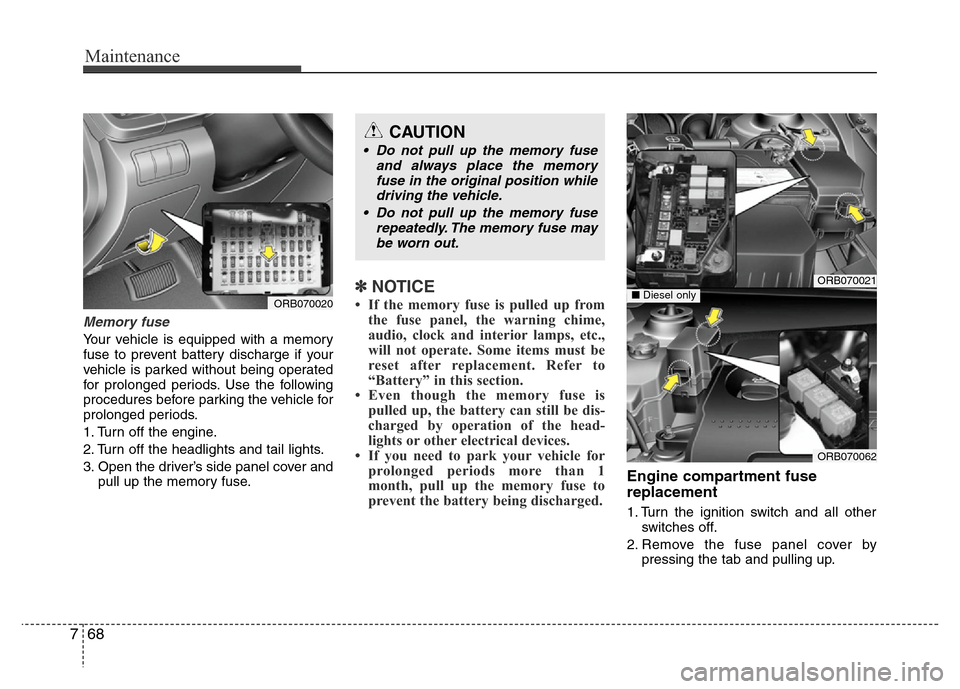
Memory fuse
Your vehicle is equipped with a memory
fuse to prevent battery discharge if your
vehicle is parked without being operated
for prolonged periods. Use the following
procedures before parking the vehicle for
prolonged periods.
1. Turn off the engine.
2. Turn off the headlights and tail lights.
3. Open the driver’s side panel cover and
pull up the memory fuse.
✽NOTICE
• If the memory fuse is pulled up from
the fuse panel, the warning chime,
audio, clock and interior lamps, etc.,
will not operate. Some items must be
reset after replacement. Refer to
“Battery” in this section.
• Even though the memory fuse is
pulled up, the battery can still be dis-
charged by operation of the head-
lights or other electrical devices.
• If you need to park your vehicle for
prolonged periods more than 1
month, pull up the memory fuse to
prevent the battery being discharged.
Engine compartment fuse
replacement
1. Turn the ignition switch and all other
switches off.
2. Remove the fuse panel cover by
pressing the tab and pulling up.
ORB070020
ORB070021
ORB070062
■Diesel only
CAUTION
• Do not pull up the memory fuse
and always place the memory
fuse in the original position while
driving the vehicle.
• Do not pull up the memory fuse
repeatedly. The memory fuse may
be worn out.
Page 364 of 402
773
Maintenance
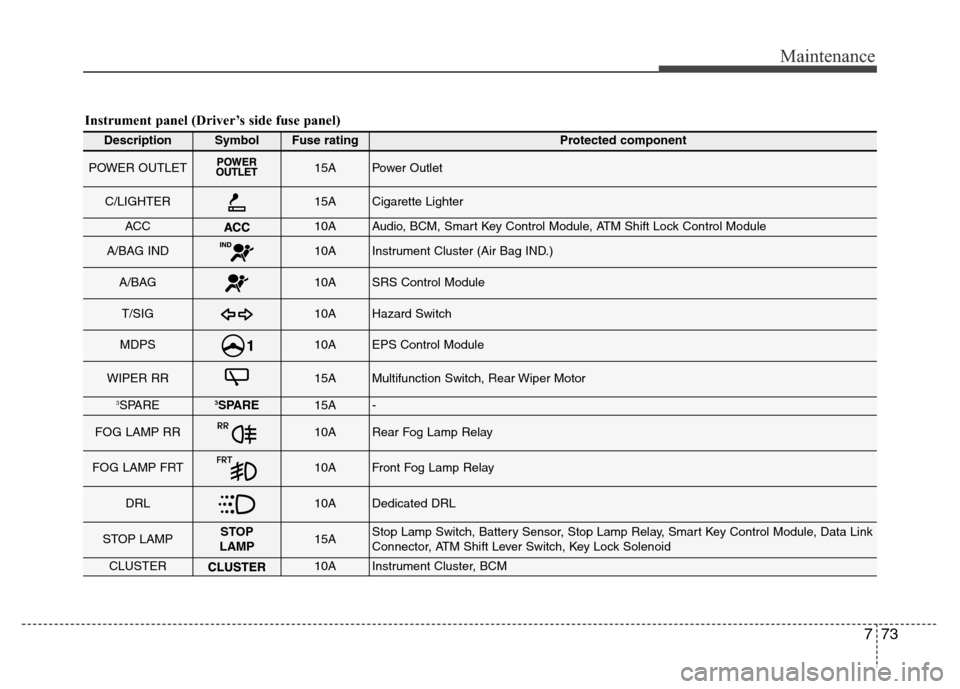
Instrument panel (Driver’s side fuse panel)
DescriptionSymbolFuse ratingProtected component
POWER OUTLET15APower Outlet
C/LIGHTER15ACigarette Lighter
ACC10AAudio, BCM, Smart Key Control Module, ATM Shift Lock Control Module
A/BAG IND10AInstrument Cluster (Air Bag IND.)
A/BAG10ASRS Control Module
T/SIG10AHazard Switch
MDPS10AEPS Control Module
WIPER RR15AMultifunction Switch, Rear Wiper Motor
3SPARE3SPARE15A-
FOG LAMP RR10ARear Fog Lamp Relay
FOG LAMP FRT10AFront Fog Lamp Relay
DRL10ADedicated DRL
STOP LAMPSTOP
LAMP15AStop Lamp Switch, Battery Sensor, Stop Lamp Relay, Smart Key Control Module, Data Link
Connector, ATM Shift Lever Switch, Key Lock Solenoid
CLUSTER10AInstrument Cluster, BCM
Page 366 of 402
775
Maintenance
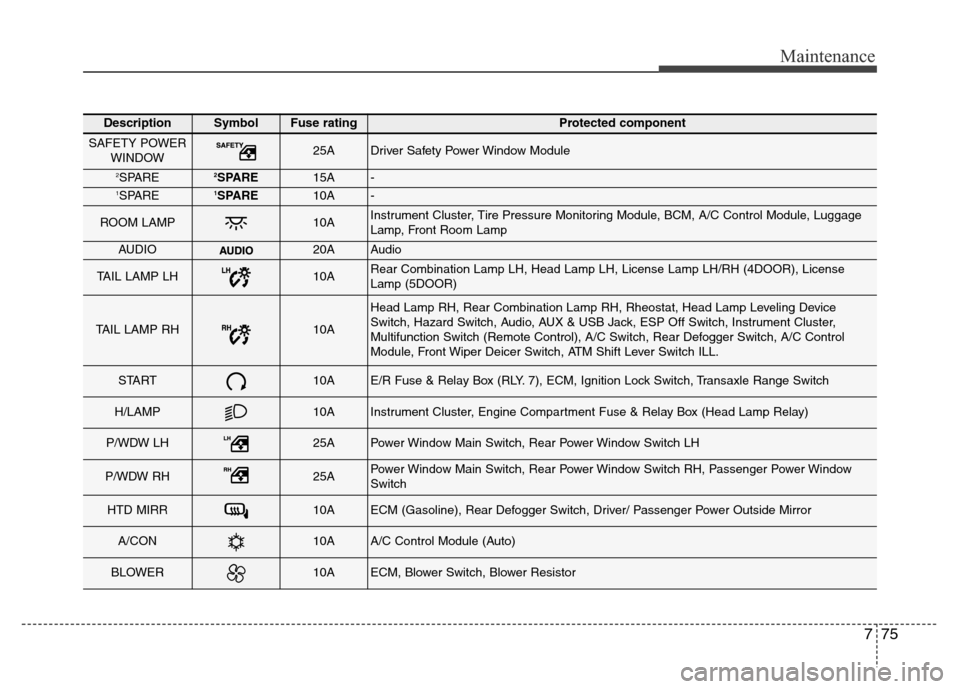
DescriptionSymbolFuse ratingProtected component
SAFETY POWER
WINDOW25ADriver Safety Power Window Module
2SPARE2SPARE15A-1SPARE1SPARE10A-
ROOM LAMP10AInstrument Cluster, Tire Pressure Monitoring Module, BCM, A/C Control Module, Luggage
Lamp, Front Room Lamp
AUDIO20AAudio
TAIL LAMP LH10ARear Combination Lamp LH, Head Lamp LH, License Lamp LH/RH (4DOOR), License
Lamp (5DOOR)
TAIL LAMP RH10A
Head Lamp RH, Rear Combination Lamp RH, Rheostat, Head Lamp Leveling Device
Switch, Hazard Switch, Audio, AUX & USB Jack, ESP Off Switch, Instrument Cluster,
Multifunction Switch (Remote Control), A/C Switch, Rear Defogger Switch, A/C Control
Module, Front Wiper Deicer Switch, ATM Shift Lever Switch ILL.
START10AE/R Fuse & Relay Box (RLY. 7), ECM, Ignition Lock Switch, Transaxle Range Switch
H/LAMP10AInstrument Cluster, Engine Compartment Fuse & Relay Box (Head Lamp Relay)
P/WDW LH25APower Window Main Switch, Rear Power Window Switch LH
P/WDW RH25APower Window Main Switch, Rear Power Window Switch RH, Passenger Power Window
Switch
HTD MIRR10AECM (Gasoline), Rear Defogger Switch, Driver/ Passenger Power Outside Mirror
A/CON10AA/C Control Module (Auto)
BLOWER10AECM, Blower Switch, Blower Resistor