Instrument Hyundai Accent 2014 Owner's Guide
[x] Cancel search | Manufacturer: HYUNDAI, Model Year: 2014, Model line: Accent, Model: Hyundai Accent 2014Pages: 406, PDF Size: 33.11 MB
Page 152 of 406
475
Features of your vehicle
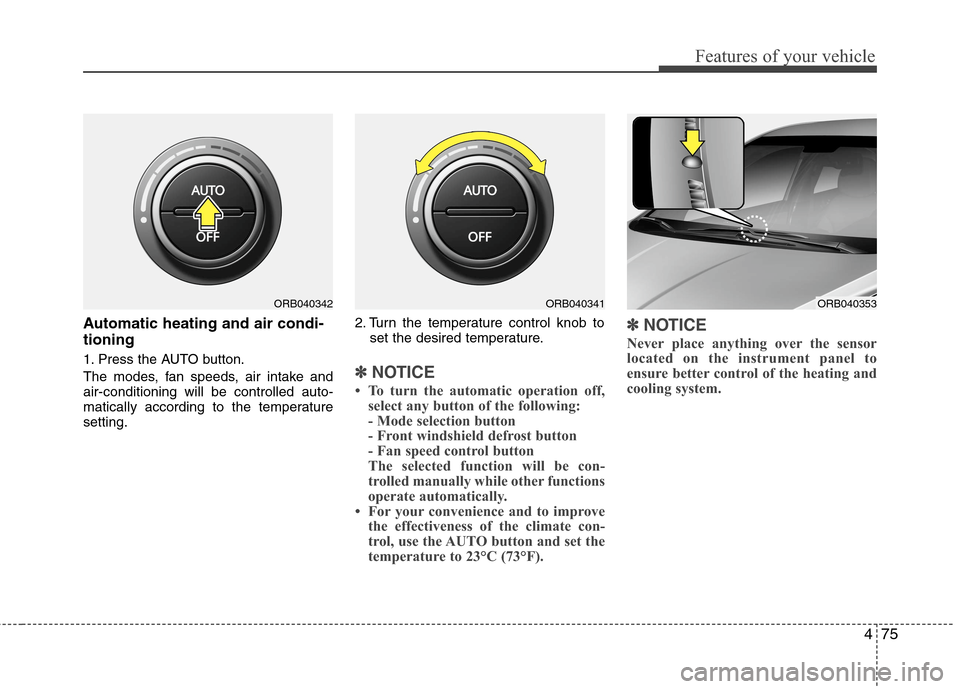
Automatic heating and air condi-
tioning
1. Press the AUTO button.
The modes, fan speeds, air intake and
air-conditioning will be controlled auto-
matically according to the temperature
setting.2. Turn the temperature control knob to
set the desired temperature.✽ ✽
NOTICE
• To turn the automatic operation off,
select any button of the following:
- Mode selection button
- Front windshield defrost button
- Fan speed control button
The selected function will be con-
trolled manually while other functions
operate automatically.
• For your convenience and to improve
the effectiveness of the climate con-
trol, use the AUTO button and set the
temperature to 23°C (73°F).
✽ ✽
NOTICE
Never place anything over the sensor
located on the instrument panel to
ensure better control of the heating and
cooling system.
ORB040353ORB040342ORB040341
Page 154 of 406
477
Features of your vehicle
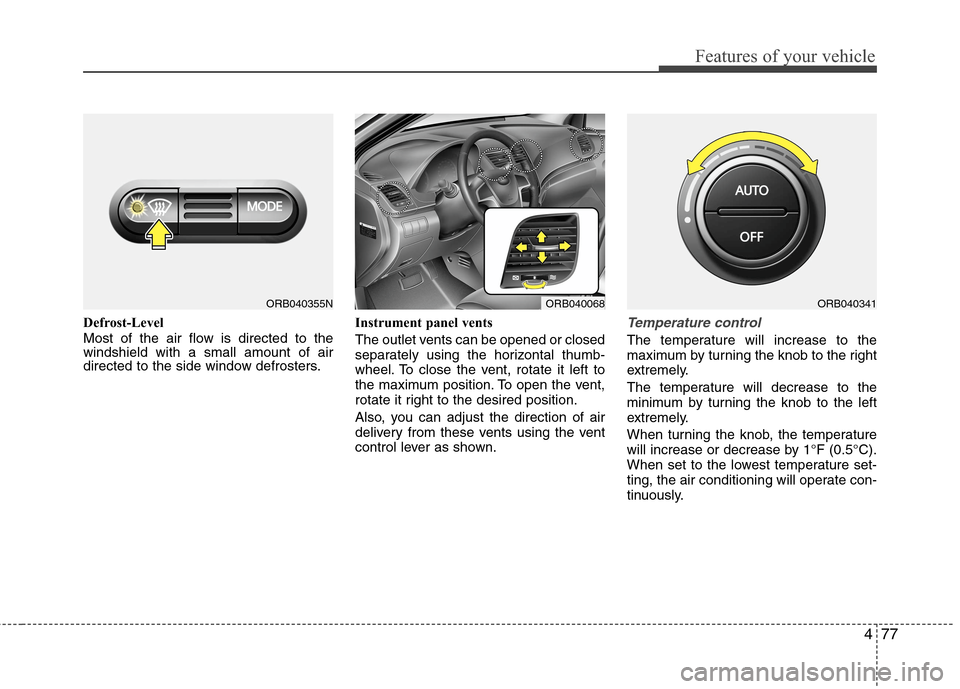
Defrost-Level
Most of the air flow is directed to the
windshield with a small amount of air
directed to the side window defrosters.Instrument panel vents
The outlet vents can be opened or closed
separately using the horizontal thumb-
wheel. To close the vent, rotate it left to
the maximum position. To open the vent,
rotate it right to the desired position.
Also, you can adjust the direction of air
delivery from these vents using the vent
control lever as shown.Temperature control
The temperature will increase to the
maximum by turning the knob to the right
extremely.
The temperature will decrease to the
minimum by turning the knob to the left
extremely.
When turning the knob, the temperature
will increase or decrease by 1°F (0.5°C).
When set to the lowest temperature set-
ting, the air conditioning will operate con-
tinuously.
ORB040355NORB040068ORB040341
Page 237 of 406
511
Driving your vehicle
For smooth operation, depress the brake
pedal when shifting from N (Neutral) to a
forward or reverse gear.Transaxle ranges
The indicator in the instrument cluster
displays the shift lever position when the
ignition switch is in the ON position.
P (Park)
Always come to a complete stop before
shifting into P (Park). This position locks
the transaxle and prevents the drive
wheels from rotating.
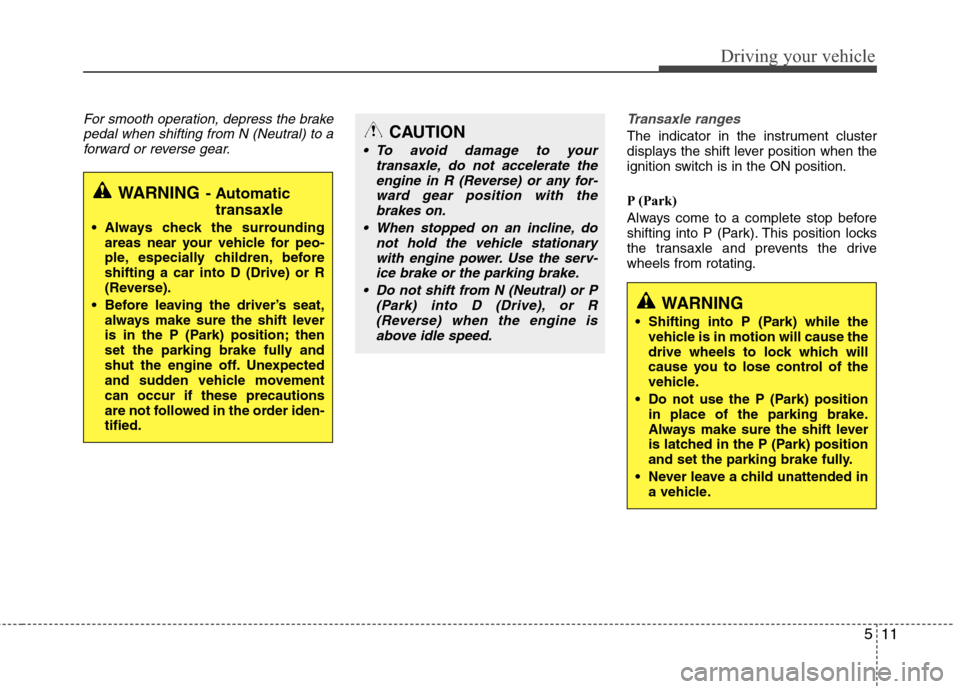
WARNING- Automatic
transaxle
Always check the surrounding
areas near your vehicle for peo-
ple, especially children, before
shifting a car into D (Drive) or R
(Reverse).
Before leaving the driver’s seat,
always make sure the shift lever
is in the P (Park) position; then
set the parking brake fully and
shut the engine off. Unexpected
and sudden vehicle movement
can occur if these precautions
are not followed in the order iden-
tified.
CAUTION
To avoid damage to your
transaxle, do not accelerate the
engine in R (Reverse) or any for-
ward gear position with the
brakes on.
When stopped on an incline, do
not hold the vehicle stationary
with engine power. Use the serv-
ice brake or the parking brake.
Do not shift from N (Neutral) or P
(Park) into D (Drive), or R
(Reverse) when the engine is
above idle speed.
WARNING
Shifting into P (Park) while the
vehicle is in motion will cause the
drive wheels to lock which will
cause you to lose control of the
vehicle.
Do not use the P (Park) position
in place of the parking brake.
Always make sure the shift lever
is latched in the P (Park) position
and set the parking brake fully.
Never leave a child unattended in
a vehicle.
Page 251 of 406
525
Driving your vehicle
Vehicle stability management
(VSM) (if equipped)
This system provides further enhance-
ments to vehicle stability and steering
responses when the vehicle is driving on a
slippery road or the vehicle detects a
change in coefficient of friction between
the left and right wheels.
VSM operation
When the VSM is in operation, ESC indi-
cator light ( ) blinks.
When the vehicle stability management
is operating properly, you can feel a slight
pulsation in the vehicle and/or abnormal
steering responses (EPS). This is only
the effect of brake and EPS control and
is a normal operating condition.
The VSM does not operate when:
Driving on a gradient or incline
Driving in reverse
ESC OFF indicator light ( ) remains
on the instrument cluster
EPS indicator light remains on the
instrument cluster
VSM operation off
If you press the ESC OFF button to turn off
the ESC, the VSM will also cancel and the
ESC OFF indicator light ( ) illuminates.
To turn on the VSM, press the button again.
The ESC OFF indicator light goes out.
Malfunction indicator
The VSM can be deactivated even if you
don’t cancel the VSM operation by press-
ing the ESC OFF button. It indicates that
a malfunction has been detected some-
where in the Electric Power Steering sys-
tem or VSM system. If the ESC indicator
light ( ) or EPS warning light ( )
remains on, take your vehicle to an
authorized HYUNDAI dealer and have
the system checked.
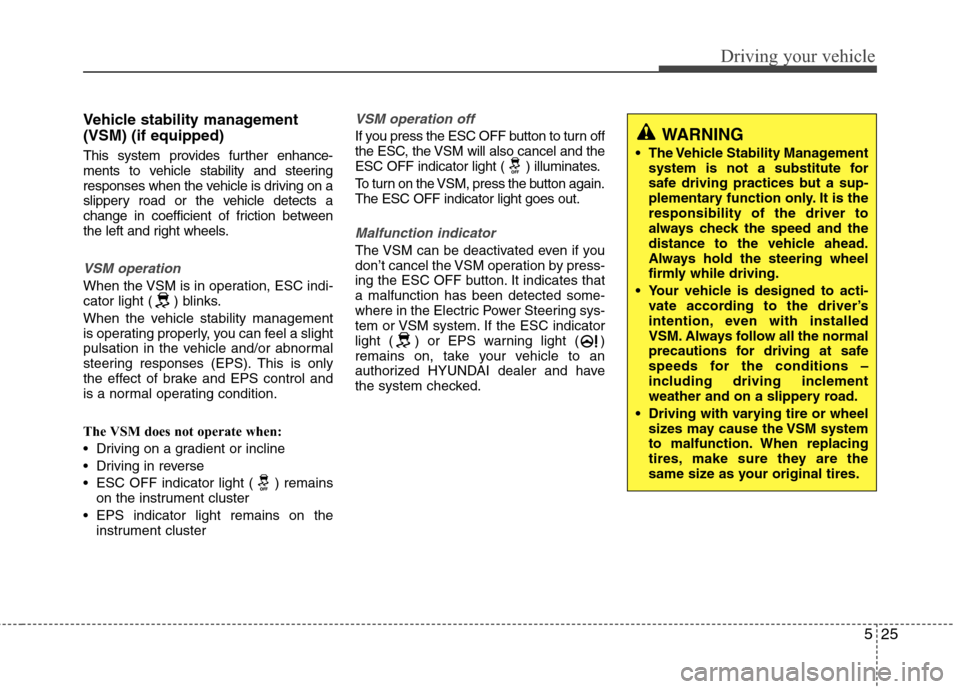
WARNING
The Vehicle Stability Management
system is not a substitute for
safe driving practices but a sup-
plementary function only. It is the
responsibility of the driver to
always check the speed and the
distance to the vehicle ahead.
Always hold the steering wheel
firmly while driving.
Your vehicle is designed to acti-
vate according to the driver’s
intention, even with installed
VSM. Always follow all the normal
precautions for driving at safe
speeds for the conditions –
including driving inclement
weather and on a slippery road.
Driving with varying tire or wheel
sizes may cause the VSM system
to malfunction. When replacing
tires, make sure they are the
same size as your original tires.
Page 253 of 406
527
Driving your vehicle
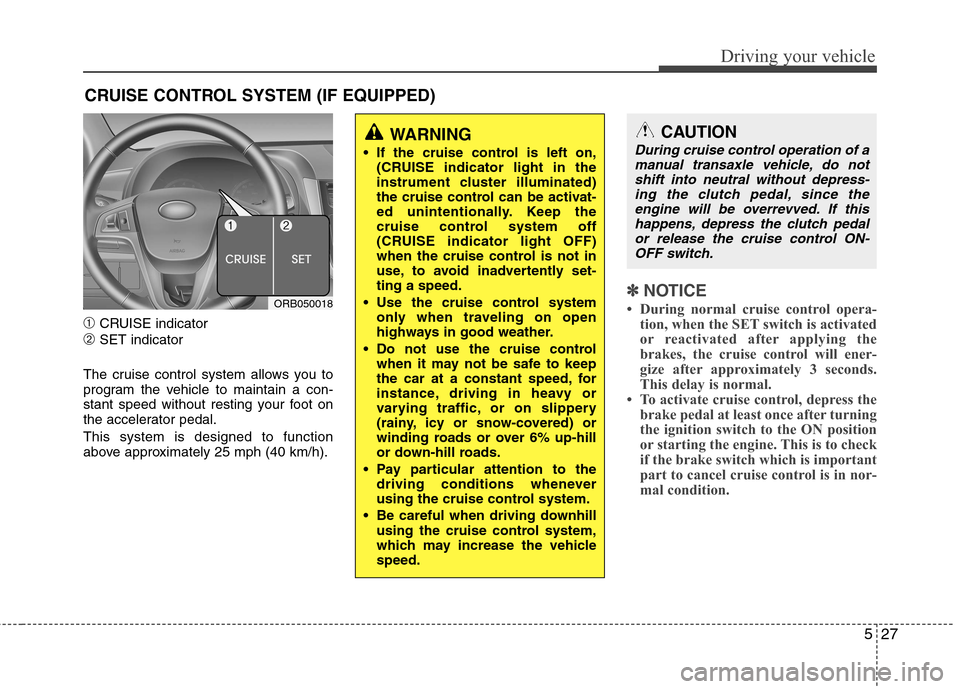
➀CRUISE indicator
➁SET indicator
The cruise control system allows you to
program the vehicle to maintain a con-
stant speed without resting your foot on
the accelerator pedal.
This system is designed to function
above approximately 25 mph (40 km/h).
✽ ✽
NOTICE
• During normal cruise control opera-
tion, when the SET switch is activated
or reactivated after applying the
brakes, the cruise control will ener-
gize after approximately 3 seconds.
This delay is normal.
• To activate cruise control, depress the
brake pedal at least once after turning
the ignition switch to the ON position
or starting the engine. This is to check
if the brake switch which is important
part to cancel cruise control is in nor-
mal condition.
CRUISE CONTROL SYSTEM (IF EQUIPPED)
WARNING
If the cruise control is left on,
(CRUISE indicator light in the
instrument cluster illuminated)
the cruise control can be activat-
ed unintentionally. Keep the
cruise control system off
(CRUISE indicator light OFF)
when the cruise control is not in
use, to avoid inadvertently set-
ting a speed.
Use the cruise control system
only when traveling on open
highways in good weather.
Do not use the cruise control
when it may not be safe to keep
the car at a constant speed, for
instance, driving in heavy or
varying traffic, or on slippery
(rainy, icy or snow-covered) or
winding roads or over 6% up-hill
or down-hill roads.
Pay particular attention to the
driving conditions whenever
using the cruise control system.
Be careful when driving downhill
using the cruise control system,
which may increase the vehicle
speed.
ORB050018
CAUTION
During cruise control operation of a
manual transaxle vehicle, do not
shift into neutral without depress-
ing the clutch pedal, since the
engine will be overrevved. If this
happens, depress the clutch pedal
or release the cruise control ON-
OFF switch.
Page 254 of 406
Driving your vehicle
28 5
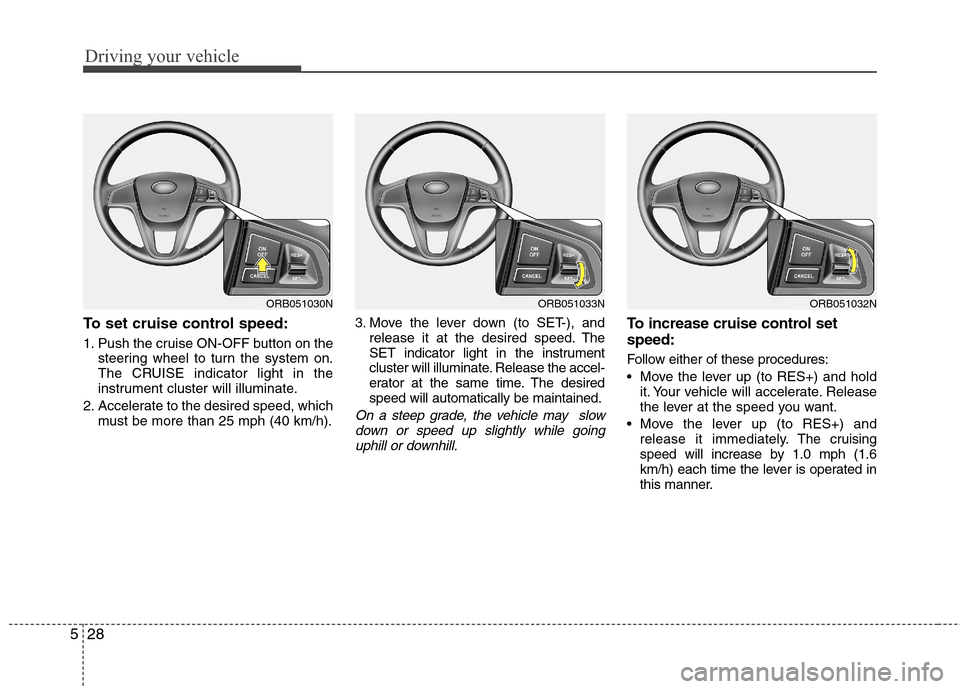
To set cruise control speed:
1. Push the cruise ON-OFF button on the
steering wheel to turn the system on.
The CRUISE indicator light in the
instrument cluster will illuminate.
2. Accelerate to the desired speed, which
must be more than 25 mph (40 km/h).3. Move the lever down (to SET-), and
release it at the desired speed. The
SET indicator light in the instrument
cluster will illuminate. Release the accel-
erator at the same time. The desired
speed will automatically be maintained.
On a steep grade, the vehicle may slow
down or speed up slightly while going
uphill or downhill.
To increase cruise control set
speed:
Follow either of these procedures:
Move the lever up (to RES+) and hold
it. Your vehicle will accelerate. Release
the lever at the speed you want.
Move the lever up (to RES+) and
release it immediately.The cruising
speed will increase by 1.0 mph (1.6
km/h) each time the lever is operated in
this manner.
ORB051033NORB051032NORB051030N
Page 256 of 406
Driving your vehicle
30 5
Each of these actions will cancel cruise
control operation (the SET indicator light
in the instrument cluster will go off), but it
will not turn the system off. If you wish to
resume cruise control operation, move
the lever up (to RES+). You will return to
your previously preset speed.
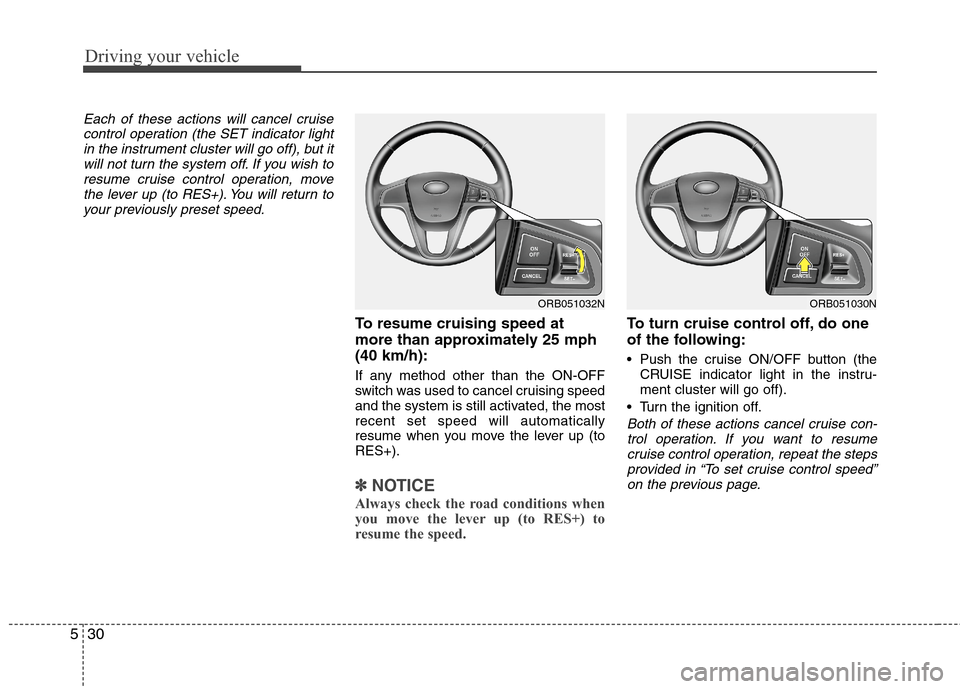
To resume cruising speed at
more than approximately 25 mph
(40 km/h):
If any method other than the ON-OFF
switch was used to cancel cruising speed
and the system is still activated, the most
recent set speed will automatically
resume when you move the lever up (to
RES+).
✽ ✽
NOTICE
Always check the road conditions when
you move the lever up (to RES+) to
resume the speed.
To turn cruise control off, do one
of the following:
Push the cruise ON/OFF button (the
CRUISE indicator light in the instru-
ment cluster will go off).
Turn the ignition off.
Both of these actions cancel cruise con-
trol operation. If you want to resume
cruise control operation, repeat the steps
provided in “To set cruise control speed”
on the previous page.
ORB051032NORB051030N
Page 360 of 406
Maintenance
52 7
✽
✽
NOTICE
The actual fuse/relay panel label may
differ from equipped items.
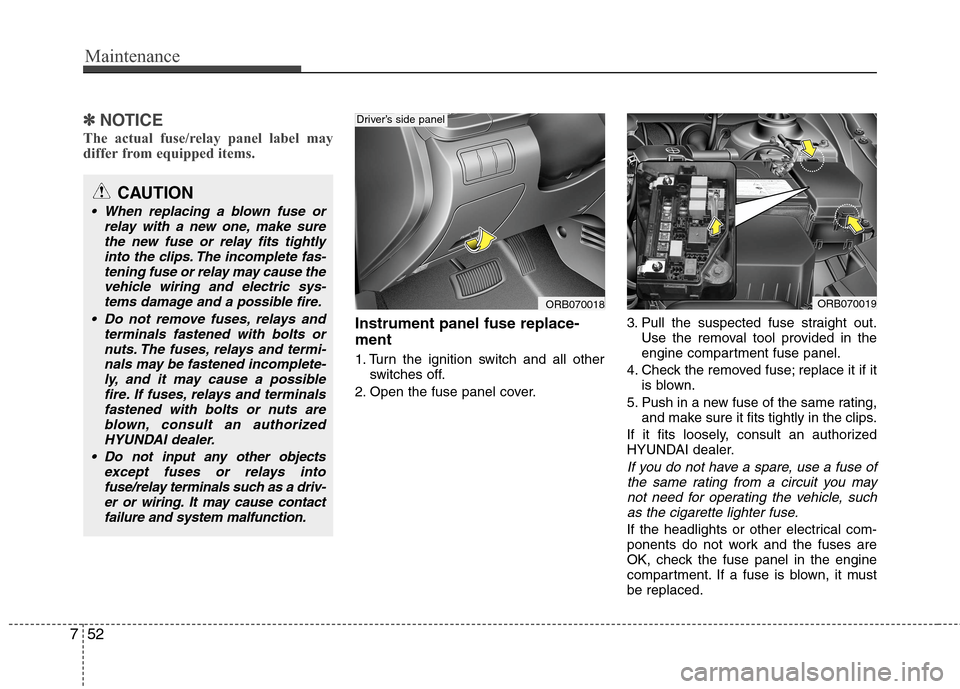
Instrument panel fuse replace-
ment
1. Turn the ignition switch and all other
switches off.
2. Open the fuse panel cover.3. Pull the suspected fuse straight out.
Use the removal tool provided in the
engine compartment fuse panel.
4. Check the removed fuse; replace it if it
is blown.
5. Push in a new fuse of the same rating,
and make sure it fits tightly in the clips.
If it fits loosely, consult an authorized
HYUNDAI dealer.
If you do not have a spare, use a fuse of
the same rating from a circuit you may
not need for operating the vehicle, such
as the cigarette lighter fuse.
If the headlights or other electrical com-
ponents do not work and the fuses are
OK, check the fuse panel in the engine
compartment. If a fuse is blown, it must
be replaced.
CAUTION
When replacing a blown fuse or
relay with a new one, make sure
the new fuse or relay fits tightly
into the clips. The incomplete fas-
tening fuse or relay may cause the
vehicle wiring and electric sys-
tems damage and a possible fire.
Do not remove fuses, relays and
terminals fastened with bolts or
nuts. The fuses, relays and termi-
nals may be fastened incomplete-
ly, and it may cause a possible
fire. If fuses, relays and terminals
fastened with bolts or nuts are
blown, consult an authorized
HYUNDAI dealer.
Do not input any other objects
except fuses or relays into
fuse/relay terminals such as a driv-
er or wiring. It may cause contact
failure and system malfunction.
ORB070018
Driver’s side panel
ORB070019
Page 365 of 406
757
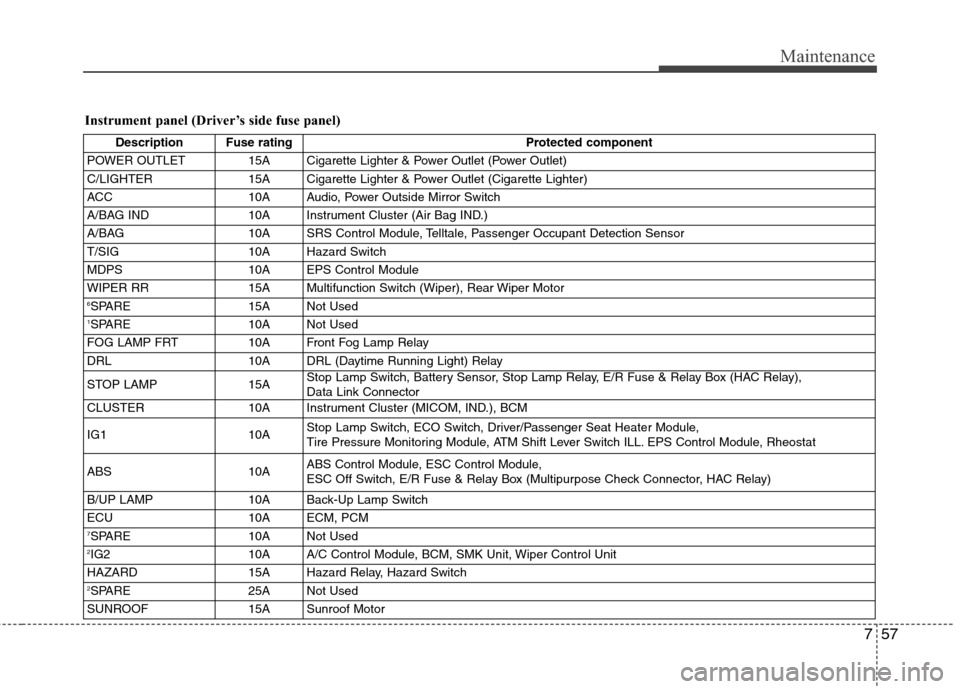
Maintenance
Instrument panel (Driver’s side fuse panel)
Description Fuse rating Protected component
POWER OUTLET 15A Cigarette Lighter & Power Outlet (Power Outlet)
C/LIGHTER 15A Cigarette Lighter & Power Outlet (Cigarette Lighter)
ACC 10A Audio, Power Outside Mirror Switch
A/BAG IND 10A Instrument Cluster (Air Bag IND.)
A/BAG 10A SRS Control Module, Telltale, Passenger Occupant Detection Sensor
T/SIG 10A Hazard Switch
MDPS 10A EPS Control Module
WIPER RR 15A Multifunction Switch (Wiper), Rear Wiper Motor
6SPARE 15A Not Used1SPARE 10A Not Used
FOG LAMP FRT 10A Front Fog Lamp Relay
DRL 10A DRL (Daytime Running Light) Relay
STOP LAMP 15AStop Lamp Switch, Battery Sensor, Stop Lamp Relay, E/R Fuse & Relay Box (HAC Relay),
Data Link Connector
CLUSTER 10A Instrument Cluster (MICOM, IND.), BCM
IG1 10AStop Lamp Switch, ECO Switch, Driver/Passenger Seat Heater Module,
Tire Pressure Monitoring Module, ATM Shift Lever Switch ILL. EPS Control Module, Rheostat
ABS 10AABS Control Module, ESC Control Module,
ESC Off Switch, E/R Fuse & Relay Box (Multipurpose Check Connector, HAC Relay)
B/UP LAMP 10A Back-Up Lamp Switch
ECU 10A ECM, PCM
7SPARE 10A Not Used2IG2 10A A/C Control Module, BCM, SMK Unit, Wiper Control Unit
HAZARD 15A Hazard Relay, Hazard Switch
2SPARE 25A Not Used
SUNROOF 15A Sunroof Motor
Page 366 of 406
Maintenance
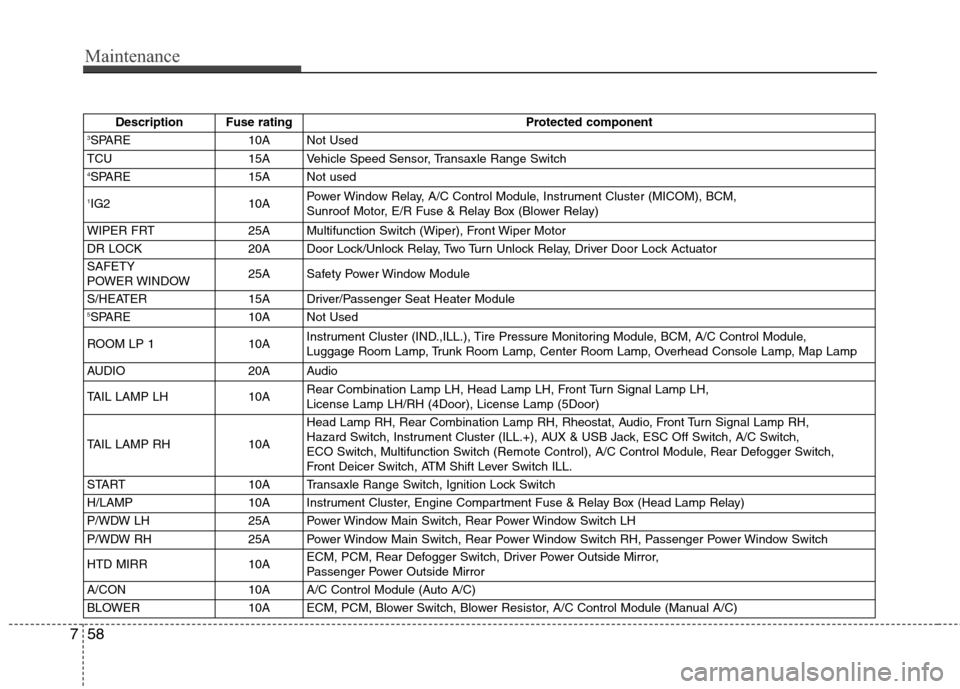
58 7
Description Fuse rating Protected component3SPARE 10A Not Used
TCU 15A Vehicle Speed Sensor, Transaxle Range Switch
4SPARE 15A Not used
1IG2 10APower Window Relay, A/C Control Module, Instrument Cluster (MICOM), BCM,
Sunroof Motor, E/R Fuse & Relay Box (Blower Relay)
WIPER FRT 25A Multifunction Switch (Wiper), Front Wiper Motor
DR LOCK 20A Door Lock/Unlock Relay, Two Turn Unlock Relay, Driver Door Lock Actuator
SAFETY
POWER WINDOW25A Safety Power Window Module
S/HEATER 15A Driver/Passenger Seat Heater Module
5SPARE 10A Not Used
ROOM LP 1 10AInstrument Cluster (IND.,ILL.), Tire Pressure Monitoring Module, BCM, A/C Control Module,
Luggage Room Lamp, Trunk Room Lamp, Center Room Lamp, Overhead Console Lamp, Map Lamp
AUDIO 20A Audio
TAIL LAMP LH 10ARear Combination Lamp LH, Head Lamp LH, Front Turn Signal Lamp LH,
License Lamp LH/RH (4Door), License Lamp (5Door)
TAIL LAMP RH 10AHead Lamp RH, Rear Combination Lamp RH, Rheostat, Audio, Front Turn Signal Lamp RH,
Hazard Switch, Instrument Cluster (ILL.+), AUX & USB Jack, ESC Off Switch, A/C Switch,
ECO Switch, Multifunction Switch (Remote Control), A/C Control Module, Rear Defogger Switch,
Front Deicer Switch, ATM Shift Lever Switch ILL.
START 10A Transaxle Range Switch, Ignition Lock Switch
H/LAMP 10A Instrument Cluster, Engine Compartment Fuse & Relay Box (Head Lamp Relay)
P/WDW LH 25A Power Window Main Switch, Rear Power Window Switch LH
P/WDW RH 25A Power Window Main Switch, Rear Power Window Switch RH, Passenger Power Window Switch
HTD MIRR 10AECM, PCM, Rear Defogger Switch, Driver Power Outside Mirror,
Passenger Power Outside Mirror
A/CON 10A A/C Control Module (Auto A/C)
BLOWER 10A ECM, PCM, Blower Switch, Blower Resistor, A/C Control Module (Manual A/C)