Features of your vehicle
140 4
Audio Streaming
Press the key Select [Phone]
Select [Audio Streaming]
When Audio Streaming is turned on, you
can play music files saved in your
Bluetooth®Wireless Technology device
through the audio system.
Outgoing Volume
Press the key Select
[Phone] Select [Outgoing Volume]
Use TUNE knob to adjust the outgo-
ing volume level.
✽ ✽
NOTICE
While on a call, the volume can be
changed by using the key.
Turning Bluetooth System Off
Press the key Select
[Phone] Select [Bluetooth System Off]
Once
Bluetooth®Wireless Technology is
turned off, Bluetooth®Wireless Technology
related features will not be supported with-
in the audio system.
✽ ✽
NOTICE
To turn Bluetooth®Wireless Technology
back on, go to [Phone] and
select “Yes”.SETUP
SETUP
SEEK
TRACK
SETUP SETUP
Features of your vehicle
144 4
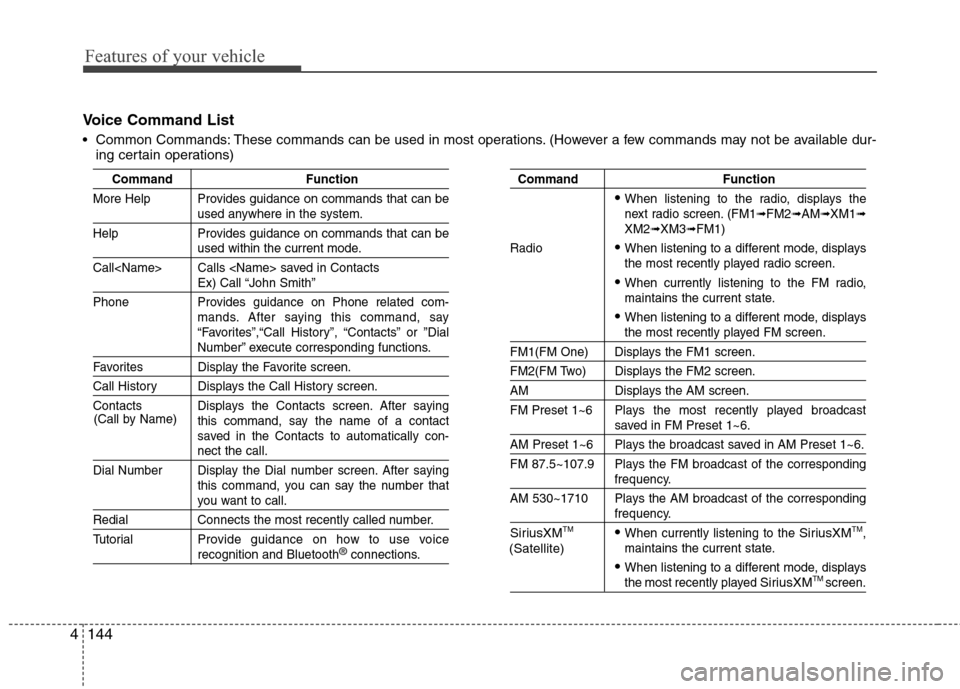
Voice Command List
Common Commands: These commands can be used in most operations. (However a few commands may not be available dur-
ing certain operations)
Command Function
More Help Provides guidance on commands that can be
used anywhere in the system.
Help Provides guidance on commands that can be
used within the current mode.
Call Calls saved in Contacts
Ex) Call “John Smith”
Phone Provides guidance on Phone related com-
mands. After saying this command, say
“Favorites”,“Call History”, “Contacts” or ”Dial
Number” execute corresponding functions.
Favorites Display the Favorite screen.
Call History Displays the Call History screen.
Contacts Displays the Contacts screen. After saying
this command, say the name of a contact
saved in the Contacts to automatically con-
nect the call.
Dial Number Display the Dial number screen. After saying
this command, you can say the number that
you want to call.
Redial Connects the most recently called number.
Tutorial Provide guidance on how to use voice
recognition and Bluetooth®connections.
Command Function
When listening to the radio, displays the
next radio screen. (FM1➟FM2➟AM➟XM1➟XM2➟XM3➟FM1)
Radio
When listening to a different mode, displays
the most recently played radio screen.
When currently listening to the FM radio,
maintains the current state.
When listening to a different mode, displaysthe most recently played FM screen.
FM1(FM One) Displays the FM1 screen.
FM2(FM Two) Displays the FM2 screen.
AM Displays the AM screen.
FM Preset 1~6 Plays the most recently played broadcast
saved in FM Preset 1~6.
AM Preset 1~6 Plays the broadcast saved in AM Preset 1~6.
FM 87.5~107.9 Plays the FM broadcast of the corresponding
frequency.
AM 530~1710 Plays the AM broadcast of the corresponding
frequency.
SiriusXMTMWhen currently listening to the SiriusXMTM,
maintains the current state.
When listening to a different mode, displaysthe most recently played SiriusXMTM screen. (Call by Name)
(Satellite)
4145
Features of your vehicle
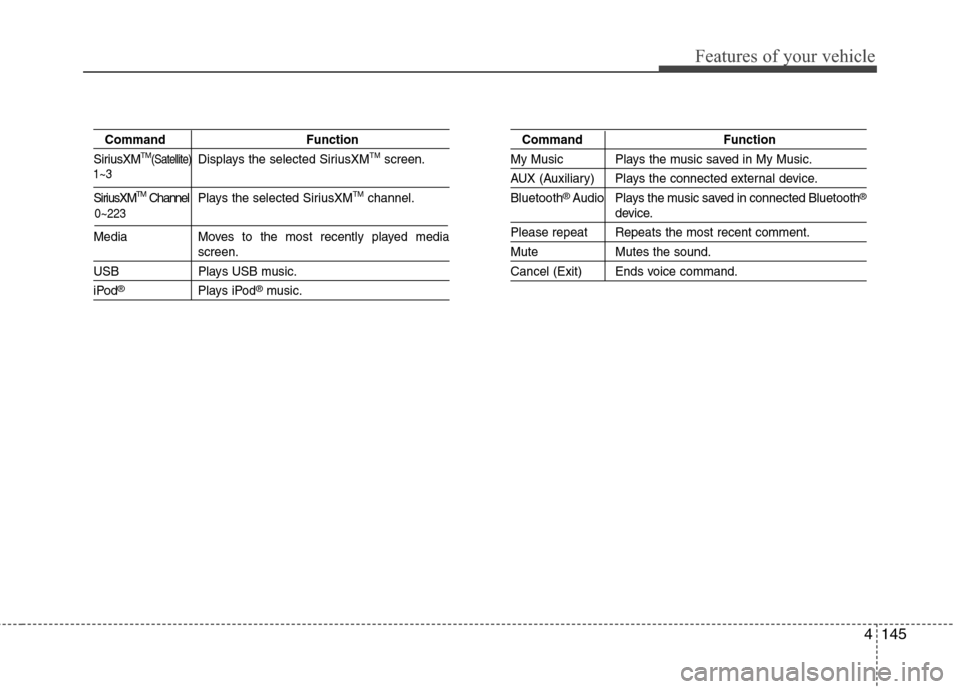
Command Function
SiriusXMTM(Satellite)Displays the selected SiriusXMTMscreen.
SiriusXMTMChannel P l ay s the selected SiriusXMTMchannel.
Media Moves to the most recently played media
screen.
USB Plays USB music.
iPod®Plays iPod®music.
Command Function
My Music Plays the music saved in My Music.
AUX (Auxiliary) Plays the connected external device.
Bluetooth
®Audio Plays the music saved in connected Bluetooth®
device.
Please repeat Repeats the most recent comment.
Mute Mutes the sound.
Cancel (Exit) Ends voice command.
0~223 1~3
![Hyundai Accent 2015 Owners Guide Features of your vehicle
140 4
Audio Streaming
Press the key Select [Phone]
Select [Audio Streaming]
When Audio Streaming is turned on, you
can play music files saved in your
Bluetooth®Wireless Tech](/img/35/14361/w960_14361-216.png "Hyundai Accent 2015 Owners Guide Features of your vehicle
140 4
Audio Streaming
Press the key Select [Phone]
Select [Audio Streaming]
When Audio Streaming is turned on, you
can play music files saved in your
Bluetooth®Wireless Tech")