change time Hyundai Accent 2016 Owner's Manual - RHD (UK. Australia)
[x] Cancel search | Manufacturer: HYUNDAI, Model Year: 2016, Model line: Accent, Model: Hyundai Accent 2016Pages: 425, PDF Size: 8.62 MB
Page 1 of 425
OWNER'S MANUAL
Operation
Maintenance
Specifications
All information in this Owner's Manual is current at the time of publication.
However, in line with the Hyundai policy of continual product improvement,
the right to amend or change specifications without prior notice or obliga-
tion to incorporate such amendments or changes into vehicles already pro-
duced, is reserved.
This manual applies to all models of this vehicle and includes descriptions
and explanations of optional as well as standard equipment. As a result,
you may find material in this manual that does not apply to your specific
vehicle.
Page 22 of 425
35
Safety features of your vehicle
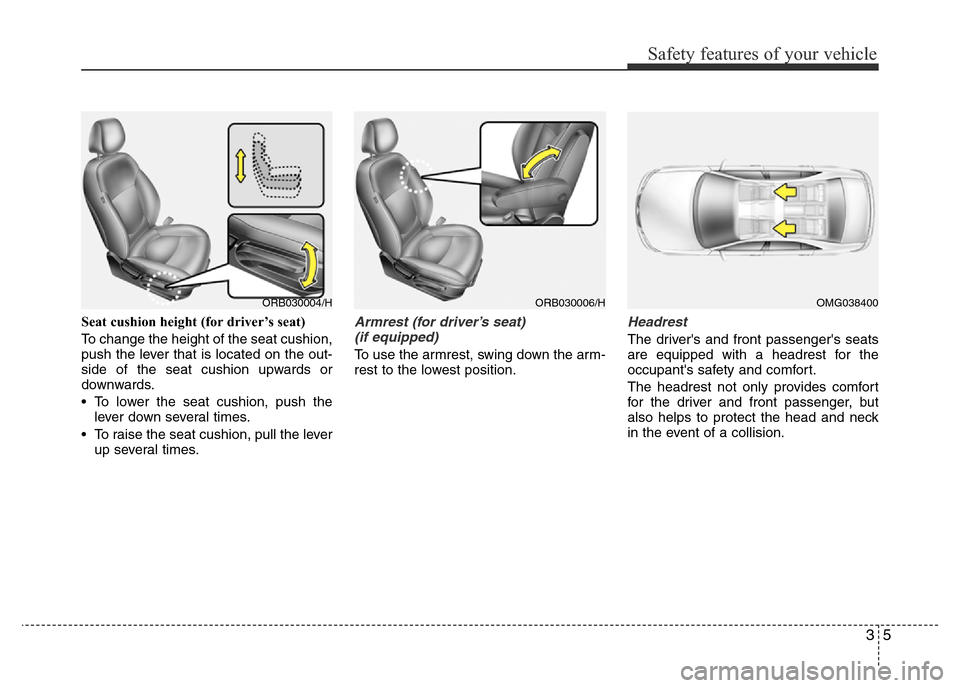
Seat cushion height (for driver’s seat)
To change the height of the seat cushion,
push the lever that is located on the out-
side of the seat cushion upwards or
downwards.
• To lower the seat cushion, push the
lever down several times.
• To raise the seat cushion, pull the lever
up several times.Armrest (for driver’s seat)
(if equipped)
To use the armrest, swing down the arm-
rest to the lowest position.
Headrest
The driver's and front passenger's seats
are equipped with a headrest for the
occupant's safety and comfort.
The headrest not only provides comfort
for the driver and front passenger, but
also helps to protect the head and neck
in the event of a collision.
ORB030004/HORB030006/HOMG038400
Page 108 of 425
Features of your vehicle
38 4
Electric power steering
Power steering system uses an electric
motor to assist you in steering the vehi-
cle. If the engine is off or if the power
steering system becomes inoperative,
the vehicle may still be steered, but it will
require an increased steering effort.
The motor driven power steering is con-
trolled by power steering control unit
which sense the steering wheel torque,
steering wheel position and vehicle
speed to command the motor.
The steering wheel becomes heavier as
the vehicle’s speed increases and
becomes lighter as the vehicle’s speed
decreases for the better control of the
steering wheel.
Should you notice any change in the
effort required to steer during normal
vehicle operation, have the power steer-
ing checked by an authorised HYUNDAI
dealer.
✽NOTICE
The following symptoms may occur dur-
ing normal vehicle operation:
• The EPS warning light does not illu-
minate.
• The steering wheel becomes heavier
after turning the ignition switch on.
This happens as the system performs
the EPS system diagnostics. When the
diagnostics is completed, the steering
wheel will return to its normal condi-
tion.
• Click noise may be heard from the
EPS relay after the ignition switch is
turned to the ON or LOCK position.
• Motor noise may be heard when the
vehicle is at a stop or at a low driving
speed.
• If the Electric Power Steering System
does not operate normally, the warn-
ing light will illuminate on the instru-
ment cluster. The steering wheel may
become difficult to control or operate
abnormally. Take your vehicle to an
authorised HYUNDAI dealer and
have the vehicle checked as soon as
possible.
(Continued)(Continued)
• When you operate the steering wheel
in low temperature, abnormal noise
could occur. If temperature rises, the
noise will disappear. This is a normal
condition.
• When the charging system warning
light comes on or the voltage is low
(When the alternator (or battery) does
not operate normally or it malfunc-
tions), the steering wheel may get
heavy and become difficult to control
operate abnormally.
STEERING WHEEL
CAUTION
When the vehicle is stationary, if
you turn the steering wheel all the
way to the left or right continuously,
the steering wheel becomes heavier
from the end. But this is for your
safety, not system malfunction. As
time passes, the steering wheel will
return to its normal condition.
Page 121 of 425
451
Features of your vehicle
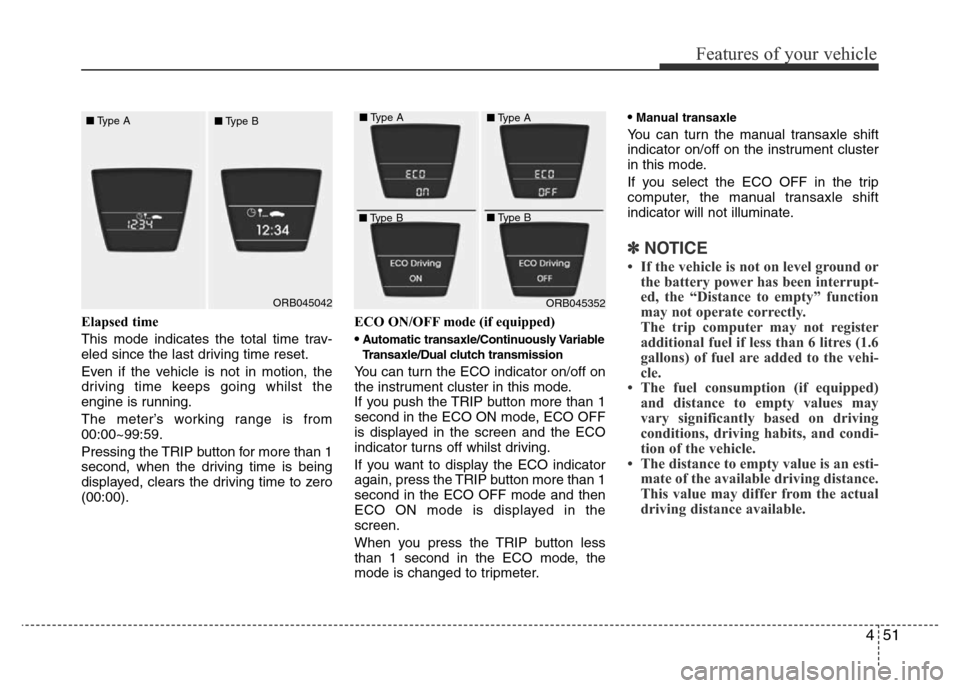
Elapsed time
This mode indicates the total time trav-
eled since the last driving time reset.
Even if the vehicle is not in motion, the
driving time keeps going whilst the
engine is running.
The meter’s working range is from
00:00~99:59.
Pressing the TRIP button for more than 1
second, when the driving time is being
displayed, clears the driving time to zero
(00:00).ECO ON/OFF mode (if equipped)
•
Automatic transaxle/Continuously Variable
Transaxle/Dual clutch transmission
You can turn the ECO indicator on/off on
the instrument cluster in this mode.
If you push the TRIP button more than 1
second in the ECO ON mode, ECO OFF
is displayed in the screen and the ECO
indicator turns off whilst driving.
If you want to display the ECO indicator
again, press the TRIP button more than 1
second in the ECO OFF mode and then
ECO ON mode is displayed in the
screen.
When you press the TRIP button less
than 1 second in the ECO mode, the
mode is changed to tripmeter.•
Manual transaxle
You can turn the manual transaxle shift
indicator on/off on the instrument cluster
in this mode.
If you select the ECO OFF in the trip
computer, the manual transaxle shift
indicator will not illuminate.
✽NOTICE
• If the vehicle is not on level ground or
the battery power has been interrupt-
ed, the “Distance to empty” function
may not operate correctly.
The trip computer may not register
additional fuel if less than 6 litres (1.6
gallons) of fuel are added to the vehi-
cle.
• The fuel consumption (if equipped)
and distance to empty values may
vary significantly based on driving
conditions, driving habits, and condi-
tion of the vehicle.
• The distance to empty value is an esti-
mate of the available driving distance.
This value may differ from the actual
driving distance available.
ORB045042ORB045352 ■Type A
■Type B■Type A
■Type B■Type A
■Type B
Page 148 of 425
Features of your vehicle
78 4
If an indicator stays on and does not
flash or if it flashes abnormally, one of the
turn signal bulbs may be burned out and
will require replacement.
One-touch lane change function
To activate an one-touch lane change
function, move the turn signal lever
slightly and then release it. The lane
change signals will blink 3 times.
✽NOTICE
If an indicator flash is abnormally quick
or slow, a bulb may be burned out or
have a poor electrical connection in the
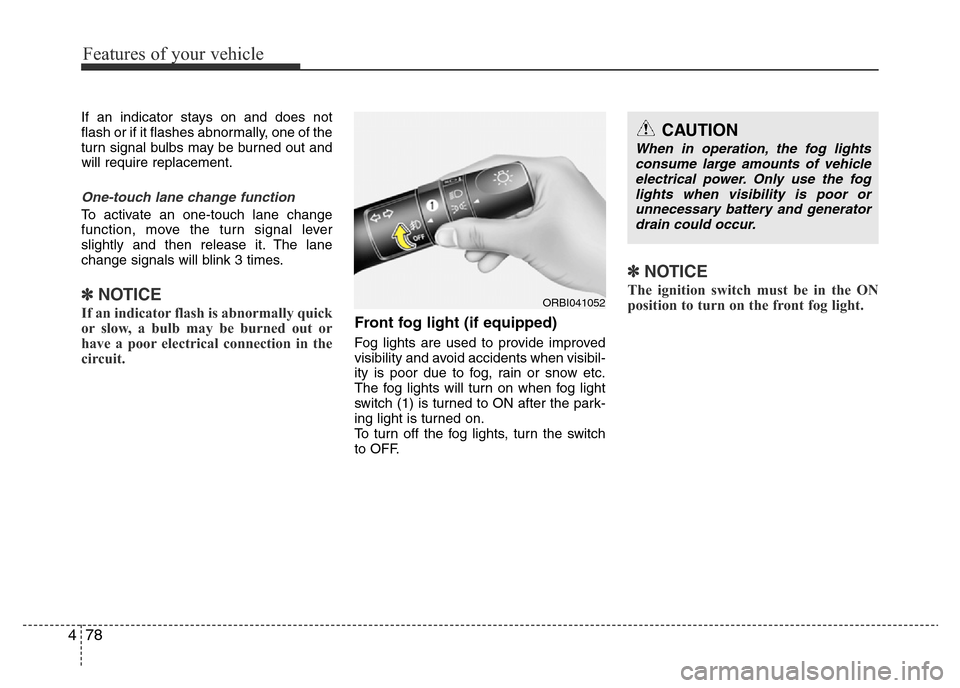
circuit.Front fog light (if equipped)
Fog lights are used to provide improved
visibility and avoid accidents when visibil-
ity is poor due to fog, rain or snow etc.
The fog lights will turn on when fog light
switch (1) is turned to ON after the park-
ing light is turned on.
To turn off the fog lights, turn the switch
to OFF.
✽NOTICE
The ignition switch must be in the ON
position to turn on the front fog light.ORBI041052
CAUTION
When in operation, the fog lights
consume large amounts of vehicle
electrical power. Only use the fog
lights when visibility is poor or
unnecessary battery and generator
drain could occur.
Page 164 of 425
Features of your vehicle
94 4
✽NOTICE
• When using the air conditioning sys-
tem, monitor the temperature gauge
closely whilst driving up hills or in
heavy traffic when outside tempera-
tures are high. Air conditioning sys-
tem operation may cause engine over-
heating. Continue to use the blower
fan but turn the air conditioning sys-
tem off if the temperature gauge indi-
cates engine overheating.
• When opening the windows in humid
weather air conditioning may create
water droplets inside the vehicle.
Since excessive water droplets may
cause damage to electrical equipment,
air conditioning should only be used
with the windows closed.
Air conditioning system operation tips
• If the vehicle has been parked in direct
sunlight during hot weather, open the
windows for a short time to let the hot
air inside the vehicle escape.
• To help reduce moisture inside of the
windows on rainy or humid days,
decrease the humidity inside the vehi-
cle by operating the air conditioning
system.
• During air conditioning system opera-
tion, you may occasionally notice a
slight change in engine speed as the
air conditioning compressor cycles.
This is a normal system operation
characteristic.
• Use the air conditioning system every
month only for a few minutes to ensure
maximum system performance.• When using the air conditioning sys-
tem, you may notice clear water drip-
ping (or even puddling) on the ground
under the passenger side of the vehi-
cle. This is a normal system operation
characteristic.
• Operating the air conditioning system
in the recirculated air position provides
maximum cooling, however, continual
operation in this mode may cause the
air inside the vehicle to become stale.
• During cooling operation, you may
occasionally notice a misty air flow
because of rapid cooling and humid air
intake. This is a normal system opera-
tion characteristic.
• If you operate air conditioner exces-
sively, the difference between the tem-
perature of the outside air and that of
the windscreen could cause the outer
surface of the windscreen to fog up,
causing loss of visibility. In this case,
set the mode selection knob or button
to the position and fan speed con-
trol to the lower speed.
Page 165 of 425
495
Features of your vehicle
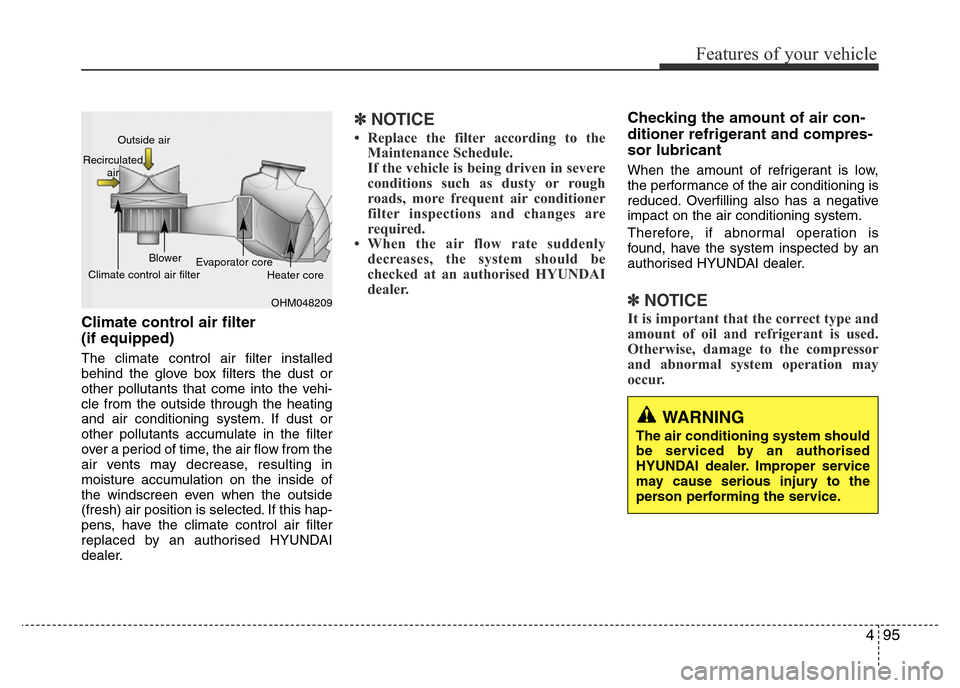
Climate control air filter
(if equipped)
The climate control air filter installed
behind the glove box filters the dust or
other pollutants that come into the vehi-
cle from the outside through the heating
and air conditioning system. If dust or
other pollutants accumulate in the filter
over a period of time, the air flow from the
air vents may decrease, resulting in
moisture accumulation on the inside of
the windscreen even when the outside
(fresh) air position is selected. If this hap-
pens, have the climate control air filter
replaced by an authorised HYUNDAI
dealer.
✽NOTICE
• Replace the filter according to the
Maintenance Schedule.
If the vehicle is being driven in severe
conditions such as dusty or rough
roads, more frequent air conditioner
filter inspections and changes are
required.
• When the air flow rate suddenly
decreases, the system should be
checked at an authorised HYUNDAI
dealer.
Checking the amount of air con-
ditioner refrigerant and compres-
sor lubricant
When the amount of refrigerant is low,
the performance of the air conditioning is
reduced. Overfilling also has a negative
impact on the air conditioning system.
Therefore, if abnormal operation is
found, have the system inspected by an
authorised HYUNDAI dealer.
✽NOTICE
It is important that the correct type and
amount of oil and refrigerant is used.
Otherwise, damage to the compressor
and abnormal system operation may
occur.
WARNING
The air conditioning system should
be serviced by an authorised
HYUNDAI dealer. Improper service
may cause serious injury to the
person performing the service.
OHM048209 Outside air
Recirculated
air
Climate control air filterBlower
Evaporator core
Heater core
Page 176 of 425
Features of your vehicle
106 4
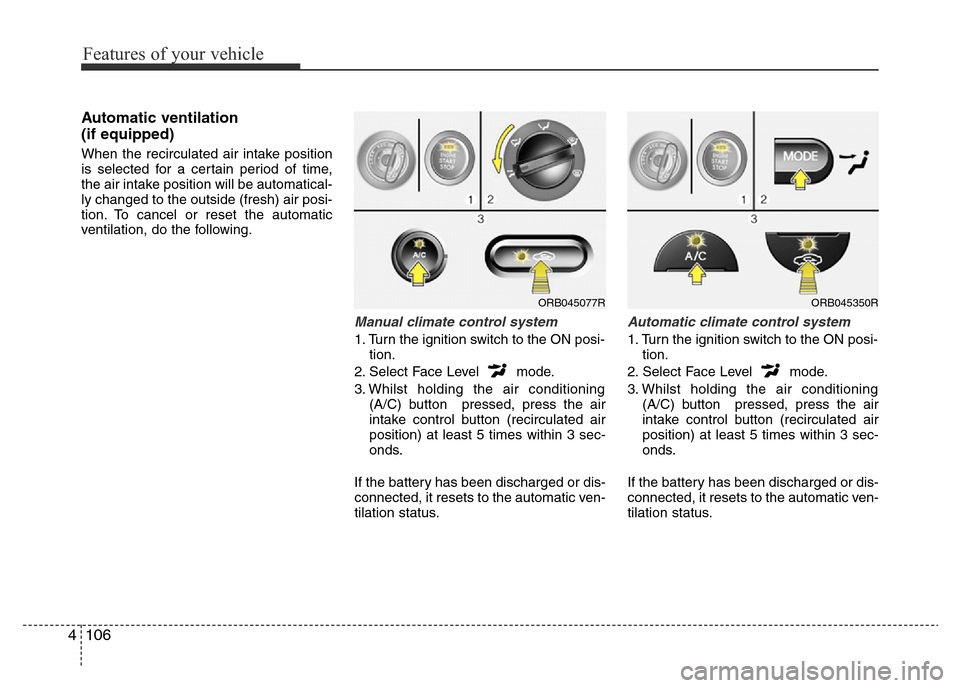
Automatic ventilation
(if equipped)
When the recirculated air intake position
is selected for a certain period of time,
the air intake position will be automatical-
ly changed to the outside (fresh) air posi-
tion. To cancel or reset the automatic
ventilation, do the following.
Manual climate control system
1. Turn the ignition switch to the ON posi-
tion.
2. Select Face Level mode.
3. Whilst holding the air conditioning
(A/C) button pressed, press the air
intake control button (recirculated air
position) at least 5 times within 3 sec-
onds.
If the battery has been discharged or dis-
connected, it resets to the automatic ven-
tilation status.
Automatic climate control system
1. Turn the ignition switch to the ON posi-
tion.
2. Select Face Level mode.
3. Whilst holding the air conditioning
(A/C) button pressed, press the air
intake control button (recirculated air
position) at least 5 times within 3 sec-
onds.
If the battery has been discharged or dis-
connected, it resets to the automatic ven-
tilation status.
ORB045077RORB045350R
Page 198 of 425
Features of your vehicle
128 4
✽NOTICE - USING THE iPod®
DEVICE
• Some iPod®models may not support
communication protocol and files may
not properly play.
Supported iPod
®models:
- iPod®Mini
- iPod®4th (Photo) ~ 6th (Classic)
generation
- iPod
®Nano 1st~4th generation
- iPod®Touch 1st~2nd generation
• The order of search or playback of
songs in the iPod
®can be different
from the order searched in the audio
system.
• If the iPod
®disabled due to its own
malfunction, reset the iPod®. (Reset:
Refer to iPod®manual)
• An iPod®may not operate normally
on low battery.
(Continued)(Continued)
• Some iPod
®devices, such as the
iPhone®, can be connected through the
Bluetooth®Wireless Technology inter-
face. The device must have audio
Bluetooth
®Wireless Technology capa-
bility (such as for stereo headphone
Bluetooth
®Wireless Technology ).
The device can play, but it will not be
controlled by the audio system.
• To use iPod
®features within the
audio, use the cable provided upon
purchasing an iPod
®device.
• Skipping or improper operation may
occur depending on the characteris-
tics of your iPod
®/iPhone®device.
• If your iPhone®is connected to both
the Bluetooth®Wireless Technology
and USB, the sound may not be prop-
erly played. In your iPhone
®, select
the Dock connector orBluetooth®
Wireless Technology to change the
sound output (source).
(Continued)(Continued)
• When connecting
iPod®with theiPod®Power Cable, insert the connec-
tor to the multimedia socket complete-
ly. If not inserted completely, communi-
cations between
iPod®and audio may
be interrupted.
• When adjusting the sound effects of
the
iPod®and the audio system, the
sound effects of both devices will over-
lap and might reduce or distort the
quality of the sound.
• Deactivate (turn off) the equalizer
function of an
iPod®when adjusting
the audio system’s volume, and turn
off the equalizer of the audio system
when using the equalizer of an
iPod®.
• When not using iPod®with car audio,
detach the iPod®cable from iPod®.
Otherwise, iPod®may remain in
accessory mode, and may not work
properly.
Page 200 of 425
Features of your vehicle
130 4
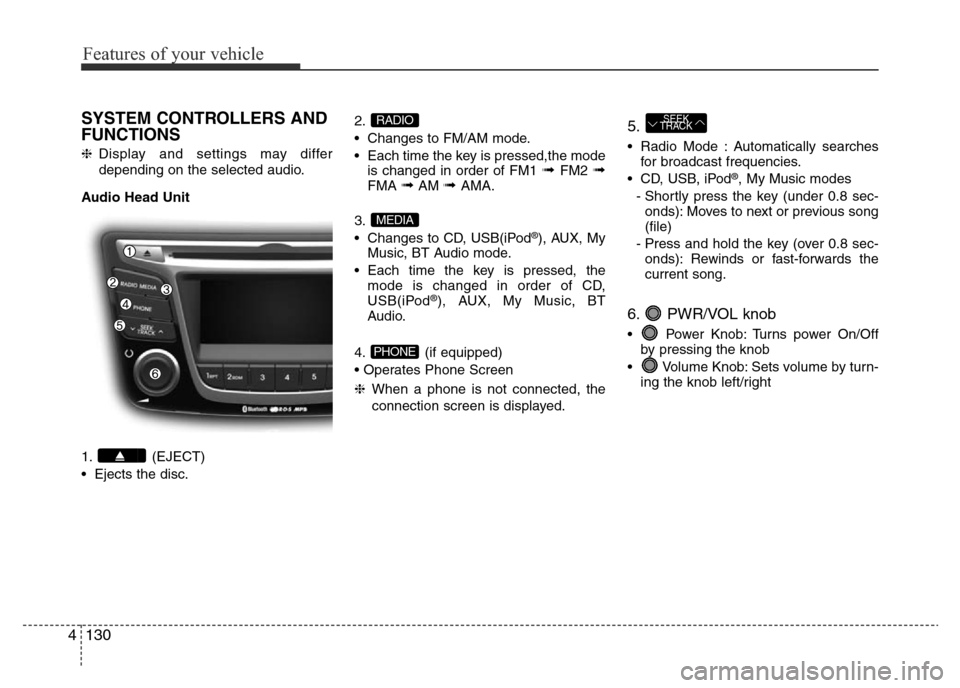
SYSTEM CONTROLLERS AND
FUNCTIONS
❈Display and settings may differ
depending on the selected audio.
Audio Head Unit
1. (EJECT)
• Ejects the disc.2.
• Changes to FM/AM mode.
• Each time the key is pressed,the mode
is changed in order of FM1
➟ FM2 ➟FMA ➟AM ➟ AMA.
3.
• Changes to CD, USB(iPod
®), AUX, My
Music, BT Audio mode.
• Each time the key is pressed, the
mode is changed in order of CD,
USB(iPod
®), AUX, My Music, BT
Audio.
4. (if equipped)
• Operates Phone Screen
❈When a phone is not connected, the
connection screen is displayed.
5.
• Radio Mode : Automatically searches
for broadcast frequencies.
• CD, USB, iPod
®, My Music modes
- Shortly press the key (under 0.8 sec-
onds): Moves to next or previous song
(file)
- Press and hold the key (over 0.8 sec-
onds): Rewinds or fast-forwards the
current song.
6. PWR/VOL knob
• Power Knob: Turns power On/Off
by pressing the knob
• Volume Knob: Sets volume by turn-
ing the knob left/right
SEEK
TRACK
PHONE
MEDIA
RADIO