tow Hyundai Accent 2016 User Guide
[x] Cancel search | Manufacturer: HYUNDAI, Model Year: 2016, Model line: Accent, Model: Hyundai Accent 2016Pages: 456, PDF Size: 16.41 MB
Page 115 of 456
Features of your vehicle
38
4
When the door is open, or if the engine is
not started within 1 minute, the tachometer
pointer may move slightly in ON position
with the engine OFF. This movement is
normal and will not affect the accuracy of
the tachometer once the engine is running.
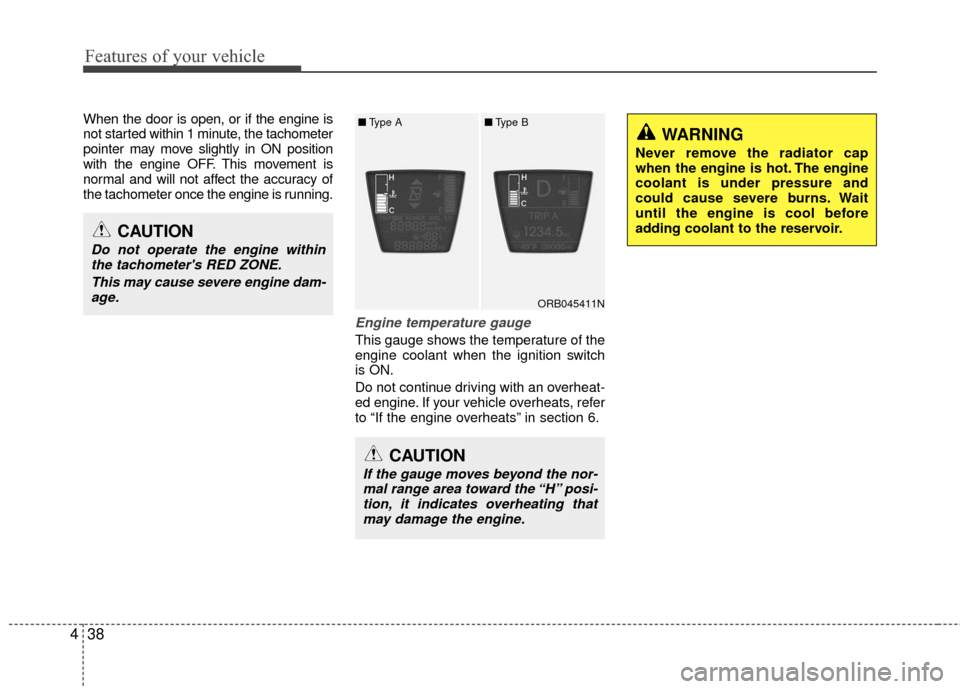
Engine temperature gauge
This gauge shows the temperature of the
engine coolant when the ignition switch
is ON.
Do not continue driving with an overheat-
ed engine. If your vehicle overheats, refer
to “If the engine overheats” in section 6.
ORB045411N
CAUTION
If the gauge moves beyond the nor-
mal range area toward the “H” posi- tion, it indicates overheating thatmay damage the engine.
CAUTION
Do not operate the engine withinthe tachometer's RED ZONE.
This may cause severe engine dam-age.
WARNING
Never remove the radiator cap
when the engine is hot. The engine
coolant is under pressure and
could cause severe burns. Wait
until the engine is cool before
adding coolant to the reservoir.
■ Type A■Type B
Page 124 of 456
447
Features of your vehicle
Engine oil pressure warning light
This warning light indicates the engine oil
pressure is low.
If the warning light illuminates while driv-
ing:
1. Drive safely to the side of the road and stop.
2. With the engine off, check the engine oil level. If the level is low, add oil as
required.
If the warning light remains on after
adding oil or if oil is not available, call an
authorized HYUNDAI dealer.
Parking brake & brake fluid warning light
Parking brake warning
This light is illuminated when the parking
brake is applied with the ignition switch in
the START or ON position. The warning
light should go off when the parking
brake is released.
Low brake fluid level warning
If the warning light remains on, it may
indicate that the brake fluid level in the
reservoir is low.
If the warning light remains on:
1. Drive carefully to the nearest safe location and stop your vehicle.
2. With the engine stopped, check the brake fluid level immediately and add
fluid as required. Then check all brake
components for fluid leaks.
3. Do not drive the vehicle if leaks are found, the warning light remains on or
the brakes do not operate properly.
Have the vehicle towed to any author-
ized HYUNDAI dealer for a brake sys-
tem inspection and necessary repairs.
CAUTION
If the engine is not stopped imme-diately after the engine oil pressurewarning light is illuminated, severe damage could result.
CAUTION
If the oil pressure warning lightstays on while the engine is run-ning, serious engine damage mayresult. The oil pressure warninglight comes on whenever there is insufficient oil pressure. In normaloperation, it should come on whenthe ignition switch is turned on,then go out when the engine isstarted. If the oil pressure warninglight stays on while the engine isrunning, there is a serious malfunc-tion.
If this happens, stop the car assoon as it is safe to do so, turn off the engine and check the oil level. Ifthe oil level is low, fill the engine oilto the proper level and start theengine again. If the light stays onwith the engine running, turn theengine off immediately. In anyinstance where the oil light stays onwhen the engine is running, theengine should be checked by anauthorized HYUNDAI dealer before the car is driven again.
Page 134 of 456
457
Features of your vehicle
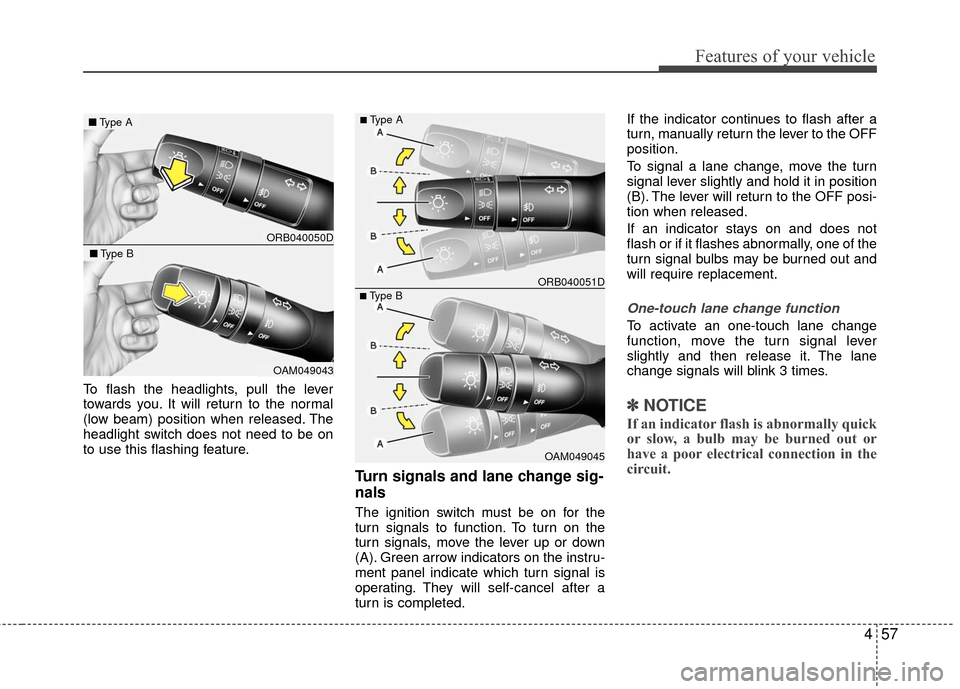
To flash the headlights, pull the lever
towards you. It will return to the normal
(low beam) position when released. The
headlight switch does not need to be on
to use this flashing feature.
Turn signals and lane change sig-
nals
The ignition switch must be on for the
turn signals to function. To turn on the
turn signals, move the lever up or down
(A). Green arrow indicators on the instru-
ment panel indicate which turn signal is
operating. They will self-cancel after a
turn is completed.If the indicator continues to flash after a
turn, manually return the lever to the OFF
position.
To signal a lane change, move the turn
signal lever slightly and hold it in position
(B). The lever will return to the OFF posi-
tion when released.
If an indicator stays on and does not
flash or if it flashes abnormally, one of the
turn signal bulbs may be burned out and
will require replacement.
One-touch lane change function
To activate an one-touch lane change
function, move the turn signal lever
slightly and then release it. The lane
change signals will blink 3 times.
✽ ✽
NOTICE
If an indicator flash is abnormally quick
or slow, a bulb may be burned out or
have a poor electrical connection in the
circuit.
ORB040050D
■ Type A
OAM049043
■Type B
OAM049045
■Type B ORB040051D
■Type A
Page 138 of 456
461
Features of your vehicle
ORB045377ORB045375
■4 Door
■5 Door
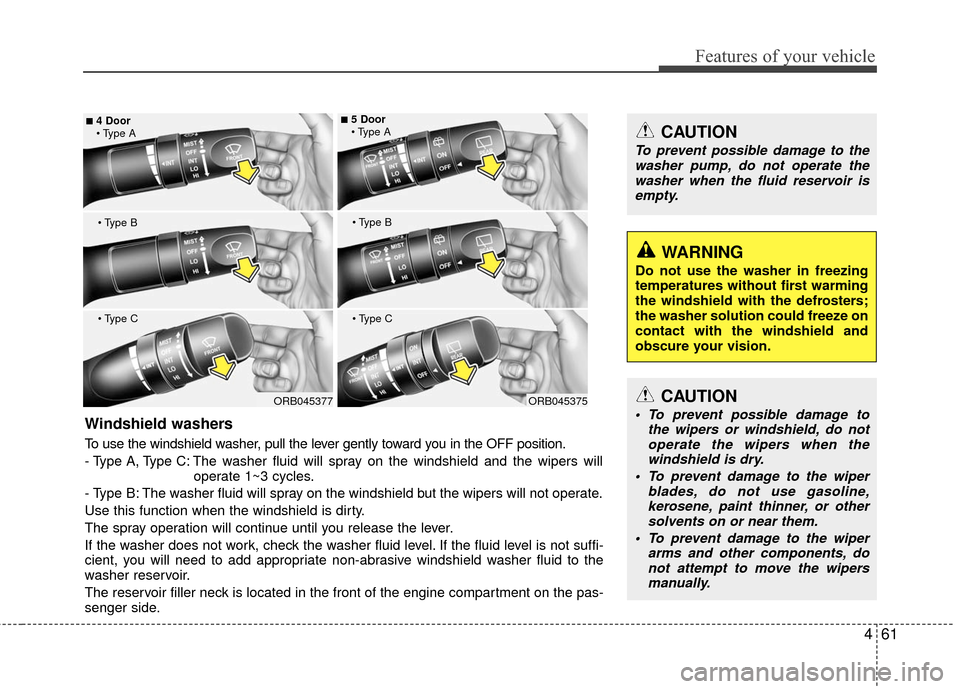
Windshield washers
To use the windshield washer, pull the lever gently toward you in the OFF position.
- Type A, Type C: The washer fluid will spray on the windshield and the wipers will operate 1~3 cycles.
- Type B: The washer fluid will spray on the windshield but the wipers will not operate.
Use this function when the windshield is dirty.
The spray operation will continue until you release the lever.
If the washer does not work, check the washer fluid level. If the fluid level is not suffi-
cient, you will need to add appropriate non-abrasive windshield washer fluid to the
washer reservoir.
The reservoir filler neck is located in the front of the engine compartment on the pas-
senger side.
CAUTION
To prevent possible damage to the wipers or windshield, do notoperate the wipers when thewindshield is dry.
To prevent damage to the wiper blades, do not use gasoline,kerosene, paint thinner, or othersolvents on or near them.
To prevent damage to the wiper arms and other components, donot attempt to move the wipersmanually.
WARNING
Do not use the washer in freezing
temperatures without first warming
the windshield with the defrosters;
the washer solution could freeze on
contact with the windshield and
obscure your vision.
CAUTION
To prevent possible damage to the
washer pump, do not operate thewasher when the fluid reservoir is empty.
Page 146 of 456
469
Features of your vehicle
Mode selection
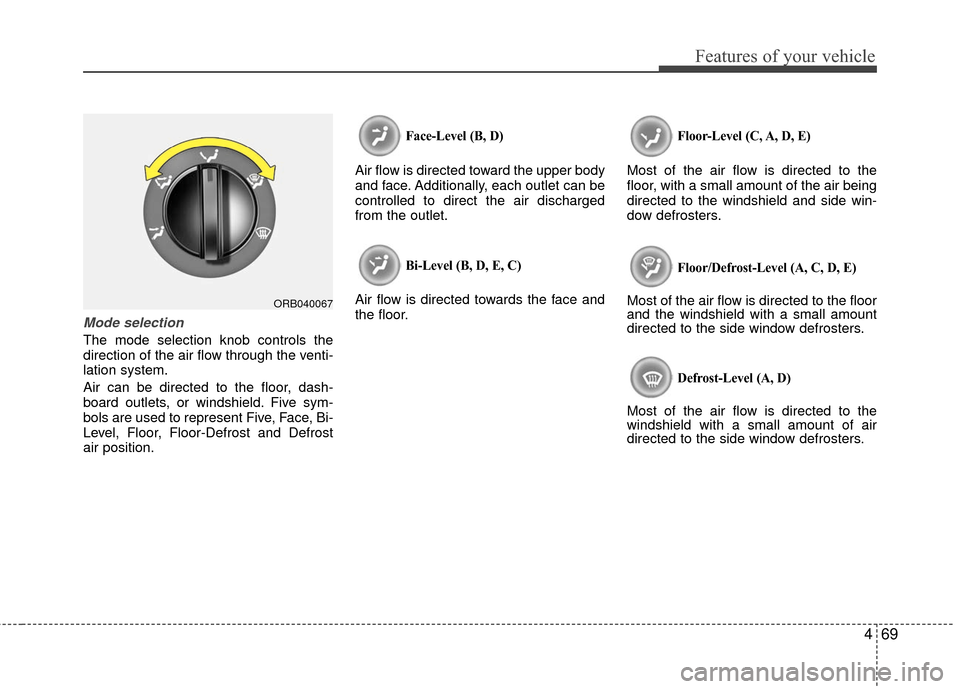
The mode selection knob controls the
direction of the air flow through the venti-
lation system.
Air can be directed to the floor, dash-
board outlets, or windshield. Five sym-
bols are used to represent Five, Face, Bi-
Level, Floor, Floor-Defrost and Defrost
air position.
Face-Level (B, D)
Air flow is directed toward the upper body
and face. Additionally, each outlet can be
controlled to direct the air discharged
from the outlet.
Bi-Level (B, D, E, C)
Air flow is directed towards the face and
the floor.
Floor-Level (C, A, D, E)
Most of the air flow is directed to the
floor, with a small amount of the air being
directed to the windshield and side win-
dow defrosters.
Floor/Defrost-Level (A, C, D, E)
Most of the air flow is directed to the floor
and the windshield with a small amount
directed to the side window defrosters.
Defrost-Level (A, D)
Most of the air flow is directed to the
windshield with a small amount of air
directed to the side window defrosters.
ORB040067
Page 147 of 456
Features of your vehicle
70
4
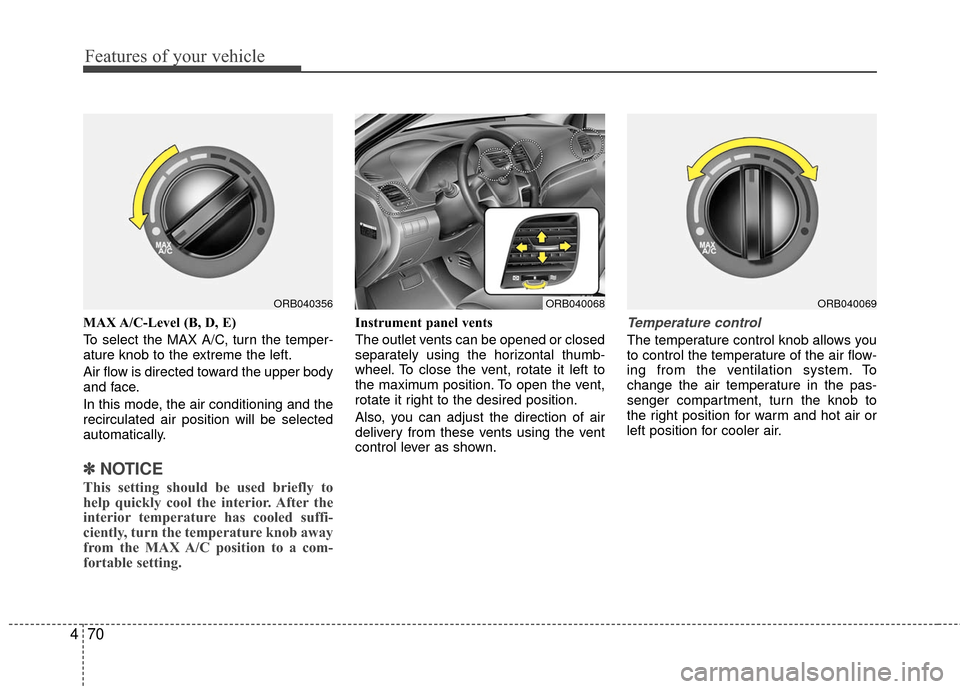
MAX A/C-Level (B, D, E)
To select the MAX A/C, turn the temper-
ature knob to the extreme the left.
Air flow is directed toward the upper body
and face.
In this mode, the air conditioning and the
recirculated air position will be selected
automatically.
✽ ✽
NOTICE
This setting should be used briefly to
help quickly cool the interior. After the
interior temperature has cooled suffi-
ciently, turn the temperature knob away
from the MAX A/C position to a com-
fortable setting.
Instrument panel vents
The outlet vents can be opened or closed
separately using the horizontal thumb-
wheel. To close the vent, rotate it left to
the maximum position. To open the vent,
rotate it right to the desired position.
Also, you can adjust the direction of air
delivery from these vents using the vent
control lever as shown.Temperature control
The temperature control knob allows you
to control the temperature of the air flow-
ing from the ventilation system. To
change the air temperature in the pas-
senger compartment, turn the knob to
the right position for warm and hot air or
left position for cooler air.
ORB040356ORB040069ORB040068
Page 156 of 456
479
Features of your vehicle
Floor & Defrost
Most of the air flow is directed to the floor
and the windshield with a small amount
directed to the side window defrosters.
Face-Level
Air flow is directed toward the upper body
and face. Additionally, each outlet can be
controlled to direct the air discharged
from the outlet.
Bi-Level
Air flow is directed towards the face and
the floor.
Floor-Level
Most of the air flow is directed to the
floor, with a small amount of the air being
directed to the windshield and side win-
dow defrosters. Defrost-Level
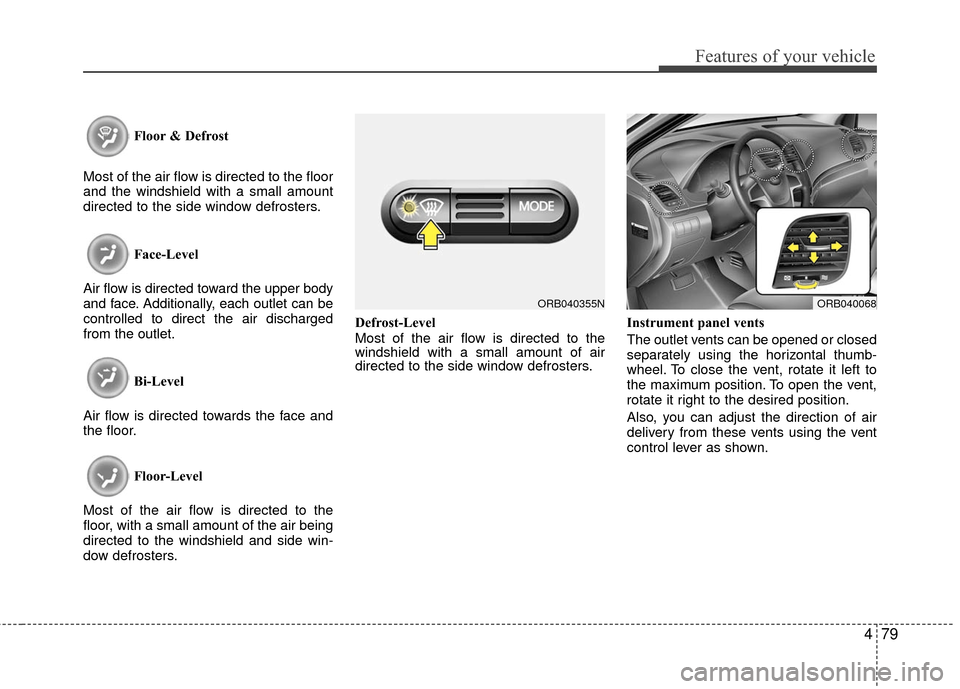
Most of the air flow is directed to the
windshield with a small amount of air
directed to the side window defrosters.
Instrument panel vents
The outlet vents can be opened or closed
separately using the horizontal thumb-
wheel. To close the vent, rotate it left to
the maximum position. To open the vent,
rotate it right to the desired position.
Also, you can adjust the direction of air
delivery from these vents using the vent
control lever as shown.
ORB040355NORB040068
Page 172 of 456
495
Features of your vehicle
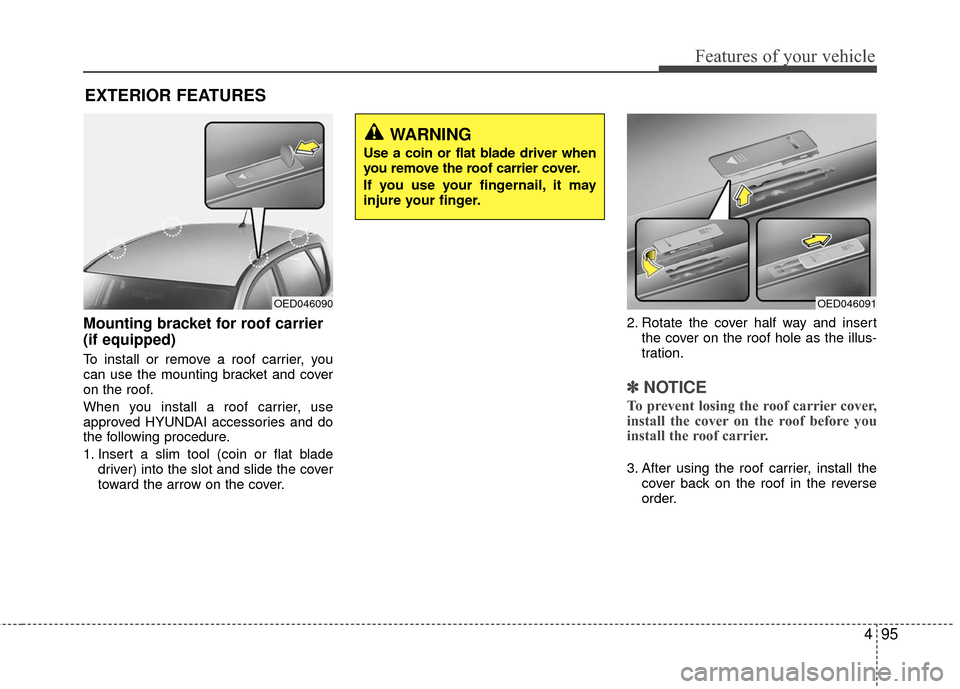
Mounting bracket for roof carrier
(if equipped)
To install or remove a roof carrier, you
can use the mounting bracket and cover
on the roof.
When you install a roof carrier, use
approved HYUNDAI accessories and do
the following procedure.
1. Insert a slim tool (coin or flat bladedriver) into the slot and slide the cover
toward the arrow on the cover. 2. Rotate the cover half way and insert
the cover on the roof hole as the illus-
tration.
✽ ✽NOTICE
To prevent losing the roof carrier cover,
install the cover on the roof before you
install the roof carrier.
3. After using the roof carrier, install the
cover back on the roof in the reverse
order.
EXTERIOR FEATURES
OED046091OED046090
WARNING
Use a coin or flat blade driver when
you remove the roof carrier cover.
If you use your fingernail, it may
injure your finger.
Page 176 of 456
499
Features of your vehicle
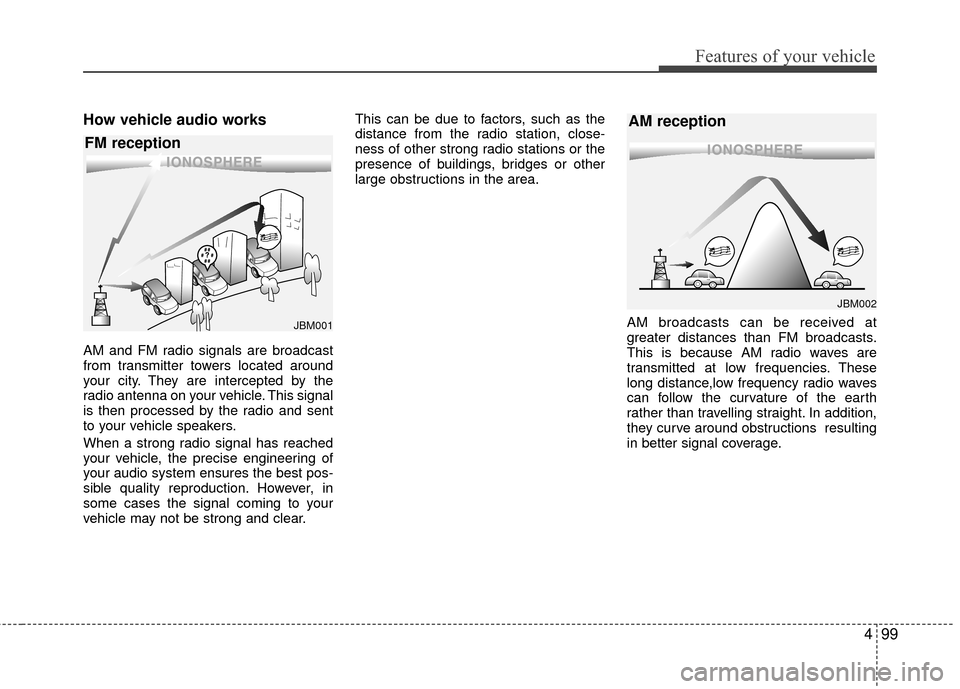
How vehicle audio works
AM and FM radio signals are broadcast
from transmitter towers located around
your city. They are intercepted by the
radio antenna on your vehicle. This signal
is then processed by the radio and sent
to your vehicle speakers.
When a strong radio signal has reached
your vehicle, the precise engineering of
your audio system ensures the best pos-
sible quality reproduction. However, in
some cases the signal coming to your
vehicle may not be strong and clear.This can be due to factors, such as the
distance from the radio station, close-
ness of other strong radio stations or the
presence of buildings, bridges or other
large obstructions in the area.
AM broadcasts can be received at
greater distances than FM broadcasts.
This is because AM radio waves are
transmitted at low frequencies. These
long distance,low frequency radio waves
can follow the curvature of the earth
rather than travelling straight. In addition,
they curve around obstructions resulting
in better signal coverage.
JBM002
AM reception
JBM001
FM reception
Page 275 of 456
5
Before driving / 5-3
Key / 5-5
Manual transaxle /5-7
Automatic transaxle / 5-10
Brake system / 5-16
Cruise control system / 5-28
Active ECO system / 5-32
Economical operation / 5-33
Special driving conditions / 5-35
Winter driving / 5-39
Vehicle load limit / 5-43
Vehicle weight / 5-48
Trailer towing / 5-49
Driving your vehicle