radio Hyundai Accent 2016 Owner's Guide
[x] Cancel search | Manufacturer: HYUNDAI, Model Year: 2016, Model line: Accent, Model: Hyundai Accent 2016Pages: 456, PDF Size: 16.41 MB
Page 240 of 456
4163
Features of your vehicle
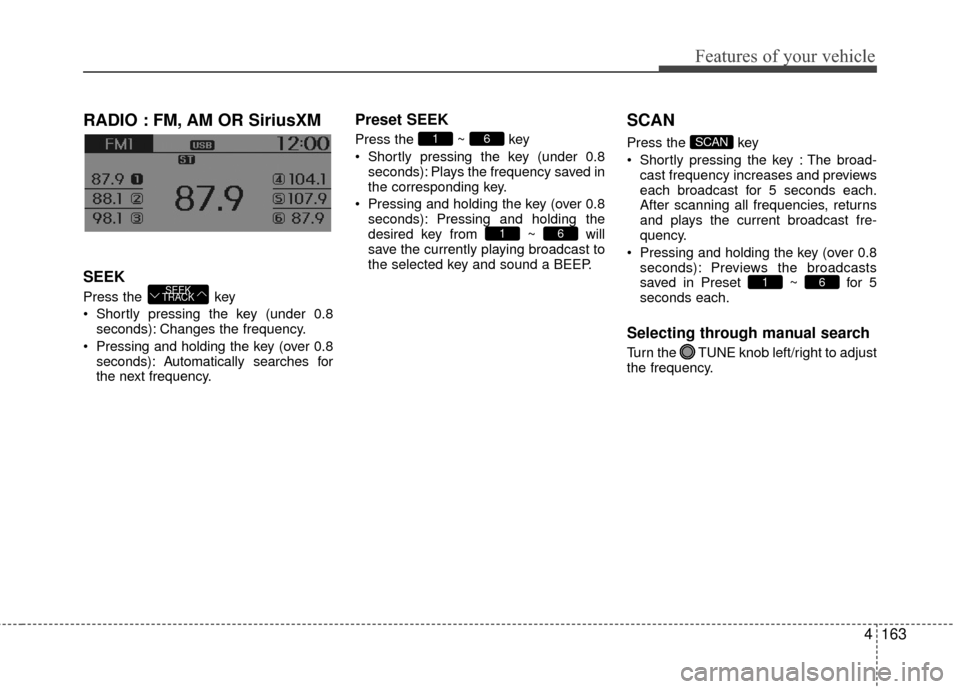
RADIO : FM, AM OR SiriusXM
SEEK
Press the key
Shortly pressing the key (under 0.8seconds): Changes the frequency.
Pressing and holding the key (over 0.8 seconds): Automatically searches for
the next frequency.
Preset SEEK
Press the ~ key
Shortly pressing the key (under 0.8seconds): Plays the frequency saved in
the corresponding key.
Pressing and holding the key (over 0.8 seconds): Pressing and holding the
desired key from ~ will
save the currently playing broadcast to
the selected key and sound a BEEP.
SCAN
Press the key
Shortly pressing the key : The broad-cast frequency increases and previews
each broadcast for 5 seconds each.
After scanning all frequencies, returns
and plays the current broadcast fre-
quency.
Pressing and holding the key (over 0.8 seconds): Previews the broadcasts
saved in Preset ~ for 5
seconds each.
Selecting through manual search
Turn the TUNE knob left/right to adjust
the frequency.
61
SCAN
61
61
SEEK
TRACK
Page 242 of 456
4165
Features of your vehicle
SiriusXM®Satellite Radio
information
Satellite Radio channels:
Enjoy SiriusXM Satellite Radio with a 3-
month trial subscription to the Sirius Select
package. You’ll get over 140 channels,
including commercial-free music, plus all
your favorite sports, exclusive talk, enter-
tainment, and a selection of premium pro-
gramming. For more information and a
complete list of SiriusXM channels, visit sir-
iusxm.com in the United States, siriusxm.ca
in Canada, or call SiriusXM at 1-888-539-
7474.
Satellite Radio reception factors:
To receive the satellite signal, your vehicle
has been equipped with a satellite radio
antenna located on the roof of your vehi-
cle. The vehicle roof provides the best
location for an unobstructed, open view of
the sky, a requirement of a satellite radio
system. Like AM/FM, there are several fac-
tors that can affect satellite radio reception
performance:
Antenna obstructions: For optimal
reception performance, keep the anten-
na clear of snow and ice build-up and
keep luggage and other material as far
away from the anten na as possible. Terrain: Hills, mountains, tall buildings,
bridges, tunnels, freeway overpasses,
parking garages, dense tree foliage and
thunderstorms can interfere with your
reception.
SiriusXM Satellite Radio service:
SiriusXM is a subscription-based satellite
radio service that broadcasts music,
sports, news and entertainment program-
ming to radio receivers, which are avail-
able for installation in motor vehicles or
factory installed, as well as for the home,
portable and wireless devices, and
through an Internet connection on person-
al computer.
Vehicles that are equipped with a factory
installed SiriusXM Satellite Radio system
include:
Hardware and an introductory trial sub-
scription term, which begins on the date
of sale or lease of the vehicle.
For a small upgrade fee, access to SiriusXM music channels, and other
select channels over the Internet using
any computer connected to the Internet
(U.S. customers only).
For information on extended subscrip-
tion terms, contact SiriusXM at 1-888-
539-7474.
NOTE:
SiriusXM services require a subscrip-
tion sold separately, or as a package,
by Sirius XM Radio Inc. If you decide
to continue service after your trial, the
subscription plan you choose will
automatically renew thereafter and
you will be charged according to your
chosen payment method at then-cur-
rent rates. Fees and taxes apply. To
cancel you must call SiriusXM at 1-
866-635-2349. See SiriusXM Customer
Agreement for complete terms at
www.siriusxm.com. SiriusXM U.S.
satellite and data services are avail-
able only in the 48 contiguous USA,
DC and PR (with coverage limita-
tions). SiriusXM satellite service is
also available in Canada; see www.sir-
iusxm. ca. All fees and programming
subject to change. Sirius, XM and all
related marks and logos are trade-
marks of Sirius XM Radio Inc.
Page 243 of 456
Features of your vehicle
166
4
SiriusXM RADIO
Using
SiriusXMSatellite Radio
Your vehicle is equipped with a 3-month
trial subscription to SiriusXM so you have
access to over 140 channels of music,
information, and entertainment program-
ming.
Activation
In order to extend or reactivate your
Sirius Select subscription, you will need
to contact SiriusXM Customer Care at 1-
800-643-2112. Have your 12-digit RID
(Radio Identification Number) / ESN
(Electronic Serial Number) ready. To
retrieve the RID / ESN, turn on the radio,
press the key, and tune to channel zero.
Please note that the vehicle will need to
be turned on, in Sirius mode, and have
an unobstructed view of the sky in order
for the radio to receive the activation sig-
nal.
SEEK
Press the key
Shortly pressing the key: select previ-
ous or next channel.
Pressing and holding the key (over 0.8 seconds): continuously move to previ-
ous or next channel.
❈ If the “Category” icon is displayed,
channels are changed within the cur-
rent category.
SCAN
Press the key
Shortly pressing the key: Previews each broadcast for 5 seconds each
❈ Press the key again to contin-
ue listening to the current frequency
❈ If the “Category” icon is displayed,
channels are changed within the cur-
rent category.
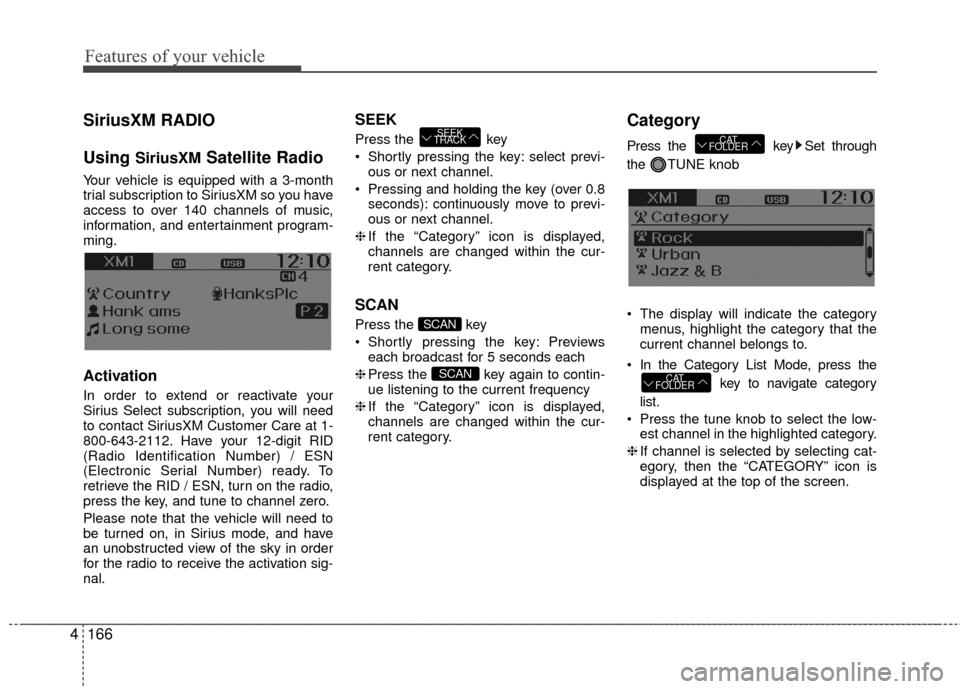
Category
Press the key Set through
the TUNE knob
The display will indicate the category menus, highlight the category that the
current channel belongs to.
In the Category List Mode, press the key to navigate category
list.
Press the tune knob to select the low- est channel in the highlighted category.
❈ If channel is selected by selecting cat-
egory, then the “CATEGORY” icon is
displayed at the top of the screen.
CAT
FOLDER
CAT
FOLDER
SCAN
SCAN
SEEK
TRACK
Page 244 of 456
4167
Features of your vehicle
Preset
Press the ~ key
Shortly pressing the key: Plays the fre-quency saved in the corresponding
key.
Pressing and holding the key (over 0.8 seconds): Pressing and holding the
desired key from ~ will
save the current broadcast to the
selected key and sound a BEEP.
✽ ✽
Troubleshooting
1. Antenna Error
If this message is displayed, the antenna
or antenna cable is broken or
unplugged. Please consult with your
Hyundai dealership.
2. No Signal
If this message is displayed, it means
that the antenna is covered and that the
SiriusXM Satellite Radio signal is not
available. Ensure the antenna is uncov-
ered and has a clear view of the sky.
Tune
Rotate TUNE knob : Changes the
channel number or scrolls category list.
Press TUNE knob : Selects the menu.
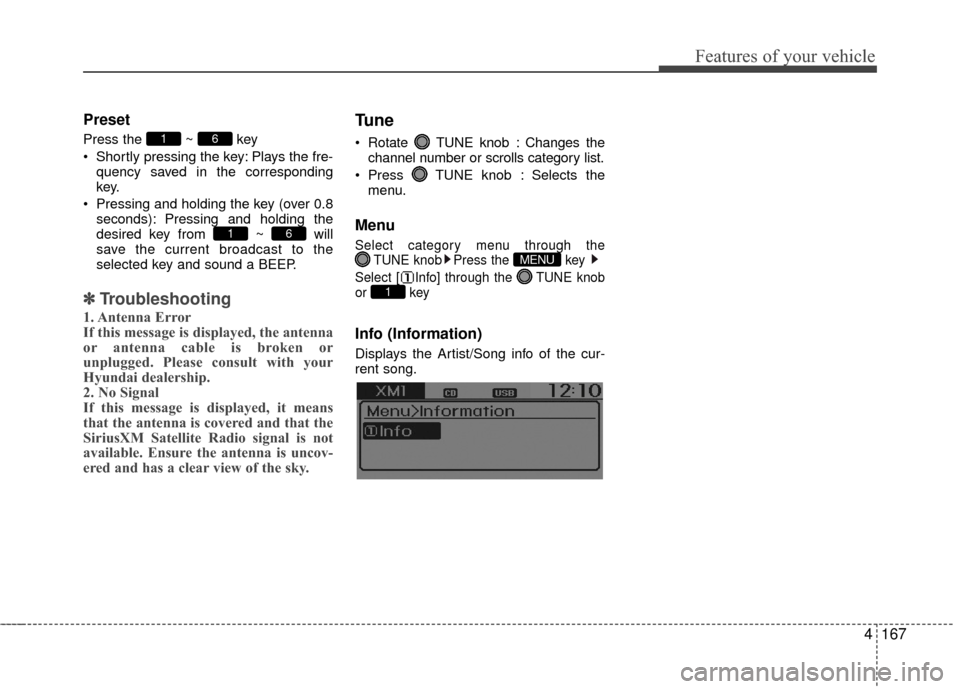
Menu
Select category menu through the TUNE knob Press the key
Select [ Info] through the TUNE knob
or key
Info (Information)
Displays the Artist/Song info of the cur-
rent song.
1
MENU
61
61
Page 268 of 456
4191
Features of your vehicle
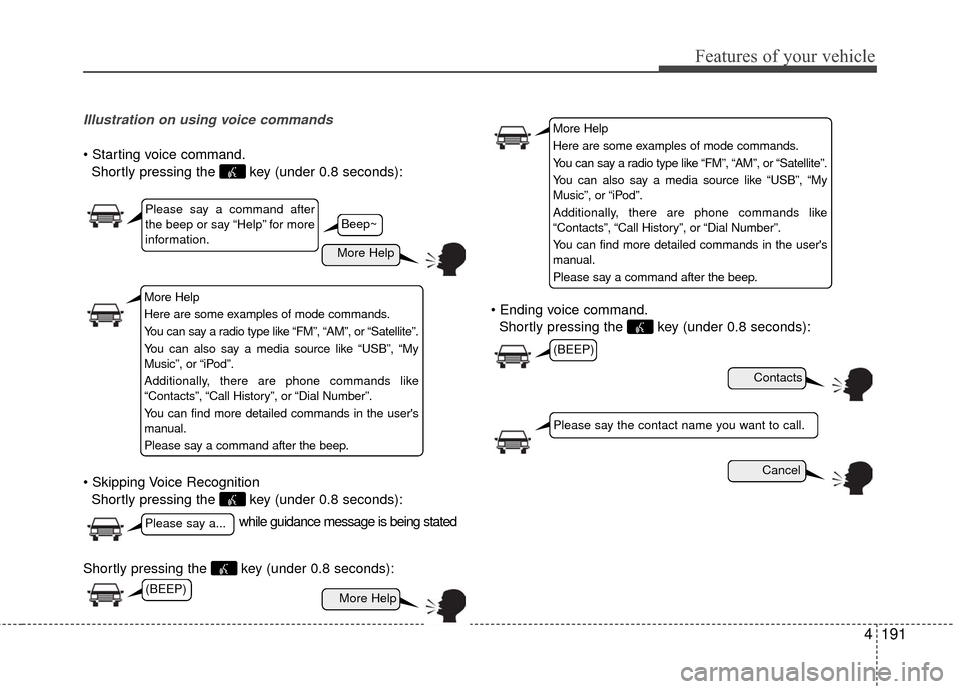
Illustration on using voice commands
Shortly pressing the key (under 0.8 seconds):
Shortly pressing the key (under 0.8 seconds):
Shortly pressing the key (under 0.8 seconds): voice command.
Shortly pressing the key (under 0.8 seconds):
while guidance message is being stated
More Help
Contacts
Cancel
More Help
Please say a command after
the beep or say “Help” for more
information.
Please say a...
Please say the contact name you want to call.
(BEEP)
Beep~
More Help
Here are some examples of mode commands.
You can say a radio type like “FM”, “AM”, or “Satellite”.
You can also say a media source like “USB”, “My
Music”, or “iPod”.
Additionally, there are phone commands like
“Contacts”, “Call History”, or “Dial Number”.
You can find more detailed commands in the user's
manual.
Please say a command after the beep.
More Help
Here are some examples of mode commands.
You can say a radio type like “FM”, “AM”, or “Satellite”.
You can also say a media source like “USB”, “My
Music”, or “iPod”.
Additionally, there are phone commands like
“Contacts”, “Call History”, or “Dial Number”.
You can find more detailed commands in the user's
manual.
Please say a command after the beep.
(BEEP)
Page 269 of 456
Features of your vehicle
192
4
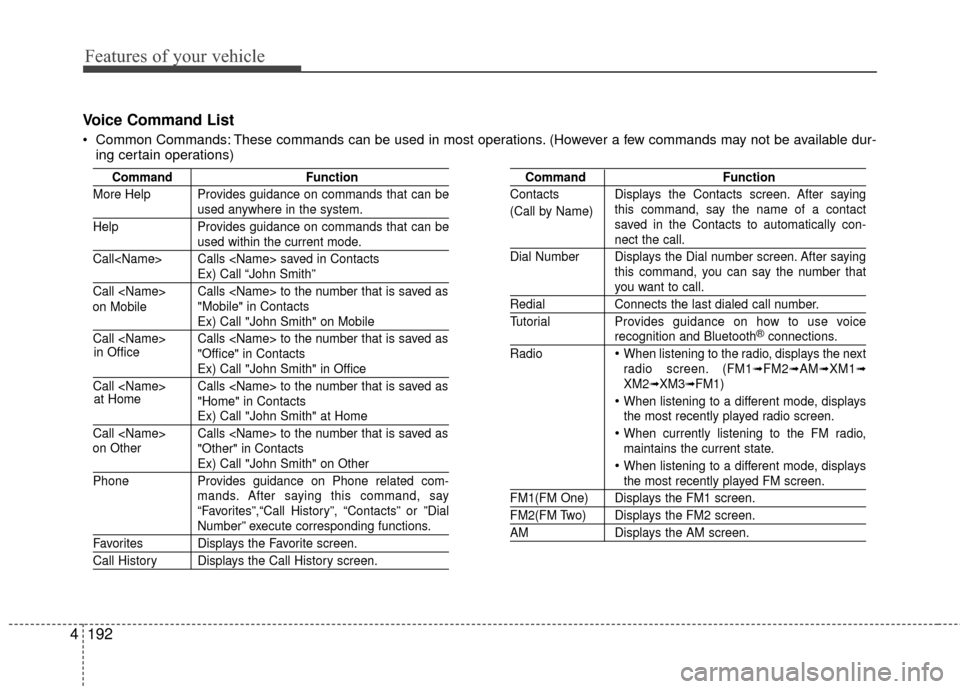
Voice Command List
Common Commands: These commands can be used in most operations. (However a few commands may not be available dur-
ing certain operations)
Command Function
More Help Provides guidance on commands that can be
used anywhere in the system.
Help Provides guidance on commands that can be
used within the current mode.
Call
Ex) Call “John Smith”
Call
Ex) Call "John Smith" on Mobile
Call
Ex) Call "John Smith" in Office
Call
Ex) Call "John Smith" at Home
Call
Ex) Call "John Smith" on Other
Phone Provides guidance on Phone related com-
mands. After saying this command, say
“Favorites”,“Call History”, “Contacts” or ”Dial
Number” execute corresponding functions.
Favorites Displays the Favorite screen.
Call History Displays the Call History screen.
Command Function
Contacts Displays the Contacts screen. After saying this command, say the name of a contact
saved in the Contacts to automatically con-
nect the call.
Dial Number Displays the Dial number screen. After saying this command, you can say the number that
you want to call.
RedialConnects the last dialed call number.
Tutorial Provides guidance on how to use voice
recognition and Bluetooth®connections.
Radio
When listening to the radio, displays the next
radio screen. (FM1➟FM2➟AM➟XM1➟XM2➟XM3➟FM1)
When listening to a different mode, displays
the most recently played radio screen.
When currently listening to the FM radio,
maintains the current state.
When listening to a different mode, displaysthe most recently played FM screen.
FM1(FM One) Displays the FM1 screen.
FM2(FM Two) Displays the FM2 screen.
AM Displays the AM screen.
(Call by Name)
on Mobile
in Office
at Home
on Other
Page 271 of 456
Features of your vehicle
194
4
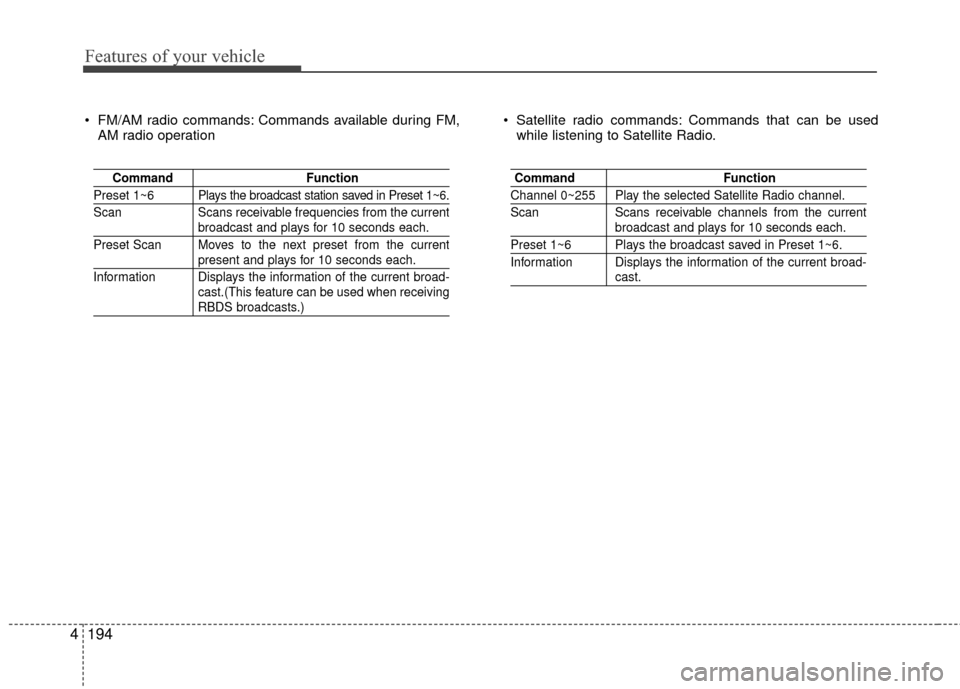
FM/AM radio commands: Commands available during FM,
AM radio operation Satellite radio commands: Commands that can be used
while listening to Satellite Radio.
Command Function
Preset 1~6 Plays the broadcast station saved in Preset 1~6.
Scan Scans receivable frequencies from the current
broadcast and plays for 10 seconds each.
Preset Scan Moves to the next preset from the current
present and plays for 10 seconds each.
Information Displays the information of the current broad- cast.(This feature can be used when receiving
RBDS broadcasts.)
Command Function
Channel 0~255 Play the selected Satellite Radio channel.
ScanScans receivable channels from the current
broadcast and plays for 10 seconds each.
Preset 1~6 Plays the broadcast saved in Preset 1~6.
Information Displays the information of the current broad-
cast.
Page 274 of 456
4197
Features of your vehicle
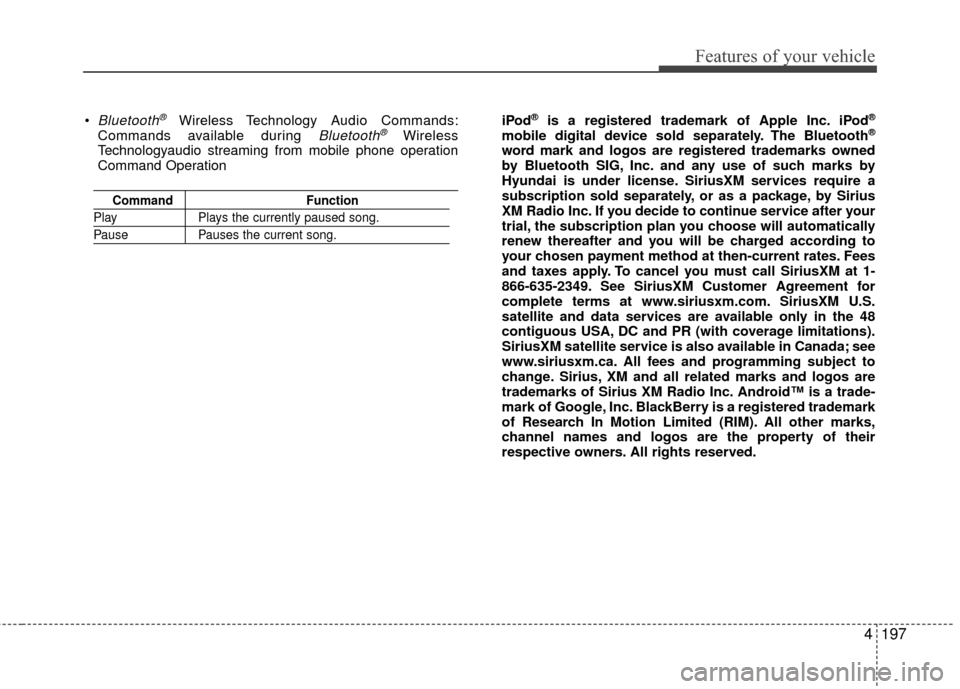
Bluetooth®Wireless Technology Audio Commands:
Commands available during Bluetooth®Wireless
Technologyaudio streaming from mobile phone operation
Command Operation
Command Function
PlayPlays the currently paused song.
PausePauses the current song.
iPod®is a registered trademark of Apple Inc. iPod®
mobile digital device sold separately. The Bluetooth®
word mark and logos are registered trademarks owned
by Bluetooth SIG, Inc. and any use of such marks by
Hyundai is under license. SiriusXM services require a
subscription sold separately, or as a package, by Sirius
XM Radio Inc. If you decide to continue service after your
trial, the subscription plan you choose will automatically
renew thereafter and you will be charged according to
your chosen payment method at then-current rates. Fees
and taxes apply. To cancel you must call SiriusXM at 1-
866-635-2349. See SiriusXM Customer Agreement for
complete terms at www.siriusxm.com. SiriusXM U.S.
satellite and data services are available only in the 48
contiguous USA, DC and PR (with coverage limitations).
SiriusXM satellite service is also available in Canada; see
www.siriusxm.ca. All fees and programming subject to
change. Sirius, XM and all related marks and logos are
trademarks of Sirius XM Radio Inc. Android™ is a trade-
mark of Google, Inc. BlackBerry is a registered trademark
of Research In Motion Limited (RIM). All other marks,
channel names and logos are the property of their
respective owners. All rights reserved.
Page 332 of 456
69
What to do in an emergency
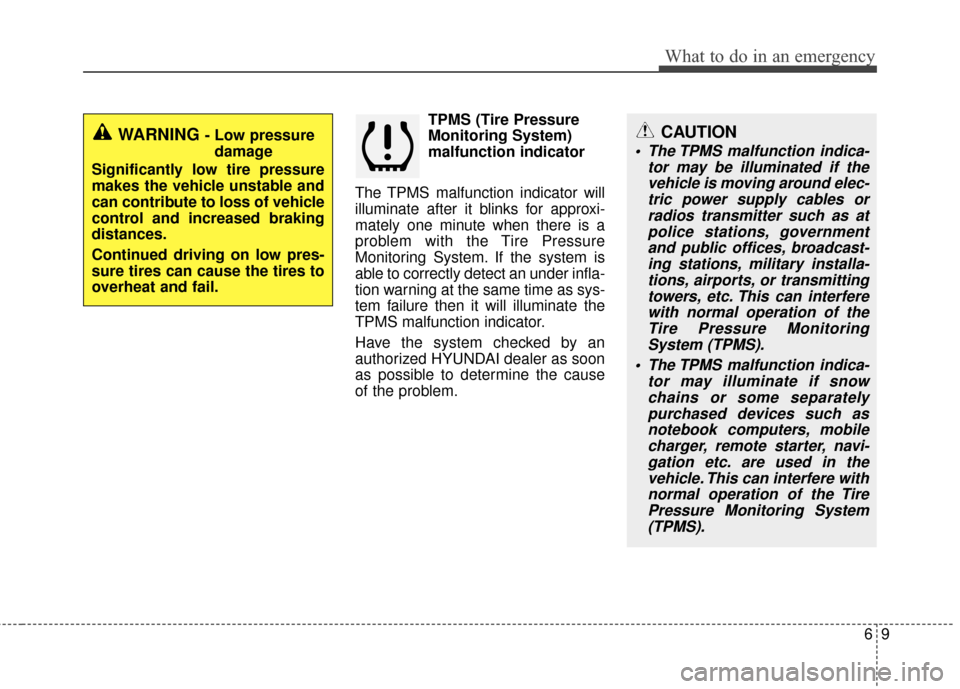
TPMS (Tire Pressure
Monitoring System)
malfunction indicator
The TPMS malfunction indicator will
illuminate after it blinks for approxi-
mately one minute when there is a
problem with the Tire Pressure
Monitoring System. If the system is
able to correctly detect an under infla-
tion warning at the same time as sys-
tem failure then it will illuminate the
TPMS malfunction indicator.
Have the system checked by an
authorized HYUNDAI dealer as soon
as possible to determine the cause
of the problem.
WARNING - Low pressure damage
Significantly low tire pressure
makes the vehicle unstable and
can contribute to loss of vehicle
control and increased braking
distances.
Continued driving on low pres-
sure tires can cause the tires to
overheat and fail.CAUTION
The TPMS malfunction indica- tor may be illuminated if thevehicle is moving around elec-tric power supply cables orradios transmitter such as atpolice stations, governmentand public offices, broadcast-ing stations, military installa-tions, airports, or transmittingtowers, etc. This can interferewith normal operation of theTire Pressure MonitoringSystem (TPMS).
The TPMS malfunction indica- tor may illuminate if snowchains or some separatelypurchased devices such asnotebook computers, mobilecharger, remote starter, navi-gation etc. are used in thevehicle. This can interfere withnormal operation of the TirePressure Monitoring System(TPMS).
Page 338 of 456
615
What to do in an emergency
Changing a tire with TPMS
If you have a flat tire, the Low Tire
Pressure and Position telltales will
come on. Have the flat tire repaired
by an authorized HYUNDAI dealer
as soon as possible or replace the
flat tire with the spare tire (if
equipped).
The spare tire (if equipped) does not
come with a tire pressure monitoring
sensor. When the low pressure tire or
the flat tire is replaced with the spare
tire, the Low Tire Pressure Telltale
will remain on.Also, the TPMS Malfunction Indicator
will illuminate after blinking for one
minute if the vehicle is driven at
speed above 15.5 mph (25 km/h) for
approximately 20 minutes.
Once the original tire equipped with
a tire pressure monitoring sensor is
reinflated to the recommended pres-
sure and reinstalled on the vehicle,
the Low Tire Pressure Telltale and
TPMS Malfunction Indicator will go
off within a few minutes.
If the indicators do not extinguish
after a few minutes, please visit an
authorized HYUNDAI dealer.
Each wheel is equipped with a tire
pressure sensor mounted inside the
tire behind the valve stem (except for
the spare tire). You must use TPMS
specific wheels. It is recommended
that you always have your tires serv-
iced by an authorized HYUNDAI
dealer as soon as possible.CAUTION
The TPMS malfunction indica-
tor may blink for approximate-ly 1 minute and then remaincontinuously illuminated if thevehicle is moving around elec-tric power supply cables orradio transmitter such as atpolice stations, governmentand public offices, broadcast-ing stations, military installa-tions, airports, or transmittingtowers, etc. This can interferewith normal operation of theTire Pressure MonitoringSystem (TPMS).
The TPMS malfunction indica- tor may blink for approximate-ly 1 minute and then remaincontinuously illuminated if thesnow chains are used or someseparate electronic devicessuch as notebook computer,mobile charger, remote starteror navigation etc., are used inthe vehicle. This can interferewith normal operation of theTire Pressure MonitoringSystem (TPMS).
CAUTION
Never use a puncture-repairingagent not approved by HYUNDAIto repair and/or inflate a lowpressure tire. The tire sealant notapproved by HYUNDAI may dam-age the tire pressure sensor.
The sealant on the tire pressuresensor and wheel shall be elim-inated when you replace the tirewith a new one.