set clock Hyundai Accent 2017 User Guide
[x] Cancel search | Manufacturer: HYUNDAI, Model Year: 2017, Model line: Accent, Model: Hyundai Accent 2017Pages: 380, PDF Size: 12.45 MB
Page 196 of 380
![Hyundai Accent 2017 User Guide Features of your vehicle
4-122
Turning Bluetooth System Off
Press the keySelect [Phone]
Select [Bluetooth System Off]
Once
Bluetooth®Wireless Technology is
turned off, Bluetooth®Wireless
Technology](/img/35/14348/w960_14348-195.png "Hyundai Accent 2017 User Guide Features of your vehicle
4-122
Turning Bluetooth System Off
Press the keySelect [Phone]
Select [Bluetooth System Off]
Once
Bluetooth®Wireless Technology is
turned off, Bluetooth®Wireless
Technology")
Features of your vehicle
4-122
Turning Bluetooth System Off
Press the keySelect [Phone]
Select [Bluetooth System Off]
Once
Bluetooth®Wireless Technology is
turned off, Bluetooth®Wireless
Technology related features will not be
supported within the audio system.
✽ ✽ NOTICE
To turn Bluetooth®Wireless Technology
back on, go to [Phone] and
select "Yes".
VOICE RECOGNITION
(if equipped model)
Using Voice Recognition
Starting Voice Recognition
Shortly press the key on the steer-
ing wheel. Say a command.
If prompt feedback is in [ON], then the
system will say "Please say a command
after the beep (BEEP)"
If prompt feedback is in [OFF] mode, then the system will only say "(BEEP)"
To change Prompt Feedback [On]/[Off], go to [System]
[Prompt Feedback]
✽ ✽ NOTICE
For proper recognition, say the com-
mand after the voice instruction and
beep tone.
Contact List Best Practices
1) Do not store single-name entries (e.g.,
"Bob", "Mom", "Kim", etc.).
Instead, always use full names (includ-
ing first and last names) for all contacts
(e.g., use "Jacob Stevenson" instead
of "Dad").
2) Do not use abbreviations (i.e., use "Lieutenant" instead of "Lt." or
"Sergeant" instead of "Sgt.").
3) Do not use acronyms (i.e., use "County Finance Department" instead of
"CFD").
4) Do not use special characters (e.g., "@", "hyphen -", "asterisk *", "amper-
sand &").
5) If a name is not recognized from the contact list, change it to a more
descriptive name (e.g., use "Grandpa
Joseph" instead of "Pa Joe").
SETUPCLOCKSETUPCLOCK
SETUPCLOCK
Page 267 of 380
6-19
What to do in an emergency
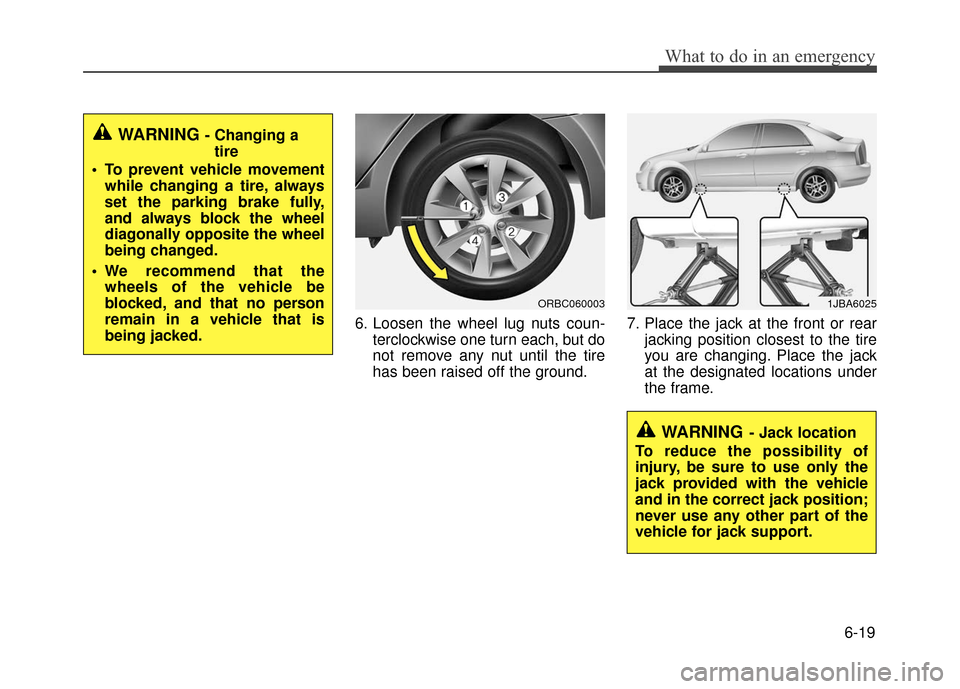
6. Loosen the wheel lug nuts coun-terclockwise one turn each, but do
not remove any nut until the tire
has been raised off the ground. 7. Place the jack at the front or rear
jacking position closest to the tire
you are changing. Place the jack
at the designated locations under
the frame.
WARNING - Changing atire
To prevent vehicle movement while changing a tire, always
set the parking brake fully,
and always block the wheel
diagonally opposite the wheel
being changed.
We recommend that the wheels of the vehicle be
blocked, and that no person
remain in a vehicle that is
being jacked.
ORBC060003
WARNING- Jack location
To reduce the possibility of
injury, be sure to use only the
jack provided with the vehicle
and in the correct jack position;
never use any other part of the
vehicle for jack support.
1JBA6025
Page 281 of 380
6-33
What to do in an emergency
When towing your vehicle in an emer-
gency without wheel dollies :
1. Set the ignition switch in the ACC posi-tion.
2. Place the shift lever in N (Neutral).
3. Release the parking brake.
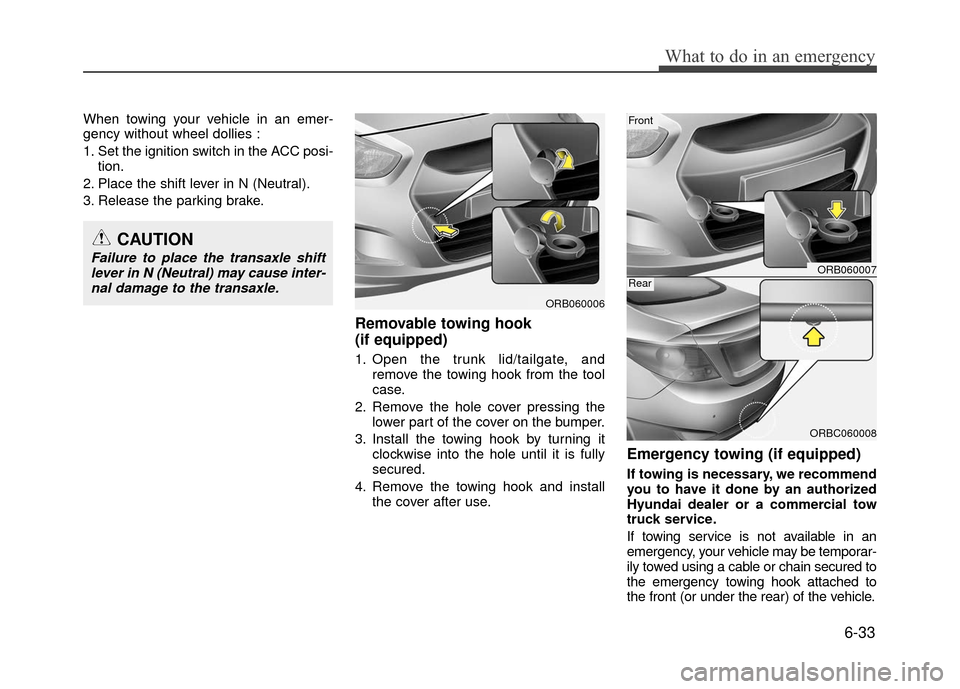
Removable towing hook
(if equipped)
1. Open the trunk lid/tailgate, and remove the towing hook from the tool
case.
2. Remove the hole cover pressing the lower part of the cover on the bumper.
3. Install the towing hook by turning it clockwise into the hole until it is fully
secured.
4. Remove the towing hook and install the cover after use.
Emergency towing (if equipped)
If towing is necessary, we recommend
you to have it done by an authorized
Hyundai dealer or a commercial tow
truck service.
If towing service is not available in an
emergency, your vehicle may be temporar-
ily towed using a cable or chain secured to
the emergency towing hook attached to
the front (or under the rear) of the vehicle.
CAUTION
Failure to place the transaxle shiftlever in N (Neutral) may cause inter-nal damage to the transaxle.ORB060007
ORBC060008
Front
Rear
ORB060006
Page 318 of 380
7-35
Maintenance
Reset items
Items should be reset after the battery
has been discharged or the battery has
been disconnected.
Sunroof (See section 4)
Trip computer (See section 4)
Climate control system (See section 4)
Clock (See section 4)
Audio (See section 4)WARNING
Before performing maintenance or recharging the battery, turn off
all accessories and stop the
engine.
The negative battery cable must be removed first and installed
last when the battery is discon-
nected.
Operation related to the battery should be done by an authorized
HYUNDAI dealer.
WARNING- Rechargingbattery
When recharging the battery,
observe the following precautions:
The battery must be removed
from the vehicle and placed in an
area with good ventilation.
Do not allow cigarettes, sparks, or flame near the battery.
Watch the battery during charg- ing, and stop or reduce the charg-
ing rate if the battery cells begin
gassing (boiling) violently or if
the temperature of the electrolyte
of any cell exceeds 120°F (49°C).
Wear eye protection when check- ing the battery during charging.
Disconnect the battery charger in the following order.
1. Turn off the battery charger main switch.
2. Unhook the negative clamp from the negative battery terminal.
3. Unhook the positive clamp from the positive battery terminal.
Page 335 of 380
Maintenance
7-52
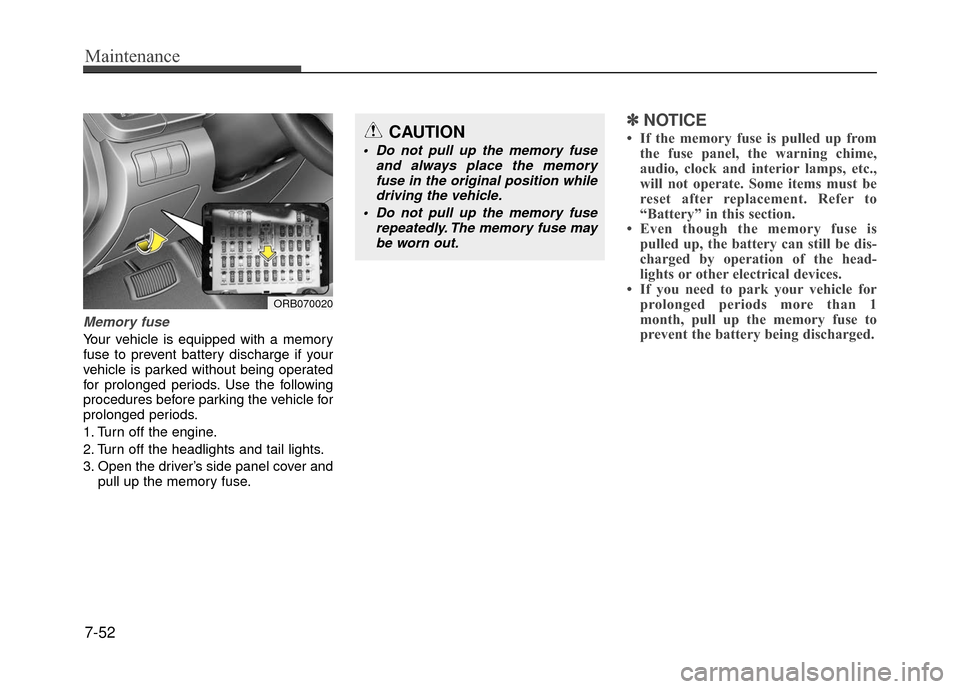
Memory fuse
Your vehicle is equipped with a memory
fuse to prevent battery discharge if your
vehicle is parked without being operated
for prolonged periods. Use the following
procedures before parking the vehicle for
prolonged periods.
1. Turn off the engine.
2. Turn off the headlights and tail lights.
3. Open the driver’s side panel cover andpull up the memory fuse.
✽ ✽NOTICE
• If the memory fuse is pulled up from
the fuse panel, the warning chime,
audio, clock and interior lamps, etc.,
will not operate. Some items must be
reset after replacement. Refer to
“Battery” in this section.
• Even though the memory fuse is pulled up, the battery can still be dis-
charged by operation of the head-
lights or other electrical devices.
• If you need to park your vehicle for prolonged periods more than 1
month, pull up the memory fuse to
prevent the battery being discharged.
ORB070020
CAUTION
Do not pull up the memory fuse
and always place the memoryfuse in the original position whiledriving the vehicle.
Do not pull up the memory fuse repeatedly. The memory fuse maybe worn out.