lock Hyundai Accent 2017 Workshop Manual
[x] Cancel search | Manufacturer: HYUNDAI, Model Year: 2017, Model line: Accent, Model: Hyundai Accent 2017Pages: 380, PDF Size: 12.45 MB
Page 161 of 380
4-87
Features of your vehicle
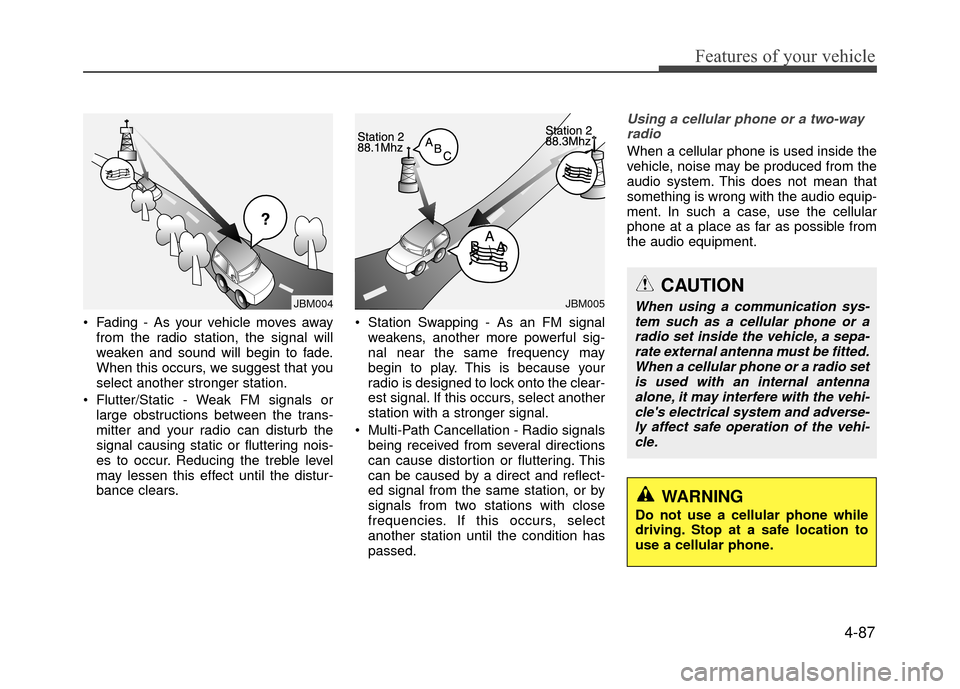
Fading - As your vehicle moves awayfrom the radio station, the signal will
weaken and sound will begin to fade.
When this occurs, we suggest that you
select another stronger station.
Flutter/Static - Weak FM signals or large obstructions between the trans-
mitter and your radio can disturb the
signal causing static or fluttering nois-
es to occur. Reducing the treble level
may lessen this effect until the distur-
bance clears. Station Swapping - As an FM signal
weakens, another more powerful sig-
nal near the same frequency may
begin to play. This is because your
radio is designed to lock onto the clear-
est signal. If this occurs, select another
station with a stronger signal.
Multi-Path Cancellation - Radio signals being received from several directions
can cause distortion or fluttering. This
can be caused by a direct and reflect-
ed signal from the same station, or by
signals from two stations with close
frequencies. If this occurs, select
another station until the condition has
passed.
Using a cellular phone or a two-wayradio
When a cellular phone is used inside the
vehicle, noise may be produced from the
audio system. This does not mean that
something is wrong with the audio equip-
ment. In such a case, use the cellular
phone at a place as far as possible from
the audio equipment.
JBM005JBM004
CAUTION
When using a communication sys-tem such as a cellular phone or a radio set inside the vehicle, a sepa-rate external antenna must be fitted. When a cellular phone or a radio setis used with an internal antennaalone, it may interfere with the vehi-cle's electrical system and adverse- ly affect safe operation of the vehi-cle.
WARNING
Do not use a cellular phone while
driving. Stop at a safe location to
use a cellular phone.
Page 172 of 380
Features of your vehicle
4-98
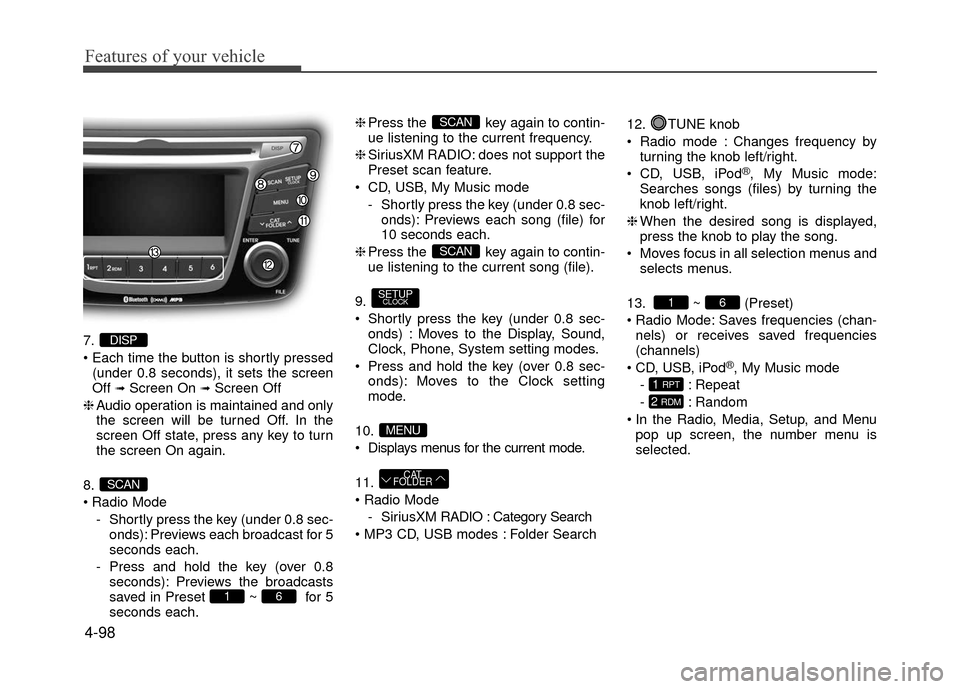
7.
(under 0.8 seconds), it sets the screen
Off
➟Screen On ➟Screen Off
❈ Audio operation is maintained and only
the screen will be turned Off. In the
screen Off state, press any key to turn
the screen On again.
8.
Radio Mode - Shortly press the key (under 0.8 sec-onds): Previews each broadcast for 5
seconds each.
- Press and hold the key (over 0.8 seconds): Previews the broadcasts
saved in Preset ~ for 5
seconds each. ❈
Press the key again to contin-
ue listening to the current frequency.
❈ SiriusXM RADIO: does not support the
Preset scan feature.
CD, USB, My Music mode - Shortly press the key (under 0.8 sec-onds): Previews each song (file) for
10 seconds each.
❈ Press the key again to contin-
ue listening to the current song (file).
9.
Shortly press the key (under 0.8 sec- onds) : Moves to the Display, Sound,
Clock, Phone, System setting modes.
Press and hold the key (over 0.8 sec- onds): Moves to the Clock setting
mode.
10.
Displays menus for the current mode.
11.
- SiriusXM RADIO : Category Search
Folder Search 12. TUNE knob
Radio mode : Changes frequency by
turning the knob left/right.
CD, USB, iPod
®, My Music mode:
Searches songs (files) by turning the
knob left/right.
❈ When the desired song is displayed,
press the knob to play the song.
Moves focus in all selection menus and selects menus.
13. ~ (Preset)
Radio Mode: Saves frequencies (chan- nels) or receives saved frequencies
(channels)
CD, USB, iPod
®, My Music mode
- : Repeat
- : Random
In the Radio, Media, Setup, and Menu pop up screen, the number menu is
selected.
2 RDM
1 RPT
61
CAT
FOLDER
MENU
SETUPCLOCK
SCAN
SCAN
61
SCAN
DISP
Page 173 of 380
4-99
Features of your vehicle
Audio Head Unit
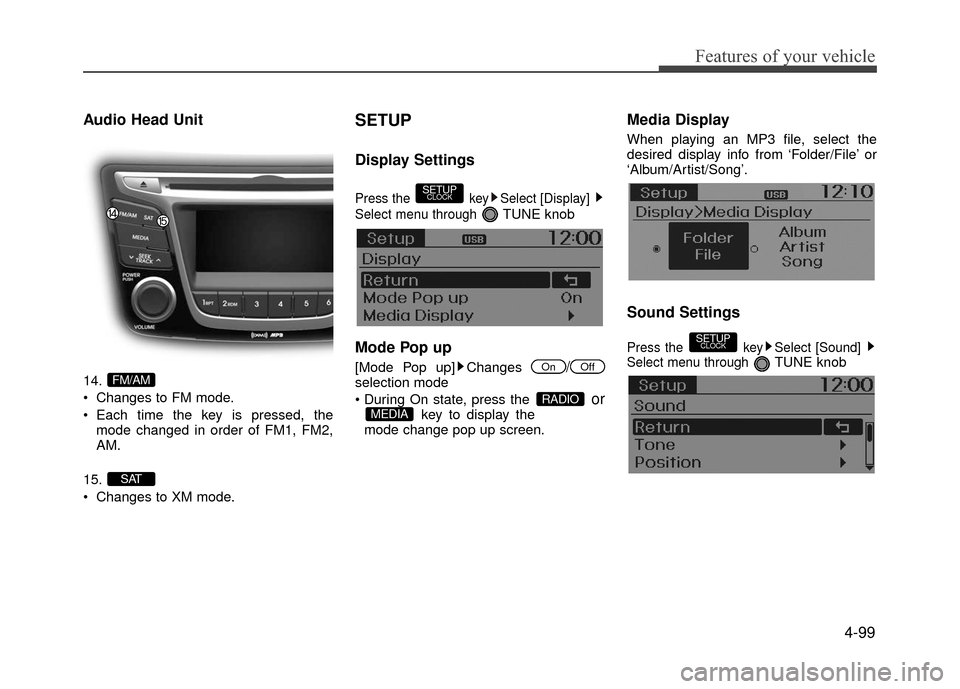
14.
Changes to FM mode.
Each time the key is pressed, themode changed in order of FM1, FM2,
AM.
15.
Changes to XM mode.
SETUP
Display Settings
Press the key Select [Display]
Select menu through
TUNE knob
Mode Pop up
[Mode Pop up] Changes /selection mode
orkey to display the
mode change pop up screen.
Media Display
When playing an MP3 file, select the
desired display info from ‘Folder/File’ or
‘Album/Artist/Song’.
Sound Settings
Press the key Select [Sound]
Select menu through TUNE knob
SETUPCLOCK
MEDIARADIO
OffOn
SETUPCLOCK
SAT
FM/AM
Page 175 of 380
![Hyundai Accent 2017 Workshop Manual 4-101
Features of your vehicle
CLOCK SETTINGS
Press the key Select[Clock]
through
TUNE knobor key
Selectmenu through TUNE knob
Clock Settings
This menu is used to set the time.
Select [Clock Settin](/img/35/14348/w960_14348-174.png "Hyundai Accent 2017 Workshop Manual 4-101
Features of your vehicle
CLOCK SETTINGS
Press the key Select[Clock]
through
TUNE knobor key
Selectmenu through TUNE knob
Clock Settings
This menu is used to set the time.
Select [Clock Settin")
4-101
Features of your vehicle
CLOCK SETTINGS
Press the key Select[Clock]
through
TUNE knobor key
Selectmenu through TUNE knob
Clock Settings
This menu is used to set the time.
Select [Clock Settings] Set through
TUNE knob Press TUNE knob
❈Adjust the number currently in focus to set the [hour] and press the tune knob to
set the [minute].
Calendar Settings
This menu is used to set the date
(DD/MM/YYYY).
Select [Calendar Settings]
Set through
TUNE knob Press TUNEknob
❈Adjust the number currently in focus to make the settings and press the tune
knob to move to the next setting. (Set in
order of Day/Month/Year)
Time Format
This function is used to set the 12/24
hour time format of the audio system.
Select [Time Format] Set 12Hr / 24Hr
through TUNE
knob
Clock Display when Power is OFF
Select [Clock Disp.(Pwr Off) Set / through TUNEknob
: Displays time/date on screen
: Turn off.Off
On
OffOn
3
SETUPCLOCK
Page 176 of 380
![Hyundai Accent 2017 Workshop Manual Features of your vehicle
4-102
SYSTEM SETTINGS
Press the keySelect [System]
Select menu through TUNE knob
Memory Information
Displays currently used memory and
total system memory.
Select [Memory Inf](/img/35/14348/w960_14348-175.png "Hyundai Accent 2017 Workshop Manual Features of your vehicle
4-102
SYSTEM SETTINGS
Press the keySelect [System]
Select menu through TUNE knob
Memory Information
Displays currently used memory and
total system memory.
Select [Memory Inf")
Features of your vehicle
4-102
SYSTEM SETTINGS
Press the keySelect [System]
Select menu through TUNE knob
Memory Information
Displays currently used memory and
total system memory.
Select [Memory Information] OK
The currently used memory is displayed
on the left side while the total system
memory is displayed on the right side.
Prompt Feedback
This feature is used to change voice
command feedback between Normal and
Expert modes.
Select [Prompt Feedback] Set through
TUNEknob
Normal(On) : This mode is for beginner users and provides detailed instruc-
tions during voice command operation.
Expert(Off) : This mode is for expert users and omits some information dur-
ing voice command operation. (When
using Expert mode, guidance instruc-
tions can be heard through the [Help]
or [Menu] commands.
Language
This menu is used to set the display and
voice recognition language.
Select [Language] Set through
TUNE knob
❈ The system will reboot after the lan-
guage is changed.
❈ Language support by region
- English, Français, EspañolSETUPCLOCK
Page 189 of 380
![Hyundai Accent 2017 Workshop Manual 4-115
Features of your vehicle
Pairing through [PHONE] Setup
Press the keySelect [Phone]
Select [Pair Phone] Select TUNE
knob
1. The following steps are the same as those described in the section "W](/img/35/14348/w960_14348-188.png "Hyundai Accent 2017 Workshop Manual 4-115
Features of your vehicle
Pairing through [PHONE] Setup
Press the keySelect [Phone]
Select [Pair Phone] Select TUNE
knob
1. The following steps are the same as those described in the section \"W")
4-115
Features of your vehicle
Pairing through [PHONE] Setup
Press the keySelect [Phone]
Select [Pair Phone] Select TUNE
knob
1. The following steps are the same as those described in the section "When
No Devices have been Paired" on the
previous page.
✽ ✽NOTICE
•Bluetooth®Wireless Technology fea-
tures supported within the vehicle are
as follows. Some features may not be
supported depending on your
Bluetooth
®Wireless Technology
device.
- Outgoing/Incoming Handsfree calls
- Operations during a call (Switch to Private, Switch to call waiting, MIC
on/off)
- Downloading Call History
- Downloading Mobile Contacts
- Bluetooth
®Wireless Technology
device auto connection
- Bluetooth Audio Streaming
• Up to five Bluetooth
®Wireless
Technology devices can be paired to
the Car Handsfree system.
• Only one Bluetooth
®Wireless
Technology device can be connected at
a time.
• Other devices cannot be paired while a Bluetooth
®Wireless Technology
device is connected.
• Only Bluetooth
®Wireless Technology
Handsfree and Bluetooth audio relat-
ed features are supported.
(Continued)(Continued)
Bluetooth related operations are pos-
sible only within devices that support
Handsfree or audio features, such as a
Bluetooth
®Wireless Technology
mobile phone or a Bluetooth audio
device.
• If a connected Bluetooth
®Wireless
Technology device becomes discon-
nected due to being out of communi-
cation range, turning the device OFF,
or a Bluetooth
®Wireless Technology
communication error, corresponding
Bluetooth
®Wireless Technology
devices are automatically searched
and reconnected.
• If the system becomes unstable due to communication errors between the
car Handsfree and the Bluetooth
®
Wireless Technology device, reset the
device by turning off and back on
again. Upon resetting Bluetooth
®
Wireless Technology device, the sys-
tem will be restored.
• After pairing is complete, a contacts download request is sent once to the
mobile phone. Some mobile phones
may require confirmation upon
receiving a download request, ensure
your mobile phone accepts the connec-
tion. Refer to your phones user’s man-
ual for additional information regard-
ing phone pairing and connections.
SETUPCLOCK
Page 190 of 380
![Hyundai Accent 2017 Workshop Manual Features of your vehicle
4-116
Connecting a Device
Press the keySelect [Phone]
Select [Paired Phone List]
1) Connected Phone : Device that is cur- rently connected
2) Paired Phone : Device that is pa](/img/35/14348/w960_14348-189.png "Hyundai Accent 2017 Workshop Manual Features of your vehicle
4-116
Connecting a Device
Press the keySelect [Phone]
Select [Paired Phone List]
1) Connected Phone : Device that is cur- rently connected
2) Paired Phone : Device that is pa")
Features of your vehicle
4-116
Connecting a Device
Press the keySelect [Phone]
Select [Paired Phone List]
1) Connected Phone : Device that is cur- rently connected
2) Paired Phone : Device that is paired but not connected
From the paired phone list, select the
device you want to connect and select
[Connect].
Changing Priority
What is Priority?
It is possible to pair up to five Bluetooth®
Wireless Technology devices with the car
audio system. The "Change Priority" fea-
ture is used to set the connection priority
of paired phones.
Press the
keySelect [Phone]
Select [Paired Phone List] From the paired phone list, select the
phone you want to
switchto the highest
priority, then select [Change Priority] but-
ton from the Menu. The selected device
will be changed to the highest priority.
✽ ✽ NOTICE
Priority icon will be displayed when the
selected phone is set as a priority phone.
SETUPCLOCK
SETUPCLOCK
Page 191 of 380
![Hyundai Accent 2017 Workshop Manual 4-117
Features of your vehicle
Disconnecting a Device
Press the keySelect [Phone]
Select [Paired Phone List]
From the paired phone list, select the
currently connected device and select
[Disconnect] b](/img/35/14348/w960_14348-190.png "Hyundai Accent 2017 Workshop Manual 4-117
Features of your vehicle
Disconnecting a Device
Press the keySelect [Phone]
Select [Paired Phone List]
From the paired phone list, select the
currently connected device and select
[Disconnect] b")
4-117
Features of your vehicle
Disconnecting a Device
Press the keySelect [Phone]
Select [Paired Phone List]
From the paired phone list, select the
currently connected device and select
[Disconnect] button.
Deleting a Device
Press the key Select [Phone]
Select [Paired Phone List]
From the paired phone list, select the
device you want to delete and select
[Delete] button.
✽ ✽ NOTICE
• When deleting the currently connect-
ed device, the device will automatical-
ly be disconnected to proceed with the
deleting process.
• If a paired Bluetooth
®Wireless
Technology device is deleted, the
device's call history and contacts data
will also be deleted.
• To re-use a deleted device, you must pair the device again.
SETUPCLOCKSETUPCLOCK
Page 194 of 380
Features of your vehicle
4-120
✽
✽NOTICE
• Up to 1,000 contacts saved in your
Bluetooth®Wireless Technology phone
can be downloaded into the car con-
tacts. Contacts that have been down-
loaded to the car cannot be edited or
deleted on the phone.
• Mobile phone contacts are managed separately for each paired Bluetooth
®
Wireless Technology device (max 5
devices x 1,000 contacts each).
Previously downloaded data is main-
tained even if the Bluetooth
®Wireless
Technology device has been discon-
nected.
(However, the contacts and call histo-
ry saved to the phone will be deleted if
a paired phone is deleted.)
• It is possible to download contacts during Bluetooth streaming audio.
• When downloading contacts, the icon will be displayed within the status bar. (Continued)(Continued)
• It is not possible to begin downloading
a contact list when the contact down-
load feature has been turned off with-
in the Bluetooth
®Wireless Technology
device. In addition, some devices may
require device authorization upon
attempting to download contacts. If
downloading does not normally occur,
check the Bluetooth
®Wireless
Technology device settings or the
screen state.
• The contacts download feature may not be supported in some mobile
phones. For more information of sup-
ported Bluetooth
®devices and func-
tion support, refer to your phone’s
user manual.
Bluetooth®Wireless
Technology Setting
Pairing a New Device
Press the keySelect [Phone]
Select [Pair Phone]
Bluetooth®Wireless Technology devices
can be paired with the audio system.
For more information, refer to the
"Pairing through Phone Setup" section
within
Bluetooth®Wireless Technology.
SETUPCLOCK
Page 195 of 380
![Hyundai Accent 2017 Workshop Manual 4-121
Features of your vehicle
Viewing Paired Phone List
Press the keySelect [Phone]
Select [Paired Phone List]
This feature is used to view mobile
phones that have been paired with the
audio system.](/img/35/14348/w960_14348-194.png "Hyundai Accent 2017 Workshop Manual 4-121
Features of your vehicle
Viewing Paired Phone List
Press the keySelect [Phone]
Select [Paired Phone List]
This feature is used to view mobile
phones that have been paired with the
audio system.")
4-121
Features of your vehicle
Viewing Paired Phone List
Press the keySelect [Phone]
Select [Paired Phone List]
This feature is used to view mobile
phones that have been paired with the
audio system. Upon selecting a paired
phone, the setup menu is displayed.
For more information, refer to the
"Setting
Bluetooth®Wireless Technology
Connection" section within Bluetooth®
Wireless Technology.
1) Connect/Disconnect Phone : Connect/ disconnects currently selected phone
2) Change Priority : Sets currently select- ed phone to highest connection priori-
ty 3) Delete : Deletes the currently selected
phone
4) Return : Moves to the previous screen
✽ ✽ NOTICE BEFORE DOWN-
LOADING CONTACTS
• Only contacts within connected
phones can be downloaded. Also
check to see that your mobile phone
supports the download feature.
• To learn more about whether your mobile phone supports contacts
downloads, refer to your mobile
phone user's manual.
• The contacts for only the connected phone can be downloaded.
Downloading Contacts
Press the keySelect [Phone]
Select [Contacts Download]
As the contacts are downloaded from
the mobile phone, a download progress
bar is displayed.
✽ ✽ NOTICE
• Upon downloading phone contacts,
the previous corresponding data is
deleted.
• This feature may not be supported in some mobile phones.
• Voice Recognition may not operate while contacts are being downloaded.
Outgoing Volume
Press thekeySelect [Phone]
Select [Outgoing Volume]
Use TUNE knob to adjust the outgo-
ing volume level.
✽ ✽ NOTICE
While on a call, the volume can be
changed by using the key.SEEK
TRACK
SETUPCLOCK
SETUPCLOCK
SETUPCLOCK