change time Hyundai Accent 2017 Owner's Manual
[x] Cancel search | Manufacturer: HYUNDAI, Model Year: 2017, Model line: Accent, Model: Hyundai Accent 2017Pages: 380, PDF Size: 12.45 MB
Page 1 of 380
All information in this Owner's Manual is current at the time of publication.
However, HYUNDAI reserves the right to make changes at any time so that
our policy of continual product improvement may be carried out.
This manual applies to all models of this vehicle and includes descriptions
and explanations of optional as well as standard equipment. As a result, you
may find material in this manual that does not apply to your specific vehicle.
O
OW
W N
NE
ER
R '
'S
S M
M A
AN
N U
UA
A L
L
Operation
Maintenance
Specifications
Page 11 of 380
Introduction
1-4
Gasoline containing MMT
Some gasoline contains harmful man-
ganese-based fuel additives such as MMT
(Methylcyclopentadienyl Manganese
Tricarbonyl).
HYUNDAI does not recommend the use
of gasoline containing MMT.
This type of fuel can reduce vehicle per-
formance and affect your emission con-
trol system.
The malfunction indicator lamp on the
cluster may come on.
Do not use methanol
Fuels containing methanol (wood alco-
hol) should not be used in your vehicle.
This type of fuel can reduce vehicle per-
formance and damage components of
the fuel system, engine control system
and emission control system.
Fuel Additives
HYUNDAI recommends that you use
good quality gasolines treated with deter-
gent additives such as TOP TIER
Detergent Gasoline, which help prevent
deposit formation in the engine. These
gasolines will help the engine run clean-
er and enhance performance of the
Emission Control System. For more infor-
mation on TOP TIER Detergent
Gasoline, please go to the website
(www.toptiergas.com).
For customers who do not use TOP Tier
Detergent Gasoline regularly, and have
problems starting or the engine does not
run smoothly, additives that you can buy
separately may be added to the gasoline.
If TOP TIER Detergent Gasoline is not
available, one bottle of additive added to
the fuel tank at every 7,500mile or every
engine oil change is recommended.
Additives are available from your author-
ized HYUNDAI dealer along with infor-
mation on how to use them. Do not mix
other additives.
Operation in foreign countries
If you are going to drive your vehicle in
another country, be sure to:
Observe all regulations regarding reg-istration and insurance.
Determine that acceptable fuel is avail- able. No special break-in period is needed. By
following a few simple precautions for the
first 600 miles (1,000 km) you may add to
the performance, economy and life of
your vehicle.
Do not race the engine.
While driving, keep your engine speed
(rpm, or revolutions per minute)
between 2,000 rpm and 4,000 rpm.
Do not maintain a single speed for long periods of time, either fast or slow.
Varying engine speed is needed to
properly break-in the engine.
Avoid hard stops, except in emergen- cies, to allow the brakes to seat prop-
erly.
CAUTION
Your New Vehicle Limited Warrantymay not cover damage to the fuelsystem and any performance prob-lems that are caused by the use offuels containing methanol.
VEHICLE BREAK-IN PROCESS
Page 21 of 380
3-5
Safety features of your vehicle
Front seat
Manual adjustment
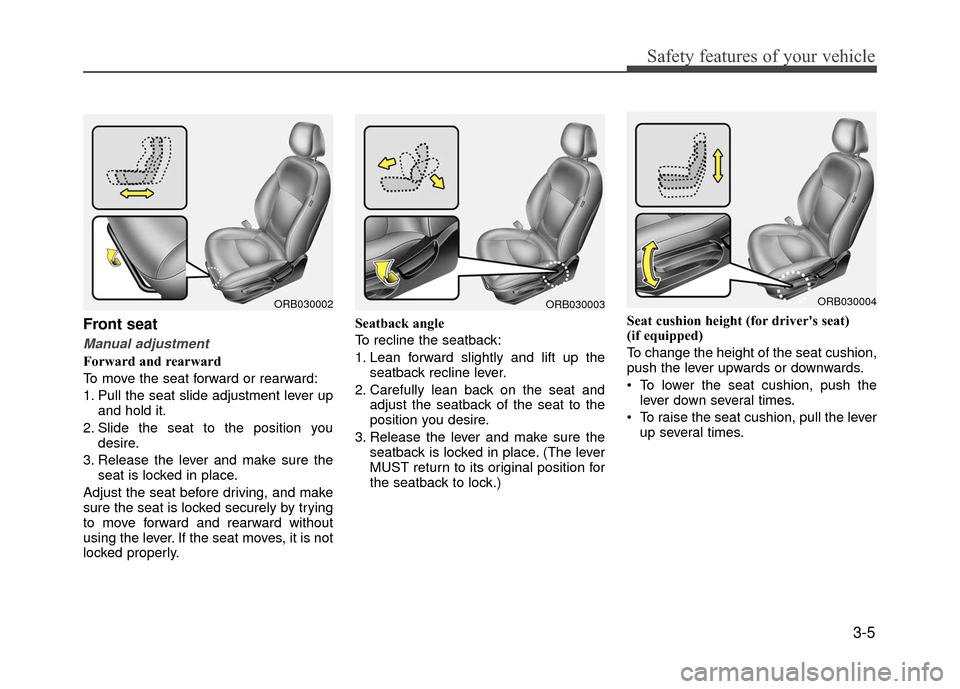
Forward and rearward
To move the seat forward or rearward:
1. Pull the seat slide adjustment lever upand hold it.
2. Slide the seat to the position you desire.
3. Release the lever and make sure the seat is locked in place.
Adjust the seat before driving, and make
sure the seat is locked securely by trying
to move forward and rearward without
using the lever. If the seat moves, it is not
locked properly. Seatback angle
To recline the seatback:
1. Lean forward slightly and lift up the
seatback recline lever.
2. Carefully lean back on the seat and adjust the seatback of the seat to the
position you desire.
3. Release the lever and make sure the seatback is locked in place. (The lever
MUST return to its original position for
the seatback to lock.) Seat cushion height (for driver's seat)
(if equipped)
To change the height of the seat cushion,
push the lever upwards or downwards.
• To lower the seat cushion, push the
lever down several times.
To raise the seat cushion, pull the lever up several times.
ORB030002ORB030003ORB030004
Page 78 of 380
Features of your vehicle
4-4
Also, if the lock button is pressed once
more within 4 seconds, the hazard warn-
ing lights will blink and the horn will
sound once to confirm that the door is
locked.
However, if any door or trunk lid remains
open, the hazard warning lights (and/or
the horn) will not operate. But if all doors
and trunk lid are closed after the lock but-
ton is pressed, the hazard warning lights
will blink once.
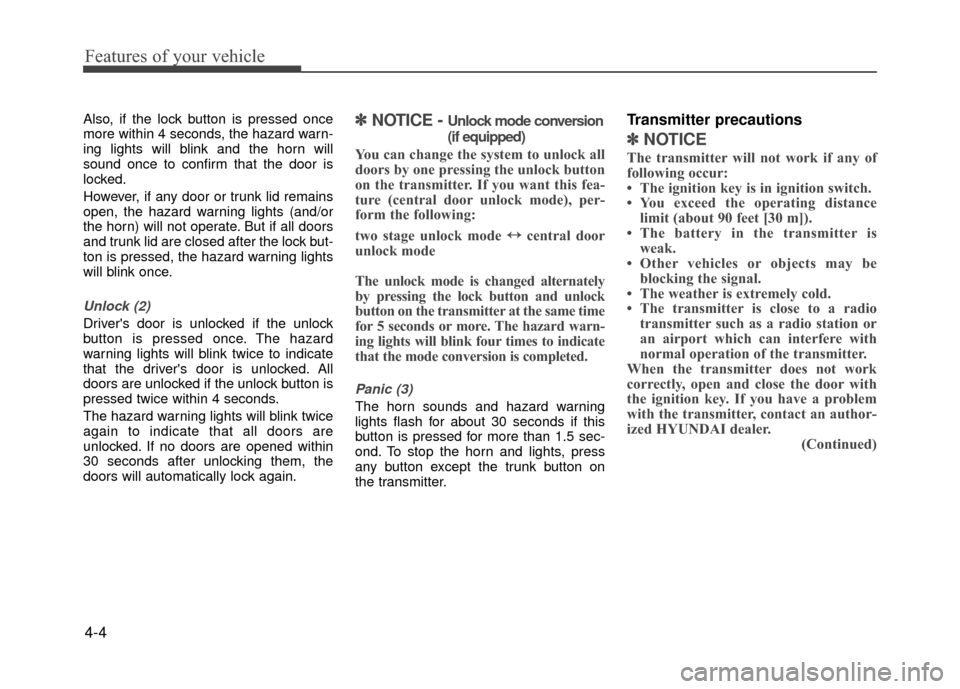
Unlock (2)
Driver's door is unlocked if the unlock
button is pressed once. The hazard
warning lights will blink twice to indicate
that the driver's door is unlocked. All
doors are unlocked if the unlock button is
pressed twice within 4 seconds.
The hazard warning lights will blink twice
again to indicate that all doors are
unlocked. If no doors are opened within
30 seconds after unlocking them, the
doors will automatically lock again.
✽ ✽NOTICE - Unlock mode conversion
(if equipped)
You can change the system to unlock all
doors by one pressing the unlock button
on the transmitter. If you want this fea-
ture (central door unlock mode), per-
form the following:
two stage unlock mode ↔ ↔
central door
unlock mode
The unlock mode is changed alternately
by pressing the lock button and unlock
button on the transmitter at the same time
for 5 seconds or more. The hazard warn-
ing lights will blink four times to indicate
that the mode conversion is completed.
Panic (3)
The horn sounds and hazard warning
lights flash for about 30 seconds if this
button is pressed for more than 1.5 sec-
ond. To stop the horn and lights, press
any button except the trunk button on
the transmitter.
Transmitter precautions
✽ ✽ NOTICE
The transmitter will not work if any of
following occur:
• The ignition key is in ignition switch.
• You exceed the operating distance
limit (about 90 feet [30 m]).
• The battery in the transmitter is weak.
• Other vehicles or objects may be blocking the signal.
• The weather is extremely cold.
• The transmitter is close to a radio transmitter such as a radio station or
an airport which can interfere with
normal operation of the transmitter.
When the transmitter does not work
correctly, open and close the door with
the ignition key. If you have a problem
with the transmitter, contact an author-
ized HYUNDAI dealer. (Continued)
Page 81 of 380
4-7
Features of your vehicle
✽
✽NOTICE - Unlock mode con-
version (if equipped)
You can change the system to unlock all
doors by turning the key to the right
once. If you want this feature (central
door unlock mode), perform the follow-
ing:
two stage unlock mode ↔ ↔
central door
unlock mode
The unlock mode is changed alternately
by pressing the lock button and unlock
button on the transmitter (if equipped)
at the same time for 5 seconds or more.
The hazard warning lights will blink
four times to indicate that the mode con-
version is completed.
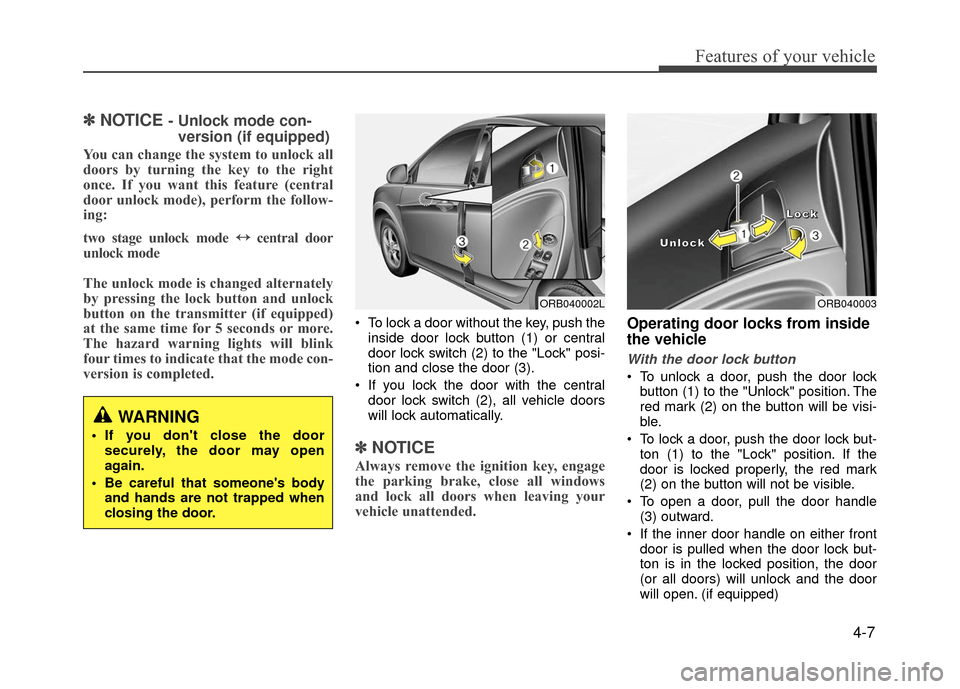
To lock a door without the key, push the
inside door lock button (1) or central
door lock switch (2) to the "Lock" posi-
tion and close the door (3).
If you lock the door with the central door lock switch (2), all vehicle doors
will lock automatically.
✽ ✽ NOTICE
Always remove the ignition key, engage
the parking brake, close all windows
and lock all doors when leaving your
vehicle unattended.
Operating door locks from inside
the vehicle
With the door lock button
To unlock a door, push the door lock
button (1) to the "Unlock" position. The
red mark (2) on the button will be visi-
ble.
To lock a door, push the door lock but- ton (1) to the "Lock" position. If the
door is locked properly, the red mark
(2) on the button will not be visible.
To open a door, pull the door handle (3) outward.
If the inner door handle on either front door is pulled when the door lock but-
ton is in the locked position, the door
(or all doors) will unlock and the door
will open. (if equipped)
WARNING
If you don't close the doorsecurely, the door may open
again.
Be careful that someone's body and hands are not trapped when
closing the door.
ORB040002LORB040003
L
L
L
L
o
o
o
o
c
c
c
c
k
k
k
k
U
U
U
U
n
n
n
n
l
l
l
l
o
o
o
o
c
c
c
c
k
k
k
k
Page 98 of 380
Features of your vehicle
4-24
TILT DOWN →SLIDE OPEN →
SLIDE CLOSE
Then, release the control lever.
When this is complete, the sunroof sys-
tem is reset.
❈ For more detailed information, contact
an authorized HYUNDAI dealer.Electric power steering (EPS)
The power steering uses a motor to
assist you in steering the vehicle. If the
engine is off or if the power steering sys-
tem becomes inoperative, the vehicle
may still be steered, but it will require
increased steering effort.
The motor driven power steering is con-
trolled by a power steering control unit
which senses the steering wheel torque
and vehicle speed to command the
motor.
The steering assist increases as the
vehicle’s speed increases and as the
vehicle’s speed decreases for optimum
steering assist decreases.
Should you notice any change in the
effort required to steer during normal
vehicle operation, have the power steer-
ing checked by an authorized HYUNDAI
dealer.
CAUTION
If the sunroof is not reset when the
vehicle battery is disconnected ordischarged, or related fuse isblown, the sunroof may operateimproperly.
STEERING WHEEL
CAUTION
If the Electric Power Steering System does not operate normal-ly, the warning light will illuminate on the instrument cluster. Thesteering wheel may become diffi-cult to control or operate abnor- mally. Take your vehicle to anauthorized HYUNDAI dealer and have the vehicle checked as soonas possible.
When you operate the steering wheel in low temperature, abnor-mal noise could occur. If tempera- ture rises, the noise will disap-pear. This is a normal condition.
When the vehicle is stationary, if you turn the steering wheel all theway to the left or right continu-ously, the steering wheel becomes heavier from the end.This is normal and not system malfunction. As time passes, thesteering wheel will return to its normal condition.
Page 109 of 380
4-35
Features of your vehicle
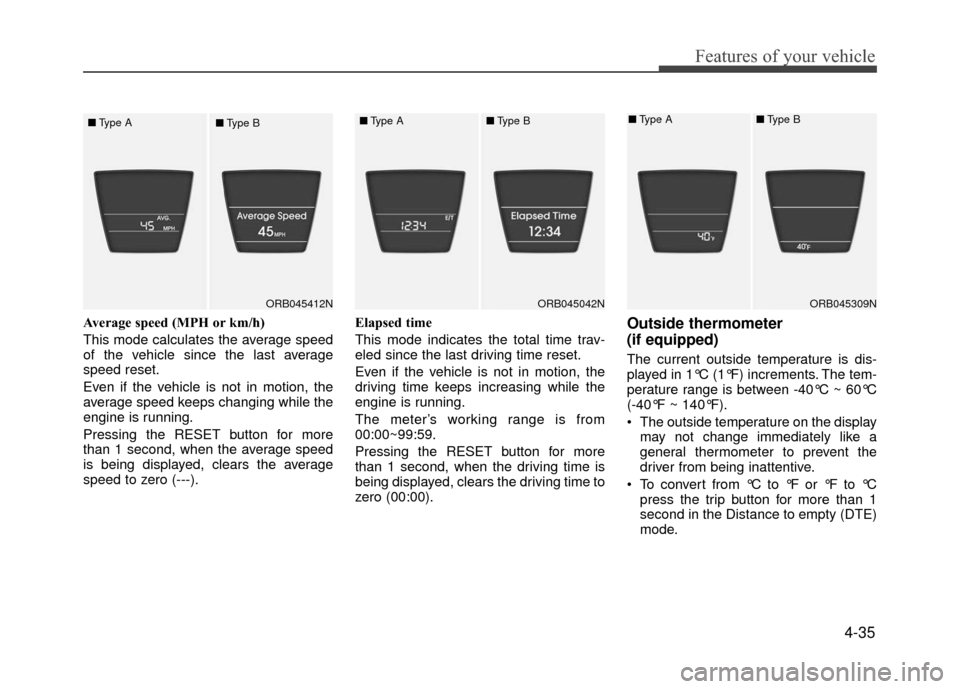
Average speed (MPH or km/h)
This mode calculates the average speed
of the vehicle since the last average
speed reset.
Even if the vehicle is not in motion, the
average speed keeps changing while the
engine is running.
Pressing the RESET button for more
than 1 second, when the average speed
is being displayed, clears the average
speed to zero (---).Elapsed time
This mode indicates the total time trav-
eled since the last driving time reset.
Even if the vehicle is not in motion, the
driving time keeps increasing while the
engine is running.
The meter’s working range is from
00:00~99:59.
Pressing the RESET button for more
than 1 second, when the driving time is
being displayed, clears the driving time to
zero (00:00).Outside thermometer
(if equipped)
The current outside temperature is dis-
played in 1°C (1°F) increments. The tem-
perature range is between -40°C ~ 60°C
(-40°F ~ 140°F).
The outside temperature on the display
may not change immediately like a
general thermometer to prevent the
driver from being inattentive.
To convert from °C to °F or °F to °C press the trip button for more than 1
second in the Distance to empty (DTE)
mode.
ORB045412N
■
Type A
■Type BORB045042N
■Type A■Type B
ORB045309N
■Type A■Type B
Page 121 of 380
4-47
Features of your vehicle
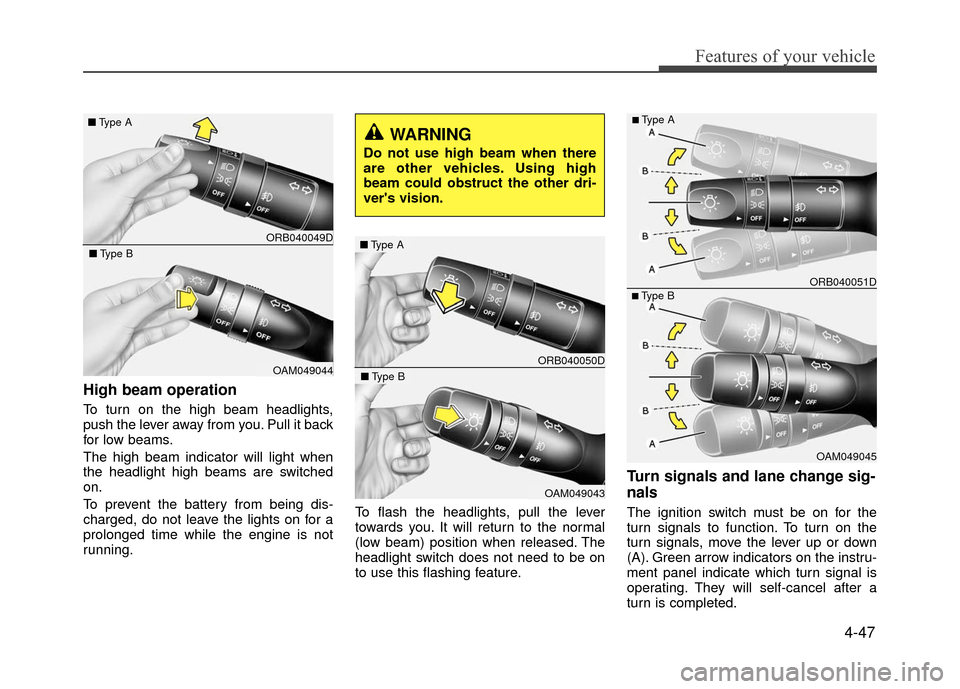
High beam operation
To turn on the high beam headlights,
push the lever away from you. Pull it back
for low beams.
The high beam indicator will light when
the headlight high beams are switched
on.
To prevent the battery from being dis-
charged, do not leave the lights on for a
prolonged time while the engine is not
running.To flash the headlights, pull the lever
towards you. It will return to the normal
(low beam) position when released. The
headlight switch does not need to be on
to use this flashing feature.
Turn signals and lane change sig-
nals
The ignition switch must be on for the
turn signals to function. To turn on the
turn signals, move the lever up or down
(A). Green arrow indicators on the instru-
ment panel indicate which turn signal is
operating. They will self-cancel after a
turn is completed.
ORB040049D
■
Type A
OAM049044
■Type B
WARNING
Do not use high beam when there
are other vehicles. Using high
beam could obstruct the other dri-
ver's vision.
ORB040050D
■Type A
OAM049043
■Type B
OAM049045
■Type B ORB040051D
■Type A
Page 122 of 380
Features of your vehicle
4-48
If the indicator continues to flash after a
turn, manually return the lever to the OFF
position.
To signal a lane change, move the turn
signal lever slightly and hold it in position
(B). The lever will return to the OFF posi-
tion when released.
If an indicator stays on and does not
flash or if it flashes abnormally, one of the
turn signal bulbs may be burned out and
will require replacement.
One-touch lane change function
To activate an one-touch lane change
function, move the turn signal lever
slightly and then release it. The lane
change signals will blink 3 times.
✽ ✽NOTICE
If an indicator flash is abnormally quick
or slow, a bulb may be burned out or
have a poor electrical connection in the
circuit.
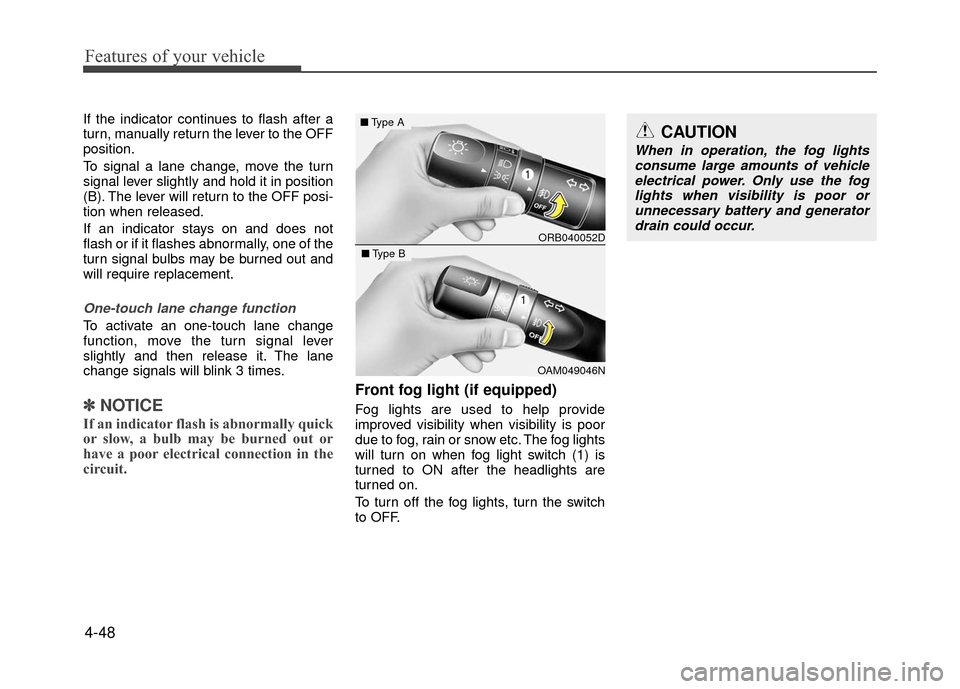
Front fog light (if equipped)
Fog lights are used to help provide
improved visibility when visibility is poor
due to fog, rain or snow etc. The fog lights
will turn on when fog light switch (1) is
turned to ON after the headlights are
turned on.
To turn off the fog lights, turn the switch
to OFF.
CAUTION
When in operation, the fog lights
consume large amounts of vehicleelectrical power. Only use the fog lights when visibility is poor orunnecessary battery and generatordrain could occur.
ORB040052D
■ Type A
OAM049046N
■Type B
Page 137 of 380
4-63
Features of your vehicle
✽
✽NOTICE
• When using the air conditioning sys-
tem, monitor the temperature gauge
closely while driving up hills or in
heavy traffic when outside tempera-
tures are high. Air conditioning sys-
tem operation may cause engine over-
heating. Continue to use the blower
fan but turn the air conditioning sys-
tem off if the temperature gauge indi-
cates engine overheating.
• When opening the windows in humid weather air conditioning may create
water droplets inside the vehicle.
Since excessive water droplets may
cause damage to electrical equipment,
air conditioning should only be used
with the windows closed.
Air conditioning system operation tips
If the vehicle has been parked in direct
sunlight during hot weather, open the
windows for a short time to let the hot
air inside the vehicle escape.
To help reduce moisture inside of the windows on rainy or humid days,
decrease the humidity inside the vehi-
cle by operating the air conditioning
system.
During air conditioning system opera- tion, you may occasionally notice a
slight change in engine speed as the
air conditioning compressor cycles.
This is a normal system operation
characteristic.
Use the air conditioning system every month only for a few minutes to ensure
maximum system performance. When using the air conditioning sys-
tem, you may notice clear water drip-
ping (or even puddling) on the ground
under the passenger side of the vehi-
cle. This is a normal system operation
characteristic.
Operating the air conditioning system in the recirculated air position provides
maximum cooling, however, continual
operation in this mode may cause the
air inside the vehicle to become stale.
During cooling operation, you may occasionally notice a misty air flow
because of rapid cooling and humid air
intake. This is a normal system opera-
tion characteristic.
If you operate air conditioner exces- sively, the difference between the tem-
perature of the outside air and that of
the windshield could cause the outer
surface of the windshield to fog up,
causing loss of visibility. In this case,
set the mode selection knob or button
to the position and fan speed con-
trol to the lower speed.