Screen Hyundai Accent 2018 Owner's Guide
[x] Cancel search | Manufacturer: HYUNDAI, Model Year: 2018, Model line: Accent, Model: Hyundai Accent 2018Pages: 442, PDF Size: 13.99 MB
Page 244 of 442
![Hyundai Accent 2018 Owners Guide 4-37
Multimedia System
4
- After confirming that the 6-digitpasskey on the audio screen
and the
Bluetooth®Wireless
Technology device are identical,
select [OK] in your
Bluetooth®
Wireless Technolo](/img/35/14346/w960_14346-243.png "Hyundai Accent 2018 Owners Guide 4-37
Multimedia System
4
- After confirming that the 6-digitpasskey on the audio screen
and the
Bluetooth®Wireless
Technology device are identical,
select [OK] in your
Bluetooth®
Wireless Technolo")
4-37
Multimedia System
4
- After confirming that the 6-digitpasskey on the audio screen
and the
Bluetooth®Wireless
Technology device are identical,
select [OK] in your
Bluetooth®
Wireless Technology device.
Information
The 6-digit passkey in the image
above is an example. Refer to your
vehicle for the actual passkey.
Pairing a second Bluetooth®
Wireless Technology device
Press the [SETUP] button on the
audio system ➟ Select [Bluetooth] ➟
Select [Connections] ➟ Select [Add
New].
- The pairing procedure from this point is identical to [Pairing the first
Bluetooth device].
Information
•Bluetooth®Wireless Technology
standby mode lasts for three min-
utes. If a device is not paired within
three minutes, pairing is canceled.
Start over from the beginning.
• For most Bluetooth
®Wireless
Technology devices, a connection is
established automatically after pair-
ing. Some devices, however, require
separate confirmation when con-
necting after pairing. Be sure to
check your Bluetooth
®Wireless
Technology device after pairing to
confirm that it has connected.
i
i
Page 246 of 442
4-39
Information
• When the incoming call screen isdisplayed, audio mode and the set-
tings screen cannot be shown. Only
call volume control is supported.
• Some Bluetooth
®Wireless Technology
devices may not support the call
reject function.
• Some Bluetooth
®Wireless Technology
devices may not support the phone
number display function.
Operation during calls
Incoming call with Bluetooth®Wireless
Technology connected ➟Select
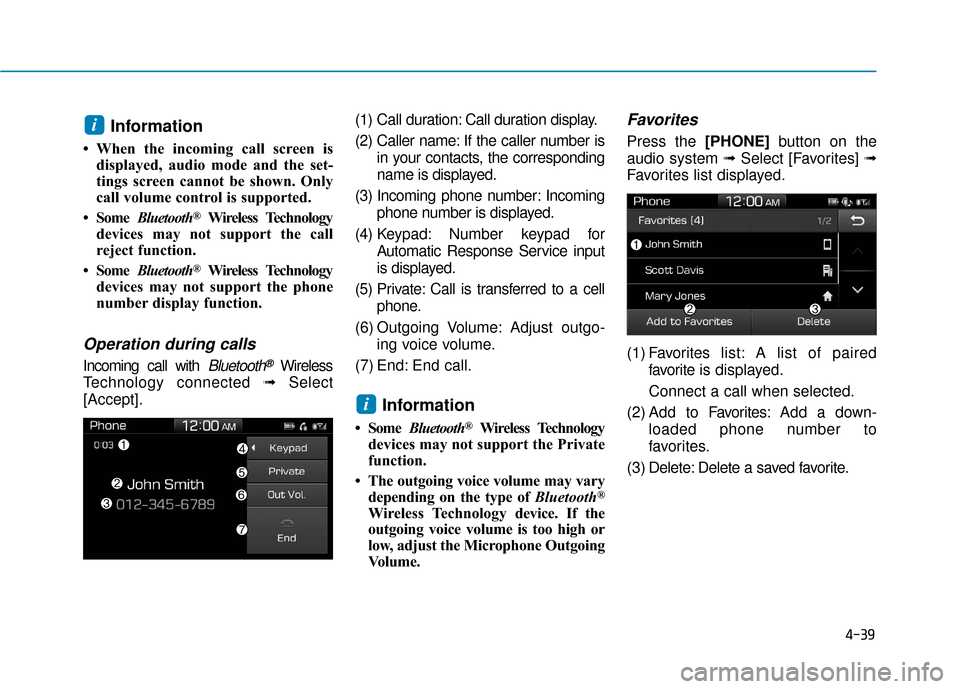
[Accept]. (1) Call duration: Call duration display.
(2) Caller name: If the caller number is
in your contacts, the corresponding
name is displayed.
(3) Incoming phone number: Incoming phone number is displayed.
(4) Keypad: Number keypad for Automatic Response Service input
is displayed.
(5) Private: Call is transferred to a cell phone.
(6) Outgoing Volume: Adjust outgo- ing voice volume.
(7) End: End call.
Information
• Some Bluetooth®Wireless Technology
devices may not support the Private
function.
• The outgoing voice volume may vary depending on the type of Bluetooth
®
Wireless Technology device. If the
outgoing voice volume is too high or
low, adjust the Microphone Outgoing
Volume.
Favorites
Press the [PHONE] button on the
audio system ➟ Select [Favorites] ➟
Favorites list displayed.
(1) Favorites list: A list of paired
favorite is displayed.
Connect a call when selected.
(2) Add to Favor ites:Add a down-
loaded phone number to
favorites.
(3) Delete: Delete a saved favorite.
i
i
Page 248 of 442
4-41
Multimedia System
4
Multimedia System
4
Information
• Only supported contacts format canbe downloaded and displayed from
the Bluetooth
®Wireless Technology
device, contacts from some applica-
tions will not be included.
• Up to 2,000 contacts can be saved.
• In some cases, additional confirmation from your Bluetooth
®Wireless
Technology device is necessary when
downloading contacts. If downloading
of contacts unsuccessful, consult your
Bluetooth
®Wireless Technology
device’s settings or the audio screen to
approve the download.
• Contacts without phone numbers are not displayed.
Dial
Press the [PHONE] button on the
audio system ➟ Select [Dial].
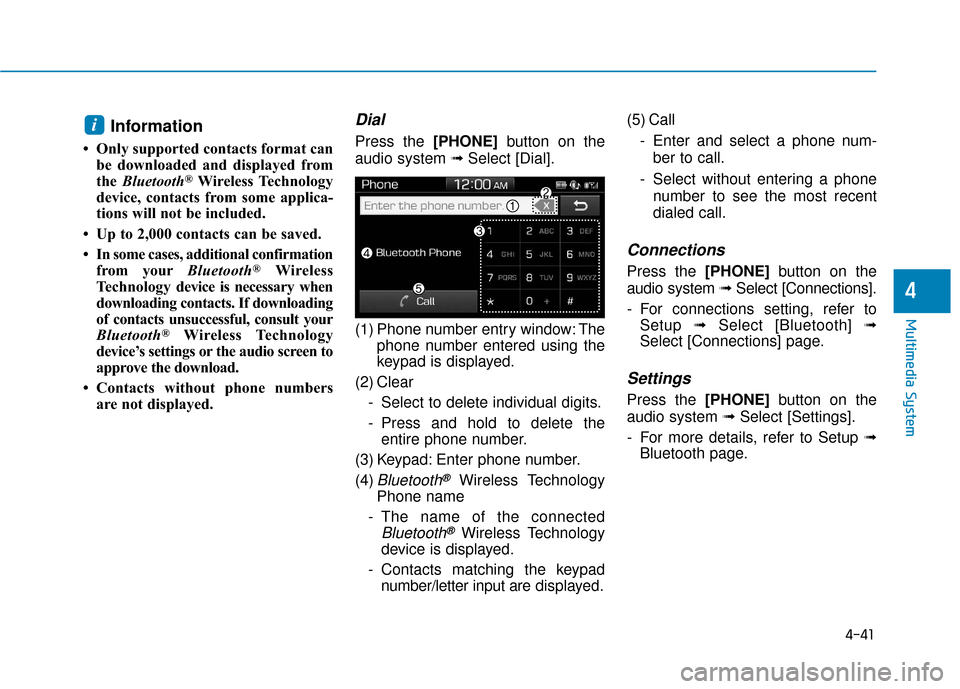
(1) Phone number entry window: The phone number entered using the
keypad is displayed.
(2) Clear - Select to delete individual digits.
- Press and hold to delete theentire phone number.
(3) Keypad: Enter phone number.
(4)
Bluetooth®Wireless Technology
Phone name
- The name of the connected
Bluetooth®Wireless Technology
device is displayed.
- Contacts matching the keypad number/letter input are displayed.(5) Call
- Enter and select a phone num-ber to call.
- Select without entering a phone number to see the most recent
dialed call.
Connections
Press the [PHONE] button on the
audio system ➟Select [Connections].
- For connections setting, refer to Setup ➟Select [Bluetooth] ➟
Select [Connections] page.
Settings
Press the [PHONE] button on the
audio system ➟ Select [Settings].
- For more details, refer to Setup ➟ Bluetooth page.
i
Page 249 of 442
![Hyundai Accent 2018 Owners Guide 4-42
Multimedia System
Setup
Access Display, Sound, Date/Time,
Bluetooth*, System, Screen Saver
and Display Off settings.
Press the [SETUP]button on the
audio system.
* if equipped
Display
Press the](/img/35/14346/w960_14346-248.png "Hyundai Accent 2018 Owners Guide 4-42
Multimedia System
Setup
Access Display, Sound, Date/Time,
Bluetooth*, System, Screen Saver
and Display Off settings.
Press the [SETUP]button on the
audio system.
* if equipped
Display
Press the")
4-42
Multimedia System
Setup
Access Display, Sound, Date/Time,
Bluetooth*, System, Screen Saver
and Display Off settings.
Press the [SETUP]button on the
audio system.
* if equipped
Display
Press the [SETUP] button on the
audio system ➟ Select [Display].
Mode: Brightness is automatically adjusted according to the headlight
use.
Illumination: The brightness of the audio screen can be changed.
Sound
Press the [SETUP] button on the
audio system ➟ Select [Sound].
Position: Sound balance and fader can be adjusted.
Tone: Sound tone color can be adjusted.
Back-up Warning Priority: Automatically lower audio volume
while reversing.
Speed Dependent Volume: Automatically adjust volume based
on vehicle speed.
Beep: Select whether to play a beep sound when the screen is
touched.
Date/Time
Press the [SETUP] button on the
audio system ➟ Select [Date/Time].
Set Time: Set the time displayed on the audio screen.
Time Format: Choose between 12- hour and 24-hour time formats.
Set Date: Set the date displayed on the audio screen.
Date/Time Setting Distraction
Adjusting the date/time setting
while driving can result in a loss
of vehicle control that may lead
to an accident, severe personal
injury, and death.
WARNING
Page 250 of 442
![Hyundai Accent 2018 Owners Guide 4-43
Multimedia System
4
Bluetooth (if equipped)
Press the [SETUP]button on the
audio system ➟ Select [Bluetooth].
Connections: Control pairing, dele- tion, connection and disconnection
of
Bluetoo](/img/35/14346/w960_14346-249.png "Hyundai Accent 2018 Owners Guide 4-43
Multimedia System
4
Bluetooth (if equipped)
Press the [SETUP]button on the
audio system ➟ Select [Bluetooth].
Connections: Control pairing, dele- tion, connection and disconnection
of
Bluetoo")
4-43
Multimedia System
4
Bluetooth (if equipped)
Press the [SETUP]button on the
audio system ➟ Select [Bluetooth].
Connections: Control pairing, dele- tion, connection and disconnection
of
Bluetooth®Wireless Technology
devices.
Auto Connection Priority: Set the
connection priority of
Bluetooth®
Wireless Technology de vices when
the vehicle is started.
Download Contacts: Contacts can be downloaded from connected
Bluetooth®Wireless Technology
devices.
Bluetooth Voice Prompts: Play or mute voice prompts for
Bluetooth®
Wireless Technology device pair-
ing, connection and errors.
Information
• When paired devices are deleted,the call history and contacts of the
device saved to the audio system are
deleted.
•For Bluetooth
®Wireless Technology
connections with low connection
priority, some time may be required
for the connection to be established.
• Contacts can be downloaded only from the currently connected
Bluetooth
®Wireless Technology
device.
• If no Bluetooth
®Wireless Technology
device is connected, the Download
Contacts button is disabled.
System
Press the [SETUP] button on the
audio system ➟ Select [System].
Memory Information: View My Music memory usage.
Language: Change the user lan- guage.
Default: Reset the audio system.
System Information: At the System Information screen, Software ver-
sion information, updates are avail-
able.
- System Update: At the SystemInformation screen, insert the
USB memory with the latest file
downloaded, and then select the
[Update] to begin updating. The
system with then reboot auto-
matically.
(if equipped)
i
Page 251 of 442
4-44
Multimedia System
Information
• The system resets to the default val-ues, and all saved data and settings
are lost.
• This product needs supplemented software updates and additional
functions, which collectively may
take some time to complete, depend-
ing on the amount of data.
• If the Power is disconnected or the USB is removed during an update,
the data might be damaged. Please
wait until the update is complete
while engine is on.
Screen Saver
Set the information displayed when
the audio system is switched off or
the screen is turned off.
Press the [SETUP] button on the
audio system ➟Select [Screen
Saver].
Analog: An analog clock is dis-
played.
Digital: A digital clock is displayed.
None: No information is displayed.
Display Off
To prevent glare, the screen can be
turned off with the audio system in
operation.
Press the [SETUP] button on the
audio system ➟ Select [Display Off].
Information
Use ‘Screen Saver’ to set the informa-
tion to be displayed when the screen is
turned off.
i
i
Page 417 of 442
7-78
Maintenance
Caring for the leather seats - Vacuum the seat periodically toremove dust and sand on the seat.
It will prevent abrasion or damage
of the leather and maintain its qual-
ity.
- Wipe the natural leather seat cover often with dry or soft cloth.
- Use of proper leather protector may prevent abrasion of the cover
and helps maintain the color. Be
sure to read the instructions and
consult a specialist when using
leather coating or protective agent.
- Light colored (beige, cream beige) leather is easily contaminated and
the stain is noticeable. Clean the
seats frequently.
- Avoid wiping with wet cloth. It may cause the surface to crack. Cleaning the leather seats
- Remove all contaminations instant-ly. Refer to instructions below for
removal of each contaminant.
- Cosmetic products (sunscreen, foundation, etc.)
Apply cleansing cream on a cloth
and wipe the contaminated spot.
Wipe off the cream with a wet cloth
and remove water with a dry cloth.
- Beverages (coffee, soft drink, etc.) Apply a small amount of neutral
detergent and wipe until contami-
nations do not smear.
- Oil Remove oil instantly with
absorbable cloth and wipe with
stain remover used only for natural
leather.
- Chewing gum Harden the gum with ice and
remove gradually.
Cleaning the seat belt webbing
Clean the belt webbing with any mild
soap solution recommended for
cleaning upholstery or carpet. Follow
the instructions provided with the
soap. Do not bleach or re-dye the
webbing because this may weaken
the seat belt.
Cleaning the interior windowglass
If the interior glass surfaces of the
vehicle become fogged (that is, cov-
ered with an oily, greasy or waxy
film), they should be cleaned with
glass cleaner. Follow the directions
on the glass cleaner container.
Do not scrape or scratch the
inside of the rear window. This
may result in damage to the rear
window defroster grid.
NOTICE
Page 436 of 442

I-2
Accessing Your Vehicle ....................................................3-3Immobilizer System....................................................3-\
11
Remote Key ..................................................................3-3
Smart Key.....................................................................3-6\
Air bag - Advanced supplemental restraint system ........2-39 Additional Safety Precautions ....................................2-61
Air Bag Warning Labels.............................................2-61
How Does the Air Bag System Operate? ...................2-44
Occupant Classification System (OCS) .....................2-50
SRS Care ....................................................................2-60\
What to Expect After an Air Bag Inflates ..................2-49
Where Are the Air Bags? ...........................................2-41
Why Didn't My Air Bag Go Off in a Collision?........2-55
Air cleaner.......................................................................7\
-23 Filter Replacement .....................................................7-23
Air Conditioning System ..................................................8-5
Appearance care..............................................................7-72 Exterior Care ..............................................................7-72
Interior Care ...............................................................7-76 Audio (With Touch Screen) ..............................................4-9
Feature of Your Audio.......................................4-10, 4-13
List ........................................................................\
......4-19
Media ........................................................................\
..4-22
Phone ........................................................................\
....4-1
Radio ........................................................................\
..4-18
Setup ........................................................................\
.....4-1
SiriusXM Radio..........................................................4-21
Automatic Climate Control System..............................3-104 Automatic Heating and Air Conditioning ................3-105
Manual Heating and Air Conditioning .....................3-106
System Maintenance.................................................3-113
System Operation .....................................................3-111
Automatic transmission ..................................................5-18 Automatic Transmission Operation............................5-18
Good Driving Practices ..............................................5-22
Battery ........................................................................\
.....7-28 Battery Recharging .....................................................7-29
For Best Battery Service ............................................7-29
Reset Features ............................................................7-30
Before driving ...................................................................5-3 Before Entering the Vehicle .........................................5-3
Before Starting .............................................................5-3
Index
A
B