Settings Hyundai Accent 2019 User Guide
[x] Cancel search | Manufacturer: HYUNDAI, Model Year: 2019, Model line: Accent, Model: Hyundai Accent 2019Pages: 442, PDF Size: 14.14 MB
Page 160 of 442
3-82
Convenient features of your vehicle
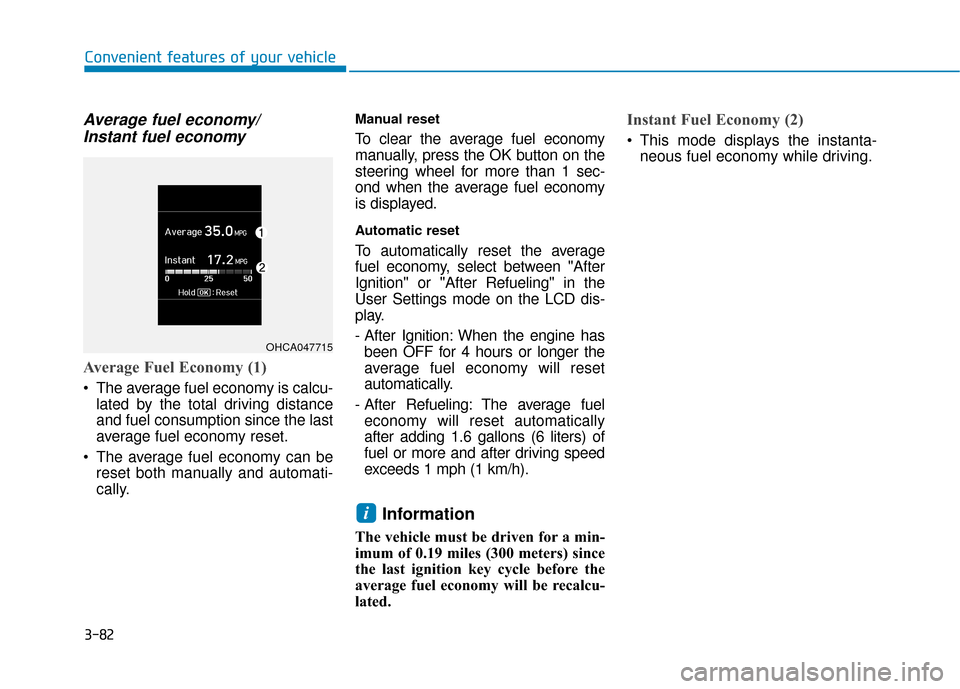
Average fuel economy/Instant fuel economy
Average Fuel Economy (1)
The average fuel economy is calcu-
lated by the total driving distance
and fuel consumption since the last
average fuel economy reset.
The average fuel economy can be reset both manually and automati-
cally.
Manual reset
To clear the average fuel economy
manually, press the OK button on the
steering wheel for more than 1 sec-
ond when the average fuel economy
is displayed.
Automatic reset
To automatically reset the average
fuel economy, select between "After
Ignition" or "After Refueling" in the
User Settings mode on the LCD dis-
play.
- After Ignition: When the engine hasbeen OFF for 4 hours or longer the
average fuel economy will reset
automatically.
- After Refueling: The average fuel economy will reset automatically
after adding 1.6 gallons (6 liters) of
fuel or more and after driving speed
exceeds 1 mph (1 km/h).
Information
The vehicle must be driven for a min-
imum of 0.19 miles (300 meters) since
the last ignition key cycle before the
average fuel economy will be recalcu-
lated.
Instant Fuel Economy (2)
This mode displays the instanta- neous fuel economy while driving.
i
OHCA047715
Page 167 of 442
3-89
Convenient features of your vehicle
3
Onetouch turn signal function
To activate the One Touch Turn
Signal function, push the turn signal
lever up or down to position (B) and
then release it.
The lane change signals will blink 3,
5 or 7 times.
You can activate or deactivate the
One Touch Turn Signal function or
choose the number of blinks (3, 5, or
7) from the User Settings mode
(Light) on the LCD display.
For more information, refer to the
"LCD Display" section in this
chapter.
Battery saver function
The purpose of this feature is to pre-
vent the battery from being dis-
charged. The system automatically
turns off the parking lamp when the
driver turns the vehicle off and opens
the driver-side door.
With this feature, the parking lamps
will turn off automatically if the driver
parks on the side of road at night.If necessary, to keep the lamps on
when the vehicle is turned off, perform
the following:
1) Open the driver-side door.
2) Turn the parking lamps OFF and
ON again using the light switch on
the steering column.
Headlamp delay function (if equipped)
If the key is removed from the ignition
switch or placed in the ACC position
or the LOCK/OFF position with the
headlamps ON, the headlamps
(and/or parking lamps) remain on for
about 5 minutes. However, if the dri-
ver’s door is opened and closed, the
headlights are turned off after 15
seconds. Also, with the engine off if
the driver's door is opened and
closed, the headlamps (and/or park-
ing lamps) are turned off after 15
seconds.
The headlamps (and/or parking
lamps) can be turned off by pressing
the lock button on the remote key or
smart key twice or turning the light
switch to the OFF or AUTO position. You can activate or deactivate the
Headlamp Delay function from the
User Settings Mode (Light) on the
LCD display.
For more information, refer to the
"LCD Display" section in this
chapter.
If the driver gets out of the vehicle
through other doors (except dri-
ver's door), the battery saver func-
tion does not operate and the
headlamp delay function does not
turn off automatically. Therefore, It
causes the battery to be dis-
charged. In this case, make sure
to turn off the lamp before getting
out of the vehicle.
NOTICE
Page 205 of 442
![Hyundai Accent 2019 User Guide 3-127
Convenient features of your vehicle
3
Clock
Vehicles with Audio system
Select the [SETUP]button on the
audio system ➟ Select [Date/Time].
Set time: Set the time displayed on the audio screen.](/img/35/14345/w960_14345-204.png "Hyundai Accent 2019 User Guide 3-127
Convenient features of your vehicle
3
Clock
Vehicles with Audio system
Select the [SETUP]button on the
audio system ➟ Select [Date/Time].
Set time: Set the time displayed on the audio screen.")
3-127
Convenient features of your vehicle
3
Clock
Vehicles with Audio system
Select the [SETUP]button on the
audio system ➟ Select [Date/Time].
Set time: Set the time displayed on the audio screen.
Time format: Choose between 12- hour and 24-hour time formats.
Vehicles with Navigation system
Select the Settings menu on the
Navigation system ➟Select
[Date/Time].
GPS time: Displays time according to the received GNSS time.
24-hour: Switches to 12 hour or 24 hour.
Clothes Hanger (if equipped)
These hangers are not designed to
hold large or heavy items.
OOS047065
Do not hang other objects such
as hangers or hard objects
except clothes. Also, do not put
heavy, sharp or breakable objects
in the clothes pockets. In an acci-
dent or when the curtain air bag
is inflated, it may cause vehicle
damage or personal injury.
WARNING
OOS047066
Do not adjust the clock while
driving, you may lose your
steering control and cause an
accident that results in severe
personal injury or death.
WARNING
Page 218 of 442
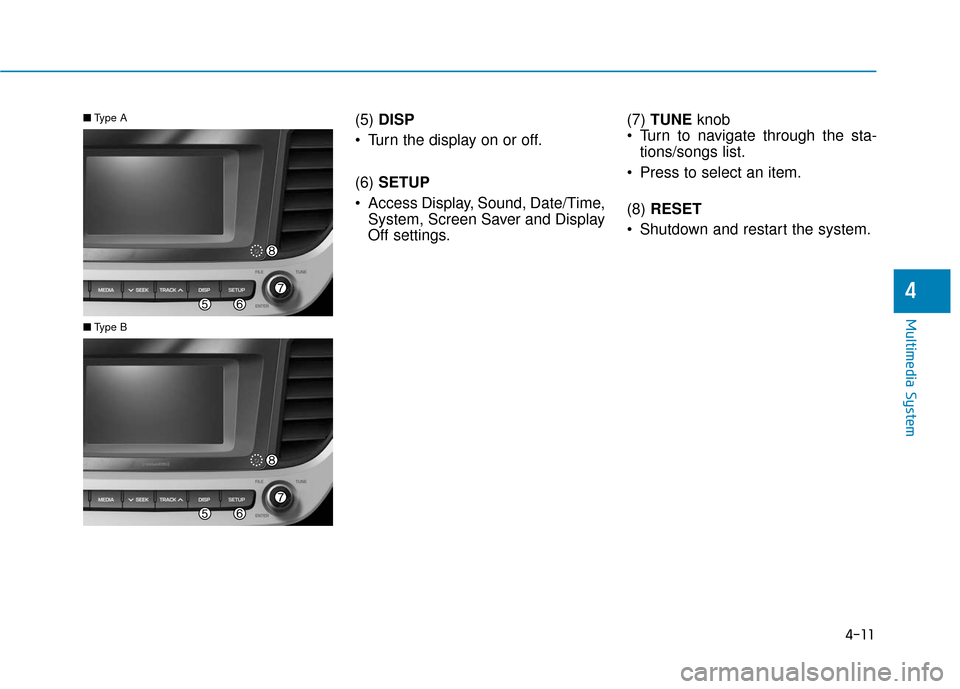
(5) DISP
Turn the display on or off.
(6) SETUP
Access Display, Sound, Date/Time, System, Screen Saver and Display
Off settings. (7)
TUNE knob
Turn to navigate through the sta- tions/songs list.
Press to select an item.
(8) RESET
Shutdown and restart the system.■ Type A
■Type B
4-11
Multimedia System
4
Page 221 of 442
4-14
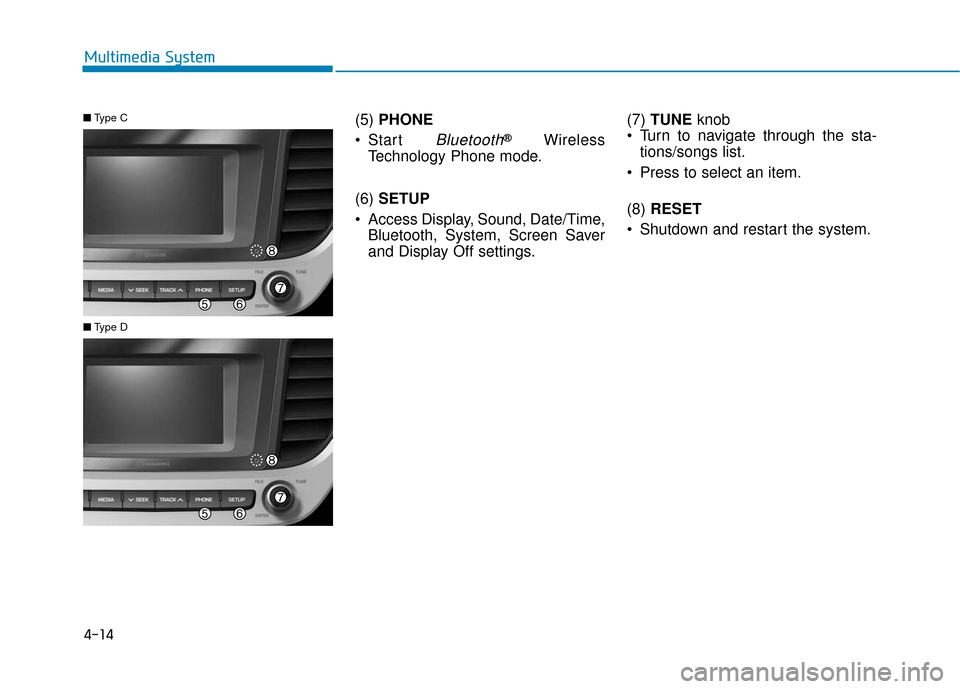
Multimedia System(5) PHONE
Start
Bluetooth®Wireless
Technology Phone mode.
(6) SETUP
Access Display, Sound, Date/Time, Bluetooth, System, Screen Saver
and Display Off settings. (7)
TUNE knob
Turn to navigate through the sta- tions/songs list.
Press to select an item.
(8) RESET
Shutdown and restart the system.
■ Type C
■Type D
Page 226 of 442
![Hyundai Accent 2019 User Guide 4-19
Multimedia System
4
(4) Menu
Navigate to the menu screen.
(5) Presets 1~40
Save or listen to favorite stations.
Switching between FM, AM and
SiriusXM* radio
Press the [RADIO]button on the
audio](/img/35/14345/w960_14345-225.png "Hyundai Accent 2019 User Guide 4-19
Multimedia System
4
(4) Menu
Navigate to the menu screen.
(5) Presets 1~40
Save or listen to favorite stations.
Switching between FM, AM and
SiriusXM* radio
Press the [RADIO]button on the
audio")
4-19
Multimedia System
4
(4) Menu
Navigate to the menu screen.
(5) Presets 1~40
Save or listen to favorite stations.
Switching between FM, AM and
SiriusXM* radio
Press the [RADIO]button on the
audio system to switch between
FM, AM and SiriusXM* radio.
Select [Band] on the screen to switch between FM, AM and
SiriusXM* radio.
* if equipped
Searching stations
Searching stations by pressing the
[SEEK/TRACK] button on the prod-
uct.
< Presets >
By selecting [< Presets >], the but-
tons for Presets 1~40 displayed on
the screen can be changed.
Presets 1~40
Select the button to listen to a preset.
Press and hold the button number to
save the current station. If the slot is
empty, simply selecting saves the
station to the slot.
List
A list of all available stations is dis-
played. Select the desired station.
Favorite stations can be saved to
[Presets] by selecting the [+].
Menu
Select [Menu], and select the desired
function.
Presets: Save up to 40 frequently used stations. To listen to a preset,
select the desired station. Press
and hold the desired slot from 1
through 40. This saves the current
station in the selected slot. If the
slot is empty, simply selecting
saves the station to the slot.
Scan: All stations available in the current location of the vehicle are
played for five seconds each.
Information: View detailed station information.
Sound Settings: Audio sound set- tings can be changed.
Station Info: Set whether to receive station information such as Station
Name, Program Type or Information.
Page 229 of 442
![Hyundai Accent 2019 User Guide 4-22
Multimedia System
Menu
Select [Menu], and select the desired
function.
Presets: Save up to 40 frequentlyused channels. To listen to a pre-
set, select the desired channel.
Press and hold the des](/img/35/14345/w960_14345-228.png "Hyundai Accent 2019 User Guide 4-22
Multimedia System
Menu
Select [Menu], and select the desired
function.
Presets: Save up to 40 frequentlyused channels. To listen to a pre-
set, select the desired channel.
Press and hold the des")
4-22
Multimedia System
Menu
Select [Menu], and select the desired
function.
Presets: Save up to 40 frequentlyused channels. To listen to a pre-
set, select the desired channel.
Press and hold the desired slot
from 1 through 40. This saves the
current channel in the selected
slot. If the slot is empty, simply
selecting saves the channel to the
slot.
Categories: Channels can be searched by category.
Direct Tune: The desired channel can be selected by entering num-
bers.
Sound Settings: Audio sound set- tings can be changed.
Tag Song: Tag the current song information. When an Apple device
(iPhone
®, iPod®) is connected,
tagged song information is sent
automatically to the connected
device.
Information
Up to 50 songs can be tagged.
Scan: All channels available in the vehicle’s current location are
played for ten seconds each.
Program Schedule: View the Program schedule.
Featured Favorites: The Featured Favorites feature allows
SiriusXM™ to broadcast additional
presets.
- Example 1: During holidays,"Holiday Music" might include all
SiriusXM™ channels that are
playing holiday music for easy
access by users.
Multiple sets of Featured Favorites
data can be broadcast by
SiriusXM™ and can change from
time to time.
Information: View detailed channel information.
Category Lock: Search or scan channels in the current category
only.
Media
Information
- Using MP3
Supported audio formats
File formats other than the for-
mats above may not be recog-
nized or playable. Information
such as filename may not be dis-
played.
NOTICE
i
i
Page 234 of 442
![Hyundai Accent 2019 User Guide 4-27
Multimedia System
4
(4) Save: Save the selected file(s).- Select the files you want to save,and select [Save]. This saves the
selected files to My Music.
- If phone calls are received or made whi](/img/35/14345/w960_14345-233.png "Hyundai Accent 2019 User Guide 4-27
Multimedia System
4
(4) Save: Save the selected file(s).- Select the files you want to save,and select [Save]. This saves the
selected files to My Music.
- If phone calls are received or made whi")
4-27
Multimedia System
4
(4) Save: Save the selected file(s).- Select the files you want to save,and select [Save]. This saves the
selected files to My Music.
- If phone calls are received or made while saving, saving will be
canceled.
- Up to 6,000 files can be saved.
- The currently playing file on the USB device cannot be changed
while saving.
- My Music cannot be used while saving.
- Up to 700 MB can be saved.
Information: Detailed information on the currently playing song is dis-
played.
Sound Settings: Audio sound set- tings can be changed.Information
- Using the iPod®Devices
• To use the audio system’s iPod
®con-
trol function, use the dedicated
cable provided with your iPod
®.
• Connecting the iPod
®to the vehicle
during play may result in a loud
noise that lasts about one to two sec-
onds. Connect the iPod
®to the vehi-
cle after stopping or pausing play.
• Connect the iPod
®with the vehicle in
the ACC ON state to begin charging.
• When connecting the iPod
®cable,
be sure to fully push the cable into
the port.
• When EQ effects are enabled simul- taneously on external devices, such
as iPod
®s and the audio system, the
EQ effects may overlap, causing
sound quality deterioration or dis-
tortion. Deactivate the EQ function
for all external devices, if possible.
• Noise may occur when your iPod
®
or the AUX port is connected.
Disconnect and store separately
when not in use. (Continued)(Continued)
• There may be noise if the audio sys-
tem is used with an iPod
®or AUX
external device connected to the
power jack. In these cases, discon-
nect the iPod
®or external device
from the power jack.
• Play may be interrupted, or device malfunctions may occur depending
on the characteristics of your
iPod
®/iPhone®/iPad®.
• Play may fail if your iPhone
®is con-
nected through both Bluetooth®
Wireless Technology and USB. In
this case, select Dock connector or
Bluetooth
®Wireless Technology on
your iPhone®to change the sound
output settings.
• If your software version does not support the communication proto-
col or your iPod
®is not recognized
due to device failure, anomalies or
defects, iPod
®mode cannot be used.
• iPod
®nano (5th generation) devices
may not be recognized if the battery
is low. Charge sufficiently before use.
(Continued)
i
Page 236 of 442
![Hyundai Accent 2019 User Guide 4-29
Multimedia System
4
Repeat play
Select [Repeat] to enable or disable
Repeat category, Repeat current
song play.
Repeat category: Repeat allsongs in the current category.
Repeat current song](/img/35/14345/w960_14345-235.png "Hyundai Accent 2019 User Guide 4-29
Multimedia System
4
Repeat play
Select [Repeat] to enable or disable
Repeat category, Repeat current
song play.
Repeat category: Repeat allsongs in the current category.
Repeat current song")
4-29
Multimedia System
4
Repeat play
Select [Repeat] to enable or disable
'Repeat category', 'Repeat current
song' play.
Repeat category: Repeat allsongs in the current category.
Repeat current song: The cur- rently playing song is repeated.
Shuffle play
Select [Shuffle] to enable or disable
'Shuffle category' play.
Shuffle category: Songs withinthe current category are played in
random order.
Menu
Select [Menu], and select the desired
function.
Information: Detailed info on thecurrently playing song is displayed.
Sound Settings: Audio sound set- tings can be changed.
When other music programs are
running
When songs saved on your iPod®
are playing through a separate music
app, the above screen is displayed.
(1) Play/Pause: Pause or play music
.
(2) Play iPod Files: Play m usic saved
on your iPod®.
(3) Sound Settngs: Audio sound set- tings can be changed.
(4) Album Image: View playback info
.
Playing iPod files
Select [Play iPod Files] to play songs
saved on your iPod®.
If there are no songs saved on your
iPod
®, the [Play iPod Files] is dis-
abled.
Information
Operation cannot be carried out cor-
rectly due to iPod®application mal-
function.
i
Page 238 of 442
4-31
Multimedia System
4
Information
• Some cell phone models may notsupport particular functions.
• Bluetooth
®Wireless Technology
audio volume is synced with cell
phone media volume.
Playback
Press the [MEDIA] button, and
select [BT Audio].
Changing songs
Press the [SEEK/TRACK] button to
play the previous or next song.
Information
Some cell phones may not support this
function.
Repeat play
Select [Repeat] to enable or disable
'Repeat all', 'Repeat current song' or
'Repeat category' play.
Repeat all: All songs in the playlist are repeated.
Repeat current song: The cur- rently playing song is repeated.
Repeat category: Repeat all songs in the current category.
Information
The repeat play function is engaged,
depending on the operation of the connect-
ed Bluetooth
®Wireless Technology
device.
Shuffle play
Select [Shuffle] to enable or disable
'Shuffle', 'Shuffle category' play.
Shuffle: Songs are played in random order.
Shuffle category: Songs within the current category are played in
random order.
Information
The shuffle function is engaged,
depending on the operation of the con-
nected Bluetooth
®Wireless
Technology device.
Menu
Select [Menu], and select the desired
function.
Connections: The currently con- nected
Bluetooth®Wireless
Technology device can be
changed.
Information: Detailed information on the currently playing song is dis-
played.
Sound Settings: Audio sound set- tings can be changed.
i
i
i
i