Parking brake sensor Hyundai Accent 2019 Owner's Manual
[x] Cancel search | Manufacturer: HYUNDAI, Model Year: 2019, Model line: Accent, Model: Hyundai Accent 2019Pages: 442, PDF Size: 14.14 MB
Page 164 of 442
3-86
Convenient features of your vehicle
Daytime running light (DRL)
(if equipped)
The Daytime Running Lights (DRL)
can make it easier for others to see
the front of your vehicle during the
day, especially after dawn and before
sunset.
The DRL system will turn the dedi-
cated lamp OFF when :
• The light switch is in the DRL OFFposition.
The headlamps are ON.
The parking lamps are ON.
The vehicle is turned off.
The parking brake is set.
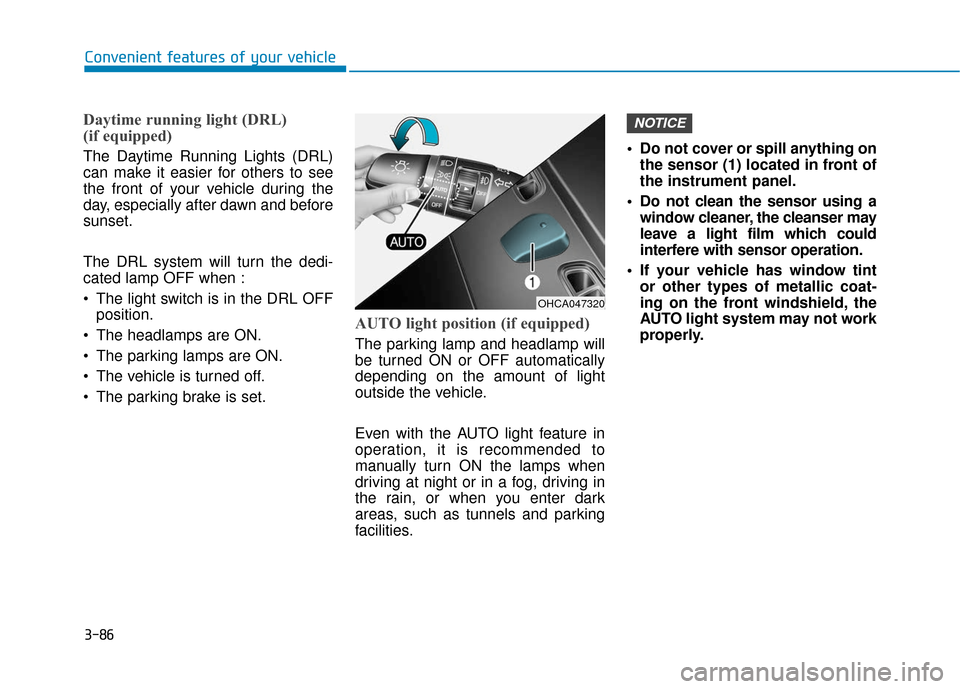
AUTO light position (if equipped)
The parking lamp and headlamp will
be turned ON or OFF automatically
depending on the amount of light
outside the vehicle.
Even with the AUTO light feature in
operation, it is recommended to
manually turn ON the lamps when
driving at night or in a fog, driving in
the rain, or when you enter dark
areas, such as tunnels and parking
facilities. • Do not cover or spill anything on
the sensor (1) located in front of
the instrument panel.
Do not clean the sensor using a window cleaner, the cleanser may
leave a light film which could
interfere with sensor operation.
If your vehicle has window tint or other types of metallic coat-
ing on the front windshield, the
AUTO light system may not work
properly.
NOTICE
OHCA047320
Page 253 of 442
Driving your vehicle
5
Before driving.........................................................5-3
Before Entering the Vehicle ...........................................5-3
Before Starting ..................................................................5-3
Ignition switch ........................................................5-5
Key Ignition Switch ...........................................................5-5
Engine Start/Stop Button................................................5-8
Manual transmission............................................5-15
Manual Transmission Operation ..................................5-15
Good Driving Practices ..................................................5-17
Automatic transmission .......................................5-18
Automatic Transmission Operation .............................5-18
Good Driving Practices ..................................................5-22
Braking system.....................................................5-24
Power Brakes ...................................................................5-24
Disc Brakes Wear Indicator ..........................................5-25
Parking Brake...................................................................5-25
Anti-lock Brake System (ABS) ....................................5-27
Electronic Stability Control (ESC)................................5-28
Vehicle Stability Management (VSM).........................5-31
Hill-Start Assist Control (HAC) ....................................5-32
Good Braking Practices .................................................5-33
Drive mode integrated control system .............5-34Forward Collision-avoidance Assist (FCA)
system-Radar Type .............................................5-35
System Setting and Activation.....................................5-35
FCA Warning Message and System Control ............5-37
FCA Sensor .......................................................................5\
-39
System Malfunction .......................................................5-40
Limitations of the System .............................................5-42
Cruise control .......................................................5-46
Cruise Control operation ...............................................5-46
Special driving conditions ...................................5-51
Hazardous Driving Conditions ......................................5-51
Rocking the Vehicle ........................................................5-51
Smooth Cornering ...........................................................5-52
Driving at Night................................................................5-52
Driving in the Rain ..........................................................5-52
Driving in Flooded Areas ...............................................5-53
Highway Driving...............................................................5-53
Winter driving .......................................................5-54
Snow or Icy Conditions ..................................................5-54
Winter Precautions .........................................................5-56
Vehicle load limit ..................................................5-58
Tire Loading Information Label ...................................5-59
Trailer Towing .......................................................5-63
Page 295 of 442
5-43
Driving your vehicle
5
The vehicle drives through a con-struction area, on an unpaved
road, or above metal materials,
such as a railway
The vehicle drives inside a build- ing, such as a basement parking
lot
The adverse road conditions cause excessive vehicle vibrations while
driving
The vehicle in front is moving verti- cally to the driving direction
The vehicle in front is stopped ver- tically
The vehicle in front is driving towards your vehicle or reversing
The sensor recognition changes suddenly when passing over a
speed bump
The vehicle is under heavy vibra- tion
The vehicle is on roundabouts.
The radar or sensor cover is bro- ken
The vehicle is passing a tunnel, toll gate or partially paved road
The radar or camera sensor recog- nition is under other limited circum-
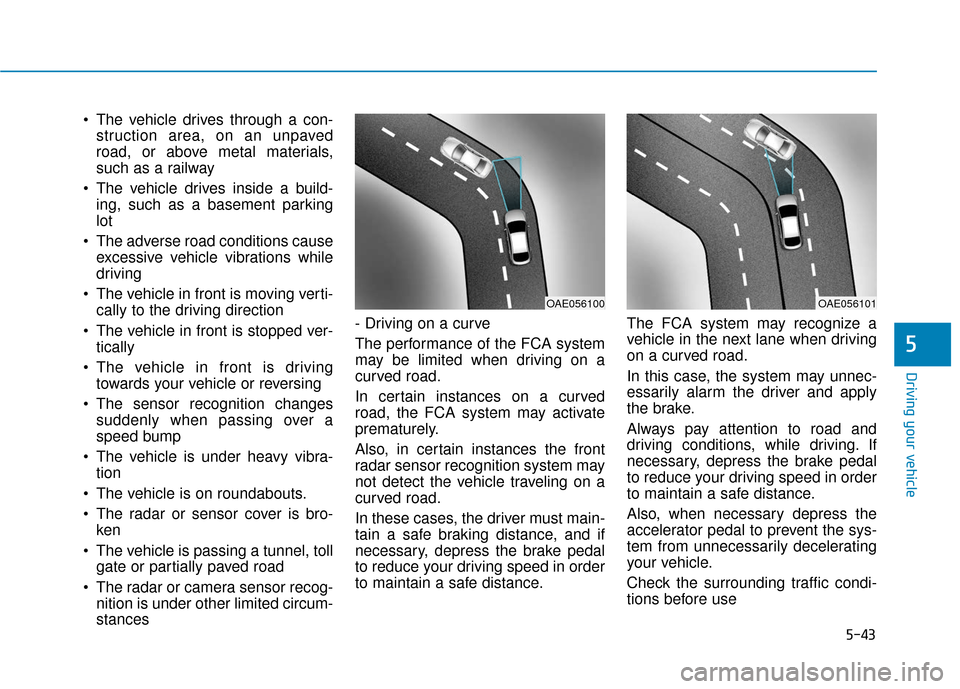
stances - Driving on a curve
The performance of the FCA system
may be limited when driving on a
curved road.
In certain instances on a curved
road, the FCA system may activate
prematurely.
Also, in certain instances the front
radar sensor recognition system may
not detect the vehicle traveling on a
curved road.
In these cases, the driver must main-
tain a safe braking distance, and if
necessary, depress the brake pedal
to reduce your driving speed in order
to maintain a safe distance.
The FCA system may recognize a
vehicle in the next lane when driving
on a curved road.
In this case, the system may unnec-
essarily alarm the driver and apply
the brake.
Always pay attention to road and
driving conditions, while driving. If
necessary, depress the brake pedal
to reduce your driving speed in order
to maintain a safe distance.
Also, when necessary depress the
accelerator pedal to prevent the sys-
tem from unnecessarily decelerating
your vehicle.
Check the surrounding traffic condi-
tions before use
OAE056100OAE056101
Page 337 of 442
6-22
What to do in an emergency
When towing your vehicle in an
emergency without wheel dollies:
1. Place the ignition switch in the ACC position.
2. Place the shift lever in N (Neutral).
3. Release the parking brake.
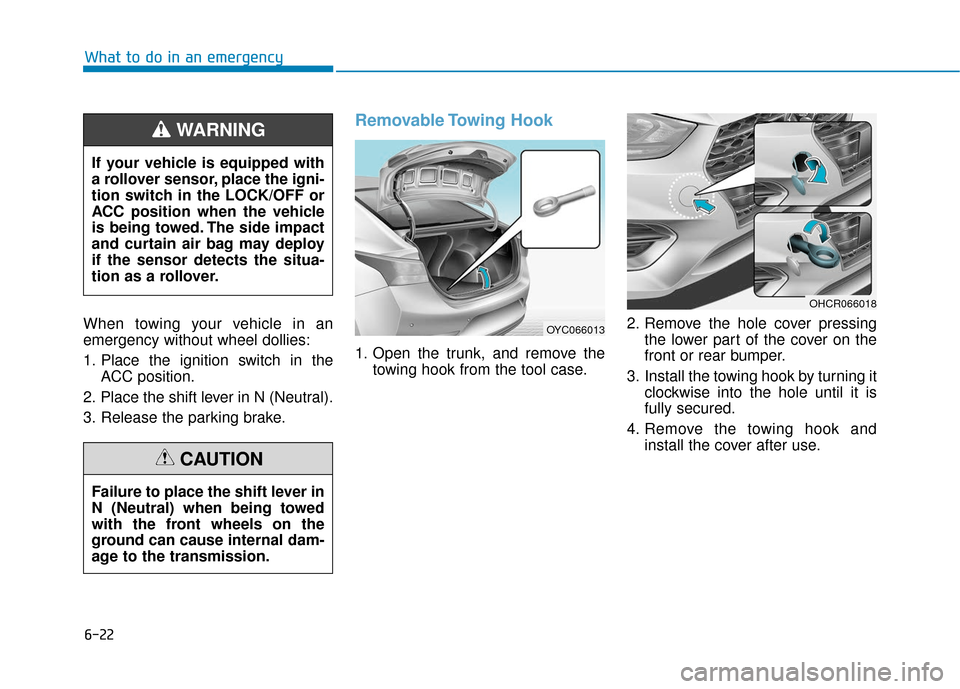
Removable Towing Hook
1. Open the trunk, and remove the towing hook from the tool case. 2. Remove the hole cover pressing
the lower part of the cover on the
front or rear bumper.
3. Install the towing hook by turning it clockwise into the hole until it is
fully secured.
4. Remove the towing hook and install the cover after use.
If your vehicle is equipped with
a rollover sensor, place the igni-
tion switch in the LOCK/OFF or
ACC position when the vehicle
is being towed. The side impact
and curtain air bag may deploy
if the sensor detects the situa-
tion as a rollover.
WARNING
Failure to place the shift lever in
N (Neutral) when being towed
with the front wheels on the
ground can cause internal dam-
age to the transmission.
CAUTION
OYC066013
OHCR066018