child lock Hyundai Accent 2020 User Guide
[x] Cancel search | Manufacturer: HYUNDAI, Model Year: 2020, Model line: Accent, Model: Hyundai Accent 2020Pages: 445, PDF Size: 42.28 MB
Page 89 of 445
Convenient features of your vehicle
Accessing Your Vehicle .........................................3-3
Remote Key.........................................................................3-3
Smart Key ............................................................................3-6
Immobilizer System .........................................................3-11
Door Locks ............................................................3-12
Operating Door Locks from Outside the Vehicle ....3-12
Operating door locks from inside the vehicle .........3-13
Auto Door Lock/Unlock Features ...............................3-16
Child-Protector Rear Door Locks ...............................3-16
Theft-Alarm System ............................................3-17
Steering Wheel .....................................................3-17
Electric Power Steering (EPS) .....................................3-17
Tilt Steering / Telescope Steering ..............................3-18
Heated steering wheel ...................................................3-19
Horn ....................................................................................3-19
Mirrors ...................................................................3-20
Inside Rearview Mirror ..................................................3-20
Side View Mirrors ...........................................................3-28
Windows ................................................................3-32
Power Windows ...............................................................3-32
Manual windows ..............................................................3-35
Sunroof..................................................................3-36
Sunroof opening and closing .......................................3-37
Sliding the sunroof .........................................................3-37
Tilting the sunroof ..........................................................3-37
Sunshade ...........................................................................3-38
Resetting the sunroof ....................................................3-38
Exterior Features .................................................3-41
Hood ...................................................................................3-41
Trunk ..................................................................................3-42
Smart Trunk ......................................................................3-44
Fuel Filler Door ................................................................3-48
Instrument Cluster ...............................................3-51
Instrument Cluster Control............................................3-52
Gauges and Meters ........................................................3-53
Transmission shift indicator .........................................3-56
Warning and Indicator Lights .......................................3-58
LCD Display Messages ...................................................3-68
LCD Display ...........................................................3-72
LCD Display Control ........................................................3-72
LCD Display Modes .........................................................3-72
Trip Computer .......................................................3-77
Type A ................................................................................3-77
Type B ................................................................................3-81
3
HCa HMA 3a(~84).qxp 4/9/2019 2:58 PM Page 1
Page 91 of 445
3-3
Convenient features of your vehicle
Remote Key (if equipped)
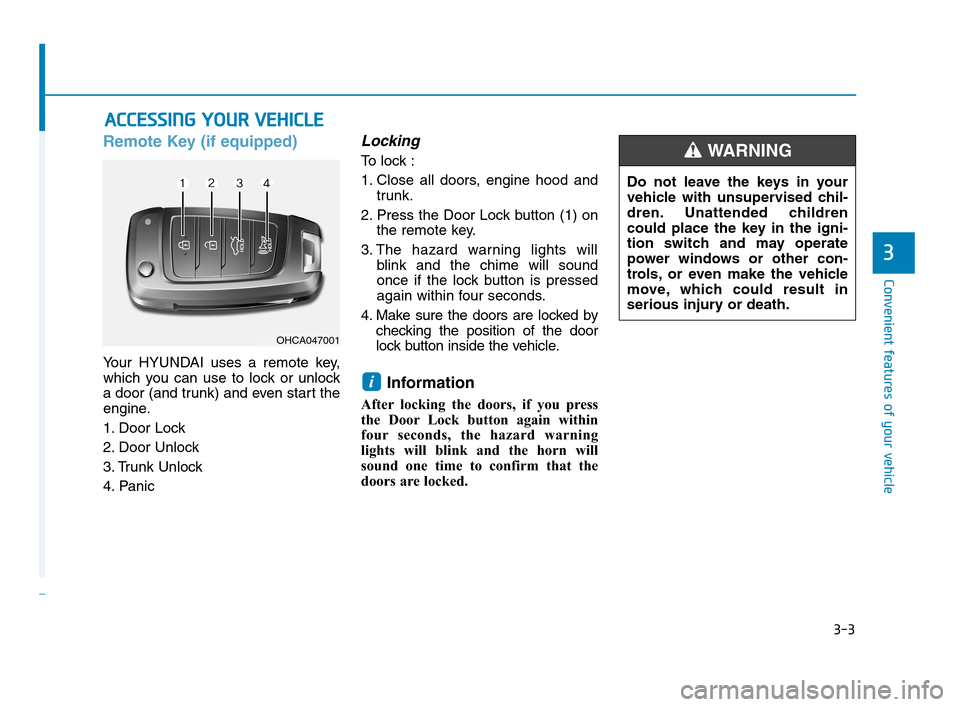
Your HYUNDAI uses a remote key,
which you can use to lock or unlock
a door (and trunk) and even start the
engine.
1. Door Lock
2. Door Unlock
3. Trunk Unlock
4. Panic
Locking
To lock :
1. Close all doors, engine hood and
trunk.
2. Press the Door Lock button (1) on
the remote key.
3. The hazard warning lights will
blink and the chime will sound
once if the lock button is pressed
again within four seconds.
4. Make sure the doors are locked by
checking the position of the door
lock button inside the vehicle.
Information
After locking the doors, if you press
the Door Lock button again within
four seconds, the hazard warning
lights will blink and the horn will
sound one time to confirm that the
doors are locked.
i
A AC
CC
CE
ES
SS
SI
IN
NG
G
Y
YO
OU
UR
R
V
VE
EH
HI
IC
CL
LE
E
3
OHCA047001
Do not leave the keys in your
vehicle with unsupervised chil-
dren. Unattended children
could place the key in the igni-
tion switch and may operate
power windows or other con-
trols, or even make the vehicle
move, which could result in
serious injury or death.
WARNING
HCa HMA 3a(~84).qxp 4/9/2019 2:58 PM Page 3
Page 95 of 445
3-7
Convenient features of your vehicle
Locking
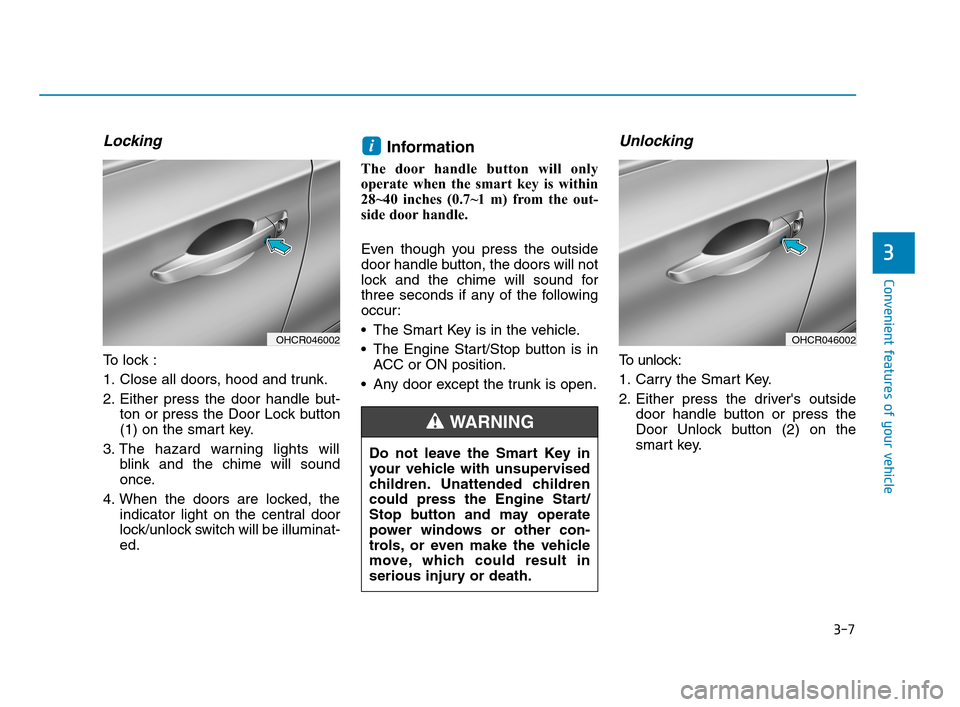
To lock :
1. Close all doors, hood and trunk.
2. Either press the door handle but-
ton or press the Door Lock button
(1) on the smart key.
3. The hazard warning lights will
blink and the chime will sound
once.
4. When the doors are locked, the
indicator light on the central door
lock/unlock switch will be illuminat-
ed.
Information
The door handle button will only
operate when the smart key is within
28~40 inches (0.7~1 m) from the out-
side door handle.
Even though you press the outside
door handle button, the doors will not
lock and the chime will sound for
three seconds if any of the following
occur:
The Smart Key is in the vehicle.
The Engine Start/Stop button is in
ACC or ON position.
Any door except the trunk is open.
Unlocking
To unlock:
1. Carry the Smart Key.
2. Either press the driver's outside
door handle button or press the
Door Unlock button (2) on the
smart key.
i
3
OHCR046002OHCR046002
Do not leave the Smart Key in
your vehicle with unsupervised
children. Unattended children
could press the Engine Start/
Stop button and may operate
power windows or other con-
trols, or even make the vehicle
move, which could result in
serious injury or death.
WARNING
HCa HMA 3a(~84).qxp 4/9/2019 2:58 PM Page 7
Page 103 of 445
3-15
Convenient features of your vehicle
3
If the key is in the ignition switch and
any door is opened, the doors will
not lock even though the lock button
(1) of the central door lock switch is
pressed.
If the smart key is in the vehicle and
any door is opened, the doors will
not lock even though the lock button
(1) of the central door lock switch is
pressed.
The doors should always be
fully closed and locked while
the vehicle is in motion. If the
doors are unlocked, the risk of
being thrown from the vehicle
in a crash is increased.
Do not pull the inner door
handle of the driver's or pas-
senger's door while the vehi-
cle is moving.
WARNING
Do not leave children or animals
unattended in your vehicle. An
enclosed vehicle can become
extremely hot, causing death or
serious injury to unattended
children or animals who cannot
escape the vehicle. Children
might operate features of the
vehicle that could injure them,
or they could encounter other
harm, possibly from someone
gaining entry to the vehicle.
WARNING
Always secure your vehicle.
Leaving your vehicle unlocked
can allow theft or entry into the
vehicle.
To secure your vehicle, while
depressing the brake, move the
shift lever to the P (Park) posi-
tion, engage the parking brake,
and place the Engine Start/Stop
button in the OFF position, close
all windows, lock all doors, and
always take the key with you.
WARNING
If you stay in the vehicle for a
long time while the weather is
very hot or cold, there are risks
of injuries or danger to life. Do
not lock the vehicle from the
outside when someone is in the
vehicle.
WARNING
Opening a door when something
is approaching may cause dam-
age or injury. Be careful when
opening doors and watch for
vehicles, motorcycles, bicycles
or pedestrians approaching the
vehicle in the path of the door.
CAUTION
HCa HMA 3a(~84).qxp 4/9/2019 2:59 PM Page 15
Page 104 of 445
3-16
Convenient features of your vehicle
Auto Door Lock/Unlock Features
Impact sensing door unlock
(if equipped)
All doors will be automatically
unlocked when an impact causes the
air bags to deploy.
Speed sensing door lock
(if equipped)
All doors will be automatically locked
(when set on cluster) when vehicle
speed exceeds 9 mph (15 km/h).
All of the doors will be automatically
unlocked after the vehicle is turned off.
You can activate or deactivate the
Auto Door Lock/Unlock features from
the User Settings mode on the LCD
display.
For more information, refer to the
"LCD Display" section in this
chapter.
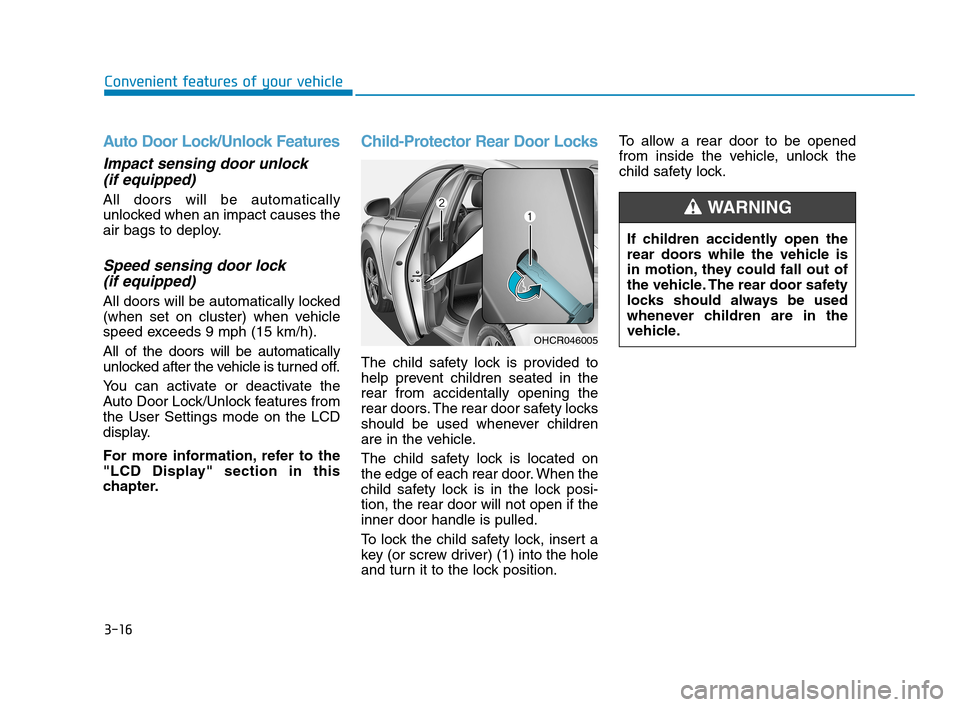
Child-Protector Rear Door Locks
The child safety lock is provided to
help prevent children seated in the
rear from accidentally opening the
rear doors. The rear door safety locks
should be used whenever children
are in the vehicle.
The child safety lock is located on
the edge of each rear door. When the
child safety lock is in the lock posi-
tion, the rear door will not open if the
inner door handle is pulled.
To lock the child safety lock, insert a
key (or screw driver) (1) into the hole
and turn it to the lock position.To allow a rear door to be opened
from inside the vehicle, unlock the
child safety lock.
OHCR046005
If children accidently open the
rear doors while the vehicle is
in motion, they could fall out of
the vehicle. The rear door safety
locks should always be used
whenever children are in the
vehicle.
WARNING
HCa HMA 3a(~84).qxp 4/9/2019 2:59 PM Page 16
Page 123 of 445
3-35
Convenient features of your vehicle
3
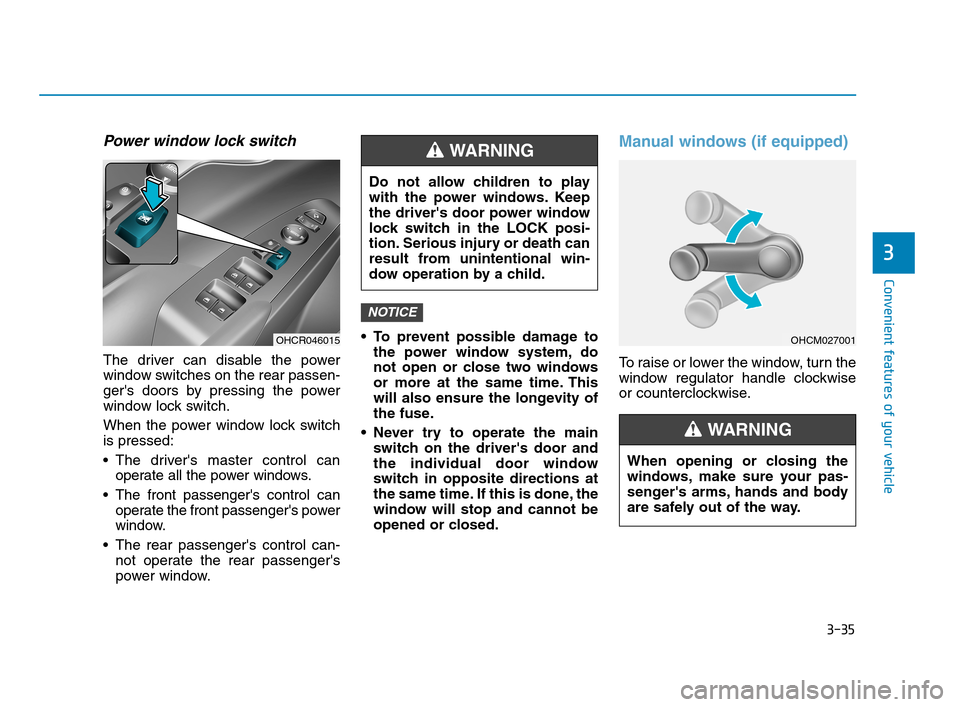
Power window lock switch
The driver can disable the power
window switches on the rear passen-
ger's doors by pressing the power
window lock switch.
When the power window lock switch
is pressed:
The driver's master control can
operate all the power windows.
The front passenger's control can
operate the front passenger's power
window.
The rear passenger's control can-
not operate the rear passenger's
power window. To prevent possible damage to
the power window system, do
not open or close two windows
or more at the same time. This
will also ensure the longevity of
the fuse.
Never try to operate the main
switch on the driver's door and
the individual door window
switch in opposite directions at
the same time. If this is done, the
window will stop and cannot be
opened or closed.
Manual windows (if equipped)
To raise or lower the window, turn the
window regulator handle clockwise
or counterclockwise.
NOTICE
OHCR046015
Do not allow children to play
with the power windows. Keep
the driver's door power window
lock switch in the LOCK posi-
tion. Serious injury or death can
result from unintentional win-
dow operation by a child.
WARNING
OHCM027001
When opening or closing the
windows, make sure your pas-
senger's arms, hands and body
are safely out of the way.
WARNING
HCa HMA 3a(~84).qxp 4/9/2019 3:00 PM Page 35
Page 132 of 445
3-44
Convenient features of your vehicle
Information
In cold and wet climates, trunk lock
and trunk mechanisms may not work
properly due to freezing conditions.
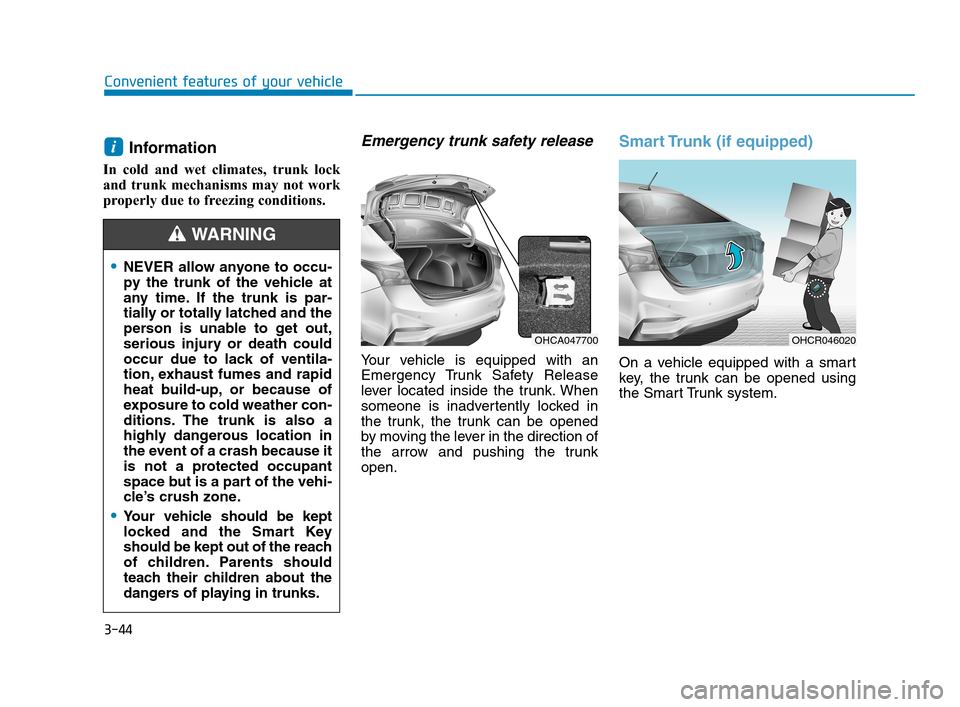
Emergency trunk safety release
Your vehicle is equipped with an
Emergency Trunk Safety Release
lever located inside the trunk. When
someone is inadvertently locked in
the trunk, the trunk can be opened
by moving the lever in the direction of
the arrow and pushing the trunk
open.
Smart Trunk (if equipped)
On a vehicle equipped with a smart
key, the trunk can be opened using
the Smart Trunk system.
i
OHCA047700OHCR046020
NEVER allow anyone to occu-
py the trunk of the vehicle at
any time. If the trunk is par-
tially or totally latched and the
person is unable to get out,
serious injury or death could
occur due to lack of ventila-
tion, exhaust fumes and rapid
heat build-up, or because of
exposure to cold weather con-
ditions. The trunk is also a
highly dangerous location in
the event of a crash because it
is not a protected occupant
space but is a part of the vehi-
cle’s crush zone.
Your vehicle should be kept
locked and the Smart Key
should be kept out of the reach
of children. Parents should
teach their children about the
dangers of playing in trunks.
WARNING
HCa HMA 3a(~84).qxp 4/9/2019 3:01 PM Page 44
Page 134 of 445
3-46
Convenient features of your vehicle
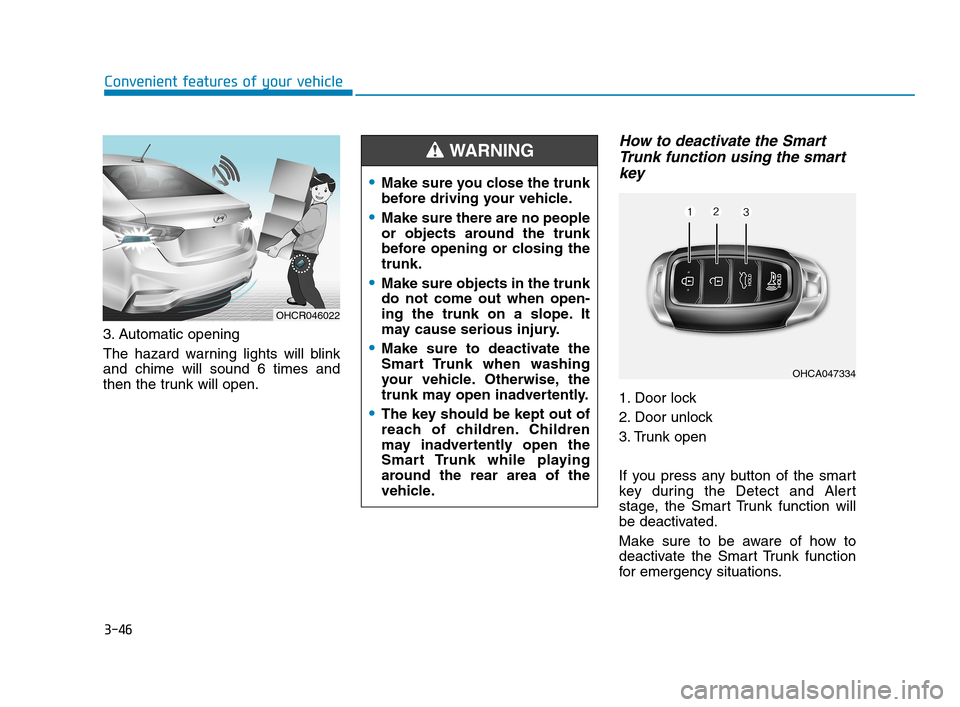
3. Automatic opening
The hazard warning lights will blink
and chime will sound 6 times and
then the trunk will open.
How to deactivate the Smart
Trunk function using the smart
key
1. Door lock
2. Door unlock
3. Trunk open
If you press any button of the smart
key during the Detect and Alert
stage, the Smart Trunk function will
be deactivated.
Make sure to be aware of how to
deactivate the Smart Trunk function
for emergency situations.
OHCR046022
Make sure you close the trunk
before driving your vehicle.
Make sure there are no people
or objects around the trunk
before opening or closing the
trunk.
Make sure objects in the trunk
do not come out when open-
ing the trunk on a slope. It
may cause serious injury.
Make sure to deactivate the
Smart Trunk when washing
your vehicle. Otherwise, the
trunk may open inadvertently.
The key should be kept out of
reach of children. Children
may inadvertently open the
Smart Trunk while playing
around the rear area of the
vehicle.
WARNING
OHCA047334
HCa HMA 3a(~84).qxp 4/9/2019 3:01 PM Page 46
Page 267 of 445
5-5
Driving your vehicle
5
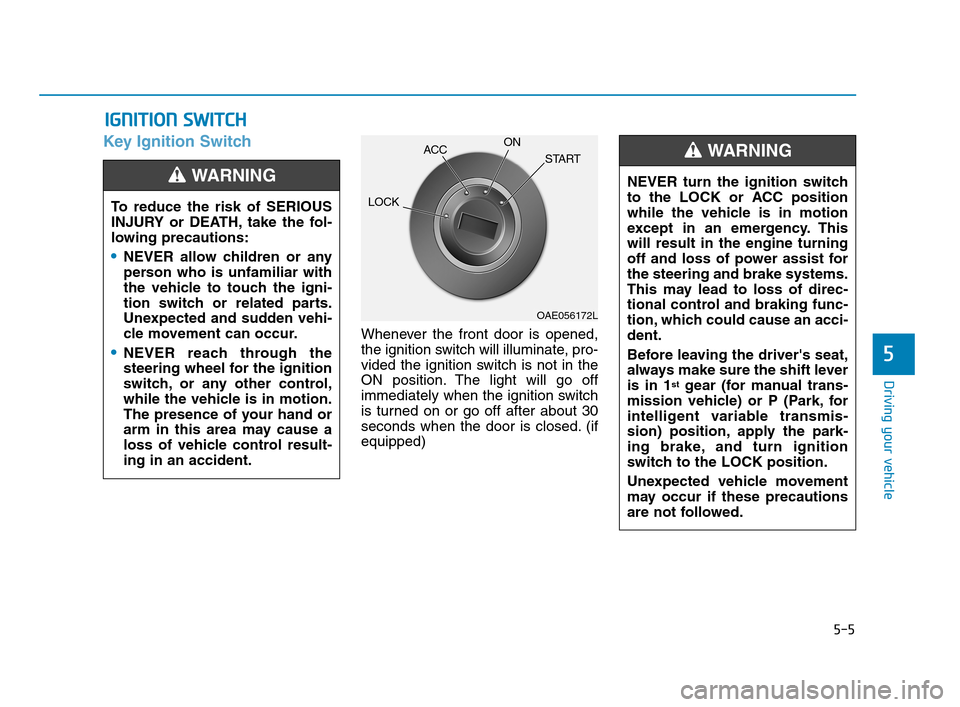
Key Ignition Switch
Whenever the front door is opened,
the ignition switch will illuminate, pro-
vided the ignition switch is not in the
ON position. The light will go off
immediately when the ignition switch
is turned on or go off after about 30
seconds when the door is closed. (if
equipped)
I IG
GN
NI
IT
TI
IO
ON
N
S
SW
WI
IT
TC
CH
H
To reduce the risk of SERIOUS
INJURY or DEATH, take the fol-
lowing precautions:
NEVER allow children or any
person who is unfamiliar with
the vehicle to touch the igni-
tion switch or related parts.
Unexpected and sudden vehi-
cle movement can occur.
NEVER reach through the
steering wheel for the ignition
switch, or any other control,
while the vehicle is in motion.
The presence of your hand or
arm in this area may cause a
loss of vehicle control result-
ing in an accident.
WARNING NEVER turn the ignition switch
to the LOCK or ACC position
while the vehicle is in motion
except in an emergency. This
will result in the engine turning
off and loss of power assist for
the steering and brake systems.
This may lead to loss of direc-
tional control and braking func-
tion, which could cause an acci-
dent.
Before leaving the driver's seat,
always make sure the shift lever
is in 1
stgear (for manual trans-
mission vehicle) or P (Park, for
intelligent variable transmis-
sion) position, apply the park-
ing brake, and turn ignition
switch to the LOCK position.
Unexpected vehicle movement
may occur if these precautions
are not followed.
WARNING
OAE056172L
LOCKACCON
START
HCa HMA 5.QXP 4/9/2019 2:38 PM Page 5
Page 281 of 445
5-19
Driving your vehicle
5
Transmission ranges
The indicator in the instrument clus-
ter displays the shift lever position
when the ignition switch is in the ON
position.
P (Park)
Always come to a complete stop
before shifting into P (Park).
To shift from P (Park), you must
depress firmly on the brake pedal
and make sure your foot is off the
accelerator pedal.
If you have done all of the above and
still cannot shift the lever out of P
(Park), see "Shift-Lock Release" in
this section.
The shift lever must be in P (Park)
before turning the engine off.
Information
The RPM (revolutions per minute)
may increase or decrease when per-
forming the IVT self-diagnosis.
i
Shifting into P (Park) while the
vehicle is in motion may
cause you to lose control of
the vehicle.
After the vehicle has stopped,
always make sure the shift
lever is in P (Park), apply the
parking brake, and turn the
engine off.
When parking on an incline,
place the shift lever in P (Park)
and apply the parking brake to
prevent the vehicle from
rolling downhill.
For safety, always engage the
parking brake with the shift
lever in the P (Park) position
except for the case of emer-
gency parking.
WARNING
To reduce the risk of serious
injury or death:
ALWAYS check the surround-
ing areas near your vehicle for
people, especially children,
before shifting a vehicle into
D (Drive) or R (Reverse).
Before leaving the driver's
seat, always make sure the
shift lever is in the P (Park)
position, then set the parking
brake, and place the ignition
switch in the LOCK/OFF posi-
tion. Unexpected and sudden
vehicle movement can occur
if these precautions are not
followed.
When using Manual Shift
Mode, use caution when shift-
ing from a higher gear to a
lower gear on slippery roads.
This could cause the tires to
slip and may result in an acci-
dent.
WARNING
HCa HMA 5.QXP 4/9/2019 2:39 PM Page 19