sensor Hyundai Accent 2020 User Guide
[x] Cancel search | Manufacturer: HYUNDAI, Model Year: 2020, Model line: Accent, Model: Hyundai Accent 2020Pages: 445, PDF Size: 42.28 MB
Page 86 of 445
2-59
Safety system of your vehicle
2
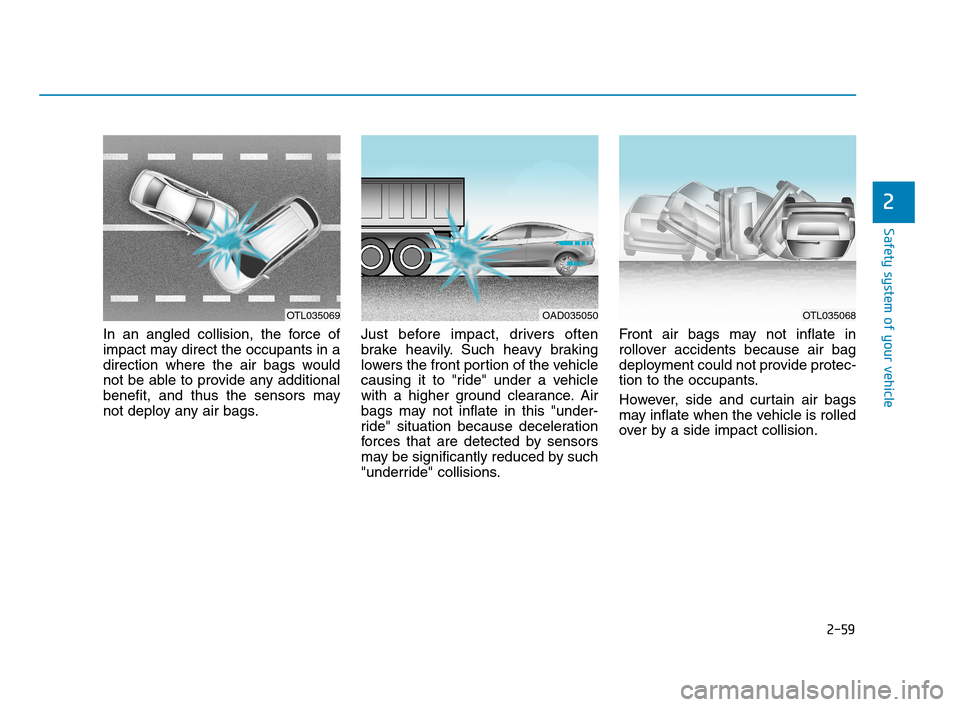
In an angled collision, the force of
impact may direct the occupants in a
direction where the air bags would
not be able to provide any additional
benefit, and thus the sensors may
not deploy any air bags.Just before impact, drivers often
brake heavily. Such heavy braking
lowers the front portion of the vehicle
causing it to "ride" under a vehicle
with a higher ground clearance. Air
bags may not inflate in this "under-
ride" situation because deceleration
forces that are detected by sensors
may be significantly reduced by such
"underride" collisions.Front air bags may not inflate in
rollover accidents because air bag
deployment could not provide protec-
tion to the occupants.
However, side and curtain air bags
may inflate when the vehicle is rolled
over by a side impact collision.
OTL035069OAD035050OTL035068
HCa HMA 2.QXP 5/7/2018 12:04 PM Page 59
Page 109 of 445
3-21
Convenient features of your vehicle
3
Electric Chromic Mirror (ECM)
(For America only, if equipped)
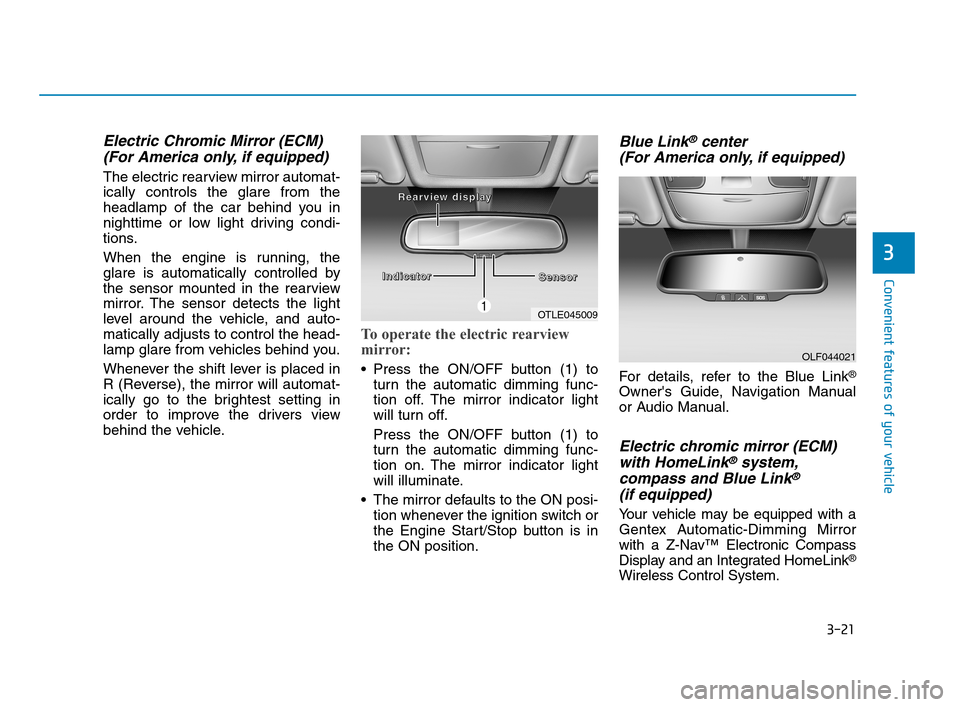
The electric rearview mirror automat-
ically controls the glare from the
headlamp of the car behind you in
nighttime or low light driving condi-
tions.
When the engine is running, the
glare is automatically controlled by
the sensor mounted in the rearview
mirror. The sensor detects the light
level around the vehicle, and auto-
matically adjusts to control the head-
lamp glare from vehicles behind you.
Whenever the shift lever is placed in
R (Reverse), the mirror will automat-
ically go to the brightest setting in
order to improve the drivers view
behind the vehicle.
To operate the electric rearview
mirror:
Press the ON/OFF button (1) to
turn the automatic dimming func-
tion off. The mirror indicator light
will turn off.
Press the ON/OFF button (1) to
turn the automatic dimming func-
tion on. The mirror indicator light
will illuminate.
The mirror defaults to the ON posi-
tion whenever the ignition switch or
the Engine Start/Stop button is in
the ON position.
Blue Link®center
(For America only, if equipped)
For details, refer to the Blue Link®
Owner's Guide, Navigation Manual
or Audio Manual.
Electric chromic mirror (ECM)
with HomeLink®system,
compass and Blue Link®
(if equipped)
Your vehicle may be equipped with a
Gentex Automatic-Dimming Mirror
with a Z-Nav™ Electronic Compass
Display and an Integrated HomeLink
®
Wireless Control System.
OLF044021
OTLE045009
I I I I
n n n n
d d d d
i i i i
c c c c
a a a a
t t t t
o o o o
r r r r
S S S S
e e e e
n n n n
s s s s
o o o o
r r r r R R R R
e e e e
a a a a
r r r r
v v v v
i i i i
e e e e
w w w w
d d d d
i
i i i
s s s s
p p p p
l l l l
a a a a
y y y y
HCa HMA 3a(~84).qxp 4/9/2019 2:59 PM Page 21
Page 110 of 445
3-22
Convenient features of your vehicle
During nighttime driving, this feature
will automatically detect and reduce
rearview mirror glare while the com-
pass indicates the direction the vehi-
cle is pointed. The HomeLink
®
Universal Transceiver allows you to
activate your garage door(s), electric
gate, home lighting, etc.
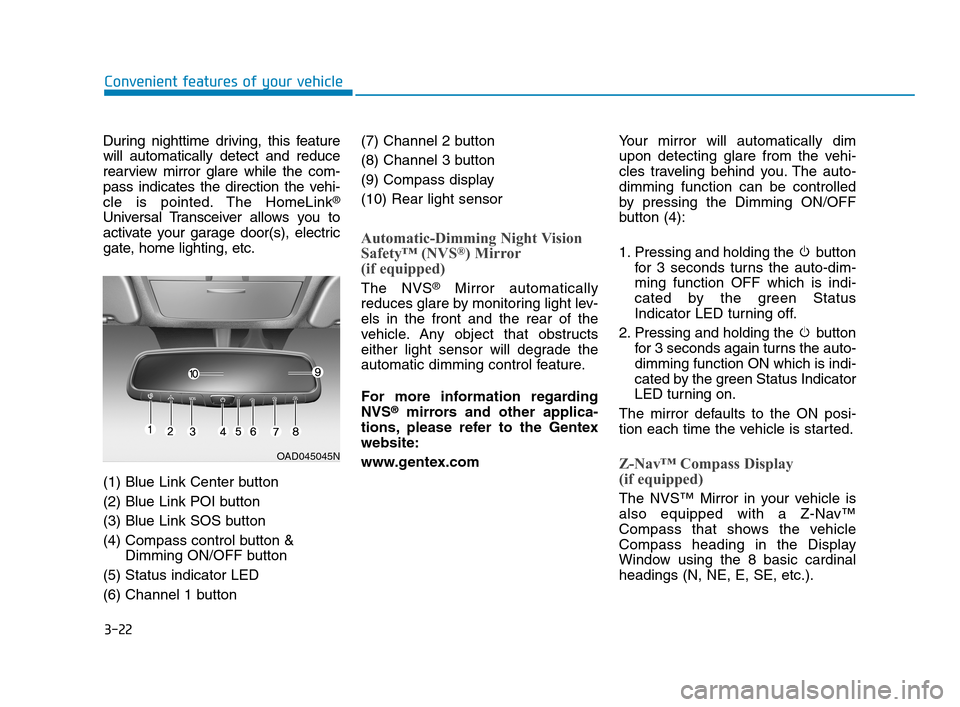
(1) Blue Link Center button
(2) Blue Link POI button
(3) Blue Link SOS button
(4) Compass control button &
Dimming ON/OFF button
(5) Status indicator LED
(6) Channel 1 button(7) Channel 2 button
(8) Channel 3 button
(9) Compass display
(10) Rear light sensor
Automatic-Dimming Night Vision
Safety™ (NVS®) Mirror
(if equipped)
The NVS®Mirror automatically
reduces glare by monitoring light lev-
els in the front and the rear of the
vehicle. Any object that obstructs
either light sensor will degrade the
automatic dimming control feature.
For more information regarding
NVS
®mirrors and other applica-
tions, please refer to the Gentex
website:
www.gentex.comYour mirror will automatically dim
upon detecting glare from the vehi-
cles traveling behind you. The auto-
dimming function can be controlled
by pressing the Dimming ON/OFF
button (4):
1. Pressing and holding the button
for 3 seconds turns the auto-dim-
ming function OFF which is indi-
cated by the green Status
Indicator LED turning off.
2. Pressing and holding the button
for 3 seconds again turns the auto-
dimming function ON which is indi-
cated by the green Status Indicator
LED turning on.
The mirror defaults to the ON posi-
tion each time the vehicle is started.
Z-Nav™ Compass Display
(if equipped)
The NVS™ Mirror in your vehicle is
also equipped with a Z-Nav™
Compass that shows the vehicle
Compass heading in the Display
Window using the 8 basic cardinal
headings (N, NE, E, SE, etc.).
OAD045045N
HCa HMA 3a(~84).qxp 4/9/2019 2:59 PM Page 22
Page 155 of 445
3-67
Convenient features of your vehicle
3
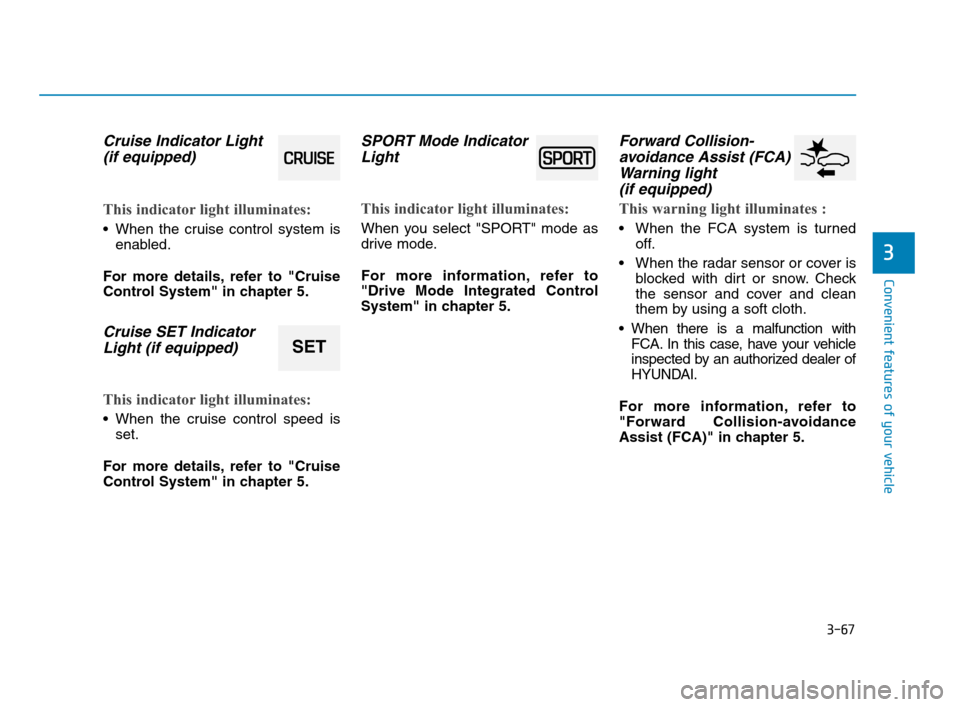
Cruise Indicator Light
(if equipped)
This indicator light illuminates:
When the cruise control system is
enabled.
For more details, refer to "Cruise
Control System" in chapter 5.
Cruise SET Indicator
Light (if equipped)
This indicator light illuminates:
When the cruise control speed is
set.
For more details, refer to "Cruise
Control System" in chapter 5.
SPORT Mode Indicator
Light
This indicator light illuminates:
When you select "SPORT" mode as
drive mode.
For more information, refer to
"Drive Mode Integrated Control
System" in chapter 5.
Forward Collision-
avoidance Assist (FCA)
Warning light
(if equipped)
This warning light illuminates :
When the FCA system is turned
off.
When the radar sensor or cover is
blocked with dirt or snow. Check
the sensor and cover and clean
them by using a soft cloth.
When there is a malfunction with
FCA. In this case, have your vehicle
inspected by an authorized dealer of
HYUNDAI.
For more information, refer to
"Forward Collision-avoidance
Assist (FCA)" in chapter 5.
SET
HCa HMA 3a(~84).qxp 4/9/2019 3:02 PM Page 67
Page 174 of 445
3-86
Convenient features of your vehicle
Daytime running light (DRL)
(if equipped)
The Daytime Running Lights (DRL)
can make it easier for others to see
the front of your vehicle during the
day, especially after dawn and before
sunset.
The DRL system will turn the dedi-
cated lamp OFF when :
• The light switch is in the DRL OFF
position.
The headlamps are ON.
The parking lamps are ON.
The vehicle is turned off.
The parking brake is set.
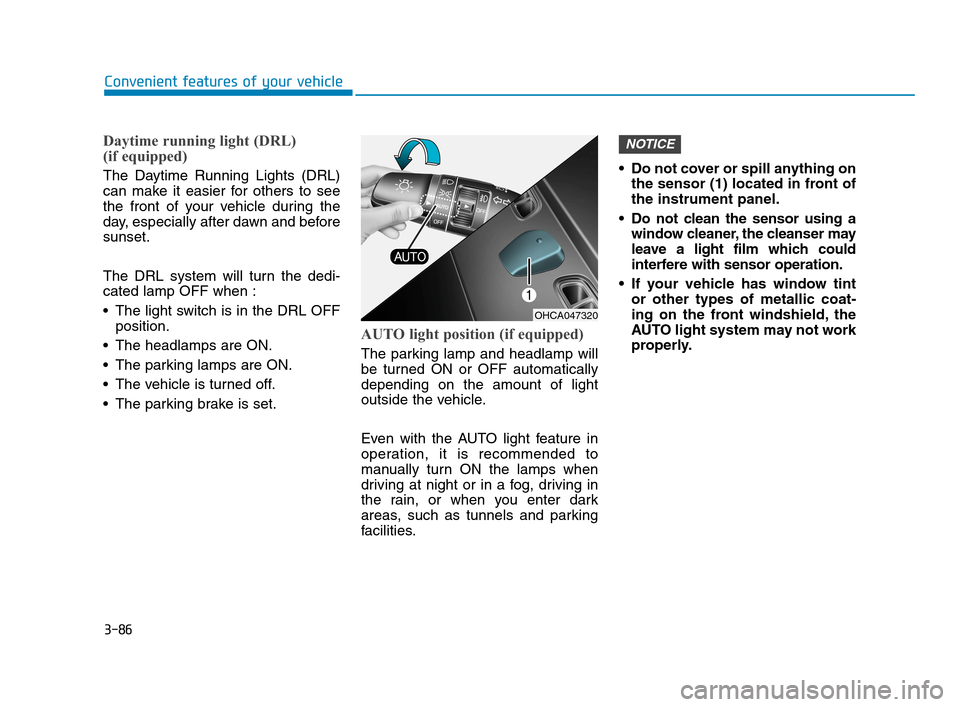
AUTO light position (if equipped)
The parking lamp and headlamp will
be turned ON or OFF automatically
depending on the amount of light
outside the vehicle.
Even with the AUTO light feature in
operation, it is recommended to
manually turn ON the lamps when
driving at night or in a fog, driving in
the rain, or when you enter dark
areas, such as tunnels and parking
facilities.• Do not cover or spill anything on
the sensor (1) located in front of
the instrument panel.
Do not clean the sensor using a
window cleaner, the cleanser may
leave a light film which could
interfere with sensor operation.
If your vehicle has window tint
or other types of metallic coat-
ing on the front windshield, the
AUTO light system may not work
properly.
NOTICE
OHCA047320
HCa HMA 3b(85~).qxp 5/7/2018 12:19 PM Page 86
Page 194 of 445
3-106
Convenient features of your vehicle
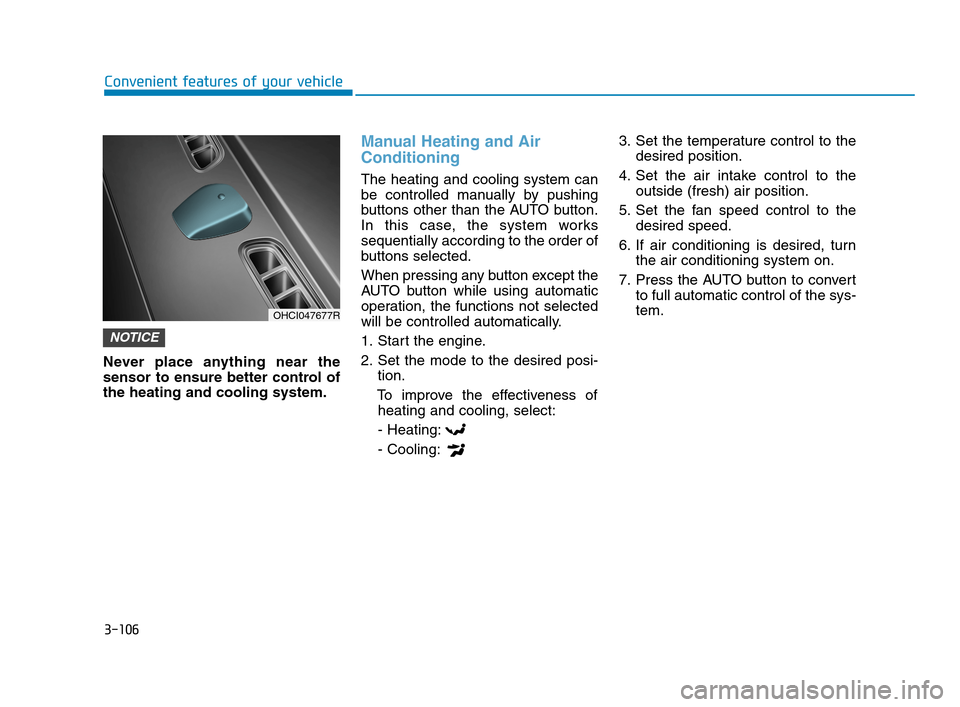
Never place anything near the
sensor to ensure better control of
the heating and cooling system.
Manual Heating and Air
Conditioning
The heating and cooling system can
be controlled manually by pushing
buttons other than the AUTO button.
In this case, the system works
sequentially according to the order of
buttons selected.
When pressing any button except the
AUTO button while using automatic
operation, the functions not selected
will be controlled automatically.
1. Start the engine.
2. Set the mode to the desired posi-
tion.
To improve the effectiveness of
heating and cooling, select:
- Heating:
- Cooling:3. Set the temperature control to the
desired position.
4. Set the air intake control to the
outside (fresh) air position.
5. Set the fan speed control to the
desired speed.
6. If air conditioning is desired, turn
the air conditioning system on.
7. Press the AUTO button to convert
to full automatic control of the sys-
tem.
NOTICE
OHCI047677R
HCa HMA 3b(85~).qxp 5/7/2018 12:21 PM Page 106
Page 206 of 445
3-118
Convenient features of your vehicle
Auto Defogging System
(Only for Automatic Climate
Control System, if equipped)
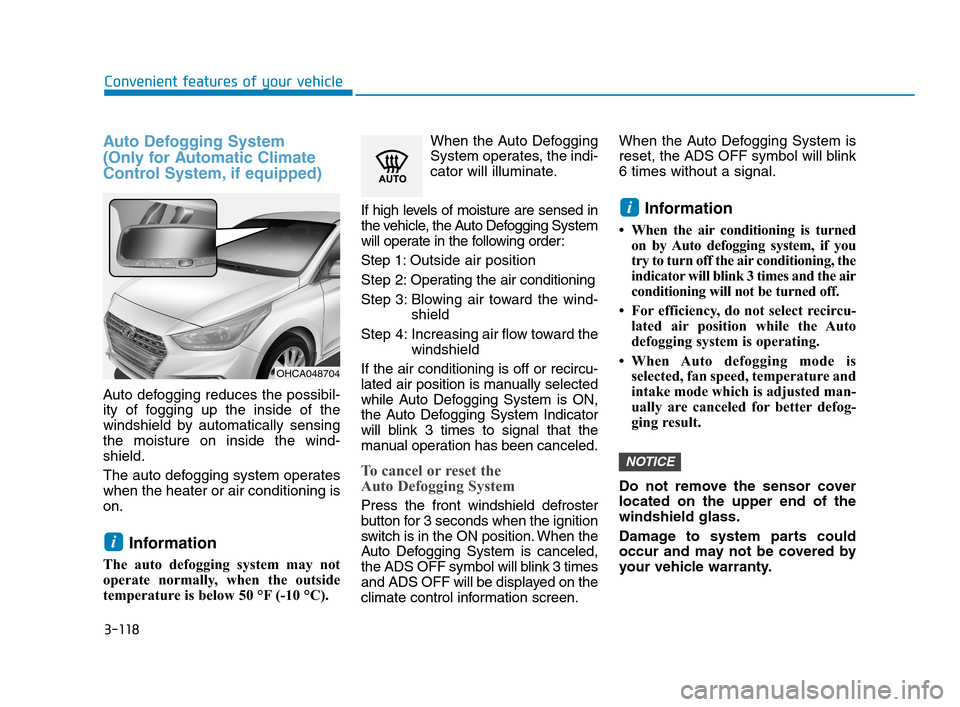
Auto defogging reduces the possibil-
ity of fogging up the inside of the
windshield by automatically sensing
the moisture on inside the wind-
shield.
The auto defogging system operates
when the heater or air conditioning is
on.
Information
The auto defogging system may not
operate normally, when the outside
temperature is below 50 °F (-10 °C).When the Auto Defogging
System operates, the indi-
cator will illuminate.
If high levels of moisture are sensed in
the vehicle, the Auto Defogging System
will operate in the following order:
Step 1: Outside air position
Step 2:Operating the air conditioning
Step 3: Blowing air toward the wind-
shield
Step 4: Increasing air flow toward the
windshield
If the air conditioning is off or recircu-
lated air position is manually selected
while Auto Defogging System is ON,
the Auto Defogging System Indicator
will blink 3 times to signal that the
manual operation has been canceled.
To cancel or reset the
Auto Defogging System
Press the front windshield defroster
button for 3 seconds when the ignition
switch is in the ON position. When the
Auto Defogging System is canceled,
the ADS OFF symbol will blink 3 times
and ADS OFF will be displayed on the
climate control information screen.When the Auto Defogging System is
reset, the ADS OFF symbol will blink
6 times without a signal.
Information
• When the air conditioning is turned
on by Auto defogging system, if you
try to turn off the air conditioning, the
indicator will blink 3 times and the air
conditioning will not be turned off.
• For efficiency, do not select recircu-
lated air position while the Auto
defogging system is operating.
• When Auto defogging mode is
selected, fan speed, temperature and
intake mode which is adjusted man-
ually are canceled for better defog-
ging result.
Do not remove the sensor cover
located on the upper end of the
windshield glass.
Damage to system parts could
occur and may not be covered by
your vehicle warranty.
NOTICE
i
i
OHCA048704
HCa HMA 3b(85~).qxp 5/7/2018 12:22 PM Page 118
Page 263 of 445
Driving your vehicle
5
Before driving.........................................................5-3
Before Entering the Vehicle ...........................................5-3
Before Starting ..................................................................5-3
Ignition switch ........................................................5-5
Key Ignition Switch ...........................................................5-5
Engine Start/Stop Button................................................5-8
Manual transmission............................................5-15
Manual Transmission Operation ..................................5-15
Good Driving Practices ..................................................5-17
Smartstream intelligent variable transmission
(Smartstream IVT) ...............................................5-18
Smartstream Intelligent Variable Transmission
(Smartstream IVT) Operation .......................................5-18
Good Driving Practices ..................................................5-23
Braking system.....................................................5-24
Power Brakes ...................................................................5-24
Disc Brakes Wear Indicator ..........................................5-25
Parking Brake...................................................................5-25
Anti-lock Brake System (ABS) ....................................5-27
Electronic Stability Control (ESC)................................5-28
Vehicle Stability Management (VSM).........................5-31
Hill-Start Assist Control (HAC) ....................................5-32
Good Braking Practices .................................................5-33
Drive mode integrated control system .............5-34Forward Collision-avoidance Assist (FCA)
system-Radar Type .............................................5-35
System Setting and Activation.....................................5-35
FCA Warning Message and System Control ............5-37
FCA Sensor .......................................................................5-39
System Malfunction .......................................................5-40
Limitations of the System .............................................5-42
Cruise control .......................................................5-46
Cruise Control operation ...............................................5-46
Special driving conditions ...................................5-51
Hazardous Driving Conditions ......................................5-51
Rocking the Vehicle ........................................................5-51
Smooth Cornering ...........................................................5-52
Driving at Night................................................................5-52
Driving in the Rain ..........................................................5-52
Driving in Flooded Areas ...............................................5-53
Highway Driving...............................................................5-53
Winter driving .......................................................5-54
Snow or Icy Conditions ..................................................5-54
Winter Precautions .........................................................5-56
Vehicle load limit ..................................................5-58
Tire Loading Information Label ...................................5-59
Trailer Towing .......................................................5-63
HCa HMA 5.QXP 4/9/2019 2:38 PM Page 1
Page 297 of 445
5-35
Driving your vehicle
5
The Forward Collision-Avoidance
Assist (FCA) system is to help
reduce or to avoid accident risk. It
recognizes the distance from the
vehicle ahead through the sensors
(i.e. radar), and, if necessary, warns
the driver or applies emergency
braking.
❈Radar type FCA system does not
recognize for pedestrians in front.System Setting and Activation
System setting
The driver can activate the FCA by
placing the ignition switch to the
ON position and by selecting:
'User Settings →Driving Assist →
Forward Collision-avoidance Assist
(FCA)'
The FCA deactivates, when the driv-
er deselects the system setting.
F FO
OR
RW
WA
AR
RD
D
C
CO
OL
LL
LI
IS
SI
IO
ON
N-
-A
AV
VO
OI
ID
DA
AN
NC
CE
E
A
AS
SS
SI
IS
ST
T
(
(F
FC
CA
A)
)
S
SY
YS
ST
TE
EM
M
-
-
R
RA
AD
DA
AR
R
T
TY
YP
PE
E
Take the following precautions
when using the Forward
Collision-avoidance Assist
(FCA) :
This system is only a supple-
mental system and it is not
intended to, nor does it replace
the need for extreme care and
attention of the driver. The
sensing range and objects
detectable by the sensors are
limited. Pay attention to the
road conditions at all times.
NEVER drive too fast in accor-
dance with the road condi-
tions or while cornering.
Always drive cautiously to
prevent unexpected and sud-
den situations from occur-
ring. FCA does not stop the
vehicle completely and is not
a collision avoidance system.
WARNING
The Forward Collision-avoid-
ance Assist (FCA) system is a
supplemental system and is not
a substitute for safe driving
practices.
It is the responsibility of the
driver to always check the
speed and distance to the vehi-
cle ahead to ensure it is safe to
use the FCA system.
WARNING
HCa HMA 5.QXP 4/9/2019 2:39 PM Page 35
Page 301 of 445
5-39
Driving your vehicle
5
FCA Sensor
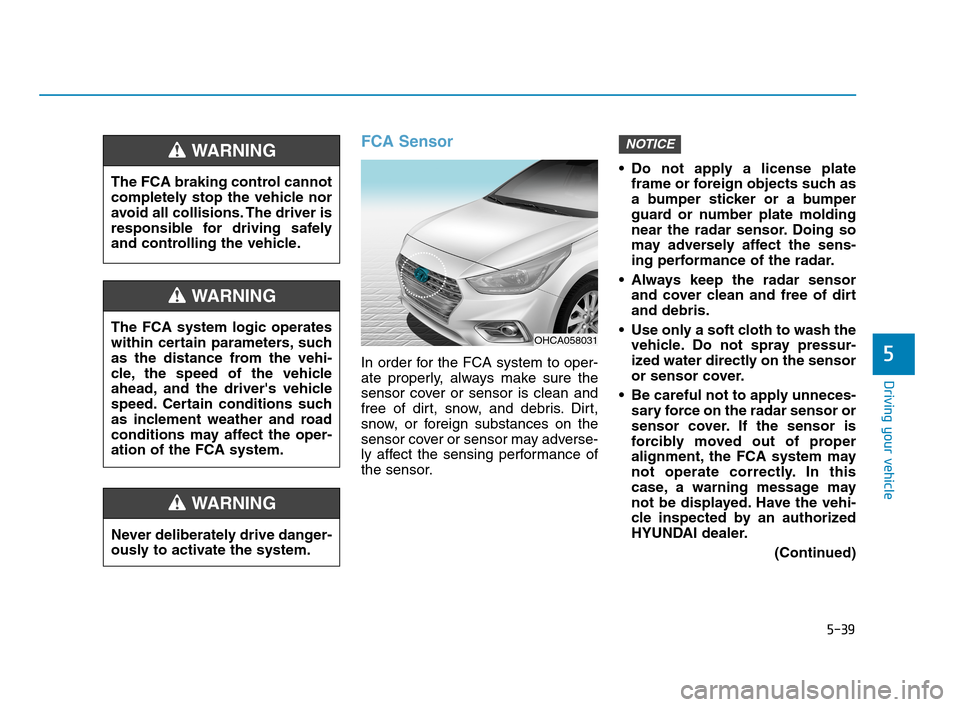
In order for the FCA system to oper-
ate properly, always make sure the
sensor cover or sensor is clean and
free of dirt, snow, and debris. Dirt,
snow, or foreign substances on the
sensor cover or sensor may adverse-
ly affect the sensing performance of
the sensor. Do not apply a license plate
frame or foreign objects such as
a bumper sticker or a bumper
guard or number plate molding
near the radar sensor. Doing so
may adversely affect the sens-
ing performance of the radar.
Always keep the radar sensor
and cover clean and free of dirt
and debris.
Use only a soft cloth to wash the
vehicle. Do not spray pressur-
ized water directly on the sensor
or sensor cover.
Be careful not to apply unneces-
sary force on the radar sensor or
sensor cover. If the sensor is
forcibly moved out of proper
alignment, the FCA system may
not operate correctly. In this
case, a warning message may
not be displayed. Have the vehi-
cle inspected by an authorized
HYUNDAI dealer.
(Continued)
NOTICE
The FCA system logic operates
within certain parameters, such
as the distance from the vehi-
cle, the speed of the vehicle
ahead, and the driver's vehicle
speed. Certain conditions such
as inclement weather and road
conditions may affect the oper-
ation of the FCA system.
WARNING
The FCA braking control cannot
completely stop the vehicle nor
avoid all collisions. The driver is
responsible for driving safely
and controlling the vehicle.
WARNING
Never deliberately drive danger-
ously to activate the system.
WARNING
OHCA058031
HCa HMA 5.QXP 4/9/2019 2:39 PM Page 39