service Hyundai Accent 2020 User Guide
[x] Cancel search | Manufacturer: HYUNDAI, Model Year: 2020, Model line: Accent, Model: Hyundai Accent 2020Pages: 445, PDF Size: 42.28 MB
Page 162 of 445
3-74
Convenient features of your vehicle
Assist mode
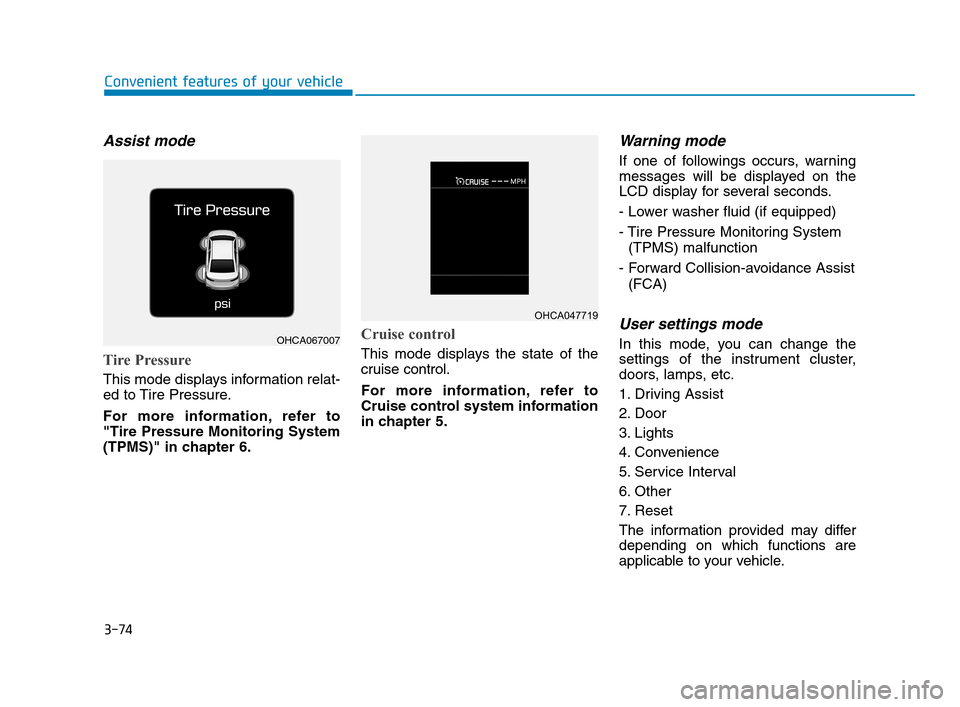
Tire Pressure
This mode displays information relat-
ed to Tire Pressure.
For more information, refer to
"Tire Pressure Monitoring System
(TPMS)" in chapter 6.
Cruise control
This mode displays the state of the
cruise control.
For more information, refer to
Cruise control system information
in chapter 5.
Warning mode
If one of followings occurs, warning
messages will be displayed on the
LCD display for several seconds.
- Lower washer fluid (if equipped)
- Tire Pressure Monitoring System
(TPMS) malfunction
- Forward Collision-avoidance Assist
(FCA)
User settings mode
In this mode, you can change the
settings of the instrument cluster,
doors, lamps, etc.
1. Driving Assist
2. Door
3. Lights
4. Convenience
5. Service Interval
6. Other
7. Reset
The information provided may differ
depending on which functions are
applicable to your vehicle.OHCA067007
OHCA047719
HCa HMA 3a(~84).qxp 4/9/2019 3:03 PM Page 74
Page 164 of 445
3-76
Convenient features of your vehicle
5. Service Interval
To activate or deactivate the service
interval function.
If the service interval menu is acti-
vated, you may adjust the time and
distance.
Information
To use the service interval menu, con-
sult an authorized HYUNDAI dealer.
If the service interval is activated and
the time and distance is adjusted,
messages are displayed in the fol-
lowing situations each time the vehi-
cle is turned on.
- Service in
: Displayed to inform the driver the
remaining mileage and days to
service.
- Service required
: Displayed when the mileage and
days to service has been reached
or passed.
Information
If any of the following conditions
occur, the mileage and number of days
to service may be incorrect.
- The battery cable is disconnected.
- The fuse switch is turned off.
- The battery is discharged.
6. Other
Reset
- Off: The average fuel economy will
not reset automatically whenever
refueling.
- After Ignition: When the engine has
been OFF for 4 hours or longer the
average fuel economy will reset
automatically.
- After Refueling: The average fuel
economy will reset automatically
after adding 1.6 gallons (6 liters) of
fuel or more and after driving speed
exceeds 1 mph (1 km/h).
For more information, refer to
"Trip Computer" in this chapter. Unit
To select the fuel economy unit.
(US gallon, UK gallon)
To select the temperature unit.
(°C,°F)
To select language.
7. Reset
You can reset the menus in the User
Settings Mode. All menus in the User
Settings Mode are reset to factory
settings, except language and service
interval.
i
i
HCa HMA 3a(~84).qxp 4/9/2019 3:03 PM Page 76
Page 168 of 445
3-80
Convenient features of your vehicle
Service information
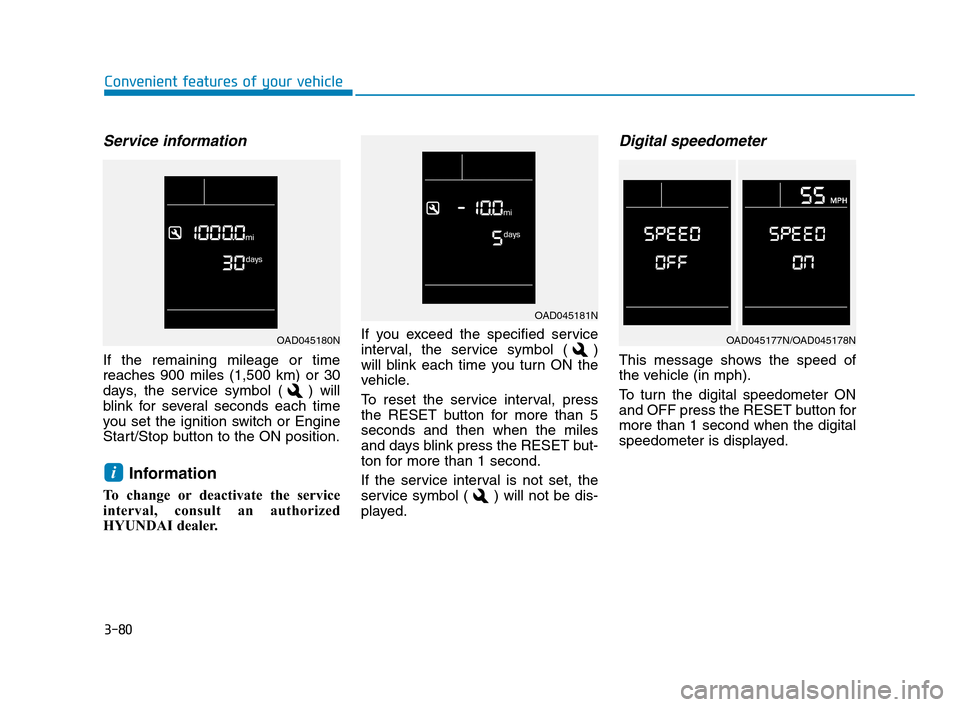
If the remaining mileage or time
reaches 900 miles (1,500 km) or 30
days, the service symbol ( ) will
blink for several seconds each time
you set the ignition switch or Engine
Start/Stop button to the ON position.
Information
To change or deactivate the service
interval, consult an authorized
HYUNDAI dealer.If you exceed the specified service
interval, the service symbol ( )
will blink each time you turn ON the
vehicle.
To reset the service interval, press
the RESET button for more than 5
seconds and then when the miles
and days blink press the RESET but-
ton for more than 1 second.
If the service interval is not set, the
service symbol ( ) will not be dis-
played.
Digital speedometer
This message shows the speed of
the vehicle (in mph).
To turn the digital speedometer ON
and OFF press the RESET button for
more than 1 second when the digital
speedometer is displayed.
i
OAD045181N
OAD045177N/OAD045178NOAD045180N
HCa HMA 3a(~84).qxp 4/9/2019 3:03 PM Page 80
Page 191 of 445
3-103
Convenient features of your vehicle
3
The air conditioning system should
be serviced by an authorized
HYUNDAI dealer.
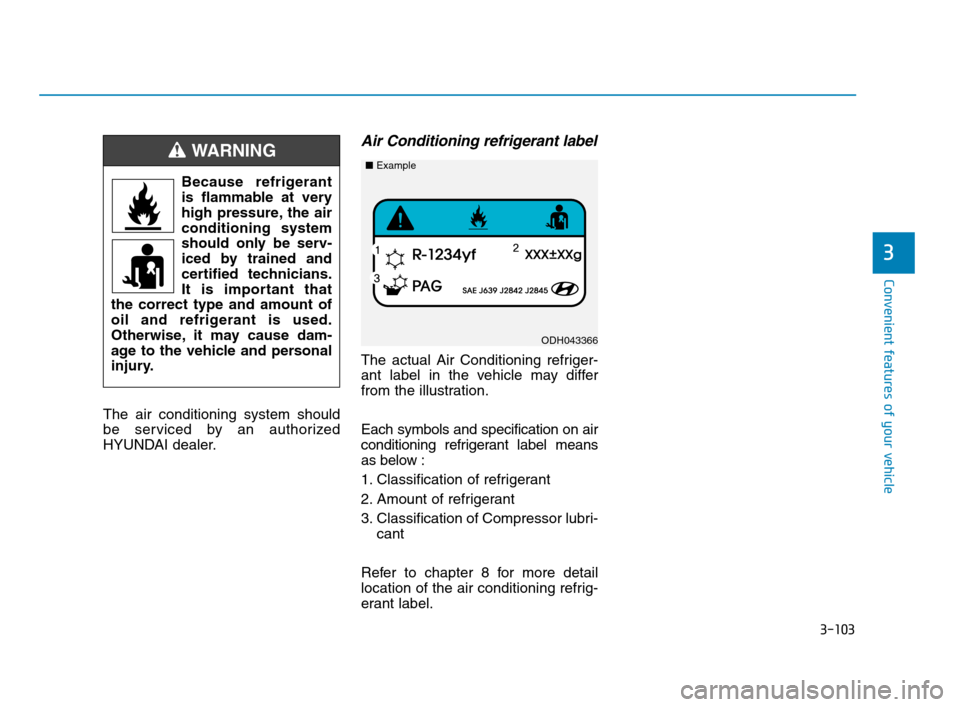
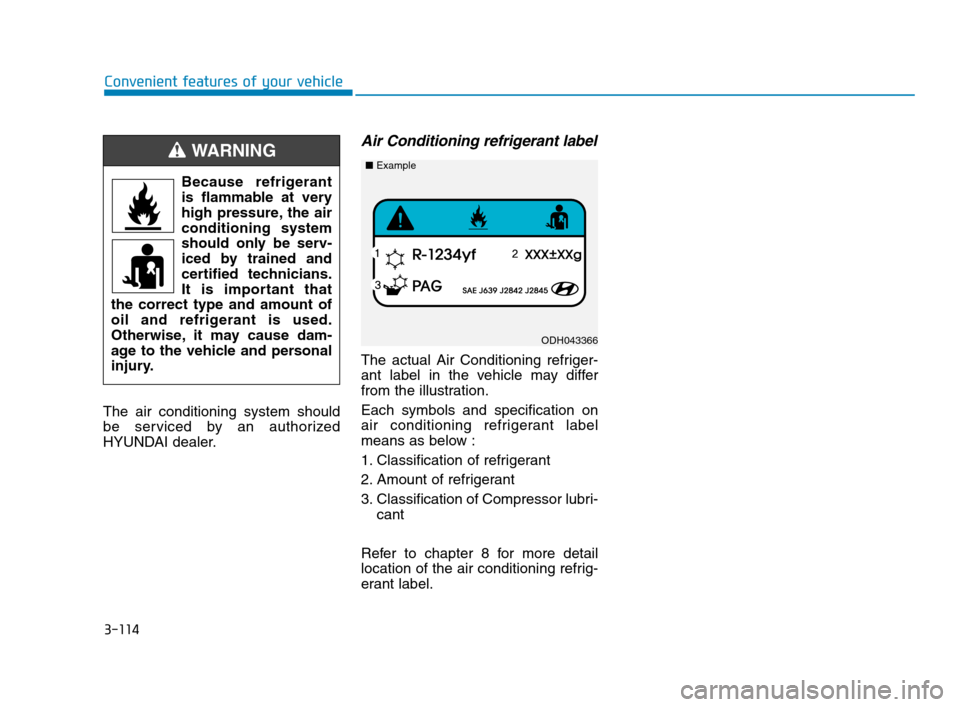
Air Conditioning refrigerant label
The actual Air Conditioning refriger-
ant label in the vehicle may differ
from the illustration.
Each symbols and specification on air
conditioning refrigerant label means
as below :
1. Classification of refrigerant
2. Amount of refrigerant
3. Classification of Compressor lubri-
cant
Refer to chapter 8 for more detail
location of the air conditioning refrig-
erant label.
ODH043366
■Example
Because refrigerant
is flammable at very
high pressure, the air
conditioning system
should only be serv-
iced by trained and
certified technicians.
It is important that
the correct type and amount of
oil and refrigerant is used.
Otherwise, it may cause dam-
age to the vehicle and personal
injury.
WARNING
HCa HMA 3b(85~).qxp 5/7/2018 12:21 PM Page 103
Page 202 of 445
3-114
Convenient features of your vehicle
The air conditioning system should
be serviced by an authorized
HYUNDAI dealer.
Air Conditioning refrigerant label
The actual Air Conditioning refriger-
ant label in the vehicle may differ
from the illustration.
Each symbols and specification on
air conditioning refrigerant label
means as below :
1. Classification of refrigerant
2. Amount of refrigerant
3. Classification of Compressor lubri-
cant
Refer to chapter 8 for more detail
location of the air conditioning refrig-
erant label. Because refrigerant
is flammable at very
high pressure, the air
conditioning system
should only be serv-
iced by trained and
certified technicians.
It is important that
the correct type and amount of
oil and refrigerant is used.
Otherwise, it may cause dam-
age to the vehicle and personal
injury.
WARNING
ODH043366
■Example
HCa HMA 3b(85~).qxp 5/7/2018 12:22 PM Page 114
Page 234 of 445
4-17
Multimedia System
4
Operating the device while driv-
ing could lead to accidents due
to a lack of attention to external
surroundings. First park the
vehicle before operating the
device.
Adjust the volume to levels that
allow the driver to hear sounds
from outside of the vehicle.
Driving in a state where external
sounds cannot be heard may
lead to accidents.
Pay attention to the volume set-
ting when turning the device on.
A sudden output of extreme vol-
ume upon turning the device on
could lead to hearing impair-
ment. (Adjust the volume to a
suitable levels before turning off
the device.)
Turn on the car engine before
using this device. Do not oper-
ate the audio system for long
periods of time only with the
ignition turned on as such oper-
ations may lead to battery dis-
charge.
(Continued)(Continued)
Do not subject the device to
severe shock or impact. Direct
pressure onto the front side of
the monitor may cause damage
to the LCD.
When cleaning the device, make
sure to turn off the device and
use a dry and smooth cloth.
Never use rough materials,
chemical cloths, or solvents
(alcohol, benzene, thinners,
etc.). As such materials may
damage the device panel or
cause color/quality deterioration
Do not place beverages close to
the audio system. Spilling bever-
ages may lead to system mal-
function.
In case of product malfunction,
please contact your place of pur-
chase or After Service center.
Placing the audio system within
an electromagnetic environment
may result in noise interference.
Prevent caustic solutions such
as perfume and cosmetic oil
from contacting the dashboard
because they may cause dam-
age or discoloration.
NOTICE
Distracted Diriving
Driving while distracted can
result in a loss of vehicle con-
trol that may lead to an acci-
dent, severe personal injury,
and death. The driver’s primary
responsibility is in the safe and
legal operation of a vehicle, and
use of any handheld devices,
other equipment, or vehicle sys-
tems which take the driver’s
eyes, attention and focus away
from the safe operation of a
vehicle or which are not permis-
sible by law should never be
used during operation of the
vehicle.
WARNING
HCa HMA 4.qxp 12/1/2017 5:30 PM Page 17
Page 237 of 445
4-20
Multimedia System
Information- SiriusXM®
Satellite Radio information
(if equipped)
• Satellite Radio channels:
Enjoy SiriusXM Satellite Radio
with a 3-month trial subscription to
the Sirius Select package. You’ll get
over variable channels, including
commercial free music, plus all your
favorite sports, exclusive talk, enter-
tainment, and a selection of premi-
um programming. For more infor-
mation and a complete list of
SiriusXM channels, visit siriusxm.com
in the United States, siriusxm.ca in
Canada, or call SiriusXM at 1-888-
539-7474.
• Satellite Radio reception factors:
To receive the satellite signal, your
vehicle has been equipped with a
satellite radio antenna located on the
roof of your vehicle. The vehicle roof
provides the best location for an
unobstructed, open view of the sky, a
requirement of a satellite radio sys-
tem. Like AM/FM, there are several
factors that can affect satellite radio
reception performance:
(Continued)(Continued)
- Antenna obstructions: For opti-
mal reception performance, keep
the antenna clear of snow and ice
build-up and keep luggage and
other material as far away from
the antenna as possible.
• SiriusXM Satellite Radio service:
SiriusXM is a subscription-based
satellite radio service that broad-
casts music, sports, news and enter-
tainment programming to radio
receivers, which are available for
installation in motor vehicles or fac-
tory installed, as well as for the
home, portable and wireless devices,
and through an Internet connection
on a personal computer.
Vehicles that are equipped with a
factory installed SiriusXM Satellite
Radio system include:
- Hardware and an introductory trial
subscription term, which begins on
the date of sale or lease of the vehicle.
- For a small upgrade fee, access to
SiriusXM music channels, and other
select channels over the Internet
using any computer connected to the
Internet (U.S. customers only).
(Continued)(Continued)
• SiriusXM services require a sub-
scription sold separately, or as a
package, by Sirius XM Radio Inc. If
you decide to continue service after
your trial, the subscription plan you
choose will automatically renew
thereafter and you will be charged
according to your chosen payment
method at then-current rates. Fees
and taxes apply. To cancel you must
call SiriusXM at 1-866-635-2349.
See SiriusXM Customer Agreement
for complete terms at www.sir-
iusxm.com. SiriusXM U.S. satellite
and data services are available only
in the 48 contiguous states, DC and
Puerto Rico (with coverage limita-
tions). SiriusXM satellite service is
also available in Canada; see
www.siriusxm.ca. All fees and pro-
gramming subject to change. Sirius,
XM and all related marks and logos
are trademarks of Sirius XM Radio
Inc.
i
HCa HMA 4.qxp 12/1/2017 5:30 PM Page 20
Page 256 of 445
4-39
Information
• When the incoming call screen is
displayed, audio mode and the set-
tings screen cannot be shown. Only
call volume control is supported.
• Some Bluetooth
®Wireless Technology
devices may not support the call
reject function.
• Some Bluetooth
®Wireless Technology
devices may not support the phone
number display function.
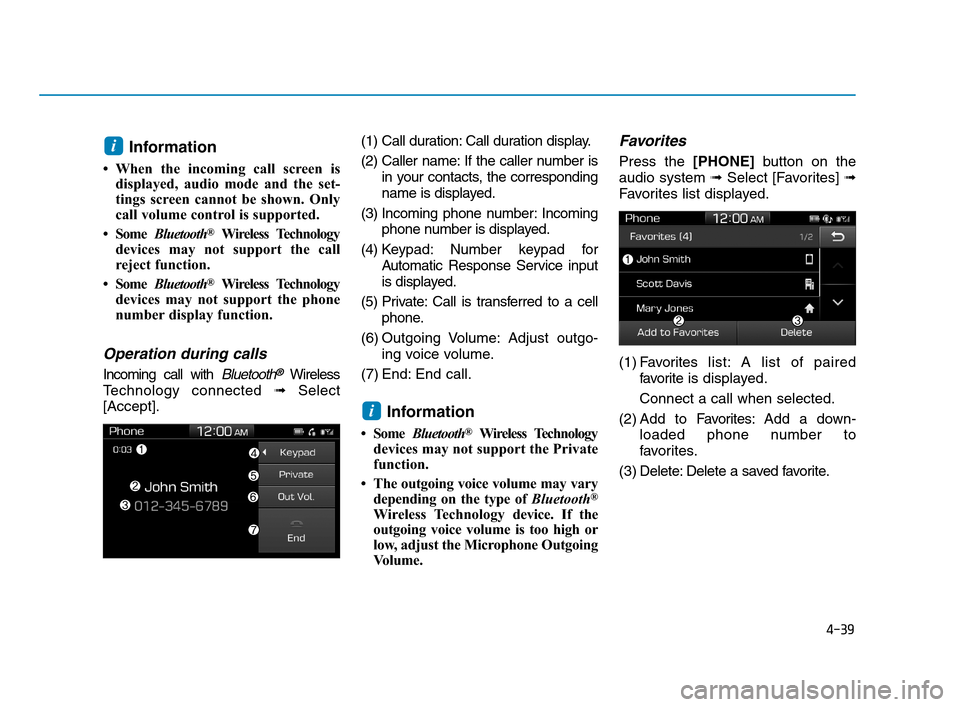
Operation during calls
Incoming call with Bluetooth®Wireless
Technology connected ➟Select
[Accept].(1) Call duration: Call duration display.
(2) Caller name: If the caller number is
in your contacts, the corresponding
name is displayed.
(3) Incoming phone number: Incoming
phone number is displayed.
(4) Keypad: Number keypad for
Automatic Response Service input
is displayed.
(5) Private: Call is transferred to a cell
phone.
(6) Outgoing Volume: Adjust outgo-
ing voice volume.
(7) End: End call.
Information
• Some Bluetooth®Wireless Technology
devices may not support the Private
function.
• The outgoing voice volume may vary
depending on the type of Bluetooth
®
Wireless Technologydevice. If the
outgoing voice volume is too high or
low, adjust the Microphone Outgoing
Volume.
Favorites
Press the [PHONE]button on the
audio system ➟Select [Favorites] ➟
Favorites list displayed.
(1) Favoriteslist: A list of paired
favorite is displayed.
Connect a call when selected.
(2) Add to Favorites:Add a down-
loaded phone number to
favorites.
(3) Delete: Delete a saved favorite.
i
i
HCa HMA 4.qxp 12/1/2017 5:31 PM Page 39
Page 318 of 445
5-56
Driving your vehicle
- When using tire chains:
Wrong size chains or improperly
installed chains can damage
your vehicle's brake lines, sus-
pension, body and wheels.
Use SAE "S" class or wire
chains.
If you hear noise caused by
chains contacting the body,
retighten the chain to prevent
contact with the vehicle body.
To prevent body damage,
retighten the chains after driving
0.3~0.6 miles (0.5~1.0 km).
Do not use tire chains on vehi-
cles equipped with aluminum
wheels. If unavoidable, use a
wire type chain.
Use wire chains less than 0.47
inch (12 mm) wide to prevent
damage to the chain’s connec-
tion.
Winter Precautions
Use high quality ethylene glycol
coolant
Your vehicle is delivered with high
quality ethylene glycol coolant in the
cooling system. It is the only type of
coolant that should be used because
it helps prevent corrosion in the cool-
ing system, lubricates the water
pump and prevents freezing. Be sure
to replace or replenish your coolant
in accordance with the maintenance
schedule in chapter 7. Before winter,
have your coolant tested to assure
that its freezing point is sufficient for
the temperatures anticipated during
the winter.
Change to "winter weight" oil if
necessary
In some climates it is recommended
that a lower viscosity "winter weight"
oil be used during cold weather. See
chapter 8 for recommendations. If
you aren't sure what weight oil you
should use, consult an authorized
HYUNDAI dealer.
Check battery and cables
Winter puts additional burdens on
the battery system. Visually inspect
the battery and cables as described
in chapter 7. The level of charge in
your battery can be checked by an
authorized HYUNDAI dealer or a
service station.
NOTICE
HCa HMA 5.QXP 4/9/2019 2:40 PM Page 56
Page 326 of 445
What to do in an emergency
6
Hazard Warning Flasher .......................................6-2
In Case of an Emergency While Driving.............6-2
If the Engine Stalls While Driving .................................6-2
If the Engine Stalls at a Crossroad or Crossing ........6-2
If you Have a Flat Tire While Driving ..........................6-3
If the Engine Will Not Start..................................6-3
If the Engine Doesn't Turn Over or
Turns Over Slowly .............................................................6-3
If the Engine Turns Over Normally but
Doesn't Start ......................................................................6-3
Jump Starting ..........................................................6-4
If the Engine Overheats........................................6-6
Tire Pressure Monitoring System (TPMS).........6-8
Check Tire Pressure .........................................................6-8
Tire Pressure Monitoring System .................................6-9
Low Tire Pressure Telltale ............................................6-10
Low Tire Pressure LCD Display with Position
Indicator.............................................................................6-10
TPMS Malfunction Indicator ........................................6-11
Changing a Tire with TPMS..........................................6-12
If You Have a Flat Tire........................................6-14
Jack and Tools .................................................................6-14
Changing Tires .................................................................6-15
Towing ...................................................................6-21
Towing Service .................................................................6-21
Removable Towing Hook ...............................................6-22
Emergency Towing..........................................................6-23
Tie-down Hook ................................................................6-24
HCa HMA 6.qxp 4/9/2019 3:07 PM Page 1