radio HYUNDAI ACCENT 2021 Owner's Manual
[x] Cancel search | Manufacturer: HYUNDAI, Model Year: 2021, Model line: ACCENT, Model: HYUNDAI ACCENT 2021Pages: 443, PDF Size: 42.78 MB
Page 228 of 443
4-21
Infotainment System
4
SiriusXM Radio (if equipped)
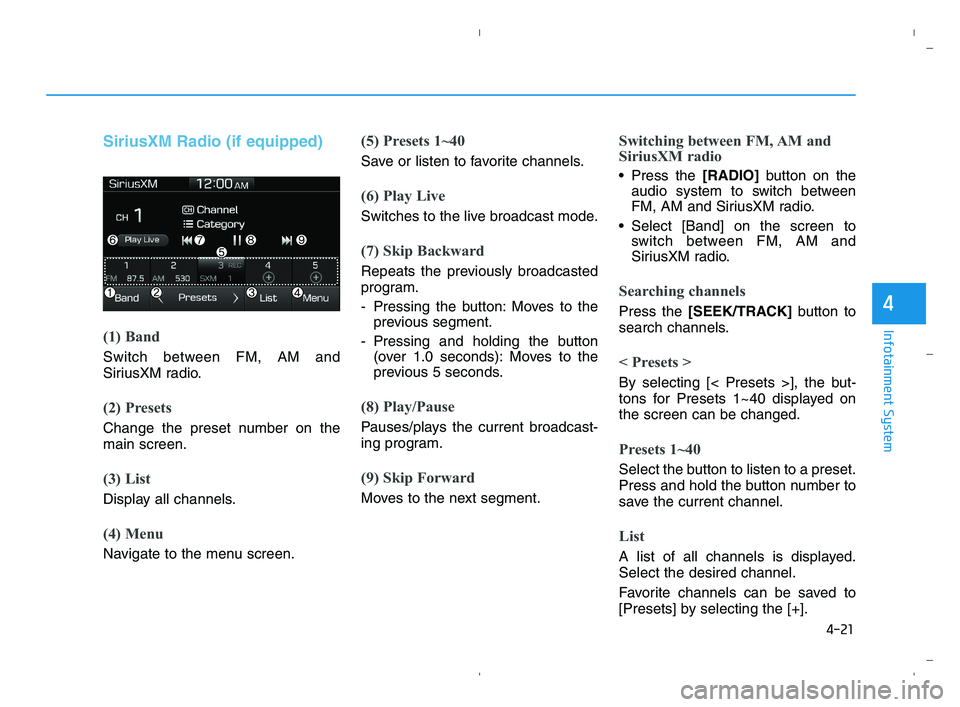
(1) Band
Switch between FM, AM and
SiriusXM radio.
(2) Presets
Change the preset number on the
main screen.
(3) List
Display all channels.
(4) Menu
Navigate to the menu screen.
(5) Presets 1~40
Save or listen to favorite channels.
(6) Play Live
Switches to the live broadcast mode.
(7) Skip Backward
Repeats the previously broadcasted
program.
- Pressing the button: Moves to the
previous segment.
- Pressing and holding the button
(over 1.0 seconds): Moves to the
previous 5 seconds.
(8) Play/Pause
Pauses/plays the current broadcast-
ing program.
(9) Skip Forward
Moves to the next segment.
Switching between FM, AM and
SiriusXM radio
Press the [RADIO]button on the
audio system to switch between
FM, AM and SiriusXM radio.
Select [Band] on the screen to
switch between FM, AM and
SiriusXM radio.
Searching channels
Press the [SEEK/TRACK]button to
search channels.
< Presets >
By selecting [< Presets >], the but-
tons for Presets 1~40 displayed on
the screen can be changed.
Presets 1~40
Select the button to listen to a preset.
Press and hold the button number to
save the current channel.
List
A list of all channels is displayed.
Select the desired channel.
Favorite channels can be saved to
[Presets] by selecting the [+].
HCa HMA 4.qxp 5/25/2020 10:58 AM Page 21
Page 252 of 443
4-45
Infotainment System
4
FCC Warning
This equipment has been tested and found to comply with the limits for a Class B digital device, pursuant to part 15
of the FCC Rules. These limits are designed to provide reasonable protection against harmful interference in a resi-
dential installation.
This equipment generates, uses and can radiate radio frequency energy and, if not installed and used in accordance
with the instructions, may cause harmful interference to radio communications. However, there is no guarantee that
interference will not occur in a particular installation. If this equipment does cause harmful interference to radio or tel-
evision reception, which can be determined by turning the equipment off and on, the user is encouraged to try to cor-
rect the interference by one or more of the following measures:
Reorient or relocate the receiving antenna.
Increase the separation between the equipment and receiver.
Connect the equipment into an outlet on a circuit different from that to which the receiver is connected.
Consult the dealer or an experienced radio/TV technician for help
This device complies with part 15 of the FCC Rules. Operation is subject to the following two conditions: (1) This
device may not cause harmful interference, and (2) this device must accept any interference received, including inter-
ference that may cause undesired operation.
Caution: Any changes or modifications to this device not expressly approved by the party responsible for compliance
could void your authority to operate the equipment.
This equipment complies with FCC radiation exposure limits set forth for an uncontrolled environment.
This equipment should be installed and operated with minimum 20 cm between the radiator and your body. This trans-
mitter must not be collocated or operating in conjunction with any other antenna or transmitter unless authorized to
do so by the FCC.
HCa HMA 4.qxp 5/25/2020 10:59 AM Page 45
Page 320 of 443
6-5
What to do in an emergency
6
Information
An inappropriately disposed
battery can be harmful to the
environment and human
health. Dispose of the battery
according to your local law(s)
or regulations.
To prevent damage to your vehicle:
Only use a 12-volt power supply
(battery or jumper system) to
jump start your vehicle.
Do not attempt to jump start
your vehicle by push-starting.
Jump starting procedure
1. Position the vehicles close enough
that the jumper cables will reach,
but do not allow the vehicles to
touch.
2. Avoid fans or any moving parts in
the engine compartment at all
times, even when the vehicles are
turned off.
3. Turn off all electrical devices such
as radios, lights, air conditioning,
etc. Put the vehicles in P (Park)
and set the parking brakes. Turn
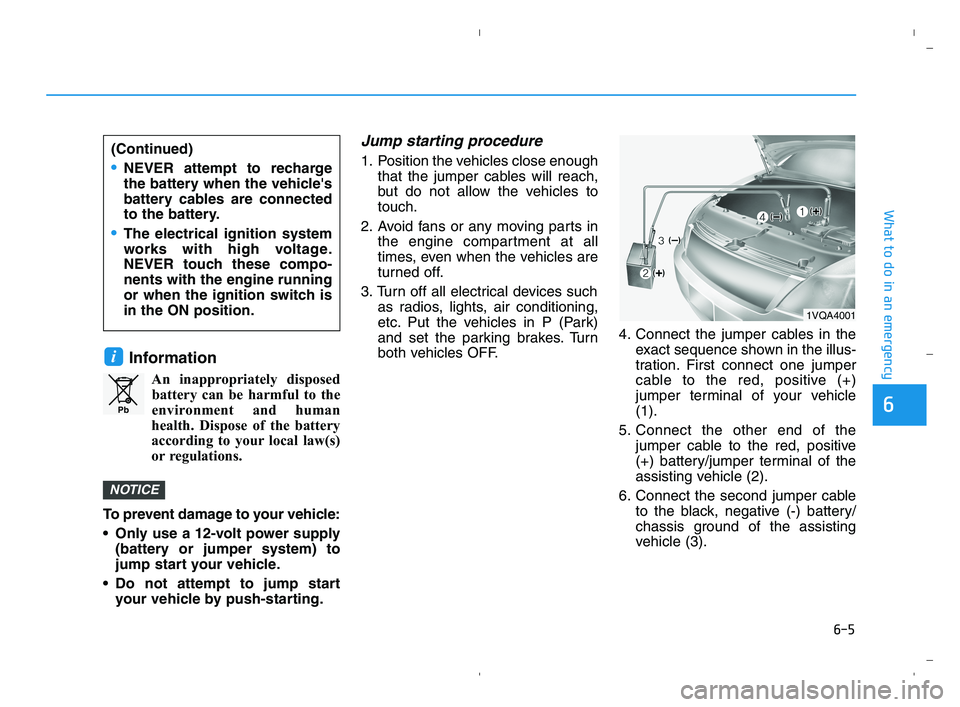
both vehicles OFF.4. Connect the jumper cables in the
exact sequence shown in the illus-
tration. First connect one jumper
cable to the red, positive (+)
jumper terminal of your vehicle
(1).
5. Connect the other end of the
jumper cable to the red, positive
(+) battery/jumper terminal of the
assisting vehicle (2).
6. Connect the second jumper cable
to the black, negative (-) battery/
chassis ground of the assisting
vehicle (3).
NOTICE
i
Pb
(Continued)
NEVER attempt to recharge
the battery when the vehicle's
battery cables are connected
to the battery.
The electrical ignition system
works with high voltage.
NEVER touch these compo-
nents with the engine running
or when the ignition switch is
in the ON position.
1VQA4001
HCa HMA 6.qxp 5/25/2020 11:03 AM Page 5
Page 327 of 443
6-12
What to do in an emergency
The TPMS Malfunction Indicator
may illuminate after blinking for
one minute if the vehicle is near
electric power supply cables or
radio transmitters such as police
stations, government and public
offices, broadcasting stations,
military installations, airports,
transmitting towers, etc.
Additionally, the TPMS Malfunction
Indicator may illuminate if snow
chains are used or electronic
devices such as computers, charg-
ers, remote starters, navigation,
etc. This may interfere with normal
operation of the TPMS.
Changing a Tire with TPMS
If you have a flat tire, the Low Tire
Pressure and LCD position indicator
will come on. Have the flat tire
repaired by an authorized HYUNDAI
dealer as soon as possible or
replace the flat tire with the spare
tire.
The spare tire does not come with a
tire pressure monitoring sensor.
When the low pressure tire or the flat
tire is replaced with the spare tire,
the Low Tire Pressure LCD position
indicator will remain on. Also, the
TPMS Malfunction Indicator will illu-
minate after blinking for one minute if
the vehicle is driven at speed above
15.5 mph (25 km/h) for approximate-
ly 20 minutes.Once the original tire equipped with
a tire pressure monitoring sensor is
reinflated to the recommended pres-
sure and reinstalled on the vehicle,
the Low Tire Pressure LCD position
indicator and TPMS Malfunction
Indicator will go off within a few min-
utes of driving.
If the indicators do not disappear
after a few minutes, please visit an
authorized HYUNDAI dealer.
Each wheel is equipped with a tire
pressure sensor mounted inside the
tire behind the valve stem (except for
the spare tire). You must use TPMS
specific wheels. It is recommended
that you always have your tires serv-
iced by an authorized HYUNDAI
dealer.
NOTICE
It is recommended that you do
not use a puncture-repairing
agent not approved by HYUNDAI
dealer to repair and/or inflate a
low pressure tire. Tire sealant
not approved by HYUNDAI deal-
er may damage the tire pressure
sensor.
CAUTION
HCa HMA 6.qxp 5/25/2020 11:03 AM Page 12
Page 437 of 443
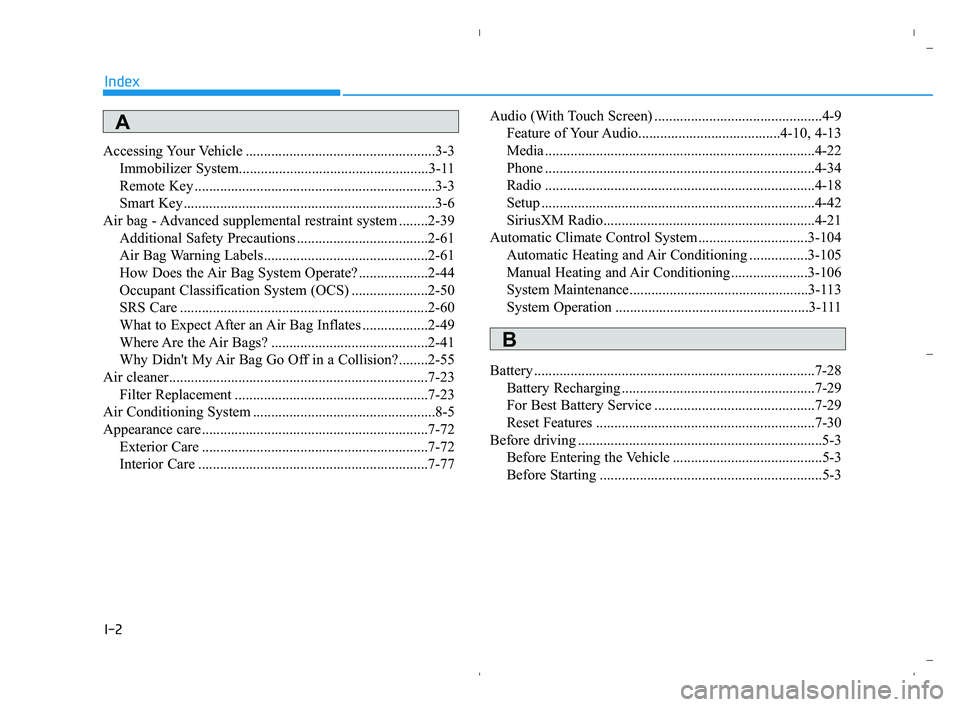
I-2
Accessing Your Vehicle ....................................................3-3
Immobilizer System....................................................3-11
Remote Key ..................................................................3-3
Smart Key.....................................................................3-6
Air bag - Advanced supplemental restraint system ........2-39
Additional Safety Precautions ....................................2-61
Air Bag Warning Labels.............................................2-61
How Does the Air Bag System Operate? ...................2-44
Occupant Classification System (OCS) .....................2-50
SRS Care ....................................................................2-60
What to Expect After an Air Bag Inflates ..................2-49
Where Are the Air Bags? ...........................................2-41
Why Didn't My Air Bag Go Off in a Collision?........2-55
Air cleaner.......................................................................7-23
Filter Replacement .....................................................7-23
Air Conditioning System ..................................................8-5
Appearance care..............................................................7-72
Exterior Care ..............................................................7-72
Interior Care ...............................................................7-77Audio (With Touch Screen) ..............................................4-9
Feature of Your Audio.......................................4-10, 4-13
Media ..........................................................................4-22
Phone ..........................................................................4-34
Radio ..........................................................................4-18
Setup ...........................................................................4-42
SiriusXM Radio..........................................................4-21
Automatic Climate Control System..............................3-104
Automatic Heating and Air Conditioning ................3-105
Manual Heating and Air Conditioning .....................3-106
System Maintenance.................................................3-113
System Operation .....................................................3-111
Battery .............................................................................7-28
Battery Recharging .....................................................7-29
For Best Battery Service ............................................7-29
Reset Features ............................................................7-30
Before driving ...................................................................5-3
Before Entering the Vehicle .........................................5-3
Before Starting .............................................................5-3
Index
A
B
HCa HMA INDEX.qxp 5/25/2020 11:16 AM Page 2