screen HYUNDAI ACCENT 2022 User Guide
[x] Cancel search | Manufacturer: HYUNDAI, Model Year: 2022, Model line: ACCENT, Model: HYUNDAI ACCENT 2022Pages: 443, PDF Size: 42.78 MB
Page 225 of 443
4-18
Infotainment System
Information on status icons
Icons showing audio status are shown
in the upper-right corner of the screen.
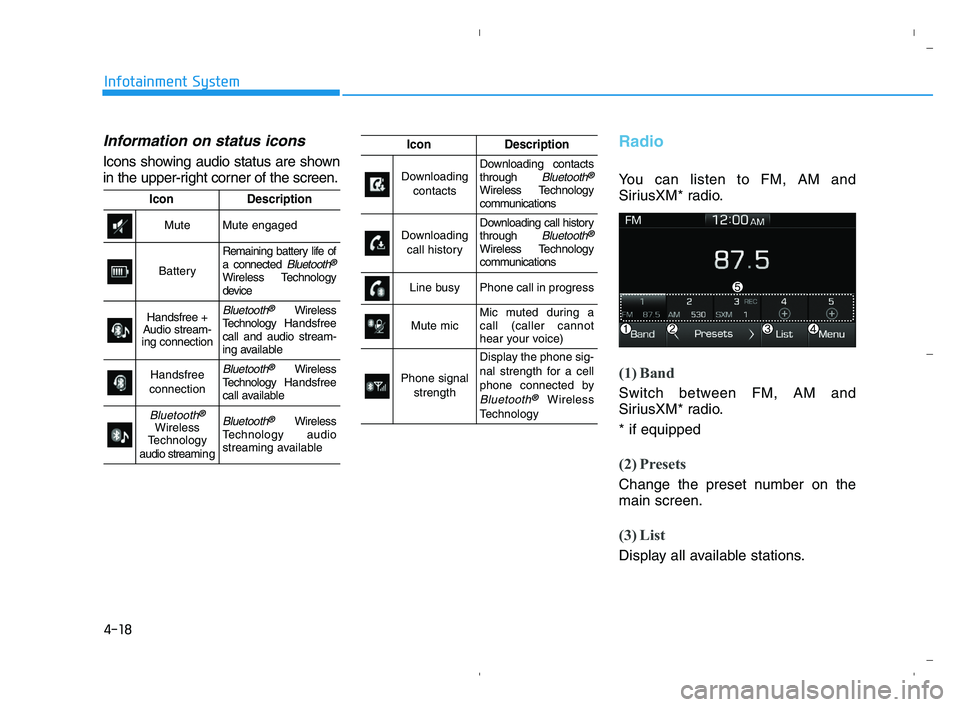
Radio
You can listen to FM, AM and
SiriusXM* radio.
(1) Band
Switch between FM, AM and
SiriusXM* radio.
* if equipped
(2) Presets
Change the preset number on the
main screen.
(3) List
Display all available stations.
IconDescription
MuteMute engaged
Battery
Remaining battery life of
a connected Bluetooth®
Wireless Technology
device
Handsfree +
Audio stream-
ing connectionBluetooth®Wireless
TechnologyHandsfree
call and audio stream-
ing available
Handsfree
connectionBluetooth®Wireless
TechnologyHandsfree
call available
Bluetooth®
Wireless
Technology
audio streami n gBluetooth®Wireless
Technology audio
streaming available
IconDescription
Downloading
contactsDownloading contacts
through Bluetooth®
Wireless Technology
communications
Downloading
call historyDownloading call history
through Bluetooth®
Wireless Technology
communications
Line busyPhone call in progress
Mute micMic muted during a
call (caller cannot
hear your voice)
Phone signal
strength
Display the phone sig-
nal strength for a cell
phone connected by
Bluetooth®Wireless
Technology
HCa HMA 4.qxp 5/25/2020 10:58 AM Page 18
Page 226 of 443
![HYUNDAI ACCENT 2022 User Guide 4-19
Infotainment System
4
(4) Menu
Navigate to the menu screen.
(5) Presets 1~40
Save or listen to favorite stations.
Switching between FM, AM and
SiriusXM* radio
Press the [RADIO]button on the
audi](/img/35/41159/w960_41159-225.png "HYUNDAI ACCENT 2022 User Guide 4-19
Infotainment System
4
(4) Menu
Navigate to the menu screen.
(5) Presets 1~40
Save or listen to favorite stations.
Switching between FM, AM and
SiriusXM* radio
Press the [RADIO]button on the
audi")
4-19
Infotainment System
4
(4) Menu
Navigate to the menu screen.
(5) Presets 1~40
Save or listen to favorite stations.
Switching between FM, AM and
SiriusXM* radio
Press the [RADIO]button on the
audio system to switch between
FM, AM and SiriusXM* radio.
Select [Band] on the screen to
switch between FM, AM and
SiriusXM* radio.
* if equipped
Searching stations
Searching stations by pressing the
[SEEK/TRACK]button on the prod-
uct.
< Presets >
By selecting [< Presets >], the but-
tons for Presets 1~40 displayed on
the screen can be changed.
Presets 1~40
Select the button to listen to a preset.
Press and hold the button number to
save the current station. If the slot is
empty, simply selecting saves the
station to the slot.
List
A list of all available stations is dis-
played. Select the desired station.
Favorite stations can be saved to
[Presets] by selecting the [+].
Menu
Select [Menu], and select the desired
function.
Presets: Save up to 40 frequently
used stations. To listen to a preset,
select the desired station. Press
and hold the desired slot from 1
through 40. This saves the current
station in the selected slot. If the
slot is empty, simply selecting
saves the station to the slot.
Scan: All stations available in the
current location of the vehicle are
played for five seconds each.
Information: View detailed station
information.
Sound Settings: Audio sound set-
tings can be changed.
Station Info: Set whether to receive
station information such as Station
Name, Program Type or Information.
HCa HMA 4.qxp 5/25/2020 10:58 AM Page 19
Page 228 of 443
4-21
Infotainment System
4
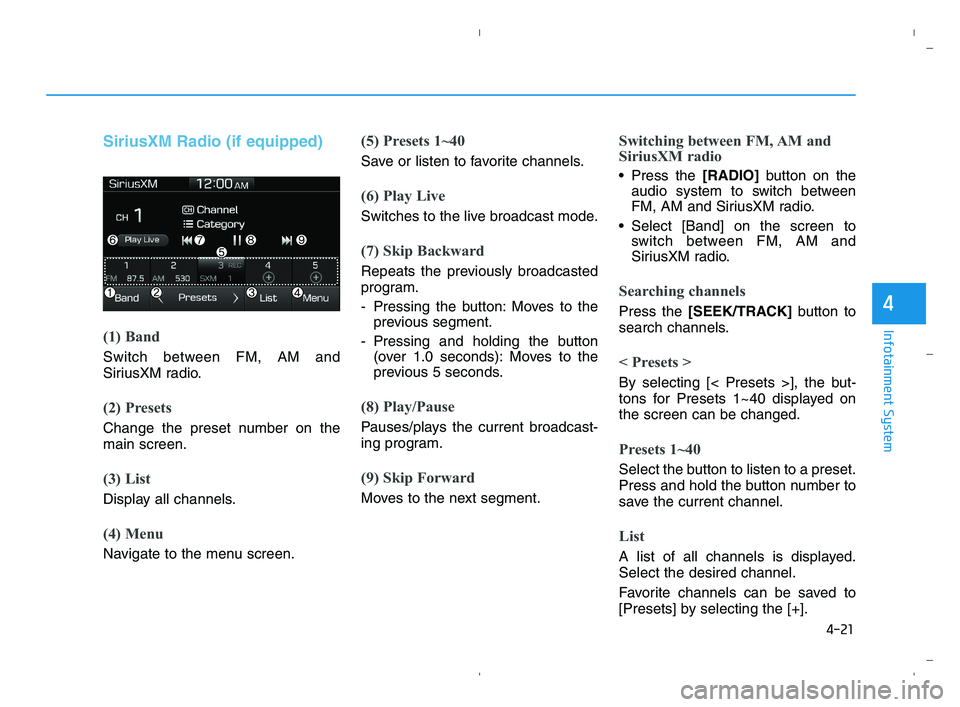
SiriusXM Radio (if equipped)
(1) Band
Switch between FM, AM and
SiriusXM radio.
(2) Presets
Change the preset number on the
main screen.
(3) List
Display all channels.
(4) Menu
Navigate to the menu screen.
(5) Presets 1~40
Save or listen to favorite channels.
(6) Play Live
Switches to the live broadcast mode.
(7) Skip Backward
Repeats the previously broadcasted
program.
- Pressing the button: Moves to the
previous segment.
- Pressing and holding the button
(over 1.0 seconds): Moves to the
previous 5 seconds.
(8) Play/Pause
Pauses/plays the current broadcast-
ing program.
(9) Skip Forward
Moves to the next segment.
Switching between FM, AM and
SiriusXM radio
Press the [RADIO]button on the
audio system to switch between
FM, AM and SiriusXM radio.
Select [Band] on the screen to
switch between FM, AM and
SiriusXM radio.
Searching channels
Press the [SEEK/TRACK]button to
search channels.
< Presets >
By selecting [< Presets >], the but-
tons for Presets 1~40 displayed on
the screen can be changed.
Presets 1~40
Select the button to listen to a preset.
Press and hold the button number to
save the current channel.
List
A list of all channels is displayed.
Select the desired channel.
Favorite channels can be saved to
[Presets] by selecting the [+].
HCa HMA 4.qxp 5/25/2020 10:58 AM Page 21
Page 232 of 443
4-25
Infotainment System
4
(Continued)
• Operation is guaranteed only for
standard (Metal Cover Type) USB
Memory drives.
• Operation of HDD, CF, SD and mem-
ory stick devices is not guaranteed.
• DRM (Digital Rights Management)
files cannot be played.
• SD-type USB memory, CF-type
USB memory, and other USB mem-
ory devices that require adapters
for connection are not supported.
• Proper operation of USB HDDs or
USB drives with connectors that
loosen due to vehicle vibrations is
not guaranteed. (iStick, etc.)
• USB products that are
used as key chains or
cell phone accessories
may damage the USB
jack and affect proper
file playback. Please refrain from
use. Use only products with plug
connectors, as shown in the follow-
ing illustration.
• When MP3 devices or cell phones are
connected simultaneously through
AUX, BT Audio and USB modes, a
popping noise or malfunction may
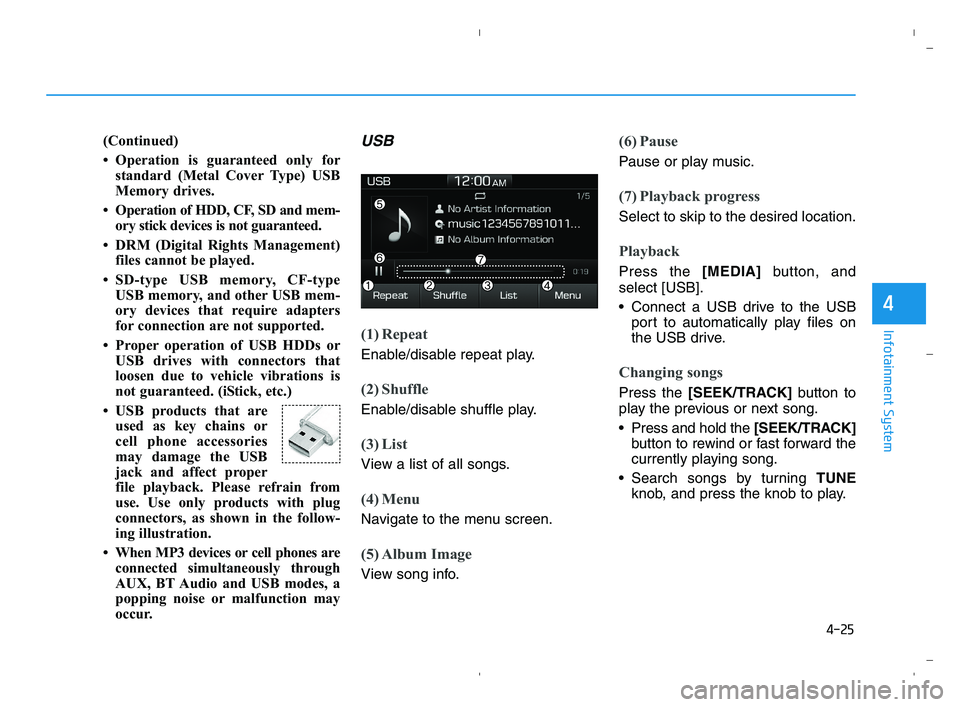
occur.USB
(1) Repeat
Enable/disable repeat play.
(2) Shuffle
Enable/disable shuffle play.
(3) List
View a list of all songs.
(4) Menu
Navigate to the menu screen.
(5) Album Image
View song info.
(6) Pause
Pause or play music.
(7) Playback progress
Select to skip to the desired location.
Playback
Press the [MEDIA]button, and
select [USB].
Connect a USB drive to the USB
port to automatically play files on
the USB drive.
Changing songs
Press the [SEEK/TRACK]button to
play the previous or next song.
Press and hold the [SEEK/TRACK]
button to rewind or fast forward the
currently playing song.
Search songs by turning TUNE
knob, and press the knob to play.
HCa HMA 4.qxp 5/25/2020 10:58 AM Page 25
Page 235 of 443
4-28
Infotainment System
(Continued)
• The search and song play order in
the iPod
®device may be different
from the search order in the audio
system.
• If the iPod
®has failed due to an
internal defect, please reset the
iPod
®(consult your iPod®manual).
• Depending on the software version,
the iPod
®may fail to sync with the
system. If the media is removed or
disconnected before recognition, the
previous mode may not be restored
(iPad
®cannot be charged).
• Cables other than the 1-meter cable
provided with iPod
®/iPhone®/iPad®
products may not be recognized.
• When other music apps are used on
your iPod
®, the system sync func-
tion may fail due to malfunction of
the iPod
®application.
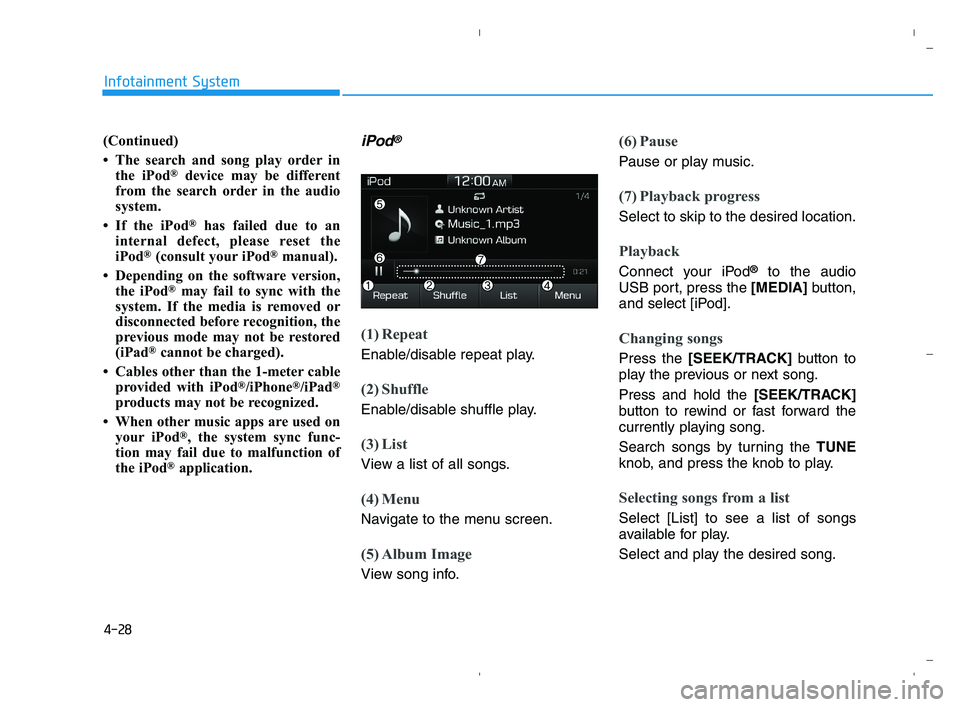
iPod®
(1) Repeat
Enable/disable repeat play.
(2) Shuffle
Enable/disable shuffle play.
(3) List
View a list of all songs.
(4) Menu
Navigate to the menu screen.
(5) Album Image
View song info.
(6) Pause
Pause or play music.
(7) Playback progress
Select to skip to the desired location.
Playback
Connect your iPod®to the audio
USB port, press the [MEDIA]button,
and select [iPod].
Changing songs
Press the [SEEK/TRACK]button to
play the previous or next song.
Press and hold the [SEEK/TRACK]
button to rewind or fast forward the
currently playing song.
Search songs by turning the TUNE
knob, and press the knob to play.
Selecting songs from a list
Select [List] to see a list of songs
available for play.
Select and play the desired song.
HCa HMA 4.qxp 5/25/2020 10:59 AM Page 28
Page 236 of 443
![HYUNDAI ACCENT 2022 User Guide 4-29
Infotainment System
4
Repeat play
Select [Repeat] to enable or disable
Repeat category, Repeat current
song play.
Repeat category: Repeat all
songs in the current category.
Repeat current s](/img/35/41159/w960_41159-235.png "HYUNDAI ACCENT 2022 User Guide 4-29
Infotainment System
4
Repeat play
Select [Repeat] to enable or disable
Repeat category, Repeat current
song play.
Repeat category: Repeat all
songs in the current category.
Repeat current s")
4-29
Infotainment System
4
Repeat play
Select [Repeat] to enable or disable
'Repeat category', 'Repeat current
song' play.
Repeat category: Repeat all
songs in the current category.
Repeat current song: The cur-
rently playing song is repeated.
Shuffle play
Select [Shuffle] to enable or disable
'Shuffle category' play.
Shuffle category: Songs within
the current category are played in
random order.
Menu
Select [Menu], and select the desired
function.
Information: Detailed info on the
currently playing song is displayed.
Sound Settings: Audio sound set-
tings can be changed.
When other music programs are
running
When songs saved on your iPod®
are playing through a separate music
app, the above screen is displayed.
(1) Play/Pause: Pause or play music
.
(2) Play iPod Files: Play music saved
on your iPod®.
(3) Sound Settngs: Audio sound set-
tings can be changed.
(4) Album Image: View playback info
.
Playing iPod files
Select [Play iPod Files] to play songs
saved on your iPod®.
If there are no songs saved on your
iPod
®, the [Play iPod Files] is dis-
abled.
Information
Operation cannot be carried out cor-
rectly due to iPod®application mal-
function.
i
HCa HMA 4.qxp 5/25/2020 10:59 AM Page 29
Page 237 of 443
4-30
Infotainment System
Information
- Using Bluetooth®Wireless
Technology(BT) Audio
(if equipped)
•Bluetooth
®Wireless Technology Audio
mode can only be used if a Bluetooth®
Wireless Technology-enabled phone is
connected. Only devices that support
Bluetooth
®Wireless Technology audio
can be used.
• If the Bluetooth
®Wireless Technology-
enabled phone is disconnected during
play, the music stops.
• When the TRACK UP/DOWN buttons
are used during Bluetooth
®Wireless
Technology audio streaming, a popping
noise or sound interruptions may occur,
depending on the cell phone device.
• Depending on the cell phone model,
the audio streaming function may
not be supported.
• If a phone call is made or received
when music is playing inBluetooth
®
Wireless Technology Audio mode,
the call may mix with the music.
• When returning to Bluetooth
®Wireless
Technology Audio mode after ending a
call, play might not resume automatical-
ly for some cell phone models.
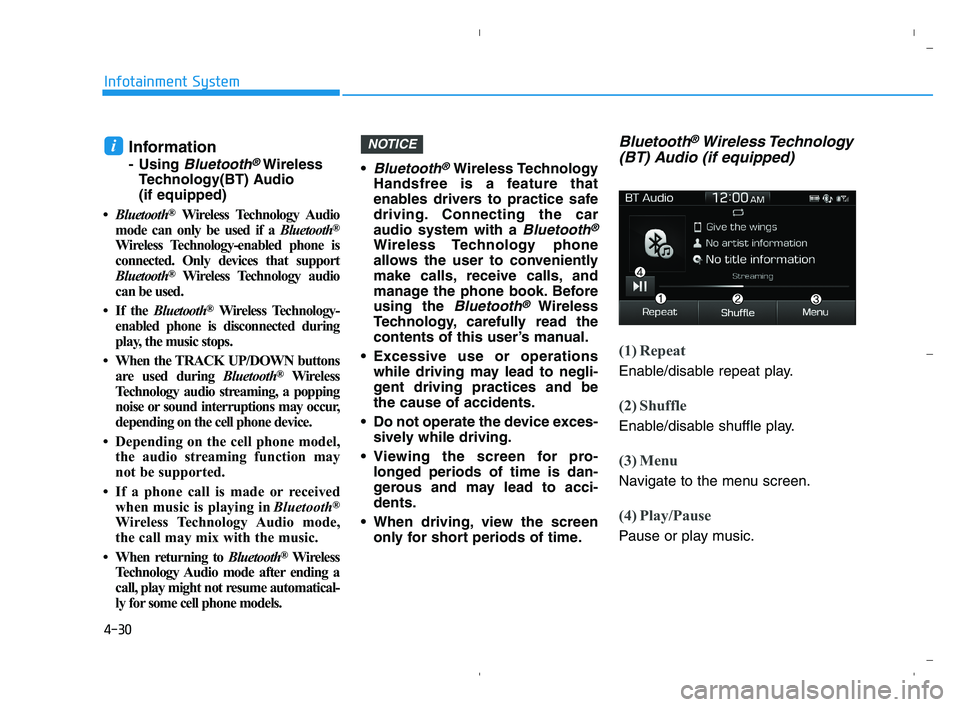
Bluetooth®Wireless Technology
Handsfree is a feature that
enables drivers to practice safe
driving. Connecting the car
audio system with a
Bluetooth®
Wireless Technology phone
allows the user to conveniently
make calls, receive calls, and
manage the phone book. Before
using the
Bluetooth®Wireless
Technology, carefully read the
contents of this user’s manual.
Excessive use or operations
while driving may lead to negli-
gent driving practices and be
the cause of accidents.
Do not operate the device exces-
sively while driving.
Viewing the screen for pro-
longed periods of time is dan-
gerous and may lead to acci-
dents.
When driving, view the screen
only for short periods of time.
Bluetooth®Wireless Technology
(BT) Audio (if equipped)
(1) Repeat
Enable/disable repeat play.
(2) Shuffle
Enable/disable shuffle play.
(3) Menu
Navigate to the menu screen.
(4) Play/Pause
Pause or play music.
NOTICEi
HCa HMA 4.qxp 5/25/2020 10:59 AM Page 30
Page 239 of 443
![HYUNDAI ACCENT 2022 User Guide 4-32
Infotainment System
AUX
Running AUX
Press the [MEDIA]button, and
select [AUX].
Connect the external device connec-
tion jack to the AUX terminal to run
AUX.
(1) Sound Settings: Audio sound set-
t](/img/35/41159/w960_41159-238.png "HYUNDAI ACCENT 2022 User Guide 4-32
Infotainment System
AUX
Running AUX
Press the [MEDIA]button, and
select [AUX].
Connect the external device connec-
tion jack to the AUX terminal to run
AUX.
(1) Sound Settings: Audio sound set-
t")
4-32
Infotainment System
AUX
Running AUX
Press the [MEDIA]button, and
select [AUX].
Connect the external device connec-
tion jack to the AUX terminal to run
AUX.
(1) Sound Settings: Audio sound set-
tings can be changed.
My Music (if equipped)
(1) Repeat
Enable/disable repeat play.
(2) Shuffle
Enable/disable shuffle play.
(3) List
View a list of all songs.
(4) Menu
Navigate to the menu screen.
(5) Album Image
View song info.
(6) Pause
Pause or play music.
(7) Playback progress
Select to skip to the desired location.
Playback
Press the [MEDIA]button, and
select [My Music].
My Music cannot be selected if it
does not contain music.
Check the content of your USB
drive before saving music to My
Music.
Changing songs
Press the [SEEK/TRACK]button to
play the previous or next song.
Press and hold the [SEEK/TRACK]
button to rewind or fast forward the
currently playing song.
Search songs by turning the TUNE
knob, and press the knob to play.
HCa HMA 4.qxp 5/25/2020 10:59 AM Page 32
Page 241 of 443
4-34
Infotainment System
Phone (if equipped)
Information
- Using Bluetooth®Wireless
Technology(BT) Cellular
Phone
•Bluetooth
®Wireless Technology is a
near-field wireless networking tech-
nology that uses the 2.4 GHz fre-
quency to connect various devices
within a certain distance wirelessly.
• The technology is used in PCs,
peripherals, Bluetooth
®Wireless
Technology phones, tablet PCs,
household appliances and automo-
biles. Devices supporting Bluetooth
®
Wireless Technology can exchange
data at high speeds without physical
cable connections.
•Bluetooth
®Wireless Technology
Handsfree devices enable convenient
access to phone functions through cell
phones equipped with Bluetooth
®
Wireless Technology.
• Some Bluetooth
®Wireless Technology
devices may not be supported by
the Bluetooth
®Wireless Technology
Handsfree function.
(Continued)(Continued)
• When Bluetooth
®Wireless Technology
is connected and calls are attempted
through a connected cell phone
from outside the vehicle, the call is
connected through the Bluetooth
®
Wireless Technology Handsfree
function of the vehicle.
• Please be sure to disconnect the
Bluetooth
®Wireless Technology
Handsfree function throughyour
Bluetooth
®Wireless Technology
device or the audio screen.
• See https://www.hyundaiusa.com/
BlueTooth/for a list of supported
Bluetooth
®Wireless Technology
devices.
Safety precautions
The Bluetooth®Wireless Technology
Handsfree function helps drivers to
drive safely. By connecting a
Bluetooth®Wireless Technology-
enabled phone to the vehicle’s
audio system, phone calls can be
made and received through the
audio system and contacts can be
managed. Consult the user manual
before use. Excessive manipulation of controls
while driving, making it difficult to
pay attention to the road ahead,
can lead to accidents. Do not oper-
ate the device excessively while
driving.
Looking at the screen for a pro-
longed time increases the risk of
accidents. Keep time spent looking
at the screen to a minimum.
Precautions when connecting
Bluetooth®Wireless Technology
devices
The vehicle supports the following
Bluetooth®Wireless Technology
functions. Some
Bluetooth®
Wireless Technology devices may
not support some functions.
1)
Bluetooth®Wireless Technology
Handsfree phone calls
2) Operations during a call
(Private, Switch, Out Vol. con-
trols)
3) Download call history saved to the
Bluetooth®Wireless Technology
device
4) Download contacts saved to the
Bluetooth®Wireless Technology
device
i
HCa HMA 4.qxp 5/25/2020 10:59 AM Page 34
Page 243 of 443
4-36
Infotainment System
Pairing a Bluetooth®Wireless
Technology device
Information on pairing Bluetooth®
Wireless Technology devices
Pairing refers to the process of
pairing
Bluetooth®Wireless
Technology cell phones or devices
with the system prior to connec-
tion. This is a necessary procedure
for
Bluetooth®Wireless Technology
connection and usage.
Up to five devices can be paired.
Pairing
Bluetooth®Wireless
Technology device is not allowed
while vehicle is moving.
Pairing the first Bluetooth®
Wireless Technology device
Press the [PHONE]button on the
audio system or the [CALL]button
on the steering wheel remote control
➟Search for the vehicle from the
Bluetooth®Wireless Technology
device, and pair ➟Enter the passkey
on the
Bluetooth®Wireless Technology
device or approve passkey ➟
Bluetooth®Wireless Technology pair-
ing completed.1. When the [PHONE]button on the
audio or the [CALL]button on the
steering wheel remote control is
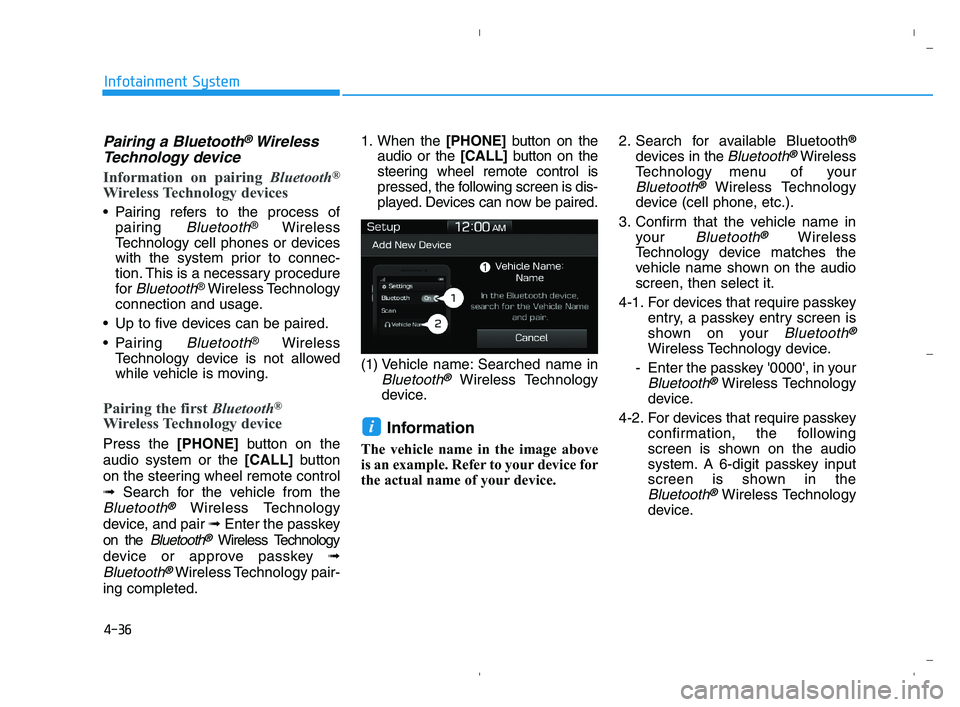
pressed, the following screen is dis-
played. Devices can now be paired.
(1) Vehicle name: Searched name in
Bluetooth®Wireless Technology
device.
Information
The vehicle name in the image above
is an example. Refer to your device for
the actual name of your device.2. Search for available Bluetooth
®
devices in the Bluetooth®Wireless
Technology menu of your
Bluetooth®Wireless Technology
device (cell phone, etc.).
3. Confirm that the vehicle name in
your
Bluetooth®Wireless
Technology device matches the
vehicle name shown on the audio
screen, then select it.
4-1. For devices that require passkey
entry, a passkey entry screen is
shown on your
Bluetooth®
Wireless Technology device.
- Enter the passkey '0000', in your
Bluetooth®Wireless Technology
device.
4-2. For devices that require passkey
confirmation, the following
screen is shown on the audio
system. A 6-digit passkey input
screen is shown in the
Bluetooth®Wireless Technology
device.
i
HCa HMA 4.qxp 5/25/2020 10:59 AM Page 36