air conditioning HYUNDAI ACCENT 2022 Owner's Manual
[x] Cancel search | Manufacturer: HYUNDAI, Model Year: 2022, Model line: ACCENT, Model: HYUNDAI ACCENT 2022Pages: 443, PDF Size: 42.78 MB
Page 196 of 443
3-118
Convenient features of your vehicle
Auto Defogging System
(Only for Automatic Climate
Control System, if equipped)
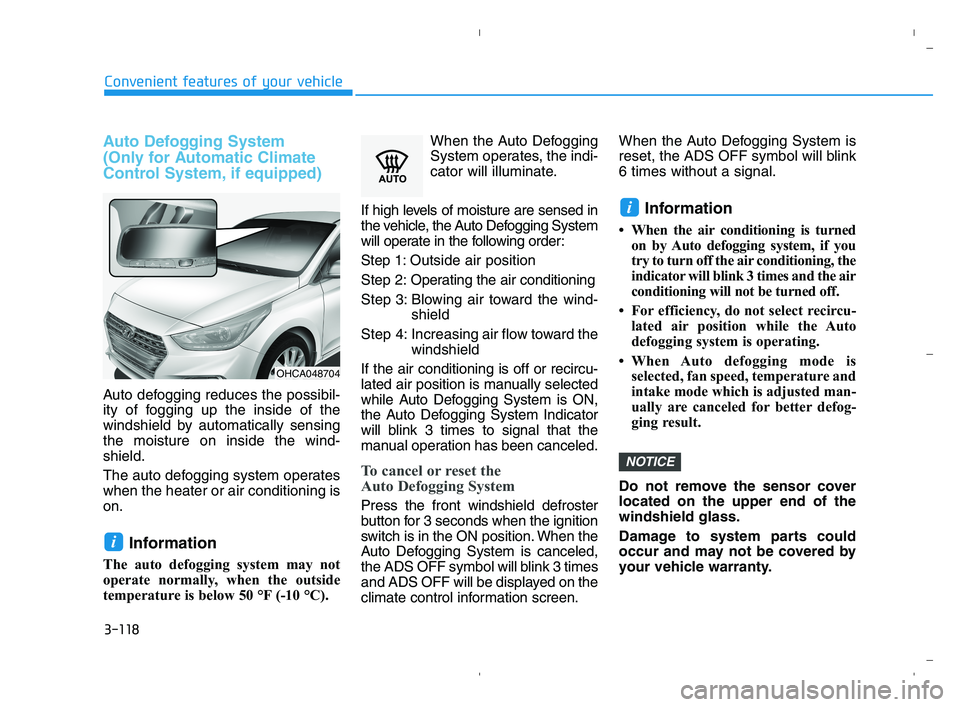
Auto defogging reduces the possibil-
ity of fogging up the inside of the
windshield by automatically sensing
the moisture on inside the wind-
shield.
The auto defogging system operates
when the heater or air conditioning is
on.
Information
The auto defogging system may not
operate normally, when the outside
temperature is below 50 °F (-10 °C).When the Auto Defogging
System operates, the indi-
cator will illuminate.
If high levels of moisture are sensed in
the vehicle, the Auto Defogging System
will operate in the following order:
Step 1: Outside air position
Step 2:Operating the air conditioning
Step 3: Blowing air toward the wind-
shield
Step 4: Increasing air flow toward the
windshield
If the air conditioning is off or recircu-
lated air position is manually selected
while Auto Defogging System is ON,
the Auto Defogging System Indicator
will blink 3 times to signal that the
manual operation has been canceled.
To cancel or reset the
Auto Defogging System
Press the front windshield defroster
button for 3 seconds when the ignition
switch is in the ON position. When the
Auto Defogging System is canceled,
the ADS OFF symbol will blink 3 times
and ADS OFF will be displayed on the
climate control information screen.When the Auto Defogging System is
reset, the ADS OFF symbol will blink
6 times without a signal.
Information
• When the air conditioning is turned
on by Auto defogging system, if you
try to turn off the air conditioning, the
indicator will blink 3 times and the air
conditioning will not be turned off.
• For efficiency, do not select recircu-
lated air position while the Auto
defogging system is operating.
• When Auto defogging mode is
selected, fan speed, temperature and
intake mode which is adjusted man-
ually are canceled for better defog-
ging result.
Do not remove the sensor cover
located on the upper end of the
windshield glass.
Damage to system parts could
occur and may not be covered by
your vehicle warranty.
NOTICE
i
i
OHCA048704
HCa HMA 3b(85~).qxp 5/25/2020 10:47 AM Page 118
Page 320 of 443
6-5
What to do in an emergency
6
Information
An inappropriately disposed
battery can be harmful to the
environment and human
health. Dispose of the battery
according to your local law(s)
or regulations.
To prevent damage to your vehicle:
Only use a 12-volt power supply
(battery or jumper system) to
jump start your vehicle.
Do not attempt to jump start
your vehicle by push-starting.
Jump starting procedure
1. Position the vehicles close enough
that the jumper cables will reach,
but do not allow the vehicles to
touch.
2. Avoid fans or any moving parts in
the engine compartment at all
times, even when the vehicles are
turned off.
3. Turn off all electrical devices such
as radios, lights, air conditioning,
etc. Put the vehicles in P (Park)
and set the parking brakes. Turn
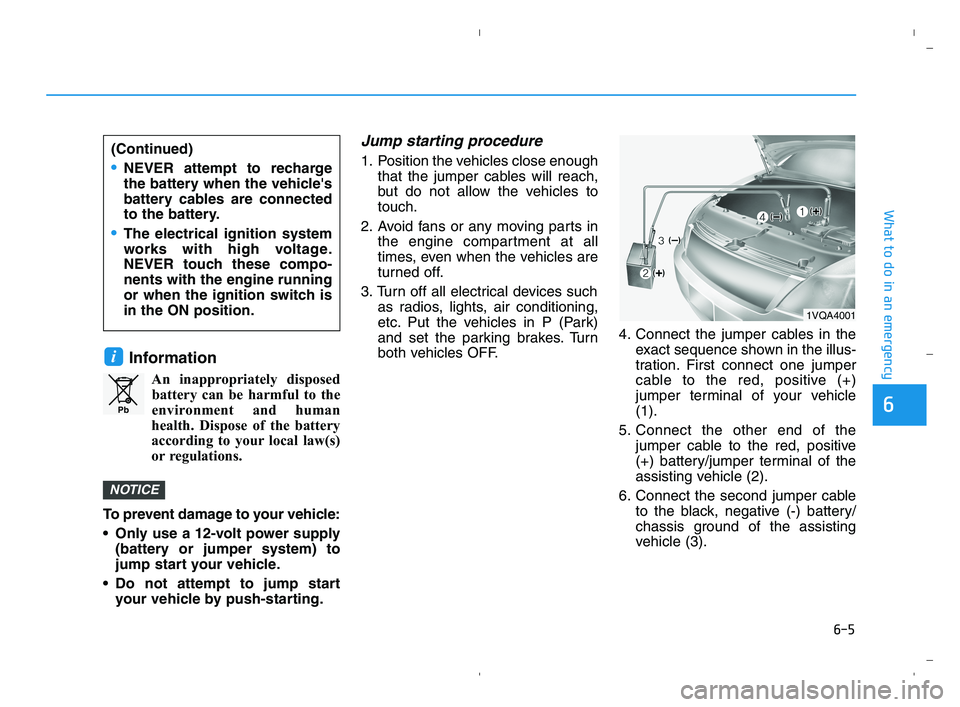
both vehicles OFF.4. Connect the jumper cables in the
exact sequence shown in the illus-
tration. First connect one jumper
cable to the red, positive (+)
jumper terminal of your vehicle
(1).
5. Connect the other end of the
jumper cable to the red, positive
(+) battery/jumper terminal of the
assisting vehicle (2).
6. Connect the second jumper cable
to the black, negative (-) battery/
chassis ground of the assisting
vehicle (3).
NOTICE
i
Pb
(Continued)
NEVER attempt to recharge
the battery when the vehicle's
battery cables are connected
to the battery.
The electrical ignition system
works with high voltage.
NEVER touch these compo-
nents with the engine running
or when the ignition switch is
in the ON position.
1VQA4001
HCa HMA 6.qxp 5/25/2020 11:03 AM Page 5
Page 321 of 443
6-6
What to do in an emergency
7. Connect the other end of the sec-
ond jumper cable to the black,
negative (-) chassis ground of
your vehicle (4).
Do not allow the jumper cables to
contact anything except the cor-
rect battery or jumper terminals or
the correct ground. Do not lean
over the battery when making
connections.
8. Start the engine of the assisting
vehicle and let it run at approxi-
mately 2,000 rpm for a few min-
utes. Then start your vehicle.
If your vehicle will not start after a
few attempts, it probably requires
servicing. In this event please seek
qualified assistance. If the cause of
your battery discharging is not
apparent, have your vehicle checked
by an authorized HYUNDAI dealer.Disconnect the jumper cables in the
exact reverse order you connected
them:
1. Disconnect the jumper cable from
the black, negative (-) chassis
ground of your vehicle (4).
2. Disconnect the other end of the
jumper cable from the black, neg-
ative (-) battery/chassis ground of
the assisting vehicle (3).
3. Disconnect the second jumper
cable from the red, positive (+)
battery/jumper terminal of the
assisting vehicle (2).
4. Disconnect the other end of the
jumper cable from the red, positive
(+) jumper terminal of your vehicle
(1).If your temperature gage indicates
overheating, you experience a loss
of power, or hear loud pinging or
knocking, the engine may be over-
heating. If this happens, you should:
1. Pull off the road and stop as soon
as it is safe to do so.
2. Place the shift lever in P (Park)
and set the parking brake. If the air
conditioning is ON, turn it OFF.
3. If engine coolant is running out
under the vehicle or steam is com-
ing out from the hood, stop the
engine. Do not open the hood until
the coolant has stopped running
or the steaming has stopped. If
there is no visible loss of engine
coolant and no steam, leave the
engine running and check to be
sure the engine cooling fan is
operating. If the fan is not running,
turn the engine off.
I IF
F
T
TH
HE
E
E
EN
NG
GI
IN
NE
E
O
OV
VE
ER
RH
HE
EA
AT
TS
S
HCa HMA 6.qxp 5/25/2020 11:03 AM Page 6
Page 322 of 443
6-7
What to do in an emergency
6
4. Check for coolant leaking from the
radiator, hoses or under the vehi-
cle. (If the air conditioning had
been in use, it is normal for cold
water to be draining from it when
you stop.)
5. If engine coolant is leaking out,
stop the engine immediately and
call the nearest authorized
HYUNDAI dealer for assistance.6. If you cannot find the cause of the
overheating, wait until the engine
temperature has returned to nor-
mal. Then, if coolant has been
lost, carefully add coolant to the
reservoir to bring the fluid level in
the reservoir up to the halfway
mark.
7. Proceed with caution, keeping
alert for further signs of overheat-
ing. If overheating happens again,
call an authorized HYUNDAI deal-
er for assistance.
Serious loss of coolant indi-
cates a leak in the cooling sys-
tem and should be checked as
soon as possible by an author-
ized HYUNDAI dealer.
CAUTION
While the engine is running,
keep hands, clothing and tools
away from the moving parts
such as the cooling fan and
drive belt to prevent serious
injury.
WARNING
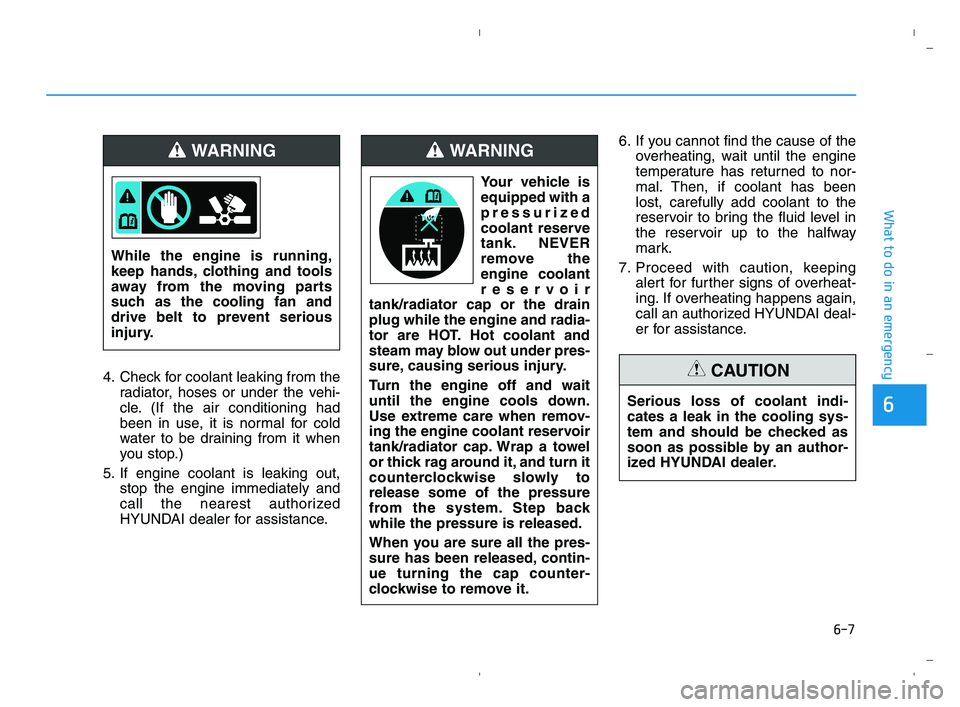
Your vehicle is
equipped with a
pressurized
coolant reserve
tank. NEVER
remove the
engine coolant
reservoir
tank/radiator cap or the drain
plug while the engine and radia-
tor are HOT. Hot coolant and
steam may blow out under pres-
sure, causing serious injury.
Turn the engine off and wait
until the engine cools down.
Use extreme care when remov-
ing the engine coolant reservoir
tank/radiator cap. Wrap a towel
or thick rag around it, and turn it
counterclockwise slowly to
release some of the pressure
from the system. Step back
while the pressure is released.
When you are sure all the pres-
sure has been released, contin-
ue turning the cap counter-
clockwise to remove it.
WARNING
HCa HMA 6.qxp 5/25/2020 11:03 AM Page 7
Page 345 of 443
7-6
Maintenance
Owner Maintenance Schedule
When you stop for fuel:
• Check the engine oil level.
Check the coolant level in the
engine coolant reservoir.
Check the windshield washer fluid
level.
Check the for low or under-inflated
tires.
While operating your vehicle:
Note any changes in the sound of
the exhaust or any smell of
exhaust fumes in the vehicle.
Check for vibrations in the steering
wheel. Notice if there is any
increased steering effort or loose-
ness in the steering wheel, or
change in its straight-ahead posi-
tion.
Notice if your vehicle constantly
turns slightly or "pulls" to one side
when traveling on smooth, level
road.
When stopping, listen and check
for unusual sounds, pulling to one
side, increased brake pedal travel
or "hard-to-push" brake pedal.
If any slipping or changes in the
operation of your transmission
occurs, check the transmission
fluid level.
Check the intelligent variable trans-
mission (IVT) P (Park) function.
Check the parking brake.
Check for fluid leaks under your
vehicle (water dripping from the air
conditioning system during or after
use is normal).
At least monthly:
Check coolant level in the engine
coolant reservoir.
Check the operation of all exterior
lights, including the brake lights,
turn signals and hazard warning
flashers.
Check the inflation pressures of all
tires including the spare for tires
that are worn, show uneven wear,
or are damaged.
Check for loose wheel lug nuts.
At least twice a year:
(i.e., every Spring and Autumn)
Check radiator, heater and air con-
ditioning hoses for leaks or dam-
age.
Check windshield washer spray
and wiper operation. Clean wiper
blades with a clean cloth damp-
ened with washer a fluid.
Check headlamp alignment.
Check muffler, exhaust pipes,
shields and clamps.
Check the seat belts for wear and
function. Be careful when checking your
engine coolant level when the
engine is hot. This may result in
coolant being blown out of the
opening and cause serious
burns and other injuries.
WARNING
HCa HMA 7.qxp 6/3/2020 7:40 AM Page 6
Page 346 of 443
7-7
7
Maintenance
• Check headlamp alignment.
Check muffler, exhaust pipes,
shields and clamps.
Check the seat belts for wear and
function.
At least once a year:
Clean body and door drain holes.
Lubricate door hinges and hood
hinges.
Lubricate door and hood locks and
latches.
Lubricate door rubber weather
strips.
Lubricate door checker.
Check the air conditioning system.
Inspect and lubricate intelligent
variable transmission (IVT) linkage
and controls.
Clean the battery and terminals.
Check the brake fluid level.Follow Normal Maintenance Schedule
if the vehicle is usually operated where
none of the following conditions apply.
If any of the following conditions apply,
you must follow the Maintenance
Under Severe Usage Conditions.
Repeated short distance driving.
Driving in dusty conditions or
sandy areas.
Extensive use of brakes.
Driving in areas where salt or other
corrosive materials are used.
Driving on rough or muddy roads.
Driving in mountainous areas.
Extended periods of idling or low
speed operation.
Driving for a prolonged period in
cold temperatures and/or extreme-
ly humid climates.
More than 50% driving in heavy
city traffic during hot weather
above 90°F (32°C).
Engine oil usage which is not rec-
ommended (mineral type, lower
grade spec, etc.)
For additional information or assis-
tance see your authorized HYUNDAI
dealer.After 10 years or 100,000 miles, we
recommend to use severe mainte-
nance schedule.
NOTICE
S SC
CH
HE
ED
DU
UL
LE
ED
D
M
MA
AI
IN
NT
TE
EN
NA
AN
NC
CE
E
S
SE
ER
RV
VI
IC
CE
ES
S
HCa HMA 7.qxp 6/12/2020 5:00 PM Page 7
Page 354 of 443
7-15
7
Maintenance
Manual Transmission Fluid
(if equipped)
Inspect the manual transmission
fluid according to the maintenance
schedule.
Brake Hoses and Lines
Visually check for proper installation,
chafing, cracks, deterioration and
any leakage. Replace any deteriorat-
ed or damaged parts immediately.
Brake/Clutch Fluid
Check the brake/clutch fluid level in
the brake/clutch fluid reservoir. The
level should be between the MIN and
the MAX marks on the side of the
reservoir. Use only hydraulic
brake/clutch fluid conforming to
DOT4 specification.
Parking Brake
Inspect the parking brake system
including the parking brake cables.
Brake Discs, Pads, Calipers
Check the pads for excessive wear,
discs for run out and wear, and
calipers for fluid leakage.
Exhaust Pipe and Muffler
Visually inspect the exhaust pipes,
muffler and hangers for cracks, dete-
rioration, or damage. Start the engine
and listen carefully for any exhaust
gas leakage. Tighten connections or
replace parts as necessary.
Suspension Mounting Bolts
Check the suspension connections
for looseness or damage. Retighten
to the specified torque.
Steering Gear Box, Linkage &
Boots/Lower Arm Ball Joint
With the vehicle stopped and the
engine off, check for excessive free-
play in the steering wheel. Check the
linkage for bends or damage. Check
the dust boots and ball joints for
deterioration, cracks, or damage.
Replace any damaged parts.
Drive Shafts and Boots
Check the drive shafts, boots and
clamps for cracks, deterioration, or
damage. Replace any damaged
parts and, if necessary, repack the
grease.
Air Conditioning Refrigerant
Check the air conditioning lines and
connections for leakage and dam-
age.
HCa HMA 7.qxp 5/25/2020 11:08 AM Page 15
Page 424 of 443
Specifications, Consumer information and Reporting safety defects
8
Dimensions ..............................................................8-2
Engine ......................................................................8-2
Bulb Wattage ..........................................................8-3
Tires and Wheels ...................................................8-4
Volume and Weight ................................................8-5
Air Conditioning System........................................8-5
Recommended Lubricants and Capacities ..........8-6
Recommended SAE viscosity number ...........................8-8
Vehicle Identification Number (VIN) ...................8-9
Vehicle Certification Label....................................8-9
Tire Specification and Pressure Label .............8-10
Engine Number .....................................................8-10
Consumer Information .........................................8-11
Reporting Safety Defects ...................................8-12
HCa HMA 8.qxp 5/25/2020 11:38 AM Page 1
Page 437 of 443
I-2
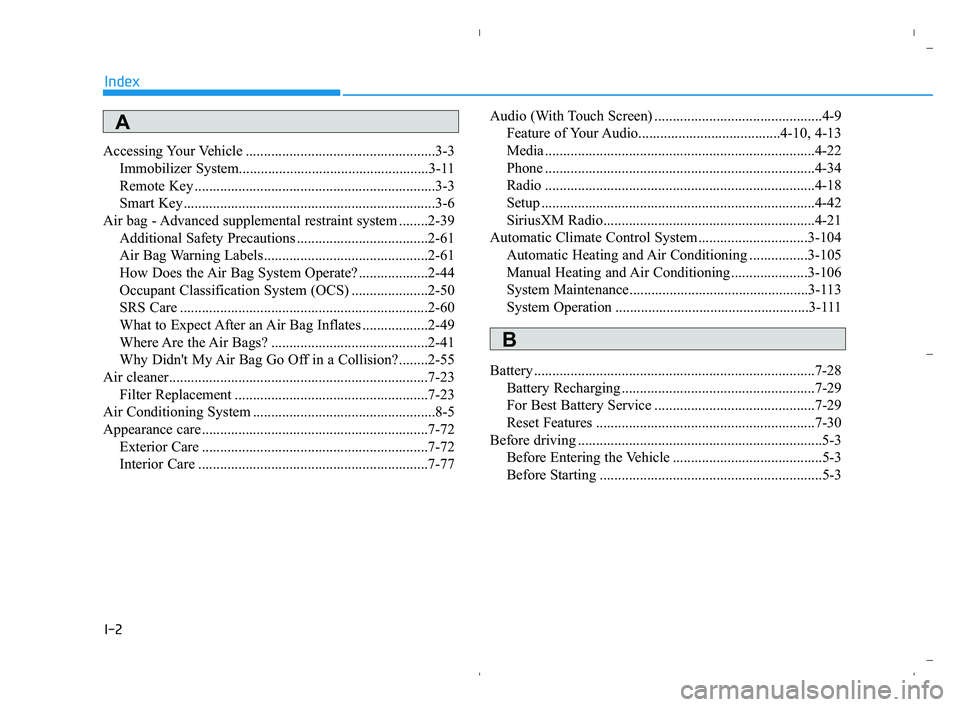
Accessing Your Vehicle ....................................................3-3
Immobilizer System....................................................3-11
Remote Key ..................................................................3-3
Smart Key.....................................................................3-6
Air bag - Advanced supplemental restraint system ........2-39
Additional Safety Precautions ....................................2-61
Air Bag Warning Labels.............................................2-61
How Does the Air Bag System Operate? ...................2-44
Occupant Classification System (OCS) .....................2-50
SRS Care ....................................................................2-60
What to Expect After an Air Bag Inflates ..................2-49
Where Are the Air Bags? ...........................................2-41
Why Didn't My Air Bag Go Off in a Collision?........2-55
Air cleaner.......................................................................7-23
Filter Replacement .....................................................7-23
Air Conditioning System ..................................................8-5
Appearance care..............................................................7-72
Exterior Care ..............................................................7-72
Interior Care ...............................................................7-77Audio (With Touch Screen) ..............................................4-9
Feature of Your Audio.......................................4-10, 4-13
Media ..........................................................................4-22
Phone ..........................................................................4-34
Radio ..........................................................................4-18
Setup ...........................................................................4-42
SiriusXM Radio..........................................................4-21
Automatic Climate Control System..............................3-104
Automatic Heating and Air Conditioning ................3-105
Manual Heating and Air Conditioning .....................3-106
System Maintenance.................................................3-113
System Operation .....................................................3-111
Battery .............................................................................7-28
Battery Recharging .....................................................7-29
For Best Battery Service ............................................7-29
Reset Features ............................................................7-30
Before driving ...................................................................5-3
Before Entering the Vehicle .........................................5-3
Before Starting .............................................................5-3
Index
A
B
HCa HMA INDEX.qxp 5/25/2020 11:16 AM Page 2
Page 440 of 443
I-5
Infotainment System .........................................................4-2
Antenna ........................................................................4-2
AUX, USB and iPod
®Port ..........................................4-2
Bluetooth®Wireless Technology Hands-Free ..............4-4
Features of Your Vehicle ..............................................4-7
How Vehicle Audio Works ...........................................4-5
Steering Wheel Audio Control .....................................4-3
Instrument Cluster...........................................................3-52
Gauges and Meters .....................................................3-54
Instrument Cluster Control .........................................3-53
LCD Display Messages ..............................................3-68
Transmission shift indicator .......................................3-57
Warning and Indicator Lights.....................................3-58
Instrument Panel Overview ..............................................1-5
Interior Features ............................................................3-123
Clock ........................................................................3-127
Clothes Hanger .........................................................3-127
Cup Holder ...............................................................3-123
Floor Mat Anchor(s) .................................................3-128
Luggage Net Holder .................................................3-128
Power Outlet.............................................................3-125
Sunvisor ....................................................................3-124
Interior Overview..............................................................1-4
Jump Starting ....................................................................6-4LCD Display ...................................................................3-72
LCD Display Control .................................................3-72
LCD Display Modes ..................................................3-72
Light bulbs ......................................................................7-61
Headlamp, Position lamp, Fog lamp,
Daytime Running Light, Turn Signal Lamp and
Side Marker .............................................................7-61
High Mounted Stop Lamp Replacement....................7-70
License Plate Light Bulb Replacement ......................7-70
Rear Combination Light Bulb Replacement ..............7-67
Side Repeater Lamp Replacement .............................7-67
Lighting ...........................................................................3-85
Exterior Lights............................................................3-85
Interior Lights.............................................................3-90
Welcome System ........................................................3-91
Maintenance services ........................................................7-4
Owner Maintenance Precautions..................................7-4
Owner's Responsibility.................................................7-4
Manual Climate Control System ....................................3-95
Heating and Air Conditioning ....................................3-96
System Maintenance ................................................3-102
System Operation .....................................................3-100
I
Index
J
L
M
HCa HMA INDEX.qxp 5/25/2020 11:16 AM Page 5