spec HYUNDAI ACCENT 2022 Workshop Manual
[x] Cancel search | Manufacturer: HYUNDAI, Model Year: 2022, Model line: ACCENT, Model: HYUNDAI ACCENT 2022Pages: 443, PDF Size: 42.78 MB
Page 269 of 443
5-17
Driving your vehicle
5
Good Driving Practices
Never take the vehicle out of gear
and coast down a hill. This is
extremely dangerous.
Don't "ride" the brakes. This can
cause the brakes and related parts
to overheat and malfunction.
When you are driving down a long
hill, slow down and shift to a lower
gear. Engine braking will help slow
down the vehicle.
Slow down before shifting to a
lower gear. This will help avoid
over-revving the engine, which can
cause damage.
Slow down when you encounter
cross winds. This gives you much
better control of your vehicle.
Be sure the vehicle is completely
stopped before you shift into R
(Reverse) to prevent damage to
the transmission. Exercise extreme caution when
driving on a slippery surface. Be
especially careful when braking,
accelerating or shifting gears. On a
slippery surface, an abrupt change
in vehicle speed can cause the
drive wheels to lose traction and
may cause loss of vehicle control
resulting in an accident
Do not use aggressive engine
braking (shifting from a higher
gear to a lower gear) on slip-
pery roads. This could cause
the tires to slip and may result
in an accident.
WARNING
(Continued)
Avoid high speeds when cor-
nering or turning.
Do not make quick steering
wheel movements, such as
sharp lane changes or fast,
sharp turns.
The risk of rollover is greatly
increased if you lose control
of your vehicle at highway
speeds.
Loss of control often occurs if
two or more wheels drop off
the roadway and the driver
over steers to reenter the
roadway.
In the event your vehicle
leaves the roadway, do not
steer sharply. Instead, slow
down before pulling back into
the travel lanes.
HYUNDAI recommends you
follow all posted speed limits.
To reduce the risk of SERIOUS
INJURY or DEATH:
ALWAYS wear your seatbelt.
In a collision, an unbelted
occupant is significantly more
likely to be seriously injured
or killed than a properly belt-
ed occupant.
(Continued)
WARNING
HCa HMA 5.QXP 5/25/2020 10:20 AM Page 17
Page 270 of 443
5-18
Driving your vehicle
S SM
MA
AR
RT
TS
ST
TR
RE
EA
AM
M
I
IN
NT
TE
EL
LL
LI
IG
GE
EN
NT
T
V
VA
AR
RI
IA
AB
BL
LE
E
T
TR
RA
AN
NS
SM
MI
IS
SS
SI
IO
ON
N
(
(S
SM
MA
AR
RT
TS
ST
TR
RE
EA
AM
M
I
IV
VT
T)
)
( (I
IF
F
E
EQ
QU
UI
IP
PP
PE
ED
D)
)
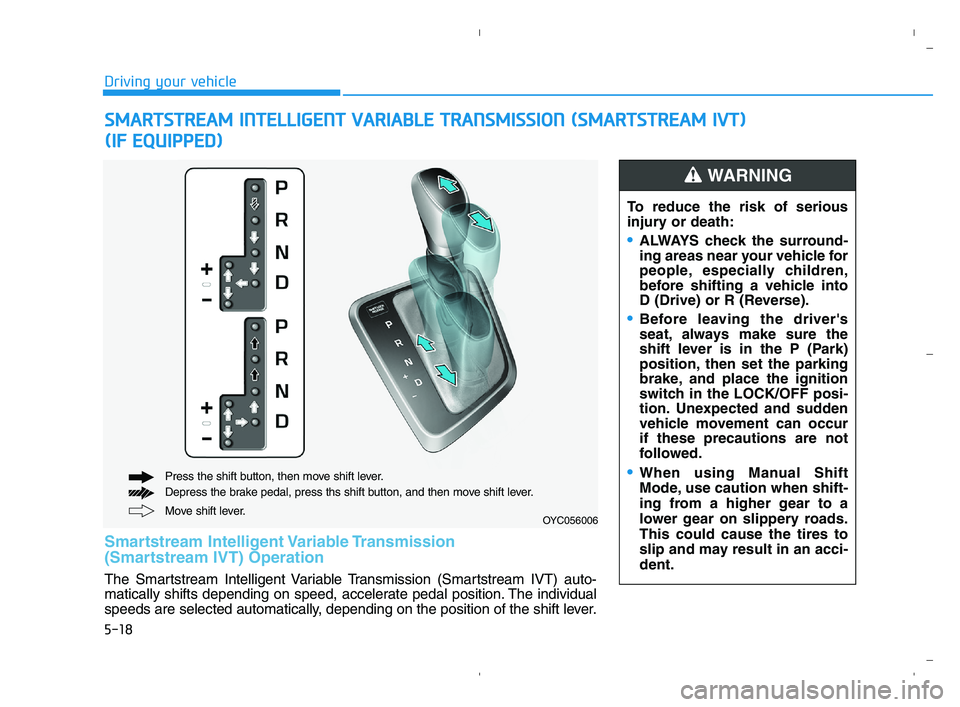
Move shift lever. Press the shift button, then move shift lever.
Depress the brake pedal, press ths shift button, and then move shift lever.OYC056006
To reduce the risk of serious
injury or death:
ALWAYS check the surround-
ing areas near your vehicle for
people, especially children,
before shifting a vehicle into
D (Drive) or R (Reverse).
Before leaving the driver's
seat, always make sure the
shift lever is in the P (Park)
position, then set the parking
brake, and place the ignition
switch in the LOCK/OFF posi-
tion. Unexpected and sudden
vehicle movement can occur
if these precautions are not
followed.
When using Manual Shift
Mode, use caution when shift-
ing from a higher gear to a
lower gear on slippery roads.
This could cause the tires to
slip and may result in an acci-
dent.
WARNING
Smartstream Intelligent Variable Transmission
(Smartstream IVT) Operation
The Smartstream Intelligent Variable Transmission (Smartstream IVT) auto-
matically shifts depending on speed, accelerate pedal position. The individual
speeds are selected automatically, depending on the position of the shift lever.
HCa HMA 5.QXP 5/25/2020 10:20 AM Page 18
Page 274 of 443
5-22
Driving your vehicle
5. Move the shift lever.
6. Remove the tool from the shift-
lock override access hole then
install the cap.
If you need to use the shift-lock
release, have your vehicle inspected
by an authorized HYUNDAI dealer
as soon as possible.
Parking
Always come to a complete stop and
continue to depress the brake pedal.
Move the shift lever into the P (Park)
position, apply the parking brake,
and place the ignition switch in the
LOCK/OFF position. Take the Key
with you when exiting the vehicle.
Good Driving Practices
• Never move the shift lever from P
(Park) or N (Neutral) to any other
position with the accelerator pedal
depressed.
Never move the shift lever into P
(Park) when the vehicle is in
motion.
Be sure the vehicle is completely
stopped before you attempt to shift
into R (Reverse) or D (Drive).
Do not move the shift lever to N
(Neutral) when driving. Doing so
may result in an accident because
of a loss of engine braking and the
transmission could be damaged.
While driving up or downhill, check
the gear position, indicated on the
cluster, to ensure the vehicle is
driving forward while in D (Drive),
or backward while in R (Reverse).
If you drive in the opposite direc-
tion of the selected gear, the
engine will turn off and a serious
accident may occur due to the
degraded brake performance.
•When you stay in the vehicle
with the engine running, be
careful not to depress the
accelerator pedal for a long
period of time. The engine or
exhaust system may overheat
and start a fire.
The exhaust gas and the
exhaust system are very hot.
Keep away from the exhaust
system components.
Do not stop or park over flam-
mable materials, such as dry
grass, paper or leaves. They
may ignite and cause a fire.
WARNING
HCa HMA 5.QXP 6/3/2020 7:28 AM Page 22
Page 275 of 443
5-23
Driving your vehicle
5
Do not drive with your foot resting
on the brake pedal. Even light, but
consistent pedal pressure can
result in the brakes overheating,
brake wear and possibly even
brake failure.
Depressing both accelerator and
brake pedals at the same time can
trigger logic for engine power
reduction to assure vehicle decel-
eration. Vehicle acceleration will
resume after the brake pedal is
released.
Always apply the parking brake
when leaving the vehicle. Do not
depend on placing the transmis-
sion in P (Park) to keep the vehicle
from moving.
Exercise extreme caution when
driving on a slippery surface. Be
especially careful when braking,
accelerating or shifting gears. On a
slippery surface, an abrupt change
in vehicle speed can cause the
drive wheels to lose traction and
may cause loss of vehicle control
resulting in an accident. Optimum vehicle performance and
economy is obtained by smoothly
depressing and releasing the
accelerator.
To reduce the risk of SERIOUS
INJURY or DEATH:
ALWAYS wear your seatbelt.
In a collision, an unbelted
occupant is significantly more
likely to be seriously injured
or killed than a properly belt-
ed occupant.
Avoid high speeds when cor-
nering or turning.
Do not make quick steering
wheel movements, such as
sharp lane changes or fast,
sharp turns.
The risk of rollover is greatly
increased if you lose control
of your vehicle at highway
speeds.
(Continued)
WARNING
(Continued)
Loss of control often occurs if
two or more wheels drop off
the roadway and the driver
over steers to reenter the
roadway.
In the event your vehicle
leaves the roadway, do not
steer sharply. Instead, slow
down before pulling back into
the travel lanes.
HYUNDAI recommends you
follow all posted speed limits.
HCa HMA 5.QXP 5/25/2020 10:20 AM Page 23
Page 291 of 443
5-39
Driving your vehicle
5
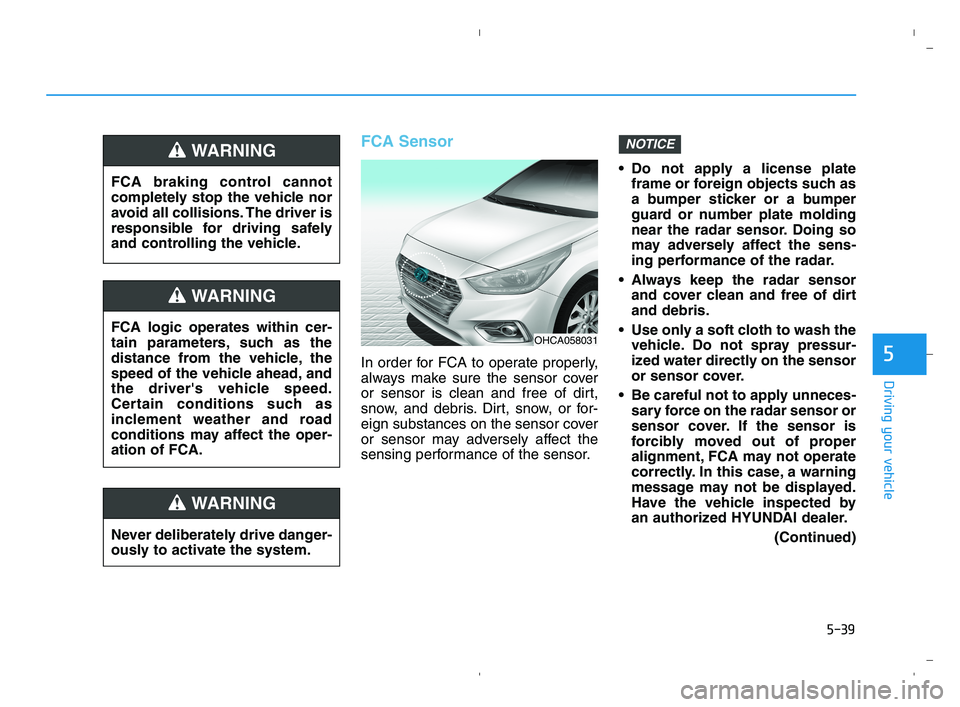
FCA Sensor
In order for FCA to operate properly,
always make sure the sensor cover
or sensor is clean and free of dirt,
snow, and debris. Dirt, snow, or for-
eign substances on the sensor cover
or sensor may adversely affect the
sensing performance of the sensor. Do not apply a license plate
frame or foreign objects such as
a bumper sticker or a bumper
guard or number plate molding
near the radar sensor. Doing so
may adversely affect the sens-
ing performance of the radar.
Always keep the radar sensor
and cover clean and free of dirt
and debris.
Use only a soft cloth to wash the
vehicle. Do not spray pressur-
ized water directly on the sensor
or sensor cover.
Be careful not to apply unneces-
sary force on the radar sensor or
sensor cover. If the sensor is
forcibly moved out of proper
alignment, FCA may not operate
correctly. In this case, a warning
message may not be displayed.
Have the vehicle inspected by
an authorized HYUNDAI dealer.
(Continued)
NOTICE
FCA logic operates within cer-
tain parameters, such as the
distance from the vehicle, the
speed of the vehicle ahead, and
the driver's vehicle speed.
Certain conditions such as
inclement weather and road
conditions may affect the oper-
ation of FCA.
WARNING
FCA braking control cannot
completely stop the vehicle nor
avoid all collisions. The driver is
responsible for driving safely
and controlling the vehicle.
WARNING
Never deliberately drive danger-
ously to activate the system.
WARNING
OHCA058031
HCa HMA 5.QXP 5/25/2020 10:21 AM Page 39
Page 292 of 443
5-40
Driving your vehicle
(Continued)
If the front bumper becomes
damaged in the area around the
radar sensor, FCA may not oper-
ate properly. Have the vehicle
inspected by an authorized
HYUNDAI dealer.
Use only genuine HYUNDAI
parts to repair or replace a dam-
aged sensor or sensor cover. Do
not apply paint to the sensor
cover.
Playing the vehicle audio sys-
tem at high volume may make it
difficult to hear FCA warning
sounds.
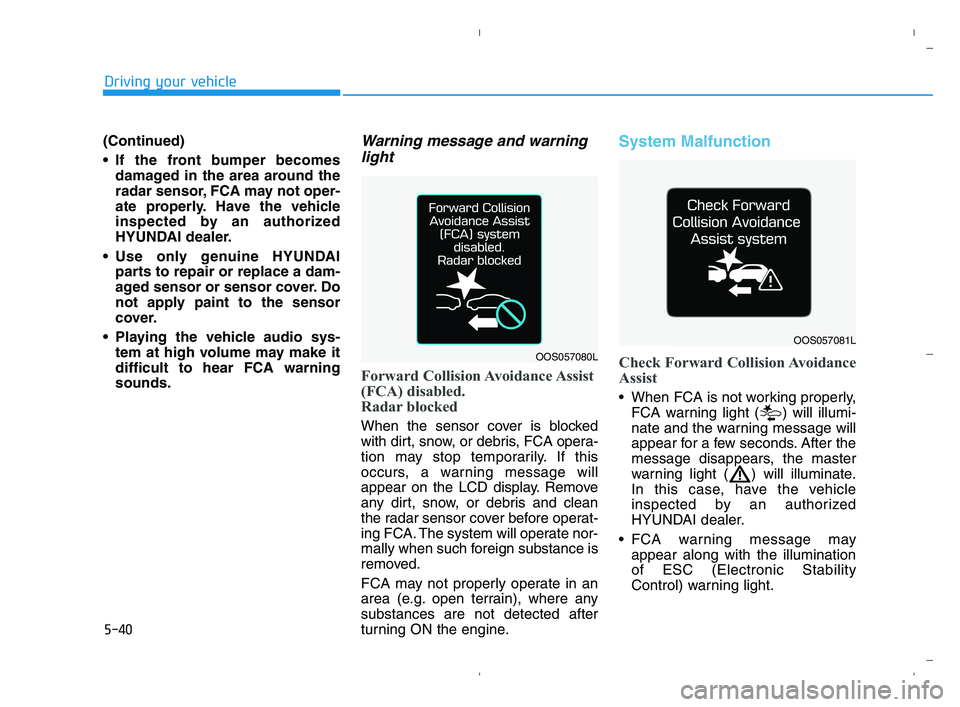
Warning message and warning
light
Forward Collision Avoidance Assist
(FCA) disabled.
Radar blocked
When the sensor cover is blocked
with dirt, snow, or debris, FCA opera-
tion may stop temporarily. If this
occurs, a warning message will
appear on the LCD display. Remove
any dirt, snow, or debris and clean
the radar sensor cover before operat-
ing FCA. The system will operate nor-
mally when such foreign substance is
removed.
FCA may not properly operate in an
area (e.g. open terrain), where any
substances are not detected after
turning ON the engine.
System Malfunction
Check Forward Collision Avoidance
Assist
When FCA is not working properly,
FCA warning light ( ) will illumi-
nate and the warning message will
appear for a few seconds. After the
message disappears, the master
warning light ( ) will illuminate.
In this case, have the vehicle
inspected by an authorized
HYUNDAI dealer.
FCA warning message may
appear along with the illumination
of ESC (Electronic Stability
Control) warning light.
OOS057080L
OOS057081L
HCa HMA 5.QXP 5/25/2020 10:21 AM Page 40
Page 296 of 443
5-44
Driving your vehicle
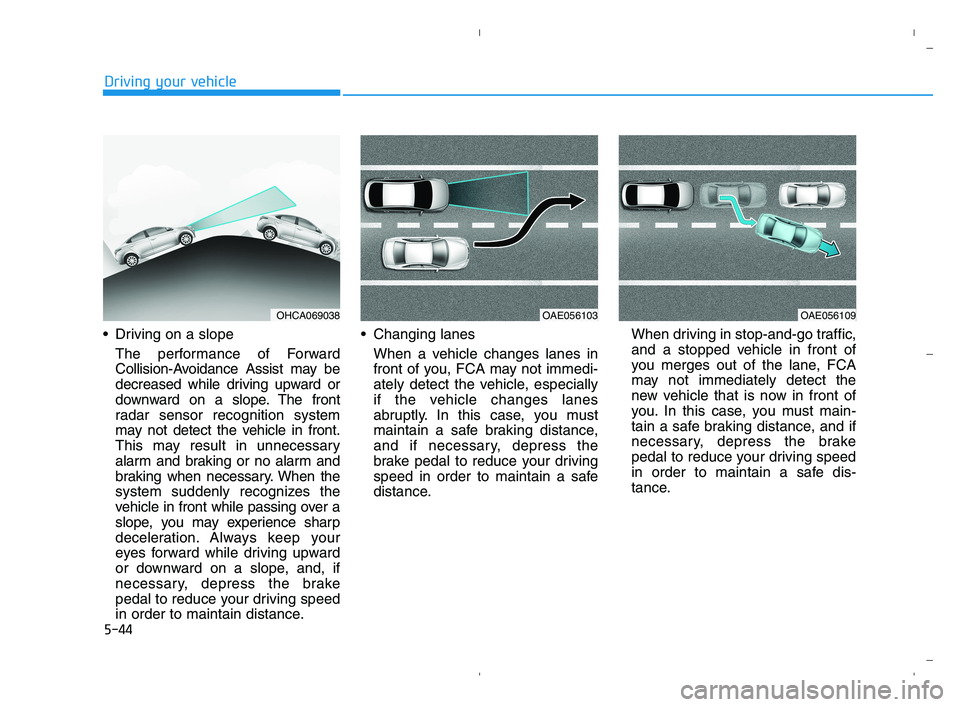
Driving on a slope
The performance of Forward
Collision-Avoidance Assist may be
decreased while driving upward or
downward on a slope. The front
radar sensor recognition system
may not detect the vehicle in front.
This may result in unnecessary
alarm and braking or no alarm and
braking when necessary. When the
system suddenly recognizes the
vehicle in front while passing over a
slope, you may experience sharp
deceleration. Always keep your
eyes forward while driving upward
or downward on a slope, and, if
necessary, depress the brake
pedal to reduce your driving speed
in order to maintain distance. Changing lanes
When a vehicle changes lanes in
front of you, FCA may not immedi-
ately detect the vehicle, especially
if the vehicle changes lanes
abruptly. In this case, you must
maintain a safe braking distance,
and if necessary, depress the
brake pedal to reduce your driving
speed in order to maintain a safe
distance.When driving in stop-and-go traffic,
and a stopped vehicle in front of
you merges out of the lane, FCA
may not immediately detect the
new vehicle that is now in front of
you. In this case, you must main-
tain a safe braking distance, and if
necessary, depress the brake
pedal to reduce your driving speed
in order to maintain a safe dis-
tance.
OHCA069038OAE056103OAE056109
HCa HMA 5.QXP 5/25/2020 10:21 AM Page 44
Page 297 of 443
5-45
Driving your vehicle
5
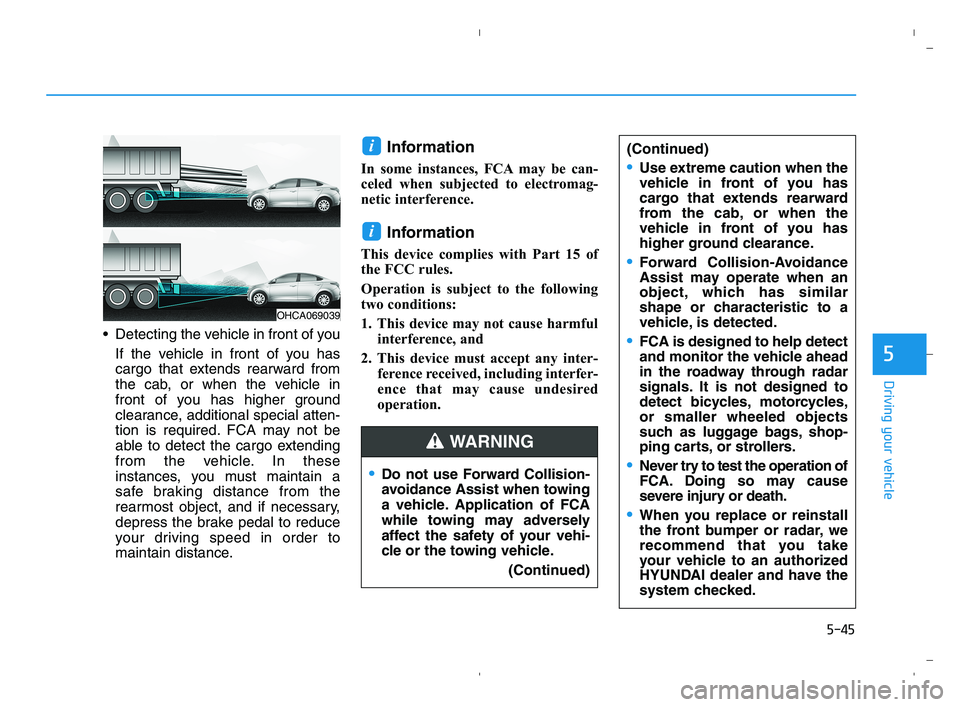
Detecting the vehicle in front of you
If the vehicle in front of you has
cargo that extends rearward from
the cab, or when the vehicle in
front of you has higher ground
clearance, additional special atten-
tion is required. FCA may not be
able to detect the cargo extending
from the vehicle. In these
instances, you must maintain a
safe braking distance from the
rearmost object, and if necessary,
depress the brake pedal to reduce
your driving speed in order to
maintain distance.
Information
In some instances, FCA may be can-
celed when subjected to electromag-
netic interference.
Information
This device complies with Part 15 of
the FCC rules.
Operation is subject to the following
two conditions:
1. This device may not cause harmful
interference, and
2. This device must accept any inter-
ference received, including interfer-
ence that may cause undesired
operation.
i
i
OHCA069039
Do not use Forward Collision-
avoidance Assist when towing
a vehicle. Application of FCA
while towing may adversely
affect the safety of your vehi-
cle or the towing vehicle.
(Continued)
(Continued)
Use extreme caution when the
vehicle in front of you has
cargo that extends rearward
from the cab, or when the
vehicle in front of you has
higher ground clearance.
Forward Collision-Avoidance
Assist may operate when an
object, which has similar
shape or characteristic to a
vehicle, is detected.
FCA is designed to help detect
and monitor the vehicle ahead
in the roadway through radar
signals. It is not designed to
detect bicycles, motorcycles,
or smaller wheeled objects
such as luggage bags, shop-
ping carts, or strollers.
Never try to test the operation of
FCA. Doing so may cause
severe injury or death.
When you replace or reinstall
the front bumper or radar, we
recommend that you take
your vehicle to an authorized
HYUNDAI dealer and have the
system checked.
WARNING
HCa HMA 5.QXP 5/25/2020 10:21 AM Page 45
Page 304 of 443

5-52
Driving your vehicle
Information
The ESC system must be turned OFF
before rocking the vehicle.
If you are still stuck after rocking
the vehicle a few times, have the
vehicle pulled out by a tow vehicle
to avoid engine overheating, pos-
sible damage to the transmission,
and tire damage. See "Towing" in
chapter 6.
Smooth Cornering
Avoid braking or gear changing in
corners, especially when roads are
wet. Ideally, corners should always
be taken under gentle acceleration.
Driving at Night
Night driving presents more hazards
than driving in the daylight. Here are
some important tips to remember:
Slow down and keep more dis-
tance between you and other vehi-
cles, as it may be more difficult to
see at night, especially in areas
where there may not be any street
lights.
Adjust your mirrors to reduce the
glare from other driver's head-
lamps.
Keep your headlamps clean and
properly aimed. Dirty or improperly
aimed headlamps will make it
much more difficult to see at night.
Avoid staring directly at the head-
lamps of oncoming vehicles. You
could be temporarily blinded, and it
will take several seconds for your
eyes to readjust to the darkness.
Driving in the Rain
Rain and wet roads can make driving
dangerous. Here are a few things to
consider when driving in the rain or
on slick pavement:
Slow down and allow extra follow-
ing distance. A heavy rainfall
makes it harder to see and increas-
es the distance needed to stop
your vehicle.
Turn OFF your Cruise Control.
Replace your windshield wiper
blades when they show signs of
streaking or missing areas on the
windshield.
Tires should be properly main-
tained with at least 2/32nds of an
inch of tread depth. If your tires do
not have enough tread, making a
quick stop on wet pavement can
cause a skid and possibly lead to
an accident.See "Tire Tread" in
chapter 7.
Turn on your headlamps to make it
easier for others to see you.
NOTICE
i
HCa HMA 5.QXP 5/25/2020 10:22 AM Page 52
Page 305 of 443
5-53
Driving your vehicle
5
Driving too fast through large pud-
dles can affect your brakes. If you
must go through puddles, try to
drive through them slowly.
If you believe your brakes may be
wet, apply them lightly while driv-
ing until normal braking operation
returns.
Hydroplaning
If the road is wet enough and you are
going fast enough, your vehicle may
have little or no contact with the road
surface and actually ride on the
water. The best advice is SLOW
DOWN when the road is wet.
The risk of hydroplaning increas-
es as the depth of tire tread
decreases, refer to "Tire Tread" in
chapter 7.
Driving in Flooded Areas
Avoid driving through flooded areas
unless you are sure the water is no
higher than the bottom of the wheel
hub. Drive through any water slowly.
Allow adequate stopping distance
because brake performance may be
reduced.
After driving through water, dry the
brakes by gently applying them sev-
eral times while the vehicle is moving
slowly.
Highway Driving
Tires
Adjust the tire inflation, as specified.
Under-inflation may overheat or
damage the tires.
Do not install worn-out or damaged
tires, which may reduce traction or
adversely affect vehicle handling.
This could lead to sudden tire failure
that may cause loss of vehicle con-
trol resulting in an accident.
Information
Never over-inflate your tires above the
maximum inflation pressure, as speci-
fied on your tires.
Fuel, engine coolant and engine
oil
Driving at higher speeds on the high-
way consumes more fuel and is less
efficient than driving at a slower,
more moderate speed. Maintain a
moderate speed in order to conserve
fuel when driving on the highway.
Be sure to check both the engine
coolant level and the engine oil
before driving.
Drive belt
A loose or damaged drive belt may
overheat the engine.
i
In a rollover crash, an unbelted
person is significantly more
likely to die than a person wear-
ing a seat belt. Make sure all
passengers are wearing their
seat belts.
WARNING
HCa HMA 5.QXP 5/25/2020 10:22 AM Page 53