buttons HYUNDAI ACCENT 2023 User Guide
[x] Cancel search | Manufacturer: HYUNDAI, Model Year: 2023, Model line: ACCENT, Model: HYUNDAI ACCENT 2023Pages: 443, PDF Size: 42.78 MB
Page 210 of 443
4-3
Infotainment System
4
Remove the antenna by rotating
it in a counter-clockwise direc-
tion, before entering a place with
a low floor height. If not, the
antenna may be damaged.
Securely install the antenna in
the upright position. This is to
guarantee proper signal recep-
tion. However, you may fold and
remove the antenna, before
parking the vehicle or loading
the luggage on the roof rack.
Do not load the luggage near the
antenna. This is to guarantee
proper signal reception.
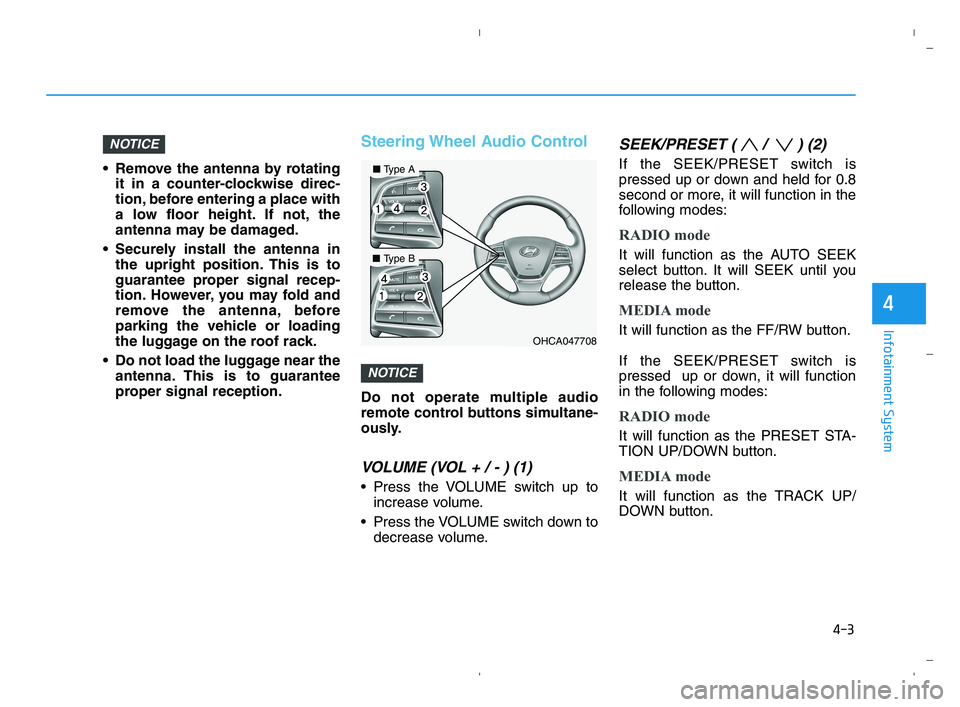
Steering Wheel Audio Control
Do not operate multiple audio
remote control buttons simultane-
ously.
VOLUME (VOL + / - ) (1)
Press the VOLUME switch up to
increase volume.
Press the VOLUME switch down to
decrease volume.
SEEK/PRESET ( / ) (2)
If the SEEK/PRESET switch is
pressed up or down and held for 0.8
second or more, it will function in the
following modes:
RADIO mode
It will function as the AUTO SEEK
select button. It will SEEK until you
release the button.
MEDIA mode
It will function as the FF/RW button.
If the SEEK/PRESET switch is
pressed up or down, it will function
in the following modes:
RADIO mode
It will function as the PRESET STA-
TION UP/DOWN button.
MEDIA mode
It will function as the TRACK UP/
DOWN button.
NOTICE
NOTICE
OHCA047708
■Type A
■Type B
HCa HMA 4.qxp 5/25/2020 10:57 AM Page 3
Page 211 of 443
4-4
Infotainment System
MODE (3)
Press the MODE button to toggle
through Radio, SXM, or AUX modes.
MUTE ( ) (4)
Press the MUTE button to mute the
sound.
Press the MUTE button again to
activate the sound.
Information
Detailed information for audio control
buttons are described in the separately
supplied manual with the vehicle.
Bluetooth®Wireless
Technology Hands-Free
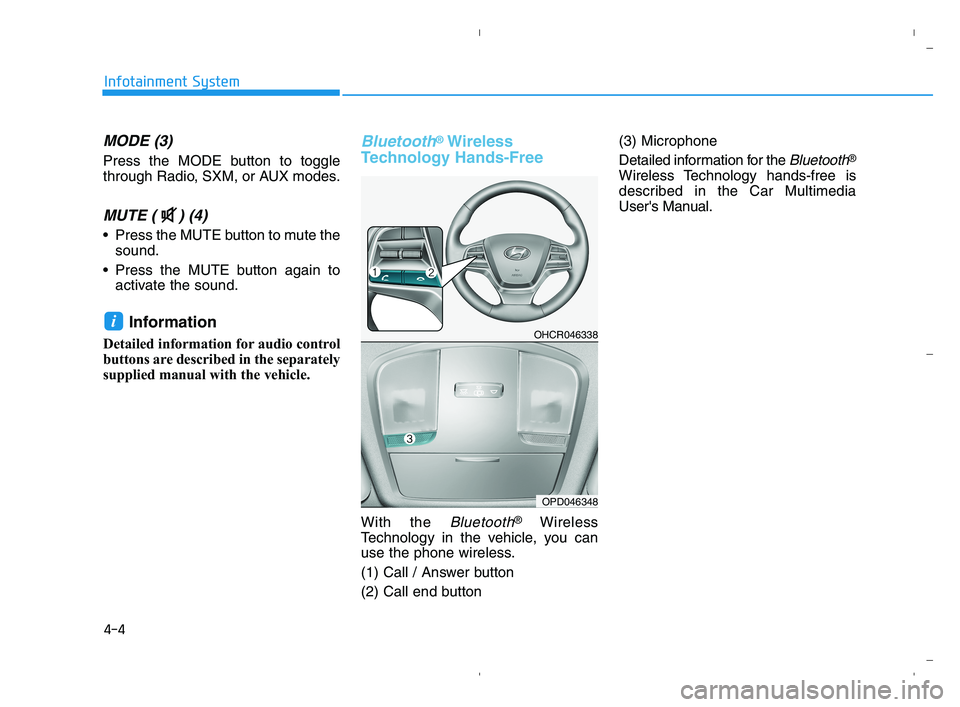
With the Bluetooth®Wireless
Technology in the vehicle, you can
use the phone wireless.
(1) Call / Answer button
(2) Call end button(3) Microphone
Detailed information for the
Bluetooth®
Wireless Technology hands-free is
described in the Car Multimedia
User's Manual.
iOHCR046338
OPD046348
HCa HMA 4.qxp 5/25/2020 10:57 AM Page 4
Page 237 of 443
4-30
Infotainment System
Information
- Using Bluetooth®Wireless
Technology(BT) Audio
(if equipped)
•Bluetooth
®Wireless Technology Audio
mode can only be used if a Bluetooth®
Wireless Technology-enabled phone is
connected. Only devices that support
Bluetooth
®Wireless Technology audio
can be used.
• If the Bluetooth
®Wireless Technology-
enabled phone is disconnected during
play, the music stops.
• When the TRACK UP/DOWN buttons
are used during Bluetooth
®Wireless
Technology audio streaming, a popping
noise or sound interruptions may occur,
depending on the cell phone device.
• Depending on the cell phone model,
the audio streaming function may
not be supported.
• If a phone call is made or received
when music is playing inBluetooth
®
Wireless Technology Audio mode,
the call may mix with the music.
• When returning to Bluetooth
®Wireless
Technology Audio mode after ending a
call, play might not resume automatical-
ly for some cell phone models.
Bluetooth®Wireless Technology
Handsfree is a feature that
enables drivers to practice safe
driving. Connecting the car
audio system with a
Bluetooth®
Wireless Technology phone
allows the user to conveniently
make calls, receive calls, and
manage the phone book. Before
using the
Bluetooth®Wireless
Technology, carefully read the
contents of this user’s manual.
Excessive use or operations
while driving may lead to negli-
gent driving practices and be
the cause of accidents.
Do not operate the device exces-
sively while driving.
Viewing the screen for pro-
longed periods of time is dan-
gerous and may lead to acci-
dents.
When driving, view the screen
only for short periods of time.
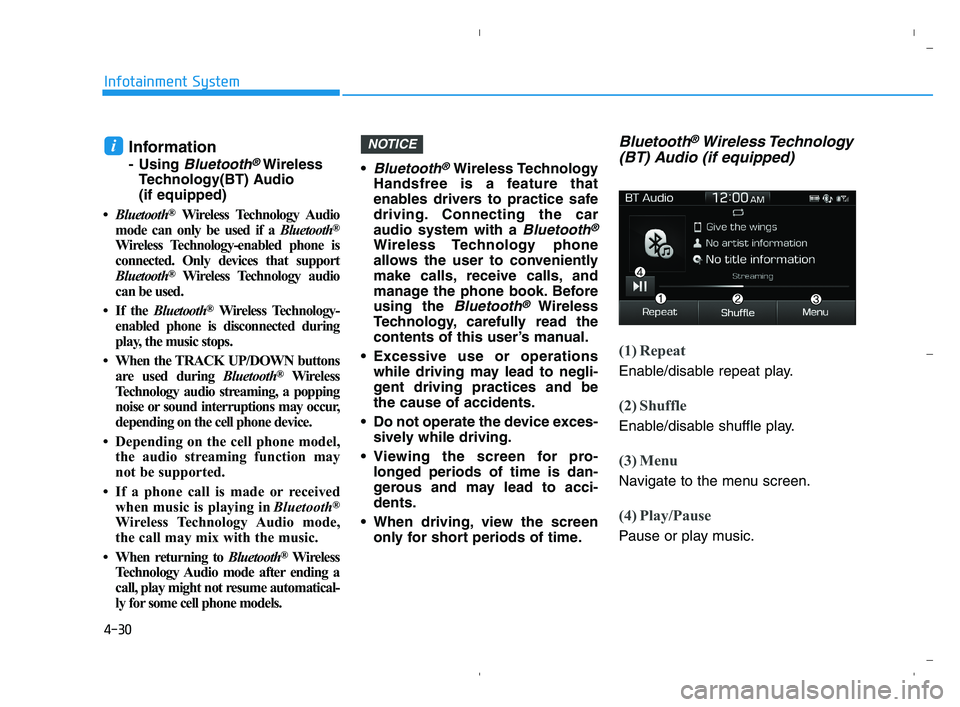
Bluetooth®Wireless Technology
(BT) Audio (if equipped)
(1) Repeat
Enable/disable repeat play.
(2) Shuffle
Enable/disable shuffle play.
(3) Menu
Navigate to the menu screen.
(4) Play/Pause
Pause or play music.
NOTICEi
HCa HMA 4.qxp 5/25/2020 10:59 AM Page 30