phone HYUNDAI ACCENT 2023 Owner's Guide
[x] Cancel search | Manufacturer: HYUNDAI, Model Year: 2023, Model line: ACCENT, Model: HYUNDAI ACCENT 2023Pages: 443, PDF Size: 42.78 MB
Page 247 of 443
4-40
Infotainment System
Information
• Up to 20 favorites can be saved for
each connected Bluetooth®Wireless
Technology device.
• Favorites can be accessed when the
Bluetooth
®Wireless Technology
device they were paired from is con-
nected.
• The audio system does not down-
load favorites from Bluetooth
®
Wireless Technology devices.
Favorites must be newly saved
before use.
• To add to favorites, contacts must be
downloaded first.
• Saved favorites are not updated
even if the contacts of the connected
Bluetooth
®Wireless Technology
device are changed. In this case,
favorites need to be deleted and
added again.
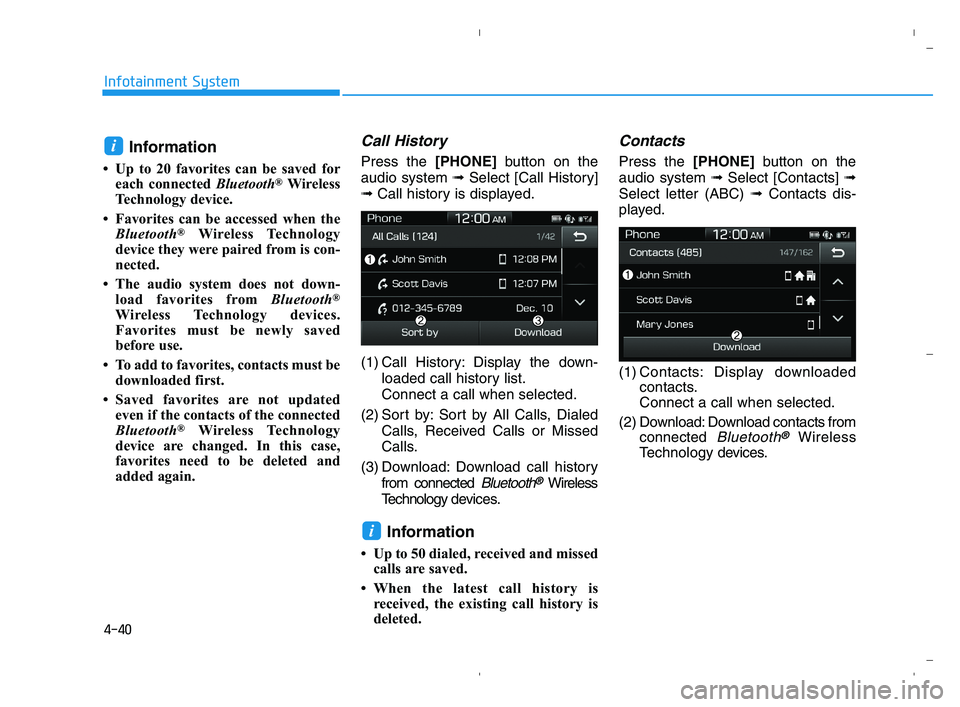
Call History
Press the [PHONE]button on the
audio system ➟Select [Call History]
➟Call history is displayed.
(1) Call History: Display the down-
loaded call history list.
Connect a call when selected.
(2) Sort by: Sort by All Calls, Dialed
Calls, Received Calls or Missed
Calls.
(3) Download: Download call history
from connected
Bluetooth®Wireless
Technology devices.
Information
• Up to 50 dialed, received and missed
calls are saved.
• When the latest call history is
received, the existing call history is
deleted.
Contacts
Press the [PHONE]button on the
audio system ➟Select [Contacts] ➟
Select letter (ABC) ➟Contacts dis-
played.
(1) Contacts: Display downloaded
contacts.
Connect a call when selected.
(2) Download: Download contacts from
connected
Bluetooth®Wireless
Technology devices.
i
i
HCa HMA 4.qxp 5/25/2020 10:59 AM Page 40
Page 248 of 443
4-41
Infotainment System
4
Multimedia System
4
Information
• Only supported contacts format can
be downloaded and displayed from
the Bluetooth
®Wireless Technology
device, contacts from some applica-
tions will not be included.
• Up to 2,000 contacts can be saved.
• In some cases, additional confirmation
from yourBluetooth
®Wireless
Technologydevice is necessary when
downloading contacts. If downloading
of contacts unsuccessful, consult your
Bluetooth
®Wireless Technology
device’s settings or the audio screen to
approve the download.
• Contacts without phone numbers
are not displayed.
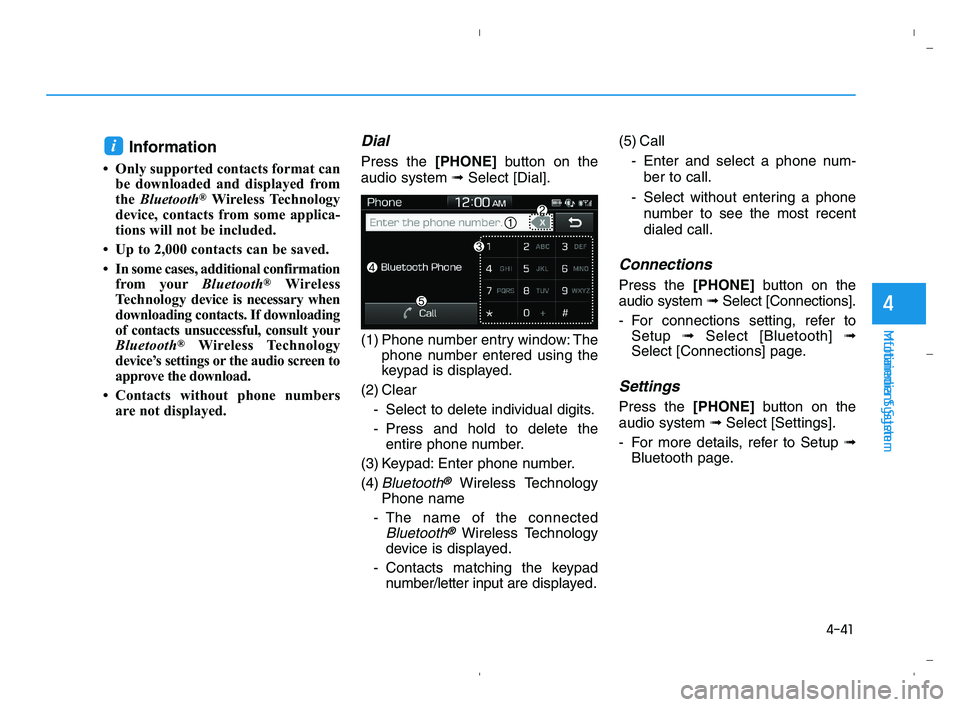
Dial
Press the [PHONE]button on the
audio system ➟Select [Dial].
(1) Phone number entry window: The
phone number entered using the
keypad is displayed.
(2) Clear
- Select to delete individual digits.
- Press and hold to delete the
entire phone number.
(3) Keypad: Enter phone number.
(4)
Bluetooth®Wireless Technology
Phone name
- The name of the connected
Bluetooth®Wireless Technology
device is displayed.
- Contacts matching the keypad
number/letter input aredisplayed.(5) Call
- Enter and select a phone num-
ber to call.
- Select without entering a phone
number to see the most recent
dialed call.
Connections
Press the [PHONE]button on the
audio system ➟Select [Connections].
- For connections setting, refer to
Setup ➟Select [Bluetooth] ➟
Select [Connections] page.
Settings
Press the [PHONE]button on the
audio system ➟Select [Settings].
- For more details, refer to Setup ➟
Bluetooth page.
i
HCa HMA 4.qxp 5/25/2020 10:59 AM Page 41
Page 437 of 443
I-2
Accessing Your Vehicle ....................................................3-3
Immobilizer System....................................................3-11
Remote Key ..................................................................3-3
Smart Key.....................................................................3-6
Air bag - Advanced supplemental restraint system ........2-39
Additional Safety Precautions ....................................2-61
Air Bag Warning Labels.............................................2-61
How Does the Air Bag System Operate? ...................2-44
Occupant Classification System (OCS) .....................2-50
SRS Care ....................................................................2-60
What to Expect After an Air Bag Inflates ..................2-49
Where Are the Air Bags? ...........................................2-41
Why Didn't My Air Bag Go Off in a Collision?........2-55
Air cleaner.......................................................................7-23
Filter Replacement .....................................................7-23
Air Conditioning System ..................................................8-5
Appearance care..............................................................7-72
Exterior Care ..............................................................7-72
Interior Care ...............................................................7-77Audio (With Touch Screen) ..............................................4-9
Feature of Your Audio.......................................4-10, 4-13
Media ..........................................................................4-22
Phone ..........................................................................4-34
Radio ..........................................................................4-18
Setup ...........................................................................4-42
SiriusXM Radio..........................................................4-21
Automatic Climate Control System..............................3-104
Automatic Heating and Air Conditioning ................3-105
Manual Heating and Air Conditioning .....................3-106
System Maintenance.................................................3-113
System Operation .....................................................3-111
Battery .............................................................................7-28
Battery Recharging .....................................................7-29
For Best Battery Service ............................................7-29
Reset Features ............................................................7-30
Before driving ...................................................................5-3
Before Entering the Vehicle .........................................5-3
Before Starting .............................................................5-3
Index
A
B
HCa HMA INDEX.qxp 5/25/2020 11:16 AM Page 2