bulb Hyundai Azera 2005 Owner's Manual
[x] Cancel search | Manufacturer: HYUNDAI, Model Year: 2005, Model line: Azera, Model: Hyundai Azera 2005Pages: 297, PDF Size: 13.2 MB
Page 94 of 297
1
FEATURES OF YOUR HYUNDAI
77
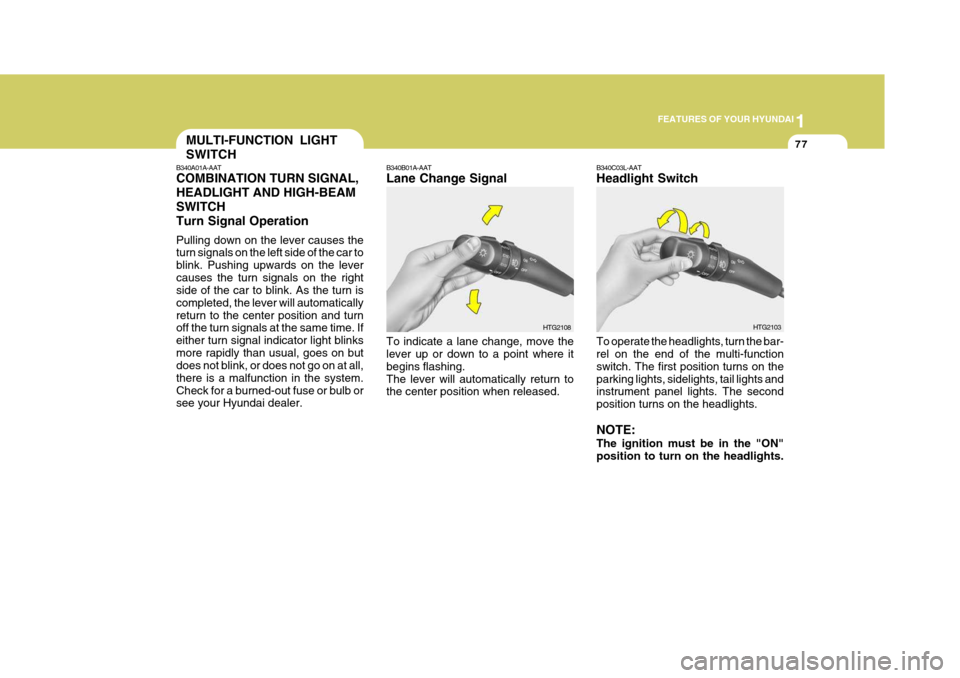
B340B01A-AAT Lane Change Signal To indicate a lane change, move the lever up or down to a point where it begins flashing.The lever will automatically return to the center position when released. HTG2108B340C03L-AAT Headlight Switch To operate the headlights, turn the bar- rel on the end of the multi-function switch. The first position turns on theparking lights, sidelights, tail lights and instrument panel lights. The second position turns on the headlights. NOTE: The ignition must be in the "ON" position to turn on the headlights. HTG2103
MULTI-FUNCTION LIGHT SWITCH
B340A01A-AAT COMBINATION TURN SIGNAL, HEADLIGHT AND HIGH-BEAMSWITCHTurn Signal Operation Pulling down on the lever causes the turn signals on the left side of the car to blink. Pushing upwards on the levercauses the turn signals on the right side of the car to blink. As the turn is completed, the lever will automaticallyreturn to the center position and turn off the turn signals at the same time. If either turn signal indicator light blinksmore rapidly than usual, goes on but does not blink, or does not go on at all, there is a malfunction in the system.Check for a burned-out fuse or bulb or see your Hyundai dealer.
Page 187 of 297
2
DRIVING YOUR HYUNDAI
3BEFORE STARTING THE ENGINE
C020A01A-AAT Before you start the engine, you should always:
1. Look around the vehicle to be sure
there are no flat tires, puddles of oil, water or other indications of pos- sible trouble.
2. After entering the car, check to be sure the parking brake is engaged.
3. Check that all windows and lights are clean.
4. Check that the interior and exterior
mirrors are clean and in position.
5. Check your seat, seatback and headrest to be sure they are in theirproper positions.
6. Lock all the doors.
7. Fasten your seat belt and be sure
that all other occupants have fas- tened theirs.
8. Turn off all lights and accessories
that are not needed. C030A01TG-GAT COMBINATION IGNITION SWITCH
o Place the shift lever in "P" (park) and
depress the brake pedal fully.
o To start the engine, insert the ignition key and turn it to the "START" posi- tion. Release it as soon as the en-gine starts. Do not hold the key in the "START" position for more than 15 seconds.
NOTE: For safety, the engine will not start if the shift lever is not in "P" or "N" position.
9. When you turn the ignition switch to
"ON", check that all appropriatewarning lights are operating and that you have sufficient fuel.
10.Check the operation of warning
lights and all bulbs when key is inthe "ON" position. TO START THE ENGINE
Page 237 of 297
Engine Compartment .................................................... 6-2
General Checks ........................................................... 6-3
Maintenance Precautions ............................................. 6-4
Checking the Engine Oil .............................................. 6-4
Checking and Changing the Engine Coolant ............... 6-7
Spark Plugs .................................................................. 6-9
Changing the Air Cleaner Filter ...................................6-10
Checking the Transaxle Fluid (Automatic) .................6-14
Checking the Brakes .................................................. 6-16
Air Conditioning Care .................................................. 6-18
Changing the Air Conditioner Filter .............................6-18
Checking Drive Belts .................................................. 6-21
Checking and Replacing Fuses ..................................6-21
Checking the Battery .................................................. 6-23
Checking the Eclectric Cooling Fans .........................6-25
Power Steering Fluid Level ......................................... 6-25
Headlight Aiming Adjustment ...................................... 6-26
Replacement of Light Bulbs ........................................6-28
Bulb Wattage ............................................................... 6-36
Fuse Panel D escription ............................................... 6-37
DO-IT-YOURSELF MAINTENANCE
6
6
Page 264 of 297
6 DO-IT-YOURSELF MAINTENANCE
28
Replacement instructions:
1. Allow the bulb to cool. Wear eye protection.
2. Open the engine hood and discon- nect the negative (-) post of the battery.
3. Always grasp the bulb by its plastic base, avoid touching the glass.
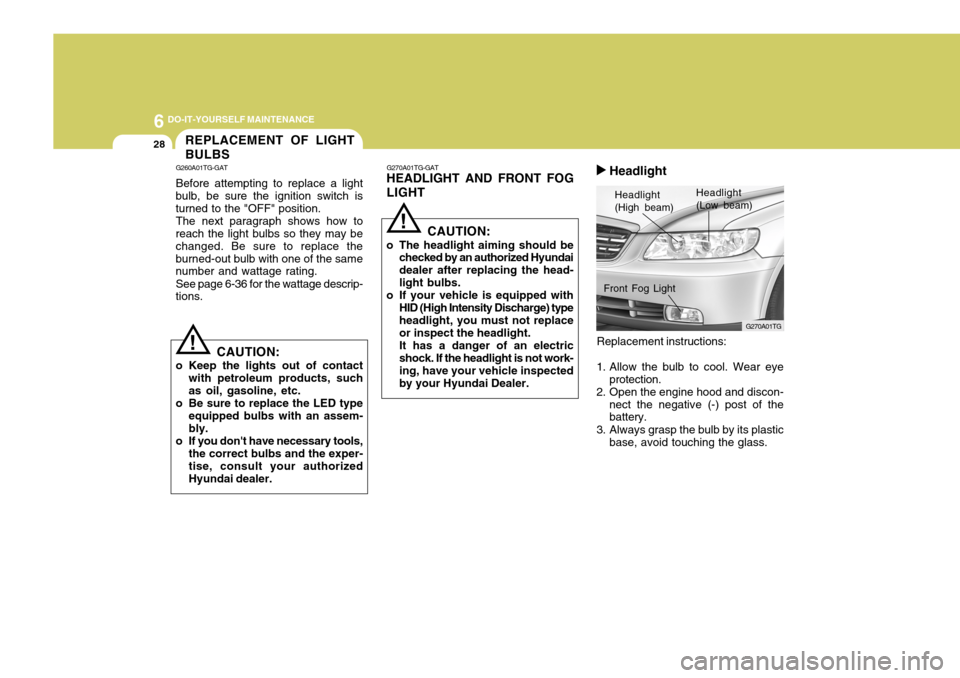
G270A01TG-GAT
HEADLIGHT AND FRONT FOG LIGHT
Headlight (High beam) Headlight(Low beam)
G270A01TG
Front Fog Light
REPLACEMENT OF LIGHT BULBS
G260A01TG-GAT Before attempting to replace a light
bulb, be sure the ignition switch is turned to the "OFF" position.
The next paragraph shows how to
reach the light bulbs so they may bechanged. Be sure to replace theburned-out bulb with one of the same number and wattage rating.
See page 6-36 for the wattage descrip-
tions.
! CAUTION:
o Keep the lights out of contact with petroleum products, such as oil, gasoline, etc.
o Be sure to replace the LED type
equipped bulbs with an assem- bly.
o If you don't have necessary tools, the correct bulbs and the exper-tise, consult your authorized Hyundai dealer. CAUTION:
o The headlight aiming should be checked by an authorized Hyundaidealer after replacing the head-light bulbs.
o If your vehicle is equipped with
HID (High Intensity Discharge) type headlight, you must not replace or inspect the headlight. It has a danger of an electric shock. If the headlight is not work- ing, have your vehicle inspectedby your Hyundai Dealer.
! Headlight
Page 265 of 297
6
DO-IT-YOURSELF MAINTENANCE
29
G270A02TG
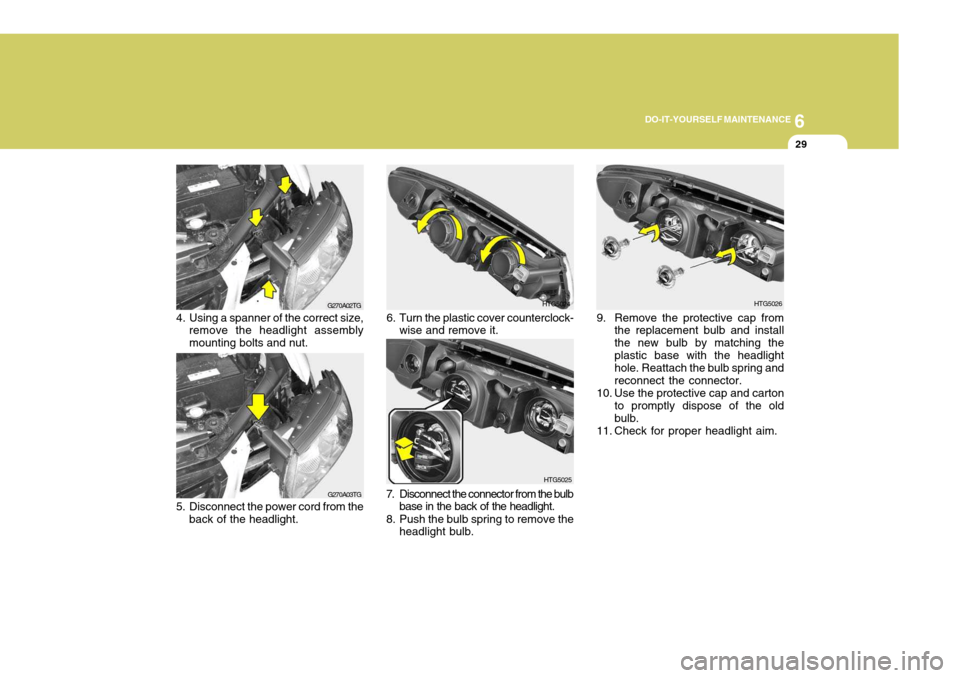
4. Using a spanner of the correct size, remove the headlight assembly mounting bolts and nut.
G270A03TG
5. Disconnect the power cord from the back of the headlight.HTG5024
6. Turn the plastic cover counterclock- wise and remove it.
HTG5025
7. Disconnect the connector from the bulb base in the back of the headlight.
8. Push the bulb spring to remove the headlight bulb.HTG5026
9. Remove the protective cap from the replacement bulb and install the new bulb by matching theplastic base with the headlight hole. Reattach the bulb spring and reconnect the connector.
10. Use the protective cap and carton to promptly dispose of the oldbulb.
11. Check for proper headlight aim.
Page 266 of 297
6 DO-IT-YOURSELF MAINTENANCE
30
!WARNING:
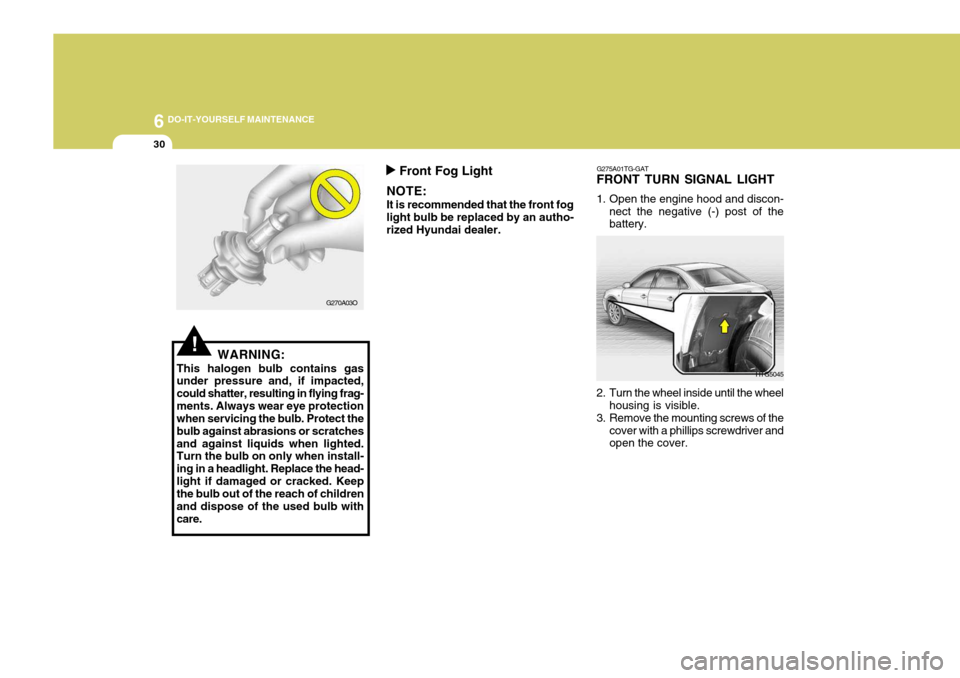
This halogen bulb contains gas under pressure and, if impacted, could shatter, resulting in flying frag-ments. Always wear eye protection when servicing the bulb. Protect the bulb against abrasions or scratchesand against liquids when lighted. Turn the bulb on only when install- ing in a headlight. Replace the head-light if damaged or cracked. Keep the bulb out of the reach of children and dispose of the used bulb withcare. G270A03O
Front Fog Light
NOTE: It is recommended that the front fog light bulb be replaced by an autho- rized Hyundai dealer. G275A01TG-GAT
FRONT TURN SIGNAL LIGHT
1. Open the engine hood and discon-
nect the negative (-) post of the battery.
HTG5045
2. Turn the wheel inside until the wheel housing is visible.
3. Remove the mounting screws of the cover with a phillips screwdriver and open the cover.
Page 267 of 297
6
DO-IT-YOURSELF MAINTENANCE
31
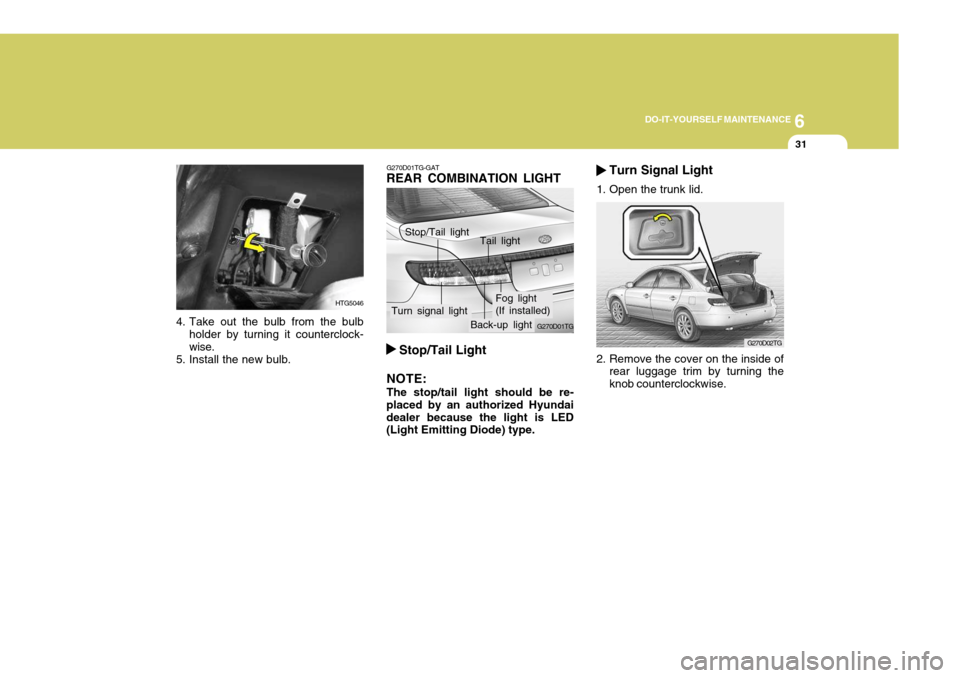
4. Take out the bulb from the bulb
holder by turning it counterclock- wise.
5. Install the new bulb.
HTG5046
G270D01TG-GAT
REAR COMBINATION LIGHT
2. Remove the cover on the inside ofrear luggage trim by turning the knob counterclockwise. G270D02TG
Stop/Tail Light
NOTE: The stop/tail light should be re-
placed by an authorized Hyundai dealer because the light is LED (Light Emitting Diode) type. G270D01TGTurn Signal Light
1. Open the trunk lid.
Stop/Tail light Tail light
Turn signal light Fog light (If installed)
Back-up light
Page 268 of 297
6 DO-IT-YOURSELF MAINTENANCE
32
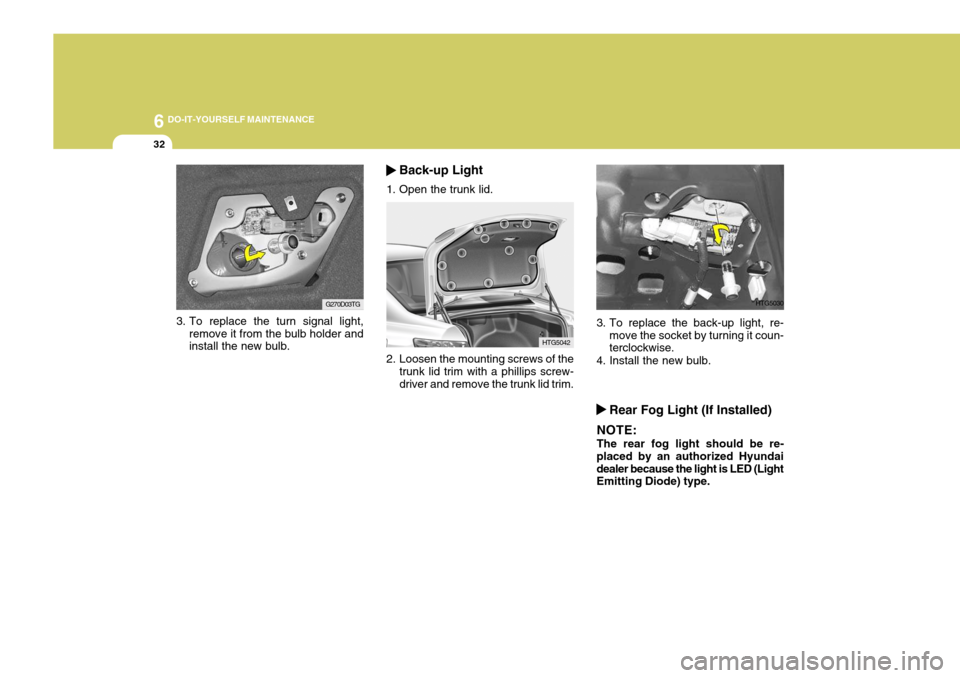
3. To replace the turn signal light,
remove it from the bulb holder and install the new bulb. G270D03TG
HTG5042
2. Loosen the mounting screws of the trunk lid trim with a phillips screw- driver and remove the trunk lid trim.
Back-up Light
1. Open the trunk lid.
3. To replace the back-up light, re- move the socket by turning it coun- terclockwise.
4. Install the new bulb. HTG5030
Rear Fog Light (If Installed)
NOTE: The rear fog light should be re-
placed by an authorized Hyundai dealer because the light is LED (Light Emitting Diode) type.
Page 269 of 297
6
DO-IT-YOURSELF MAINTENANCE
33
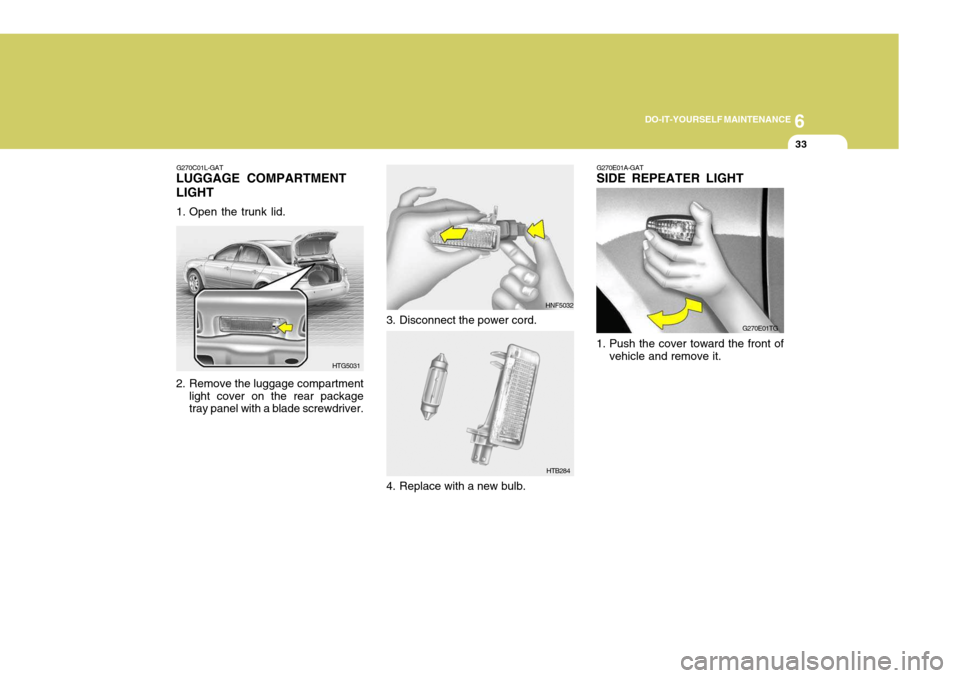
G270E01A-GAT SIDE REPEATER LIGHT
1. Push the cover toward the front of vehicle and remove it. G270E01TGG270C01L-GAT
LUGGAGE COMPARTMENT LIGHT
1. Open the trunk lid.
2. Remove the luggage compartment
light cover on the rear package tray panel with a blade screwdriver. HTG5031 HNF5032
3. Disconnect the power cord.
4. Replace with a new bulb.
HTB284
Page 270 of 297
6 DO-IT-YOURSELF MAINTENANCE
34
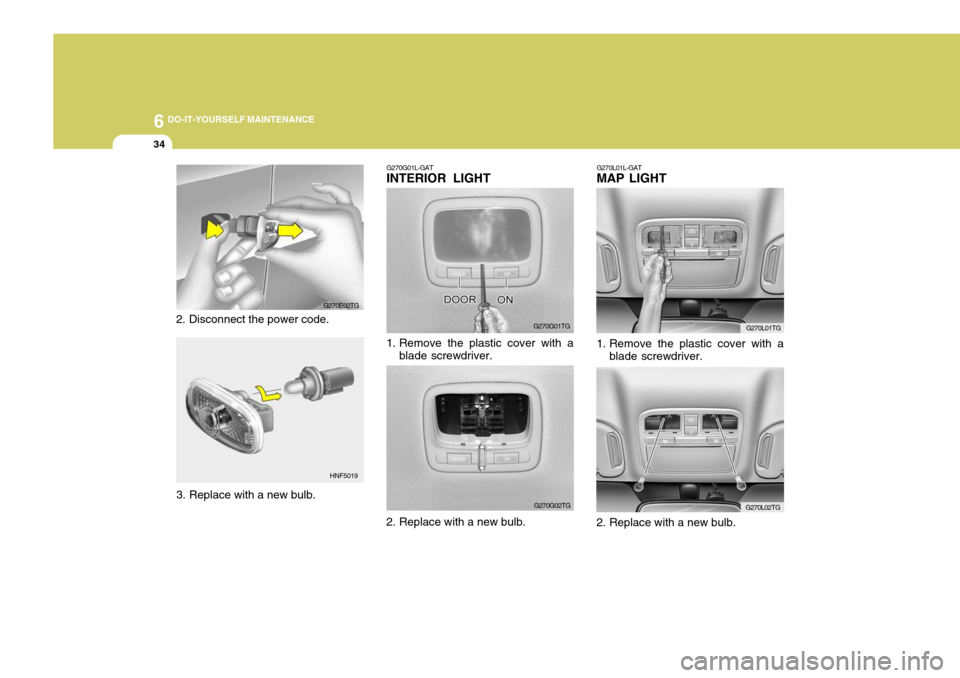
2. Disconnect the power code. G270E02TG
HNF5019 G270G01L-GAT
INTERIOR LIGHT
G270G01TG
1. Remove the plastic cover with a blade screwdriver.
G270G02TG G270L01TG
G270L02TG
G270L01L-GAT
MAP LIGHT
1. Remove the plastic cover with a
blade screwdriver.
2. Replace with a new bulb.
3. Replace with a new bulb.
2. Replace with a new bulb.