display Hyundai Azera 2007 User Guide
[x] Cancel search | Manufacturer: HYUNDAI, Model Year: 2007, Model line: Azera, Model: Hyundai Azera 2007Pages: 308, PDF Size: 12.63 MB
Page 118 of 308
1FEATURES OF YOUR HYUNDAI
104
!
Integrated HomeLink
® Wireless Con-
trol System
The HomeLink
® Wireless Control System
provides a convenient way to replace up to
three hand-held radio-frequency (RF)
transmitters with a single built-in device.
This innovative feature will learn the radio
frequency codes of most current transmit-
ters to operate devices such as gate op-
erators, garage door openers, entry door
locks, security systems, even home light-
ing. Both standard and rolling code-
equipped transmitters can be programmed
by following the outlined procedures. Ad-
ditional HomeLink
® information can be
found at: www.homelink.com or by calling
1-800-355-3515.
CAUTION:
Before programming HomeLink
® to a
garage door opener or gate operator,
make sure that people and objects are
out of the way of the device to prevent
potential harm or damage. Do not use
HomeLink
® with any garage door opener
that lacks the safety stop and reverse
features as required by U.S. federal
safety standards (this includes any ga-
rage door opener model manufactured
before April 1, 1982). A garage door that
cannot detect an object - signaling the
door to stop and reverse - does not meet
current U.S. federal safety standards.
Using a garage door opener without these
features increases the risk of serious
injury or death.Programming HomeLink
®
NOTE:o When programming a garage door
opener, it is advised to park the ve-
hicle outside of the garage.
o It is recommended that a new battery
be placed in the hand-held transmit-
ter of the device being programmed
to HomeLink
® for quicker training and
accurate transmission of the radio-
frequency signal.
o Some vehicles may require the igni-
tion switch to be turned to the second
(or "accessories") position for pro-
gramming and/or operation of
HomeLink.
o In the event that there are still pro-
gramming difficulties or questions
after following the programming steps
listed below, contact HomeLink
® at:
www.homelink.com or 1-800-355-
3515. Retain the original transmitter of the RF
device you are programming for use in
other vehicles as well as for future
HomeLink
® programming. It is also sug-
gested that upon the sale of the vehicle, the
programmed HomeLink
® buttons be
erased for security purposes.
1. Press and hold the button for more
than 6 seconds. When the compass
memory is cleared a "C" will appear in
the display.
2. To calibrate the compass, drive the
vehicle in 2 complete circles at less than
5 MPH (8 Km/h).
Page 138 of 308
1FEATURES OF YOUR HYUNDAI
124
AUTOMATIC HEATING AND COOLING CONTROL SYSTEMB970A01Y-AATYour Hyundai is equipped with an auto-
matic heating and cooling control system
controlled by simply setting the desired
temperature.
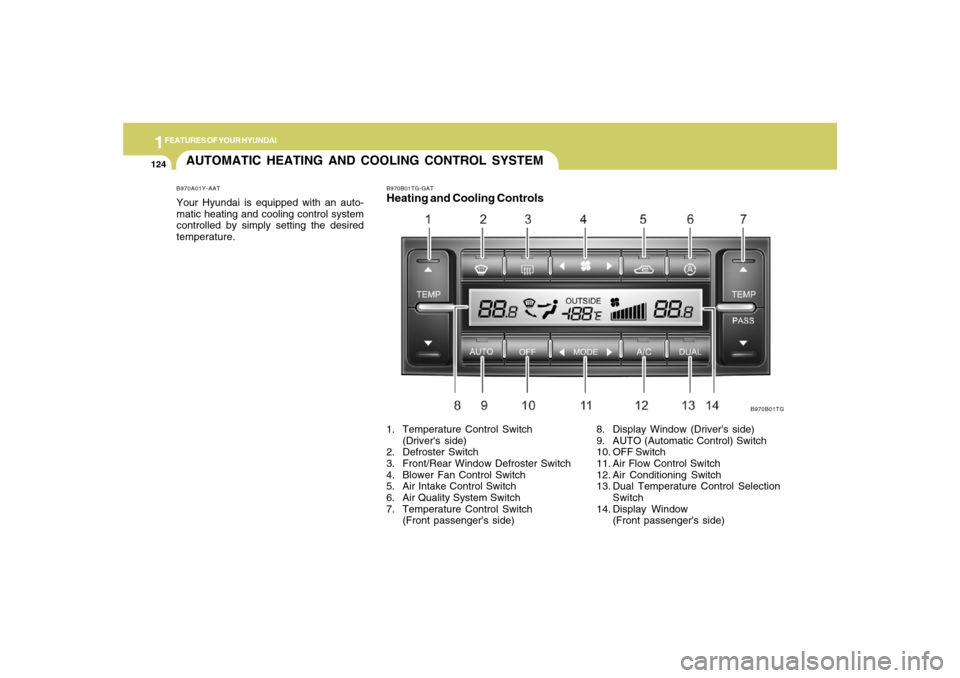
B970B01TG-GATHeating and Cooling Controls1. Temperature Control Switch
(Driver's side)
2. Defroster Switch
3. Front/Rear Window Defroster Switch
4. Blower Fan Control Switch
5. Air Intake Control Switch
6. Air Quality System Switch
7. Temperature Control Switch
(Front passenger's side)
B970B01TG
8. Display Window (Driver's side)
9. AUTO (Automatic Control) Switch
10. OFF Switch
11. Air Flow Control Switch
12. Air Conditioning Switch
13. Dual Temperature Control Selection
Switch
14. Display Window
(Front passenger's side)
Page 139 of 308
1
FEATURES OF YOUR HYUNDAI
1251
FEATURES OF YOUR HYUNDAI
125
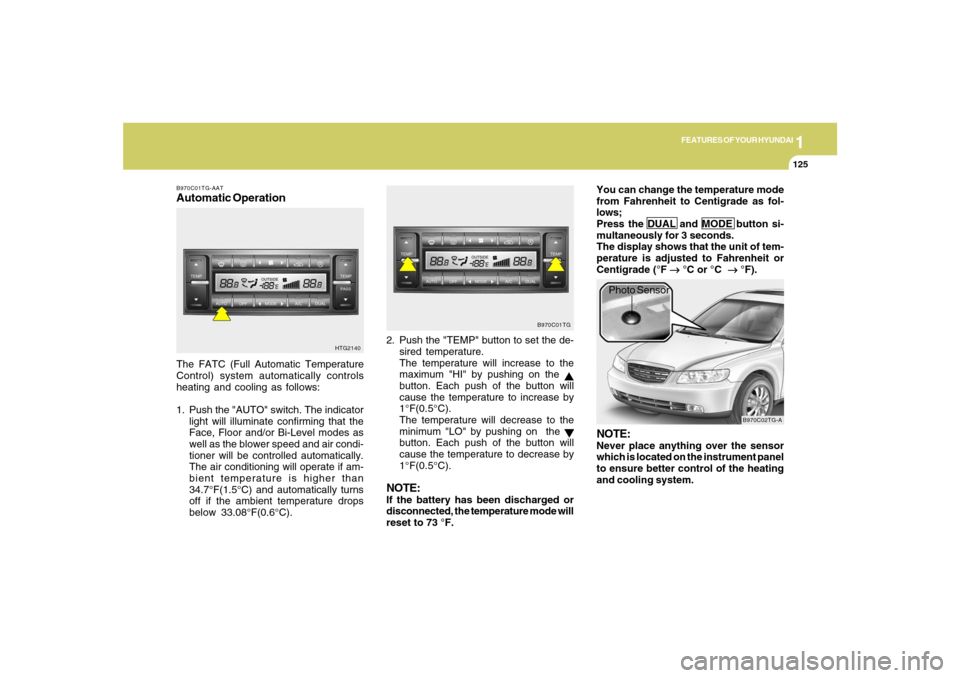
B970C01TG-AATAutomatic OperationThe FATC (Full Automatic Temperature
Control) system automatically controls
heating and cooling as follows:
1. Push the "AUTO" switch. The indicator
light will illuminate confirming that the
Face, Floor and/or Bi-Level modes as
well as the blower speed and air condi-
tioner will be controlled automatically.
The air conditioning will operate if am-
bient temperature is higher than
34.7°F(1.5°C) and automatically turns
off if the ambient temperature drops
below 33.08°F(0.6°C).2. Push the "TEMP" button to set the de-
sired temperature.
The temperature will increase to the
maximum "HI" by pushing on the
button. Each push of the button will
cause the temperature to increase by
1°F(0.5°C).
The temperature will decrease to the
minimum "LO" by pushing on the button. Each push of the button will
cause the temperature to decrease by
1°F(0.5°C).
NOTE:If the battery has been discharged or
disconnected, the temperature mode will
reset to 73 °F.You can change the temperature mode
from Fahrenheit to Centigrade as fol-
lows;
Press the DUAL and MODE button si-
multaneously for 3 seconds.
The display shows that the unit of tem-
perature is adjusted to Fahrenheit or
Centigrade (°F
→ →→ →
→ °C or °C
→ →→ →
→ °F).
HTG2140B970C01TG
B970C02TG-A
Photo Sensor
NOTE:Never place anything over the sensor
which is located on the instrument panel
to ensure better control of the heating
and cooling system.
Page 151 of 308
1
FEATURES OF YOUR HYUNDAI
1371
FEATURES OF YOUR HYUNDAI
137
M445B01TG-AAT1. POWER ON-OFF Control Knobo The radio unit may be operated when
the ignition key is in the "ACC" or "ON"
position. Press the knob to switch the
power on. The display shows the radio
frequency in the radio mode or CD/MP3
track in either the CD/MP3 mode. To
switch the power off, press the knob
again.
o Push the FM/AM or CD/MP3 to turn on
that function without pushing Power
ON-OFF control knob.VOLUME ControlRotate the knob clockwise to increase the
volume and turn the knob counterclock-
wise to reduce the volume.2. BAND SelectorPressing the band selector FM/AM changes
the AM, FM1 and FM2 bands.
The mode selected is shown on the dis-
play.
3. TUNE (Manual) Select KnobRotate the knob clockwise to increase the
frequency and turn the knob counterclock-
wise to reduce the frequency.4. SEEK Select Button
(Automatic Channel Selection)Press the SEEK select button. When the (
) side is pressed, the unit will automati-
cally tune to the next higher frequency and
when the (
) side is pressed, it will
automatically tune to the next lower fre-
quency.
5. SCAN ButtonWhen you press the button, frequency is
changed and the next channel is received
automatically. To stay on a station, press
the SCAN button again.
6. EQUALIZER (EQ) ButtonPress the EQ button to select the CLAS-
SIC, POPS, ROCK, JAZZ and DEFEAT
MODE for the desired tone quality. Each
press of the button changes the display as
follows;7. Adjustment Mode
Select (A.MODE) ButtonPressing the A.MODE button changes the
BASS, MIDDLE, TREBLE, FADER and
BALANCE mode. The mode selected is
shown on the display. After selecting the
each mode, rotate the VOLUME control
knob clockwise or counterclockwise.BASS ControlTo increase the bass, rotate the knob clock-
wise, while to decrease the bass, rotate the
knob counterclockwise. CLASSIC → POPS → ROCK → JAZZ →DEFEAT
Page 155 of 308
1
FEATURES OF YOUR HYUNDAI
1411
FEATURES OF YOUR HYUNDAI
141
o Press the MARK button to bookmark the
desired track for more than one second.
This will display the "
" symbol on the
LCD for five seconds with sequential
number. To play the bookmarked tracks,
press the MARK button within a second.
o Press the MARK button to erase the
bookmarked tracks for more than one
second. This will erase the bookmark
with beep sound.
7. PAGE UP/DOWN ButtonPress the button and you can check the file
title more than 16 characters on MP3 CD.
The button doesn't work on file title less
than 16 characters.8. EQUALIZER (EQ) ButtonPress the EQ button to select the CLAS-
SIC, POPS, ROCK, JAZZ and DEFEAT
MODE for the desired tone quality. Each
press of the button changes the display as
follows;
9. CD EJECT ButtonWhen the (
)button is pressed with a CD
loaded, the CD will eject. Forcing to eject
: To force to eject a CD, press this button for
more than 3 seconds. (Do this only when
a CD is jammed and you can not eject it in
the normal way - e.g.) in case that you have
inserted 2 CDs by mistake)
10. SCAN Buttono To playback the first 10 seconds of each
track, press the button with the beep
sound for more than one second. Press
the button again when reached the
desired track.
o To playback the first 10 seconds of each
track in the selected folder, press the
button within one second. If it pressed
for more than one second, it will play-
back the first seconds of each track in
the all folder with beep sound. Press the
button again within one second when
reached the desired track, the search-
ing function is released and the track
you desired will be played in the se-
lected folder. (MP3 CD only)
11. FILE SEARCH Knob (TUNE Se-
lect Knob)o You can skip the track by turning the
FILE SEARCH knob to counterclock-
wise or clockwise.
After selecting the desired track, press the
FILE SEARCH knob to playback the track.
If you do not press the FILE SEARCH knob
within 5 seconds, the file searching func-
tion will be released.12. CHANGE DIRECTORY(DIR) But-
tono You can move through the folder by
pushing the DIR button to up (
) and
down (
).
After moving the desired folder, press the
FILE SEARCH knob to playback the first
file in the selected folder.
If you do not press the FILE SEARCH knob
within 5 seconds, the folder searching
function will be released.
It is not operated in single folder.
CLASSIC → POPS → ROCK → JAZZ →DEFEAT
Page 158 of 308
1FEATURES OF YOUR HYUNDAI
144
7. Adjustment Mode Select
(A.MODE) ButtonPressing the A.MODE button changes the
BASS, MIDDLE, TREBLE, FADER and
BALANCE mode. The mode selected is
shown on the display. After selecting the
each mode, rotate the VOLUME control
knob clockwise or counterclockwise.
BASS Control
To increase the BASS, rotate the knob
clockwise, while to decrease the BASS,
rotate the knob counterclockwise.
M455B01TG-AAT1. POWER ON-OFF Control Knobo The radio unit may be operated when
the ignition key is in the "ACC" or "ON"
position. Press the knob to switch the
power on. The display shows the radio
frequency in the radio mode, the tape
direction Indicator in the tape mode or
CD/MP3 track in either the CD/MP3
mode. To switch the power off, press the
knob again.
o Push the FM/AM, TAPE or CD/MP3 to
turn on that function without pushing
Power ON-OFF control knob.VOLUME ControlRotate the knob clockwise to increase the
volume and turn the knob counterclock-
wise to reduce the volume.2. BAND SelectorPressing the band selector FM/AM changes
the AM, FM1 and FM2 bands.
The mode selected is shown on the dis-
play.
3. TUNE (Manual) Select KnobRotate the knob clockwise to increase the
frequency and turn the knob counterclock-
wise to reduce the frequency.4. SEEK Select Button
(Automatic Channel Selection)Press the SEEK select button. When the (
) side is pressed, the unit will automati-
cally tune to the next higher frequency and
when the (
) side is pressed, it will
automatically tune to the next lower fre-
quency.
5. SCAN ButtonWhen you press the button, frequency is
changed and the next channel is received
automatically. To stay on a station, press
the SCAN button again.
6. EQUALIZER (EQ) ButtonPress the EQ button to select the CLAS-
SIC, POPS, ROCK, JAZZ and DEFEAT
MODE for the desired tone quality. Each
press of the button changes the display as
follows;
CLASSIC → POPS → ROCK → JAZZ →DEFEAT
Page 161 of 308
1
FEATURES OF YOUR HYUNDAI
1471
FEATURES OF YOUR HYUNDAI
147
M455D01TG-GAT1. TAPE PROGRAM Buttono This allows you to play the reverse side
of the tape by merely depressing the
program button. An arrow will appear in
the display to show tape direction.
o Push the TAPE button to turn on that
function without pushing power ON-
OFF control knob.2. TAPE EJECT Buttono When the button is pressed with a cas-
sette loaded, the cassette will eject.
o When the button is pressed during FF/
REW mode, the cassette will eject.3. AUTO MUSIC Search ButtonPress the button to find the starting point of
each song in a prerecorded music tape.
The quiet space between songs (must
have at least 4 sec. gap) can be accepted
by the AUTO MUSIC search button.
o Pressing the button (
) will play the
beginning of the next music segment.
o Pressing the button (
) will start
replay at the beginning of the music just
listened to.
4. FF/REW Buttono Fast forward tape winding starts when
the FF button is pressed during PLAY or
REW mode.
o Tape PLAY starts when the FF button is
pressed again during FF mode.
o Tape rewinding starts when the REW
button is pressed during PLAY or FF
mode.
o Tape PLAY starts when the REW button
pressed again during REW mode.5. REPEAT Buttono To repeat the track you are currently
listening to, press the RPT button. To
cancel, press again.
o If you do not release RPT operation
when the track ends, it will automati-
cally be replayed.
This process will be continued until you
push the button again.6. DOLBY ButtonIf you get background noise during tape
PLAY, you can reduce this considerably
by merely pressing the DOLBY button. If
you want to cancel the DOLBY feature,
press the button again.
7. EQUALIZER (EQ) ButtonPress the EQ button to select the CLAS-
SIC, POPS, ROCK, JAZZ and DEFEAT
MODE for the desired tone quality. Each
press of the button changes the display as
follows;NOTE:o To assure proper operation of the
unit, keep the vehicle interior tem-
perature within a normal range by
using the vehicle’s air conditioning or
heating system.
o When replacing the fuse, replace it
with a fuse having the correct capac-
ity.
o The preset station frequencies are all
erased when the car battery is dis-
connected. Therefore, all data will have
to be set again if this should occur.
o Do not add any oil to the rotating parts.
Keep magnets, screwdrivers and
other metallic objects away from the
tape mechanism and head. CLASSIC → POPS → ROCK → JAZZ →DEFEAT
Page 165 of 308
1
FEATURES OF YOUR HYUNDAI
1511
FEATURES OF YOUR HYUNDAI
151
6. BOOKMARK (MARK) ButtonWhen the CD player unit is operating, the
desired track on the disc can be
bookmarked by using the MARK button.
o Press the MARK button to bookmark the
desired track for more than one second.
This will display the "
" symbol on the
LCD for five seconds with sequential
number. To play the bookmarked tracks,
press the MARK button within a second.
o Press the MARK button to erase the
bookmarked tracks for more than one
second. This will erase the bookmark
with beep sound.
7. PAGE UP/DOWN ButtonPress the button and you can check the file
title more than 16 characters on MP3 CD.
The button doesn't work on file title less
than 16 characters.
8. EQUALIZER (EQ) ButtonPress the EQ button to select the CLAS-
SIC, POPS, ROCK, JAZZ and DEFEAT
MODE for the desired tone quality. Each
press of the button changes the display as
follows;9. CD EJECT ButtonWhen the (
)button is pressed with a CD
loaded, the CD will eject. Forcing to eject
: To force to eject a CD, press this button for
more than 3 seconds. (Do this only when
a CD is jammed and you can not eject it in
the normal way - e.g.) in case that you have
inserted 2 CDs by mistake)
10. SCAN Buttono To playback the first 10 seconds of each
track, press the button with the beep
sound for more than one second. Press
the button again when reached the
desired track.
o To playback the first 10 seconds of each
track in the selected folder, press the
button within one second. If it pressed
for more than one second, it will play-
back the first seconds of each track in
the all folder with beep sound.
Press the button again within one sec-
ond when reached the desired track,
the searching function is released and
the track you desired will be played in
the selected folder. (MP3 CD only)11. FILE SEARCH Knob (TUNE Se-
lect Knob)o You can skip the track by turning the
FILE SEARCH knob to counterclock-
wise or clockwise.
After selecting the desired track, press the
FILE SEARCH knob to playback the track.
If you do not press the FILE SEARCH knob
within 5 seconds, the file searching func-
tion will be released. CLASSIC → POPS → ROCK → JAZZ →DEFEAT
Page 168 of 308
1FEATURES OF YOUR HYUNDAI
154
M465B01TG-AAT1. POWER ON-OFF Control KnobThe radio unit may be operated when the
ignition key is in the "ACC" or "ON" posi-
tion. Press the knob to switch the power on.
The LCD shows the radio frequency in the
radio mode, the tape direction indicator in
the tape mode or CD track in either the CD
mode or CD AUTO CHANGER mode. To
switch the power off, press the knob again.VOLUME ControlRotate the knob clockwise to increase the
volume and turn the knob counterclock-
wise to reduce the volume.2. BAND SelectorPressing the button changes the AM, FM1
and FM2 bands.
The mode selected is shown on the dis-
play.3. TUNE Select KnobRotate the knob clockwise to increase the
frequency and turn the knob counterclock-
wise to reduce the frequency.
4. Adjustment mode
select(A.MODE) ButtonPressing the A. MODE button changes the
BASS, MIDDLE, TREBLE, FADER and
BALANCE mode. The mode selected is
shown on the display.
After selecting the each mode, rotate the
VOLUME control knob clockwise or coun-
terclockwise.BASS ControlTo increase the BASS, rotate the knob
clockwise, while to decrease the BASS,
rotate the knob counterclockwise.MIDDLE ControlTo increase the MIDDLE, rotate the knob
clockwise, while to decrease the MIDDLE,
rotate the knob counterclockwise.TREBLE ControlTo increase the TREBLE, rotate the knob
clockwise, while to decrease the TREBLE,
rotate the knob counterclockwise.
FADER ControlRotate the control knob clockwise to em-
phasize rear speaker sound (front speaker
sound will be attenuated).
When the control knob is turned counter-
clockwise, front speaker sound will be
emphasized (rear speaker sound will be
attenuated).BALANCE ControlRotate the knob clockwise to emphasize
right speaker sound (left speaker sound
will be attenuated). When the control knob
is turned counterclockwise, left speaker
sound will be emphasized (right speaker
sound will be attenuated).5. SEEK Select Button (Automatic
Channel Selection)Press the SEEK select button. When the
(
) side is pressed, the unit will auto-
matically tune to the next higher frequency
and when the (
) side is pressed, it
will automatically tune to the next lower
frequency.
Page 169 of 308
1
FEATURES OF YOUR HYUNDAI
1551
FEATURES OF YOUR HYUNDAI
155
6. SCAN ButtonWhen you press the button, frequency is
changed and the next channel is received
automatically. To stay on a station, press
the SCAN button again.7. EQUALIZER (EQ) ButtonPress the EQ button to select the CLAS-
SIC, POPS, ROCK, JAZZ and DEFEAT
MODE for the desired tone quality. Each
press of the button changes the display as
follows;
HOW TO PRESET STATIONSSix AM and twelve FM stations may be
programmed into the memory of the radio.
Then, by simply pressing the AM / FM
select button and/or one of the six station
select buttons, you may recall any of these
stations instantly. To program the stations,
follow these steps:
o Press AM/FM selector to set the band for
AM, FM1 and FM2.
o Select the desired station to be stored
by seek or manual tuning.
o Determine the preset station select
button you wish to use to access that
station.
o Press the station select button for more
than two seconds. A select button indi-
cator will show in the display indicating
which select button you have de-
pressed. The frequency display will flash
after it has been stored into the memory.
You should then release the button,
and proceed to program the next de-
sired station. A total of 18 stations can
be programmed by selecting one AM
and two FM station per button.
8. PRESET STATION Select ButtonsSix (6) stations for AM, FM1 and FM2
respectively can be preset in the electronic
memory circuit.o When completed, any preset station
may be recalled by selecting AM, FM1
or FM2 band and the appropriate sta-
tion button.
!
CLASSIC → POPS → ROCK → JAZZ →DEFEAT
CAUTION
o Do not place beverages close to the
audio system. The audio system
mechanism may be damaged if you
spill them.
o Do not strike or allow anything to im-
pact the audio system, damage to the
system mechanisms could occur.