reset Hyundai Azera 2008 Owner's Guide
[x] Cancel search | Manufacturer: HYUNDAI, Model Year: 2008, Model line: Azera, Model: Hyundai Azera 2008Pages: 345, PDF Size: 14.61 MB
Page 158 of 345
1FEATURES OF YOUR HYUNDAI
144
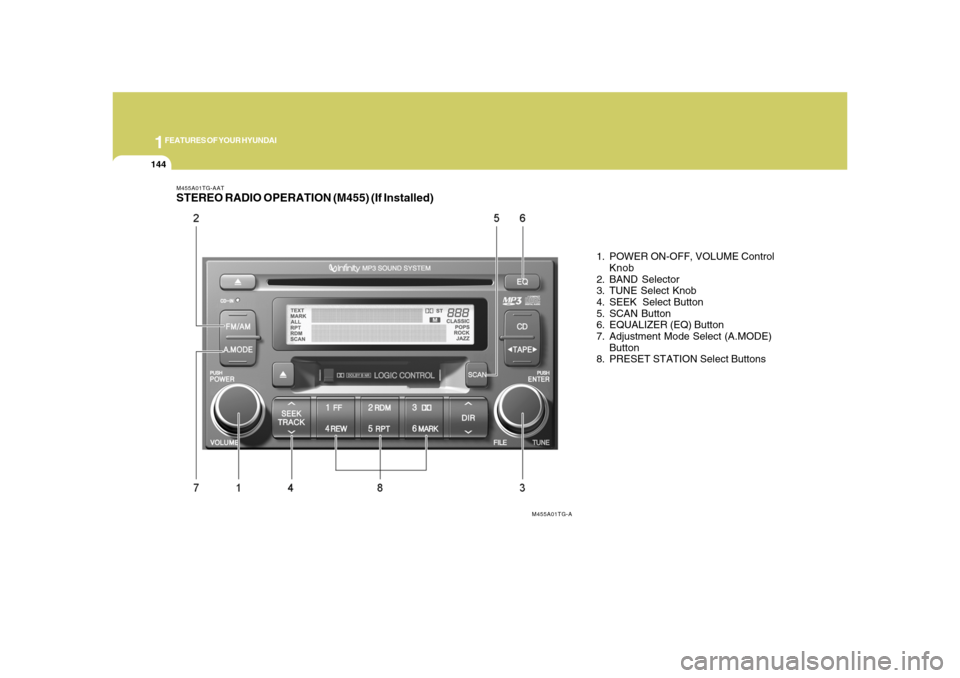
M455A01TG-AATSTEREO RADIO OPERATION (M455) (If Installed)
1. POWER ON-OFF, VOLUME Control
Knob
2. BAND Selector
3. TUNE Select Knob
4. SEEK Select Button
5. SCAN Button
6. EQUALIZER (EQ) Button
7. Adjustment Mode Select (A.MODE)
Button
8. PRESET STATION Select Buttons
M455A01TG-A
Page 160 of 345
1FEATURES OF YOUR HYUNDAI
146
8. PRESET STATION Select ButtonsSix (6) stations for AM, FM1 and FM2
respectively can be preset in the electronic
memory circuit.HOW TO PRESET STATIONSSix AM and twelve FM stations may be
programmed into the memory of the radio.
Then, by simply pressing the band select
button and/or one of the six station select
buttons, you may recall any of these sta-
tions instantly.
To program the stations, follow these steps:
o Press band selector to set the band for
AM, FM and FM2.
o Select the desired station to be stored
by seek or manual tuning.
o Determine the preset station select
button you wish to use to access that
station.
o Press the station select button for more
than two seconds. Beep sound will be
heard while depressing the button. You
should then release the button, and
proceed to program the next desired
station. A total of 18 stations can be
programmed by selecting one AM and
two FM station per button.
!
MIDDLE ControlTo increase the MIDDLE, rotate the knob
clockwise, while to decrease the MIDDLE,
rotate the knob counterclockwise.TREBLE ControlTo increase the TREBLE, rotate the knob
clockwise, while to decrease the TREBLE,
rotate the knob counterclockwise.FADER ControlTurn the control knob clockwise to empha-
size rear speaker sound (front speaker
sound will be attenuated).
When the control knob is turned counter-
clockwise, front speaker sound will be
emphasized (rear speaker sound will be
attenuated).BALANCE ControlRotate the knob clockwise to emphasize
right speaker sound. (Left speaker sound
will be attenuated)
When the control knob is turned counter
clockwise, left speaker sound will be em-
phasized (Right speaker sound will be
attenuated).o When completed, any preset station
may be recalled by selecting AM, FM1
or FM2 band and the appropriate sta-
tion button.
CAUTION:
o Do not place beverages close to the
audio system. The playback mecha-
nism may be damaged if you spill
them.
o Do not impact on the audio system, or
the playback mechanism could be
damaged.
Page 162 of 345
1FEATURES OF YOUR HYUNDAI
148
M455D01TG-GAT1. TAPE PROGRAM Buttono This allows you to play the reverse side
of the tape by merely depressing the
program button. An arrow will appear in
the display to show tape direction.
o Push the TAPE button to turn on that
function without pushing power ON-
OFF control knob.2. TAPE EJECT Buttono When the button is pressed with a cas-
sette loaded, the cassette will eject.
o When the button is pressed during FF/
REW mode, the cassette will eject.3. AUTO MUSIC Search ButtonPress the button to find the starting point of
each song in a prerecorded music tape.
The quiet space between songs (must
have at least 4 sec. gap) can be accepted
by the AUTO MUSIC search button.
o Pressing the button (
) will play the
beginning of the next music segment.
o Pressing the button (
) will start
replay at the beginning of the music just
listened to.
4. FF/REW Buttono Fast forward tape winding starts when
the FF button is pressed during PLAY or
REW mode.
o Tape PLAY starts when the FF button is
pressed again during FF mode.
o Tape rewinding starts when the REW
button is pressed during PLAY or FF
mode.
o Tape PLAY starts when the REW button
pressed again during REW mode.5. REPEAT Buttono To repeat the track you are currently
listening to, press the RPT button. To
cancel, press again.
o If you do not release RPT operation
when the track ends, it will automati-
cally be replayed.
This process will be continued until you
push the button again.6. DOLBY ButtonIf you get background noise during tape
PLAY, you can reduce this considerably
by merely pressing the DOLBY button. If
you want to cancel the DOLBY feature,
press the button again.
7. EQUALIZER (EQ) ButtonPress the EQ button to select the CLAS-
SIC, POPS, ROCK, JAZZ and DEFEAT
MODE for the desired tone quality. Each
press of the button changes the display as
follows;NOTE:o To assure proper operation of the
unit, keep the vehicle interior tem-
perature within a normal range by
using the vehicle’s air conditioning or
heating system.
o When replacing the fuse, replace it
with a fuse having the correct capac-
ity.
o The preset station frequencies are all
erased when the car battery is dis-
connected. Therefore, all data will have
to be set again if this should occur.
o Do not add any oil to the rotating parts.
Keep magnets, screwdrivers and
other metallic objects away from the
tape mechanism and head. CLASSIC → POPS → ROCK → JAZZ →DEFEAT
Page 168 of 345
1FEATURES OF YOUR HYUNDAI
154
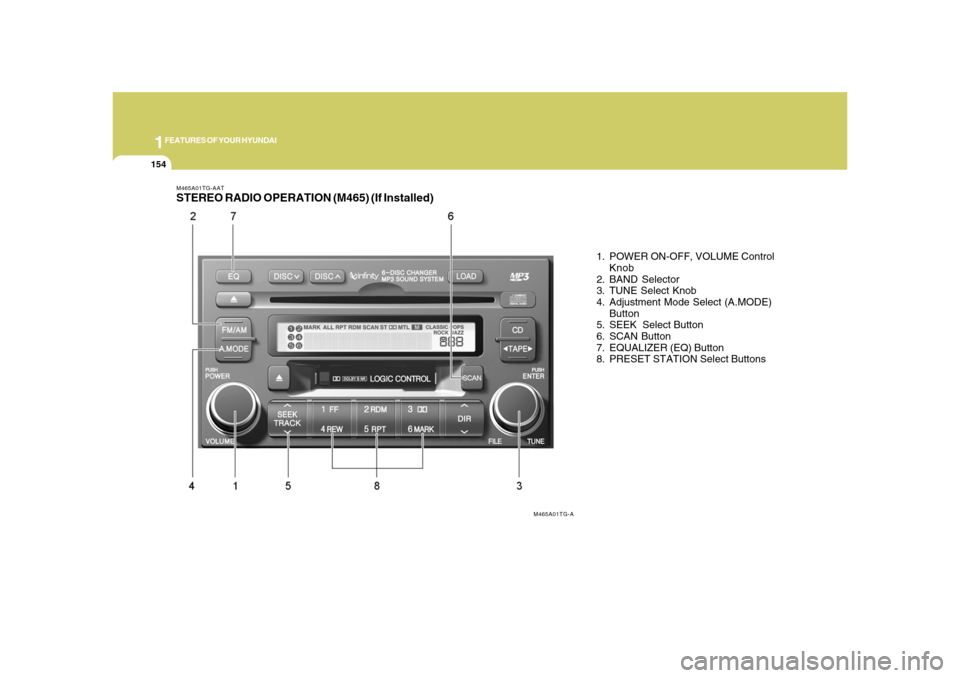
M465A01TG-AATSTEREO RADIO OPERATION (M465) (If Installed)
1. POWER ON-OFF, VOLUME Control
Knob
2. BAND Selector
3. TUNE Select Knob
4. Adjustment Mode Select (A.MODE)
Button
5. SEEK Select Button
6. SCAN Button
7. EQUALIZER (EQ) Button
8. PRESET STATION Select Buttons
M465A01TG-A
Page 170 of 345
1FEATURES OF YOUR HYUNDAI
156
6. SCAN ButtonWhen you press the button, frequency is
changed and the next channel is received
automatically. To stay on a station, press
the SCAN button again.7. EQUALIZER (EQ) ButtonPress the EQ button to select the CLAS-
SIC, POPS, ROCK, JAZZ and DEFEAT
MODE for the desired tone quality. Each
press of the button changes the display as
follows;
HOW TO PRESET STATIONSSix AM and twelve FM stations may be
programmed into the memory of the radio.
Then, by simply pressing the AM / FM
select button and/or one of the six station
select buttons, you may recall any of these
stations instantly. To program the stations,
follow these steps:
o Press AM/FM selector to set the band for
AM, FM1 and FM2.
o Select the desired station to be stored
by seek or manual tuning.
o Determine the preset station select
button you wish to use to access that
station.
o Press the station select button for more
than two seconds. A select button indi-
cator will show in the display indicating
which select button you have de-
pressed. The frequency display will flash
after it has been stored into the memory.
You should then release the button,
and proceed to program the next de-
sired station. A total of 18 stations can
be programmed by selecting one AM
and two FM station per button.
8. PRESET STATION Select ButtonsSix (6) stations for AM, FM1 and FM2
respectively can be preset in the electronic
memory circuit.o When completed, any preset station
may be recalled by selecting AM, FM1
or FM2 band and the appropriate sta-
tion button.
!
CLASSIC → POPS → ROCK → JAZZ →DEFEAT
CAUTION
o Do not place beverages close to the
audio system. The audio system
mechanism may be damaged if you
spill them.
o Do not strike or allow anything to im-
pact the audio system, damage to the
system mechanisms could occur.
Page 178 of 345
1FEATURES OF YOUR HYUNDAI
164
CAUTION
o Do not insert warped or poor quality
discs into the CD player as damage to
the unit may occur.
o Do not insert anything like coins into
the player slot as damage to the unit
may occur.
!
NOTE:o To assure proper operation of the
unit, keep the vehicle interior tem-
perature within a normal range by
using the vehicle’s air conditioning or
heating system.
o When replacing the fuse, replace it
with a fuse having the correct capac-
ity.
o All stored bookmarks are all erased
when the car battery is disconnected
or power to the vehicle is lost. If this
occurs, the bookmarks will have to be
reset.
o Do not add any oil to the rotating parts.
Keep magnets, screwdrivers and
other metallic objects away from the
tape mechanism and head.
o Do not place beverages close to the
audio system. The playback mecha-
nism may be damaged if you spill
them.
o Do not strike or allow anything to im-
pact the audio system, damage to the
system mechanisms could occur.
o Off-road or rough surface driving may
cause the compact disc to skip. Do
not use the compact disc when driv-
ing in such conditions as damage to
the compact disc face could occur.
o Do not attempt to grab or pull the
compact disc out while the disc is
being pulled into the audio unit by the
self-loading mechanism. Damage to
the audio unit and compact disc could
occur.
o This equipment is designed to be used
only in a 12 volt DC battery system
with negative ground.
o This unit is made of precision parts.
Do not attempt to disassemble or ad-
just any parts.o When driving your vehicle, be sure to
keep the volume of the unit set low
enough to allow you to hear sounds
coming from the outside.
o Do not expose this equipment (includ-
ing the speakers and tape) to water or
excessive moisture.
o Avoid using home-made recorded
compact discs in your audio unit. Origi-
nal compact discs are recommended.
o The unit may not play CD-RW
(Rewritable) discs.
Page 179 of 345
1
FEATURES OF YOUR HYUNDAI
165165
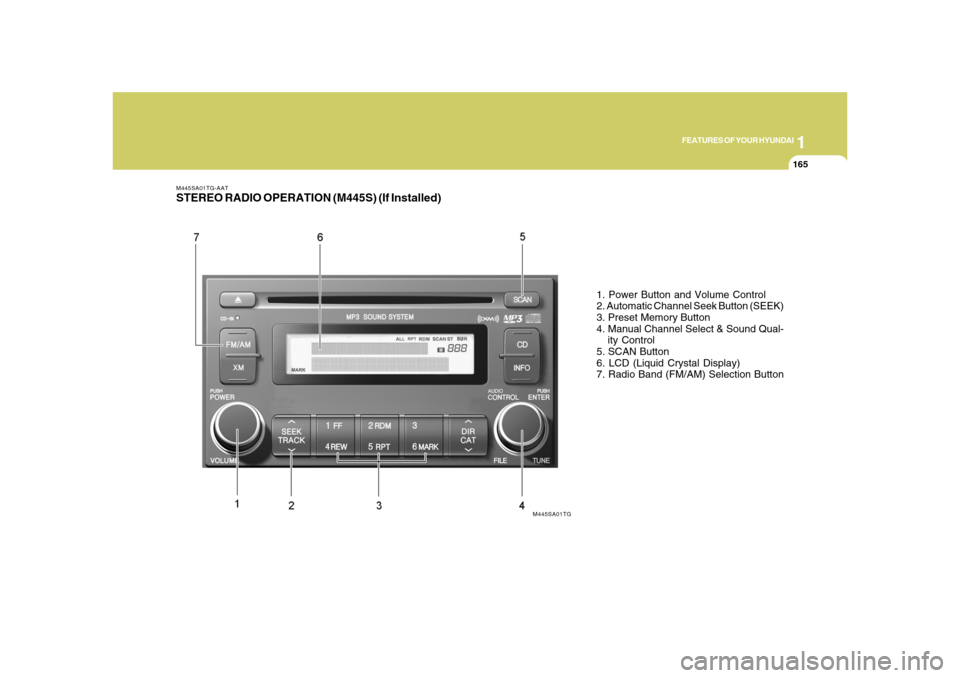
M445SA01TG-AATSTEREO RADIO OPERATION (M445S) (If Installed)
1. Power Button and Volume Control
2. Automatic Channel Seek Button (SEEK)
3. Preset Memory Button
4. Manual Channel Select & Sound Qual-
ity Control
5. SCAN Button
6. LCD (Liquid Crystal Display)
7. Radio Band (FM/AM) Selection Button
M445SA01TG
Page 180 of 345
1FEATURES OF YOUR HYUNDAI
166
M445SB01TG-AAT1. Power Button and Volume Controlo Used for turning on/off the audio sys-
tem.
o Press this button when using the audio
system to turn off the power.
o Turn the volume control clockwise to
increase volume and counterclockwise,
to decrease. (The volume level is dis-
played when adjusting the volume.)2. Automatic Channel Seek Button
(SEEK)Press this button to automatically find and
tune to next available channel.
(Press [
] to automatically seek next avail-
able channel in higher frequencies and
[
] in lower frequencies.)
NOTE:If the channel is not received well, use
the manual control (4).
3. Preset Memory ButtonPress this button and hold for less than 0.8
seconds to easily listen to the channel
memorized to the button. Also, when you
are listening to the channel other than the
channel memorized to the button using
TUNE or SEEK, press the button you wish
to memorize current channel to and hold
for more than 0.8 seconds until it beeps to
memorize the channel.4. Manual Channel Select & Sound
Quality Controlo When listening to a radio channel, ro-
tate this control to manually adjust the
frequency. Turn this control to the right
to increase the frequency and left, to
decrease.
o This selects all functions related with
audio quality.
o When listening to the audio system,
press this button to select following
sound qualities in respective order.
BASS → MIDDLE → TREBLE →
FADER→BALANCE→EQUALIZER →
Current State
FM1 → FM2→ AM
o Rotate the control to adjust the sound
mode when adjusting sound quality.5. SCAN ButtonPress this button to tune to all available
channels for 5 seconds each. (LCD will
display "SCAN") Press the button once
again to cancel scanning.6. LCD (Liquid Crystal Display)It displays the state of the system when
listening to the radio such as AM, FM1,
FM2, Stereo(ST), preset number, fre-
quency received, EQ mode (CLASSIC,
POP, ROCK, JAZZ) and SCAN status.7. Radio Band (FM/AM) Selection
Buttono This selects FM/AM and the radio band
will change in the following order every
time you press the button.
Page 186 of 345
1FEATURES OF YOUR HYUNDAI
172
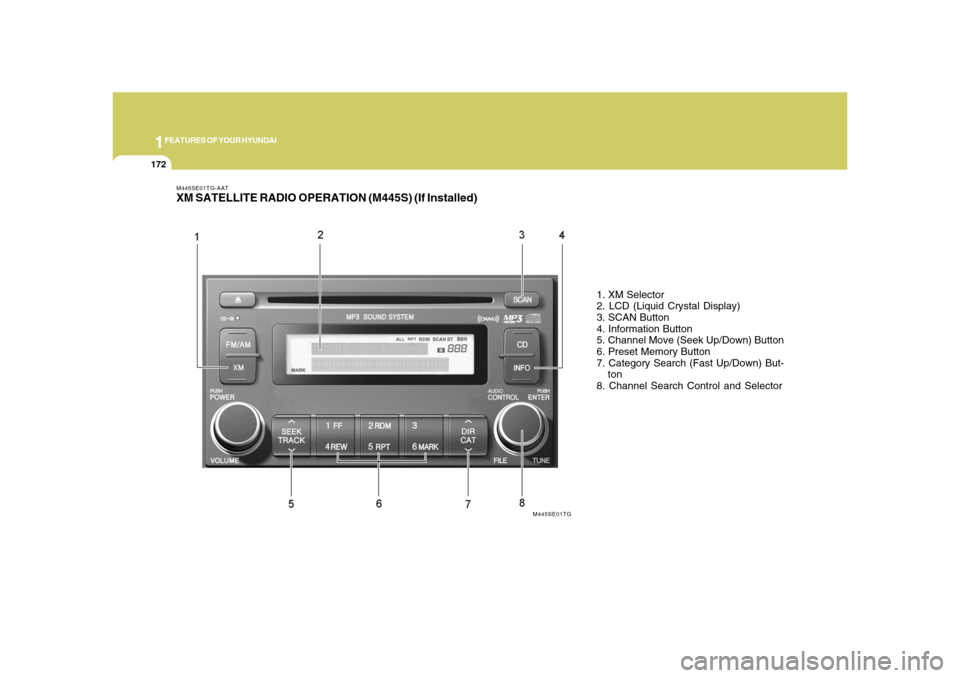
M445SE01TG-AATXM SATELLITE RADIO OPERATION (M445S) (If Installed)
1. XM Selector
2. LCD (Liquid Crystal Display)
3. SCAN Button
4. Information Button
5. Channel Move (Seek Up/Down) Button
6. Preset Memory Button
7. Category Search (Fast Up/Down) But-
ton
8. Channel Search Control and Selector
M445SE01TG
Page 187 of 345
1
FEATURES OF YOUR HYUNDAI
173173
M445SF01TG-AAT1. XM Selectoro This is XM selector and it will turn to
each mode in the following order each
time you press the button.
3. SCAN ButtonWhen you press this button, the player will
play 10 seconds of each channel (LCD will
display "SCAN"). Press it again to cancel
scanning. Also, press and this button for
more than 0.8 seconds to play the chan-
nels memorized to the preset buttons for
10 seconds each. (LCD will display "corre-
sponding channel number", "
", and
"SCAN".) Press it again to cancel scan-
ning.4. Information ButtonYou can see the information of the channel
currently received and you can switch to
different information by pressing this but-
ton in the following order.
5. Channel Move (Seek Up/Down)
Buttono When you press this button, the chan-
nel will move automatically and stop at
the next available channel and play the
channel. The display will cycle once
through the Channel, Title, Name and
Category for selected channel.
(Press [
] to move to the higher fre-
quencies, press [
] to the lower fre-
quencies automatically.)
Press and hold either the down or up at
a fast rate. The display will show the
Channel, Name and Number while tun-
ing at the fast rate.
o Radio ID : Seek or tune to XM channel
0 to display the Radio ID.
6. Preset Memory ButtonPress this button and hold for less than 0.8
seconds to listen to the channel memo-
rized to the button. Also, when you are
listening to the channel other than the
channel memorized to the button using
TUNE or SEEK, press the button you wish
to memorize current channel to and hold
for more than 0.8 seconds until it beeps to
memorize the channel. o When you press this button when you
are listening to CD or RADIO, the sys-
tem will automatically turn to XM mode.
o When ignition switch of the automobile
is set to ACC (1st notch) or ON (2nd
notch) and when you press this button,
XM will be on even when the audio
system was turned off.
2. LCD (Liquid Crystal Display)It displays the XM1, XM2, XM3, Preset
Number, Title of the Channel Received,
EQ Mode (CLASSIC, POP, ROCK, JAZZ),
and SCAN Status when listening to XM.XM1 → XM2→ XM3
Title→Name→Category→Current State