ESP Hyundai Azera 2008 Owner's Manual
[x] Cancel search | Manufacturer: HYUNDAI, Model Year: 2008, Model line: Azera, Model: Hyundai Azera 2008Pages: 345, PDF Size: 14.61 MB
Page 2 of 345
A010A03A-AAT
WARRANTIES FOR YOUR HYUNDAI VEHICLE
Please consult your Owner's Handbook & Warranty Information booklet for your vehicle's
specific warranty coverage.A020A01A-AAT
RESPONSIBILITY FOR MAINTENANCE
The maintenance requirements for your new Hyundai are found in Section 5. As the owner, it is your
responsibility to see that all maintenance operations specified by the manufacturer are carried out
at the appropriate intervals. When the vehicle is used in severe driving conditions, more frequent
maintenance is required for some operations. Maintenance requirements for severe operating
conditions are also included in Section 5.
Page 6 of 345

F4
A110A01A-AAT
VEHICLE DATA COLLECTION AND EVENT DATA RECORDERS
Your Hyundai vehicle is equipped with many high technology, electronically controlled systems
that help to ensure your vehicle operates properly and provides the performance that you
expect. These systems utilize computers to monitor the operation of various systems and
components and help to control their operation. These computerized system operations are
wide-ranging and involve components to reduce emissions, to continuously evaluate the
readiness of the airbag and seat belt pretensioner systems, to determine when the airbag and
seat belt pre-tensioner systems should be deployed and then to activate the deployment, and
if equipped, to operate anti-lock braking, traction control and electrical stability control to assist
the driver to control the vehicle in difficult driving situations. These systems electronically store
information that is useful to service technicians when they need to diagnose and repair these
systems. Additional information is stored only when a crash occurs that results in the
deployment of the airbags or seat belt pre-tensioners. This type of data storage is done by
devices called event data recorders(EDR).
After a crash event, the airbag and seat belt pre-tensioner computer system, known as the
Supplemental Restraint System Control Module (SRSCM) or Airbag Control Unit (ACU), may
record some information about the condition of the vehicle and how it was being operated. This
information consists of data related to seat belt usage and if there was diagnostic information
in the airbag or seat belt systems at the time that a crash occurred, and if the ACU sensed that
a crash of sufficient severity occurred to require seat belt pre-tensioner or airbag deployment.
To retrieve this information, special equipment is needed and access to the vehicle or the device
that stores the data is required. Hyundai will not access information about a crash event or share
it with others except:
o in response to an official request of police or similar government office, or
o with the consent of the vehicle owner or, if the vehicle is leased, with the consent of the lessee,
or
o as part of Hyundai’s defense of litigation, or
o as required by law.
Page 17 of 345
1
FEATURES OF YOUR HYUNDAI
3
BREAKING IN YOUR NEW
HYUNDAI
B010F01A-AATOperation in Foreign CountriesIf you are going to drive your Hyundai in
another country, be sure to:
o Observe all regulations regarding reg-
istration and insurance.
o Determine that acceptable fuel is avail-
able.B010E01A-AATGasolines for Cleaner AirTo help contribute to cleaner air, Hyundai
recommends that you use gasolines
treated with detergent additives, which
help prevent deposit formation in the en-
gine. These gasolines will help the engine
run cleaner and enhance performance of
the Emission Control System.
B020A01TG-AATDuring the First 1,200 Miles (2,000
Km)No formal "break-in" procedure is required
with your new Hyundai. However, you can
contribute to the economical operation
and durability of your Hyundai by observ-
ing the following recommendations dur-
ing the first 1,200 miles (2,000 km).
o Don't drive faster than 55 MPH (88 km/
h).
o While driving, keep your engine speed
(rpm, or revolutions per minute) be-
tween 2,000 rpm and 4,000 rpm.
o Use moderate acceleration. Don't start
quickly or depress the accelerator pedal
fully.
o For the first 200 miles (300 km), try to
avoid hard stops.
o Whether going fast or slow, vary your
speed from time to time.
o Don't let the engine idle longer than 3
minutes at one time.
o Don't tow a trailer during the first 1,200
miles (2,000 km) of operation.
IMMOBILIZER SYSTEMB880A01TG-AATThe immobilizer system is an anti-theft
device, designed to deter automobile theft.NOTE:This device complies with Part 15 of the
FCC rules. Operation is subject to the
following two conditions:
(1) This device may not cause harmful
interference, and (2) this device must
accept any interference received, in-
cluding interference that may cause
undesired operation.
CAUTION:
Changes or modifications not expressly
approved by the party responsible for
compliance could void the user's au-
thority to operate the equipment.
!
Page 21 of 345
1
FEATURES OF YOUR HYUNDAI
7
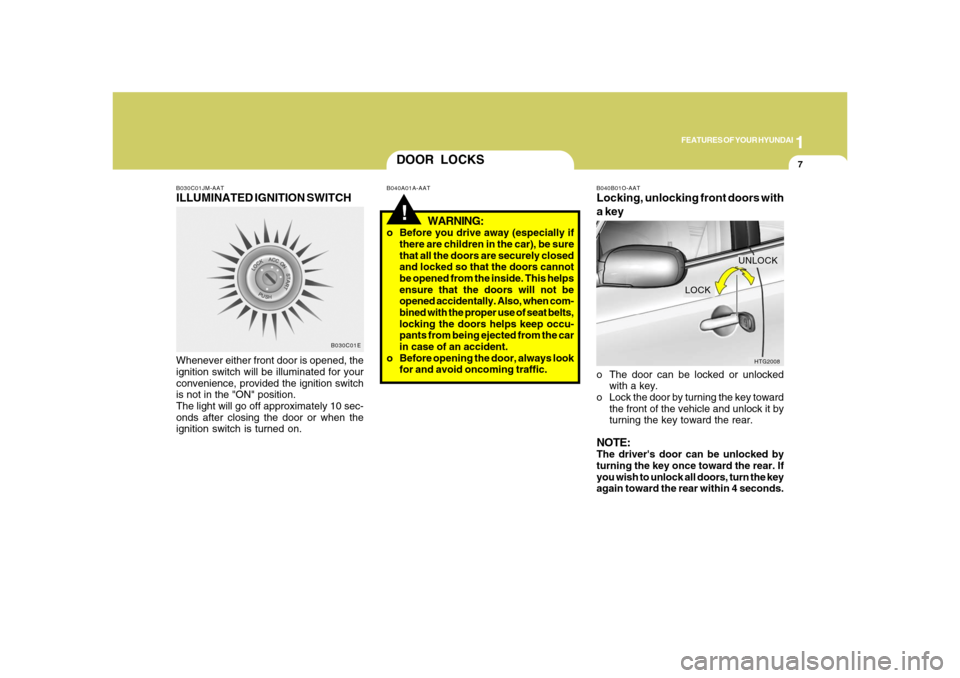
B030C01JM-AATILLUMINATED IGNITION SWITCHWhenever either front door is opened, the
ignition switch will be illuminated for your
convenience, provided the ignition switch
is not in the "ON" position.
The light will go off approximately 10 sec-
onds after closing the door or when the
ignition switch is turned on.
B030C01E
DOOR LOCKS!
B040A01A-AAT
WARNING:
o Before you drive away (especially if
there are children in the car), be sure
that all the doors are securely closed
and locked so that the doors cannot
be opened from the inside. This helps
ensure that the doors will not be
opened accidentally. Also, when com-
bined with the proper use of seat belts,
locking the doors helps keep occu-
pants from being ejected from the car
in case of an accident.
o Before opening the door, always look
for and avoid oncoming traffic.
B040B01O-AATLocking, unlocking front doors with
a keyo The door can be locked or unlocked
with a key.
o Lock the door by turning the key toward
the front of the vehicle and unlock it by
turning the key toward the rear.NOTE:The driver's door can be unlocked by
turning the key once toward the rear. If
you wish to unlock all doors, turn the key
again toward the rear within 4 seconds.
HTG2008
LOCKUNLOCK
Page 24 of 345
1FEATURES OF YOUR HYUNDAI10
B070F02NF-AATKEYLESS ENTRY SYSTEM
NOTE:This device complies with Part 15 of the
FCC rules. Operation is subject to the
following two conditions:
(1) This device may not cause harmful
interference, and (2) this device must
accept any interference received, in-
cluding interference that may cause
undesired operation.
CAUTION:
Changes or modifications not expressly
approved by the party responsible for
compliance could void the user's au-
thority to operate the equipment.
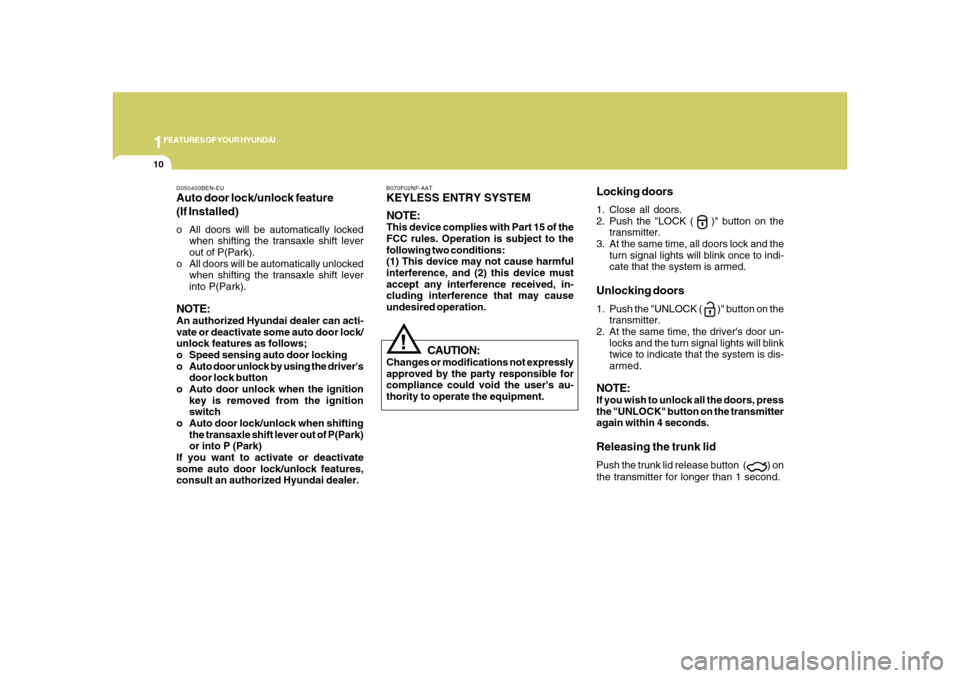
Locking doors1. Close all doors.
2. Push the "LOCK (
)" button on the
transmitter.
3. At the same time, all doors lock and the
turn signal lights will blink once to indi-
cate that the system is armed.
Unlocking doors1. Push the "UNLOCK (
)" button on the
transmitter.
2. At the same time, the driver's door un-
locks and the turn signal lights will blink
twice to indicate that the system is dis-
armed.
NOTE:If you wish to unlock all the doors, press
the "UNLOCK" button on the transmitter
again within 4 seconds.Releasing the trunk lidPush the trunk lid release button (
) on
the transmitter for longer than 1 second.
!
D050400BEN-EUAuto door lock/unlock feature
(If Installed)o All doors will be automatically locked
when shifting the transaxle shift lever
out of P(Park).
o All doors will be automatically unlocked
when shifting the transaxle shift lever
into P(Park).NOTE:An authorized Hyundai dealer can acti-
vate or deactivate some auto door lock/
unlock features as follows;
o Speed sensing auto door locking
o Auto door unlock by using the driver's
door lock button
o Auto door unlock when the ignition
key is removed from the ignition
switch
o Auto door lock/unlock when shifting
the transaxle shift lever out of P(Park)
or into P (Park)
If you want to activate or deactivate
some auto door lock/unlock features,
consult an authorized Hyundai dealer.
Page 113 of 345
1
FEATURES OF YOUR HYUNDAI
99
CAUTION:
If the mirror is jammed with ice, do not
adjust the mirror by force. Use an ap-
proved spray de-icer (not radiator anti-
freeze) to release the frozen mecha-
nism or move the vehicle to a warm
place and allow the ice to melt.
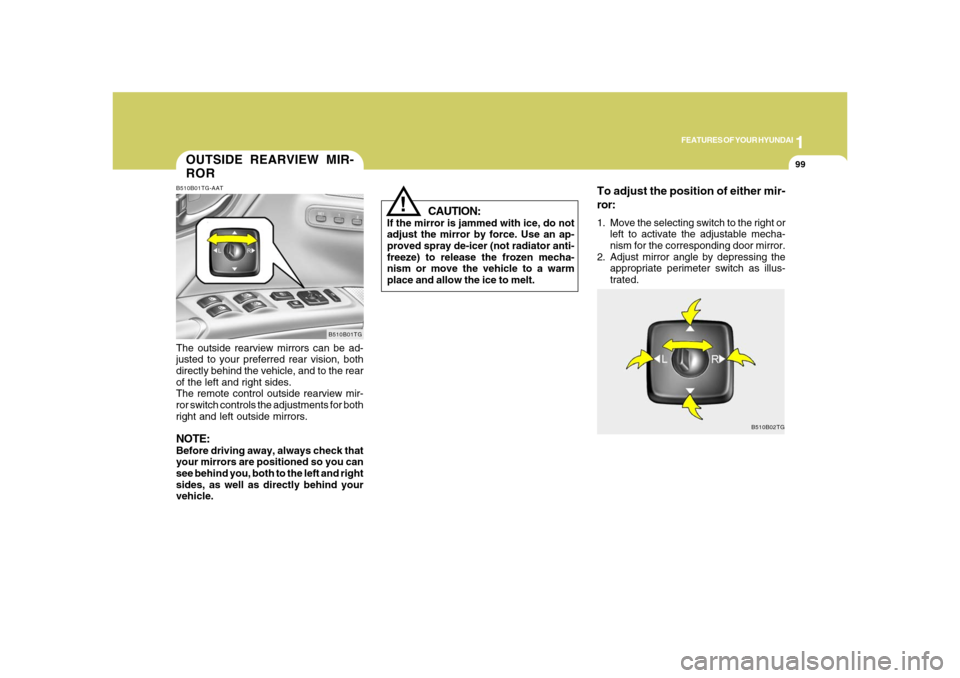
To adjust the position of either mir-
ror:1. Move the selecting switch to the right or
left to activate the adjustable mecha-
nism for the corresponding door mirror.
2. Adjust mirror angle by depressing the
appropriate perimeter switch as illus-
trated.
!
B510B02TG
OUTSIDE REARVIEW MIR-
RORB510B01TG-AATThe outside rearview mirrors can be ad-
justed to your preferred rear vision, both
directly behind the vehicle, and to the rear
of the left and right sides.
The remote control outside rearview mir-
ror switch controls the adjustments for both
right and left outside mirrors.NOTE:Before driving away, always check that
your mirrors are positioned so you can
see behind you, both to the left and right
sides, as well as directly behind your
vehicle.
B510B01TG
Page 122 of 345
1FEATURES OF YOUR HYUNDAI
108
!
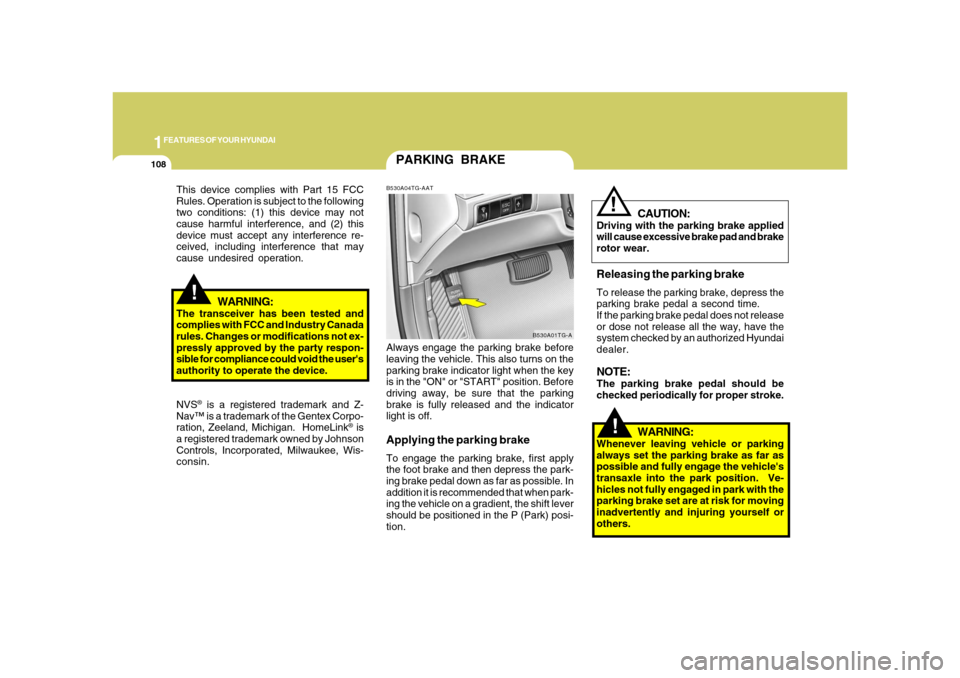
PARKING BRAKEB530A04TG-AATAlways engage the parking brake before
leaving the vehicle. This also turns on the
parking brake indicator light when the key
is in the "ON" or "START" position. Before
driving away, be sure that the parking
brake is fully released and the indicator
light is off.Applying the parking brakeTo engage the parking brake, first apply
the foot brake and then depress the park-
ing brake pedal down as far as possible. In
addition it is recommended that when park-
ing the vehicle on a gradient, the shift lever
should be positioned in the P (Park) posi-
tion.
B530A01TG-A
!
This device complies with Part 15 FCC
Rules. Operation is subject to the following
two conditions: (1) this device may not
cause harmful interference, and (2) this
device must accept any interference re-
ceived, including interference that may
cause undesired operation.
WARNING:
The transceiver has been tested and
complies with FCC and Industry Canada
rules. Changes or modifications not ex-
pressly approved by the party respon-
sible for compliance could void the user's
authority to operate the device.
NVS
® is a registered trademark and Z-
Nav™ is a trademark of the Gentex Corpo-
ration, Zeeland, Michigan. HomeLink
® is
a registered trademark owned by Johnson
Controls, Incorporated, Milwaukee, Wis-
consin.
WARNING:
Whenever leaving vehicle or parking
always set the parking brake as far as
possible and fully engage the vehicle's
transaxle into the park position. Ve-
hicles not fully engaged in park with the
parking brake set are at risk for moving
inadvertently and injuring yourself or
others.
CAUTION:
Driving with the parking brake applied
will cause excessive brake pad and brake
rotor wear.Releasing the parking brakeTo release the parking brake, depress the
parking brake pedal a second time.
If the parking brake pedal does not release
or dose not release all the way, have the
system checked by an authorized Hyundai
dealer.NOTE:The parking brake pedal should be
checked periodically for proper stroke.
!
Page 128 of 345
1FEATURES OF YOUR HYUNDAI
114
!
WARNING:
- When refueling always shut the en-
gine off. Sparks produced by elec-
trical components related to the
engine can ignite fuel vapors caus-
ing a fire. Always insure that the
engine is OFF before and during
refueling. Once refueling is com-
plete, check to make sure the fuel
filler cap and door are securely
closed, before starting the engine.
- Do not light any fire around a gas
station. DO NOT use matches or a
lighter and DO NOT SMOKE or leave
a lit cigarette in your vehicle while at
a gas station especially during re-
fueling. Automotive fuel is highly
flammable and can, when ignited,
result in explosion by flames.
- If a fire breaks out during refueling,
leave the vicinity of the vehicle, and
immediately contact the manager
of the gas station or contact the
police and local fire department.
Follow any safety instructions they
provide.
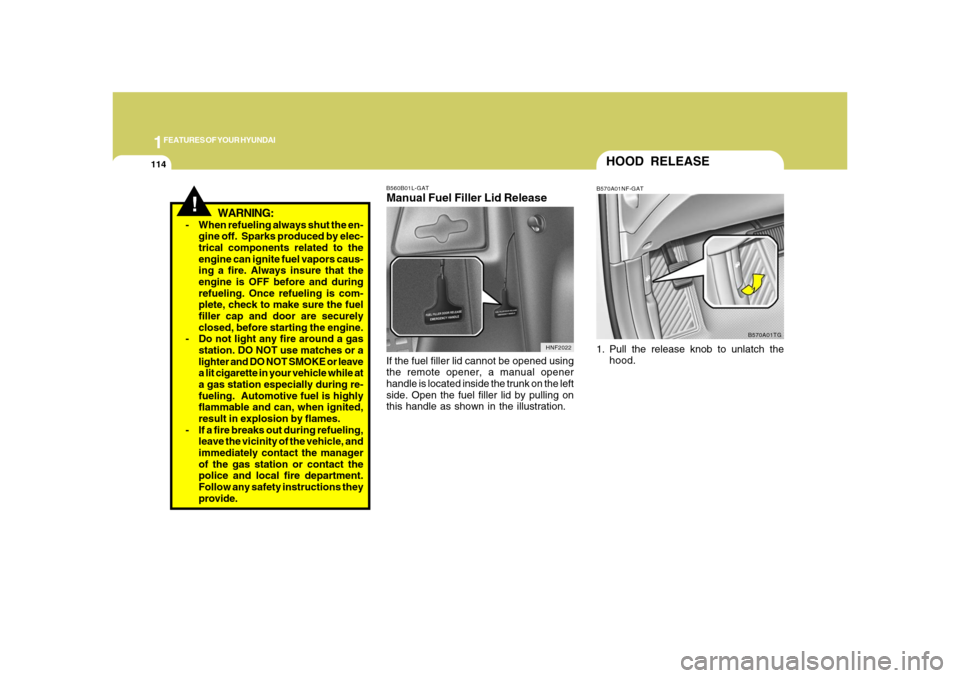
B560B01L-GATManual Fuel Filler Lid ReleaseIf the fuel filler lid cannot be opened using
the remote opener, a manual opener
handle is located inside the trunk on the left
side. Open the fuel filler lid by pulling on
this handle as shown in the illustration.
HNF2022
HOOD RELEASEB570A01NF-GAT1. Pull the release knob to unlatch the
hood.
B570A01TG
Page 153 of 345
1
FEATURES OF YOUR HYUNDAI
139139
MIDDLE ControlTo increase the MIDDLE, rotate the knob
clockwise, while to decrease the MIDDLE,
rotate the knob counterclockwise.TREBLE ControlTo increase the TREBLE, rotate the knob
clockwise, while to decrease the TREBLE,
rotate the knob counterclockwise.FADER ControlTurn the control knob clockwise to empha-
size rear speaker sound (front speaker
sound will be attenuated).
When the control knob is turned counter-
clockwise, front speaker sound will be
emphasized (rear speaker sound will be
attenuated).BALANCE ControlRotate the knob clockwise to emphasize
right speaker sound (Left speaker sound
will be attenuated).
When the control knob is turned counter-
clockwise, left speaker sound will be em-
phasized (Right speaker sound will be
attenuated).
CAUTION:
o Do not place beverages close to the
audio system. The playback mecha-
nism may be damaged if you spill
them.
o Do not impact on the audio system, or
the playback mechanism could be
damaged.
!
8. PRESET STATION Select ButtonsSix (6) stations for AM, FM1 and FM2
respectively can be preset in the electronic
memory circuit.HOW TO PRESET STATIONSSix AM and twelve FM stations may be
programmed into the memory of the radio.
Then, by simply pressing the band select
button and/or one of the six station select
buttons, you may recall any of these sta-
tions instantly.
To program the stations, follow these steps:
o Press band selector to set the band for
AM, FM1 and FM2.
o Select the desired station to be stored
by seek or manual tuning.
o Determine the preset station select
button you wish to use to access that
station.
o Press the station select button for more
than two seconds. Beep sound will be
heard while depressing the button. You
should then release the button, and
proceed to program the next desired
station. A total of 18 stations can be
programmed by selecting one AM and
two FM station per button.o When completed, any preset station
may be recalled by selecting AM, FM1
or FM2 band and the appropriate sta-
tion button.
Page 160 of 345
1FEATURES OF YOUR HYUNDAI
146
8. PRESET STATION Select ButtonsSix (6) stations for AM, FM1 and FM2
respectively can be preset in the electronic
memory circuit.HOW TO PRESET STATIONSSix AM and twelve FM stations may be
programmed into the memory of the radio.
Then, by simply pressing the band select
button and/or one of the six station select
buttons, you may recall any of these sta-
tions instantly.
To program the stations, follow these steps:
o Press band selector to set the band for
AM, FM and FM2.
o Select the desired station to be stored
by seek or manual tuning.
o Determine the preset station select
button you wish to use to access that
station.
o Press the station select button for more
than two seconds. Beep sound will be
heard while depressing the button. You
should then release the button, and
proceed to program the next desired
station. A total of 18 stations can be
programmed by selecting one AM and
two FM station per button.
!
MIDDLE ControlTo increase the MIDDLE, rotate the knob
clockwise, while to decrease the MIDDLE,
rotate the knob counterclockwise.TREBLE ControlTo increase the TREBLE, rotate the knob
clockwise, while to decrease the TREBLE,
rotate the knob counterclockwise.FADER ControlTurn the control knob clockwise to empha-
size rear speaker sound (front speaker
sound will be attenuated).
When the control knob is turned counter-
clockwise, front speaker sound will be
emphasized (rear speaker sound will be
attenuated).BALANCE ControlRotate the knob clockwise to emphasize
right speaker sound. (Left speaker sound
will be attenuated)
When the control knob is turned counter
clockwise, left speaker sound will be em-
phasized (Right speaker sound will be
attenuated).o When completed, any preset station
may be recalled by selecting AM, FM1
or FM2 band and the appropriate sta-
tion button.
CAUTION:
o Do not place beverages close to the
audio system. The playback mecha-
nism may be damaged if you spill
them.
o Do not impact on the audio system, or
the playback mechanism could be
damaged.