radio Hyundai Azera 2009 User Guide
[x] Cancel search | Manufacturer: HYUNDAI, Model Year: 2009, Model line: Azera, Model: Hyundai Azera 2009Pages: 335, PDF Size: 12.4 MB
Page 165 of 335
1FEATURES OF YOUR HYUNDAI
152
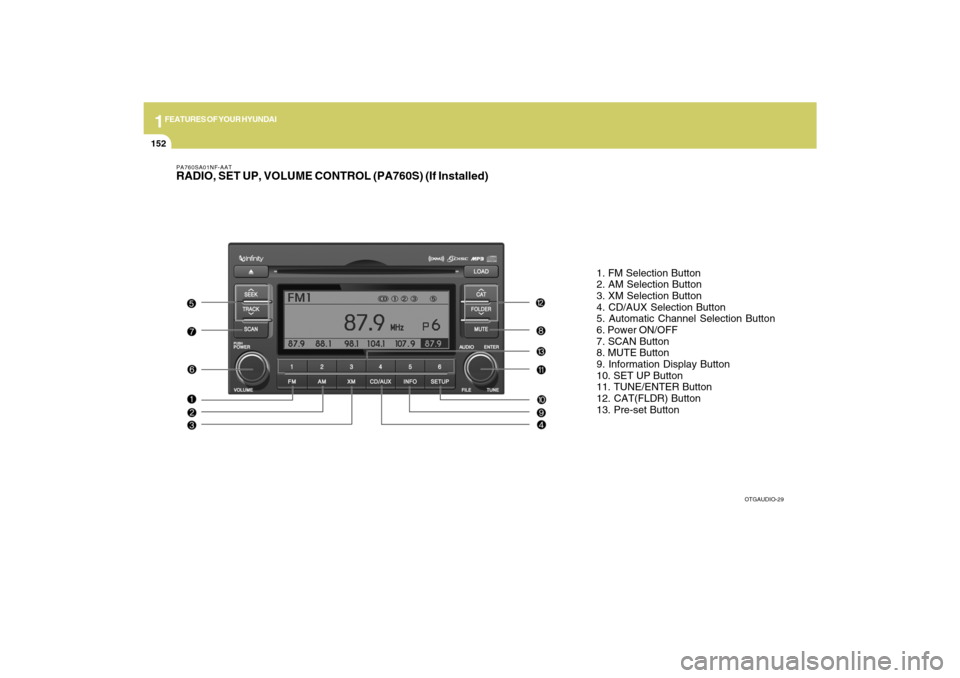
PA760SA01NF-AATRADIO, SET UP, VOLUME CONTROL (PA760S) (If Installed)
1. FM Selection Button
2. AM Selection Button
3. XM Selection Button
4. CD/AUX Selection Button
5. Automatic Channel Selection Button
6. Power ON/OFF
7. SCAN Button
8. MUTE Button
9. Information Display Button
10. SET UP Button
11. TUNE/ENTER Button
12. CAT(FLDR) Button
13. Pre-set Button
OTGAUDIO-29
Page 173 of 335
1FEATURES OF YOUR HYUNDAI
160
PA760SF01TG-AATIf a USB is connected to the multiple termi-
nal inside the console on the right hand
side of the driver’s seat, the ‘USB’ icon will
be displayed on the top right corner of the
display screen.1.AUX Selection ButtonIf a USB device is connected, it switches to
the USB mode from the CD mode to play
the song files stored in the USB device.
If there is no CD and USB mode from the
Radio mode, it displays ‘NO MEDIA’.2. Track Moving Buttono Press the [SEEK
] button for less than
0.8 second to play from the beginning of
the song currently played.
Press the button for less than 0.8 sec-
ond and press it again within 1 second
to move and play the previous track.
Press the button for 0.8 second or longer
to play the song in reverse direction in
fast speed.
o Press the [SEEK ] button for less than
0.8 second to move to the next track.
Press the button for 0.8 second or longer
to play the song in forward direction in
fast speed.
3. INFO ButtonDisplays the information of the file cur-
rently played in the order of FILE NAME
➟TITLE➟ARTIST➟ALBUM➟FOLDER➟TOTAL
FILE➟normal display➟FILE NAME➟…
(Displays no information if the file has no
song information.)4. Folder moving Buttono Moves [FLDR
] button child folder of
the current folder and displays the first
song in the folder. Press TUNE/ENTER
button to move to the folder displayed.
It will play the first song in the folder.
o Moves [FLDR ] button parent folder
and displays the first song in the folder.
Press TUNE/ENTER button to move to
the folder displayed. It will play the first
song in the folder.
5. TUNE/ENTER ButtonTurn this button clockwise to display the
songs next to the currently played song.
Turn the button counterclockwise to dis-
play the songs before the currently played
song.
Press the button to skip and play the se-
lected song.Pressing the button changes the BASS,
MIDDLE, TREBLE, FADER and BALANCE
TUNE mode. The mode selected is shown
on the display. After selecting each mode,
rotate the Audio control knob clockwise or
counterclockwise.
o BASS Control
To increase the BASS, rotate the knob
clockwise, while to decrease the BASS,
rotate the knob counterclockwise.
o MIDDLE Control
To increase the MIDDLE, rotate the knob
clockwise, while to decrease the MIDDLE,
rotate the knob counterclockwise.
o TREBLE Control
To increase the TREBLE, rotate the knob
clockwise, while to decrease the TREBLE,
rotate the knob counterclockwise.
o FADER Control
Turn the control knob clockwise to empha-
size rear speaker sound (front speaker
sound will be attenuated). When the con-
trol knob is turned counterclockwise, front
speaker sound will be emphasized (rear
speaker sound will be attenuated).
Page 176 of 335

1
FEATURES OF YOUR HYUNDAI
163
PA760SH01TG-AATIn case the i-Pod exclusive cable is con-
nected to the multiple terminal inside the
console on the right hand side of the driver’s
seat. When the i-Pod is connected, the ‘i-
Pod’ icon will be displayed on the top right
corner of the display screen.1. i-Pod Selection ButtonIf i-Pod is connected, it switches to the i-
Pod mode from the CD mode to play the
song files stored in the i-Pod.
If there are no CD and AUX mode from the
Radio mode, it displays ‘NO MEDIA’.2. Track Moving Buttono Press the [SEEK
] button for less than
0.8 second to play from the beginning
of the song currently played.
Press the button for less than 0.8 sec-
ond and press it again within 1 second
to move and play the previous track.
Press the button for 0.8 second or longer
to play the song in reverse direction in
fast speed.
o Press the [SEEK ] button for less than
0.8 second to move to the next track.
Press the button for 0.8 second or longer
to play the song in forward direction in
fast speed.
3. INFO ButtonDisplays the information of the file cur-
rently played in the order of
TITLE➟ARTIST➟ALBUM➟normal display
➟TITLE➟…
(Displays no information if the file has no
song information.)4. Category Selection ButtonMoves to the upper category from currently
played category of the i-Pod.
To move to (play) the category (song)
displayed, press MENU(preset6).
You will be able to search through the
lower category of the selected category.
The order of i-Pod’s category is SONG,
ALBUMES, ARTISTS, GENRES, and i-
Pod.5. TUNE/ENTER ButtonWhen you turn the button clockwise, it will
display the songs (category) next to the
song currently played (category in the same
level).
Also, when you turn the button counter-
clockwise, it will display the songs (cat-
egory) before the song currently played
(category in the same level).
If you want to listen to the song displayed
in the song category, press the button, then
it will skip to the selected song and play.Pressing the button changes the BASS,
MIDDLE, TREBLE, FADER and BALANCE
TUNE mode. The mode selected is shown
on the display. After selecting each mode,
rotate the Audio control knob clockwise or
counterclockwise.
o BASS Control
To increase the BASS, rotate the knob
clockwise, while to decrease the BASS,
rotate the knob counterclockwise.
o MIDDLE Control
To increase the MIDDLE, rotate the knob
clockwise, while to decrease the MIDDLE,
rotate the knob counterclockwise.
o TREBLE Control
To increase the TREBLE, rotate the knob
clockwise, while to decrease the TREBLE,
rotate the knob counterclockwise.
o FADER Control
Turn the control knob clockwise to empha-
size rear speaker sound (front speaker
sound will be attenuated). When the con-
trol knob is turned counterclockwise, front
speaker sound will be emphasized (rear
speaker sound will be attenuated).
Page 178 of 335
1
FEATURES OF YOUR HYUNDAI
165
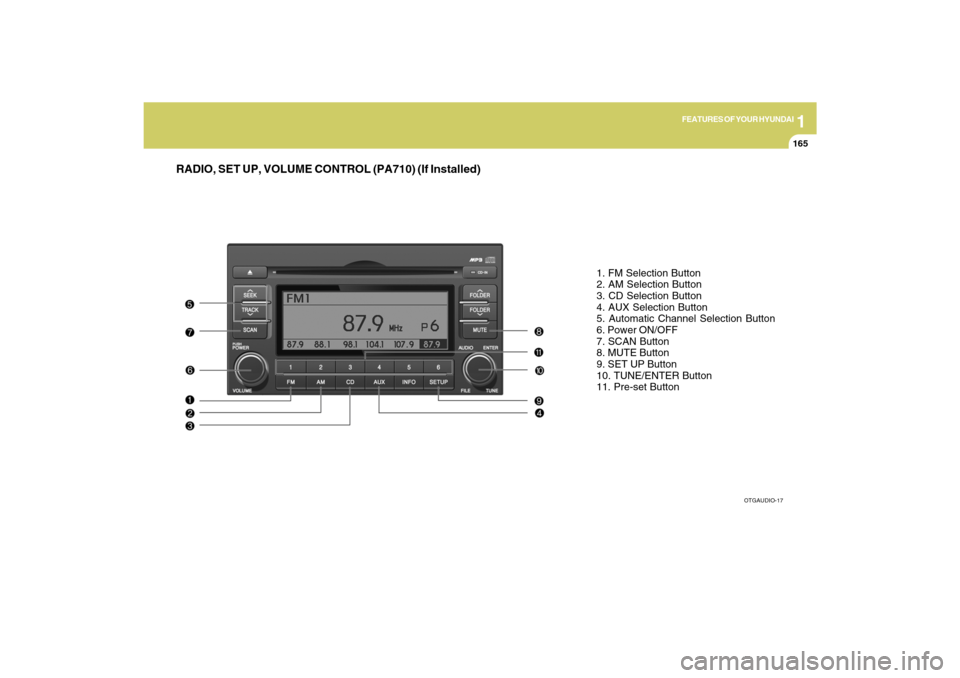
RADIO, SET UP, VOLUME CONTROL (PA710) (If Installed)
1. FM Selection Button
2. AM Selection Button
3. CD Selection Button
4. AUX Selection Button
5. Automatic Channel Selection Button
6. Power ON/OFF
7. SCAN Button
8. MUTE Button
9. SET UP Button
10. TUNE/ENTER Button
11. Pre-set Button
OTGAUDIO-17
Page 186 of 335

1
FEATURES OF YOUR HYUNDAI
173
In case USB is connected to the multiple
terminal inside the console on the right
hand side of the driver’s seat. When USB
is connected, the ‘USB’ icon will be dis-
played on the top right corner of the display
screen.1.AUX Selection ButtonIf USB is not connected, it switches to the
USB mode from the Radio and CD mode
to play the song files stored in the USB.
If AUX is not connected, it is invalid key.2. Track Moving Buttono Press the [SEEK
] button for less than
0.8 second to play from the beginning of
the song currently played.
Press the button for less than 0.8 sec-
ond and press it again within 1 second
to move and play the previous track.
Press the button for 0.8 second or longer
to play the song in reverse direction in
fast speed.
o Press the [SEEK ] button for less than
0.8 seconds to move to the next track.
Press the button for 0.8 second or longer
to play the song in forward direction in
fast speed.
3. INFO ButtonDisplays the information of the file cur-
rently played in the order of FILE NAME
➟TITLE➟ARTIST➟ALBUM➟FOLDER➟
TOTAL FILE➟NORMAL DISPLAY➟FILE
NAME➟… (Displays no information if the
file has no song information.)4. Folder moving Buttono Moves [FLDR
] button child folder of
the current folder and displays the first
song in the folder. Press TUNE/ENTER
button to move to the folder displayed.
It will play the first song in the folder.
o Moves [FLDR ] button parent folder
and displays the first song in the folder.
Press TUNE/ENTER button to move to
the folder displayed. It will play the first
song in the folder.
5. TUNE/ENTER ButtonTurn this button clockwise to display the
songs next to the currently played song.
Turn the button counterclockwise to dis-
play the songs before the currently played
song.
Press the button to skip and play the se-
lected song.Pressing the button changes the BASS,
MIDDLE, TREBLE, FADER and BALANCE
TUNE mode. The mode selected is shown
on the display. After selecting each mode,
rotate the Audio control knob clockwise or
counterclockwise.
o BASS Control
To increase the BASS, rotate the knob
clockwise, while to decrease the BASS,
rotate the knob counterclockwise.
o MIDDLE Control
To increase the MIDDLE, rotate the knob
clockwise, while to decrease the MIDDLE,
rotate the knob counterclockwise.
o TREBLE Control
To increase the TREBLE, rotate the knob
clockwise, while to decrease the TREBLE,
rotate the knob counterclockwise.
o FADER Control
Turn the control knob clockwise to empha-
size rear speaker sound (front speaker
sound will be attenuated). When the con-
trol knob is turned counterclockwise, front
speaker sound will be emphasized (rear
speaker sound will be attenuated).
Page 189 of 335

1FEATURES OF YOUR HYUNDAI
176
In case the i-Pod exclusive cable is con-
nected to the multiple terminal inside the
console on the right hand side of the driver’s
seat. When the i-Pod is connected, the ‘i-
Pod’ icon will be displayed on the top right
corner of the display screen.1. i-Pod Selection ButtonIf i-Pod is connected, it switches to the i-
Pod mode from the Radio and CD mode to
play the song files stored in the i-Pod.
If there are no CD and AUX mode from the
Radio mode, it displays ‘NO MEDIA’.2. Track Moving Buttono Press the [SEEK
] button for less than
0.8 second to play from the beginning of
the song currently played.
Press the button for less than 0.8 sec-
ond and press it again within 1 second
to move and play the previous track.
Press the button for 0.8 seconds or
longer to play the song in reverse direc-
tion in fast speed.
o Press the [SEEK ] button for less than
0.8 second to move to the next track.
Press the button for 0.8 second or longer
to play the song in forward direction in
fast speed.
3. INFO ButtonDisplays the information of the file cur-
rently played in the order of TITLE➟
ARTIST➟ALBUM➟NORMAL DISPLAY
➟TITLE➟… (Displays no information if the
file has no song information.)4. Category Selection ButtonMoves to the upper category from currently
played category of the i-Pod.
To move to (play) the category (song)
displayed, press MENU(Preset 6).
You will be able to search through the
lower category of the selected category.
The order of i-Pod’s category is SONG,
ALBUMES, ARTISTS, GENRES, and i-
Pod.5. TUNE/ENTER ButtonWhen you turn the button clockwise, it will
display the songs (category) next to the
song currently played (category in the same
level).
Also, when you turn the button counter-
clockwise, it will display the songs (cat-
egory) before the song currently played
(category in the same level).
If you want to listen to the song displayed
in the song category, press the button, then
it will skip to the selected song and play.Pressing the button changes the BASS,
MIDDLE, TREBLE, FADER and BALANCE
TUNE mode. The mode selected is shown
on the display. After selecting each mode,
rotate the Audio control knob clockwise or
counterclockwise.
o BASS Control
To increase the BASS, rotate the knob
clockwise, while to decrease the BASS,
rotate the knob counterclockwise.
o MIDDLE Control
To increase the MIDDLE, rotate the knob
clockwise, while to decrease the MIDDLE,
rotate the knob counterclockwise.
o TREBLE Control
To increase the TREBLE, rotate the knob
clockwise, while to decrease the TREBLE,
rotate the knob counterclockwise.
o FADER Control
Turn the control knob clockwise to empha-
size rear speaker sound (front speaker
sound will be attenuated). When the con-
trol knob is turned counterclockwise, front
speaker sound will be emphasized (rear
speaker sound will be attenuated).
Page 191 of 335
1FEATURES OF YOUR HYUNDAI
178
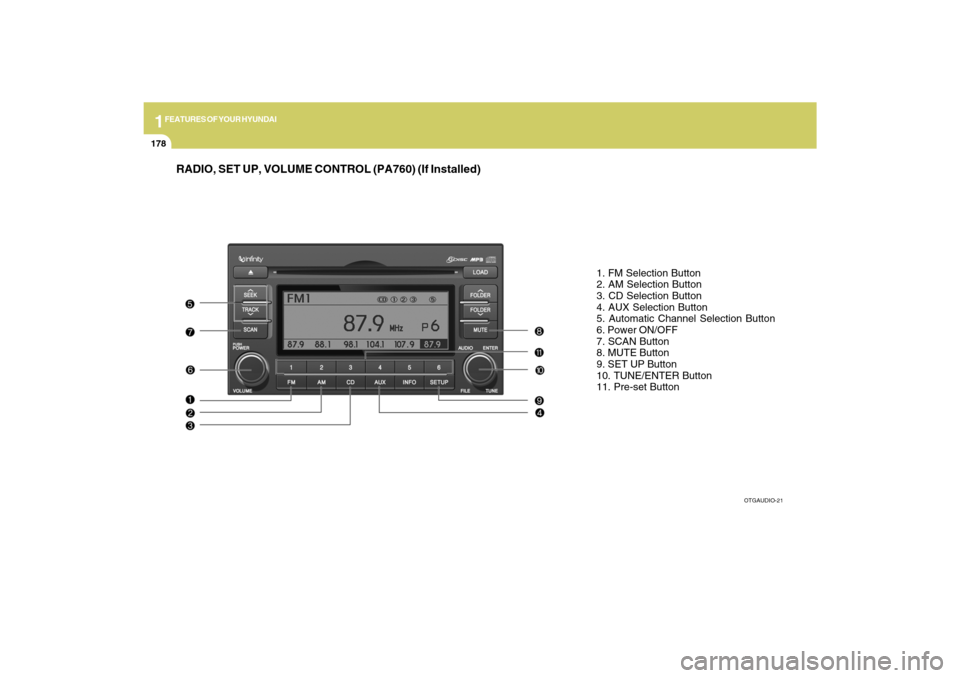
RADIO, SET UP, VOLUME CONTROL (PA760) (If Installed)
1. FM Selection Button
2. AM Selection Button
3. CD Selection Button
4. AUX Selection Button
5. Automatic Channel Selection Button
6. Power ON/OFF
7. SCAN Button
8. MUTE Button
9. SET UP Button
10. TUNE/ENTER Button
11. Pre-set Button
OTGAUDIO-21
Page 199 of 335
1FEATURES OF YOUR HYUNDAI
186
In case USB is connected to the multiple
terminal inside the console on the right
hand side of the driver’s seat. When USB
is connected, the ‘USB’ icon will be dis-
played on the top right corner of the display
screen.1.AUX Selection ButtonIf USB is not connected, it switches to the
USB mode from the Radio and CD mode
to play the song files stored in the USB.
If AUX is not connected, it is invalid key.2. Track Moving Buttono Press the [SEEK
] button for less than
0.8 second to play from the beginning of
the song currently played.
Press the button for less than 0.8 sec-
ond and press it again within 1 second
to move and play the previous track.
Press the button for 0.8 second or longer
to play the song in reverse direction in
fast speed.
o Press the [SEEK ] button for less than
0.8 second to move to the next track.
Press the button for 0.8 second or longer
to play the song in forward direction in
fast speed.
3. INFO ButtonDisplays the information of the file cur-
rently played in the order of FILE NAME
➟TITLE➟ARTIST➟ALBUM➟FOLDER➟
TOTAL FILE➟NORMAL DISPLAY➟FILE
NAME➟… (Displays no information if the
file has no song information.)4. Folder moving Buttono Moves [FLDR
] button child folder of
the current folder and displays the first
song in the folder. Press TUNE/ENTER
button to move to the folder displayed.
It will play the first song in the folder.
o Moves [FLDR ] button parent folder
and displays the first song in the folder.
Press TUNE/ENTER button to move to
the folder displayed. It will play the first
song in the folder.
5. TUNE/ENTER ButtonTurn this button clockwise to display the
songs next to the currently played song.
Turn the button counterclockwise to dis-
play the songs before the currently played
song.
Press the button to skip and play the se-
lected song.Pressing the button changes the BASS,
MIDDLE, TREBLE, FADER and BALANCE
TUNE mode. The mode selected is shown
on the display. After selecting each mode,
rotate the Audio control knob clockwise or
counterclockwise.
o BASS Control
To increase the BASS, rotate the knob
clockwise, while to decrease the BASS,
rotate the knob counterclockwise.
o MIDDLE Control
To increase the MIDDLE, rotate the knob
clockwise, while to decrease the MIDDLE,
rotate the knob counterclockwise.
o TREBLE Control
To increase the TREBLE, rotate the knob
clockwise, while to decrease the TREBLE,
rotate the knob counterclockwise.
o FADER Control
Turn the control knob clockwise to empha-
size rear speaker sound (front speaker
sound will be attenuated). When the con-
trol knob is turned counterclockwise, front
speaker sound will be emphasized (rear
speaker sound will be attenuated).
Page 202 of 335

1
FEATURES OF YOUR HYUNDAI
189
In case the i-Pod exclusive cable is con-
nected to the multiple terminal inside the
console on the right hand side of the driver’s
seat. When the i-Pod is connected, the ‘i-
Pod’ icon will be displayed on the top right
corner of the display screen.1. i-Pod Selection ButtonIf i-Pod is connected, it switches to the i-
Pod mode from the Radio and CD mode to
play the song files stored in the i-Pod.
If there are no CD and AUX mode from the
Radio mode, it displays ‘NO MEDIA’.2. Track Moving Buttono Press the [SEEK
] button for less than
0.8 second to play from the beginning of
the song currently played.
Press the button for less than 0.8 sec-
ond and press it again within 1 second
to move and play the previous track.
Press the button for 0.8 second or longer
to play the song in reverse direction in
fast speed.
o Press the [SEEK ] button for less than
0.8 second to move to the next track.
Press the button for 0.8 second or longer
to play the song in forward direction in
fast speed.
3. INFO ButtonDisplays the information of the file cur-
rently played in the order of TITLE➟
ARTIST➟ALBUM➟NORMAL DISPLAY
➟TITLE➟… (Displays no information if the
file has no song information.)4. Category Selection ButtonMoves to the upper category from currently
played category of the i-Pod.
To move to (play) the category (song)
displayed, press MENU(Preset 6).
You will be able to search through the
lower category of the selected category.
The order of i-Pod’s category is SONG,
ALBUMES, ARTISTS, GENRES, and i-
Pod.5. TUNE/ENTER ButtonWhen you turn the button clockwise, it will
display the songs (category) next to the
song currently played (category in the same
level).
Also, when you turn the button counter-
clockwise, it will display the songs (cat-
egory) before the song currently played
(category in the same level).
If you want to listen to the song displayed
in the song category, press the button, then
it will skip to the selected song and play.Pressing the button changes the BASS,
MIDDLE, TREBLE, FADER and BALANCE
TUNE mode. The mode selected is shown
on the display. After selecting each mode,
rotate the Audio control knob clockwise or
counterclockwise.
o BASS Control
To increase the BASS, rotate the knob
clockwise, while to decrease the BASS,
rotate the knob counterclockwise.
o MIDDLE Control
To increase the MIDDLE, rotate the knob
clockwise, while to decrease the MIDDLE,
rotate the knob counterclockwise.
o TREBLE Control
To increase the TREBLE, rotate the knob
clockwise, while to decrease the TREBLE,
rotate the knob counterclockwise.
o FADER Control
Turn the control knob clockwise to empha-
size rear speaker sound (front speaker
sound will be attenuated). When the con-
trol knob is turned counterclockwise, front
speaker sound will be emphasized (rear
speaker sound will be attenuated).
Page 207 of 335
2
DRIVING YOUR HYUNDAI
4
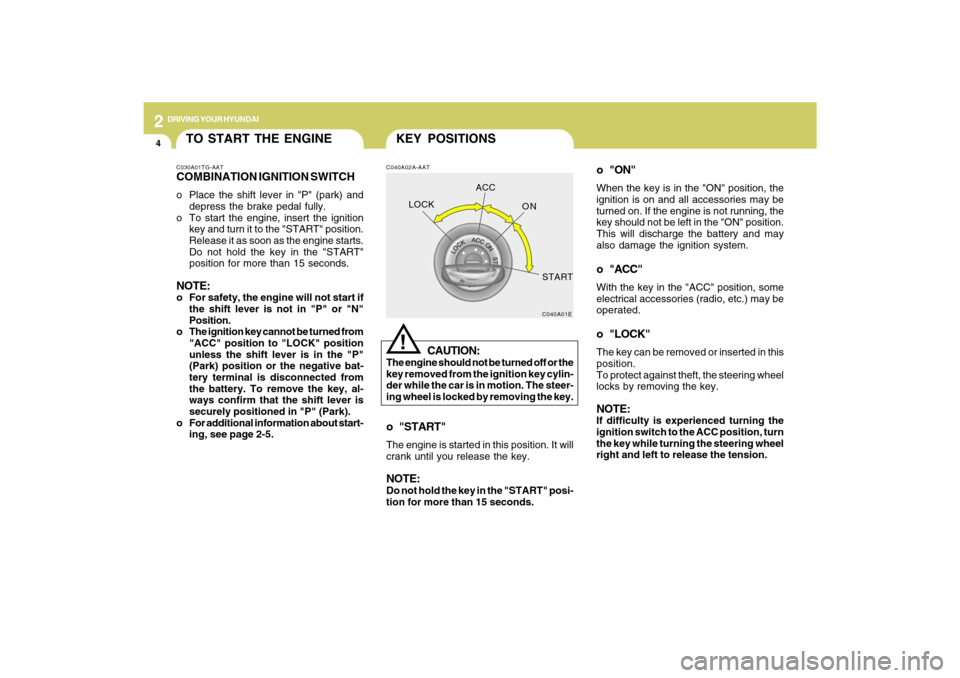
o "ON"When the key is in the "ON" position, the
ignition is on and all accessories may be
turned on. If the engine is not running, the
key should not be left in the "ON" position.
This will discharge the battery and may
also damage the ignition system.o "ACC"With the key in the "ACC" position, some
electrical accessories (radio, etc.) may be
operated.o "LOCK"The key can be removed or inserted in this
position.
To protect against theft, the steering wheel
locks by removing the key.NOTE:If difficulty is experienced turning the
ignition switch to the ACC position, turn
the key while turning the steering wheel
right and left to release the tension.
KEY POSITIONSC040A02A-AAT
CAUTION:
The engine should not be turned off or the
key removed from the ignition key cylin-
der while the car is in motion. The steer-
ing wheel is locked by removing the key.
!
o "START"The engine is started in this position. It will
crank until you release the key.NOTE:Do not hold the key in the "START" posi-
tion for more than 15 seconds.
C040A01E
LOCKACC
ON
START
TO START THE ENGINEC030A01TG-AATCOMBINATION IGNITION SWITCHo Place the shift lever in "P" (park) and
depress the brake pedal fully.
o To start the engine, insert the ignition
key and turn it to the "START" position.
Release it as soon as the engine starts.
Do not hold the key in the "START"
position for more than 15 seconds.NOTE:o For safety, the engine will not start if
the shift lever is not in "P" or "N"
Position.
o The ignition key cannot be turned from
"ACC" position to "LOCK" position
unless the shift lever is in the "P"
(Park) position or the negative bat-
tery terminal is disconnected from
the battery. To remove the key, al-
ways confirm that the shift lever is
securely positioned in "P" (Park).
o For additional information about start-
ing, see page 2-5.