reset Hyundai Azera 2009 User Guide
[x] Cancel search | Manufacturer: HYUNDAI, Model Year: 2009, Model line: Azera, Model: Hyundai Azera 2009Pages: 335, PDF Size: 12.4 MB
Page 91 of 335
1FEATURES OF YOUR HYUNDAI78
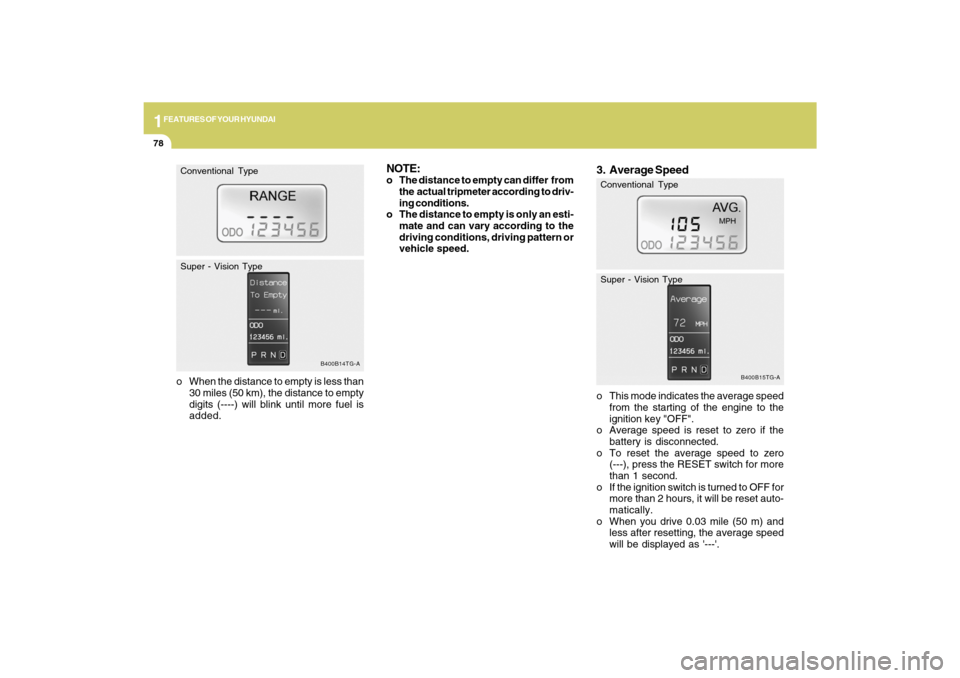
o When the distance to empty is less than
30 miles (50 km), the distance to empty
digits (----) will blink until more fuel is
added.
B400B14TG-A
Conventional Type
Super - Vision Type
3. Average Speedo This mode indicates the average speed
from the starting of the engine to the
ignition key "OFF".
o Average speed is reset to zero if the
battery is disconnected.
o To reset the average speed to zero
(---), press the RESET switch for more
than 1 second.
o If the ignition switch is turned to OFF for
more than 2 hours, it will be reset auto-
matically.
o When you drive 0.03 mile (50 m) and
less after resetting, the average speed
will be displayed as '---'.
B400B15TG-A
Conventional Type
Super - Vision Type
NOTE:o The distance to empty can differ from
the actual tripmeter according to driv-
ing conditions.
o The distance to empty is only an esti-
mate and can vary according to the
driving conditions, driving pattern or
vehicle speed.
Page 92 of 335
1
FEATURES OF YOUR HYUNDAI
79
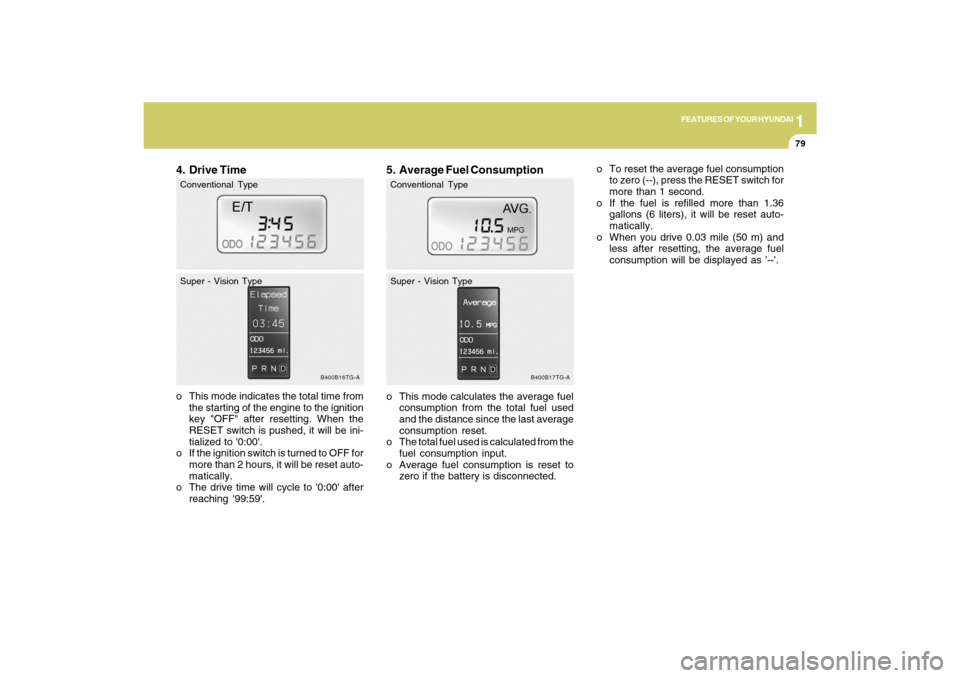
5. Average Fuel Consumptiono This mode calculates the average fuel
consumption from the total fuel used
and the distance since the last average
consumption reset.
o The total fuel used is calculated from the
fuel consumption input.
o Average fuel consumption is reset to
zero if the battery is disconnected.
B400B17TG-A
Conventional Type
Super - Vision Type
o To reset the average fuel consumption
to zero (--), press the RESET switch for
more than 1 second.
o If the fuel is refilled more than 1.36
gallons (6 liters), it will be reset auto-
matically.
o When you drive 0.03 mile (50 m) and
less after resetting, the average fuel
consumption will be displayed as '--'.
4. Drive Timeo This mode indicates the total time from
the starting of the engine to the ignition
key "OFF" after resetting. When the
RESET switch is pushed, it will be ini-
tialized to '0:00'.
o If the ignition switch is turned to OFF for
more than 2 hours, it will be reset auto-
matically.
o The drive time will cycle to '0:00' after
reaching '99:59'.
B400B16TG-A
Conventional Type
Super - Vision Type
Page 100 of 335
1
FEATURES OF YOUR HYUNDAI
87
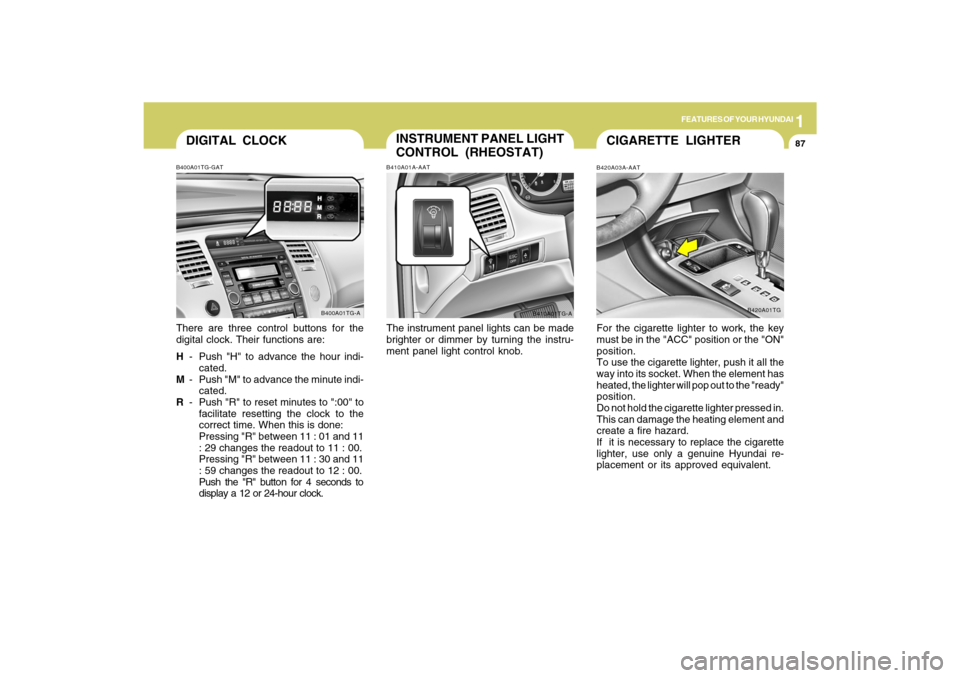
DIGITAL CLOCKB400A01TG-GATThere are three control buttons for the
digital clock. Their functions are:
H- Push "H" to advance the hour indi-
cated.
M- Push "M" to advance the minute indi-
cated.
R- Push "R" to reset minutes to ":00" to
facilitate resetting the clock to the
correct time. When this is done:
Pressing "R" between 11 : 01 and 11
: 29 changes the readout to 11 : 00.
Pressing "R" between 11 : 30 and 11
: 59 changes the readout to 12 : 00.
Push the "R" button for 4 seconds to
display a 12 or 24-hour clock.
B400A01TG-A
INSTRUMENT PANEL LIGHT
CONTROL (RHEOSTAT)B410A01A-AATThe instrument panel lights can be made
brighter or dimmer by turning the instru-
ment panel light control knob.
B410A01TG-A
CIGARETTE LIGHTERB420A03A-AATFor the cigarette lighter to work, the key
must be in the "ACC" position or the "ON"
position.
To use the cigarette lighter, push it all the
way into its socket. When the element has
heated, the lighter will pop out to the "ready"
position.
Do not hold the cigarette lighter pressed in.
This can damage the heating element and
create a fire hazard.
If it is necessary to replace the cigarette
lighter, use only a genuine Hyundai re-
placement or its approved equivalent.
B420A01TG
Page 106 of 335
1
FEATURES OF YOUR HYUNDAI
93
!
CAUTION:
o Do not open the sunroof in severely
cold temperatures or when it is cov-
ered with ice or snow.
o Periodically remove any dirt that may
have accumulated on the guide rails.
o Do not press any sunroof control but-
ton longer than necessary. Damage
to the motor or system components
could occur.
!
B460E02TG-AATResetting the sunroofWhenever the vehicle battery is discon-
nected or discharged, you have to reset
your sunroof system as follows:
1. Turn the ignition key to the "ON" posi-
tion.
2. Press the TILT UP button for more than
1 second to tilt up the sunroof com-
pletely when the sunroof is fully closed.
Then, release the button.
3. Press and hold the TILT UP button once
again until the sunroof has returned to
the original TILT UP position after it
raises a little higher than the maximum
TILT UP position. Then, release the
button.
4. Press and hold the TILT UP button within
5 seconds until the sunroof is operated
as follows;
TILT DOWN → SLIDE OPEN → SLIDE
CLOSE
Then, release the button.
CAUTION:
If the sunroof is not reset, it may not
operate properly.
Page 132 of 335
1
FEATURES OF YOUR HYUNDAI
119
NOTE:If the vehicle speed decreases more
than 9 mph (15 km/h) below the set speed
or decreases below 25 mph (40 km/h),
the cruise control system will automati-
cally cancel the set speed.
OTG048801
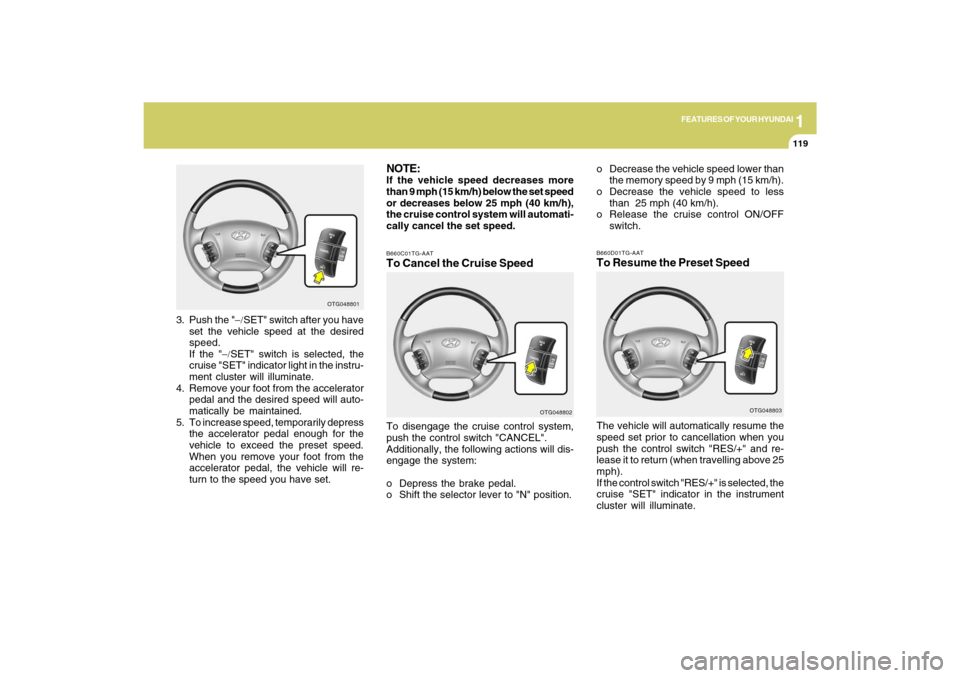
3. Push the "−/SET" switch after you have
set the vehicle speed at the desired
speed.
If the "−/SET" switch is selected, the
cruise "SET" indicator light in the instru-
ment cluster will illuminate.
4. Remove your foot from the accelerator
pedal and the desired speed will auto-
matically be maintained.
5. To increase speed, temporarily depress
the accelerator pedal enough for the
vehicle to exceed the preset speed.
When you remove your foot from the
accelerator pedal, the vehicle will re-
turn to the speed you have set.
B660C01TG-AATTo Cancel the Cruise SpeedTo disengage the cruise control system,
push the control switch "CANCEL".
Additionally, the following actions will dis-
engage the system:
o Depress the brake pedal.
o Shift the selector lever to "N" position.
OTG048802
o Decrease the vehicle speed lower than
the memory speed by 9 mph (15 km/h).
o Decrease the vehicle speed to less
than 25 mph (40 km/h).
o Release the cruise control ON/OFF
switch.B660D01TG-AATTo Resume the Preset SpeedThe vehicle will automatically resume the
speed set prior to cancellation when you
push the control switch "RES/+" and re-
lease it to return (when travelling above 25
mph).
If the control switch "RES/+" is selected, the
cruise "SET" indicator in the instrument
cluster will illuminate.
OTG048803
Page 133 of 335
1FEATURES OF YOUR HYUNDAI
120
!
WARNING:
o Keep the cruise control ON/OFF switch
off when not using the cruise control
to avoid inadvertently setting a speed.
o Use the cruise control system only
when traveling on open highways in
good weather.
o Do not use the cruise control when it
may not be safe to keep the car at a
constant speed, for instance, driving
in heavy or varying traffic, or on slip-
pery (rainy, icy or snow-covered) or
winding roads or over 6% up-hill or
down-hill roads.
o Pay particular attention to the driving
conditions whenever using the cruise
control system.
o During normal cruise control opera-
tion, when the "
−/ −/−/ −/
−/SET" switch is acti-
vated or reactivated after applying
the brakes, the cruise control will
energize after approximately 3 sec-
onds. This delay is normal.
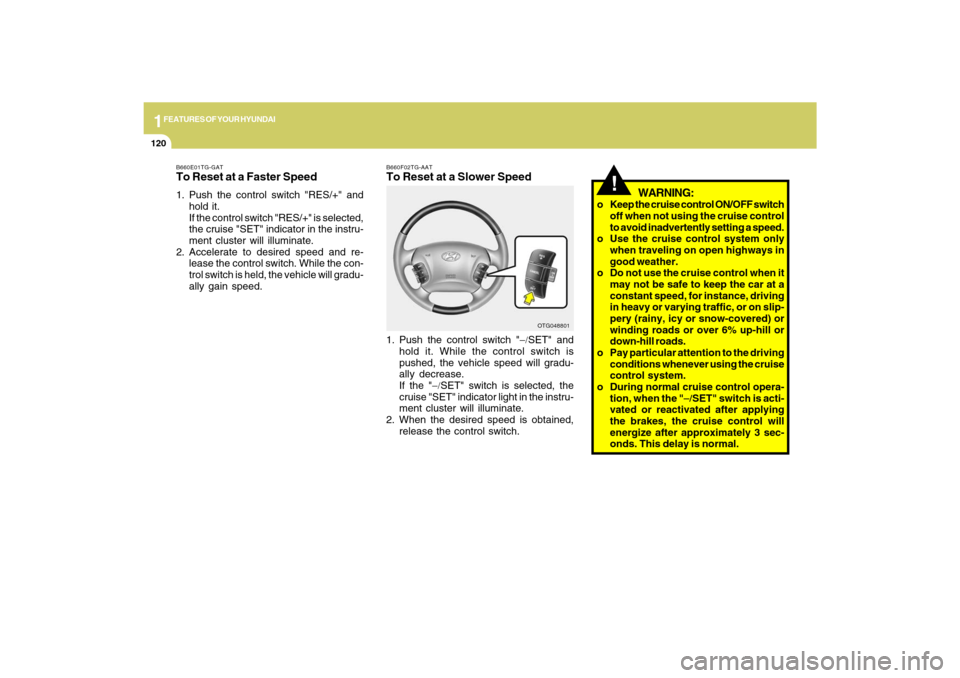
B660F02TG-AATTo Reset at a Slower Speed1. Push the control switch "−/SET" and
hold it. While the control switch is
pushed, the vehicle speed will gradu-
ally decrease.
If the "−/SET" switch is selected, the
cruise "SET" indicator light in the instru-
ment cluster will illuminate.
2. When the desired speed is obtained,
release the control switch.
OTG048801 B660E01TG-GAT
To Reset at a Faster Speed1. Push the control switch "RES/+" and
hold it.
If the control switch "RES/+" is selected,
the cruise "SET" indicator in the instru-
ment cluster will illuminate.
2. Accelerate to desired speed and re-
lease the control switch. While the con-
trol switch is held, the vehicle will gradu-
ally gain speed.
Page 134 of 335
1
FEATURES OF YOUR HYUNDAI
121
AUDIO REMOTE CONTROL
SWITCHB610A02TG-AAT(If Installed)
NOTE:Do not operate audio remote control
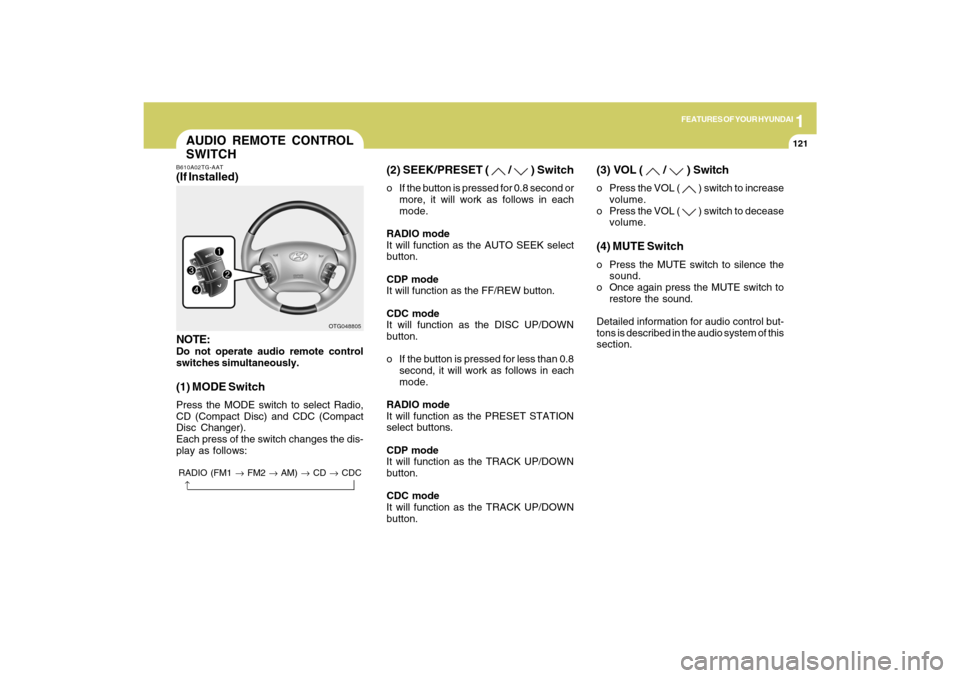
switches simultaneously.(1) MODE SwitchPress the MODE switch to select Radio,
CD (Compact Disc) and CDC (Compact
Disc Changer).
Each press of the switch changes the dis-
play as follows:
OTG048805
RADIO (FM1 → FM2 → AM) → CD → CDC→
(2) SEEK/PRESET (
/
) Switch
o If the button is pressed for 0.8 second or
more, it will work as follows in each
mode.
RADIO mode
It will function as the AUTO SEEK select
button.
CDP mode
It will function as the FF/REW button.
CDC mode
It will function as the DISC UP/DOWN
button.
o If the button is pressed for less than 0.8
second, it will work as follows in each
mode.
RADIO mode
It will function as the PRESET STATION
select buttons.
CDP mode
It will function as the TRACK UP/DOWN
button.
CDC mode
It will function as the TRACK UP/DOWN
button.
(3) VOL (
/
) Switch
o Press the VOL (
) switch to increase
volume.
o Press the VOL ( ) switch to decease
volume.
(4) MUTE Switcho Press the MUTE switch to silence the
sound.
o Once again press the MUTE switch to
restore the sound.
Detailed information for audio control but-
tons is described in the audio system of this
section.
Page 139 of 335
1FEATURES OF YOUR HYUNDAI
126
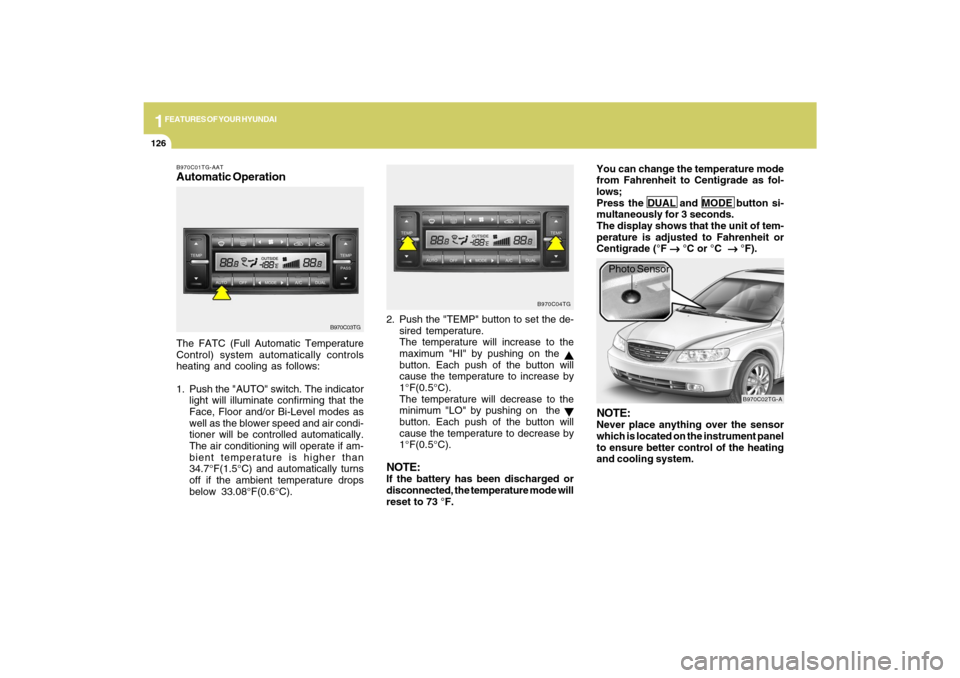
B970C01TG-AATAutomatic OperationThe FATC (Full Automatic Temperature
Control) system automatically controls
heating and cooling as follows:
1. Push the "AUTO" switch. The indicator
light will illuminate confirming that the
Face, Floor and/or Bi-Level modes as
well as the blower speed and air condi-
tioner will be controlled automatically.
The air conditioning will operate if am-
bient temperature is higher than
34.7°F(1.5°C) and automatically turns
off if the ambient temperature drops
below 33.08°F(0.6°C).2. Push the "TEMP" button to set the de-
sired temperature.
The temperature will increase to the
maximum "HI" by pushing on the
button. Each push of the button will
cause the temperature to increase by
1°F(0.5°C).
The temperature will decrease to the
minimum "LO" by pushing on the button. Each push of the button will
cause the temperature to decrease by
1°F(0.5°C).
NOTE:If the battery has been discharged or
disconnected, the temperature mode will
reset to 73 °F.You can change the temperature mode
from Fahrenheit to Centigrade as fol-
lows;
Press the DUAL and MODE button si-
multaneously for 3 seconds.
The display shows that the unit of tem-
perature is adjusted to Fahrenheit or
Centigrade (°F
→ →→ →
→ °C or °C
→ →→ →
→ °F).
B970C03TGB970C04TG
B970C02TG-A
Photo Sensor
NOTE:Never place anything over the sensor
which is located on the instrument panel
to ensure better control of the heating
and cooling system.
Page 161 of 335
1FEATURES OF YOUR HYUNDAI
148
o BALANCE Control
Rotate the knob clockwise to emphasize
right speaker sound (left speaker sound
will be attenuated). When the control knob
is turned counterclockwise, left speaker
sound will be emphasized (right speaker
sound will be attenuated).6. RANDOM Playback ButtonPress the button for less than 0.8 second
to start or stop the random playback of the
songs in the current folder.
Press the button for more than 0.8 second
to randomly play the entire songs in the
USB device.
Press the button again to cancel the mode.7. REPEAT ButtonPress the button for less than 0.8 second
to repeat the song currently played.
Press the button for more than 0.8 second
to repeat the entire songs in the USB
device.8. SCAN ButtonPlays 10 seconds of each song in the USB
device.
Press the button once again to cancel
scanning.
NOTE FOR USING i-Pod DEVICE:o Some i-Pod models might not support
the communication protocol and the
files will not be played. (i-Pod models
supported: Mini, 4G, Photo, Nano, 5G)
o The order of search or playback of
songs in the i-Pod can be different
from the order searched in the audio
system.
o If the i-Pod crashes due to its own
trouble, reset i-Pod. (Reset: Refer to
i-Pod manual)
o An i-Pod may not operate normally on
low battery charge.
!
CAUTION IN USING i-Pod
DEVICE:
o You need the power cable exclusive
for an i-Pod in order to operate i-Pod
with the buttons on the audio system.
The PC cable provided by Apple may
cause a malfunction. Do not use it for
vehicle use.
o When connecting the device with an i-
Pod cable, push in the jack fully to not
interfere with communication.
o When adjusting the sound of an i-Pod
and the audio system, the sound ef-
fects of both devices will overlap each
and might reduce or distort the quality
of the sound.
o Deactivate (turn off) the equalizer
function of an i-Pod when adjusting
the audio system’s volume, and turn
off the equalizer of the audio system
when using the equalizer of an i-Pod.
o When the i-Pod cable is connected,
the system can be switched to the
AUX mode even without the i-Pod
device and can cause noise. Discon-
nect i-Pod cable when you are not
using the i-Pod device.
Page 163 of 335
1FEATURES OF YOUR HYUNDAI
150
PA710SH01TG-AATIf the i-Pod exclusive cable is connected to
the multiple terminal inside the console on
the right hand side of the driver’s seat, the
‘i-Pod’ icon will be displayed on the top
right corner of the display screen.1. i-Pod Selection ButtonIf i-Pod is connected, it switches to the i-
Pod mode from the CD mode to play the
song files stored in the i-Pod.
If there is no CD and AUX mode from the
Radio mode, it displays ‘NO MEDIA’.2. Track Moving Buttono Press the [SEEK
] button for less than
0.8 second to play from the beginning
of the song currently played.
Press the button for less than 0.8 sec-
ond and press it again within 1 second
to move and play the previous track.
Press the button for 0.8 second or longer
to play the song in reverse direction in
fast speed.
o Press the [SEEK ] button for less than
0.8 second to move to the next track.
Press the button for 0.8 second or longer
to play the song in forward direction in
fast speed.
3. INFO ButtonDisplays the information of the file cur-
rently played in the order of
TITLE➟ARTIST➟ALBUM➟normal display
➟TITLE➟…
(Displays no information if the file has no
song information.)4. Category Selection ButtonMoves to the upper category from currently
played category of the i-Pod.
To move to (play) the category (song)
displayed, press MENU(Preset6).
You will be able to search through the
lower category of the selected category.
The order of i-Pod’s category is SONG,
ALBUMS, ARTISTS, GENRES, and i-Pod.5. TUNE/ENTER ButtonWhen you turn the button clockwise, it will
display the songs (category) next to the
song currently played (category in the same
level).
Also, when you turn the button counter-
clockwise, it will display the songs (cat-
egory) before the song currently played
(category in the same level).
If you want to listen to the song displayed
in the song category, press the button, then
it will skip to the selected song and play.Pressing the button changes the BASS,
MIDDLE, TREBLE, FADER and BALANCE
TUNE mode. The mode selected is shown
on the display. After selecting each mode,
rotate the Audio control knob clockwise or
counterclockwise.
o BASS Control
To increase the BASS, rotate the knob
clockwise, while to decrease the BASS,
rotate the knob counterclockwise.
o MIDDLE Control
To increase the MIDDLE, rotate the knob
clockwise, while to decrease the MIDDLE,
rotate the knob counterclockwise.
o TREBLE Control
To increase the TREBLE, rotate the knob
clockwise, while to decrease the TREBLE,
rotate the knob counterclockwise.
o FADER Control
Turn the control knob clockwise to empha-
size rear speaker sound (front speaker
sound will be attenuated). When the con-
trol knob is turned counterclockwise, front
speaker sound will be emphasized (rear
speaker sound will be attenuated).