clock Hyundai Azera 2009 Owner's Guide
[x] Cancel search | Manufacturer: HYUNDAI, Model Year: 2009, Model line: Azera, Model: Hyundai Azera 2009Pages: 335, PDF Size: 12.4 MB
Page 200 of 335
1
FEATURES OF YOUR HYUNDAI
187
o BALANCE Control
Rotate the knob clockwise to emphasize
right speaker sound (left speaker sound
will be attenuated). When the control knob
is turned counter clockwise, left speaker
sound will be emphasized (right speaker
sound will be attenuated).6. RANDOM Playback ButtonPress the button for less than 0.8 second
to start or stop the random playback of the
songs in the current folder.
Press the button for more than 0.8 second
to randomly play the entire songs in the
USB device.
Press the button again to cancel the mode.7. REPEAT ButtonPress the button for less than 0.8 second
to repeat the song currently played.
Press the button for more than 0.8 second
to repeat the entire songs in the USB
device.8. SCAN ButtonPlays 10 seconds of each song in the USB
device.
Press the button once again to cancel
scanning.
NOTE FOR USING i-Pod DEVICE:o Some i-Pod models might not support
the communication protocol and the
files will not be played. (i-Pod models
supported: Mini, 4G, Photo, Nano, 5G)
o The order of search or playback of
songs in the i-Pod can be different
from the order searched in the audio
system.
o If the i-Pod crashes due to its own
trouble, reset i-Pod. (Reset: Refer to
i-Pod manual)
o i-Pod may not operate normally on
low battery.
!
CAUTION IN USING i-Pod
DEVICE:
o You need the power cable exclusive
for i-Pod in order to operate i-Pod with
the buttons on the audio system. The
PC cable provided by Apple may cause
malfunction and do not use it for ve-
hicle use.
o When connecting the device with i-
Pod cable, push in the jack fully not to
interfere with communication.
o When adjusting the sound effects of i-
Pod and the audio system, the sound
effects of both devices will overlap
each and might cause reduce or dis-
tort the quality of the sound.
o Deactivate (turn off) the equalizer
function of i-Pod when adjusting the
audio system’s volume, and turn off
the equalizer of the audio system
when using the equalizer of i-Pod.
o When the i-Pod cable is connected,
the system can be switched to the
AUX mode even without the i-Pod
device and can cause noise. Discon-
nect i-Pod cable when you are not
using the i-Pod device.
Page 202 of 335

1
FEATURES OF YOUR HYUNDAI
189
In case the i-Pod exclusive cable is con-
nected to the multiple terminal inside the
console on the right hand side of the driver’s
seat. When the i-Pod is connected, the ‘i-
Pod’ icon will be displayed on the top right
corner of the display screen.1. i-Pod Selection ButtonIf i-Pod is connected, it switches to the i-
Pod mode from the Radio and CD mode to
play the song files stored in the i-Pod.
If there are no CD and AUX mode from the
Radio mode, it displays ‘NO MEDIA’.2. Track Moving Buttono Press the [SEEK
] button for less than
0.8 second to play from the beginning of
the song currently played.
Press the button for less than 0.8 sec-
ond and press it again within 1 second
to move and play the previous track.
Press the button for 0.8 second or longer
to play the song in reverse direction in
fast speed.
o Press the [SEEK ] button for less than
0.8 second to move to the next track.
Press the button for 0.8 second or longer
to play the song in forward direction in
fast speed.
3. INFO ButtonDisplays the information of the file cur-
rently played in the order of TITLE➟
ARTIST➟ALBUM➟NORMAL DISPLAY
➟TITLE➟… (Displays no information if the
file has no song information.)4. Category Selection ButtonMoves to the upper category from currently
played category of the i-Pod.
To move to (play) the category (song)
displayed, press MENU(Preset 6).
You will be able to search through the
lower category of the selected category.
The order of i-Pod’s category is SONG,
ALBUMES, ARTISTS, GENRES, and i-
Pod.5. TUNE/ENTER ButtonWhen you turn the button clockwise, it will
display the songs (category) next to the
song currently played (category in the same
level).
Also, when you turn the button counter-
clockwise, it will display the songs (cat-
egory) before the song currently played
(category in the same level).
If you want to listen to the song displayed
in the song category, press the button, then
it will skip to the selected song and play.Pressing the button changes the BASS,
MIDDLE, TREBLE, FADER and BALANCE
TUNE mode. The mode selected is shown
on the display. After selecting each mode,
rotate the Audio control knob clockwise or
counterclockwise.
o BASS Control
To increase the BASS, rotate the knob
clockwise, while to decrease the BASS,
rotate the knob counterclockwise.
o MIDDLE Control
To increase the MIDDLE, rotate the knob
clockwise, while to decrease the MIDDLE,
rotate the knob counterclockwise.
o TREBLE Control
To increase the TREBLE, rotate the knob
clockwise, while to decrease the TREBLE,
rotate the knob counterclockwise.
o FADER Control
Turn the control knob clockwise to empha-
size rear speaker sound (front speaker
sound will be attenuated). When the con-
trol knob is turned counterclockwise, front
speaker sound will be emphasized (rear
speaker sound will be attenuated).
Page 203 of 335

1FEATURES OF YOUR HYUNDAI
190
o BALANCE Control
Rotate the knob clockwise to emphasize
right speaker sound (left speaker sound
will be attenuated). When the control knob
is turned counterclockwise, left speaker
sound will be emphasized (right speaker
sound will be attenuated).6. RANDOM Playback ButtonPress the button for less than 0.8 second
to activate or deactivate the random play-
back of the songs within the current cat-
egory.
Press the button for longer than 0.8 second
to randomly play all songs in the entire
album of the i-Pod.
Press the button once again to cancel the
mode.7. REPEAT ButtonRepeats the song currently played.
Page 208 of 335
2
DRIVING YOUR HYUNDAI
5
!
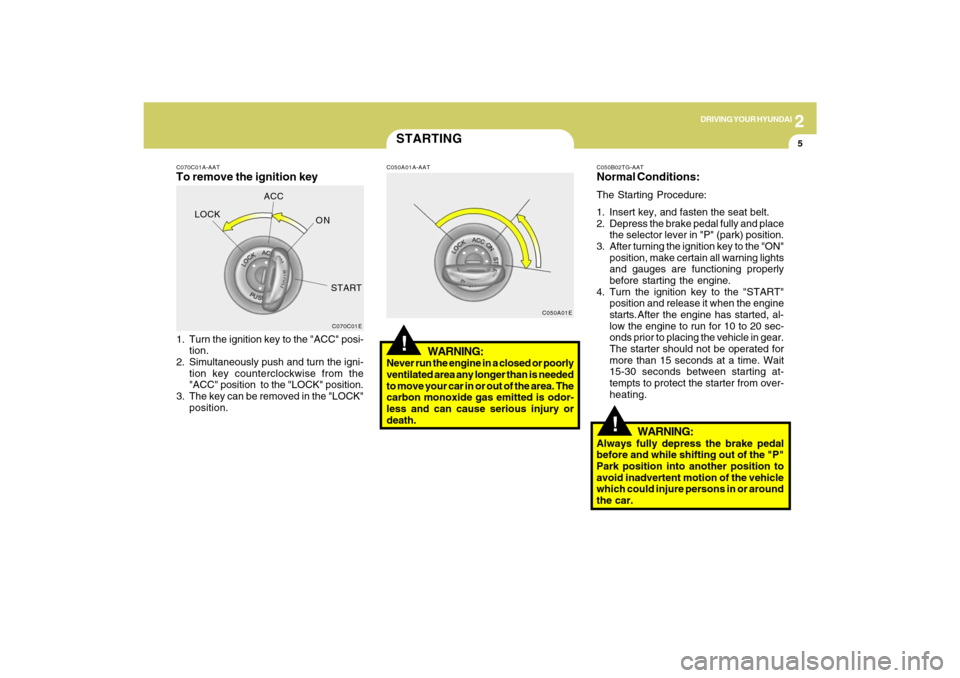
C070C01A-AATTo remove the ignition key1. Turn the ignition key to the "ACC" posi-
tion.
2. Simultaneously push and turn the igni-
tion key counterclockwise from the
"ACC" position to the "LOCK" position.
3. The key can be removed in the "LOCK"
position.
C070C01E
LOCKACC
ON
START
STARTING!
C050A01A-AAT
WARNING:
Never run the engine in a closed or poorly
ventilated area any longer than is needed
to move your car in or out of the area. The
carbon monoxide gas emitted is odor-
less and can cause serious injury or
death.
C050A01EC050B02TG-AAT
Normal Conditions:The Starting Procedure:
1. Insert key, and fasten the seat belt.
2. Depress the brake pedal fully and place
the selector lever in "P" (park) position.
3. After turning the ignition key to the "ON"
position, make certain all warning lights
and gauges are functioning properly
before starting the engine.
4. Turn the ignition key to the "START"
position and release it when the engine
starts.After the engine has started, al-
low the engine to run for 10 to 20 sec-
onds prior to placing the vehicle in gear.
The starter should not be operated for
more than 15 seconds at a time. Wait
15-30 seconds between starting at-
tempts to protect the starter from over-
heating.
WARNING:
Always fully depress the brake pedal
before and while shifting out of the "P"
Park position into another position to
avoid inadvertent motion of the vehicle
which could injure persons in or around
the car.
Page 241 of 335
310
WHAT TO DO IN AN EMERGENCY
IF YOU HAVE A FLAT TIRED050A01TG-AATIf a tire goes flat while you are driving:
1. Take your foot off the accelerator pedal
and let the car slow down while driving
straight ahead. Do not apply the brakes
immediately or attempt to pull off the
road as this may cause a loss of
control. When the car has slowed to
such a speed that it is safe to do so,
brake carefully and pull off the road.
Drive off the road as far as possible
and park on firm, level ground. If you
are on a divided highway, do not park
in the median area between the two
traffic lanes.
2. When the car is stopped, turn on your
emergency hazard flashers, set the
parking brake and put the transaxle in
"P".
3. Have all passengers get out of the car.
Be sure they all get out on the side of
the car that is away from traffic.
4. Change the tire according to the in-
structions provided as follows.
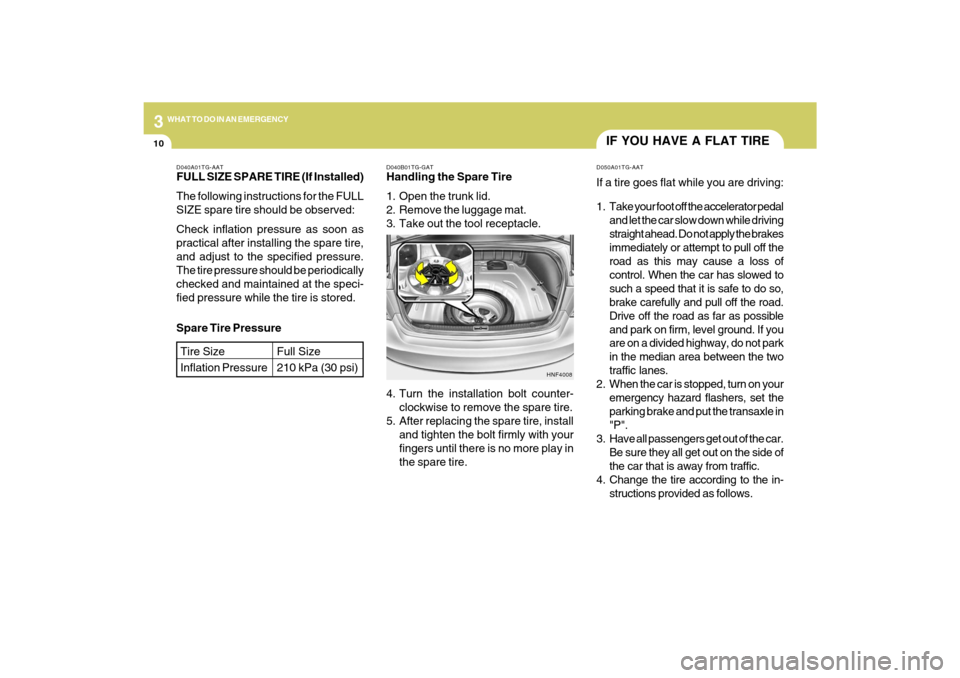
D040B01TG-GATHandling the Spare Tire
1. Open the trunk lid.
2. Remove the luggage mat.
3. Take out the tool receptacle.
HNF4008
4. Turn the installation bolt counter-
clockwise to remove the spare tire.
5. After replacing the spare tire, install
and tighten the bolt firmly with your
fingers until there is no more play in
the spare tire. Spare Tire Pressure
D040A01TG-AATFULL SIZE SPARE TIRE (If Installed)
The following instructions for the FULL
SIZE spare tire should be observed:
Check inflation pressure as soon as
practical after installing the spare tire,
and adjust to the specified pressure.
The tire pressure should be periodically
checked and maintained at the speci-
fied pressure while the tire is stored.Tire Size
Inflation Pressure
Full Size
210 kPa (30 psi)
Page 242 of 335
3
WHAT TO DO IN AN EMERGENCY
11
CHANGING A FLAT TIRED060A01TG-AATThe procedure described on the follow-
ing pages can be used to rotate tires as
well as to change a flat tire. When
preparing to change a flat tire, check to
be sure the gear selector lever is in "P"
and that the parking brake is set, then:
D060A01TG-A
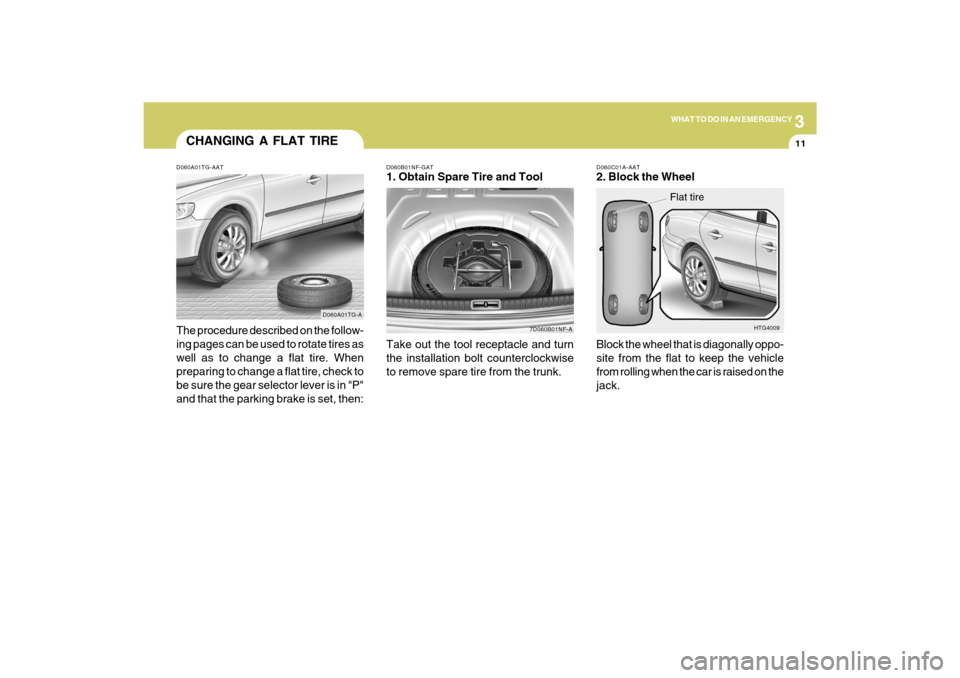
D060B01NF-GAT1. Obtain Spare Tire and Tool
7D060B01NF-A
Take out the tool receptacle and turn
the installation bolt counterclockwise
to remove spare tire from the trunk.
D060C01A-AAT2. Block the Wheel
Block the wheel that is diagonally oppo-
site from the flat to keep the vehicle
from rolling when the car is raised on the
jack.
HTG4009
Flat tire
Page 243 of 335
312
WHAT TO DO IN AN EMERGENCY
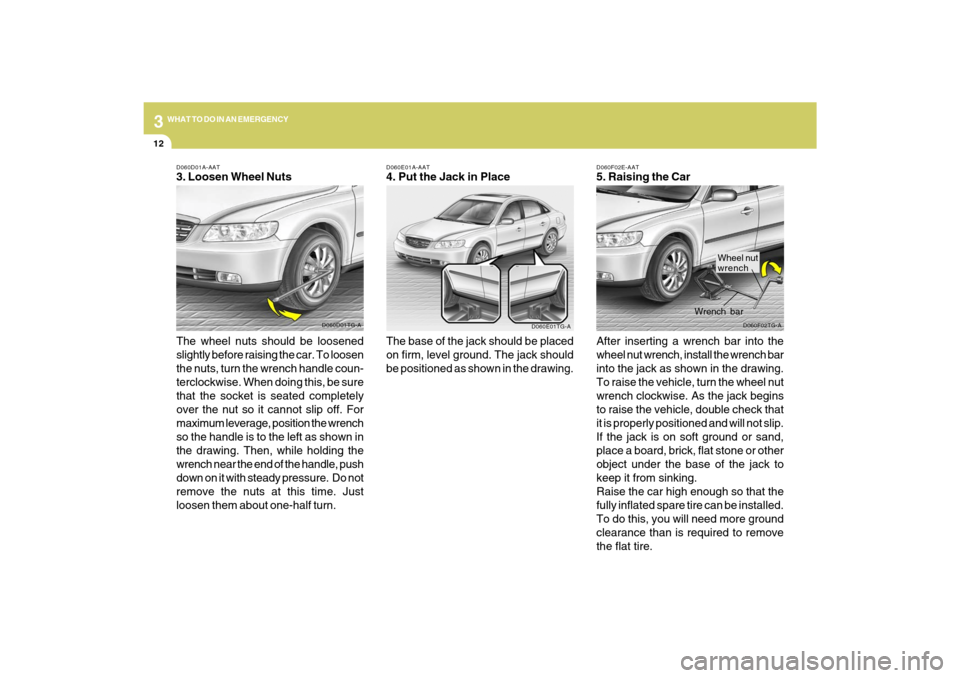
D060F02E-AAT5. Raising the Car
After inserting a wrench bar into the
wheel nut wrench, install the wrench bar
into the jack as shown in the drawing.
To raise the vehicle, turn the wheel nut
wrench clockwise. As the jack begins
to raise the vehicle, double check that
it is properly positioned and will not slip.
If the jack is on soft ground or sand,
place a board, brick, flat stone or other
object under the base of the jack to
keep it from sinking.
Raise the car high enough so that the
fully inflated spare tire can be installed.
To do this, you will need more ground
clearance than is required to remove
the flat tire.
D060F02TG-A
Wrench bar
D060E01A-AAT4. Put the Jack in Place
The base of the jack should be placed
on firm, level ground. The jack should
be positioned as shown in the drawing.
D060E01TG-A
Wheel nut
wrench
D060D01A-AAT3. Loosen Wheel Nuts
The wheel nuts should be loosened
slightly before raising the car. To loosen
the nuts, turn the wrench handle coun-
terclockwise. When doing this, be sure
that the socket is seated completely
over the nut so it cannot slip off. For
maximum leverage, position the wrench
so the handle is to the left as shown in
the drawing. Then, while holding the
wrench near the end of the handle, push
down on it with steady pressure. Do not
remove the nuts at this time. Just
loosen them about one-half turn.
D060D01TG-A
Page 245 of 335
314
WHAT TO DO IN AN EMERGENCY
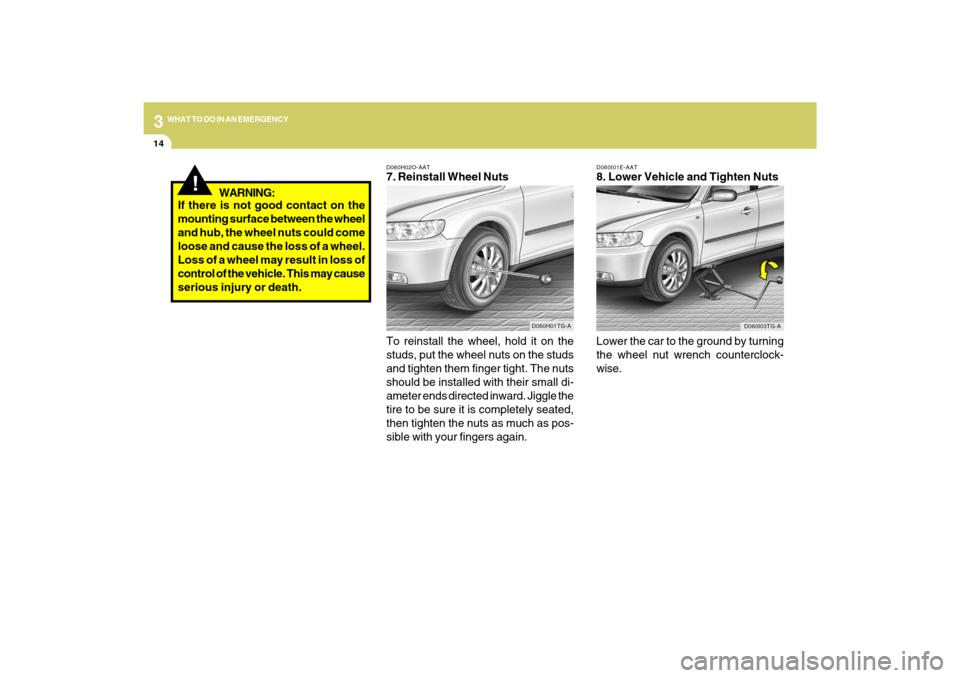
D060I01E-AAT8. Lower Vehicle and Tighten Nuts
Lower the car to the ground by turning
the wheel nut wrench counterclock-
wise.
D060I03TG-A
D060H02O-AAT7. Reinstall Wheel Nuts
To reinstall the wheel, hold it on the
studs, put the wheel nuts on the studs
and tighten them finger tight. The nuts
should be installed with their small di-
ameter ends directed inward. Jiggle the
tire to be sure it is completely seated,
then tighten the nuts as much as pos-
sible with your fingers again.
D060H01TG-A
!
If there is not good contact on the
mounting surface between the wheel
and hub, the wheel nuts could come
loose and cause the loss of a wheel.
Loss of a wheel may result in loss of
control of the vehicle. This may cause
serious injury or death.WARNING:
Page 271 of 335
6
DO-IT-YOURSELF MAINTENANCE
5
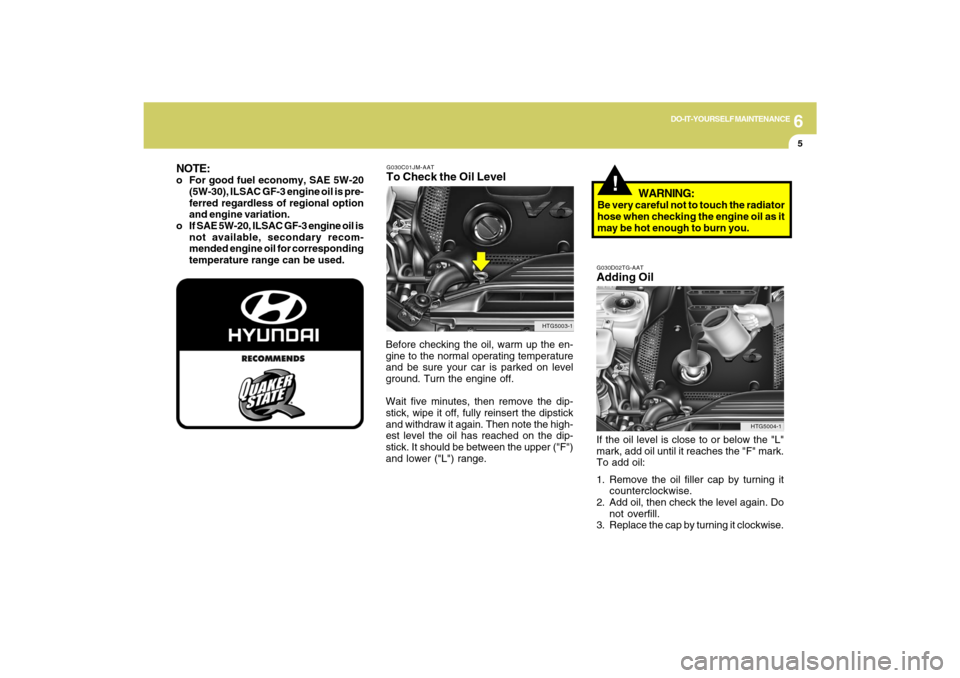
G030C01JM-AATTo Check the Oil LevelBefore checking the oil, warm up the en-
gine to the normal operating temperature
and be sure your car is parked on level
ground. Turn the engine off.
Wait five minutes, then remove the dip-
stick, wipe it off, fully reinsert the dipstick
and withdraw it again. Then note the high-
est level the oil has reached on the dip-
stick. It should be between the upper ("F")
and lower ("L") range.
!
HTG5003-1
NOTE:o For good fuel economy, SAE 5W-20
(5W-30), ILSAC GF-3 engine oil is pre-
ferred regardless of regional option
and engine variation.
o If SAE 5W-20, ILSAC GF-3 engine oil is
not available, secondary recom-
mended engine oil for corresponding
temperature range can be used.
G030D02TG-AATAdding OilIf the oil level is close to or below the "L"
mark, add oil until it reaches the "F" mark.
To add oil:
1. Remove the oil filler cap by turning it
counterclockwise.
2. Add oil, then check the level again. Do
not overfill.
3. Replace the cap by turning it clockwise.
HTG5004-1
WARNING:
Be very careful not to touch the radiator
hose when checking the engine oil as it
may be hot enough to burn you.
Page 286 of 335
6
DO-IT-YOURSELF MAINTENANCE
20
!
CAUTION:
An open fuse indicates that there is a
problem in the electrical circuit. If you
replace a fuse and it blows as soon as the
accessory is turned on, the problem is
serious and should be referred to a
Hyundai dealer for diagnosis and repair.
Never replace a fuse with anything ex-
cept a fuse with the same or a lower
amperage rating. A higher capacity fuse
could cause damage and create a fire
hazard.NOTE:See page 6-33 for the fuse panel descrip-
tions.
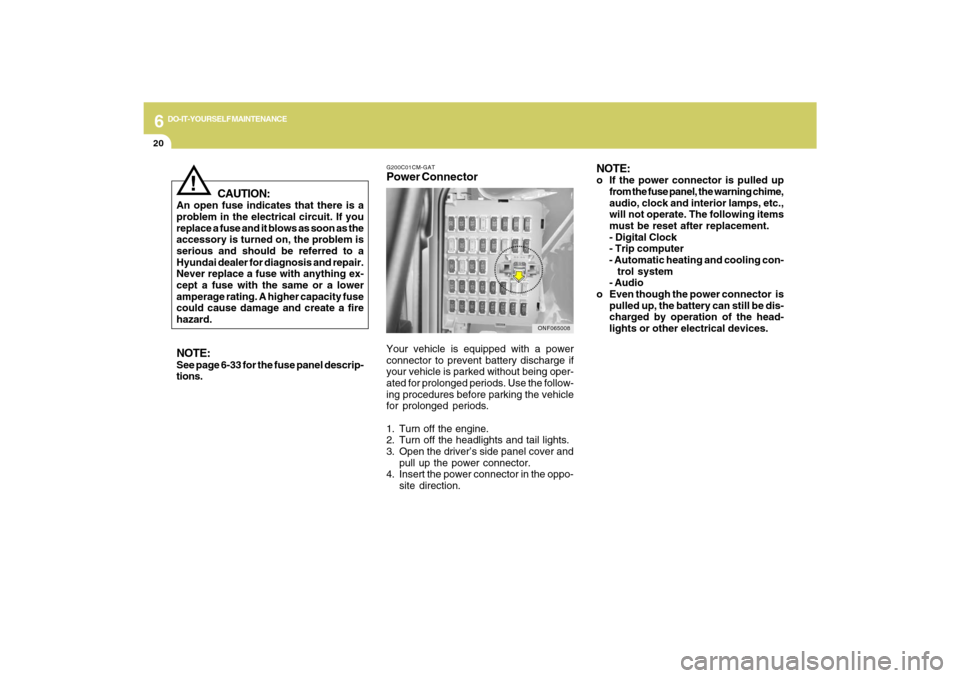
G200C01CM-GATPower ConnectorNOTE:
o If the power connector is pulled up
from the fuse panel, the warning chime,
audio, clock and interior lamps, etc.,
will not operate. The following items
must be reset after replacement.
- Digital Clock
- Trip computer
- Automatic heating and cooling con-
trol system
- Audio
o Even though the power connector is
pulled up, the battery can still be dis-
charged by operation of the head-
lights or other electrical devices.
Your vehicle is equipped with a power
connector to prevent battery discharge if
your vehicle is parked without being oper-
ated for prolonged periods. Use the follow-
ing procedures before parking the vehicle
for prolonged periods.
1. Turn off the engine.
2. Turn off the headlights and tail lights.
3. Open the driver’s side panel cover and
pull up the power connector.
4. Insert the power connector in the oppo-
site direction.
ONF065008