key Hyundai Azera 2009 Service Manual
[x] Cancel search | Manufacturer: HYUNDAI, Model Year: 2009, Model line: Azera, Model: Hyundai Azera 2009Pages: 335, PDF Size: 12.4 MB
Page 120 of 335
1
FEATURES OF YOUR HYUNDAI
107
!
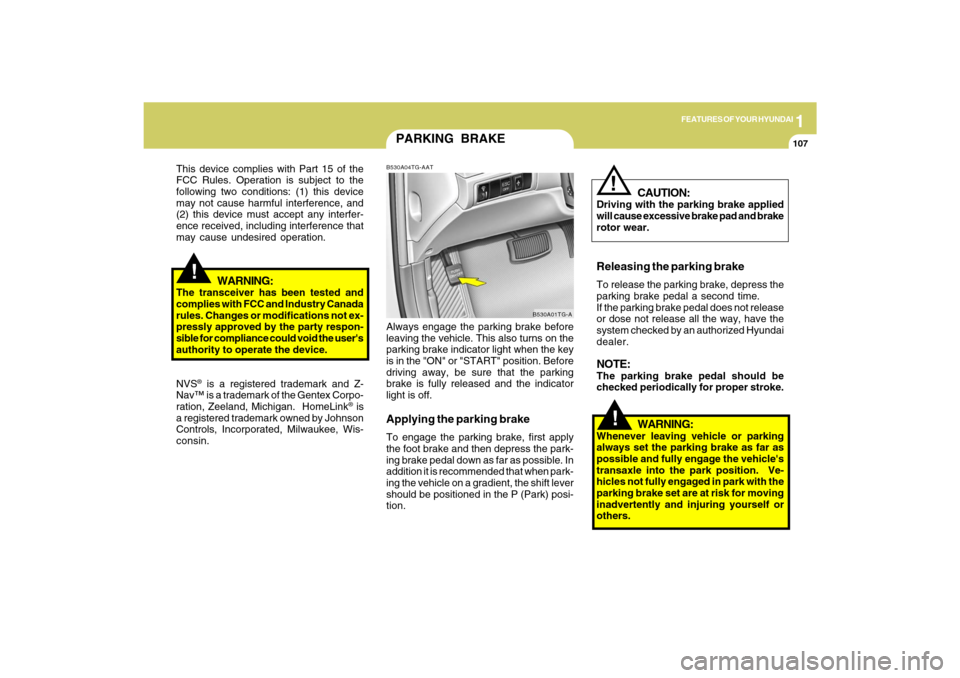
PARKING BRAKEB530A04TG-AATAlways engage the parking brake before
leaving the vehicle. This also turns on the
parking brake indicator light when the key
is in the "ON" or "START" position. Before
driving away, be sure that the parking
brake is fully released and the indicator
light is off.Applying the parking brakeTo engage the parking brake, first apply
the foot brake and then depress the park-
ing brake pedal down as far as possible. In
addition it is recommended that when park-
ing the vehicle on a gradient, the shift lever
should be positioned in the P (Park) posi-
tion.
B530A01TG-A
!
This device complies with Part 15 of the
FCC Rules. Operation is subject to the
following two conditions: (1) this device
may not cause harmful interference, and
(2) this device must accept any interfer-
ence received, including interference that
may cause undesired operation.
WARNING:
The transceiver has been tested and
complies with FCC and Industry Canada
rules. Changes or modifications not ex-
pressly approved by the party respon-
sible for compliance could void the user's
authority to operate the device.
NVS
® is a registered trademark and Z-
Nav™ is a trademark of the Gentex Corpo-
ration, Zeeland, Michigan. HomeLink
® is
a registered trademark owned by Johnson
Controls, Incorporated, Milwaukee, Wis-
consin.
WARNING:
Whenever leaving vehicle or parking
always set the parking brake as far as
possible and fully engage the vehicle's
transaxle into the park position. Ve-
hicles not fully engaged in park with the
parking brake set are at risk for moving
inadvertently and injuring yourself or
others.
CAUTION:
Driving with the parking brake applied
will cause excessive brake pad and brake
rotor wear.Releasing the parking brakeTo release the parking brake, depress the
parking brake pedal a second time.
If the parking brake pedal does not release
or dose not release all the way, have the
system checked by an authorized Hyundai
dealer.NOTE:The parking brake pedal should be
checked periodically for proper stroke.
!
Page 121 of 335
1FEATURES OF YOUR HYUNDAI
108
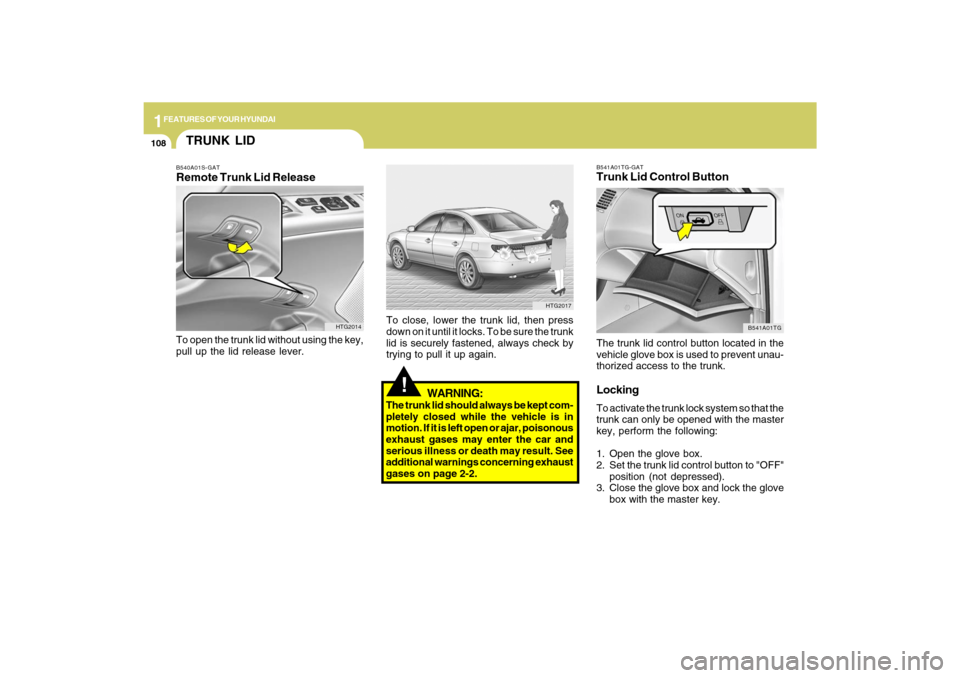
B541A01TG-GATTrunk Lid Control ButtonThe trunk lid control button located in the
vehicle glove box is used to prevent unau-
thorized access to the trunk.LockingTo activate the trunk lock system so that the
trunk can only be opened with the master
key, perform the following:
1. Open the glove box.
2. Set the trunk lid control button to "OFF"
position (not depressed).
3. Close the glove box and lock the glove
box with the master key.
B541A01TG
!
WARNING:
The trunk lid should always be kept com-
pletely closed while the vehicle is in
motion. If it is left open or ajar, poisonous
exhaust gases may enter the car and
serious illness or death may result. See
additional warnings concerning exhaust
gases on page 2-2.To close, lower the trunk lid, then press
down on it until it locks. To be sure the trunk
lid is securely fastened, always check by
trying to pull it up again.
HTG2017
TRUNK LIDB540A01S-GATRemote Trunk Lid ReleaseTo open the trunk lid without using the key,
pull up the lid release lever.
HTG2014
Page 122 of 335
1
FEATURES OF YOUR HYUNDAI
109
!
When leaving the key with a parking lot
attendant or valet, perform steps 1 to 3
above and leave the sub key with the
attendent. Sub key can start the engine
and operate door locks only.ReleasingTo release the trunk lock feature, open the
glove box with master key and set the trunk
lid control button to "ON" position (de-
pressed). In this position the trunk will
open with trunk lid release lever or trans-
mitter. The trunk can never be opened with
the sub key.
WARNING:
Doors and trunk should be kept locked
and keys be kept out of the reach of
children. Parents also should teach their
children about the dangers of playing in
trunks.
!
WARNING:
o If a person becomes locked in the
trunk, push the emergency trunk re-
lease handle on the inside panel of the
trunk to open the trunk lid.
o Keep cars locked and keys out of the
reach of children. HYUNDAI recom-
mends parents teach children about
the emergency trunk release lever in
their vehicle and how to open the trunk
lid if they are accidentally locked in
the trunk.
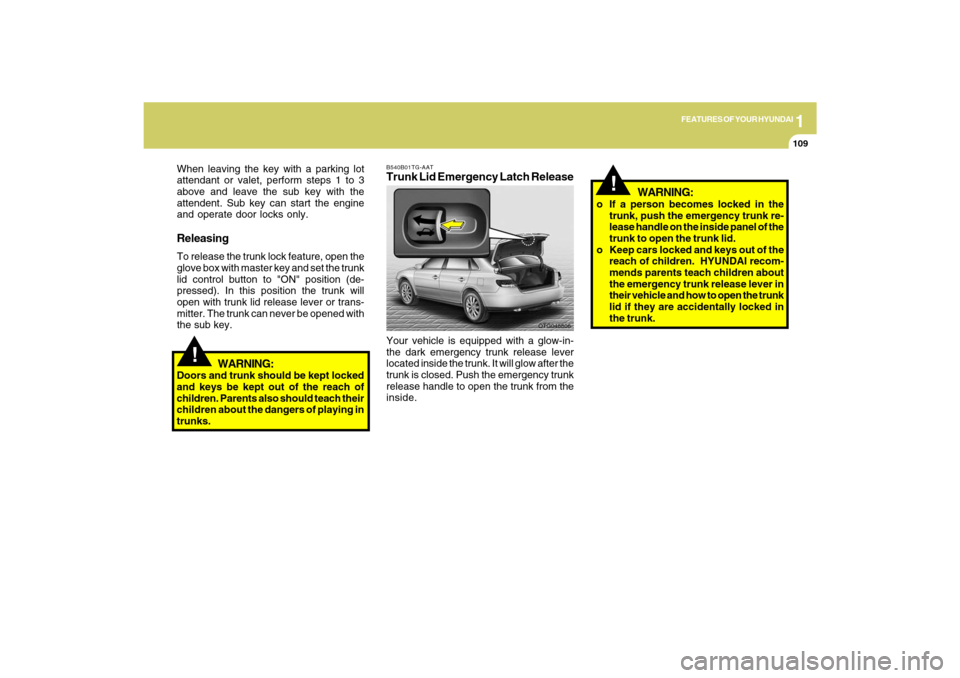
B540B01TG-AATTrunk Lid Emergency Latch ReleaseYour vehicle is equipped with a glow-in-
the dark emergency trunk release lever
located inside the trunk. It will glow after the
trunk is closed. Push the emergency trunk
release handle to open the trunk from the
inside.
OTG048806
Page 123 of 335
1FEATURES OF YOUR HYUNDAI
110
!
CAUTION:
To prevent damage to the goods or the
vehicle, care should be taken when car-
rying fragile or bulky objects in the lug-
gage compartment.
!
WARNING:
Avoid eye injury. DO NOT overstretch.
The luggage net ALWAYS keep your
face and body out of its recoil path. DO
NOT use when the luggage net straps
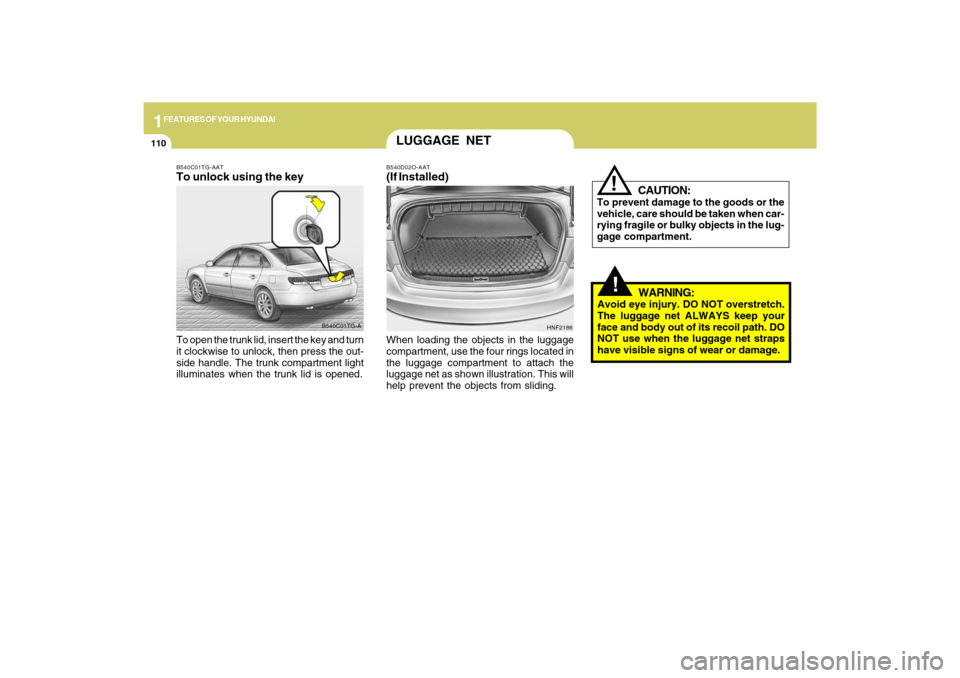
have visible signs of wear or damage. When loading the objects in the luggage
compartment, use the four rings located in
the luggage compartment to attach the
luggage net as shown illustration. This will
help prevent the objects from sliding.
HNF2186
LUGGAGE NETB540D02O-AAT(If Installed)
B540C01TG-A B540C01TG-AAT
To unlock using the keyTo open the trunk lid, insert the key and turn
it clockwise to unlock, then press the out-
side handle. The trunk compartment light
illuminates when the trunk lid is opened.
Page 151 of 335
1FEATURES OF YOUR HYUNDAI
138
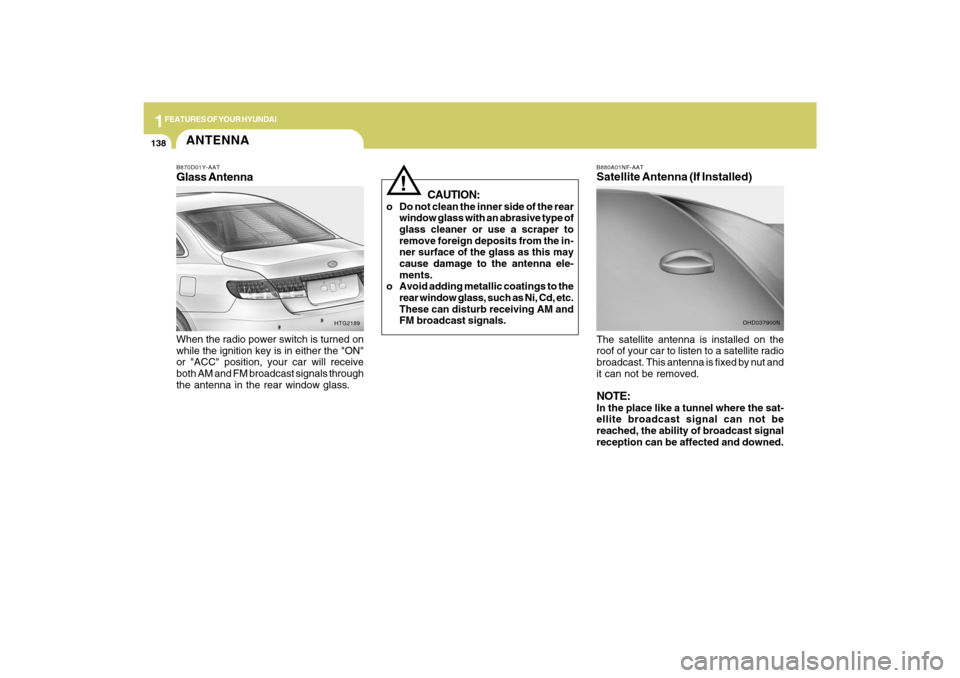
B880A01NF-AATSatellite Antenna (If Installed)The satellite antenna is installed on the
roof of your car to listen to a satellite radio
broadcast. This antenna is fixed by nut and
it can not be removed.NOTE:In the place like a tunnel where the sat-
ellite broadcast signal can not be
reached, the ability of broadcast signal
reception can be affected and downed.
OHD037900N
CAUTION:
o Do not clean the inner side of the rear
window glass with an abrasive type of
glass cleaner or use a scraper to
remove foreign deposits from the in-
ner surface of the glass as this may
cause damage to the antenna ele-
ments.
o Avoid adding metallic coatings to the
rear window glass, such as Ni, Cd, etc.
These can disturb receiving AM and
FM broadcast signals.
!
ANTENNAB870D01Y-AATGlass AntennaWhen the radio power switch is turned on
while the ignition key is in either the "ON"
or "ACC" position, your car will receive
both AM and FM broadcast signals through
the antenna in the rear window glass.
HTG2189
Page 153 of 335
1FEATURES OF YOUR HYUNDAI
140
PA710SB01TG-AAT1. FM Selection ButtonTurns to FM mode and toggles FM1 and
FM2 when the button is pressed each time.2. AM Selection ButtonTurns to AM mode, selects the AM.3. XM Selection ButtonTurns to XM mode, and toggles in the order
of XM1➟XM2➟XM3➟···➟XM1··· when the
button is pressed each time.4. CD/AUX Selection ButtonIf there is a CD in the CDP DECK it turns to
CD mode, and if a device is connected to
AUX then it toggles.
CD➟AUX➟CD··· when the button is
pressed each time.(It will not turn to AUX if
the auxiliary device is not connected)
5. Automatic Channel Selection
Buttono When the [SEEK
]button is pressed,
it reduces the band frequency by 200khz
to automatically select channel. Stops
at the previous frequency if no channel
is found.
o When the [SEEK ]button is pressed,
it increases the band frequency by
200khz to automatically select chan-
nel. Stops at the previous frequency if
no channel is found.
6. Power ON/OFF & Volume Control
ButtonTurns the set on/off when the IGNITION
SWITCH is on ACC or ON. If the button is
turned to the right, it increases the volume
and left, decreases the volume.7. SCAN ButtonIf this button is pressed, the frequencies
will increase and receive the correspond-
ing broadcasts.
This function will play the frequencies for
5 seconds (XM mode : 10 seconds) each
and find other broadcasts as the frequency
increases.
Press the button again when desiring to
continue listening to the currently playing
broadcast.
8. MUTE ButtonPress to temporarily cut off the Sound.9. Information Display ButtonInformation Display function operation (In-
formation is displayed each time (the) Key
is pressed) : Pressing the Category/
Channel➟ Artist Name/Song
Title➟Category/Channel... for 3 seconds
will display the corresponding text then
become restored.
Text Scroll operation
After pressing (the) Key, if the text to be
displayed is longer than the LCD text line,
then rotating the Tune Knob will operate
the Page up function displaying 16(Max.
characters) characters for 3 seconds each
dispalys.10. SET UP ButtonPress this button to turn to the XM option,
TEXT SCROLL and adjustment mode.
If no action is taken for 5 seconds after
pressing the button, it will return to the play
mode.(After entering SET UP mode, move
between items using the left, right and
PUSH functions of the TUNE button.)
The set up item changes from TEXT
SCROLL ➟XM...
Page 154 of 335

1
FEATURES OF YOUR HYUNDAI
141
11. TUNE/ENTER ButtonTurn this button clockwise by one notch to
increase frequency by 200Khz from cur-
rent frequency.
Turn this button counterclockwise by one
notch to decrease frequency by 200Khz
from current frequency.
Press this button while holding SET UP
button to activate / inactivate the item.
Select SET UP item using left and right
function of the Tune button.
Pressing the button changes the BASS,
MIDDLE, TREBLE, FADER and BALANCE
TUNE mode. The mode selected is shown
on the display. After selecting each mode,
rotate the Audio control knob clockwise or
counterclockwise.
o BASS Control
To increase the BASS, rotate the knob
clockwise, while to decrease the BASS,
rotate the knob counterclockwise.
o MIDDLE Control
To increase the MIDDLE, rotate the knob
clockwise, while to decrease the MIDDLE,
rotate the knob counterclockwise.
o TREBLE Control
To increase the TREBLE, rotate the knob
clockwise, while to decrease the TREBLE,
rotate the knob counterclockwise.o FADER Control
Turn the control knob clockwise to empha-
size rear speaker sound (front speaker
sound will be attenuated). When the con-
trol knob is turned counterclockwise, front
speaker sound will be emphasized (rear
speaker sound will be attenuated).
o BALANCE Control
Rotate the knob clockwise to emphasize
right speaker sound (left speaker sound
will be attenuated). When the control knob
is turned counterclockwise, left speaker
sound will be emphasized (right speaker
sound will be attenuated).
12. CAT(FLDR) ButtonMoves [CAT
] button when Category Up
search operation.
o Category is moved Up from the cat-
egory currently being received and Cat-
egory Name becomes displayed.
o If the Enter Key is not pressed within 5
seconds, then the previous mode will
be restored.
o If the Key is pressed while in the last
Category, then the first category will
become displayed and operation will
be repeated.
o Corresponding category can be se-
lected by pressing ENTER.Moves [CAT
] button when Category
Down search operation.
o Category is moved Down from the cat-
egory currently being received and Cat-
egory Name becomes displayed.
o If the Enter Key is not pressed within 5
seconds, then the previous mode will
be restored.
o If the [CAT ] Key is pressed while in
the first Category, then the last category
will become displayed and operation
will be repeated.
o Corresponding category can be se-
lected by pressing ENTER.
13. Pre-set ButtonPush [1]~[6] buttons less than 0.8 second
to play the channel saved in each button.
Push pre-set button for 0.8 second or longer
to save current channel to the respective
button with a beep.
Page 157 of 335
1FEATURES OF YOUR HYUNDAI
144
!
CAUTION IN USING
USB DEVICE:
o To use the external USB device, make
sure the device is not connected when
starting up the vehicle and connect
the device after starting up.
o If you start the vehicle when the USB
device is connected, it may damage
the USB device. (USB is not ESA)
o If the vehicle is started up or turned off
while the external USB device is con-
nected, the external USB device may
not work. o FADER Control
Turn the control knob clockwise to empha-
size rear speaker sound (front speaker
sound will be attenuated). When the con-
trol knob is turned counterclockwise, front
speaker sound will be emphasized (rear
speaker sound will be attenuated).
o BALANCE Control
Rotate the knob clockwise to emphasize
right speaker sound (left speaker sound
will be attenuated). When the control knob
is turned counter clockwise, left speaker
sound will be emphasized (right speaker
sound will be attenuated).
8.REPEAT ButtonRepeats current song when the button is
pressed for less than 0.8 second.
Repeats the entire DISC when the button
is pressed for 0.8 second or longer.9. RANDOM Play ButtonTurns on/off the randomization of the play
list of files in the currently played DISC.
To cancel the mode, press the key once
again.
10. SCAN Play ButtonPlays first 10 seconds of each song in the
DISC.
To cancel the mode, press the key once
again.11. MUTE ButtonPress this button to temporarily cut off the
Sound. "Audio Mute" is displayed on the
LCD. Press the button once again to can-
cel MUTE mode.o It may not play inauthentic MP3 or
WMA files.
1) It can only play MP3 files with the
compression rate between
8Kbps~320Kbps.
2) It can only play WMA music files
with the compression rate between
8Kbps~320Kbps.
o Take cautions for static electricity
when connecting or disconnecting the
external USB device.
o Encoded MP3 PLAYER'S are not rec-
ognizable.
o Depending on the condition of the ex-
ternal USB device, the connected ex-
ternal USB device can be unrecogniz-
able.
o When the formatted byte/sector set-
ting of External USB devices is not
either 512BYTE or 2048BYTE, then
the device will not be recognized.
o Only the USB device formatted to FAT
12/16/32 can be used.
o USB device without USB IF
(Implementers-Forum) authentica-
tion may not be recognizable.
o Make sure the USB connection termi-
nal does not come in contact with a
human body or any other object.
Page 166 of 335

1
FEATURES OF YOUR HYUNDAI
153
PA760SB01TG-AAT1. FM Selection ButtonTurns to FM mode and toggles FM1 and
FM2 when the button is pressed each time.2. AM Selection ButtonTurns to AM mode, selects the AM.3. XM Selection ButtonTurns to XM mode, and toggles in the order
of XM1➟XM2➟XM3➟···➟XM1··· when the
button is pressed each time.4. CD/AUX Selection ButtonIf there is a CD in the CDP DECK it turns to
CD mode, and if a device is connected to
AUX then it toggles.
CD➟AUX➟CD··· when the button is
pressed each time.(It will not turn to AUX if
the auxiliary device is not connected)5. Automatic Channel Selection
Buttono When the [SEEK
]button is pressed,
it reduces the band frequency by 200khz
to automatically select channel. Stops
at the previous frequency if no channel
is found.o When the [SEEK
]button is pressed,
it increases the band frequency by
200khz to automatically select chan-
nel. Stops at the previous frequency if
no channel is found.
6. Power ON/OFF & Volume Control
ButtonTurns the set on/off when the IGNITION
SWITCH is on ACC or ON. If the button is
turned to the right, it increases the volume
and left, decreases the volume.7. SCAN ButtonIf this button is pressed, the frequencies
will increase and receive the correspond-
ing broadcasts.
This function will play the frequencies for
5 seconds (XM mode : 10 seconds) each
and find other broadcasts as the frequency
increases.
Press the button again when desiring to
continue listening to the currently playing
broadcast.8. MUTE ButtonPress to temporarily cut off the Sound.
9. Information Display ButtonInformation Display function operation (In-
formation is displayed each time (the) Key
is pressed) : Pressing the Category/
Channel➟ Artist Name/Song
Title➟Category/Channel... for 3 seconds
will display the corresponding text then
become restored.
Text Scroll operation
After pressing (the) Key, if the text to be
displayed is longer than the LCD text line,
then rotating the Tune Knob will operate
the Page up function displaying 16(Max.
characters) characters for 3 seconds each
dispalys.10. SET UP ButtonPress this button to turn to the XM option,
TEXT SCROLL and adjustment mode.
If no action is taken for 5 seconds after
pressing the button, it will return to the play
mode.(After entering SET UP mode, move
between items using the left, right and
PUSH functions of the TUNE button.)
The set up item changes from TEXT
SCROLL ➟XM...
Page 167 of 335
1FEATURES OF YOUR HYUNDAI
154
11. TUNE/ENTER ButtonTurn this button clockwise by one notch to
increase frequency by 200Khz from cur-
rent frequency.
Turn this button counterclockwise by one
notch to decrease frequency by 200Khz
from current frequency.
Press this button while holding SET UP
button to activate / inactivate the item to
select.
Select SET UP item using left and right
function of the Tune button.
Pressing the button changes the BASS,
MIDDLE, TREBLE, FADER and BALANCE
TUNE mode. The mode selected is shown
on the display. After selecting each mode,
rotate the Audio control knob clockwise or
counterclockwise.
o BASS Control
To increase the BASS, rotate the knob
clockwise, while to decrease the BASS,
rotate the knob counterclockwise.
o MIDDLE Control
To increase the MIDDLE, rotate the knob
clockwise, while to decrease the MIDDLE,
rotate the knob counterclockwise.o TREBLE Control
To increase the TREBLE, rotate the knob
clockwise, while to decrease the TREBLE,
rotate the knob counterclockwise.
o FADER Control
Turn the control knob clockwise to empha-
size rear speaker sound (front speaker
sound will be attenuated). When the con-
trol knob is turned counterclockwise, front
speaker sound will be emphasized (rear
speaker sound will be attenuated).
o BALANCE Control
Rotate the knob clockwise to emphasize
right speaker sound (left speaker sound
will be attenuated). When the control knob
is turned counterclockwise, left speaker
sound will be emphasized (right speaker
sound will be attenuated).
12. CAT(FLDR) ButtonMoves [CAT
] button when Category Up
search operation.
o Category is moved Up from the cat-
egory currently being received and
Category Name becomes displayed.
o If the Enter Key is not pressed within 5
seconds, then the previous mode will
be restored.o If the Key is pressed while in the last
Category, then the first category will
become displayed and operation will
be repeated.
o Corresponding category can be se-
lected by pressing ENTER.
Moves [CAT
] button when Category
Down search operation.
o Category is moved Down from the cat-
egory currently being received and
Category Name becomes displayed.
o If the Enter Key is not pressed within 5
seconds, then the previous mode will
be restored.
o If the [CAT ] Key is pressed while in
the first Category, then the last category
will become displayed and operation
will be repeated.
o Corresponding category can be se-
lected by pressing ENTER.
13. Pre-set ButtonPush [1]~[6] buttons less than 0.8 second
to play the channel saved in each button.
Push pre-set button for 0.8 second or longer
to save current channel to the respective
button with a beep.