engine Hyundai Azera 2010 Owner's Guide
[x] Cancel search | Manufacturer: HYUNDAI, Model Year: 2010, Model line: Azera, Model: Hyundai Azera 2010Pages: 334, PDF Size: 12.24 MB
Page 101 of 334
1FEATURES OF YOUR HYUNDAI88
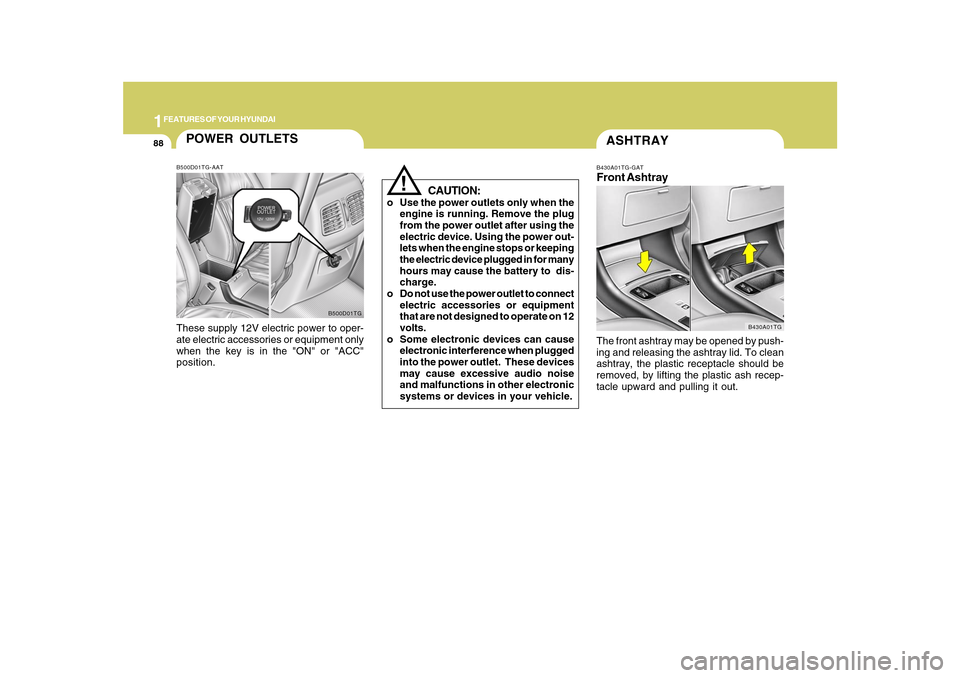
ASHTRAYB430A01TG-GATFront AshtrayThe front ashtray may be opened by push-
ing and releasing the ashtray lid. To clean
ashtray, the plastic receptacle should be
removed, by lifting the plastic ash recep-
tacle upward and pulling it out.
B430A01TG
!
CAUTION:
o Use the power outlets only when the
engine is running. Remove the plug
from the power outlet after using the
electric device. Using the power out-
lets when the engine stops or keeping
the electric device plugged in for many
hours may cause the battery to dis-
charge.
o Do not use the power outlet to connect
electric accessories or equipment
that are not designed to operate on 12
volts.
o Some electronic devices can cause
electronic interference when plugged
into the power outlet. These devices
may cause excessive audio noise
and malfunctions in other electronic
systems or devices in your vehicle.
POWER OUTLETSB500D01TG-AATThese supply 12V electric power to oper-
ate electric accessories or equipment only
when the key is in the "ON" or "ACC"
position.
B500D01TG
Page 122 of 334
1
FEATURES OF YOUR HYUNDAI
109
!
When leaving the key with a parking lot
attendant or valet, perform steps 1 to 3
above and leave the sub key with the
attendent. Sub key can start the engine
and operate door locks only.ReleasingTo release the trunk lock feature, open the
glove box with master key and set the trunk
lid control button to "ON" position (de-
pressed). In this position the trunk will
open with trunk lid release lever or trans-
mitter. The trunk can never be opened with
the sub key.
WARNING:
Doors and trunk should be kept locked
and keys be kept out of the reach of
children. Parents also should teach their
children about the dangers of playing in
trunks.
!
WARNING:
o If a person becomes locked in the
trunk, push the emergency trunk re-
lease handle on the inside panel of the
trunk to open the trunk lid.
o Keep cars locked and keys out of the
reach of children. HYUNDAI recom-
mends parents teach children about
the emergency trunk release lever in
their vehicle and how to open the trunk
lid if they are accidentally locked in
the trunk.
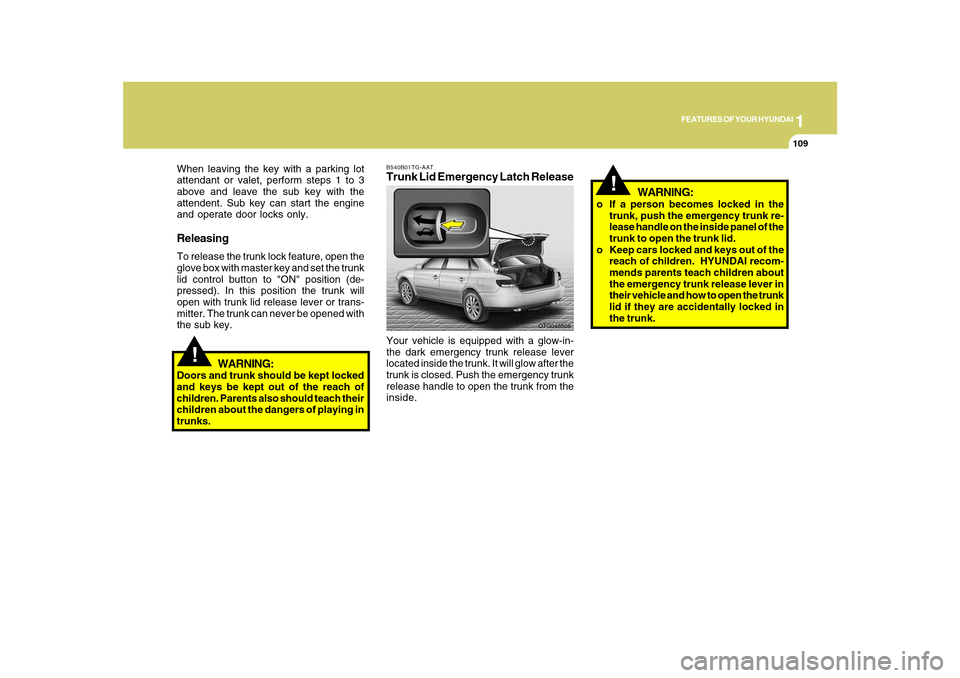
B540B01TG-AATTrunk Lid Emergency Latch ReleaseYour vehicle is equipped with a glow-in-
the dark emergency trunk release lever
located inside the trunk. It will glow after the
trunk is closed. Push the emergency trunk
release handle to open the trunk from the
inside.
OTG048806
Page 124 of 334
1
FEATURES OF YOUR HYUNDAI
111
HIGH-MOUNTED REAR
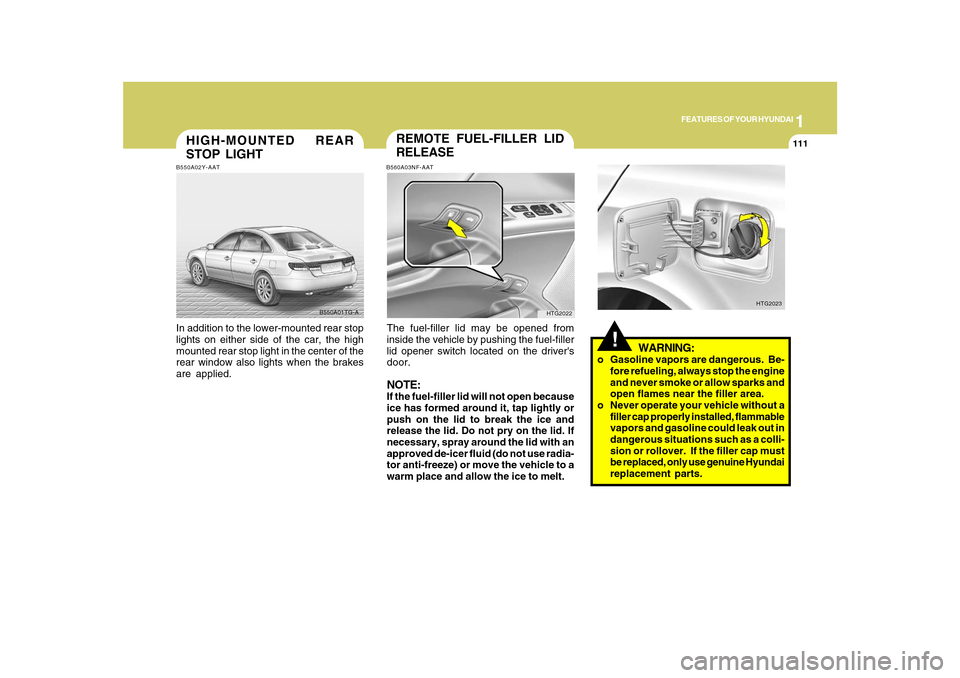
STOP LIGHTB550A02Y-AATIn addition to the lower-mounted rear stop
lights on either side of the car, the high
mounted rear stop light in the center of the
rear window also lights when the brakes
are applied.
B550A01TG-A
!
WARNING:
o Gasoline vapors are dangerous. Be-
fore refueling, always stop the engine
and never smoke or allow sparks and
open flames near the filler area.
o Never operate your vehicle without a
filler cap properly installed, flammable
vapors and gasoline could leak out in
dangerous situations such as a colli-
sion or rollover. If the filler cap must
be replaced, only use genuine Hyundai
replacement parts.
HTG2023
REMOTE FUEL-FILLER LID
RELEASEB560A03NF-AATThe fuel-filler lid may be opened from
inside the vehicle by pushing the fuel-filler
lid opener switch located on the driver's
door.NOTE:If the fuel-filler lid will not open because
ice has formed around it, tap lightly or
push on the lid to break the ice and
release the lid. Do not pry on the lid. If
necessary, spray around the lid with an
approved de-icer fluid (do not use radia-
tor anti-freeze) or move the vehicle to a
warm place and allow the ice to melt.
HTG2022
Page 126 of 334
1
FEATURES OF YOUR HYUNDAI
113
!
WARNING:
- When refueling always shut the en-
gine off. Sparks produced by elec-
trical components related to the
engine can ignite fuel vapors caus-
ing a fire. Always insure that the
engine is OFF before and during
refueling. Once refueling is com-
plete, check to make sure the fuel
filler cap and door are securely
closed, before starting the engine.
- Do not light any fire around a gas
station. DO NOT use matches or a
lighter and DO NOT SMOKE or leave
a lit cigarette in your vehicle while at
a gas station especially during re-
fueling. Automotive fuel is highly
flammable and can, when ignited,
result in explosion by flames.
- If a fire breaks out during refueling,
leave the vicinity of the vehicle, and
immediately contact the manager
of the gas station or contact the
police and local fire department.
Follow any safety instructions they
provide.
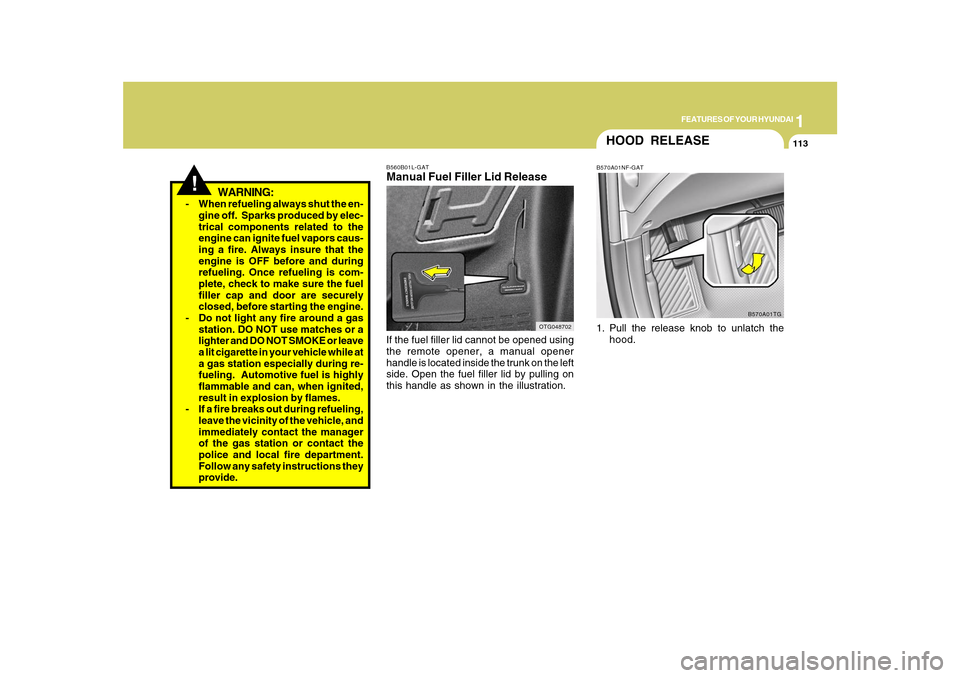
B560B01L-GATManual Fuel Filler Lid ReleaseIf the fuel filler lid cannot be opened using
the remote opener, a manual opener
handle is located inside the trunk on the left
side. Open the fuel filler lid by pulling on
this handle as shown in the illustration.
OTG048702
HOOD RELEASEB570A01NF-GAT1. Pull the release knob to unlatch the
hood.
B570A01TG
Page 140 of 334
1
FEATURES OF YOUR HYUNDAI
127127
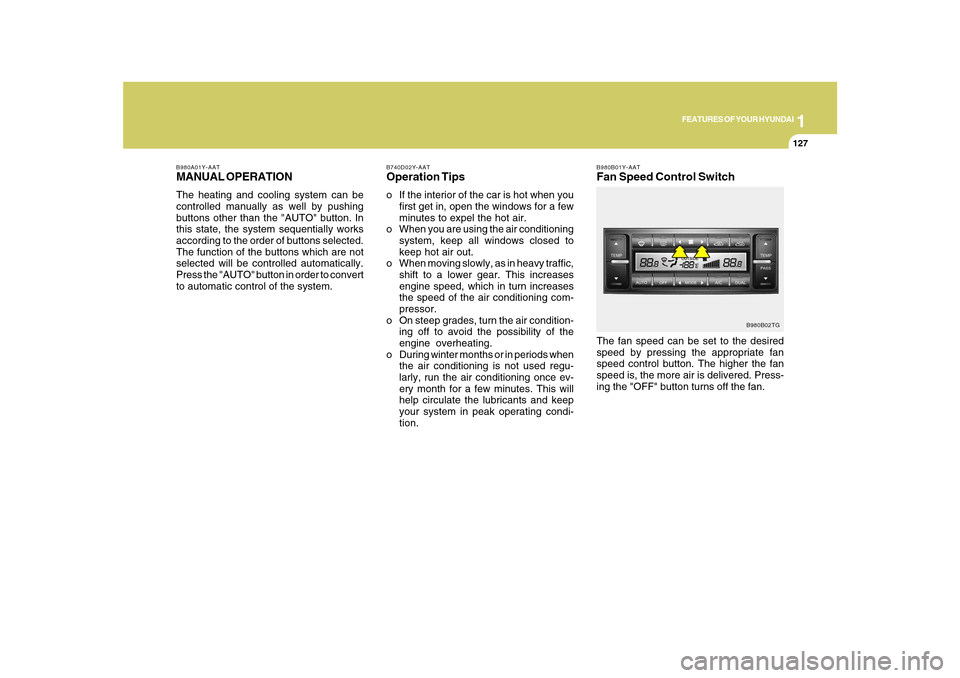
B980B01Y-AATFan Speed Control SwitchThe fan speed can be set to the desired
speed by pressing the appropriate fan
speed control button. The higher the fan
speed is, the more air is delivered. Press-
ing the "OFF" button turns off the fan.
B980B02TG B980A01Y-AAT
MANUAL OPERATIONThe heating and cooling system can be
controlled manually as well by pushing
buttons other than the "AUTO" button. In
this state, the system sequentially works
according to the order of buttons selected.
The function of the buttons which are not
selected will be controlled automatically.
Press the "AUTO" button in order to convert
to automatic control of the system.
B740D02Y-AATOperation Tipso If the interior of the car is hot when you
first get in, open the windows for a few
minutes to expel the hot air.
o When you are using the air conditioning
system, keep all windows closed to
keep hot air out.
o When moving slowly, as in heavy traffic,
shift to a lower gear. This increases
engine speed, which in turn increases
the speed of the air conditioning com-
pressor.
o On steep grades, turn the air condition-
ing off to avoid the possibility of the
engine overheating.
o During winter months or in periods when
the air conditioning is not used regu-
larly, run the air conditioning once ev-
ery month for a few minutes. This will
help circulate the lubricants and keep
your system in peak operating condi-
tion.
Page 148 of 334
1
FEATURES OF YOUR HYUNDAI
135135
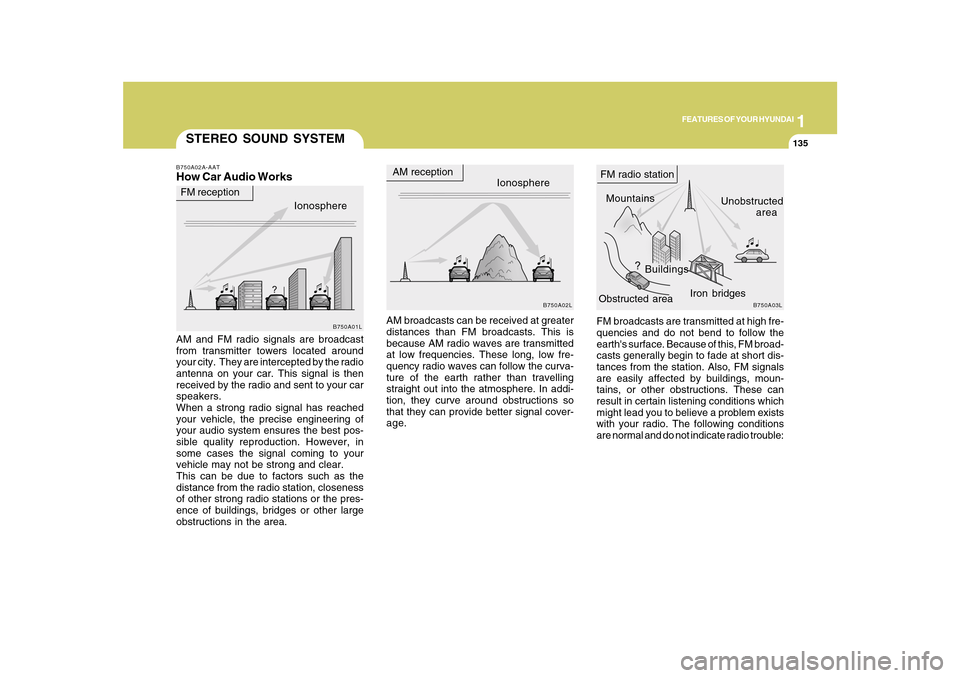
FM broadcasts are transmitted at high fre-
quencies and do not bend to follow the
earth's surface. Because of this, FM broad-
casts generally begin to fade at short dis-
tances from the station. Also, FM signals
are easily affected by buildings, moun-
tains, or other obstructions. These can
result in certain listening conditions which
might lead you to believe a problem exists
with your radio. The following conditions
are normal and do not indicate radio trouble:
STEREO SOUND SYSTEMB750A02A-AATHow Car Audio WorksAM and FM radio signals are broadcast
from transmitter towers located around
your city. They are intercepted by the radio
antenna on your car. This signal is then
received by the radio and sent to your car
speakers.
When a strong radio signal has reached
your vehicle, the precise engineering of
your audio system ensures the best pos-
sible quality reproduction. However, in
some cases the signal coming to your
vehicle may not be strong and clear.
This can be due to factors such as the
distance from the radio station, closeness
of other strong radio stations or the pres-
ence of buildings, bridges or other large
obstructions in the area.AM broadcasts can be received at greater
distances than FM broadcasts. This is
because AM radio waves are transmitted
at low frequencies. These long, low fre-
quency radio waves can follow the curva-
ture of the earth rather than travelling
straight out into the atmosphere. In addi-
tion, they curve around obstructions so
that they can provide better signal cover-
age.Ionosphere
B750A02L
AM reception
Mountains
BuildingsUnobstructed
area FM radio station
B750A03L
Ionosphere FM reception
B750A01L
Obstructed areaIron bridges
Page 158 of 334
1
FEATURES OF YOUR HYUNDAI
145
o If you repeat connecting or discon-
necting USB device in a short period
of time, it may damage the device.
o You might hear unusual noise when
connecting or disconnecting a USB
device.
o If you disconnect the external USB
device during playback in USB mode,
the external USB device can be dam-
aged. Therefore, connect the external
USB device when the engine is turned
off or in another mode.
o Depending on the type and capacity of
the external USB device or the type of
the files stored in the device, there is
a difference in the time taken for rec-
ognition of the device, but this does
not indicate a problem.
o Do not use the USB device for other
purposes than playing music files.
o Use of USB accessories such as a
recharger or heater using the USB I/F
may lower the performance or cause
trouble.
o If you use devices such as a USB hub
you purchased separately, the
vehicle’s audio system may not rec-
ognize the USB device. Connect the
USB device directly to the multimedia
terminal of the vehicle.
Page 171 of 334
1FEATURES OF YOUR HYUNDAI
158
o When the formatted byte/sector set-
ting of External USB devices is not
either 512BYTE or 2048BYTE, then
the device will not be recognized.
o Only the USB device formatted to FAT
12/16/32 can be used.
o USB device without USB IF
(Implementers-Forum) authentica-
tion may not be recognizable.
o Make sure the USB connection termi-
nal does not come in contact with a
human body or any other object.
o If you repeat connecting or discon-
necting USB device in a short period
of time, it may damage the device.
o You might hear unusual noise when
connecting or disconnecting a USB
device.
o If you disconnect the external USB
device during playback in USB mode,
the external USB device can be dam-
aged. Therefore, connect the exter-
nal USB device when the engine is
turned off or in another mode.
o Depending on the type and capacity
of the external USB device or the type
of the files stored in the device, there
is a difference in the time taken for
recognition of the device, but this does
not indicate a problem.o Do not use the USB device for other
purposes than playing music files.
o Use of USB accessories such as a
recharger or heater using the USB I/
F may lower the performance or cause
trouble.
o If you use devices such as a USB hub
you purchased separately, the
vehicle’s audio system may not rec-
ognize the USB device. Connect the
USB device directly to the multimedia
terminal of the vehicle.
Page 184 of 334
1
FEATURES OF YOUR HYUNDAI
171
o When the formatted byte/sector set-
ting of External USB devices is not
either 512BYTE or 2048BYTE, then
the device will not be recognized.
o Only the USB device formatted to FAT
12/16/32.
o USB device without USB IF authenti-
cation may not be recognizable.
o Make sure the USB connection termi-
nal does not come in contact with
human body or any object.
o If you repeat mounting or dismount-
ing USB device in a short period of
time, it may break the device.
o You might hear strange noise when
mounting or dismounting a USB de-
vice.
o If you dismount the external USB de-
vice during playback in USB mode,
the external USB device can be dam-
aged or malfunction. Therefore, mount
the external USB device when the
engine is turned off or in another
mode.
o Depending on the type and capacity
of the external USB device or the type
of the files stored in the device, there
is a difference in the time taken for
recognition of the device, but this is
not a trouble and you only have to wait.
o Do not use the USB device for other
purposes than playing music files.o Use of USB accessories such as the
recharger or heater using USB I/F
may lower the performance or cause
trouble.
o If you use devices such as the USB
hub you purchased separately, the
vehicle’s audio system may not rec-
ognize the USB device. Connect the
USB device directly to the multimedia
terminal of the vehicle.
Page 197 of 334
1FEATURES OF YOUR HYUNDAI
184
o When the formatted byte/sector set-
ting of External USB devices is not
either 512BYTE or 2048BYTE, then
the device will not be recognized.
o Only the USB device formatted to FAT
12/16/32.
o USB device without USB IF authenti-
cation may not be recognizable.
o Make sure the USB connection termi-
nal does not come in contact with
human body or any object.
o If you repeat mounting or dismount-
ing USB device in a short period of
time, it may break the device.
o You might hear strange noise when
mounting or dismounting a USB de-
vice.
o If you dismount the external USB de-
vice during playback in USB mode,
the external USB device can be dam-
aged or malfunction. Therefore, mount
the external USB device when the
engine is turned off or in another
mode.
o Depending on the type and capacity
of the external USB device or the type
of the files stored in the device, there
is a difference in the time taken for
recognition of the device, but this is
not a trouble and you only have to wait.
o Do not use the USB device for other
purposes than playing music files.o Use of USB accessories such as the
recharger or heater using USB I/F
may lower the performance or cause
trouble.
o If you use devices such as the USB
hub you purchased separately, the
vehicle’s audio system may not rec-
ognize the USB device. Connect the
USB device directly to the multimedia
terminal of the vehicle.