Auto Hyundai Azera 2011 User Guide
[x] Cancel search | Manufacturer: HYUNDAI, Model Year: 2011, Model line: Azera, Model: Hyundai Azera 2011Pages: 403, PDF Size: 9.28 MB
Page 47 of 403
Safety features of your vehicle
32 3
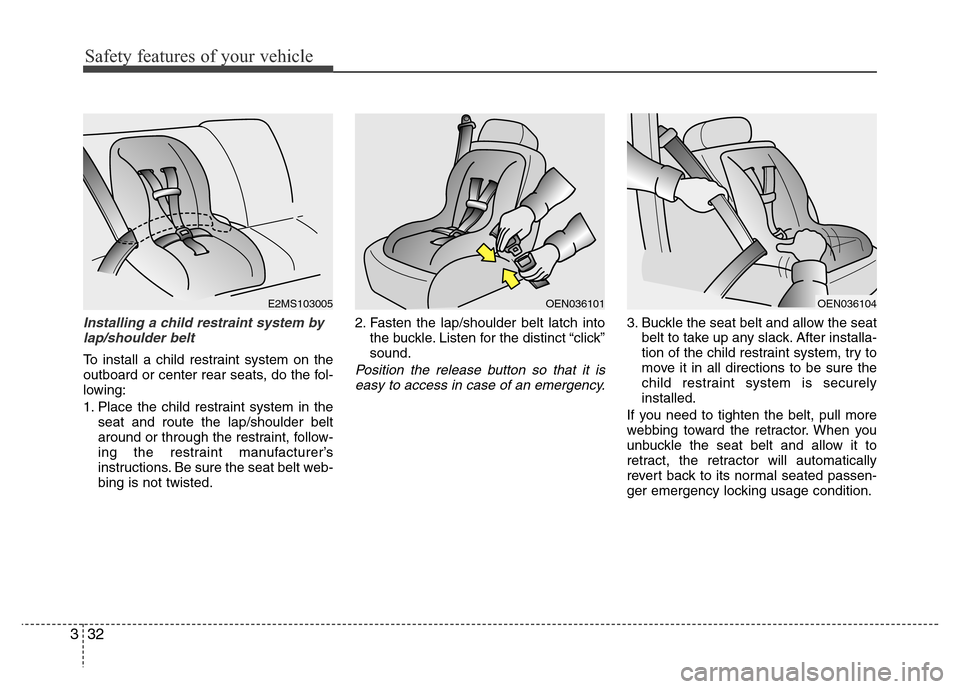
Installing a child restraint system by
lap/shoulder belt
To install a child restraint system on the
outboard or center rear seats, do the fol-
lowing:
1. Place the child restraint system in the
seat and route the lap/shoulder belt
around or through the restraint, follow-
ing the restraint manufacturer’s
instructions. Be sure the seat belt web-
bing is not twisted.2. Fasten the lap/shoulder belt latch into
the buckle. Listen for the distinct “click”
sound.Position the release button so that it is
easy to access in case of an emergency.
3. Buckle the seat belt and allow the seat
belt to take up any slack. After installa-
tion of the child restraint system, try to
move it in all directions to be sure the
child restraint system is securely
installed.
If you need to tighten the belt, pull more
webbing toward the retractor. When you
unbuckle the seat belt and allow it to
retract, the retractor will automatically
revert back to its normal seated passen-
ger emergency locking usage condition.
E2MS103005OEN036101OEN036104
Page 59 of 403
Safety features of your vehicle
44 3
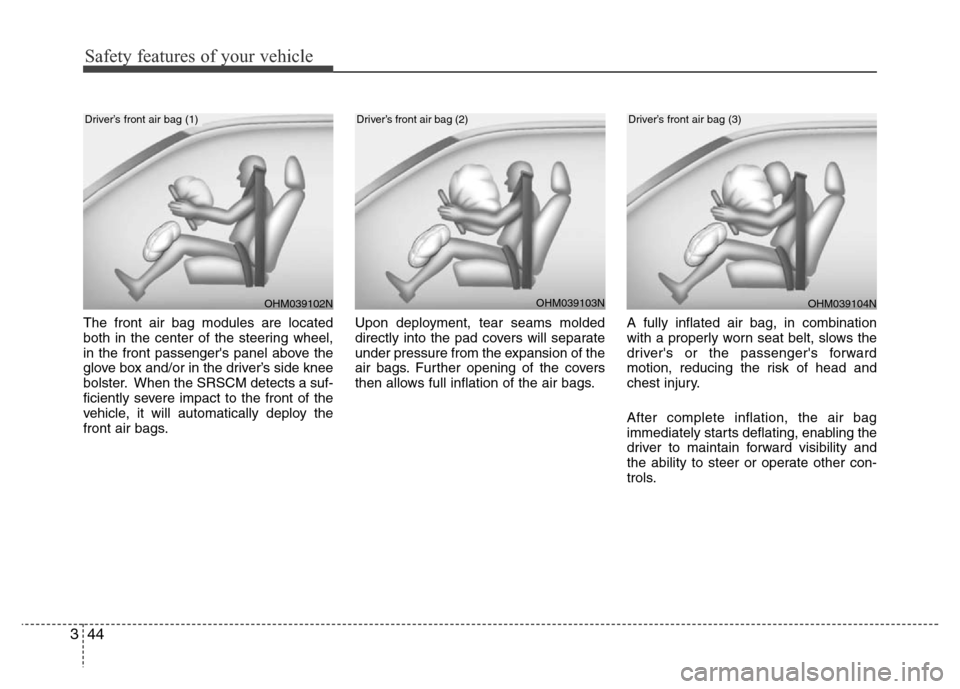
The front air bag modules are located
both in the center of the steering wheel,
in the front passenger's panel above the
glove box and/or in the driver’s side knee
bolster. When the SRSCM detects a suf-
ficiently severe impact to the front of the
vehicle, it will automatically deploy the
front air bags.Upon deployment, tear seams molded
directly into the pad covers will separate
under pressure from the expansion of the
air bags. Further opening of the covers
then allows full inflation of the air bags.A fully inflated air bag, in combination
with a properly worn seat belt, slows the
driver's or the passenger's forward
motion, reducing the risk of head and
chest injury.
After complete inflation, the air bag
immediately starts deflating, enabling the
driver to maintain forward visibility and
the ability to steer or operate other con-
trols.
OHM039103NOHM039104N
Driver’s front air bag (2)Driver’s front air bag (3)
OHM039102N
Driver’s front air bag (1)
Page 78 of 403
Manual climate control system / 4-91
Automatic climate control system / 4-101
Windshield defrosting and defogging / 4-113
Storage compartment / 4-117
Interior features / 4-118
Audio system / 4-125
Features of your vehicle4
Page 79 of 403
43
Features of your vehicle
Record your key number
The key code number is
stamped on the key
code tag attached to the
key set. Should you lose
your keys, we recom-
mend that you contact an authorized
HYUNDAI dealer. Remove the key code
tag and store it in a safe place. Also,
record the key code number and keep it
in a safe and handy place, but not in the
vehicle.
Key operations
• Used to start the engine.
• Used to lock and unlock the doors.
• Used to lock and unlock the glove box.
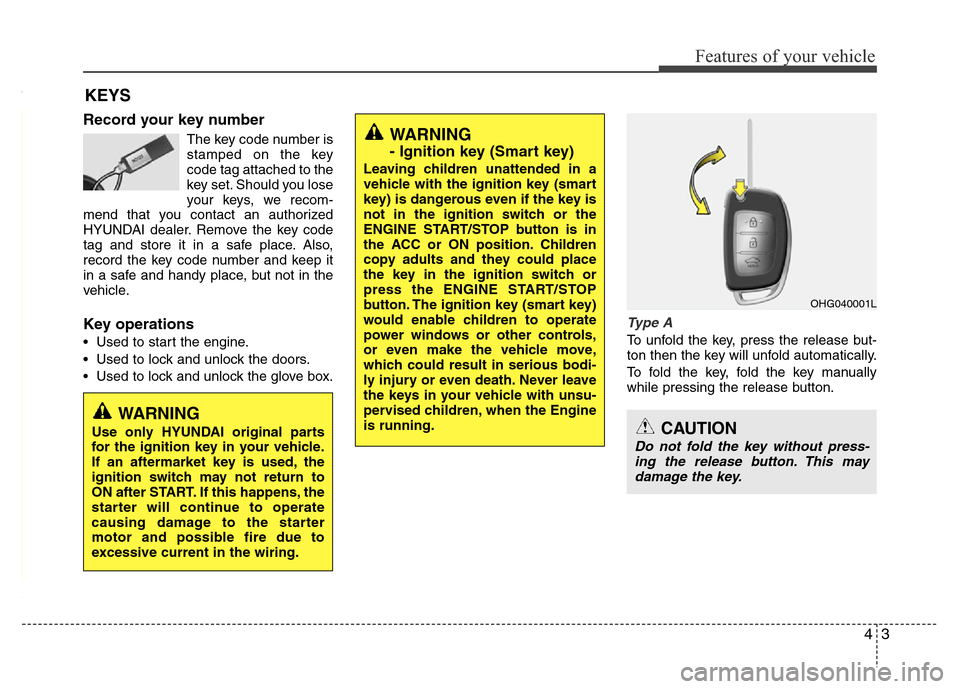
Type A
To unfold the key, press the release but-
ton then the key will unfold automatically.
To fold the key, fold the key manually
while pressing the release button.
KEYS
WARNING
- Ignition key (Smart key)
Leaving children unattended in a
vehicle with the ignition key (smart
key) is dangerous even if the key is
not in the ignition switch or the
ENGINE START/STOP button is in
the ACC or ON position. Children
copy adults and they could place
the key in the ignition switch or
press the ENGINE START/STOP
button. The ignition key (smart key)
would enable children to operate
power windows or other controls,
or even make the vehicle move,
which could result in serious bodi-
ly injury or even death. Never leave
the keys in your vehicle with unsu-
pervised children, when the Engine
is running.
WARNING
Use only HYUNDAI original parts
for the ignition key in your vehicle.
If an aftermarket key is used, the
ignition switch may not return to
ON after START. If this happens, the
starter will continue to operate
causing damage to the starter
motor and possible fire due to
excessive current in the wiring.
OHG040001L
CAUTION
Do not fold the key without press-
ing the release button. This may
damage the key.
Page 82 of 403
Features of your vehicle
6 4
To activate the immobilizer system:
Turn the ignition key to the OFF position.
The immobilizer system activates auto-
matically. Without a valid ignition key for
your vehicle, the engine will not start.
To deactivate the immobilizer sys-
tem:
Insert the ignition key into the key cylin-
der and turn it to the ON position.
✽NOTICE
When starting the engine, do not use the
key with other immobilizer keys around.
Otherwise the engine may not start or
may stop soon after it starts. Keep each
key separate in order to avoid a starting
malfunction.
✽NOTICE
If you need additional keys or lose your
keys, consult an authorized HYUNDAI
dealer.
WARNING
In order to prevent theft of your
vehicle, do not leave spare keys
anywhere in your vehicle. Your
Immobilizer password is a cus-
tomer unique password and should
be kept confidential. Do not leave
this number anywhere in your vehi-
cle.
CAUTION
The transponder in your ignition
key is an important part of the
immobilizer system. It is designed
to give years of trouble-free service,
however you should avoid expo-
sure to moisture, static electricity
and rough handling. Immobilizer
system malfunction could occur.
CAUTION
Do not put metal accessories near
the ignition switch.
The engine may not start because
the metal accessories may interrupt
the transponder signal from trans-
mitting normally.
CAUTION
Do not change, alter or adjust the
immobilizer system because it
could cause the immobilizer sys-
tem to malfunction and should only
be serviced by an authorized
HYUNDAI dealer.
Malfunctions caused by improper
alterations, adjustments or modifi-
cations to the immobilizer system
are not covered by your vehicle
manufacturer warranty.
Page 83 of 403

47
Features of your vehicle
With a smart key, you can lock or unlock
a door (and trunk) and even start the
engine without inserting the key.
The functions of buttons on a smart key
are similar to the remote keyless entry.
(Refer to the “Remote keyless entry” in
this section.)
Smart key functions
Carrying the smart key, you may lock and
unlock the vehicle doors (and trunk).
Also, you may start the engine. Refer to
the following, for more details.Locking
Using the door handle switch
Pressing the button of the front outside
door handles with all doors closed and
any door unlock, locks all the doors. If all
doors, trunk and engine hood are closed,
the hazard warning lights will blink once
to indicate that all doors are locked.Also, the outside rearview mirror will
automatically fold if the outside rearview
mirror folding switch is in the AUTO posi-
tion (if equipped).
However, if any door, trunk or engine
hood remains open, the hazard warning
lights will not operate. If all doors, trunk
and engine hood are closed after the lock
button is pressed, the hazard warning
lights will blink once.
The button will only operate when the
smart key is within 0.7~1 m (28~40 in.)
from the outside door handle. If you want
to make sure that a door has locked or
not, you should check the door lock but-
ton inside the vehicle or pull the outside
door handle.
Even though you press the outside door
handle buttons, the doors will not lock
and the chime will sound for 3 seconds if
any of following occur:
• The smart key is in the vehicle.
• The ignition switch is in ACC or ON
position.
• Any door except the trunk is open.
SMART KEY (IF EQUIPPED)
OHG040010L
OHG040007L
OHG040011
Page 84 of 403

Features of your vehicle
8 4
Using the button on the smart key
All doors are locked if the lock button(1)
is pressed. If all doors, trunk and hood
are closed, the hazard warning lights will
blink once to indicate that all doors are
locked. Also, the outside rearview mirror
will automatically fold if the outside
rearview mirror folding switch is in the
AUTO position (if equipped).
However, if any door, trunk or engine
hood remains open, the hazard warning
lights will not operate. If all doors, trunk
and engine hood are closed after the lock
button is pressed, the hazard warning
lights will blink once.Unlocking
Using the door handle switch
Press the button of the front outside door
handles with all doors closed and locked,
unlocks all the doors. The hazard warn-
ing lights will blink twice to indicate that
all doors are unlocked. Also, the outside
rearview mirror will automatically unfold if
the outside rearview mirror folding switch
is in the AUTO position (if equipped). The
button will only operate when the smart
key is within 0.7~1 m (28~40 in.) from the
outside door handle.
When the smart key is recognized in the
area of 0.7~1 m (28~40 in.) from the front
outside door handle, other people can
also open the door without possession of
the smart key.
After pressing the button, the doors will
lock automatically unless you open any
door within 30 seconds.Using the button on the smart key
All doors are unlocked if the unlock but-
ton(2) is pressed. The hazard warning
lights will blink twice to indicate that all
doors are unlocked. Also, the outside
rearview mirror will automatically unfold if
the outside rearview mirror folding switch
is in the AUTO position (if equipped).
After pressing this button, the doors will
lock automatically unless you open any
door within 30 seconds.
Page 85 of 403
49
Features of your vehicle
Trunk open
Using the trunk handle switch
If you are within 0.7~1 m (28~40 in.) from
the outside trunk handle with your smart
key in your possession, the trunk will
unlock and open when you press the
trunk handle switch.
Also, once the trunk is opened and then
closed, the trunk will lock automatically.
Using the button on the smart key
The trunk is opened if the trunk unlock
button(3) is pressed for more than 1 sec-
ond.
Once the trunk is opened and then
closed, the trunk will lock automatically.
The word “HOLD” is written on the button
to inform you that you must press and
hold the button for more than 1 second.
Start-up
You can start the engine without inserting
the key. For detailed information refer to
“Engine start/stop button” in section 5.
Smart key precautions
✽NOTICE
• If, for some reason, you happen to lose
your smart key, you will not be able to
start the engine. Tow the vehicle, if
necessary, and contact an authorized
HYUNDAI dealer.
• A maximum of 2 smart keys can be
registered to a single vehicle. If you
lose a smart key, you should immedi-
ately take the vehicle and key to your
authorized HYUNDAI dealer to pro-
tect it from potential theft.
• The smart key will not work if any of
following occur:
- The smart key is close to a radio
transmitter such as a radio station or
an airport which can interfere with
normal operation of the smart key.
- You keep the smart key near a
mobile two-way radio system or a
cellular phone.
- Another vehicle’s smart key is being
operated close to your vehicle.
When the smart key does not work
correctly, open and close the door with
the mechanical key. If you have a
problem with the smart key, contact
an authorized HYUNDAI dealer.
(Continued)(Continued)
• If the smart key is in close proximity
to your cell phone or smart phone, the
signal from the smart key could be
blocked by normal operation of your
cell phone or smart phone. This is
especially important when the phone
is active such as making call, receiving
calls, text messaging, and/or send-
ing/receiving emails. Avoid placing the
smart key and your cell phone or
smart phone in the same pants or
jacket pocket and maintain adequate
distance between the two devices.
CAUTION
Keep the smart key away from
water or any liquid. If the keyless
entry system is inoperative due to
exposure to water or liquids, it will
not be covered by your manufactur-
er’s vehicle warranty.
CAUTION
Keep the smart key away from elec-
tromagnetic materials that blocks
electromagnetic waves to the key
surface.
Page 86 of 403

Features of your vehicle
10 4
Battery replacement
A smart key battery should last for sever-
al years, but if the smart key is not work-
ing properly, try replacing the battery with
a new one. If you are unsure how to use
your smart key or replace the battery,
contact an authorized HYUNDAI dealer.
✽NOTICE
The circuit inside the smart key can have
a problem if exposed to moisture or stat-
ic electricity. If you are unsure how to
use your smart key or replace the bat-
tery, contact an authorized HYUNDAI
dealer.
1. Pry open the rear cover of the smart
key.
2. Replace the battery with a new battery
(CR2032). When replacing the battery,
make sure the battery position.
3. Install the battery in the reverse order
of removal.
✽NOTICE
• Using the wrong battery can cause the
smart key to malfunction. Be sure to
use the correct battery.
• Circuits inside the smart key may
develop problems when dropped,
exposed to moisture or static electrici-
ty.
• If you suspect that your smart key
might have sustained some damage,
or you feel your smart key is not
working correctly, contact an author-
ized HYUNDAI dealer.
Remote keyless entry system
operations
Lock (1)
All doors are locked if the lock button is
pressed while all doors are closed.
The hazard warning lights blink once to
indicate that all doors are locked. Also,
the outside rearview mirror will automati-
cally fold if the outside rearview mirror
folding switch is in the AUTO position (if
equipped).
However, if any door, engine hood or
trunk remains open, the hazard warning
lights will not operate. If all doors, engine
hood and trunk are closed after the lock
button is pressed, the hazard warning
lights will blink once.
OHG040009
CAUTION
An inappropriately disposed bat-
tery can be harmful to the environ-
ment and human health.
Dispose the battery according to
your local law(s) or regulation.
REMOTE KEYLESS ENTRY
(IF EQUIPPED)
OHG040006L
Page 87 of 403
411
Features of your vehicle
Unlock (2)
All doors are unlocked if the unlock but-
ton is pressed.
The hazard warning lights will blink twice
to indicate that all doors are unlocked.
Also, the outside rearview mirror will
automatically unfold if the outside
rearview mirror folding switch is in the
AUTO position (if equipped).
After pressing this button, the doors will
lock automatically unless you open any
door within 30 seconds.
Trunk open (3)
The trunk is opened if the button is
pressed for more than 1 second.
Once the trunk is opened and then
closed with all doors locked, the trunk will
lock automatically.
The word "HOLD" is written on the button
in inform you that you must press and
hold the button for more than 1 second.
Transmitter precautions
✽NOTICE
• The transmitter will not work if any of
following occur:
- The ignition key is in ignition switch.
- You exceed the operating distance
limit (about 30 m [90 feet]).
- The battery in the transmitter is
weak.
- Other vehicles or objects may be
blocking the signal.
- The weather is extremely cold.
- The transmitter is close to a radio
transmitter such as a radio station or
an airport which can interfere with
normal operation of the transmitter.
When the transmitter does not work
correctly, open and close the door with
the ignition key. If you have a problem
with the transmitter, contact an
authorized HYUNDAI dealer.
• If the transmitter is in close proximity
to your cell phone or smart phone, the
signal from the transmitter could be
blocked by normal operation of your
cell phone or smart phone. This is
especially important when the phone
is active such as making call, receiving
calls, text messaging, and/or send-
ing/receiving emails.
(Continued)(Continued)
Avoid placing the transmitter and
your cell phone or smart phone in the
same pants or jacket pocket and
maintain adequate distance between
the two devices.
CAUTION
Changes or modifications not
expressly approved by the party
responsible for compliance could
void the user’s authority to operate
the equipment. If the keyless entry
system is inoperative due to
changes or modifications not
expressly approved by the party
responsible for compliance, it will
not be covered by your manufactur-
er’s vehicle warranty.
CAUTION
Keep the transmitter away from
water or any liquid. If the keyless
entry system is inoperative due to
exposure to water or liquids, it will
not be covered by your manufactur-
er vehicle warranty.