ECO mode Hyundai Azera 2011 User Guide
[x] Cancel search | Manufacturer: HYUNDAI, Model Year: 2011, Model line: Azera, Model: Hyundai Azera 2011Pages: 403, PDF Size: 9.28 MB
Page 207 of 403
4131
Features of your vehicle
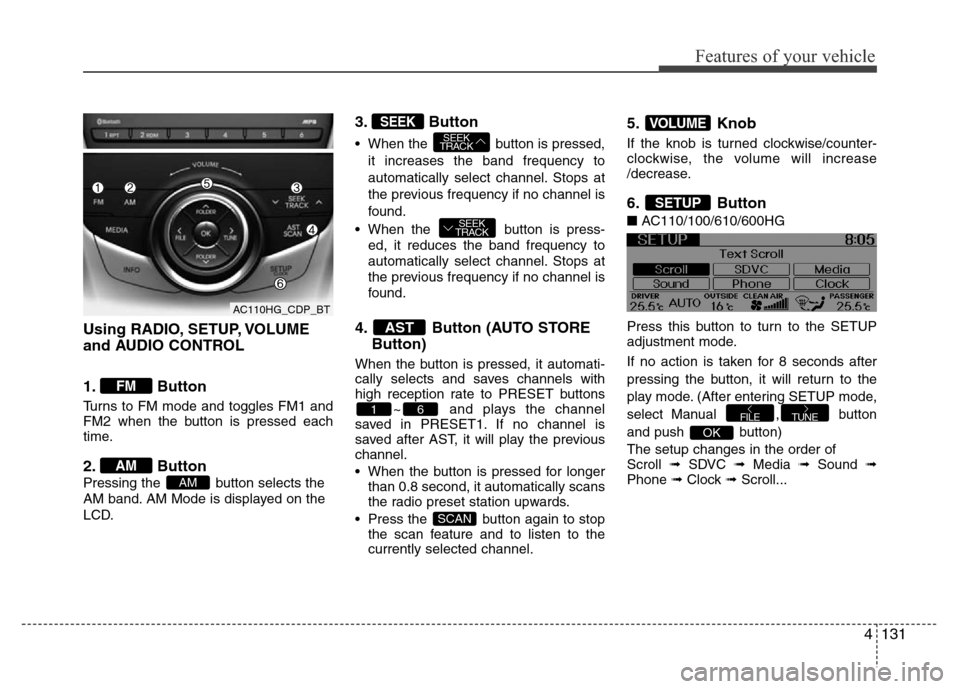
Using RADIO, SETUP, VOLUME
and AUDIO CONTROL
1. Button
Turns to FM mode and toggles FM1 and
FM2 when the button is pressed each
time.
2. Button
Pressing the button selects the
AM band. AM Mode is displayed on the
LCD.
3. Button
• When the button is pressed,
it increases the band frequency to
automatically select channel. Stops at
the previous frequency if no channel is
found.
• When the button is press-
ed, it reduces the band frequency to
automatically select channel. Stops at
the previous frequency if no channel is
found.
4. Button (AUTO STORE
Button)
When the button is pressed, it automati-
cally selects and saves channels with
high reception rate to PRESET buttons
~ and plays the channel
saved in PRESET1. If no channel is
saved after AST, it will play the previous
channel.
• When the button is pressed for longer
than 0.8 second, it automatically scans
the radio preset station upwards.
• Press the button again to stop
the scan feature and to listen to the
currently selected channel.
5. Knob
If the knob is turned clockwise/counter-
clockwise, the volume will increase
/decrease.
6. Button
■AC110/100/610/600HG
Press this button to turn to the SETUP
adjustment mode.
If no action is taken for 8 seconds after
pressing the button, it will return to the
play mode. (After entering SETUP mode,
select Manual , button
and push button)
The setup changes in the order of
Scroll ➟ SDVC ➟ Media ➟ Sound ➟
Phone ➟ Clock ➟ Scroll...
OK
TUNEFILE
SETUP
VOLUME
SCAN
61
AST
SEEK
TRACK
SEEK
TRACKSEEK
AM
AM
FM
AC110HG_CDP_BT
Page 209 of 403

4133
Features of your vehicle
MIDDLE Control
To increase the MIDDLE, press the right
button, while to decrease the MIDDLE,
press the left button.
TREBLE Control
To increase the TREBLE, press the right
button, while to decrease the TREBLE,
press the left button.
FADER Control
Press the right button to emphasize rear
speaker sound(front speaker sound will
be attenuated). When the left button is
pressed, front speaker sound will be
emphasized(rear speaker sound will be
attenuated).BALANCE Control
Press the right button to emphasize right
speaker sound(left speaker sound will be
attenuated). When the left button is
pressed, left speaker sound will be
emphasized(right speaker sound will be
attenuated).
• PHONE
(if equipped)
Select this item to enter PHONE setup
mode. Refer to “BLUETOOTH PHONE
OPERATION” section for detailed infor-
mation.
❈“PHONE” menu is not available if the
audio does not support
Bluetooth®
Wireless Technology features.• CLOCK
Select this item to enter Clock setup
mode. Adjust the hour using ,
button and press the
button.
Adjust the minute using ,
button and press the
button to complete and exit from clock
adjustment mode.
Press the button for more than 1
seconds while in power off/on, you can
enter the Clock setup mode directly.
• Return( )
This function displays the previous
MODE screen.
SETUP
OKFOLDERFOLDER
TUNEFOLDERFOLDER
AC110HG_CDP_BT
Page 211 of 403
4135
Features of your vehicle
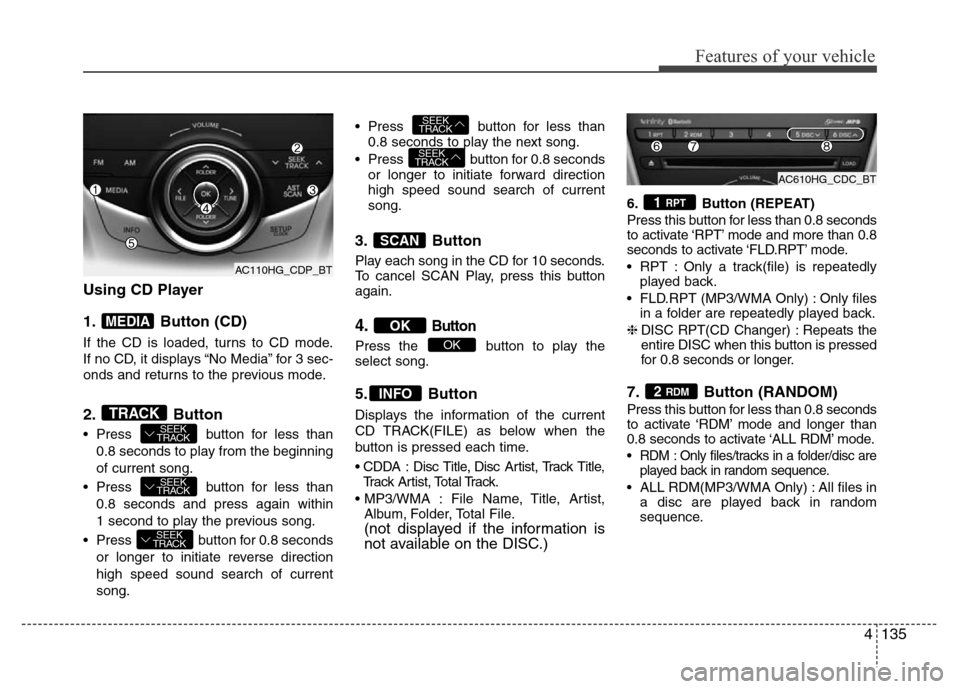
Using CD Player
1. Button (CD)
If the CD is loaded, turns to CD mode.
If no CD, it displays “No Media” for 3 sec-
onds and returns to the previous mode.
2. Button
• Press button for less than
0.8 seconds to play from the beginning
of current song.
• Press button for less than
0.8 seconds and press again within
1 second to play the previous song.
• Press button for 0.8 seconds
or longer to initiate reverse direction
high speed sound search of current
song.• Press button for less than
0.8 seconds to play the next song.
• Press button for 0.8 seconds
or longer to initiate forward direction
high speed sound search of current
song.
3. Button
Play each song in the CD for 10 seconds.
To cancel SCAN Play, press this button
again.
4.Button
Press the button to play the
select song.
5. Button
Displays the information of the current
CD TRACK(FILE) as below when the
button is pressed each time.
• CDDA : Disc Title, Disc Artist, Track Title,
Track Artist, Total Track.
• MP3/WMA : File Name, Title, Artist,
Album, Folder, Total File.
(not displayed if the information is
not available on the DISC.)
6. Button (REPEAT)
Press this button for less than 0.8 seconds
to activate ‘RPT’ mode and more than 0.8
seconds to activate ‘FLD.RPT’ mode.
• RPT : Only a track(file) is repeatedly
played back.
• FLD.RPT (MP3/WMA Only) : Only files
in a folder are repeatedly played back.
❈DISC RPT(CD Changer) : Repeats the
entire DISC when this button is pressed
for 0.8 seconds or longer.
7. Button (RANDOM)
Press this button for less than 0.8 seconds
to activate ‘RDM’ mode and longer than
0.8 seconds to activate ‘ALL RDM’ mode.
• RDM : Only files/tracks in a folder/disc are
played back in random sequence.
• ALL RDM(MP3/WMA Only) : All files in
a disc are played back in random
sequence.
2 RDM
1 RPT
INFO
OK
OK
SCAN
SEEK
TRACK
SEEK
TRACK
SEEK
TRACK
SEEK
TRACK
SEEK
TRACKTRACK
MEDIA
AC110HG_CDP_BTAC610HG_CDC_BT
AC110HG_CDP_BT
Page 213 of 403
4137
Features of your vehicle
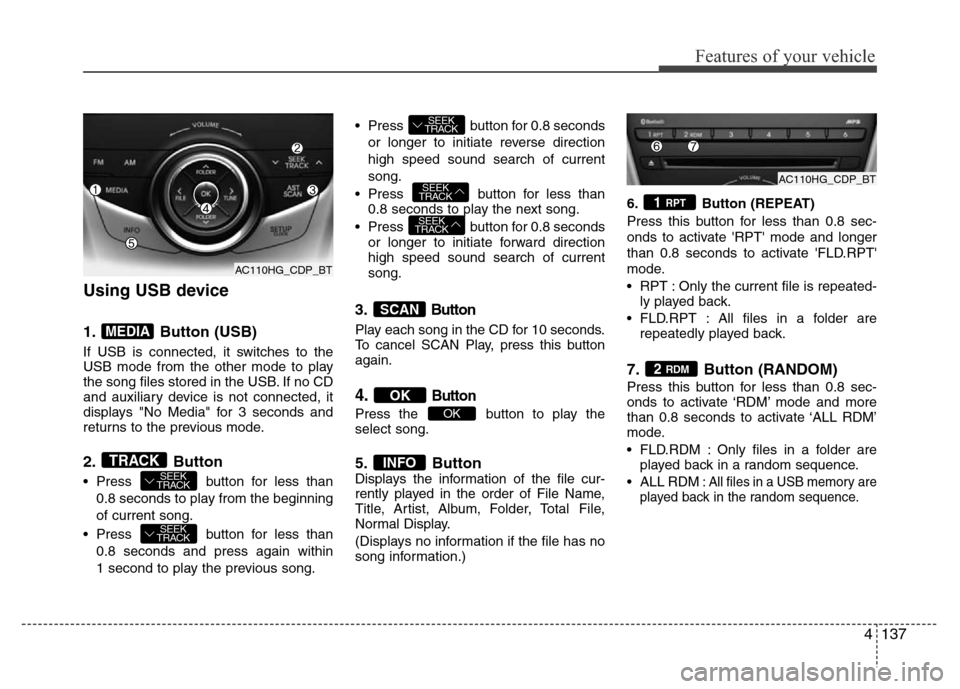
Using USB device
1. Button (USB)
If USB is connected, it switches to the
USB mode from the other mode to play
the song files stored in the USB. If no CD
and auxiliary device is not connected, it
displays "No Media" for 3 seconds and
returns to the previous mode.
2. Button
• Press button for less than
0.8 seconds to play from the beginning
of current song.
• Press button for less than
0.8 seconds and press again within
1 second to play the previous song.• Press button for 0.8 seconds
or longer to initiate reverse direction
high speed sound search of current
song.
• Press button for less than
0.8 seconds to play the next song.
• Press button for 0.8 seconds
or longer to initiate forward direction
high speed sound search of current
song.
3.Button
Play each song in the CD for 10 seconds.
To cancel SCAN Play, press this button
again.
4.Button
Press the button to play the
select song.
5. ButtonDisplays the information of the file cur-
rently played in the order of File Name,
Title, Artist, Album, Folder, Total File,
Normal Display.
(Displays no information if the file has no
song information.)6. Button (REPEAT)
Press this button for less than 0.8 sec-
onds to activate 'RPT' mode and longer
than 0.8 seconds to activate 'FLD.RPT'
mode.
• RPT : Only the current file is repeated-
ly played back.
• FLD.RPT : All files in a folder are
repeatedly played back.
7. Button (RANDOM)
Press this button for less than 0.8 sec-
onds to activate ‘RDM’ mode and more
than 0.8 seconds to activate ‘ALL RDM’
mode.
• FLD.RDM : Only files in a folder are
played back in a random sequence.
•ALL RDM: All files in a USB memory are
played back in the random sequence.
2 RDM
1 RPT
INFO
OK
OK
SCAN
SEEK
TRACK
SEEK
TRACK
SEEK
TRACK
SEEK
TRACK
SEEK
TRACKTRACK
MEDIA
AC110HG_CDP_BT
AC110HG_CDP_BTAC110HG_CDP_BT
Page 215 of 403
4139
Features of your vehicle
CAUTION IN USING
USB DEVICE
• To use an external USB device,
make sure the device is not con-
nected when starting up the vehi-
cle. Connect the device after
starting up.
• If you start the engine when the
USB device is connected, it may
damage the USB device. (USB
flashdrives are very sensitive to
electric shock.)
• If the engine is started up or
turned off while the external USB
device is connected, the external
USB device may not work.
• It may not play inauthentic MP3 or
WMA files.
1) It can only play MP3 files with
the compression rate between
8Kbps~320Kbps.
2) It can only play WMA music
files with the compression rate
between 8Kbps~320Kbps.
• Take precautions for static electrici-
ty when connecting or disconnect-
ing the external USB device.
(Continued)
(Continued)
• An encrypted MP3 PLAYER is not
recognizable.
• Depending on the condition of
the external USB device, the con-
nected external USB device can
be unrecognizable.
• When the formatted byte/sector
setting of External USB device is
not either 512BYTE or 2048BYTE,
then the device will not be recog-
nized.
• Use only a USB device formatted
to FAT 12/16/32.
• USB devices without USB I/F
authentication may not be recog-
nizable.
• Make sure the USB connection
terminal does not come in contact
with the human body or other
objects.
• If you repeatedly connect or dis-
connect the USB device in a short
period of time, it may break the
device.
• You may hear a strange noise
when connecting or disconnect-
ing a USB device.
(Continued)(Continued)
• If you disconnect the external USB
device during playback in USB
mode, the external USB device can
be damaged or may malfunction.
Therefore, disconnect the external
USB device when the audio is
turned off or in another mode. (e.g,
Radio or CD)
• Depending on the type and capacity
of the external USB device or the
type of the files stored in the device,
there is a difference in the time
taken for recognition of the device.
• Do not use the USB device for pur-
poses other than playing music files.
• Playing videos through the USB is
not supported.
• Use of USB accessories such as
rechargers or heaters using USB
I/F may lower performance or
cause trouble.
• If you use devices such as a USB
hub purchased separately, the
vehicle’s audio system may not
recognize the USB device. In that
case, connect the USB device
directly to the multimedia termi-
nal of the vehicle.
(Continued)
Page 217 of 403
4141
Features of your vehicle
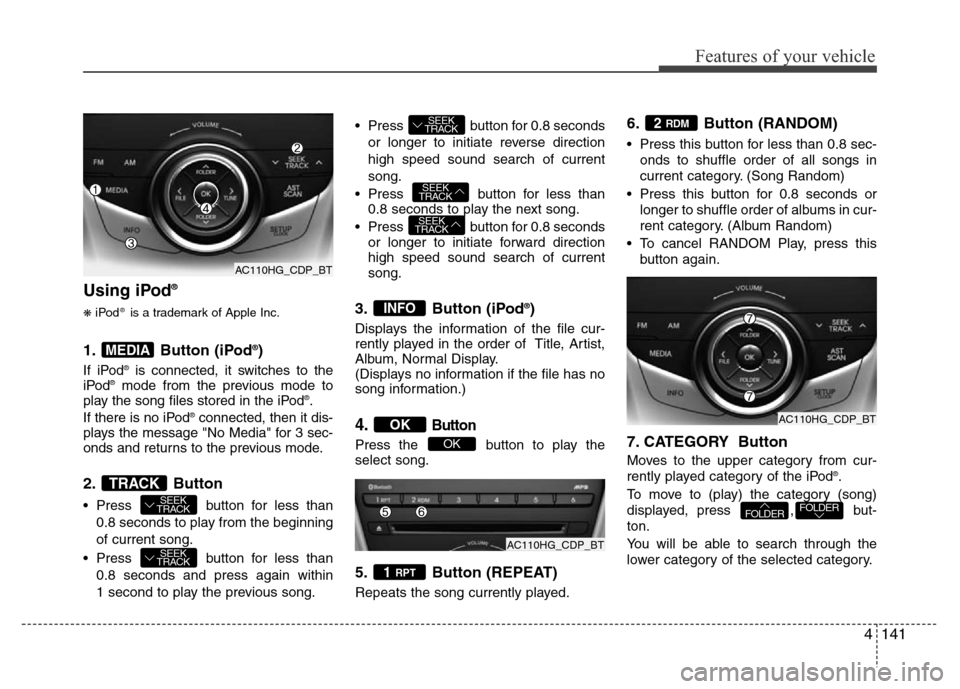
Using iPod®
❋iPod®is a trademark of Apple Inc.
1. Button (iPod®)
If iPod®is connected, it switches to the
iPod®mode from the previous mode to
play the song files stored in the iPod®.
If there is no iPod®connected, then it dis-
plays the message "No Media" for 3 sec-
onds and returns to the previous mode.
2. Button
• Press button for less than
0.8 seconds to play from the beginning
of current song.
• Press button for less than
0.8 seconds and press again within
1 second to play the previous song.• Press button for 0.8 seconds
or longer to initiate reverse direction
high speed sound search of current
song.
• Press button for less than
0.8 seconds to play the next song.
• Press button for 0.8 seconds
or longer to initiate forward direction
high speed sound search of current
song.
3. Button (iPod®)
Displays the information of the file cur-
rently played in the order of Title, Artist,
Album, Normal Display.
(Displays no information if the file has no
song information.)
4.Button
Press the button to play the
select song.
5. Button (REPEAT)
Repeats the song currently played.
6. Button (RANDOM)
• Press this button for less than 0.8 sec-
onds to shuffle order of all songs in
current category. (Song Random)
• Press this button for 0.8 seconds or
longer to shuffle order of albums in cur-
rent category. (Album Random)
• To cancel RANDOM Play, press this
button again.
7. CATEGORY Button
Moves to the upper category from cur-
rently played category of the iPod®.
To move to (play) the category (song)
displayed, press , but-
ton.
You will be able to search through the
lower category of the selected category.
FOLDERFOLDER
2 RDM
1 RPT
OK
OK
INFO
SEEK
TRACK
SEEK
TRACK
SEEK
TRACK
SEEK
TRACK
SEEK
TRACKTRACK
MEDIA
AC110HG_CDP_BT
AC110HG_CDP_BT
AC110HG_CDP_BT
Page 229 of 403
Driving your vehicle
6 5
Starting the engine1. Make sure the parking brake is
applied.
2. Place the transaxle shift lever in P
(Park). Depress the brake pedal fully.
You can also start the engine when the
shift lever is in the N (Neutral) position.
3. Turn the ignition switch to START and
hold it there until the engine starts (a
maximum of 10 seconds), then release
the key.
It should be started without depressing
the accelerator.
4. Do not wait for the engine to warm up
while the vehicle remains stationary.
Start driving at moderate engine
speeds. (Steep accelerating and decel-
erating should be avoided.)
WARNING
• Always wear appropriate shoes
when operating your vehicle.
Unsuitable shoes (high heels, ski
boots,etc.) may interfere with
your ability to use the brake and
accelerator pedal.
• Do not start the vehicle with the
accelerator pedal depressed. The
vehicle can move and lead to an
accident.
• Wait until the engine rpm is nor-
mal. The vehicle may suddenly
move if the brake pedal is
released when the rpm is high.
CAUTION
If the engine stalls while you are in
motion, do not attempt to move the
shift lever to the P (Park) position. If
traffic and road conditions permit,
you may put the shift lever in the N
(Neutral) position while the vehicle
is still moving and turn the ignition
switch to the START position in an
attempt to restart the engine.
CAUTION
• Do not engage the starter for
more than 10 seconds. If the
engine stalls or fails to start, wait
5 to 10 seconds before re-engag-
ing the starter. Improper use of
the starter may damage it.
• Do not turn the ignition switch to
the START position with the
engine running. It may damage
the starter.
Page 237 of 403
Driving your vehicle
14 5
R (Reverse)
Use this position to drive the vehicle
backward.
N (Neutral)
The wheels and transaxle are not
engaged. The vehicle will roll freely even
on the slightest incline unless the parking
brake or service brakes are applied.D (Drive)
This is the normal forward driving posi-
tion. The transaxle will automatically shift
through a 6-gear sequence, providing the
best fuel economy and power.
For extra power when passing another
vehicle or climbing grades, depress the
accelerator pedal fully (more than 80%)
until the kick down mechanism works
with a clicking noise, at which time the
transaxle will automatically downshift to
the next lower gear.
✽NOTICE
• Always come to a complete stop
before shifting into D (Drive).
• A clicking noise heard from the kick
down mechanism by depressing the
accelerator pedal fully is a normal
condition.
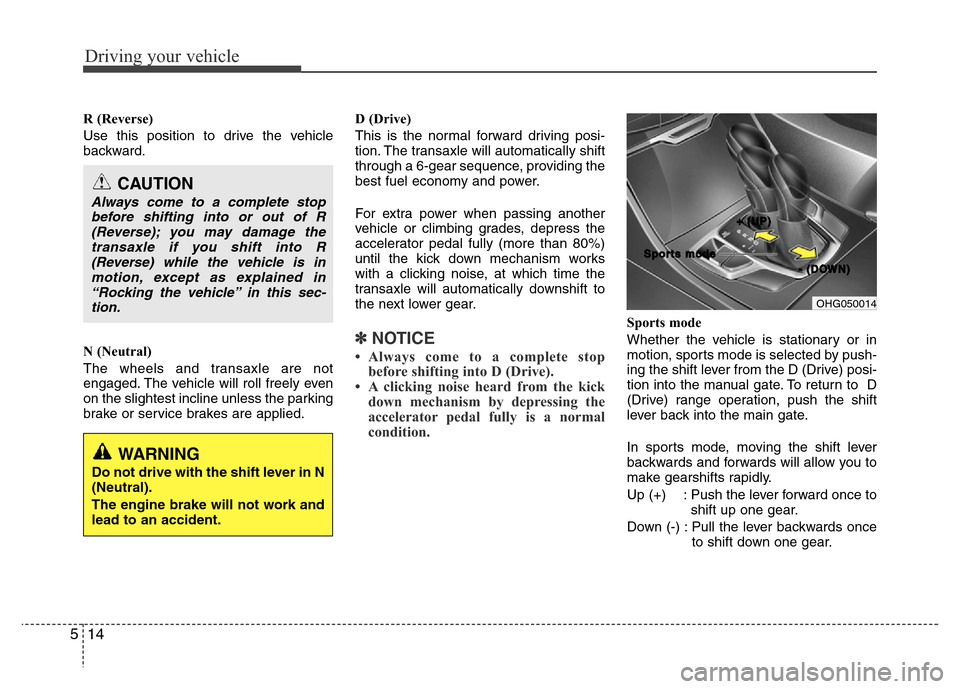
Sports mode
Whether the vehicle is stationary or in
motion, sports mode is selected by push-
ing the shift lever from the D (Drive) posi-
tion into the manual gate. To return to D
(Drive) range operation, push the shift
lever back into the main gate.
In sports mode, moving the shift lever
backwards and forwards will allow you to
make gearshifts rapidly.
Up (+) : Push the lever forward once to
shift up one gear.
Down (-) : Pull the lever backwards once
to shift down one gear.
CAUTION
Always come to a complete stop
before shifting into or out of R
(Reverse); you may damage the
transaxle if you shift into R
(Reverse) while the vehicle is in
motion, except as explained in
“Rocking the vehicle” in this sec-
tion.
OHG050014
+ +
( (
U U
P P
) )
- -
( (
D D
O O
W W
N N
) ) S S
p p
o o
r r
t t
s s
m m
o o
d d
e e
WARNING
Do not drive with the shift lever in N
(Neutral).
The engine brake will not work and
lead to an accident.
Page 271 of 403
Driving your vehicle
48 5
To convert to cruise control mode:
The driver may choose to only use the
cruise control mode (speed control func-
tion) by doing as follows:
1. Turn the smart cruise control system
on (the cruise indicator light will be on
but the system will not be activated).
2. Push the distance to distance switch
for more than 2 seconds.
3. Choose between "Smart cruise con-
trol(SCC) mode" and "Cruise con-
trol(CC) mode".
Limitations of the system
The smart cruise control system may
have limits to its ability to detect distance
to the vehicle ahead due to road and traf-
fic conditions.
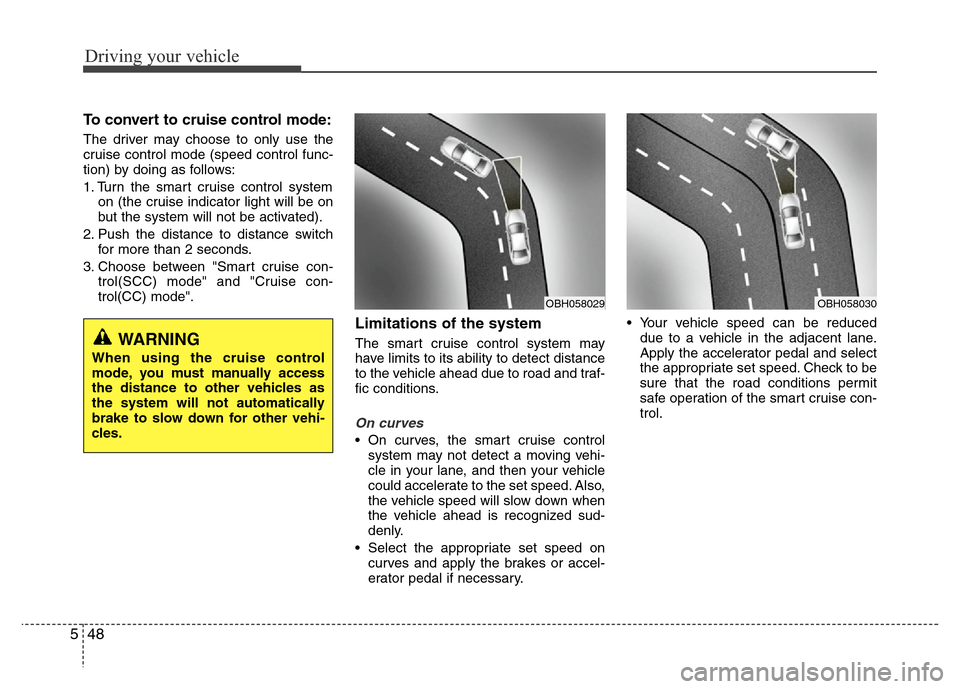
On curves
• On curves, the smart cruise control
system may not detect a moving vehi-
cle in your lane, and then your vehicle
could accelerate to the set speed. Also,
the vehicle speed will slow down when
the vehicle ahead is recognized sud-
denly.
• Select the appropriate set speed on
curves and apply the brakes or accel-
erator pedal if necessary.• Your vehicle speed can be reduced
due to a vehicle in the adjacent lane.
Apply the accelerator pedal and select
the appropriate set speed. Check to be
sure that the road conditions permit
safe operation of the smart cruise con-
trol.
WARNING
When using the cruise control
mode, you must manually access
the distance to other vehicles as
the system will not automatically
brake to slow down for other vehi-
cles.
OBH058030OBH058029
Page 276 of 403

553
Driving your vehicle
Your vehicle's fuel economy depends
mainly on your style of driving, where you
drive and when you drive.
Each of these factors affects how many
kilometers (miles) you can get from a liter
(gallon) of fuel. To operate your vehicle
as economically as possible, use the fol-
lowing driving suggestions to help save
money in both fuel and repairs:
• Drive smoothly. Accelerate at a moder-
ate rate. Don't make "jack-rabbit" starts
or full-throttle shifts and maintain a
steady cruising speed. Don't race
between stoplights. Try to adjust your
speed to that of the other traffic so you
don't have to change speeds unneces-
sarily. Avoid heavy traffic whenever
possible. Always maintain a safe dis-
tance from other vehicles so you can
avoid unnecessary braking. This also
reduces brake wear.
• Drive at a moderate speed. The faster
you drive, the more fuel your car uses.
Driving at a moderate speed, especial-
ly on the highway, is one of the most
effective ways to reduce fuel consump-
tion.• Do not "ride" the brake pedal. This can
increase fuel consumption and also
increase wear on these components.
In addition, driving with your foot rest-
ing on the brake pedal may cause the
brakes to overheat, which reduces
their effectiveness and may lead to
more serious consequences.
• Take care of your tires. Keep them
inflated to the recommended pressure.
Incorrect inflation, either too much or
too little, results in unnecessary tire
wear. Check the tire pressures at least
once a month.
• Be sure that the wheels are aligned
correctly. Improper alignment can
result from hitting curbs or driving too
fast over irregular surfaces. Poor align-
ment causes faster tire wear and may
also result in other problems as well as
greater fuel consumption.• Keep your car in good condition. For
better fuel economy and reduced
maintenance costs, maintain your car
in accordance with the maintenance
schedule in section 7. If you drive your
car in severe conditions, more frequent
maintenance is required (see section 7
for details).
• Keep your car clean. For maximum
service, your vehicle should be kept
clean and free of corrosive materials. It
is especially important that mud, dirt,
ice, etc. not be allowed to accumulate
on the underside of the car. This extra
weight can result in increased fuel con-
sumption and also contribute to corro-
sion.
• Travel lightly. Do not carry unnecessary
weight in your car. Weight reduces fuel
economy.
• Do not let the engine idle longer than
necessary. If you are waiting (and not
in traffic), turn off your engine and
restart only when you're ready to go.
ECONOMICAL OPERATION