change time Hyundai Azera 2011 User Guide
[x] Cancel search | Manufacturer: HYUNDAI, Model Year: 2011, Model line: Azera, Model: Hyundai Azera 2011Pages: 403, PDF Size: 9.28 MB
Page 171 of 403
495
Features of your vehicle
Temperature conversion
You can switch the temperature mode
between Centigrade to Fahrenheit as fol-
lows:
1. Select mode.
2. Press the OFF button.
3. Press the air intake control button
( ) 5 times within 3 seconds.
The display will change from Centigrade
to Fahrenheit, or from Fahrenheit to
Centigrade.
If the battery has been discharged or dis-
connected, the temperature mode dis-
play will reset to Centigrade.
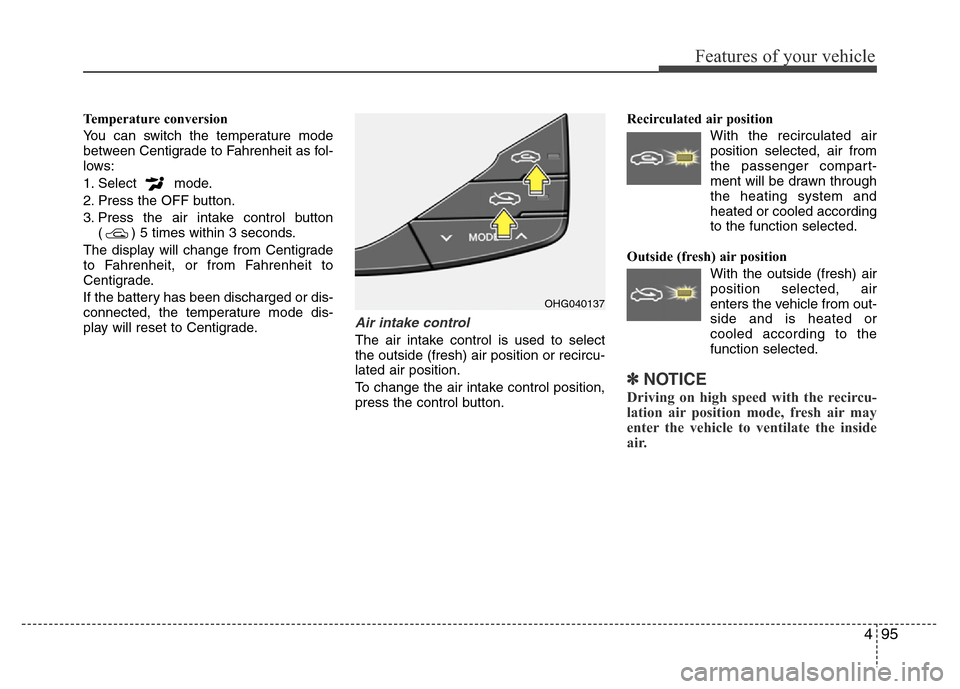
Air intake control
The air intake control is used to select
the outside (fresh) air position or recircu-
lated air position.
To change the air intake control position,
press the control button.Recirculated air position
With the recirculated air
position selected, air from
the passenger compart-
ment will be drawn through
the heating system and
heated or cooled according
to the function selected.
Outside (fresh) air position
With the outside (fresh) air
position selected, air
enters the vehicle from out-
side and is heated or
cooled according to the
function selected.
✽NOTICE
Driving on high speed with the recircu-
lation air position mode, fresh air may
enter the vehicle to ventilate the inside
air.
OHG040137
Page 175 of 403
499
Features of your vehicle
Air conditioning system operation tips
• If the vehicle has been parked in direct
sunlight during hot weather, open the
windows for a short time to let the hot
air inside the vehicle escape.
• To help reduce moisture inside of the
windows on rainy or humid days,
decrease the humidity inside the vehi-
cle by operating the air conditioning
system.
• During air conditioning system opera-
tion, you may occasionally notice a
slight change in engine speed as the
air conditioning compressor cycles.
This is a normal system operation
characteristic.
• Use the air conditioning system every
month only for a few minutes to ensure
maximum system performance.
• When using the air conditioning sys-
tem, you may notice clear water drip-
ping (or even puddling) on the ground
under the passenger side of the vehi-
cle. This is a normal system operation
characteristic.
• Operating the air conditioning system
in the recirculated air position provides
maximum cooling, however, continual
operation in this mode may cause the
air inside the vehicle to become stale.• During cooling operation, you may
occasionally notice a misty air flow
because of rapid cooling and humid air
intake. This is a normal system opera-
tion characteristic.
• If you operate air conditioner exces-
sively, the difference between the tem-
perature of the outside air and that of
the windshield could cause the outer
surface of the windshield to fog up,
causing loss of visibility. In this case,
set the mode selection knob or button
to the position and fan speed con-
trol to the lower speed.
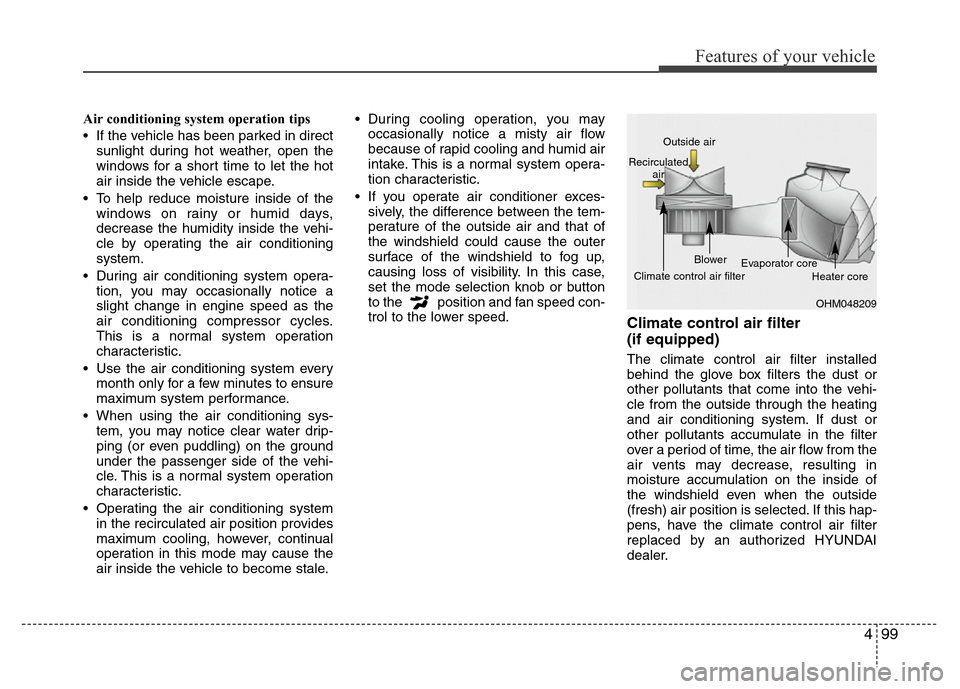
Climate control air filter
(if equipped)
The climate control air filter installed
behind the glove box filters the dust or
other pollutants that come into the vehi-
cle from the outside through the heating
and air conditioning system. If dust or
other pollutants accumulate in the filter
over a period of time, the air flow from the
air vents may decrease, resulting in
moisture accumulation on the inside of
the windshield even when the outside
(fresh) air position is selected. If this hap-
pens, have the climate control air filter
replaced by an authorized HYUNDAI
dealer.
OHM048209 Outside air
Recirculated
air
Climate control air filterBlower
Evaporator core
Heater core
Page 186 of 403
Features of your vehicle
110 4
Air conditioning
HYUNDAI Air Conditioning Systems are
filled with environmentally friendly
R-134a refrigerant.
1. Start the engine. Press the air condi-
tioning button.
2. Set the mode to the position.
3. Set the air intake control to the outside
air or recirculated air position.
4. Adjust the fan speed control and tem-
perature control to maintain maximum
comfort.✽NOTICE
• When using the air conditioning sys-
tem, monitor the temperature gauge
closely while driving up hills or in
heavy traffic when outside tempera-
tures are high. Air conditioning sys-
tem operation may cause engine over-
heating. Continue to use the blower
fan but turn the air conditioning sys-
tem off if the temperature gauge indi-
cates engine overheating.
• When opening the windows in humid
weather air conditioning may create
water droplets inside the vehicle.
Since excessive water droplets may
cause damage to electrical equipment,
air conditioning should only be used
with the windows closed.
Air conditioning system operation tips
• If the vehicle has been parked in direct
sunlight during hot weather, open the
windows for a short time to let the hot
air inside the vehicle escape.
• To help reduce moisture inside of the
windows on rainy or humid days,
decrease the humidity inside the vehi-
cle by operating the air conditioning
system.
• During air conditioning system opera-
tion, you may occasionally notice a
slight change in engine speed as the
air conditioning compressor cycles.
This is a normal system operation
characteristic.
• Use the air conditioning system every
month only for a few minutes to ensure
maximum system performance.
• When using the air conditioning sys-
tem, you may notice clear water drip-
ping (or even puddling) on the ground
under the passenger side of the vehi-
cle. This is a normal system operation
characteristic.
• Operating the air conditioning system
in the recirculated air position provides
maximum cooling, however, continual
operation in this mode may cause the
air inside the vehicle to become stale.
Page 187 of 403

4111
Features of your vehicle
• During cooling operation, you may
occasionally notice a misty air flow
because of rapid cooling and humid air
intake. This is a normal system opera-
tion characteristic.
• If you operate air conditioner exces-
sively, the difference between the tem-
perature of the outside air and that of
the windshield could cause the outer
surface of the windshield to fog up,
causing loss of visibility. In this case,
set the mode selection knob or button
to the position and fan speed con-
trol to the lower speed.
Climate control air filter
(if equipped)
The climate control air filter installed
behind the glove box filters the dust or
other pollutants that come into the vehi-
cle from the outside through the heating
and air conditioning system. If dust or
other pollutants accumulate in the filter
over a period of time, the air flow from the
air vents may decrease, resulting in
moisture accumulation on the inside of
the windshield even when the outside
(fresh) air position is selected. If this hap-
pens, have the climate control air filter
replaced by an authorized HYUNDAI
dealer.
✽NOTICE
• Replace the filter according to the
Maintenance Schedule.
If the vehicle is being driven in severe
conditions such as dusty or rough
roads, more frequent air conditioner
filter inspections and changes are
required.
• When the air flow rate suddenly
decreases, the system should be
checked at an authorized HYUNDAI
dealer.
OHM048209 Outside air
Recirculated
air
Climate control air filterBlower
Evaporator core
Heater core
Page 207 of 403
4131
Features of your vehicle
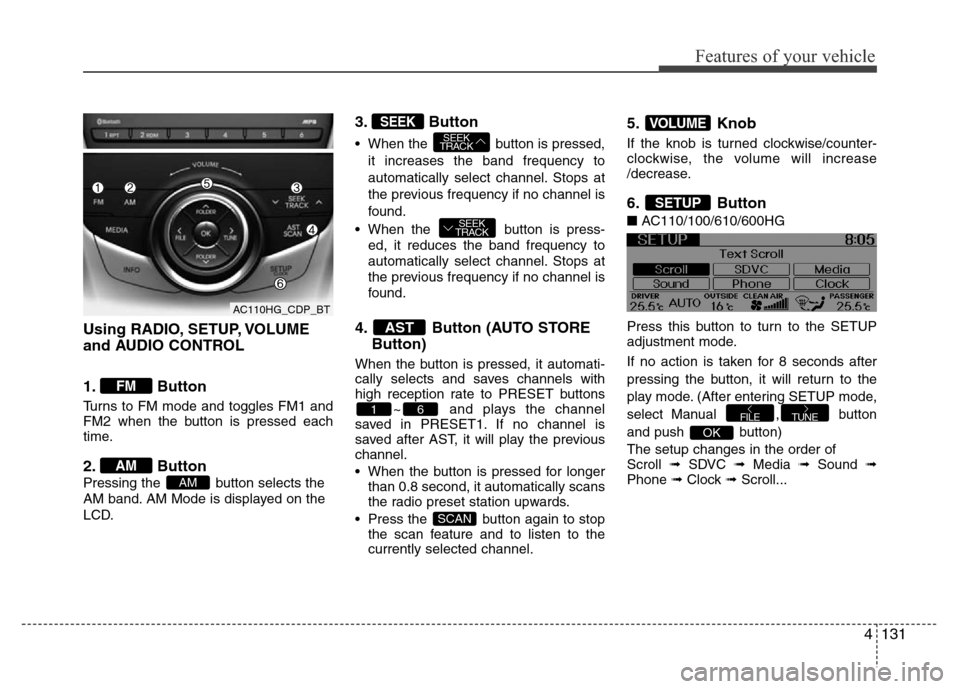
Using RADIO, SETUP, VOLUME
and AUDIO CONTROL
1. Button
Turns to FM mode and toggles FM1 and
FM2 when the button is pressed each
time.
2. Button
Pressing the button selects the
AM band. AM Mode is displayed on the
LCD.
3. Button
• When the button is pressed,
it increases the band frequency to
automatically select channel. Stops at
the previous frequency if no channel is
found.
• When the button is press-
ed, it reduces the band frequency to
automatically select channel. Stops at
the previous frequency if no channel is
found.
4. Button (AUTO STORE
Button)
When the button is pressed, it automati-
cally selects and saves channels with
high reception rate to PRESET buttons
~ and plays the channel
saved in PRESET1. If no channel is
saved after AST, it will play the previous
channel.
• When the button is pressed for longer
than 0.8 second, it automatically scans
the radio preset station upwards.
• Press the button again to stop
the scan feature and to listen to the
currently selected channel.
5. Knob
If the knob is turned clockwise/counter-
clockwise, the volume will increase
/decrease.
6. Button
■AC110/100/610/600HG
Press this button to turn to the SETUP
adjustment mode.
If no action is taken for 8 seconds after
pressing the button, it will return to the
play mode. (After entering SETUP mode,
select Manual , button
and push button)
The setup changes in the order of
Scroll ➟ SDVC ➟ Media ➟ Sound ➟
Phone ➟ Clock ➟ Scroll...
OK
TUNEFILE
SETUP
VOLUME
SCAN
61
AST
SEEK
TRACK
SEEK
TRACKSEEK
AM
AM
FM
AC110HG_CDP_BT
Page 211 of 403
4135
Features of your vehicle
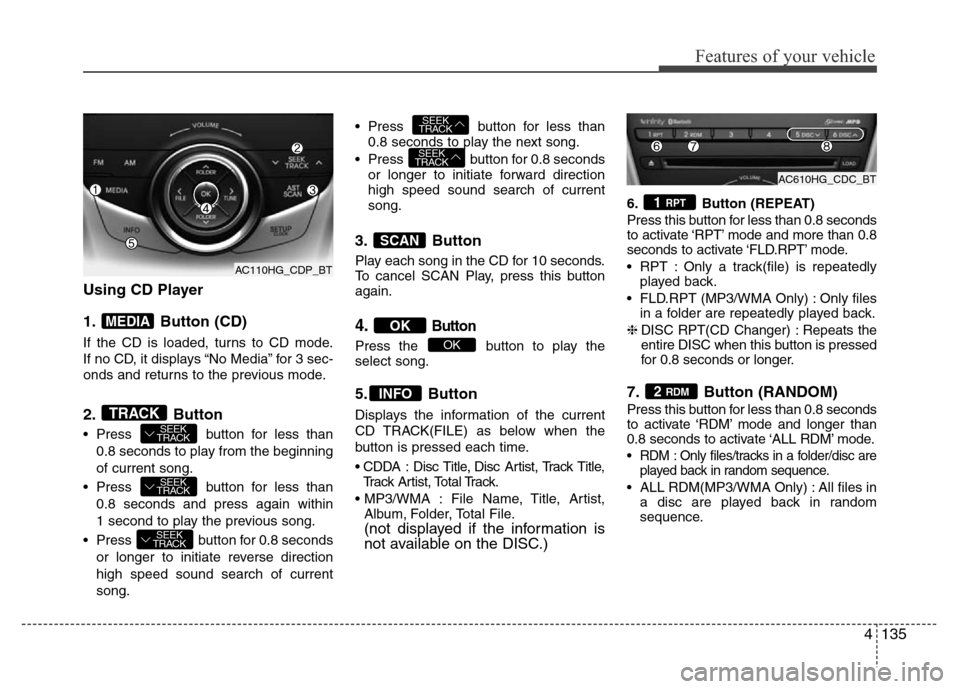
Using CD Player
1. Button (CD)
If the CD is loaded, turns to CD mode.
If no CD, it displays “No Media” for 3 sec-
onds and returns to the previous mode.
2. Button
• Press button for less than
0.8 seconds to play from the beginning
of current song.
• Press button for less than
0.8 seconds and press again within
1 second to play the previous song.
• Press button for 0.8 seconds
or longer to initiate reverse direction
high speed sound search of current
song.• Press button for less than
0.8 seconds to play the next song.
• Press button for 0.8 seconds
or longer to initiate forward direction
high speed sound search of current
song.
3. Button
Play each song in the CD for 10 seconds.
To cancel SCAN Play, press this button
again.
4.Button
Press the button to play the
select song.
5. Button
Displays the information of the current
CD TRACK(FILE) as below when the
button is pressed each time.
• CDDA : Disc Title, Disc Artist, Track Title,
Track Artist, Total Track.
• MP3/WMA : File Name, Title, Artist,
Album, Folder, Total File.
(not displayed if the information is
not available on the DISC.)
6. Button (REPEAT)
Press this button for less than 0.8 seconds
to activate ‘RPT’ mode and more than 0.8
seconds to activate ‘FLD.RPT’ mode.
• RPT : Only a track(file) is repeatedly
played back.
• FLD.RPT (MP3/WMA Only) : Only files
in a folder are repeatedly played back.
❈DISC RPT(CD Changer) : Repeats the
entire DISC when this button is pressed
for 0.8 seconds or longer.
7. Button (RANDOM)
Press this button for less than 0.8 seconds
to activate ‘RDM’ mode and longer than
0.8 seconds to activate ‘ALL RDM’ mode.
• RDM : Only files/tracks in a folder/disc are
played back in random sequence.
• ALL RDM(MP3/WMA Only) : All files in
a disc are played back in random
sequence.
2 RDM
1 RPT
INFO
OK
OK
SCAN
SEEK
TRACK
SEEK
TRACK
SEEK
TRACK
SEEK
TRACK
SEEK
TRACKTRACK
MEDIA
AC110HG_CDP_BTAC610HG_CDC_BT
AC110HG_CDP_BT
Page 220 of 403

Features of your vehicle
144 4
• Pairing a phone
Before using Bluetooth®Wireless
Technology features, the phone must be
paired (registered) with the audio sys-
tem. Up to 5 phones can be paired with
the system.
NOTE:
• The pairing procedure of the phone
varies according to each phone
model. Before attempting to pair
phone, please see your phone’s
User’s Guide for instructions.
• Once pairing with the phone is com-
pleted, there is no need to pair with
that phone again unless the phone
is deleted manually from the audio
system (refer “Deleting a Phone”
section) or the vehicle’s information
is removed from the phone.
1. Press button to enter SETUP
mode.
2. Select “Phone”, then “Pair” in PHONE
menu.
3. The audio displays “searching
----
passkey: 0000”4. Search the
Bluetooth®Wireless
Technology system on your phone.
Your phone should display your [vehi-
cle model name] on the
Bluetooth®
Wireless Technology device list. Then
attempt pairing on your phone.
NOTE:
If the phone is paired to two or more
vehicles of the same model, i.e. both
vehicles are HYUNDAI
AZERA/GRANDEUR, some phones
may not handle
Bluetooth®Wireless
Technology devices of that name cor-
rectly. In this case, you may need to
change the name displayed on your
phone from AZERA/ GRANDEUR to
AZERA1/GRANDEUR1 and
AZERA2/GRANDEUR2.
Refer to your phone’s User’s Guide, or
contact your cellular carrier or phone
manufacturer for instructions.• Connecting a phone
When the
Bluetooth®Wireless
Technology system is enabled, the
phone previously used is automatically
selected and re-connected. If you want to
select different phone previously paired,
the phone can be selected through
“Select Phone” menu.
Only a selected phone can be used with
the hands-free system at a time.
1. Press button to enter SETUP
mode.
2. Select “Phone”, then “Select” in
PHONE menu.
3. Select desired phone name from the
list shown.
• Deleting a Phone
The paired phone can be deleted.
- When the phone is deleted, all the infor-
mation associated with that phone is
also deleted (including phonebook).
- If you want to use the deleted phone
with the audio system again, pairing
procedure must be completed once
more.
1. Press button to enter SETUP
mode.
2. Select “Phone”, then “Delete” in
PHONE menu.
3. Select desired phone name from the
list shown.
SETUP
SETUP
SETUP
Page 225 of 403
Driving your vehicle
2 5
WARNING- ENGINE EXHAUST CAN BE DANGEROUS!
Engine exhaust fumes can be extremely dangerous. If, at any time, you smell exhaust fumes inside the vehicle, open the win-
dows immediately.
• Do not inhale exhaust fumes.
Exhaust fumes contain carbon monoxide, a colorless, odorless gas that can cause unconsciousness and death by asphyxia-
tion.
• Be sure the exhaust system does not leak.
The exhaust system should be checked whenever the vehicle is raised to change the oil or for any other purpose. If you hear
a change in the sound of the exhaust or if you drive over something that strikes the underneath side of the car, have the
exhaust system checked as soon as possible by an authorized HYUNDAI dealer.
• Do not run the engine in an enclosed area.
Letting the engine idle in your garage, even with the garage door open, is a hazardous practice. Never run the engine in your
garage any longer than it takes to start the engine and back the car out.
• Avoid idling the engine for prolonged periods with people inside the car.
If it is necessary to idle the engine for a prolonged period with people inside the car, be sure to do so only in an open area
with the air intake set at "Fresh" and fan operating at one of the higher speeds so fresh air is drawn into the interior.
If you must drive with the trunk lid open because you are carrying objects that make this necessary:
1. Close all windows.
2. Open side vents.
3. Set the air intake control at "Fresh", the air flow control at "Floor" or "Face" and the fan at one of the higher speeds.
To assure proper operation of the ventilation system, be sure the ventilation air intakes located just in front of the windshield are
kept clear of snow, ice, leaves or other obstructions.
Page 232 of 403
59
Driving your vehicle
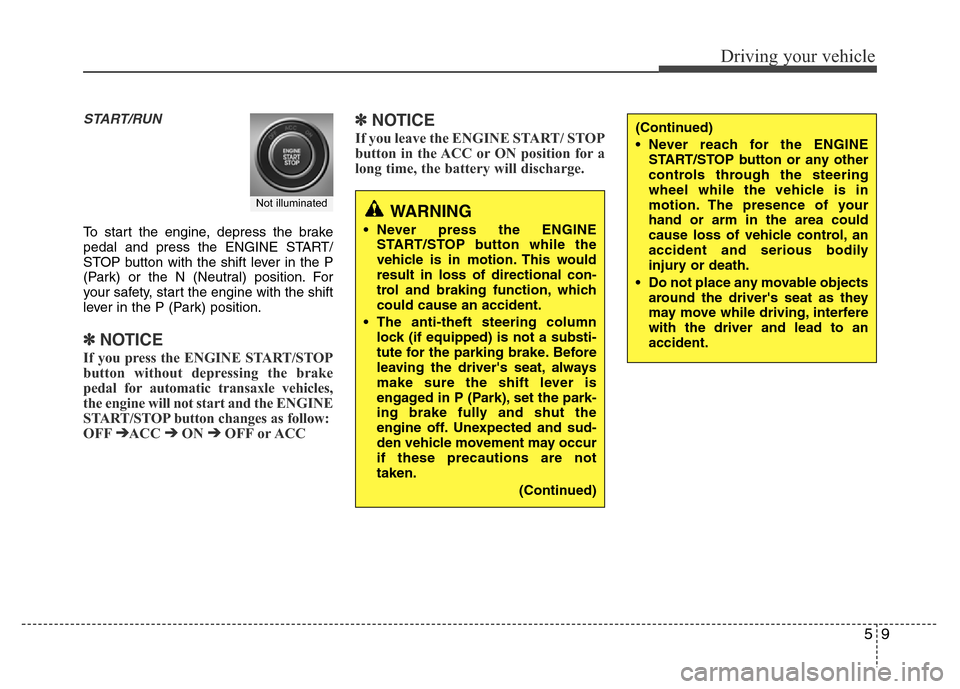
START/RUN
To start the engine, depress the brake
pedal and press the ENGINE START/
STOP button with the shift lever in the P
(Park) or the N (Neutral) position. For
your safety, start the engine with the shift
lever in the P (Park) position.
✽ NOTICE
If you press the ENGINE START/STOP
button without depressing the brake
pedal for automatic transaxle vehicles,
the engine will not start and the ENGINE
START/STOP button changes as follow:
OFF
➔ACC ➔ON ➔OFF or ACC
✽ NOTICE
If you leave the ENGINE START/ STOP
button in the ACC or ON position for a
long time, the battery will discharge.
WARNING
• Never press the ENGINE
START/STOP button while the
vehicle is in motion. This would
result in loss of directional con-
trol and braking function, which
could cause an accident.
• The anti-theft steering column
lock (if equipped) is not a substi-
tute for the parking brake. Before
leaving the driver's seat, always
make sure the shift lever is
engaged in P (Park), set the park-
ing brake fully and shut the
engine off. Unexpected and sud-
den vehicle movement may occur
if these precautions are not
taken.
(Continued)
(Continued)
• Never reach for the ENGINE
START/STOP button or any other
controls through the steering
wheel while the vehicle is in
motion. The presence of your
hand or arm in the area could
cause loss of vehicle control, an
accident and serious bodily
injury or death.
• Do not place any movable objects
around the driver's seat as they
may move while driving, interfere
with the driver and lead to an
accident.
Not illuminated
Page 250 of 403
527
Driving your vehicle
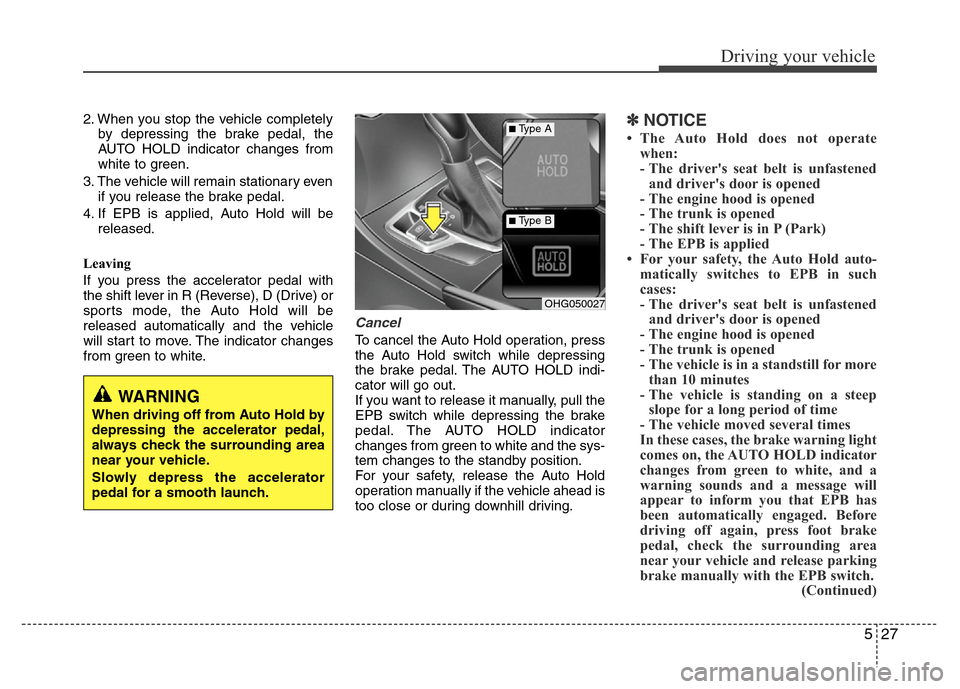
2. When you stop the vehicle completely
by depressing the brake pedal, the
AUTO HOLD indicator changes from
white to green.
3. The vehicle will remain stationary even
if you release the brake pedal.
4. If EPB is applied, Auto Hold will be
released.
Leaving
If you press the accelerator pedal with
the shift lever in R (Reverse), D (Drive) or
sports mode, the Auto Hold will be
released automatically and the vehicle
will start to move. The indicator changes
from green to white.
Cancel
To cancel the Auto Hold operation, press
the Auto Hold switch while depressing
the brake pedal. The AUTO HOLD indi-
cator will go out.
If you want to release it manually, pull the
EPB switch while depressing the brake
pedal. The AUTO HOLD indicator
changes from green to white and the sys-
tem changes to the standby position.
For your safety, release the Auto Hold
operation manually if the vehicle ahead is
too close or during downhill driving.
✽NOTICE
• The Auto Hold does not operate
when:
- The driver's seat belt is unfastened
and driver's door is opened
- The engine hood is opened
- The trunk is opened
- The shift lever is in P (Park)
- The EPB is applied
• For your safety, the Auto Hold auto-
matically switches to EPB in such
cases:
- The driver's seat belt is unfastened
and driver's door is opened
- The engine hood is opened
- The trunk is opened
- The vehicle is in a standstill for more
than 10 minutes
- The vehicle is standing on a steep
slope for a long period of time
- The vehicle moved several times
In these cases, the brake warning light
comes on, the AUTO HOLD indicator
changes from green to white, and a
warning sounds and a message will
appear to inform you that EPB has
been automatically engaged. Before
driving off again, press foot brake
pedal, check the surrounding area
near your vehicle and release parking
brake manually with the EPB switch.
(Continued)
OHG050027
■Type A
■Type B
WARNING
When driving off from Auto Hold by
depressing the accelerator pedal,
always check the surrounding area
near your vehicle.
Slowly depress the accelerator
pedal for a smooth launch.