key Hyundai Azera 2011 Owner's Guide
[x] Cancel search | Manufacturer: HYUNDAI, Model Year: 2011, Model line: Azera, Model: Hyundai Azera 2011Pages: 403, PDF Size: 9.28 MB
Page 95 of 403
419
Features of your vehicle
Shift lever door lock/unlock system
(if equipped)
• All doors will automatically lock when
the shift lever is moved out of P (Park).
• All doors will automatically unlock
when the shift lever is moved into P
(Park).
Driver's door unlock system
(if equipped)
All doors will automatically unlock when
the driver's door is unlocked.
✽NOTICE
You can activate or deactivate the auto
door lock/unlock features in the vehicle.
Refer to "Vehicle Option" in this chap-
ter.
Child-protector rear door lock
The child safety lock is provided to help
prevent children from accidentally open-
ing the rear doors from inside the vehicle.
The rear door safety locks should be
used whenever children are in the vehi-
cle.
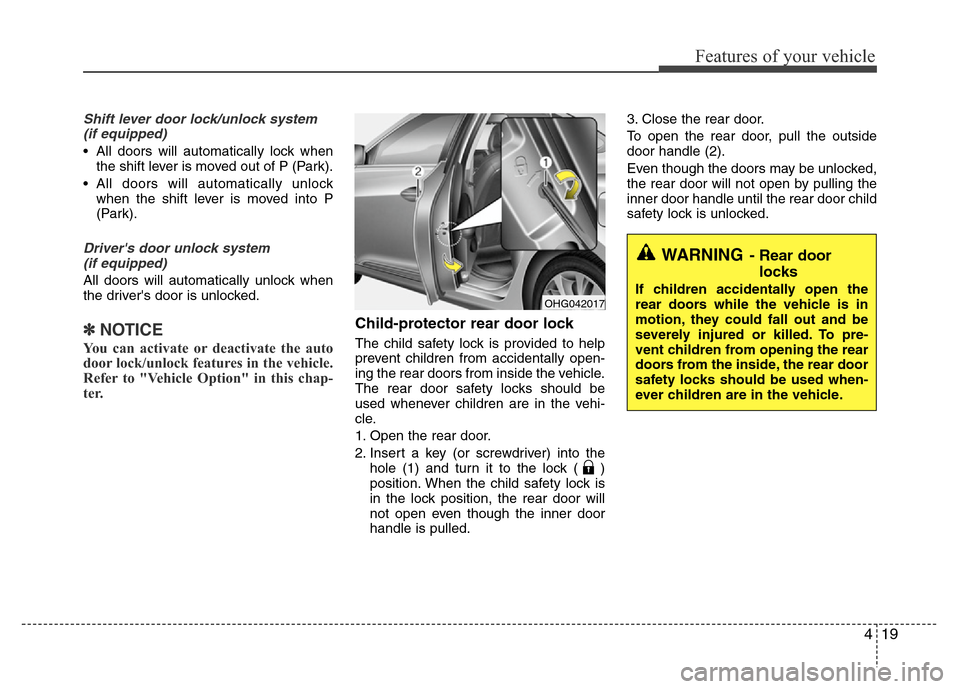
1. Open the rear door.
2. Insert a key (or screwdriver) into the
hole (1) and turn it to the lock ( )
position. When the child safety lock is
in the lock position, the rear door will
not open even though the inner door
handle is pulled.3. Close the rear door.
To open the rear door, pull the outside
door handle (2).
Even though the doors may be unlocked,
the rear door will not open by pulling the
inner door handle until the rear door child
safety lock is unlocked.
WARNING- Rear door
locks
If children accidentally open the
rear doors while the vehicle is in
motion, they could fall out and be
severely injured or killed. To pre-
vent children from opening the rear
doors from the inside, the rear door
safety locks should be used when-
ever children are in the vehicle.OHG042017
Page 96 of 403
Features of your vehicle
20 4
Opening the trunk
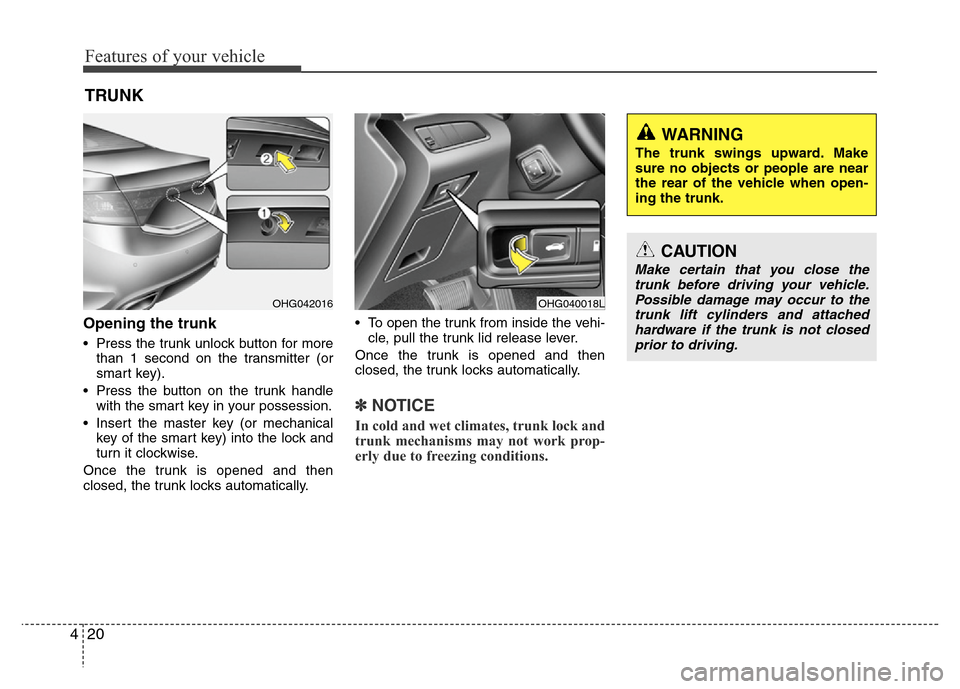
• Press the trunk unlock button for more
than 1 second on the transmitter (or
smart key).
• Press the button on the trunk handle
with the smart key in your possession.
• Insert the master key (or mechanical
key of the smart key) into the lock and
turn it clockwise.
Once the trunk is opened and then
closed, the trunk locks automatically.• To open the trunk from inside the vehi-
cle, pull the trunk lid release lever.
Once the trunk is opened and then
closed, the trunk locks automatically.
✽NOTICE
In cold and wet climates, trunk lock and
trunk mechanisms may not work prop-
erly due to freezing conditions.
TRUNK
OHG040018LOHG042016
CAUTION
Make certain that you close the
trunk before driving your vehicle.
Possible damage may occur to the
trunk lift cylinders and attached
hardware if the trunk is not closed
prior to driving.
WARNING
The trunk swings upward. Make
sure no objects or people are near
the rear of the vehicle when open-
ing the trunk.
Page 97 of 403
421
Features of your vehicle
Closing the trunk
To close, lower the trunk lid, then press
down on it until it locks. To be sure the
trunk lid is securely fastened, always
check by trying to pull it up again.
✽NOTICE
If the trunk is closed with the smart key
in it, the chime will sound for approxi-
mately 3 seconds and the trunk will
reopen.
Emergency trunk safety release
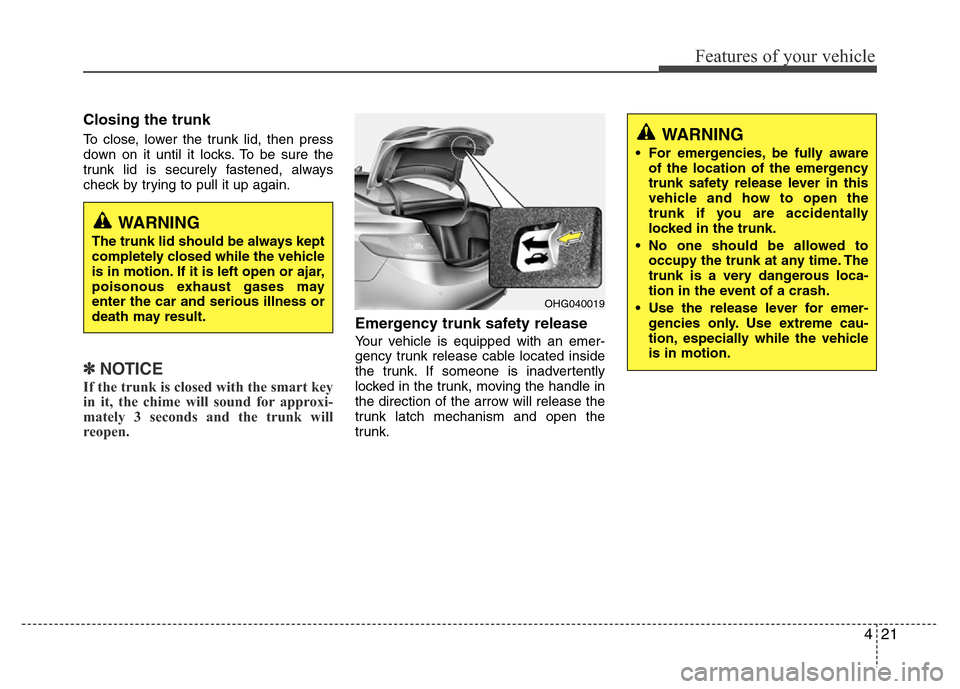
Your vehicle is equipped with an emer-
gency trunk release cable located inside
the trunk. If someone is inadvertently
locked in the trunk, moving the handle in
the direction of the arrow will release the
trunk latch mechanism and open the
trunk.
WARNING
The trunk lid should be always kept
completely closed while the vehicle
is in motion. If it is left open or ajar,
poisonous exhaust gases may
enter the car and serious illness or
death may result.
WARNING
• For emergencies, be fully aware
of the location of the emergency
trunk safety release lever in this
vehicle and how to open the
trunk if you are accidentally
locked in the trunk.
• No one should be allowed to
occupy the trunk at any time. The
trunk is a very dangerous loca-
tion in the event of a crash.
• Use the release lever for emer-
gencies only. Use extreme cau-
tion, especially while the vehicle
is in motion.
OHG040019
Page 99 of 403
423
Features of your vehicle
Power windows
The ignition switch must be in the ON
position for power windows to operate.
Each door has a power window switch
that controls the door's window. The driv-
er has a power window lock switch which
can block the operation of passenger
windows. The power windows can be
operated for approximately 30 seconds
after the ignition key is removed or turned
to the ACC or LOCK position. However, if
the front doors are opened, the power
windows cannot be operated within the
30 second period.
✽NOTICE
While driving with the rear windows
down or with the sunroof (if equipped)
in an open (or partially open position),
your vehicle may demonstrate a wind
buffeting or pulsation noise. This
noise is a normal occurrence and can be
reduced or eliminated by taking the fol-
lowing actions. If the noise occurs with
one or both of the rear windows down,
partially lower both front windows
approximately one inch. If you expe-
rience the noise with the sunroof open,
slightly reduce the size of the sunroof
opening.
Window opening and closing
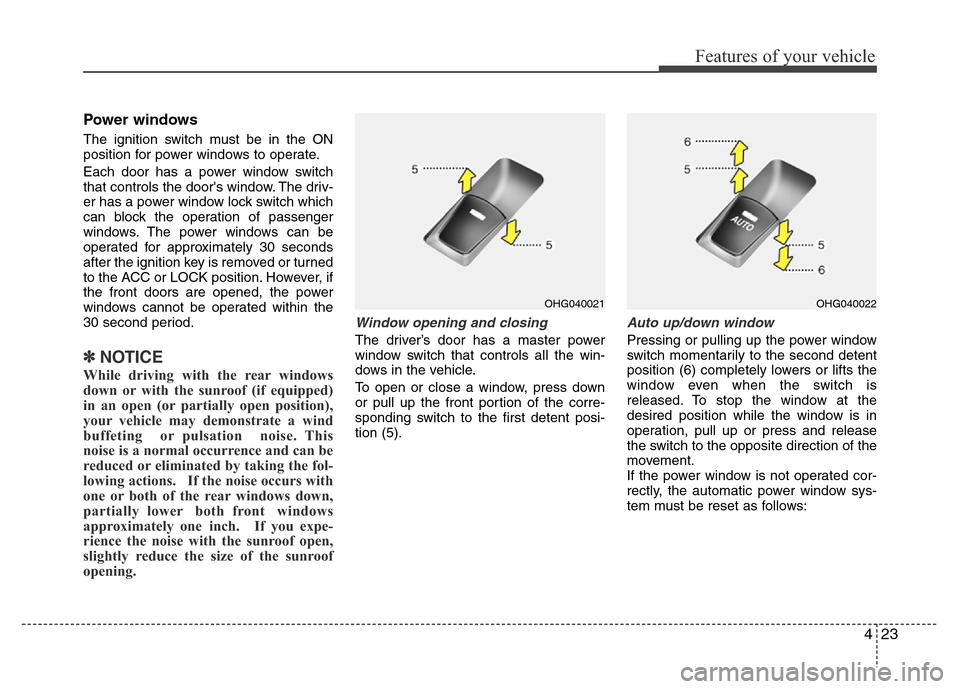
The driver’s door has a master power
window switch that controls all the win-
dows in the vehicle.
To open or close a window, press down
or pull up the front portion of the corre-
sponding switch to the first detent posi-
tion (5).
Auto up/down window
Pressing or pulling up the power window
switch momentarily to the second detent
position (6) completely lowers or lifts the
window even when the switch is
released. To stop the window at the
desired position while the window is in
operation, pull up or press and release
the switch to the opposite direction of the
movement.
If the power window is not operated cor-
rectly, the automatic power window sys-
tem must be reset as follows:
OHG040021OHG040022
Page 101 of 403
425
Features of your vehicle
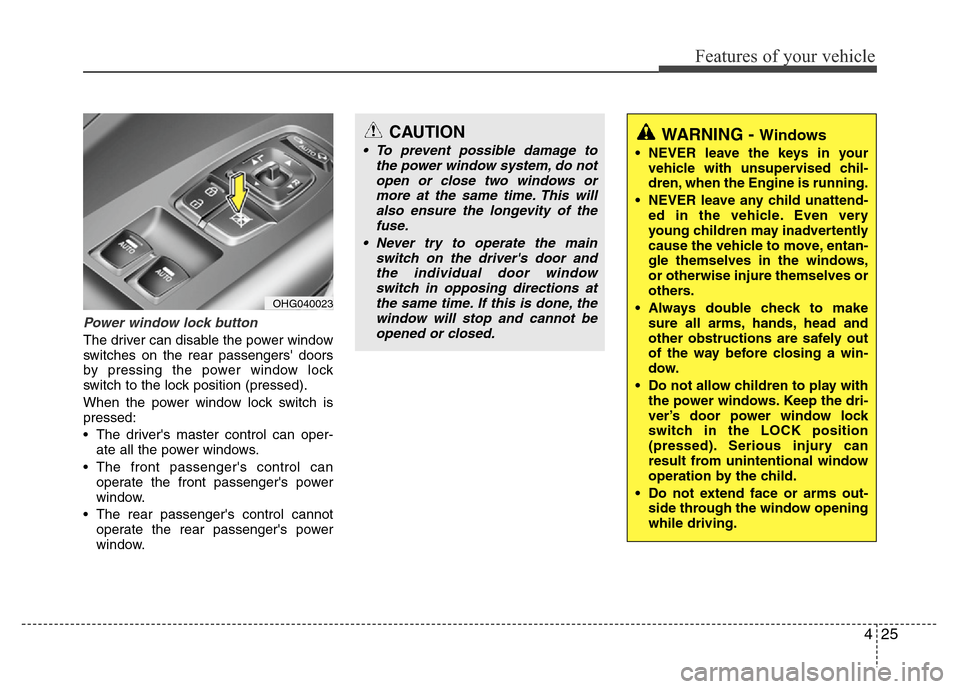
Power window lock button
The driver can disable the power window
switches on the rear passengers' doors
by pressing the power window lock
switch to the lock position (pressed).
When the power window lock switch is
pressed:
• The driver's master control can oper-
ate all the power windows.
• The front passenger's control can
operate the front passenger's power
window.
• The rear passenger's control cannot
operate the rear passenger's power
window.
CAUTION
• To prevent possible damage to
the power window system, do not
open or close two windows or
more at the same time. This will
also ensure the longevity of the
fuse.
• Never try to operate the main
switch on the driver's door and
the individual door window
switch in opposing directions at
the same time. If this is done, the
window will stop and cannot be
opened or closed.WARNING - Windows
• NEVER leave the keys in your
vehicle with unsupervised chil-
dren, when the Engine is running.
• NEVER leave any child unattend-
ed in the vehicle. Even very
young children may inadvertently
cause the vehicle to move, entan-
gle themselves in the windows,
or otherwise injure themselves or
others.
• Always double check to make
sure all arms, hands, head and
other obstructions are safely out
of the way before closing a win-
dow.
• Do not allow children to play with
the power windows. Keep the dri-
ver’s door power window lock
switch in the LOCK position
(pressed). Serious injury can
result from unintentional window
operation by the child.
• Do not extend face or arms out-
side through the window opening
while driving.
OHG040023
Page 112 of 403
Features of your vehicle
36 4
Recalling positions from memory
1. Shift the shift lever into P (Park) while
the ignition switch is ON.
2. To recall the position in memory, press
the desired memory button (1 or 2).
The system will beep once, then the
driver’s seat, outside rearview mirror,
steering wheel and the instrument
panel illumination will automatically
adjust to the stored positions.
3. "Driver 1 (or 2) set is changed" will
appear on the instrument cluster LCD
display.
Adjusting the control switch for the dri-
ver’s seat, outside rearview mirror, steer-
ing wheel and the instrument panel illu-
mination while the system is recalling the
stored position will cause the movement
to stop and move in the direction that the
control switch is moved.
Easy access function
(if equipped)
With the shift lever in the P (Park) posi-
tion, the system will move the driver's
seat and steering wheel automatically so
you can comfortably enter and exit the
vehicle.
• Without smart key system
- The steering wheel will move away
from the driver and the seat will move
rearward, when the ignition key is
removed and the driver’s door is
opened.
- The steering wheel will move toward
the driver and the seat will move for-
ward, when the ignition key is insert-
ed.
• With smart key system
- The steering wheel will move away
from the driver and the seat will move
rearward, when the ENGINE START/
STOP button is in the OFF position
and the driver’s door is opened.
- The steering wheel will move toward
the driver and the seat will move for-
ward, when the ENGINE START/
STOP button is in the ACC position.
You can activate or deactivate this fea-
ture. Refer to “Vehicle Option" in this
chapter.
WARNING
Use caution when recalling adjust-
ment memory while sitting in the
vehicle. Push the seat position con-
trol switch to the desired position
immediately if the seat moves too
far in any direction.
Page 118 of 403
Features of your vehicle
42 4
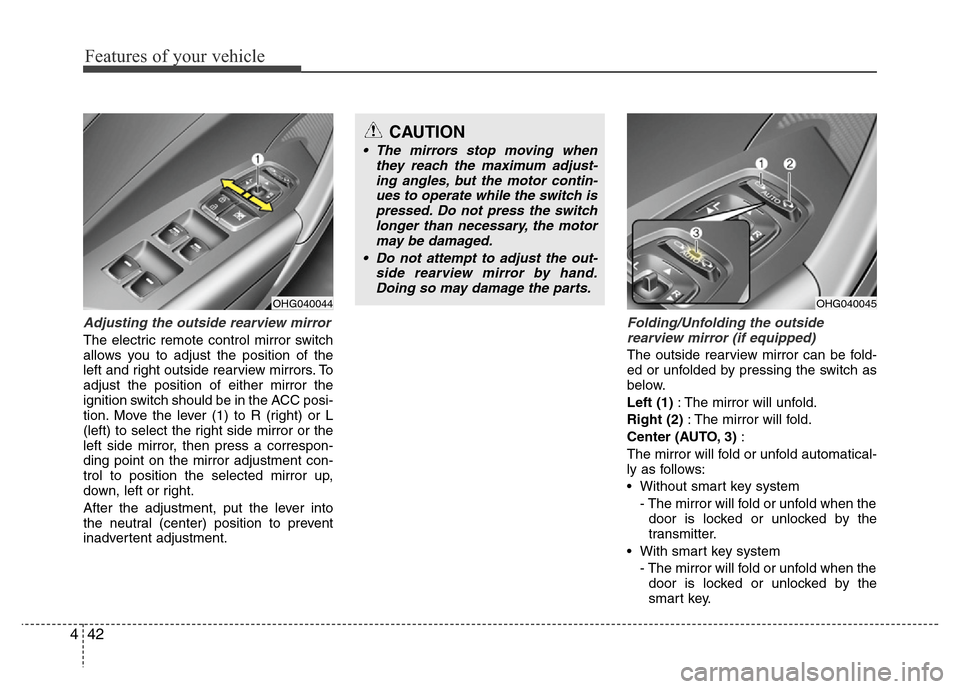
Adjusting the outside rearview mirror
The electric remote control mirror switch
allows you to adjust the position of the
left and right outside rearview mirrors. To
adjust the position of either mirror the
ignition switch should be in the ACC posi-
tion. Move the lever (1) to R (right) or L
(left) to select the right side mirror or the
left side mirror, then press a correspon-
ding point on the mirror adjustment con-
trol to position the selected mirror up,
down, left or right.
After the adjustment, put the lever into
the neutral (center) position to prevent
inadvertent adjustment.
Folding/Unfolding the outside
rearview mirror (if equipped)
The outside rearview mirror can be fold-
ed or unfolded by pressing the switch as
below.
Left (1): The mirror will unfold.
Right (2): The mirror will fold.
Center (AUTO, 3):
The mirror will fold or unfold automatical-
ly as follows:
• Without smart key system
- The mirror will fold or unfold when the
door is locked or unlocked by the
transmitter.
• With smart key system
- The mirror will fold or unfold when the
door is locked or unlocked by the
smart key.
OHG040044
CAUTION
• The mirrors stop moving when
they reach the maximum adjust-
ing angles, but the motor contin-
ues to operate while the switch is
pressed. Do not press the switch
longer than necessary, the motor
may be damaged.
• Do not attempt to adjust the out-
side rearview mirror by hand.
Doing so may damage the parts.
OHG040045
Page 119 of 403
443
Features of your vehicle
- The mirror will fold or unfold when the
door is locked or unlocked by the but-
ton on the outside door handle.
- The mirror will unfold when you
approach the vehicle (all doors
closed and locked) with a smart key
in possession. (if equipped)
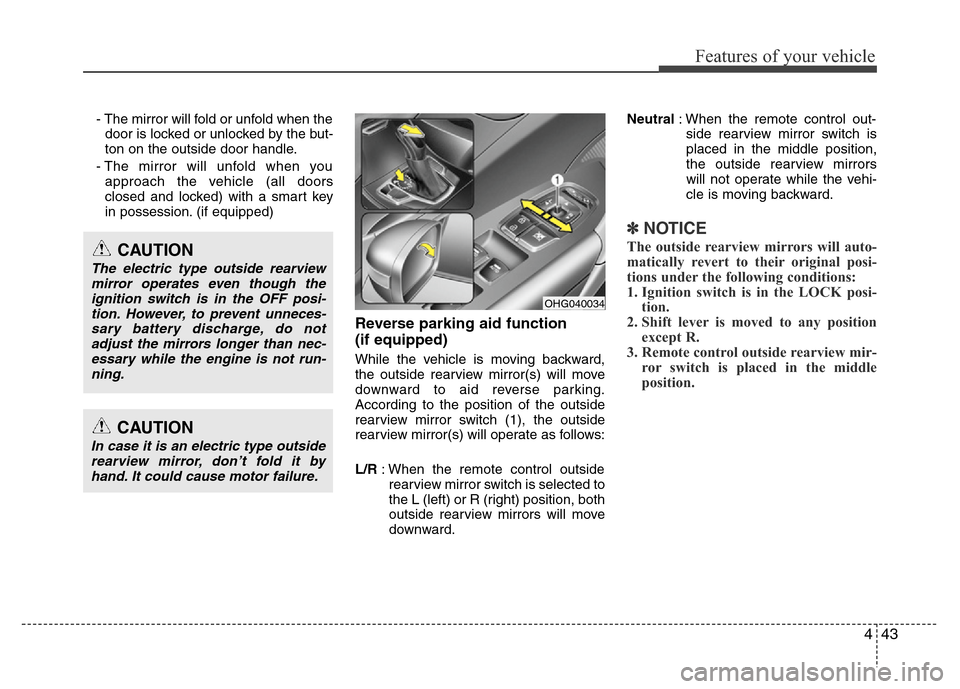
Reverse parking aid function
(if equipped)
While the vehicle is moving backward,
the outside rearview mirror(s) will move
downward to aid reverse parking.
According to the position of the outside
rearview mirror switch (1), the outside
rearview mirror(s) will operate as follows:
L/R: When the remote control outside
rearview mirror switch is selected to
the L (left) or R (right) position, both
outside rearview mirrors will move
downward.Neutral: When the remote control out-
side rearview mirror switch is
placed in the middle position,
the outside rearview mirrors
will not operate while the vehi-
cle is moving backward.
✽NOTICE
The outside rearview mirrors will auto-
matically revert to their original posi-
tions under the following conditions:
1. Ignition switch is in the LOCK posi-
tion.
2. Shift lever is moved to any position
except R.
3. Remote control outside rearview mir-
ror switch is placed in the middle
position.
CAUTION
In case it is an electric type outside
rearview mirror, don’t fold it by
hand. It could cause motor failure.
CAUTION
The electric type outside rearview
mirror operates even though the
ignition switch is in the OFF posi-
tion. However, to prevent unneces-
sary battery discharge, do not
adjust the mirrors longer than nec-
essary while the engine is not run-
ning.
OHG040034
Page 127 of 403

451
Features of your vehicle
Vehicle option
1. When the vehicle is at a standstill,
pressing the DISP button for more
than 2 seconds with the ignition switch
in the ON position or engine running,
the LCD display on the cluster will
change to the “Vehicle Option” group.
2. You can change the item by pressing
the or button and choose an
item by pressing the DISP button.
Auto door lock
Off - The auto door lock operation will be
canceled.
Speed - All doors will be automatically
locked when the vehicle speed
exceeds 15 km/h (9.3 mph).
Shift Lever - All doors will be automati-
cally locked if the shift lever
is shifted from the P (Park)
position to the R (Reverse),
N (Neutral) or D (Drive)
position.
Auto door unlock
Off - The auto door unlock operation will
be canceled.
Key Out - All doors will be automatically
unlocked when the ignition key
is removed from ignition switch
(or smart key is in the OFF
position).
Shift Lever - All doors will be automati-
cally unlocked if the shift
lever is shifted to the
P(Park) position.
Door - All doors will be automatically
unlocked if the driver's door is
unlocked.
Seat Easy Access (only for Driver
Position Memory System equipped
vehicle)
On - The driver's seat will automatically
move forward or rearward for the
driver to enter or exit the vehicle
comfortably.
Off - The Seat Easy Access function will
be inactivated.
Steering Easy Access (only for Driver
Position Memory System equipped
vehicle)
On - The steering wheel will automatical-
ly move away or toward the driver
for the driver to enter or exit the
vehicle comfortably.
Off - The Steering Easy Access function
will be inactivated.
OHG040064L
■Type A■Type B
Page 128 of 403
Features of your vehicle
52 4
Headlamp Escort
On - The Headlamp Escort and
Headlamp Welcome function will be
activated.
Off - The Headlamp Escort and
Headlamp Welcome function will be
inactivated.
Welcome Light (if equipped)
On - When all the doors(and trunk) are
locked and closed, if you approach
the vehicle with a smart key in pos-
session the puddle lamp and door
handle lamp will come on for about
15 seconds.
Off - The Welcome Light function will be
inactivated.
Welcome Sound
On - The Welcome Sound function will
be activated.
Off - The Welcome Sound function will
be inactivated.
Auto Triple Turn (One-touch triple
turn signal)
On - The lane change signals will blink 3
times when the turn signal lever is
moved slightly.
Off - The Auto Triple Turn function will be
inactivated.
AVG fuel economy
Auto Reset - The average fuel economy
will reset automatically
when you drive after refuel-
ing.
Manual Reset - The average fuel econo-
my will not reset auto-
matically when you drive
after refueling.
Ambient lighting
The brightness of the ambient light may
be adjusted.
• 5 stage : Off / Level 1 / Level 2 / Level 3 /
Level 4