Memory 1 Hyundai Azera 2011 Owner's Manual
[x] Cancel search | Manufacturer: HYUNDAI, Model Year: 2011, Model line: Azera, Model: Hyundai Azera 2011Pages: 403, PDF Size: 9.28 MB
Page 13 of 403
Your vehicle at a glance
2 2
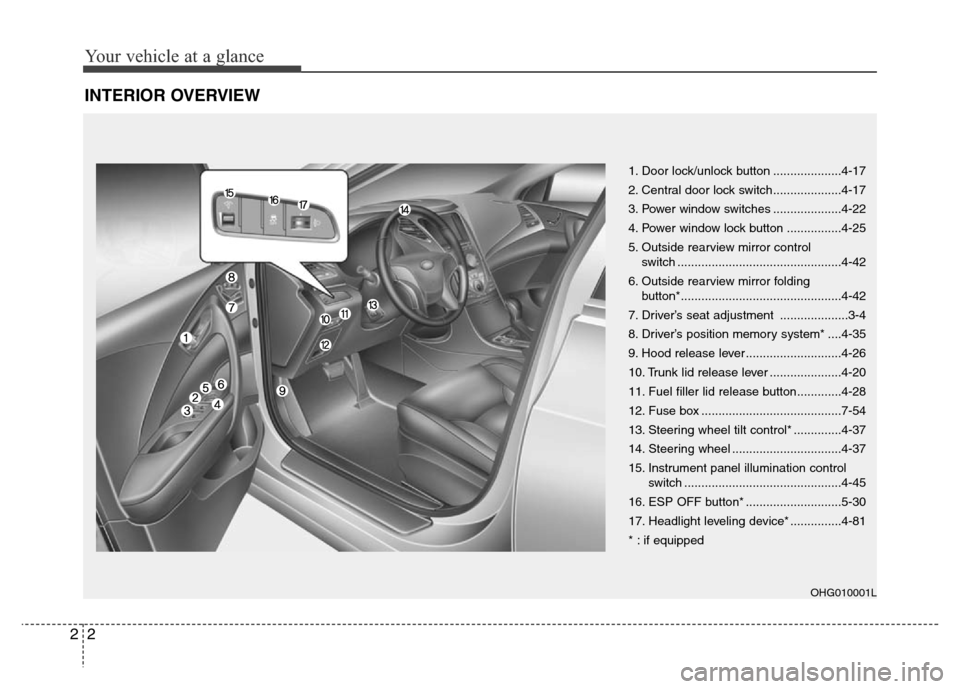
INTERIOR OVERVIEW
1. Door lock/unlock button ....................4-17
2. Central door lock switch....................4-17
3. Power window switches ....................4-22
4. Power window lock button ................4-25
5. Outside rearview mirror control
switch ................................................4-42
6. Outside rearview mirror folding
button*...............................................4-42
7. Driver’s seat adjustment ....................3-4
8. Driver’s position memory system* ....4-35
9. Hood release lever ............................4-26
10. Trunk lid release lever .....................4-20
11. Fuel filler lid release button.............4-28
12. Fuse box .........................................7-54
13. Steering wheel tilt control* ..............4-37
14. Steering wheel ................................4-37
15. Instrument panel illumination control
switch ..............................................4-45
16. ESP OFF button* ............................5-30
17. Headlight leveling device* ...............4-81
* : if equipped
OHG010001L
Page 17 of 403
Safety features of your vehicle
2 3
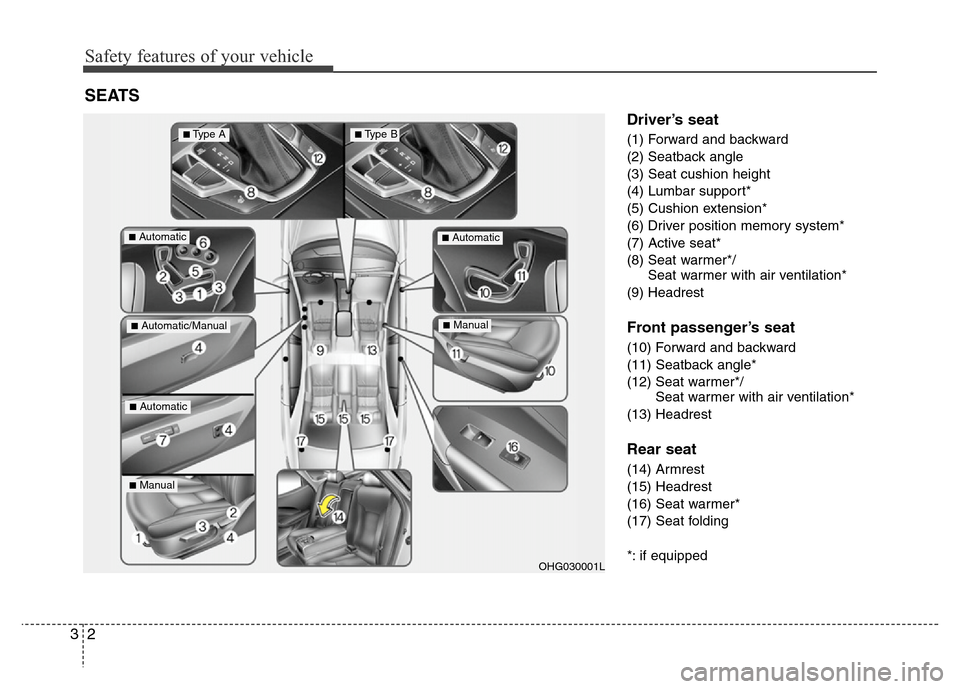
Driver’s seat
(1) Forward and backward
(2) Seatback angle
(3) Seat cushion height
(4) Lumbar support*
(5) Cushion extension*
(6) Driver position memory system*
(7) Active seat*
(8) Seat warmer*/
Seat warmer with air ventilation*
(9) Headrest
Front passenger’s seat
(10) Forward and backward
(11) Seatback angle*
(12) Seat warmer*/
Seat warmer with air ventilation*
(13) Headrest
Rear seat
(14) Armrest
(15) Headrest
(16) Seat warmer*
(17) Seat folding
*: if equipped
SEATS
OHG030001L
■Automatic■Automatic
■Automatic/Manual
■Automatic
■Manual
■Manual
■Type A■Type B
Page 77 of 403
4
Keys / 4-3
Smart key / 4-7
Remote keyless entry / 4-10
Theft-alarm system / 4-13
Door locks / 4-16
Trunk / 4-20
Windows / 4-22
Hood / 4-26
Fuel filler lid / 4-28
Panorama sunroof / 4-31
Driver position memory system / 4-35
Steering wheel / 4-37
Mirrors / 4-40
Instrument cluster / 4-44
Rear parking assist system / 4-68
Parking assist system / 4-72
Rearview camera / 4-76
Hazard warning flasher / 4-76
Lighting / 4-77
Wipers and washers / 4-83
Interior light / 4-86
Welcome system / 4-89
Defroster / 4-90
Features of your vehicle
Page 111 of 403
435
Features of your vehicle
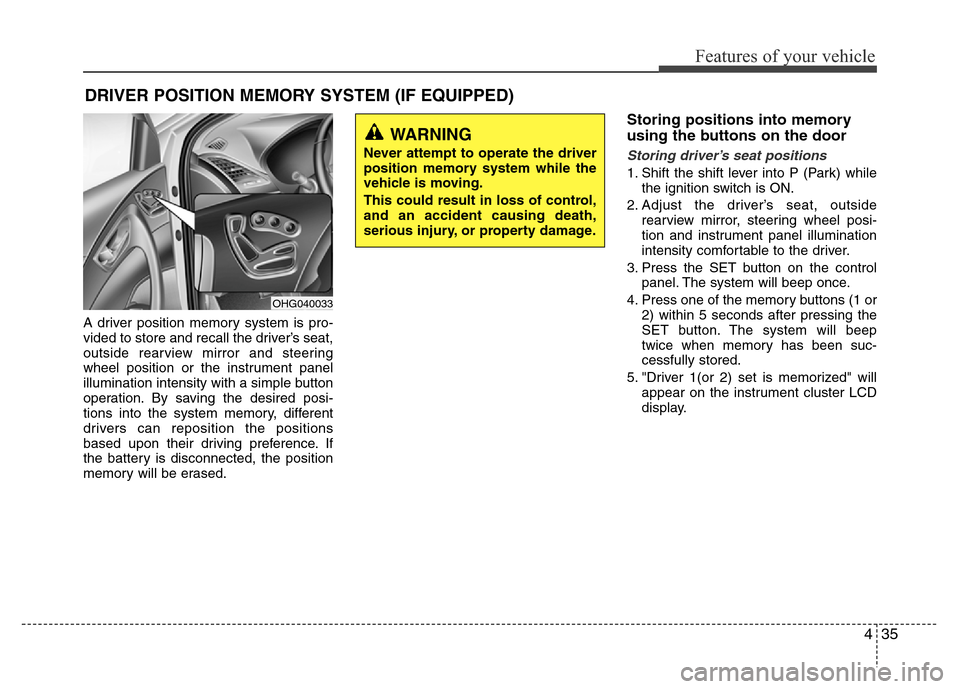
A driver position memory system is pro-
vided to store and recall the driver’s seat,
outside rearview mirror and steering
wheel position or the instrument panel
illumination intensity with a simple button
operation. By saving the desired posi-
tions into the system memory, different
drivers can reposition the positions
based upon their driving preference. If
the battery is disconnected, the position
memory will be erased.
Storing positions into memory
using the buttons on the door
Storing driver’s seat positions
1. Shift the shift lever into P (Park) while
the ignition switch is ON.
2. Adjust the driver’s seat, outside
rearview mirror, steering wheel posi-
tion and instrument panel illumination
intensity comfortable to the driver.
3. Press the SET button on the control
panel. The system will beep once.
4. Press one of the memory buttons (1 or
2) within 5 seconds after pressing the
SET button. The system will beep
twice when memory has been suc-
cessfully stored.
5. "Driver 1(or 2) set is memorized" will
appear on the instrument cluster LCD
display.
DRIVER POSITION MEMORY SYSTEM (IF EQUIPPED)
WARNING
Never attempt to operate the driver
position memory system while the
vehicle is moving.
This could result in loss of control,
and an accident causing death,
serious injury, or property damage.
OHG040033
Page 112 of 403
Features of your vehicle
36 4
Recalling positions from memory
1. Shift the shift lever into P (Park) while
the ignition switch is ON.
2. To recall the position in memory, press
the desired memory button (1 or 2).
The system will beep once, then the
driver’s seat, outside rearview mirror,
steering wheel and the instrument
panel illumination will automatically
adjust to the stored positions.
3. "Driver 1 (or 2) set is changed" will
appear on the instrument cluster LCD
display.
Adjusting the control switch for the dri-
ver’s seat, outside rearview mirror, steer-
ing wheel and the instrument panel illu-
mination while the system is recalling the
stored position will cause the movement
to stop and move in the direction that the
control switch is moved.
Easy access function
(if equipped)
With the shift lever in the P (Park) posi-
tion, the system will move the driver's
seat and steering wheel automatically so
you can comfortably enter and exit the
vehicle.
• Without smart key system
- The steering wheel will move away
from the driver and the seat will move
rearward, when the ignition key is
removed and the driver’s door is
opened.
- The steering wheel will move toward
the driver and the seat will move for-
ward, when the ignition key is insert-
ed.
• With smart key system
- The steering wheel will move away
from the driver and the seat will move
rearward, when the ENGINE START/
STOP button is in the OFF position
and the driver’s door is opened.
- The steering wheel will move toward
the driver and the seat will move for-
ward, when the ENGINE START/
STOP button is in the ACC position.
You can activate or deactivate this fea-
ture. Refer to “Vehicle Option" in this
chapter.
WARNING
Use caution when recalling adjust-
ment memory while sitting in the
vehicle. Push the seat position con-
trol switch to the desired position
immediately if the seat moves too
far in any direction.
Page 127 of 403

451
Features of your vehicle
Vehicle option
1. When the vehicle is at a standstill,
pressing the DISP button for more
than 2 seconds with the ignition switch
in the ON position or engine running,
the LCD display on the cluster will
change to the “Vehicle Option” group.
2. You can change the item by pressing
the or button and choose an
item by pressing the DISP button.
Auto door lock
Off - The auto door lock operation will be
canceled.
Speed - All doors will be automatically
locked when the vehicle speed
exceeds 15 km/h (9.3 mph).
Shift Lever - All doors will be automati-
cally locked if the shift lever
is shifted from the P (Park)
position to the R (Reverse),
N (Neutral) or D (Drive)
position.
Auto door unlock
Off - The auto door unlock operation will
be canceled.
Key Out - All doors will be automatically
unlocked when the ignition key
is removed from ignition switch
(or smart key is in the OFF
position).
Shift Lever - All doors will be automati-
cally unlocked if the shift
lever is shifted to the
P(Park) position.
Door - All doors will be automatically
unlocked if the driver's door is
unlocked.
Seat Easy Access (only for Driver
Position Memory System equipped
vehicle)
On - The driver's seat will automatically
move forward or rearward for the
driver to enter or exit the vehicle
comfortably.
Off - The Seat Easy Access function will
be inactivated.
Steering Easy Access (only for Driver
Position Memory System equipped
vehicle)
On - The steering wheel will automatical-
ly move away or toward the driver
for the driver to enter or exit the
vehicle comfortably.
Off - The Steering Easy Access function
will be inactivated.
OHG040064L
■Type A■Type B
Page 213 of 403
4137
Features of your vehicle
Using USB device
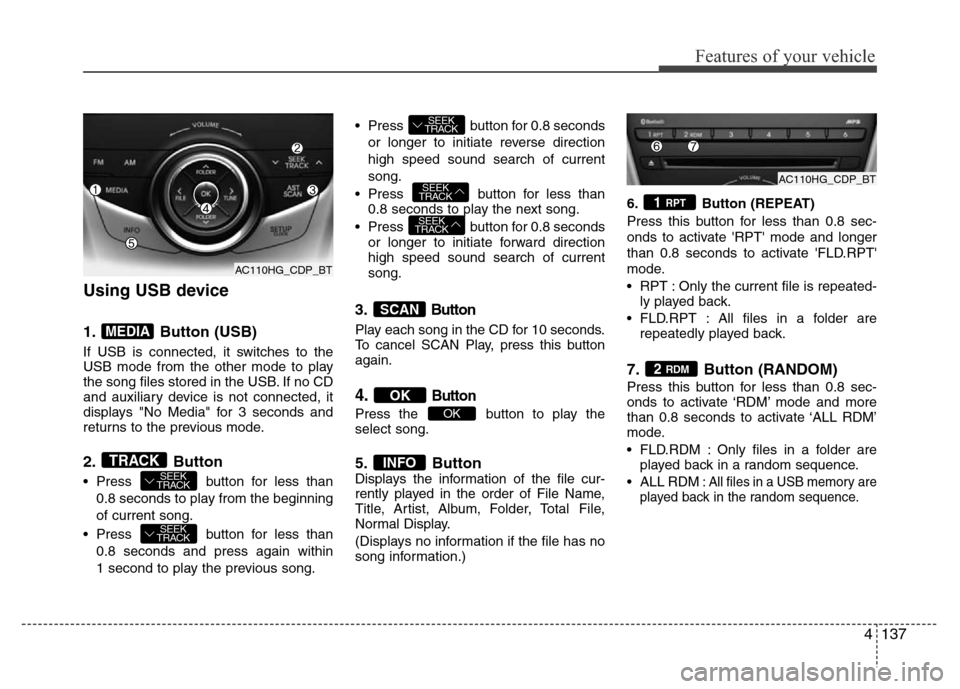
1. Button (USB)
If USB is connected, it switches to the
USB mode from the other mode to play
the song files stored in the USB. If no CD
and auxiliary device is not connected, it
displays "No Media" for 3 seconds and
returns to the previous mode.
2. Button
• Press button for less than
0.8 seconds to play from the beginning
of current song.
• Press button for less than
0.8 seconds and press again within
1 second to play the previous song.• Press button for 0.8 seconds
or longer to initiate reverse direction
high speed sound search of current
song.
• Press button for less than
0.8 seconds to play the next song.
• Press button for 0.8 seconds
or longer to initiate forward direction
high speed sound search of current
song.
3.Button
Play each song in the CD for 10 seconds.
To cancel SCAN Play, press this button
again.
4.Button
Press the button to play the
select song.
5. ButtonDisplays the information of the file cur-
rently played in the order of File Name,
Title, Artist, Album, Folder, Total File,
Normal Display.
(Displays no information if the file has no
song information.)6. Button (REPEAT)
Press this button for less than 0.8 sec-
onds to activate 'RPT' mode and longer
than 0.8 seconds to activate 'FLD.RPT'
mode.
• RPT : Only the current file is repeated-
ly played back.
• FLD.RPT : All files in a folder are
repeatedly played back.
7. Button (RANDOM)
Press this button for less than 0.8 sec-
onds to activate ‘RDM’ mode and more
than 0.8 seconds to activate ‘ALL RDM’
mode.
• FLD.RDM : Only files in a folder are
played back in a random sequence.
•ALL RDM: All files in a USB memory are
played back in the random sequence.
2 RDM
1 RPT
INFO
OK
OK
SCAN
SEEK
TRACK
SEEK
TRACK
SEEK
TRACK
SEEK
TRACK
SEEK
TRACKTRACK
MEDIA
AC110HG_CDP_BT
AC110HG_CDP_BTAC110HG_CDP_BT
Page 216 of 403
Features of your vehicle
140 4
(Continued)
• If the USB device is divided by
logical drives, only the music files
on the highest-priority drive are
recognized by car audio.
• Devices such as MP3 Player/
Cellular phone/Digital camera can
be unrecognizable by standard
USB I/F can be unrecognizable.
• Charging through the USB may
not be supported in some mobile
devices.
❋ A car exclusive cable (sold sep-
arately) is required to use the
iPod
®.
• Some non-standard USB devices
(METAL COVER TYPE USB) can
be unrecognizable.
• Some USB flash memory readers
(such as CF, SD, microSD, etc.) or
external-HDD type devices can be
unrecognizable.
• Music files protected by DRM
(DIGITAL RIGHTS MANAGEMENT)
are not recognizable.
• The data in the USB memory may
be lost while using this audio.
Always back up important data on
a personal storage device.
(Continued)
(Continued)
• A SD-to-USB adapter may not
work with the car audio system.
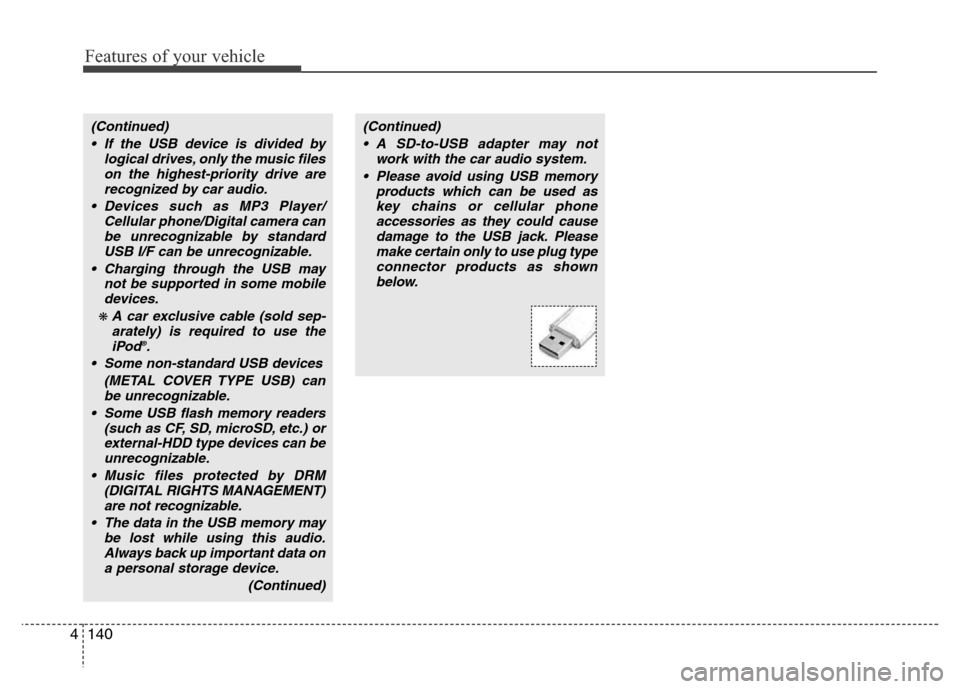
• Please avoid using USB memory
products which can be used as
key chains or cellular phone
accessories as they could cause
damage to the USB jack. Please
make certain only to use plug type
connector products as shown
below.
Page 261 of 403
Driving your vehicle
38 5
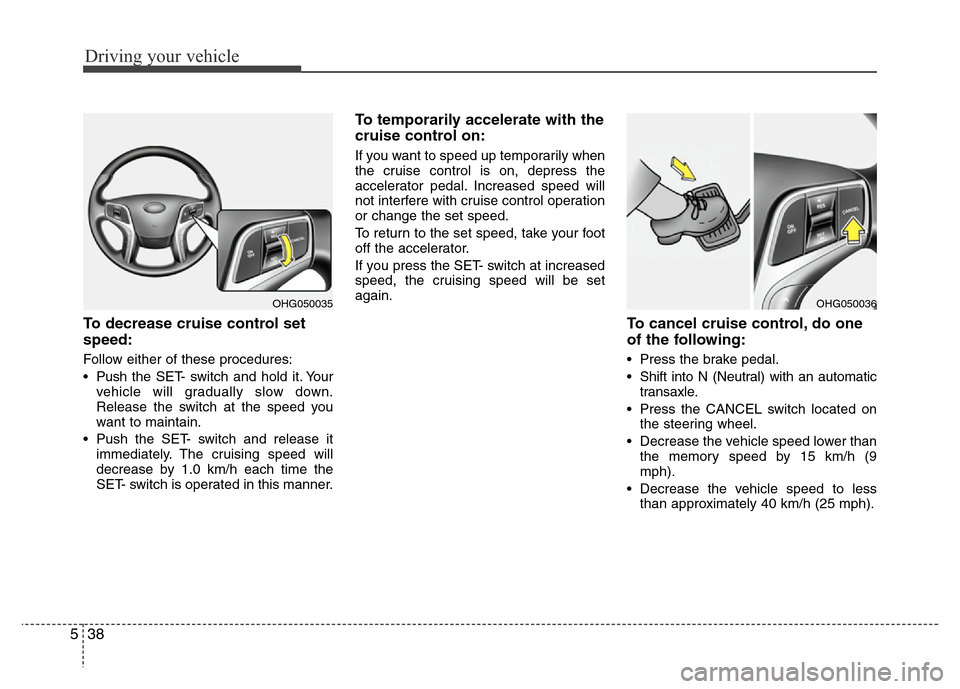
To decrease cruise control set
speed:
Follow either of these procedures:
• Pushthe SET- switch and hold it. Your
vehicle will gradually slow down.
Release the switch at the speed you
want to maintain.
• Push the SET- switch and release it
immediately. The cruising speed will
decrease by 1.0 km/h each time the
SET- switch is operated in this manner.
To temporarily accelerate with the
cruise control on:
If you want to speed up temporarily when
the cruise control is on, depress the
accelerator pedal. Increased speed will
not interfere with cruise control operation
or change the set speed.
To return to the set speed, take your foot
off the accelerator.
If you press the SET- switch at increased
speed, the cruising speed will be set
again.
To cancel cruise control, do one
of the following:
• Press the brake pedal.
• Shift into N (Neutral) with an automatic
transaxle.
• Press the CANCEL switch located on
the steering wheel.
• Decrease the vehicle speed lower than
the memory speed by 15 km/h (9
mph).
• Decrease the vehicle speed to less
than approximately 40 km/h (25 mph).
OHG050036OHG050035
Page 354 of 403
Maintenance
42 7
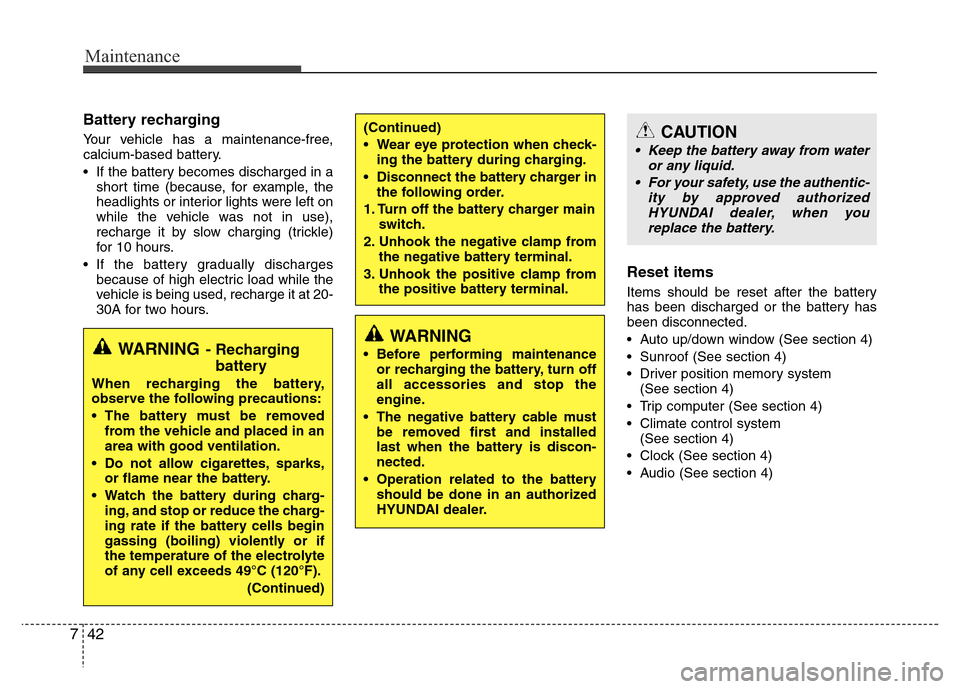
Battery recharging
Your vehicle has a maintenance-free,
calcium-based battery.
• If the battery becomes discharged in a
short time (because, for example, the
headlights or interior lights were left on
while the vehicle was not in use),
recharge it by slow charging (trickle)
for 10 hours.
• If the battery gradually discharges
because of high electric load while the
vehicle is being used, recharge it at 20-
30A for two hours.
Reset items
Items should be reset after the battery
has been discharged or the battery has
been disconnected.
• Auto up/down window (See section 4)
• Sunroof (See section 4)
• Driver position memory system
(See section 4)
• Trip computer (See section 4)
• Climate control system
(See section 4)
• Clock (See section 4)
• Audio (See section 4)
WARNING
• Before performing maintenance
or recharging the battery, turn off
all accessories and stop the
engine.
• The negative battery cable must
be removed first and installed
last when the battery is discon-
nected.
• Operation related to the battery
should be done in an authorized
HYUNDAI dealer.
CAUTION
• Keep the battery away from water
or any liquid.
• For your safety, use the authentic-
ity by approved authorized
HYUNDAI dealer, when you
replace the battery.
WARNING- Recharging
battery
When recharging the battery,
observe the following precautions:
• The battery must be removed
from the vehicle and placed in an
area with good ventilation.
• Do not allow cigarettes, sparks,
or flame near the battery.
• Watch the battery during charg-
ing, and stop or reduce the charg-
ing rate if the battery cells begin
gassing (boiling) violently or if
the temperature of the electrolyte
of any cell exceeds 49°C (120°F).
(Continued)
(Continued)
• Wear eye protection when check-
ing the battery during charging.
• Disconnect the battery charger in
the following order.
1. Turn off the battery charger main
switch.
2. Unhook the negative clamp from
the negative battery terminal.
3. Unhook the positive clamp from
the positive battery terminal.