display Hyundai Azera 2012 Owner's Guide
[x] Cancel search | Manufacturer: HYUNDAI, Model Year: 2012, Model line: Azera, Model: Hyundai Azera 2012Pages: 403, PDF Size: 9.28 MB
Page 208 of 403
Features of your vehicle
132 4
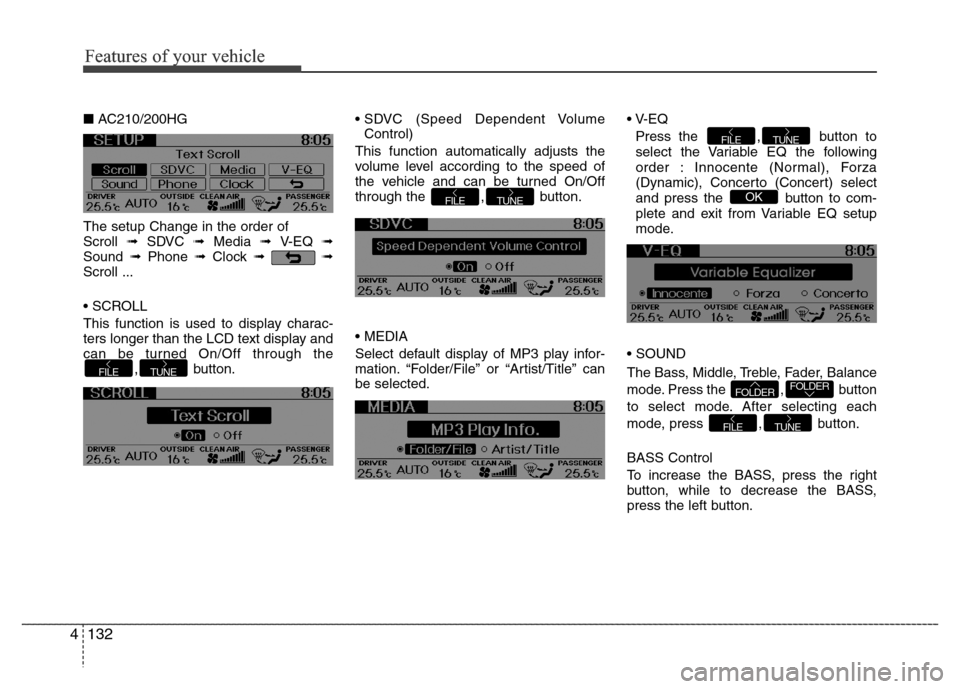
■AC210/200HG
The setup Change in the order of
Scroll ➟ SDVC ➟ Media ➟ V-EQ ➟
Sound ➟Phone ➟Clock ➟➟
Scroll ...
• SCROLL
This function is used to display charac-
ters longer than the LCD text display and
can be turned On/Off through the
, button.• SDVC (Speed Dependent Volume
Control)
This function automatically adjusts the
volume level according to the speed of
the vehicle and can be turned On/Off
through the , button.
• MEDIA
Select default display of MP3 play infor-
mation. “Folder/File” or “Artist/Title” can
be selected.• V-EQ
Press the , button to
select the Variable EQ the following
order : Innocente (Normal), Forza
(Dynamic), Concerto (Concert) select
and press the button to com-
plete and exit from Variable EQ setup
mode.
• SOUND
The Bass, Middle, Treble, Fader, Balance
mode. Press the , button
to select mode. After selecting each
mode, press , button.
BASS Control
To increase the BASS, press the right
button, while to decrease the BASS,
press the left button.
TUNEFILE
FOLDERFOLDER
OK
TUNEFILE
TUNEFILE
TUNEFILE
Features of your vehicle
Page 209 of 403
4133
Features of your vehicle
MIDDLE Control
To increase the MIDDLE, press the right
button, while to decrease the MIDDLE,
press the left button.
TREBLE Control
To increase the TREBLE, press the right
button, while to decrease the TREBLE,
press the left button.
FADER Control
Press the right button to emphasize rear
speaker sound(front speaker sound will
be attenuated). When the left button is
pressed, front speaker sound will be
emphasized(rear speaker sound will be
attenuated).BALANCE Control
Press the right button to emphasize right
speaker sound(left speaker sound will be
attenuated). When the left button is
pressed, left speaker sound will be
emphasized(right speaker sound will be
attenuated).
• PHONE
(if equipped)
Select this item to enter PHONE setup
mode. Refer to “BLUETOOTH PHONE
OPERATION” section for detailed infor-
mation.
❈“PHONE” menu is not available if the
audio does not support
Bluetooth®
Wireless Technology features.• CLOCK
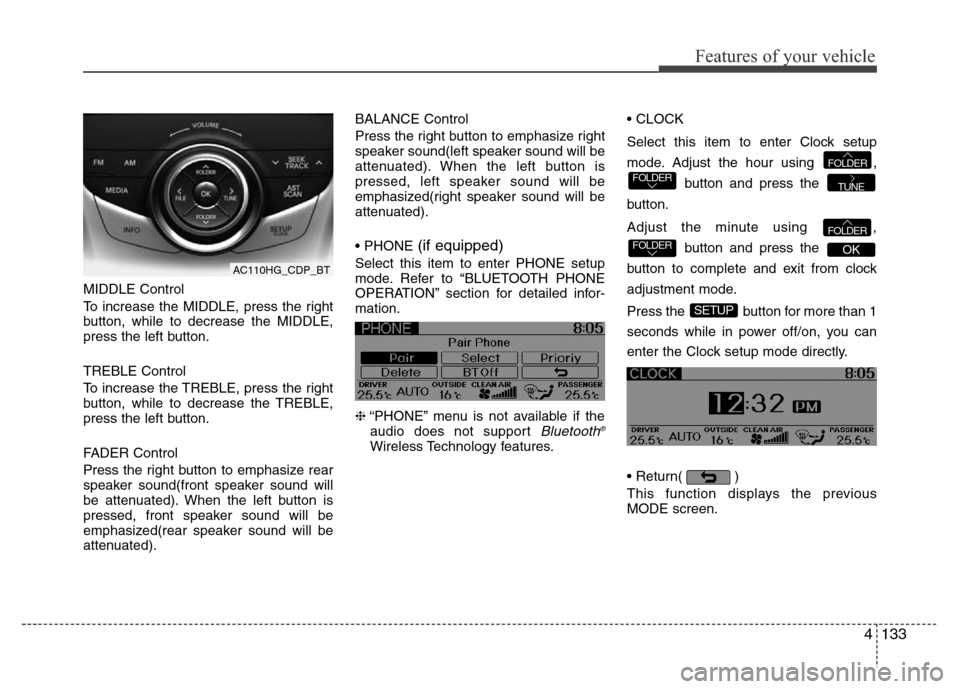
Select this item to enter Clock setup
mode. Adjust the hour using ,
button and press the
button.
Adjust the minute using ,
button and press the
button to complete and exit from clock
adjustment mode.
Press the button for more than 1
seconds while in power off/on, you can
enter the Clock setup mode directly.
• Return( )
This function displays the previous
MODE screen.
SETUP
OKFOLDERFOLDER
TUNEFOLDERFOLDER
AC110HG_CDP_BT
Page 210 of 403
Features of your vehicle
134 4
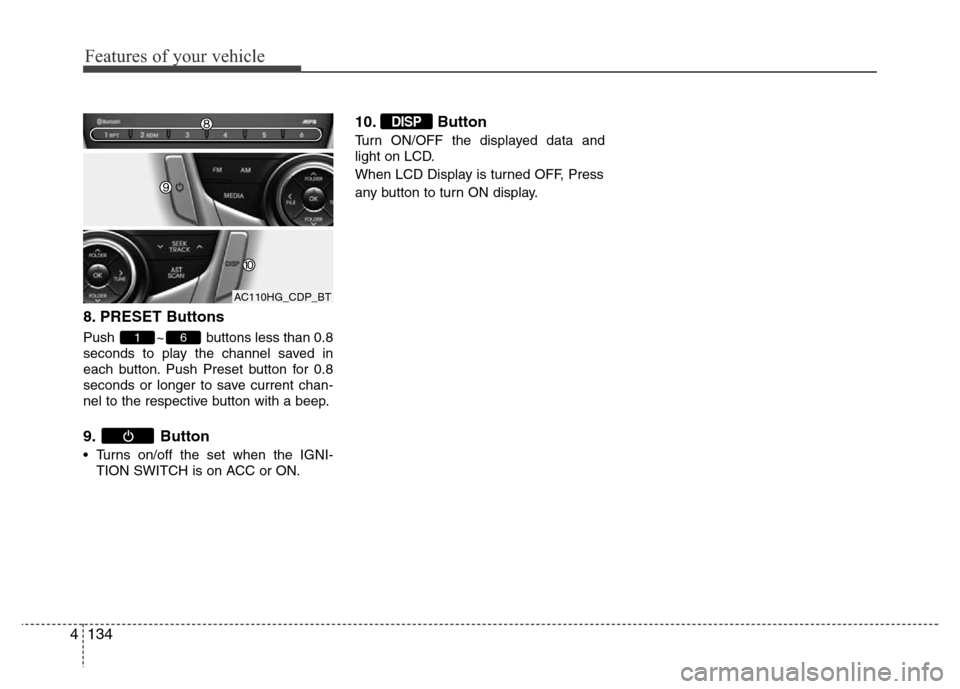
8. PRESET Buttons
Push ~ buttons less than 0.8
seconds to play the channel saved in
each button. Push Preset button for 0.8
seconds or longer to save current chan-
nel to the respective button with a beep.
9. Button
• Turns on/off the set when the IGNI-
TION SWITCH is on ACC or ON.
10. Button
Turn ON/OFF the displayed data and
light on LCD.
When LCD Display is turned OFF, Press
any button to turn ON display.
DISP
61
AC110HG_CDP_BT
Page 211 of 403
4135
Features of your vehicle
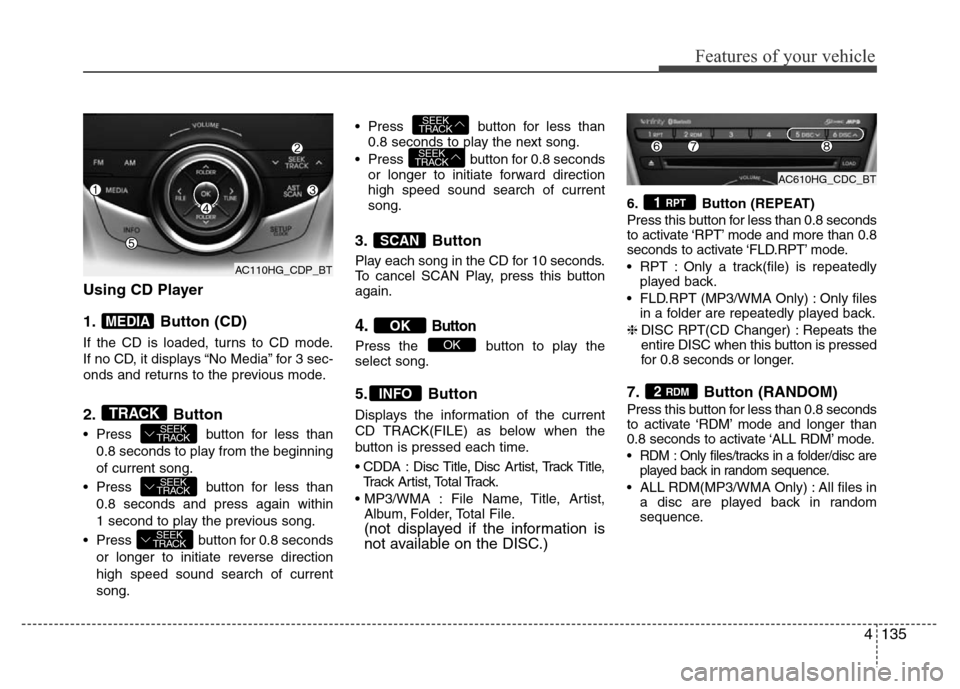
Using CD Player
1. Button (CD)
If the CD is loaded, turns to CD mode.
If no CD, it displays “No Media” for 3 sec-
onds and returns to the previous mode.
2. Button
• Press button for less than
0.8 seconds to play from the beginning
of current song.
• Press button for less than
0.8 seconds and press again within
1 second to play the previous song.
• Press button for 0.8 seconds
or longer to initiate reverse direction
high speed sound search of current
song.• Press button for less than
0.8 seconds to play the next song.
• Press button for 0.8 seconds
or longer to initiate forward direction
high speed sound search of current
song.
3. Button
Play each song in the CD for 10 seconds.
To cancel SCAN Play, press this button
again.
4.Button
Press the button to play the
select song.
5. Button
Displays the information of the current
CD TRACK(FILE) as below when the
button is pressed each time.
• CDDA : Disc Title, Disc Artist, Track Title,
Track Artist, Total Track.
• MP3/WMA : File Name, Title, Artist,
Album, Folder, Total File.
(not displayed if the information is
not available on the DISC.)
6. Button (REPEAT)
Press this button for less than 0.8 seconds
to activate ‘RPT’ mode and more than 0.8
seconds to activate ‘FLD.RPT’ mode.
• RPT : Only a track(file) is repeatedly
played back.
• FLD.RPT (MP3/WMA Only) : Only files
in a folder are repeatedly played back.
❈DISC RPT(CD Changer) : Repeats the
entire DISC when this button is pressed
for 0.8 seconds or longer.
7. Button (RANDOM)
Press this button for less than 0.8 seconds
to activate ‘RDM’ mode and longer than
0.8 seconds to activate ‘ALL RDM’ mode.
• RDM : Only files/tracks in a folder/disc are
played back in random sequence.
• ALL RDM(MP3/WMA Only) : All files in
a disc are played back in random
sequence.
2 RDM
1 RPT
INFO
OK
OK
SCAN
SEEK
TRACK
SEEK
TRACK
SEEK
TRACK
SEEK
TRACK
SEEK
TRACKTRACK
MEDIA
AC110HG_CDP_BTAC610HG_CDC_BT
AC110HG_CDP_BT
Page 212 of 403
Features of your vehicle
136 4
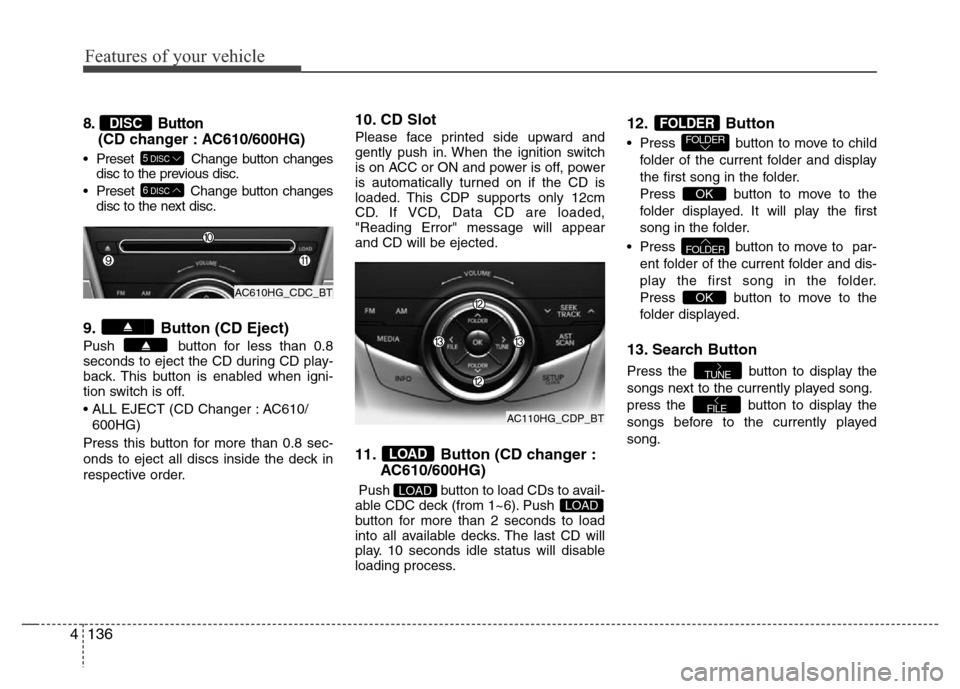
8. Button
(CD changer : AC610/600HG)
• Preset Change button changes
disc to the previous disc.
• Preset Change button changes
disc to the next disc.
9. Button (CD Eject)
Push button for less than 0.8
seconds to eject the CD during CD play-
back. This button is enabled when igni-
tion switch is off.
• ALL EJECT (CD Changer : AC610/
600HG)
Press this button for more than 0.8 sec-
onds to eject all discs inside the deck in
respective order.
10. CD Slot
Please face printed side upward and
gently push in. When the ignition switch
is on ACC or ON and power is off, power
is automatically turned on if the CD is
loaded. This CDP supports only 12cm
CD. If VCD, Data CD are loaded,
"Reading Error" message will appear
and CD will be ejected.
11. Button (CD changer :
AC610/600HG)
Push button to load CDs to avail-
able CDC deck (from 1~6). Push
button for more than 2 seconds to load
into all available decks. The last CD will
play. 10 seconds idle status will disable
loading process.
12. Button
• Press button to move to child
folder of the current folder and display
the first song in the folder.
Press button to move to the
folder displayed. It will play the first
song in the folder.
• Press button to move to par-
ent folder of the current folder and dis-
play the first song in the folder.
Press button to move to the
folder displayed.
13. Search Button
Press the button to display the
songs next to the currently played song.
press the button to display the
songs before to the currently played
song.
FILE
TUNE
OK
FOLDER
OK
FOLDERFOLDER
LOADLOAD
LOAD
6DISC
5DISC
DISC
AC610HG_CDC_BT
AC110HG_CDP_BT
Page 213 of 403
4137
Features of your vehicle
Using USB device
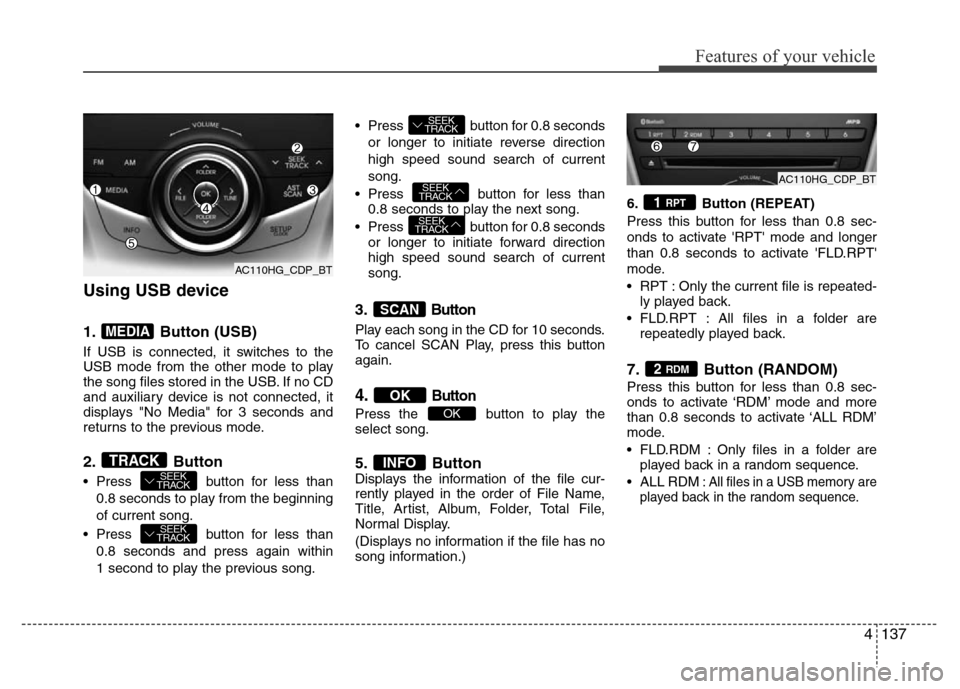
1. Button (USB)
If USB is connected, it switches to the
USB mode from the other mode to play
the song files stored in the USB. If no CD
and auxiliary device is not connected, it
displays "No Media" for 3 seconds and
returns to the previous mode.
2. Button
• Press button for less than
0.8 seconds to play from the beginning
of current song.
• Press button for less than
0.8 seconds and press again within
1 second to play the previous song.• Press button for 0.8 seconds
or longer to initiate reverse direction
high speed sound search of current
song.
• Press button for less than
0.8 seconds to play the next song.
• Press button for 0.8 seconds
or longer to initiate forward direction
high speed sound search of current
song.
3.Button
Play each song in the CD for 10 seconds.
To cancel SCAN Play, press this button
again.
4.Button
Press the button to play the
select song.
5. ButtonDisplays the information of the file cur-
rently played in the order of File Name,
Title, Artist, Album, Folder, Total File,
Normal Display.
(Displays no information if the file has no
song information.)6. Button (REPEAT)
Press this button for less than 0.8 sec-
onds to activate 'RPT' mode and longer
than 0.8 seconds to activate 'FLD.RPT'
mode.
• RPT : Only the current file is repeated-
ly played back.
• FLD.RPT : All files in a folder are
repeatedly played back.
7. Button (RANDOM)
Press this button for less than 0.8 sec-
onds to activate ‘RDM’ mode and more
than 0.8 seconds to activate ‘ALL RDM’
mode.
• FLD.RDM : Only files in a folder are
played back in a random sequence.
•ALL RDM: All files in a USB memory are
played back in the random sequence.
2 RDM
1 RPT
INFO
OK
OK
SCAN
SEEK
TRACK
SEEK
TRACK
SEEK
TRACK
SEEK
TRACK
SEEK
TRACKTRACK
MEDIA
AC110HG_CDP_BT
AC110HG_CDP_BTAC110HG_CDP_BT
Page 214 of 403
Features of your vehicle
138 4
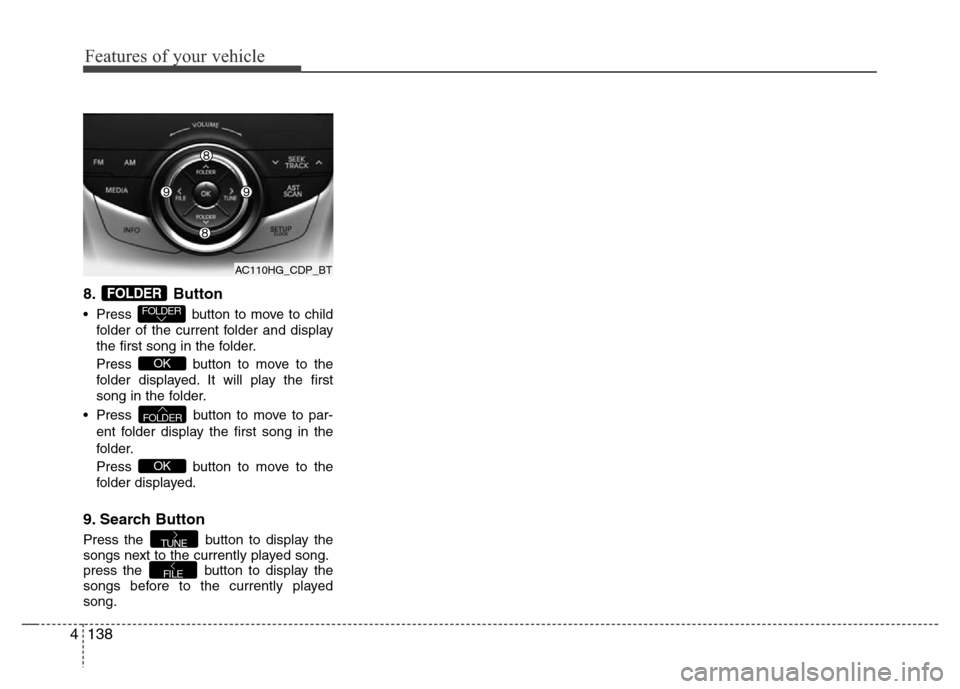
8. Button
• Press button to move to child
folder of the current folder and display
the first song in the folder.
Press button to move to the
folder displayed. It will play the first
song in the folder.
• Press button to move to par-
ent folder display the first song in the
folder.
Press button to move to the
folder displayed.
9. Search Button
Press the button to display the
songs next to the currently played song.
press the button to display the
songs before to the currently played
song.
FILE
TUNE
OK
FOLDER
OK
FOLDER
FOLDER
AC110HG_CDP_BT
Page 217 of 403
4141
Features of your vehicle
Using iPod®
❋iPod®is a trademark of Apple Inc.
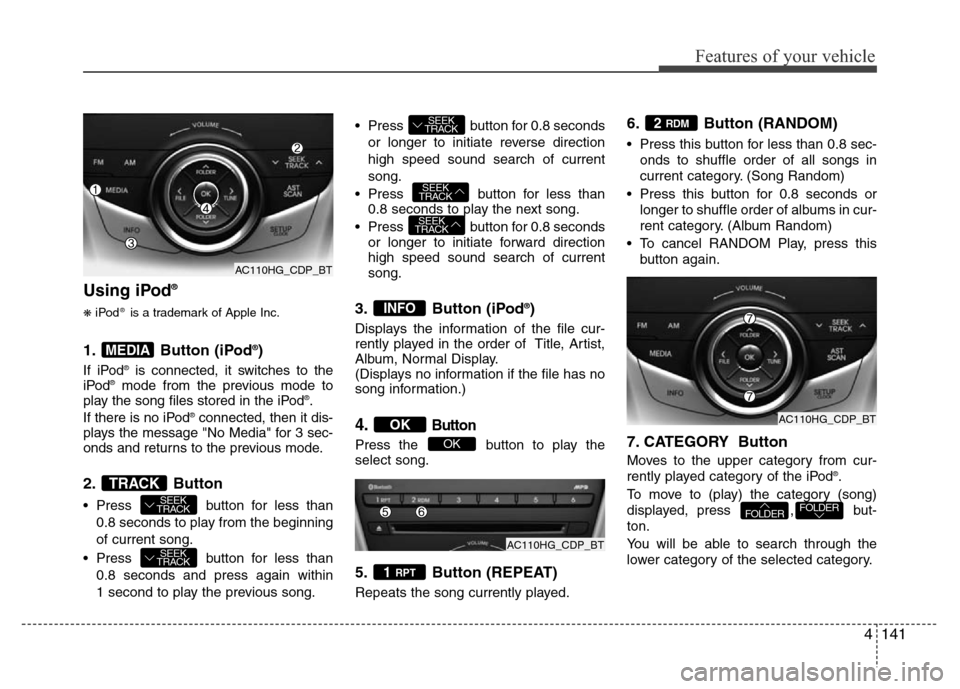
1. Button (iPod®)
If iPod®is connected, it switches to the
iPod®mode from the previous mode to
play the song files stored in the iPod®.
If there is no iPod®connected, then it dis-
plays the message "No Media" for 3 sec-
onds and returns to the previous mode.
2. Button
• Press button for less than
0.8 seconds to play from the beginning
of current song.
• Press button for less than
0.8 seconds and press again within
1 second to play the previous song.• Press button for 0.8 seconds
or longer to initiate reverse direction
high speed sound search of current
song.
• Press button for less than
0.8 seconds to play the next song.
• Press button for 0.8 seconds
or longer to initiate forward direction
high speed sound search of current
song.
3. Button (iPod®)
Displays the information of the file cur-
rently played in the order of Title, Artist,
Album, Normal Display.
(Displays no information if the file has no
song information.)
4.Button
Press the button to play the
select song.
5. Button (REPEAT)
Repeats the song currently played.
6. Button (RANDOM)
• Press this button for less than 0.8 sec-
onds to shuffle order of all songs in
current category. (Song Random)
• Press this button for 0.8 seconds or
longer to shuffle order of albums in cur-
rent category. (Album Random)
• To cancel RANDOM Play, press this
button again.
7. CATEGORY Button
Moves to the upper category from cur-
rently played category of the iPod®.
To move to (play) the category (song)
displayed, press , but-
ton.
You will be able to search through the
lower category of the selected category.
FOLDERFOLDER
2 RDM
1 RPT
OK
OK
INFO
SEEK
TRACK
SEEK
TRACK
SEEK
TRACK
SEEK
TRACK
SEEK
TRACKTRACK
MEDIA
AC110HG_CDP_BT
AC110HG_CDP_BT
AC110HG_CDP_BT
Page 220 of 403
Features of your vehicle
144 4
• Pairing a phone
Before using Bluetooth®Wireless
Technology features, the phone must be
paired (registered) with the audio sys-
tem. Up to 5 phones can be paired with
the system.
NOTE:
• The pairing procedure of the phone
varies according to each phone
model. Before attempting to pair
phone, please see your phone’s
User’s Guide for instructions.
• Once pairing with the phone is com-
pleted, there is no need to pair with
that phone again unless the phone
is deleted manually from the audio
system (refer “Deleting a Phone”
section) or the vehicle’s information
is removed from the phone.
1. Press button to enter SETUP
mode.
2. Select “Phone”, then “Pair” in PHONE
menu.
3. The audio displays “searching
----
passkey: 0000”4. Search the
Bluetooth®Wireless
Technology system on your phone.
Your phone should display your [vehi-
cle model name] on the
Bluetooth®
Wireless Technology device list. Then
attempt pairing on your phone.
NOTE:
If the phone is paired to two or more
vehicles of the same model, i.e. both
vehicles are HYUNDAI
AZERA/GRANDEUR, some phones
may not handle
Bluetooth®Wireless
Technology devices of that name cor-
rectly. In this case, you may need to
change the name displayed on your
phone from AZERA/ GRANDEUR to
AZERA1/GRANDEUR1 and
AZERA2/GRANDEUR2.
Refer to your phone’s User’s Guide, or
contact your cellular carrier or phone
manufacturer for instructions.• Connecting a phone
When the
Bluetooth®Wireless
Technology system is enabled, the
phone previously used is automatically
selected and re-connected. If you want to
select different phone previously paired,
the phone can be selected through
“Select Phone” menu.
Only a selected phone can be used with
the hands-free system at a time.
1. Press button to enter SETUP
mode.
2. Select “Phone”, then “Select” in
PHONE menu.
3. Select desired phone name from the
list shown.
• Deleting a Phone
The paired phone can be deleted.
- When the phone is deleted, all the infor-
mation associated with that phone is
also deleted (including phonebook).
- If you want to use the deleted phone
with the audio system again, pairing
procedure must be completed once
more.
1. Press button to enter SETUP
mode.
2. Select “Phone”, then “Delete” in
PHONE menu.
3. Select desired phone name from the
list shown.
SETUP
SETUP
SETUP
Page 221 of 403
4145
Features of your vehicle
• Changing Priority
If several phones are paired with the
audio system, the system attempts to
connect following order when the
Bluetooth®Wireless Technology system
is enabled:
1) “Priority” checked phone.
2) Previously connected phone
3) Gives up auto connection.
1. Press button to enter SETUP
mode.
2. Select “Phone”, then “Priority” in
PHONE menu.
3. Select desired phone name from the
list shown.
• Turning
Bluetooth®Wireless
Technology ON/OFF
Bluetooth®Wireless Technology Wireless
Technology system can be enabled (ON)
or disabled (OFF) by this menu.
- If
Bluetooth®Wireless Technology is
disabled, all the commands related to
Bluetooth®Wireless Technology system
prompts whether you wish to turn
Bluetooth®Wireless Technology ON or
not.
1. Press button to enter SETUP
mode.
2. Select “Phone”, then “BT Off ” in
PHONE menu.
■Receiving a Phone Call
When receiving a phone call, a ringtone
is audible from speakers and the audio
system changes into telephone mode.
When receiving a phone call, “Incoming”
message and incoming phone number (if
available) are displayed on the audio.
• To Answer a Call:
- Press button on the steering
wheel.
• To Reject a Call:
- Press button on the steering
wheel.
• To Adjust Ring Volume:
- Use VOLUME buttons on the steering
wheel.
• To Transfer a Call to the Phone (Private
Call):
- Press and hold button on the
steering wheel until the audio system
transfers a call to the phone.
■Talking on the Phone
When talking on the phone, “Active Calls”
message and the other party’s phone
number (if available) are displayed on the
audio.
• To Mute the Microphone
- Press button on the steering
wheel.
• To Finish a Call
- Press button on the steering
wheel.
■Making a Phone Call
A Call Back can be made by pressing
button on the steering wheel.
- This is the same function as using the
button solely on the cellular
phone.
NOTE:
Some phone models require pressing
button twice to make a call.
MUTE
SETUP
SETUP